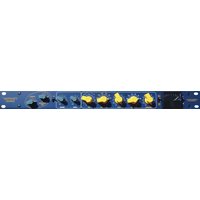
Germanium Compressor - Processor Chandler - Free user manual and instructions
Find the device manual for free Germanium Compressor Chandler in PDF.


| Product Type | Compressor/Limiter |
| Brand | Chandler |
| Model | Germanium Compressor |
| Category | Processor |
| Dimensions | 19" rackmount, 1U (44.5 mm height) |
| Weight | Approximately 5.5 kg (12 lbs) |
| Power Supply | 120V/240V AC, 50/60 Hz, 30W |
| Inputs | Balanced XLR and 1/4" TRS |
| Outputs | Balanced XLR and 1/4" TRS |
| Gain Reduction Element | Germanium transistor |
| Output Stage | Class A discrete |
| Controls | Threshold, Ratio (1:1 to 20:1), Attack (0.1-50 ms), Release (50 ms-2 s), Makeup Gain, Mix (wet/dry) |
| Bypass | True bypass with hard-wired relay |
| Frequency Response | 20 Hz to 20 kHz ±0.5 dB |
| Total Harmonic Distortion | Less than 0.05% (typical) |
| Maximum Input Level | +24 dBu |
| Cleaning | Wipe with a soft, dry cloth. Do not use solvents. |
| Safety | Connect to a grounded AC outlet. Do not remove cover; no user-serviceable parts inside. |
| Spare Parts | Contact an authorized Chandler dealer for spare parts. |
| Manufacturing | Hand-built in the USA |
Frequently Asked Questions - Germanium Compressor Chandler
User questions about Germanium Compressor Chandler
0 question about this device. Answer the ones you know or ask your own.
Ask a new question about this device
Download the instructions for your Processor in PDF format for free! Find your manual Germanium Compressor - Chandler and take your electronic device back in hand. On this page are published all the documents necessary for the use of your device. Germanium Compressor by Chandler.
USER MANUAL Germanium Compressor Chandler
Thank you for purchasing the Chandler Limited Germanium Compressor. This unit is proudly hand wired and assembled in the USA. It uses a 100% discrete transistor circuit and specially wound transformers. Included are item descriptions and hints to get you on your way.
For peak performance, please allow the unit to warm up for at least 25 minutes before use.
Please feel free to call our shop anytime for help or questions.
Prior to sending in your gear for repair, please contact our shop at the number below. We will assist you in troubleshooting the problem and if needed, we will issue you an RMA# to send in the gear.
Send repairs to: Chandler Limited, Inc.
Attention: Repairs
222 S. Cherry St.
Shell Rock, IA 50670
Phone: (319) 885-4200
Email: support@chandlerlimited.com
Connections - All connections on the Germanium are transformer balanced with pin 2 hot.
Power supply - This is designed to be used with Chandler Limited PSU-1 MKII power supply.
1) Chassis and Audio Ground
2) 48 Volt
3) +28 Volt
4) -28 Volt
Notes on Grounding - On the back of the power supply are two black banana connectors. These join the audio ground to earth ground with a solid wire between them. Depending on your studio you may want this connected or disconnected. Turn up your monitors or headphones a bit and experiment with which has a lower noise floor in your system. You may also need to join the audio banana plug to other sections of your studio to obtain the lowest noise floor. The audio banana plug is located closest to the edge of the power supply case. Use something simple like a guitar cord and touch the tip to other portions of your studio to find best results. The power supply is shipped with a 10 ohm resistor joining audio ground and earth ground. We have found this to work best in most situations.
CHANDLER LIMITED®
The GERMANIUM Compressor uses the same all class A amplifier from our other GERMANIUM Series units. An FET is used for the gain reduction but with the added flexibility and tricks the GERMANIUM Series has become known for. Again, like all the GERM units, many of the parameters have been set by extensive listening and recording not by technical analysis and equations. We feel this approach leads to very musical equipment that is more similar to a fine instrument. In many cases we actually TRIED NOT to “accidentally” discover the physics and math behind what we were doing so that nothing got in the way of what we were hearing :-) This Compressor has been in the design process for over two years. We really hope you like it!!!
Controls and Features

BYPASS - This is a hardwire bypass. Use this switch to easily check between compressed or e fected sounds as well as to easily check and adjust unity gain through the unit.

CLEAN/DIRTY COMP - FET compressors are known for high amounts of distortion. This is compensated for in the design. The DIRTY COMP position removes most of the compensation leaving just enough to remove the unwanted distortion harmonics. You are left with very high THD content that is exclusively 2nd AND 3rd harmon s. In the dirty position THD will range from 2 to 5%. In CLEAN COMP mode compression distortion will range from .2 to .5%.

INPUT - The INPUT controls the amount of signal into the compressor. Simply turn the knob up to drive the compression section harder. You may notice that the unit is slightly tighter in the 7 to 10 range. In our use of the unit we tend to use the INPUT in the 8-10 range. This may vary for you depending on how hot your system is. For example, Pro Tools HD has hot outputs while a tape machine would generally be less and require higher input.
CHANDLER LIMITED®
Controls and Features continued
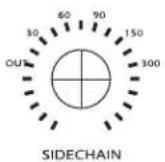
SIDECHAIN - Use this to tailor the amount of low frequency entering the Compressor detector. This is very useful on bass-heavy instruments like kick drum and bass guitar, but also useful on dense audio such as mixes and subgroups. Any track where more precise control of compression frequency is required will benefit from experimenting with the SIDECHAIN. For example, on an acoustic guitar track the lower strings may cause the compressor to clamp down harder on certain sections where they are hit harder or more often. Adjusting the SIDECHAIN can smooth the compression action and give better overall control of the source material. It is recommended you also experiment with this to change or create sounds by altering the compression characteristic. You should spend some time getting to know this feature. The settings are OUT, 30, 60, 90, 150, and 300 Hz.

RATIO - Controls the Compression Ratio from very gentle, around 1.5:1 to a very good squash around 10:1. This control as with many of the GERM Comp parameters were set/designed by extensive listening. We did not “do the math!” Instead we adjusted the individual settings while listening to various pre-recorded tracks and used what sounded best on most sources.
The ratio works intimately with the Comp Curve control. It is recommended that you first select the sound of the Comp Curve (or knee) that you like best and use the ratio to fine tune the compression from there.
CHANDLER LIMITED®
Controls and Features

COMP CURVE - One of the most fun and usable features on the GERM Comp. The CURVE adjusts the knee of the compression with various diode combinations. Designing this section was one of the hardest and most rewarding parts of the GERM Comp. Simply put we took every type diode we could find and endlessly experimented with them in the CURVE section until we found the most useful combinations. Most Ratio/Curve controls are simple resistance circuits. Using diodes adds flavor and character. We ended up with 6 different combinations, using germanium, silicon, and zener diodes in several configurations as well a more standard resistance setting.
The individual choices were selected to give the best range of sounds on a variety of sources. Germanium diodes have a low forward voltage which translates to a very smooth compression knee. Silicon forward voltage is higher and makes the knee sharper. Zener diodes have another voltage characteristic that has an even more extreme effect on the knee.
These are choices and their effect:
Resistance (marked R Soft) -This is the most neutral and gentle of the CURVES. It uses the more standard resistance circuits and is the least colored and audible.
GERM Soft -Uses a single germanium diode. This diode was chosen to be the most gentle of the diode curves. Has a slightly sharper knee than the RESISTANCE setting and also starts to introduce more color and vibe to the compression tone.
GERM Medium -This uses five germanium diodes of another type than GERM Soft and also adds the single diode from the Soft setting. It sharpens the knee a bit more and also adds a bit more vibe to the compression.
SILICON Medium -A single silicon diode that sharpens the knee even more from the GERM Med. It also has a different character than the GERM and resistance selections.
SILICON Hard -Uses two silicon diodes in combination sharpening the knee further while adding a bit more vibe.
ZENER Hard -This selection uses a single Zener with the sharpest knee of any of the settings. It adds yet another Compression character as well.
CHANDLER LIMITED®
Controls and Features continued
COMP CURVE in practice
Simply put the knee of the Curve gets sharper as you turn it up. Each diode has its own flavor as well. The Resistance, GERM Soft, GERM Med, and SILICON Med tend to be the best for general use with each having its own tonality. For compression with the least artifacts or audibilty choose the Resis ance or GERM Soft settings. For a little more coloration and character choose the GERM Med and SILICON Med.
GERM Soft and Med selections tend to be our favorite general use settings as they are the best compromise between coloration, tone, and punch. On drums for example you can use larger amounts of compression without losing the attack, punch, and tone of the drum while the germanium diode adds character. For Stereo buss or mastering use the Resistance or GERM Soft setting. For hard smash use the SILICON Hard and Zener selections. For sub-mixing with the WET/DRY control use the Harder presets.
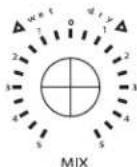
WET/DRY MIX - The most surprising and effective feature of the GERM Comp, this lets you simulate parallel compression or sub-mixing in the unit. Mix the tight compressed sound together with the unprocessed original signal and get the best of both. Use this on any source to keep the compression from removing too much attack, transient, or intensity. Leave the attack and punch on your drums while adding in as much of the tight compressed sound as you need.
A couple of our favorite uses...
For intense sub-mix sounds use the HARD Silicon and ZENER curves with a faster attack. Set the MIX control on WET from three to zero.
For more subtle sub-mix sounds where you just want to keep the track from sounding too soft use the moderate CURVEs and medium attack. Mix in just enough DRY signal to add some life back to the compressed sound.
One excellent use of this is to use two compressors in series. The first would be the GERM Comp set with the WET/DRY set slightly dry. You then use the second compressor to compress the remaining unprocessed sound. Interesting control of the tone as well as the dynamics can be achieved.
CHANDLER LIMITED®
Controls and Features continued

ATTACK - Attack was set by listening to as much material as possible. We have never calculated the actual ATTACK and RELEASE times in an attempt to keep them as musical and natural as possible. Another important feature of ATTACK is the range that it has. It is relatively fast but more importantly it can be very slow! We found this extremely useful on drums, bass, guitars, mixes and mastering. For example on drums you can control the attitude, punch, and intensity by the attack setting. For tight drums, setting the attack from medium to slow lets you compress large amounts which will make them very punchy and will not overly soften the sound by dampening the attack. The same results apply with bass, etc. For general use we found medium attack times (2-6) very appropriate.
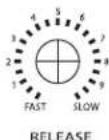
RELEASE - Fast to slow, this was again set by listening and experimentation. We have had interesting results when grabbing both the attack and release at the same time and just turning them. You never know what will hit you!

LINK - To Link GERM Comps in stereo or up to 5:1 surround simply throw the switch on each unit you want to link. Some controls on the Compressor link the control voltage but some do not use the control voltage to function. Input, attack, and release will follow the LINK but all remaining functions must be set by hand. Since the remaining controls are mostly switches it is easy to reproduce the sound from unit to unit.
CHANDLER LIMITED®
Controls and Features continued

GAIN/GERMANIUM DRIVE - A gain switch in 3db steps, this is your output level type control. The actual amount of overall gain however is affected by feedback control. With gain at 0 and feedback at 0, overall gain is -30db. Moving the feedback to 10 overall gain becomes -8db with all the tonal changes described under the feedback control. Available gain of the unit is -30db with Gain and Feedback at 0 to +25db with the Germanium Drive and Feedback at full. Using different combinations of feedback and input gain is essential if you want to take advantage of all the available tones from the Germanium Compressor.

FEEDBACK - The Feedback control is essential to the sound and function of this Comp. Audio amplifiers incorporate some amount of negative feedback which is where the output signal of the amplifier is fed back to its input. This affects the sound and function of the amplifier in many ways. THD, frequency response, gain and amplifier stabilization change considerably with varying feedback.
In use you will find these results:
Feedback at zero will have more high frequency information, less THD, less gain, and a generally more pristine, clear tone. As you push the feedback higher you will add THD, gain, a small bass rise, and a small hi-end roll off.
TONE VARIATION WITH GAIN AND FEEDBACK -
1) Gain 2, Feedback 10 - Slight low-end rise and gentle high-end roll off. THD and noise are lowest of any unity gain setting.
2) Gain 5, Feedback 5 - Slight low end rise with a gentle high end rise. THD is medium while noise is low but a few db higher than setting 1. This would generally be considered the "flatest" setting.
3) Gain 9, Feedback 2 - Slight low end rise with a smooth high-end rise. THD is medium and noise is generally the same as setting 2.
4) Gain 10, Feedback 1.5 - Very slight low-end roll off with a smooth high-end rise. THD is highest of any unity gain setting and noise is roughly the same as 2 and 3.
CHANDLER LIMITED®
EXAMPLE Settings - Gain and Feedback settings are omitted on these settings. Please refer to the section titled "TONE VARIATIONS WITH GAIN AND FEEDBACK" for more info. Tune these to taste and instrument.
TIGHT DRUMS -

flowchart
graph LR
    A["OUT"] --> B["CLEAN COMP"]
    B --> C["INPUT"]
    C --> D["SIDECHAIN"]
    D --> E["RATIO"]
    E --> F["COMP CURVE"]
    F --> G["MIX"]
    G --> H["ATTACK"]
    H --> I["RELEASE"]
    I --> J["LINK"]
    J --> K["FEEDBACK"]
    style A fill:#f9f,stroke:#333
    style K fill:#bbf,stroke:#333
TIGHT DRUMS with WET/DRY -

flowchart
graph LR
    A["OUT"] --> B["CLEAN COMP"]
    B --> C["INPUT"]
    C --> D["SIDECHAIN"]
    D --> E["RATIO"]
    E --> F["COMP CURVE"]
    F --> G["MIX"]
    G --> H["ATTACK"]
    H --> I["RELEASE"]
    I --> J["LINK"]
    J --> K["FEEDBACK"]
    style A fill:#f9f,stroke:#333
    style K fill:#bbf,stroke:#333
BASS -

BASS with WET/DRY -

SUSTAINED DRUMS or BASS - One of our favorites(thanks Cody!)

flowchart
graph LR
    A["OUT"] --> B["INPUT"]
    B --> C["SIDECHAIN"]
    C --> D["RATIO"]
    D --> E["COMP CURVE"]
    E --> F["MIX"]
    F --> G["ATTACK"]
    G --> H["RELEASE"]
    H --> I["LINK"]

    subgraph Control Signals
        J["CLEAN COMP"] --> K["1 2 3 4 5 6 7 8 9 10 11 12 13 14 15 16 17 18 19 20 21 22 23 24 25 26 27 28 29 30 31 32 33 34 35 36 37 38 39 40 41 42 43 44 45 46 47 48 49 50 51 52 53 54 55 56 57 58 59 60 61 62 63 64 65 66 67 68 69 70 71 72 73 74 75 76 77 78 79 80<br>    end<br><br>    subgraph Feedback Signals<br>        K[SWITCH"] --> L["10"]
        L --> M["11"]
        M --> N["12"]
        N --> O["13"]
        O --> P["14"]
        P --> Q["15"]
        Q --> R["16"]
        R --> S["17"]
        S --> T["18"]
        T --> U["19"]
        U --> V["20"]
        V --> W["21"]
        W --> X["22"]
        X --> Y["23"]
        Y --> Z["24"]
        Z --> AA["25"]
        AA --> AB["26"]
        AB --> AC["27"]
        AC --> AD["28"]
        AD --> AE["29"]
        AE --> AF["30"]
        AF --> AG["31"]
        AG --> AH["32"]
        AH --> AI["33"]
        AI --> AJ["34"]
        AJ --> AK["35"]
        AK --> AL["36"]
        AL --> AM["37"]
        AM --> AN["38"]
        AN --> AO["39"]
        AO --> AP["40"]
        AP --> AQ["41"]
        AQ --> AR["42"]
        AR --> AS["43"]
        AS --> AT["44"]
        AT --> AU["45"]
        AU --> AV["46"]
        AV --> AW["47"]
        AW --> AX["48"]
        AX --> AY["49"]
        AY --> AZ["50"]
        AZ --> BA["51"]
        BA --> BB["52"]
        BB --> BC["53"]
        BC --> BD["54"]
        BD --> BE["55"]
        BE --> BF["56"]
        BF --> BG["57"]
        BG --> BH["58"]
        BH --> BI["59"]
        BI --> BJ["60"]
        BJ --> BK["61"]
        BK --> BL["62"]
        BL --> BM["63"]
        BM --> BN["64"]
        BN --> BO["65"]
        BO --> BP["66"]
        BP --> BQ["67"]
        BQ --> BR["68"]
        BR --> BS["69"]
        BS --> BT["70"]
        BT --> BU["71"]
        BU --> BV["72"]
        BV --> BW["73"]
        BW --> BX["74"]
        BX --> BY["75"]
        BY --> BZ["76"]
        BZ --> CA["77"]
        CA --> CB["78"]
        CB --> CC["79"]
        CC --> CD["80"]
GENTLE ACOUSTIC GUITAR -

flowchart
graph LR
    A["OUT"] --> B["IN"]
    B --> C["CLEAN COMP"]
    C --> D["OUT COMP"]
    D --> E["INPUT"]
    E --> F["SIDECHAIN"]
    F --> G["RATIO"]
    G --> H["COMP CURVE"]
    H --> I["MIX"]
    I --> J["ATTACK"]
    J --> K["RELEASE"]
    K --> L["LINK"]
    L --> M["GERMANIUM DRIVE"]
    M --> N["FEEDBACK"]
ACOUSTIC with SPICE! - Smooth out acoustics and add life.

CHANDLER LIMITED®
EXAMPLE settings- Gain and Feedback settings are omitted on these settings. Please refer to the section titled "TONE VARIATIONS WITH GAIN AND FEEDBACK" for more info. Tune these to taste and instrument.

CHANDLER LIMITED®
CE Certification
Chandler Limited declares under its sole responsibility that all products manufactured by them are in compliance with EC directives 2004/108/EC Electromagnetic Compatibility; 2004/108/EG Electromagnetic Compatibility; 2006/95/EC Low Voltage Equipment Safety.
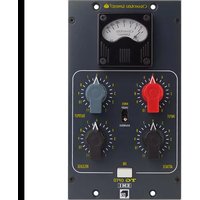


Brand : Chandler
Model : Germanium Compressor
Category : Processor