
GXLIEM4 - Earphones CAD Audio - Free user manual and instructions
Find the device manual for free GXLIEM4 CAD Audio in PDF.


| Product Type | In-Ear Earphones |
| Driver Type | Dynamic, 10 mm |
| Impedance | 32 ohms |
| Sensitivity | 100 dB/mW |
| Frequency Response | 20 Hz – 20 kHz |
| Cable Length | 1.2 meters |
| Connector | 3.5 mm gold-plated |
| Weight | 15 grams |
| Microphone | Yes, in-line |
| Controls | Volume up/down, play/pause, answer/end call |
| Color | Black |
| Compatibility | Devices with 3.5 mm jack (smartphones, tablets, PCs) |
| Care Instructions | Wipe earphones with a dry, soft cloth. Keep eartips clean. |
| Safety Precautions | Do not use at high volume for prolonged periods. Keep away from moisture. |
| Spare Parts Available | Replacement eartips (S/M/L) included, additional sizes sold separately. |
| Repairability | Cable non-replaceable; eartips are user-replaceable. |
| General Information | Brand: CAD Audio; Model: GXLIEM4; Warranty: 1 year limited. |
Frequently Asked Questions - GXLIEM4 CAD Audio
User questions about GXLIEM4 CAD Audio
0 question about this device. Answer the ones you know or ask your own.
Ask a new question about this device
Download the instructions for your Earphones in PDF format for free! Find your manual GXLIEM4 - CAD Audio and take your electronic device back in hand. On this page are published all the documents necessary for the use of your device. GXLIEM4 by CAD Audio.
USER MANUAL GXLIEM4 CAD Audio
Individuals with cardiac pacemakers and other similar medical devices should consult with their physician before using any RF devices. Though the output level of this wireless system is below 50 milliwatts, the proximity of the transmitter to the implant device could pose a threat.
As with any wireless product, environmental conditions can reduce or in some cases prohibit a successful connection between the transmitter and the receiver.
This device complies with Part 15 of the FCC Rules. Most users of CAD Audio wireless products in the United States do not need a license for operation. However, the rules for unlicensed operation state that this device must not operate in excess of 50 milliwatts and it must not cause harmful interference to other wireless devices, and must accept interference received from other devices. Wireless products meeting CAD factory standards adhere to these rules. The FCC reserves the right to change these rules at any time. For more information contact the FCC at 1-888 -CALL-FCC (TTY: 1-888 -TELL-FCC) or visit the FCC's wireless microphone website at:
www.fcc.gov/cgb/wirelessmicrophones
Two-Year Limited Warranty
CAD Audio hereby warrants that this product will be free of defects in material and workmanship for a period of two years from the date of purchase. In the unlikely event that a defect occurs CAD Audio will, at its option, either repair or replace with a new unit of equal or greater value. Retain proof of purchase to validate the purchase date and return it with any warranty claim.
This warranty excludes exterior finish or appearance, damage from abuse, misuse of the product, use contrary to CAD Audio's instructions or unauthorized repair. All implied warranties, merchantability, or fitness for a particular purpose is hereby disclaimed and CAD Audio hereby disclaims liability for incidental, special or consequential damages resulting from the use or unavailability of this product.
This warranty gives you specific legal rights and you may have other rights that vary from state to state. Some states do not allow the exclusion or limitation of incidental or consequential damages or limitations on how long an implied warranty lasts, so the above exclusions and limitations may not apply to you. Note: No other warranty, written or oral is authorized by CAD Audio.

CAD Audio Corporate Offices
6573 Cochran Rd., Bldg. I Solon, OH 44139 U.S.A.
Tel: (440) 349-4900 Fax: (440) 248-4904
www.cadaudio.com
Distributed Worldwide by American Music and Sound
925 Broadbeck Drive, Suite 220
Newbury Park, CA 91320 U.S.A.
Tel: (800) 431-2609 Fax: (800) 431-3129
©2020 CAD Audio Part No. 62278-04 -00 Sep2020


GXLIEM
Wireless In-Ear Monitor System
Manual and
Quick Start-up Guide

natural_image
Exterior view of a multi-band audio recording equipment with multiple speakers and earbuds (no visible text or labels)The GXLIEM Wireless IEM System is available in 3 configurations. A Single Mix transmitter, Dual Mix transmitter and Quad Mix transmitter base station that transmits discrete mixes to your performers. With near infinite bodypack receiver monitoring, this solution is the most flexible in the industry - useful when setting up multiple mixes with high bodypack receiver count. The systems' Frequency Agile design aids in the assurance of a clean, clear, channel plan. In addition, the bodypack receiver has a high contrast display, featuring a battery life indicator. The bodypack receiver is supplied with MEB1 high-performance earbuds. The robust, rack mountable, all-metal transmitter is supplied with rack ears and half wave antenna. Systems are supplied with equal quantity bodypack receivers to transmitters.
GXLIEM
Wireless In-Ear Monitor System
Introduction
Enjoy the easy and exciting performance that the GXLIEM™ Wireless In-Ear Monitor system provides for your next performance. CAD Audio has been creating valued product since 1931 and prides itself on developing and supporting the live performer. Our concept was straightforward. Develop a high value wireless IEM System that can cope with today's challenging RF environment and deliver superior audio quality.
The GXLIEM Wireless In-Ear Monitor System features:
• Available as a Single Mix (GXLIEM), Dual Mix (GXLIEM2) or Quad Mix (GXLIEM4) Transmitter Base Station System
• 16 Channel Frequency Agile performance
• High Dynamic Range for outstanding fidelity
• High Contrast LCD Display
- Battery Life Indicator on Bodypack Receiver
- Operates in 900 MHz band, free from TV and FCC regulatory issues
- Advanced dipole antenna technology on the bodypack receiver for increased operating distance
- All-Metal Transmitter Chassis for shielded operation, 1/2U or 1U.
• AA Battery Life of >10Hrs of operation
- 2-Year Warranty
System Components
All systems include:
- Transmitter
• 1/4" (6.35mm) audio cable (1pc/2pcs /4pcs)
• BNC antenna (1pc / 2pcs) - Power supply
• Bodypack Receiver (1pc / 2pcs /4pcs) - Earbuds (1pc /2pcs/4pcs)
- Rack ears
- Antenna relocation cable
- User guide
Specifications GXLIEM Wireless In-Ear Monitor System
Frequency Response 20Hz - 20KHz
Frequency Band....T Band 902 - 928MHz
Dynamic Range....>110dB
Channels....16 Channel Frequency Agile
Transmitting Power 30mW
Displays ....LCD
Receiver Output....Line out and earphone out
Receiver Power requirements .... 2x AA alkaline or rechargeable battery
Receiver Battery Life....>10hrs
Receiver Dimensions (LxWxH) ....3.77"x2.44"x8.26" (96mm x 62mm x 210mm)
Transmitter Dimensions (LxWxH)
4"x12"x12" (212mm x 177mm x 44mm) Single and Dual
4"x22"x12" (483mm x 177mm x 44mm) Quad
Transmitter Weight......5lbs (2.26Kg) : 7lbs (3.17Kg) : 12lbs (5.44Kg)
WARNING! USE AS LOW A VOLUME AS POSSIBLE.
PERMANENT HEARING DAMAGE CAN RESULT FROM USING THIS SYSTEM AT EXCESSIVE VOLUMES.
For safe operation of this in-ear monitor system, do not listen at excessive sound pressure levels. Most national safety and health administrations have established guidelines for maximum time being exposed to sound pressure levels before hearing damage occurs.
85 dB(A) SPL at 8 hours
88 dB(A) SPL at 4 hours
91 dB(A) SPL at 2 hours
94 dB(A) SPL at 1 hour
97 dB(A) SPL at 30 minutes
100 dB(A) SPL at 15 minutes
120 dB(A) SPL - avoid or hearing damage may occur
In live settings it is difficult to make exact measurements of Sound Pressure Levels (SPL) present at the eardrum, which is affected not only by the in-ear monitor volume, but by ambient sound on the stage and other factors.
To protect your ears from hearing damage:
- Use the in-ear monitor system at the lowest volume possible; turn up the volume only enough to hear.
- Be aware that ringing in your ears may indicate that the volume is set too high.
- Have your ears examined regularly by an audiologist.
- If wax builds up in your ears, stop using the in-ear monitor system until you have seen an audiologist.
- To avoid infections, use an antiseptic to wipe the earphones before and after using the system.
- Stop using the earphones if you experience ear discomfort or infection.
Bodypack GXLIEMBP Receiver
- Antennas
- LCD display
- IR Node
- Battery compartment
- Power switch and volume control
- Earphone jack
- Line out jack
- Belt clip
- RF Signal indicator
- Low battery indicator (flashes when low)
T Band 902-928MHz
| CH | MHz |
| 0 | 903.250 |
| 1 | 903.825 |
| 2 | 904.875 |
| 3 | 905.325 |
| 4 | 905.975 |
| 5 | 906.575 |
| 6 | 907.225 |
| 7 | 908.425 |
| 8 | 909.075 |
| 9 | 910.875 |
| A | 911.325 |
| B | 916.850 |
| C | 925.000 |
| D | 925.650 |
| E | 926.850 |
| F | 927.650 |


Operating Instructions/System Setup
- Apply power and press the power switch. The following screen appears at power up.
Fb = Frequency Band
90 = 902 - 928MHz

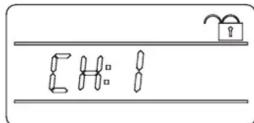
- Default display shows current transmitting channel.

Setting the transmitter frequency
- Channel adjustment. A long press of the UP and DOWN button unlocks channel adjustment.
When the channel numbers are flashing, press the UP or DOWN button to select a channel.
Setting the bodypack receiver frequency
- ScanLink ^™ is enabled by pressing the DOWN and UP buttons simultaneously for one second. Hold the receiver ScanLink interface towards the flashing LED to set receiver frequency.

Should you need to temporarily turn off the transmitter
Transmitter power enable/disable.
Transmitter power can be temporarily disabled by holding the DOWN and UP buttons for more than 3 seconds until the screen to the right appears. To enable, hold both the DOWN and UP buttons at the same time until default interfa

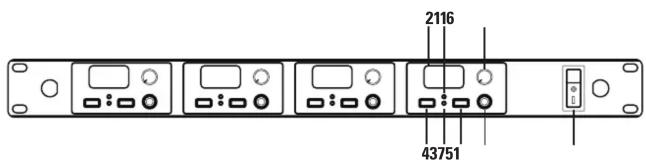
Transmitter GXLIEM/GXLIEM2/GXLIEM4
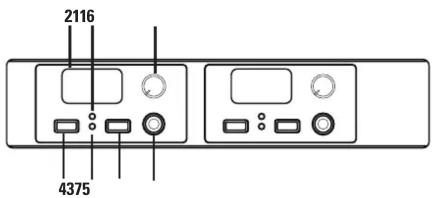
- Power switch
- LCD display
- IR Node
- Channel down button
- Channel up button
- Volume control. Adjust the headphone monitor volume.
Single channel front view

Dual channel front view
Quad channel front view
Transmitter GXLIEM/GXLIEM2/GXLIEM4
- Headphone Jack. 1/4" (6.35mm) headphone monitor jack
- Power jack
- 1/4" (6.35mm) audio input jack. Connect to audio source, such as mixer monitor send.
- BNC antenna connection
- Audio signal level indicator
Single channel rear view
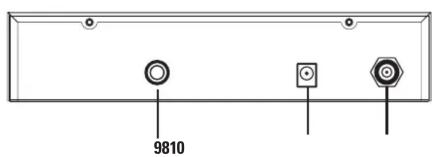
Dual channel rear view
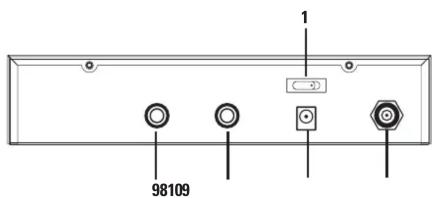
Quad channel rear view

- Two-Year Limited Warranty
- GXLIEM
- Wireless In-Ear Monitor System
- Introduction
- The GXLIEM Wireless In-Ear Monitor System features:
- System Components
- All systems include:
- Specifications GXLIEM Wireless In-Ear Monitor System
- WARNING! USE AS LOW A VOLUME AS POSSIBLE.
- PERMANENT HEARING DAMAGE CAN RESULT FROM USING THIS SYSTEM AT EXCESSIVE VOLUMES.
- dB(A) SPL - avoid or hearing damage may occur
- Bodypack GXLIEMBP Receiver
- Operating Instructions/System Setup
- Setting the transmitter frequency
- Setting the bodypack receiver frequency
- Should you need to temporarily turn off the transmitter
- Transmitter GXLIEM/GXLIEM2/GXLIEM4
Brand : CAD Audio
Model : GXLIEM4
Category : Earphones