CAB-15L - Loudspeaker Citronic - Free user manual and instructions
Find the device manual for free CAB-15L Citronic in PDF.


| Product Type | Active Speaker System |
| Brand | Citronic |
| Model | CAB-15L |
| Power Supply | 220-240Vac, 50Hz (IEC) with selectable 110Vac/230Vac |
| Amplifier Type | Class D + Class AB |
| Main Driver | 380mm∅ (15") woofer |
| HF Driver | 35mm∅ (1.35") titanium compression driver |
| Voice Coil | 60mm∅ (2.36") |
| Frequency Response | 46Hz - 19kHz |
| Output Power (RMS) | 350W |
| Output Power (Peak) | 1400W |
| Max SPL | 134dB |
| Crossover Frequency | 2.6kHz |
| Dispersion | 90° x 60° |
| Inputs | Mic/Line XLR or jack, Line XLR or RCA, Bluetooth |
| Outputs | XLR line output |
| Bluetooth | Built-in receiver with pairing button; Bluetooth Link for stereo pairing between two identical models |
| EQ Controls | Global High and Low EQ, center detent (12 o'clock), ±cut/boost |
| Mounting | 35mm pole mount socket with securing screw; threaded inserts for flying (capped) |
| Dimensions (WxHxD) | 695 x 420 x 390mm |
| Weight | 17.6kg |
| Housing Material | Injection moulded polypropylene |
| Indicators | Power on, Limit & Bluetooth link LEDs |
| Safety | Do not expose to rain/moisture; no user-serviceable parts; use soft cloth with neutral detergent for cleaning |
Frequently Asked Questions - CAB-15L Citronic
User questions about CAB-15L Citronic
0 question about this device. Answer the ones you know or ask your own.
Ask a new question about this device
Download the instructions for your Loudspeaker in PDF format for free! Find your manual CAB-15L - Citronic and take your electronic device back in hand. On this page are published all the documents necessary for the use of your device. CAB-15L by Citronic.
USER MANUAL CAB-15L Citronic
Active Speakers with
Bluetooth Link
Item ref: 178.010UK
178.012UK
178.015UK
User Manual
natural_image
Technical diagram of a device casing with mesh pattern and labeled 'citronic' (no readable text or symbols beyond label)
natural_image
Technical line drawing of a device casing with a mesh pattern and 'citronic' branding (no text or symbols on the main diagram)
natural_image
Technical line drawing of a rectangular electronic device with hexagonal lattice pattern and 'citronic' branding (no text or symbols on the device itself)Version 1.2

Caution: Please read this manual carefully before operating
Damage caused by misuse is not covered by the warranty
Introduction
Thank you for choosing CAB series active speakers with Bluetooth link for your sound system. These cabinets provide versatile, high quality sound reinforcement with true wireless function. Please read this manual prior to use to avoid damage through misuse.
Package Contents
Please check the contents to ensure that the product has been received in good condition.
• Active speaker cabinet
• IEC mains power lead(s)
- User manual
If you find any accessory is missing or the product has arrived with any problems, please contact your retailer at once. This product contains no user-serviceable parts so make no attempt to try to fix or modify this item yourself as this will invalidate the warranty.
We recommend you keep the original package and proof of purchase for any possible return or servicing requirement.
Warning
To prevent the risk of fire or electric shock, do not expose this appliance to rain or moisture and avoid ingress of water into the enclosure. To prevent electric shock do not remove the cover. No user serviceable parts inside. Refer servicing to qualified service personnel.
Safety
Prior to connecting mains, ensure that the supply voltage is correct and that the mains lead is in good condition. If the mains fuse blows, refer the unit to qualified service personnel
Placement
Keep the unit out of direct sunlight and away from heat sources.
Keep the unit away from moisture or dusty environments.
For Bluetooth connection, ensure that the paired devices are within wireless range.
Cleaning
Use a soft cloth with a neutral detergent to clean the cabinet, panel and controls. To avoid damage, do not use solvents to clean this equipment.
Rear Panel
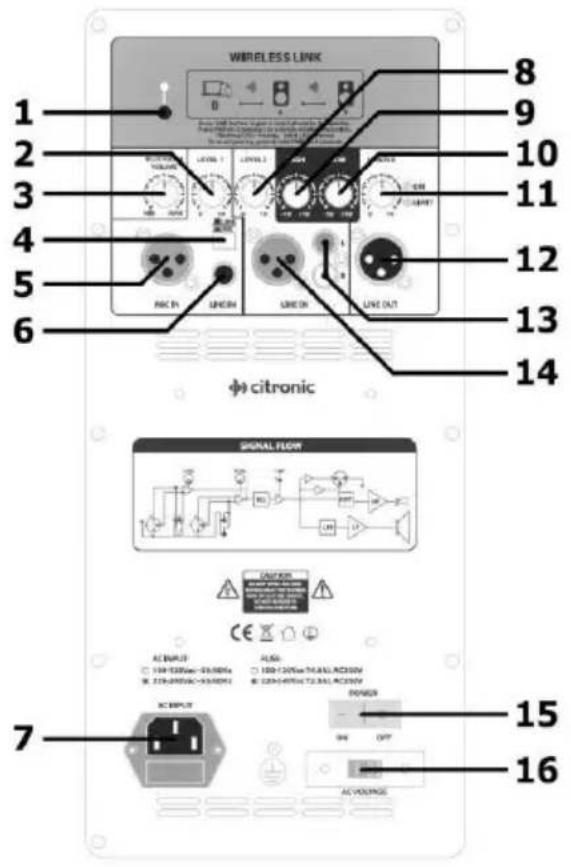
1 Bluetooth pairing button
2 Mic/Line input 1 level
3 Bluetooth volume
4 Input 1 Mic/Line level switch
5 Input 1 Mic input XLR
6 Input 1 Line input 6.3mm jack
7 Mains IEC inlet + fuse holder
8 Line input 2 level
9 High EQ boost/cut control
10 Low EQ boost/cut control
11 Master output and status LEDs
12 Line output XLR
13 Input 2 Line input RCA sockets
14 Input 2 Line input XLR
15 Power on/off rocker switch
16 Mains voltage selector
Setting up
The CAB series enclosures are fitted with a 35mm∅ pole mount socket at the base. For pole mounting, ensure that the stand or bracket can support the cabinet safely. The 35mm∅ socket has a securing screw at the rear, which should be loosened before mounting onto the pole and tightened to secure the cabinet when mounted.
The cabinets are also fitted with threaded inserts for suspending from a ceiling or trussing. These are covered with plastic domed caps, which should be removed to reveal the threaded insert for fixing hardware to the cabinet, such as eyebolts or brackets. When flying the cabinets at height, it is necessary to include a secondary fixing with drop wire for safety.
Each cabinet has rubber feet on the base for free standing or stacked operation. Ensure that the surface that the cabinet is positioned on is stable and can withstand the weight of the cabinet.
Connections
If a microphone is to be used directly with the CAB speaker, connect via the Mic Input 1 XLR (5) and select MIC on the mic/line level sector switch (4). Alternatively, a line input (e.g. CD, mp3 player or laptop) can be connected to the Input 1 jack socket (6) and the mic/line selector switch set to LINE.
An additional Line input 2 can connect via XLR (14) or dual RCA sockets (13). Note: Both red and white RCA inputs are summed to mono.
To connect the output of the CAB speaker onto an additional CAB speaker or other active cabinet, there is an XLR line output (12) which can be linked to a line input using a good quality balanced audio XLR cable.
Before connecting to mains power, ensure that the supply voltage at the mains outlet is correct. A covered slide switch (16) can select 110Vac or 230Vac operation to match the supply voltage. Connect mains to the IEC inlet (7) using the power lead provided or an equivalent lead with the same fuse and same or higher current rating.
Operation
Before powering up, turn the Bluetooth Volume, Level 1, Level 2 and Master controls (2, 3, 8, 11) fully down. This will avoid any loud noises or pops when the speaker is activated. High and Low EQ controls (9, 10) should remain at the 12 o'clock position.
Switch mains power on using the on/off rocker switch (15) and the "ON" LED next to the Master volume control will light.
If a microphone is connected to Input 1, firstly take care to keep the microphone pointing away from the front of the speaker, as this can result in feedback. (howling or squealing noise caused by the microphone "hearing" the speaker output)
Turn up the Master volume (11) part way and gradually increase Level 1 (2) whilst speaking into the microphone to check for the sound coming through the speaker.
For a line input connected to either input 1 or 2, again with the Master volume turned up part way, play the audio source (CD, mp3 or other) whilst gradually increasing Level 1 or Level 2 (2, 8) until the audio can be heard through the speaker.
When all wired inputs have been checked, increase the Master to the maximum required volume and adjust Level 1 and Level 2 as needed.
EQ controls
For all inputs to the CAB speaker, there are global High and Low EQ controls (9, 10)
High EQ adjusts the high frequency content of the output (otherwise called "treble") This affects the detail and intelligibility of the tone.
Low EQ adjusts the low frequency content of the output (otherwise called "bass") This affects the warmth and depth of the tone.
Each control has no effect in the 12 o'clock position. Turning to the left will cut the affected frequencies and turning to the right will boost the affected frequencies.
Adjust the High and Low controls to suit the type of application, style of music or tonal characteristics of the venue.
Bluetooth Audio
The CAB-10/12/15L cabinets each have an inbuilt Bluetooth receiver for wireless connection from a smart phone or tablet, allowing playback of stored audio tracks.
The Bluetooth pairing button at the top of the rear panel (1) has a blue status LED above it.
Press the pairing button and the LED will flash to indicate that it is in pairing mode (Bluetooth is also normally in pairing mode at power-up). An audible message will also confirm that the CAB unit is in pairing mode.
In pairing mode, open the Bluetooth menu on a smart phone or tablet and search for the speaker model number – e.g. "CAB-10L" - and select to connect. In case there is more than one device in range with the same ID, attempt connection of each in turn until an audible "connected" message is heard from the CAB speaker.
The Bluetooth status LED will stay on constantly when paired.
(note: the status LED may also stay on constantly if there is no pairing for a period of time after power-up to show that pairing mode has ended)
When paired to the smart phone or tablet, playback of audio files on the sending device will be heard through the connected CAB speaker and governed by the Bluetooth Volume control (3)
Bluetooth Link
A key feature of the CAB-10/12/15L cabinets is the Bluetooth link function, which enables 2 cabinets to pair to each other wirelessly for stereo Bluetooth playback.
Note: Only cabinets of the same size can be linked together.
i.e. CAB-10L cannot be linked with CAB-12L or CAB-15L to form a stereo pair
To pair 2 CAB speakers, power both up into pairing mode within wireless range of each other and pairing should be automatic when they detect each other (unless one or both cabinets are already paired to others, in which case, reset Bluetooth pairing by holding down the pairing button for 3 seconds)
When paired, each CAB speaker will confirm with an audible message denoting which is "Left speaker" and "Right speaker".
If a smart phone or tablet is already paired to one of the CAB units, this will be the Right speaker and only the right side of the Bluetooth audio signal will play through the speaker.
The left side will transmit wirelessly and play back through the other paired speaker to give a full stereo image.
For each linked CAB speaker (left or right), the Bluetooth output is still governed by the Bluetooth Volume control.
Any wired inputs are not affected by the Bluetooth link. Any audio from Input 1 or Input 2 will not be transmitted wirelessly from one CAB speaker to the other.
Powering down
When not being used, turn down the Master volume control and switch off power to the CAB speaker. Disconnect from the mains supply if not being used for long periods.
Specifications
| Model | CAB-10L | CAB-12L | CAB-15L |
| Power supply | 220-240Vac, 50Hz (IEC) | ||
| Housing material | Injection moulded polypropylene | ||
| Amplifier type | Class D + Class AB | ||
| HF driver | 35mm∅ (1.35") Ti compression driver | ||
| Dispersion | 90° x 60° | ||
| Inputs | Mic/Line XLR or jack, Line XLR or RCA, Bluetooth | ||
| Indicators | Power on, Limit & Bluetooth link LEDs | ||
| Line output | XLR | ||
| Freq. response | 58Hz - 19kHz | 53Hz - 19kHz | 46Hz - 19kHz |
| Output power : rms | 220W | 300W | 350W |
| Output power peak | 880W | 1200W | 1400W |
| Max. SPL | 132dB | 134dB | 134dB |
| Main driver | 250mm∅ (10") | 300mm∅ (12") | 380mm∅ (15") |
| Voice coil | 38mm∅ (1.5") | 50mm∅ (2") | 60mm∅ (2.36") |
| Crossover freq. | 3.2kHz | 2.8kHz | 2.6kHz |
| Dimensions | 530 x 310 x 300mm | 603 x 355 x 350mm | 695 x 420 x 390mm |
| Weight | 11.2kg | 14.2kg | 17.6kg |

Disposal: The "Crossed Wheelie Bin" symbol on the product means that the product is classed as Electrical or Electronic equipment and should not be disposed with other household or commercial waste at the end of its useful life. The goods must be disposed of according to your local council guidelines.
Hereby, AVSL Group Ltd. declares that the radio equipment types 178.010UK, 178.012UK and 178.015UK are in compliance with Directive 2014/53/EU
The full text of the EU declaration of conformity for 178.010UK is available at the following internet address: http://www.avsl.com/assets/exportdoc/1/7/178010UK%20CE.pdf
The full text of the EU declaration of conformity for 178.012UK is available at the following internet address: http://www.avsl.com/assets/exportdoc/1/7/178012UK%20CE.pdf
The full text of the EU declaration of conformity for 178.015UK is available at the following internet address: http://www.avsl.com/assets/exportdoc/1/7/178015UK%20CE.pdf
Errors and omissions excepted. Copyright© 2021. AVSL Group Ltd. Unit 2-4 Bridgewater Park, Taylor Rd. Manchester. M41 7JQ AVSL (EUROPE) Ltd, Unit 3D North Point House, North Point Business Park, New Mallow Road, Cork, Ireland.
Brand : Citronic
Model : CAB-15L
Category : Loudspeaker