
DX360CF - Household Fan DIMPLEX - Free user manual and instructions
Find the device manual for free DX360CF DIMPLEX in PDF.


| Brand | Dimplex |
| Model | DX360CF |
| Product Type | Domestic Fan |
| Rated Voltage | 220-240 V |
| Rated Frequency | 50 Hz |
| Fan Power Input | 34.34 W |
| Standby Power Consumption | 0.27 W |
| Maximum Fan Flow Rate | 14.44 m³/min |
| Service Value | 0.42 (m³/min)/W |
| Seasonal Electricity Consumption | 11.29 kWh/a |
| Sound Power Level | 57.06 dB(A) |
| Maximum Air Velocity | 5.32 m/s |
| Speed Settings | Low, Medium, High |
| Modes | Normal, Natural, Sleep |
| Oscillation Angles | 30°, 90°, 180°, 360° |
| Timer Settings | 1, 2, 4, 8 hours |
| Remote Control | Yes (3V CR2032 battery, range 6 m) |
| Control Type | Buttons on unit and remote |
| Cleaning | Disconnect power, clean every 2 months with dry cloth |
| Safety | Do not immerse, keep cord away from traffic, not for outdoor use |
| Guarantee | 1 year (extendable to 3 upon registration) |
Frequently Asked Questions - DX360CF DIMPLEX
User questions about DX360CF DIMPLEX
0 question about this device. Answer the ones you know or ask your own.
Ask a new question about this device
Download the instructions for your Household Fan in PDF format for free! Find your manual DX360CF - DIMPLEX and take your electronic device back in hand. On this page are published all the documents necessary for the use of your device. DX360CF by DIMPLEX.
USER MANUAL DX360CF DIMPLEX
natural_image
Line drawing of a standard electric fan with visible blades and mounting base (no text or symbols)DX360CF
08/54646/0
Issue 3
As with all portable appliances: This product is suitable only for well insulated spaces or occasional use.
Important Safety Advice
IMPORTANT : THESE INSTRUCTIONS SHOULD BE READ CAREFULLY AND RETAINED FOR FUTURE REFERENCE
This product should be used only in accordance with the specifications outlined in this manual. Usage other than as specified in these instructions may result in serious injury, risk of fire or electric shock.
WARNING - The plug is intended to fit in a standard polarized 13Amp socket outlet, only plug the appliance directly into a proper electrical outlet, to reduce the risk of electric shock.
The socket outlet must be accessible at all times to enable the mains plug to be disconnected as quickly as possible.
To protect against electrical hazards, DO NOT immerse in water or other liquids. Do not use near water.
WARNING - Children cannot recognise the hazards associated with the usage of electrical appliances. For this reason, always supervise children when they are near the unit. These appliances can be used by children aged from 3 and above and persons with reduced physical, sensory or mental capabilities or lack of experience and knowledge if they have been given supervision or instruction concerning use of the appliance in a safe way and understand the hazards involved. Children shall not play with the appliance. Cleaning and user maintenance shall not be made by children without supervision.
WARNING - Children aged from 3 years and less than 8 years shall only switch on/off the appliance if it has been placed or installed in its intended normal operating position and they have been given supervision or instruction concerning use of the appliance in a safe way and understand the hazards involved. Children aged from 3 years and less than 8 years shall not plug in, regulate and clean the appliance or perform user maintenance.
IMPORTANT - Always unplug the air circulating fan before moving it or cleaning it. Be sure to pull by the plug and not the cord when un-plugging the appliance.
NEVER drop or insert any object into any openings.
DO NOT operate appliance connected to an extension cable.
WARNING - Keep the cord out of heavy traffic areas, to avoid fire hazard.
NEVER put the cord near heat registers, radiators, stoves or heaters.
DO NOT cover cord with carpeting, throw rugs, runners, or similar coverings.
DO NOT route cord under furniture or appliances. Take care to position the cord away from traffic areas and where it will not be a trip hazard.
DO NOT operate any appliance with a damaged cord or plug, if motor fan fails to rotate, after the appliance malfunctions, or if it has been dropped or damaged in any manner. Please contact our customer service team.
IMPORTANT - Use appliance only for intended household use as described in this manual. Any other use not recommended by the manufacturer may cause fire, electric shock or injury to persons.
DO NOT use outdoors. DO NOT place anything on top of the appliance.
NEVER block the air openings, grills/outlets or place on a soft surface such as a bed or sofa, as this could cause the unit to tip over, blocking the air intake or outtake opening.
DO NOT attempt to repair or adjust any electrical or mechanical functions on this unit. Doing so will void your warranty. The inside of the unit contains no user serviceable parts.
WARNING - To reduce the risk of fire or electric shock, do not use this fan with any solid-state speed control device.
WARNING - To avoid danger of suffocation please remove all packaging materials particularly plastic and EPS and keep these away from vulnerable people, children and babies.
WARNING - To avoid the risk of accidental strangulation from the supply cord all children and vulnerable people must be supervised when near the product whether it is working or not.
WARNING - Keep batteries out of reach of children, dispose of used button batteries immediately and safely.
WARNING - The remote control for this unit contains a small battery. To avoid risk of choking, keep the remote away from children and do not swallow the battery. If the battery is swallowed seek medical advice at once.
DO NOT pull, carry or move the appliance using the power cable.
If the supply cord is damaged, it must be replaced by the manufacturer, its service agent or similarly qualified persons in order to avoid a hazard.
This instruction leaflet belongs to the appliance and must be kept in a safe place. If changing owners, the leaflet must be surrendered to the new owner.
Part Diagrams
Product Structure
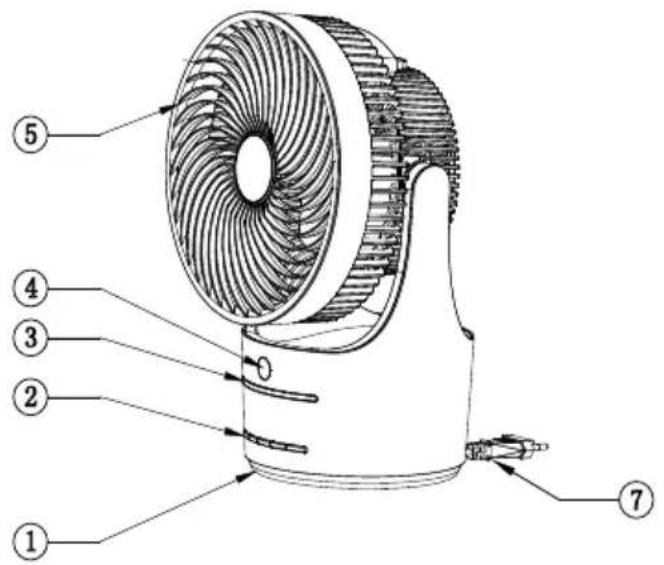
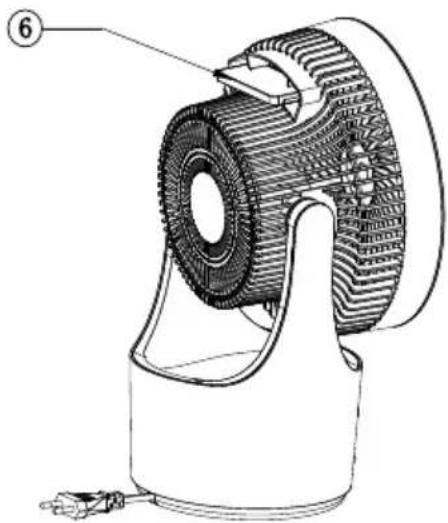
natural_image
Technical line drawing of a mechanical device with gear and housing (no text or symbols)Fig. 1
- Base 4. IR recieving window 7. Power cord
- Control Buttons 5. Fan guard
- LED light display 6. Remote control
Remote Control
flowchart
graph TD
    A["①"] --> B["③"]
    C["②"] --> D["④"]
    E["⑤"] --> F["⑥"]
    G["⑦"] --> H["⑧"]
    I["⑨"] --> J["⑩"]
    K["⑪"] --> L["⑫"]
    M["⑬"] --> N["⑭"]
    O["⑮"] --> P["⑯"]
    Q["⑰"] --> R["⑱"]
    S["⑲"] --> T["⑳"]
    U["⑳"] --> V["⑴"]
    W["⑵"] --> X["⑶"]
    Y["⑷"] --> Z["⑧"]
    style A fill:#f9f,stroke:#333
    style C fill:#f9f,stroke:#333
    style E fill:#f9f,stroke:#333
    style G fill:#f9f,stroke:#333
    style I fill:#f9f,stroke:#333
    style J fill:#f9f,stroke:#333
    style K fill:#f9f,stroke:#333
    style L fill:#f9f,stroke:#333
    style M fill:#f9f,stroke:#333
    style N fill:#f9f,stroke:#333
    style O fill:#f9f,stroke:#333
    style P fill:#f9f,stroke:#333
    style Q fill:#f9f,stroke:#333
    style R fill:#f9f,stroke:#333
    style S fill:#f9f,stroke:#333
    style T fill:#f9f,stroke:#333
    style U fill:#f9f,stroke:#333
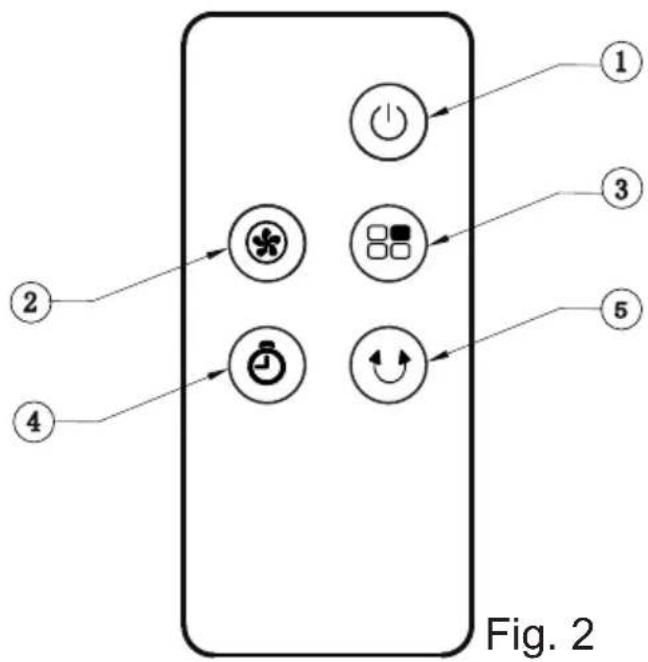
- Standby
- Fan
- Mode
- Timer
- Oscillation
Control Panel
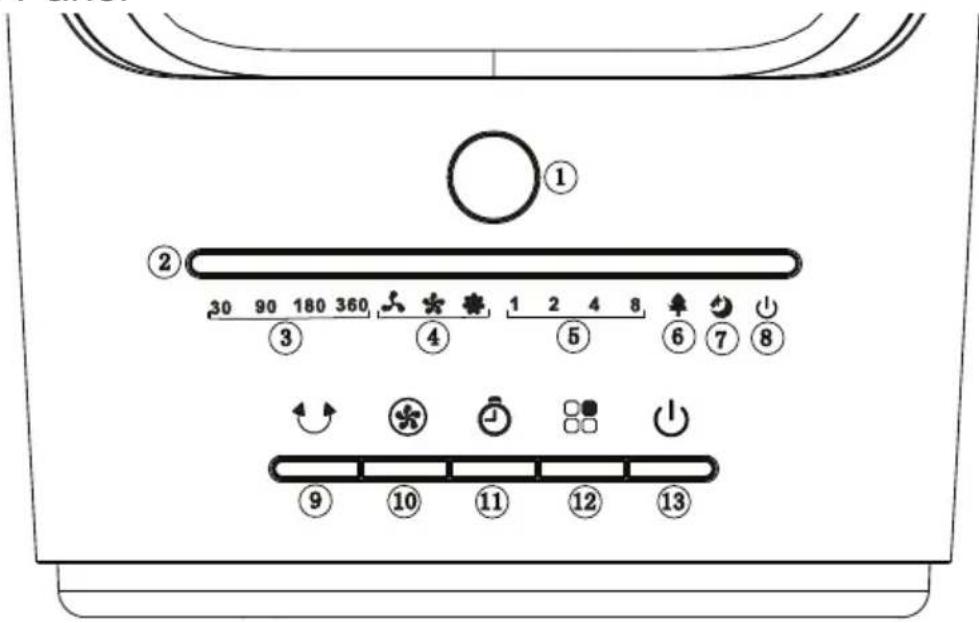
Fig. 3
- IR recieving window 6. Natural mode 11. Timer Button
- LED light display 7. Sleep mode 12. Mode Button
- Oscillation angles 8. Standy mode 13. Standby Button
- Fan speeds 9. Oscillation Button
- Runback timer intervals
- Fan Speed Button
Installation Instruction
Open up the carton to take out the product, instructions and the remote control, then store or dispose of the packaging materials carefully.
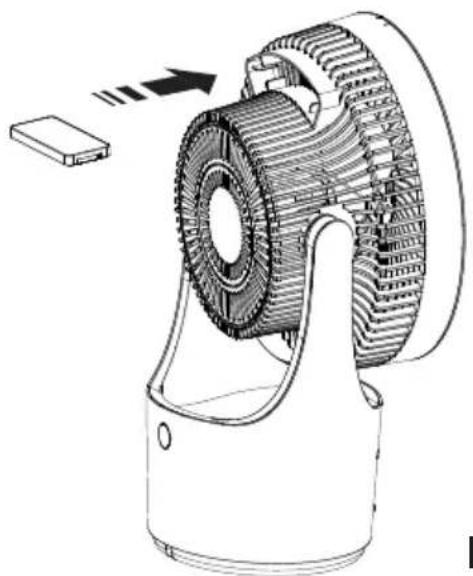
This product does not need to be assembled, it is ready to operate once all packaging materials are removed. The handle in the rear housing should be used to lift and carry the product, it can also be used to store the remote control when not in use. (See Fig. 4)
natural_image
Technical line drawing of a mechanical gear assembly with a base component (no text or symbols)Fig. 4
Operating Instructions
Unwrap the cable and plug in the product, it will beep twice to signify that it is connected and remain in standby mode. Standby LED will be active.
Standby
The standby button ⏻, see 1 Fig. 2 and 13 Fig. 3, must always be pushed to start the product, once the product is started, it defaults to operate in Normal mode at Low speed with the Low speed LED and the power on LED both illuminated, no other function will operate unless the relevant button is pressed. Pressing the standby button again during any mode of operation will return the product to standby mode. When the product is switched back on it will remember fan speed and oscillation setting and will turn back on in Normal Mode. Note: After one minute product indication lights will turn off, light will come back on when any button is pressed.
Mode
Pressing Mode 8 button, see 3 Fig. 2 and 12 Fig. 3, when unit is on will cycle through product modes. Product will cycle through Natural Mode, Sleep back and back to Normal Mode with each button press. The relevant LED light will indicate when Natural and Sleep mode is selected. Only the selected fan speed LED will light in Normal Blower mode.
Normal mode: The fan speed selection button *, see 2 Fig. 2, is used to manually select Low ✦, Medium ★ or High ★ speed fan operation. The relevant speed indication LED will light as the appliance changes between speeds.
Natural mode: In this mode the fan will automatically change speed to simulate natural variances in the speed of the air flow to give an experience similar to a natural breeze. In this mode you can use the speed selection button to cycle between low, medium and strong breeze.
Sleep mode: In this mode ☑ the fan speed will continuously vary speed to assist in keeping cool at night when asleep. You can select 3 different running patterns in this mode by using the Speed Selection button;
- Varies between high, medium and low speed.
- Varies between medium and low speed.
- Operates at low speed.
Runback Timer
By pressing ⚙ button, see 4 Fig. 2 and 11 Fig. 3, the fan can be set to operate continuously with currently selected settings for a set time before turning off. Time intervals of 1 hour, 2 hours, 4 hours or 8 hours can be selected. The selected period will be indicated by its LED light which will remain on for the selected time, when the selected operating time has run out the product will switch off automatically and go into standby mode.
Oscillation
The oscillation button ⬤, see 5 Fig. 2 and 9 Fig. 3 can be pressed while the product is operating to activate oscillation. The product can be set to oscillate at an angle of 30^ , 90^ , 180^ or 360^ , the angle selected will be indicated by the illumination of the relevant LED. When selected fan will oscillate over and back through the selected angle to provide a wider cooling effect. When 360^ is selected the fan will constantly rotate clockwise.
If the fan speed varies randomly this means NATURAL ♦mode is selected, which simulates natural breeze conditions. THIS IS NOT A FAULT.
To activate normal mode again use the mode button to cycle through modes to Normal mode.
Remote Control Use
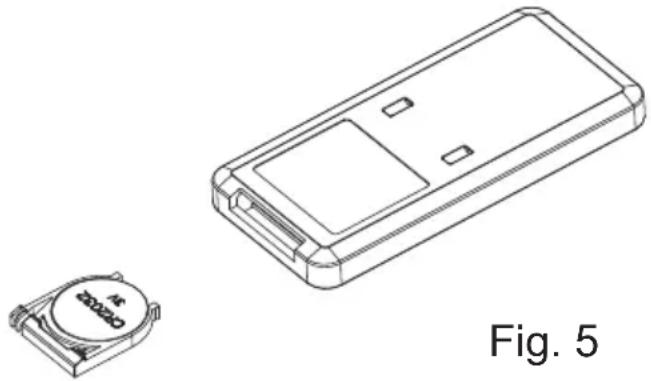
To activate the remote control release and slide out the battery holder from the bottom back of the remote control handset see Fig. 5, install the 3V CR2032 button battery cell into its location ensuring the positive and negative pole are as indicated on the label on the back of the remote and reinstall the battery holder completely.
natural_image
Technical line drawing of a remote control box and its small electronic component (no text or symbols)The remote control will only operate the product if it is in direct line of site and within a distance of 6 meters from the product. If it fails to do so under these conditions and the product has been in use for some time, please check the battery is not depleted before taking any other action.
Technical Specification
| DX360CF Symbol Value Unit | |||
| Maximum Fan Flow Rate F 14.44 m^3/min | |||
| Fan Power Input P 34.34 W | |||
| Service Value SV 0.42 ( m^3/min )/W | |||
| Standby Power Consumption PsB 0.27 | W | ||
| Seasonal electricity consumption | Q | 11.29 | kWh/a |
| Fan Sound Power Level | LWA | 57.06 | dB(A) |
| Maximum Air Velocity | c | 5.32 | m/s |
| Rated Voltage | V | 220-240 | V |
| Rated Frequency | Hz | 50 | Hz |
| Standards application | Commission Regulation (EU) No 206/2012 & (EU) 2016/2282IEC 60879:1986EN 50564:2011EN 60704-2-7:1998EN 60704-1:2010+A11:2012EN 60335-1; EN 60335-2-80 | ||
Cleaning and Maintenance
WARNING ALWAYS DISCONNECT FROM THE POWER SUPPLY BEFORE CLEANING THE APPLIANCE
The fan should be cleaned at least once every two months as dust may accumulate on the rear grill cover and wind wheel, which would affect performance. Do not use detergents, abrasive cleaning products or polish of any kind on the appliance. Wipe with a dry cloth to remove dust and a damp cloth (not wet) to clean off stains. Be careful not to allow moisture into the appliance. Use a vaccum cleaner to remove any fluff which does accumulate.
Recycling
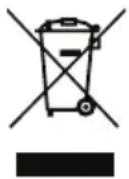
For electrical products sold within the European Community.
At the end of the electrical products useful life it should not be disposed of within household waste.
Please recycle where facilities exist. Check with your Local Authority or retailer for recycling advice in your country.
Guarantee
What does a Dimplex Guarantee cover?
Dimplex products deliver reliable service for normal, household use in domestic settings. All Dimplex products are individually tested before leaving the factory.
If you are a consumer and you experience a problem with your Dimplex product, which is found to be defective due to faulty materials or workmanship within the Guarantee Period, this Dimplex Guarantee will cover repair or - at the discretion of Dimplex - replacement with a functionally equivalent Dimplex product.
Your product is under guarantee for 1 year from the date of purchase or the date of delivery of the product, if later. The 1 year guarantee is extended for an additional 2 years when you register the product with Dimplex, within 28 days of purchase. If you do not register the product with Dimplex within 28 days, your product will remain guaranteed for 1 year only. To validate your extended guarantee register with us online at: http://register.dimplex.co.uk. N.B. Each qualifying product needs to be registered with Dimplex individually. Please note that the extended guarantee is only available in the UK and Ireland.
The Dimplex Guarantee is conditional upon you providing the original purchase receipt as proof of purchase. Please therefore retain your receipt as proof of purchase.
If you do experience a problem with your Dimplex product please call the Helpline on +44 [0]344 879 3588 or visit https://www.dimplex.co.uk/support. For ROI please email serviceireland@glendimplex.com or call +353(0)1 842 4833. We will need details of your Dimplex product and a description of the fault which has occurred. Once we receive your information and proof of purchase we will contact you to make the necessary arrangements. If your Dimplex product is not covered by this Dimplex Guarantee there may be a charge to repair your product. However, we will contact you for agreement to any charges before any chargeable service is carried out.
What is not covered by a Dimplex Guarantee?
The Dimplex Guarantee does not cover any of the following:
Any fault or damage to your Dimplex product due to faulty materials or workmanship occurring outside the Guarantee Period. Normal wear and tear including parts that might wear out over time or consumables, such as filters.
Any fault or damage occurring to any pre-owned Dimplex product or to any other equipment or property.
Accidental damage to your Dimplex product or damage to your Dimplex product from external sources (for example, transit, weather, electrical outages or power surges).
Fault or damage to your Dimplex product which is:
- Not due to faulty materials or workmanship or which is due to circumstances outside Dimplex's control.
- Caused by use of your Dimplex product for anything other than normal domestic household purposes in the country where it was purchased.
- Caused by any misuse, abuse or negligent use of the Dimplex product, including but not limited to any failure to use it in accordance with the Operating Instructions supplied with the product.
- Caused by any failure to assemble, install clean and maintain your Dimplex product in accordance with the Operating Instructions supplied with the product unless this was carried out by Dimplex or its authorised dealers.
- Caused by repairs or alterations to your Dimplex product not carried out by Dimplex service personnel or its authorised dealer(s).
- Caused by use of any consumables or spare parts for your Dimplex product which are not Dimplex - specified.
Terms and Conditions
The Dimplex Guarantee is valid for 1 calendar year, plus 2 if registered, from the date of purchase of your Dimplex product from a recognised retailer in the country of purchase and use, or the date of delivery of the product if later, always provided the original receipt has been retained and is produced as proof of purchase.
You must provide to Dimplex or its authorised agents on request the original receipt as proof of purchase and - if required by Dimplex - proof of delivery. If you are unable to provide this documentation, you will be required to pay for any repair work required. Any repair work under the Dimplex Guarantee will be carried out by Dimplex or its authorised dealer(s) and any parts that are replaced will become the property of Dimplex. Any repairs performed under the Dimplex Guarantee will not extend the Guarantee Period.
Any replacement of your Dimplex product by Dimplex during the Guarantee Period will start the 3 year Guarantee Period afresh from the date of delivery of the replacement Dimplex product to you. (*Please keep original online guarantee registration email and sales receipt for your original purchase as proof of the additional 2 years, in case of the unlikely event you experience an issue).
The Dimplex Guarantee does not entitle you to recovery of any indirect or consequential loss or damage including but not limited to loss or damage to any other property.
The Dimplex Guarantee is in addition to your statutory rights as a consumer and your statutory rights are not affected by this Dimplex Guarantee.
Contact Dimplex A brand of Glen Dimplex UK Limited, trading as Dimplex Dimplex Heating & Ventilation
If you have any questions about what the Dimplex Guarantee covers and does not cover or how to claim under the Dimplex Guarantee, please contact us:
Glen Dimplex Heating & Ventilation, Grange Drive, Hedge End, Southampton SO30 2DF
Telephone: 0344 879 3588
Visit: www.dimplex.co.uk
- Important Safety Advice
- Part Diagrams
- Control Panel
- Installation Instruction
- Operating Instructions
- Standby
- Mode
- Runback Timer
- Oscillation
- Remote Control Use
- Cleaning and Maintenance
- WARNING ALWAYS DISCONNECT FROM THE POWER SUPPLY BEFORE CLEANING THE APPLIANCE
- Recycling
- Guarantee
- What does a Dimplex Guarantee cover?
- What is not covered by a Dimplex Guarantee?
- Terms and Conditions
- Contact Dimplex A brand of Glen Dimplex UK Limited, trading as Dimplex Dimplex Heating & Ventilation
Brand : DIMPLEX
Model : DX360CF
Category : Household Fan