
DCACP25 - Household Fan DIMPLEX - Free user manual and instructions
Find the device manual for free DCACP25 DIMPLEX in PDF.


| Type | Domestic fan |
| Model | DCACP25 |
| Brand | Dimplex |
| Dimensions (H x W x D) | 40 x 30 x 30 cm |
| Weight | 3.5 kg |
| Power supply | AC 220-240V, 50 Hz |
| Power consumption | 45 W |
| Speed settings | 3 |
| Oscillation | Yes, 80° |
| Remote control | Yes (infrared) |
| Timer | Up to 7 hours |
| Airflow | 1200 m³/h |
| Noise level | 50 dB (low) - 60 dB (high) |
| Blade diameter | 12 inches (30 cm) |
| Height adjustable | Yes |
| Safety features | Overheat protection, tip-over switch |
| Maintenance | Clean with damp cloth, do not immerse in water |
| Spare parts | Available from Dimplex or authorized dealers |
| Energy class | A |
Frequently Asked Questions - DCACP25 DIMPLEX
User questions about DCACP25 DIMPLEX
0 question about this device. Answer the ones you know or ask your own.
Ask a new question about this device
Download the instructions for your Household Fan in PDF format for free! Find your manual DCACP25 - DIMPLEX and take your electronic device back in hand. On this page are published all the documents necessary for the use of your device. DCACP25 by DIMPLEX.
USER MANUAL DCACP25 DIMPLEX
natural_image
Line drawing of a standard office fan with a circular top and six blades, mounted on a base (no text or symbols)Dimplex Pedestal Air Circulator
Models: DCACP25
For domestic household use only.
CAUTION: FAILURE TO FOLLOW THESE INSTRUCTIONS MAY CAUSE INJURY AND/OR DAMAGE AND MAY INVALIDATE YOUR GUARANTEE
Please read the operating instructions carefully before using your fan for the first time and keep them in a safe place.
WARNING
- To prevent against the risk of electric shock never immerse the appliance in water or other liquids.
- Never operate the appliance if a cable or connector has been damaged, after appliance malfunction or if the appliance was dropped or is otherwise damaged.
- If the mains lead is damaged it must only be replaced by the manufacturers' service agent or a similarly qualified person in order to avoid a hazard.
- Please ask a professional service agent to repair the product. Improper repair may cause danger to users.
- Disconnect the appliance from mains power whenever it is not in use, before relocating it, and before cleaning.
- Operate the appliance only at the voltage specified on the rating label.
- This appliance can be used by children aged from 8 years and above and persons with reduced physical, sensory or mental capabilities or lack of experience and knowledge if they have been given supervision or instruction concerning use of the appliance in a safe way and understand the hazards involved. Children shall not play with the appliance. Cleaning and user maintenance shall not be made by children without supervision.
- Keep electrical appliances out of reach from children or infirm persons. Do not let them use the appliances without supervision.
- When the fan is assembled, the rotor blade guard should not be taken off again.
- Indoor use only.
- Never insert fingers, pencils, or any other object through the grille when fan is running.
- Disconnect the fan when moving from one location to another.
- Be sure the fan is on a stable surface when operating to avoid overturning.
- DO NOT use the fan in a window, rain may create an electrical hazard.
• Household use only.
Installation Instructions
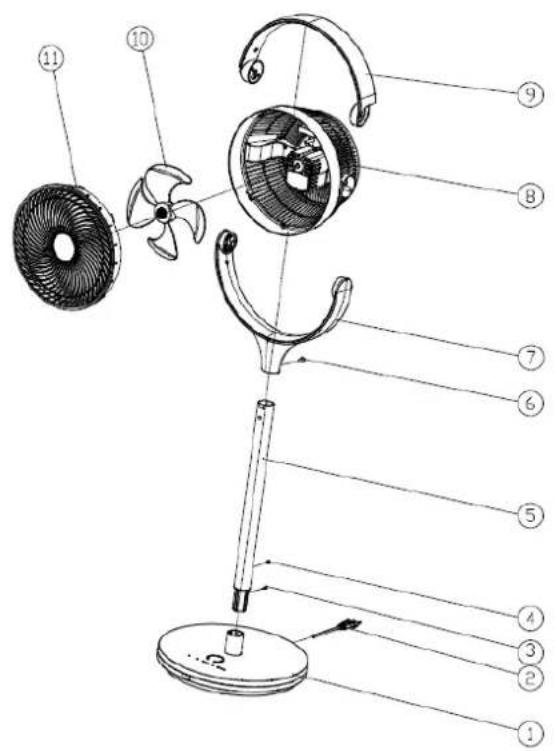
STRUCTURE
-
Base plate
-
Power cord
-
Button
-
Screw
-
Column
-
Button
-
Bracket
-
Rear grill
-
Handle
-
Fan blade
-
Front cover
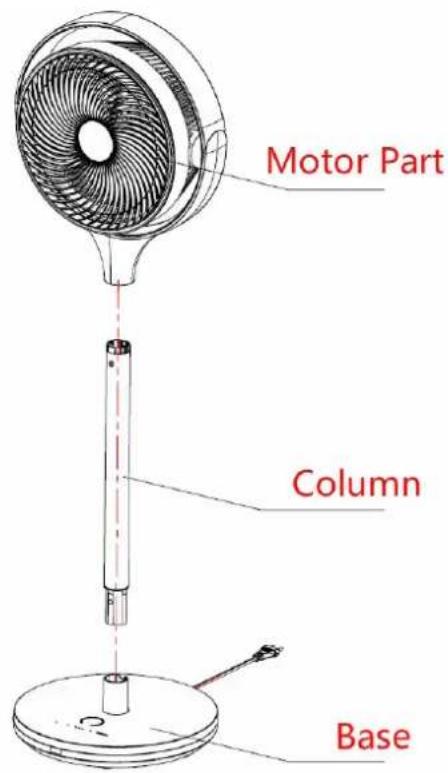
ASSEMBLY INSTRUCTIONS
-
Install the column on the base.
-
Install the motor part on the column.
Remote and Display
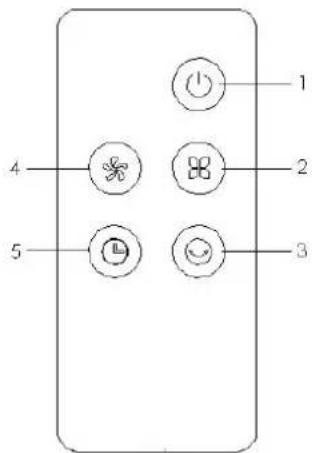
REMOTE
- On/Off button
- Mode button
- Swing/Oscillation button
- Fan speed button
- Timer button
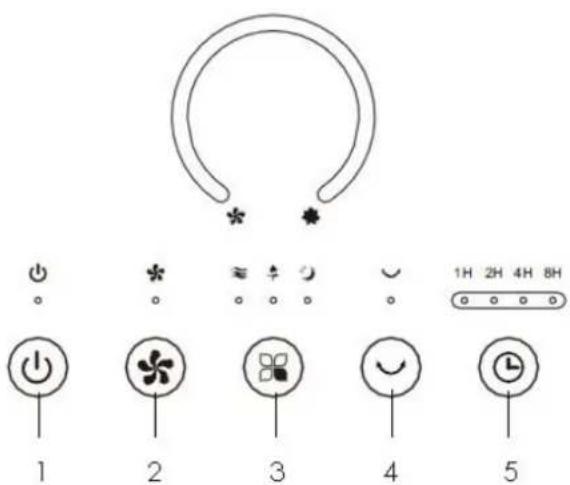
DISPLAY/CONTROL PANEL
- On/Off button
- Fan speed button
- Mode button
- Swing/Oscillation button
- Timer button
Operation Instructions
When you first plug in, the fan will make a sound alert and then enter standby mode. Only the [ON/OFF] button is operational in standby mode.
ON/OFF
While in stand-by mode, press the [ON/OFF] button to turn the fan on.
Pressing the [ON/OFF] button when the fan is operational will turn the fan off. The indicator light will also turn off. If the fan is oscillating then the motor will return back to the central point first and then go into standby mode.
FAN SPEED
The wind speed can be adjusted with the [FAN SPEED] button. Pressing the button repeatedly will rotate between Low, Medium and High wind speeds.
MODES
The wind mode can be adjusted by pressing the [MODE] button. Pressing the button repeatedly will rotate between Normal, Natural breeze, Sleep modes.
Normal Mode: Operates normally with the selected wind speed - Low, Medium, High.
Natural Breeze Mode: The fan speed automatically shifts through Low, Medium, High speed to imitate a natural wind speed rhythm.
Sleep Mode: The fan will run using the Natural Breeze mode pattern and automatically lower the set wind speed in 30 minute intervals depending on the speed setting and then run continuously at low speed.
Sleep on High: high speed for half an hour, then medium speed for half an hour, then low speed continuously
Sleep on Medium: medium speed for half an hour, then low speed continuously
Sleep on low: low speed continuously
TIMER
The [TIMER] button has 4 timer settings in the order of 1H, 2H, 4H, 8H, OFF. The LED display will indicate which time frame is set. Selecting the relative settings will start the timer and once the timer runs out the fan will automatically turn off. After resetting the timer, the fan will work according to the last setting.
The timer can be preset in stand-by mode, presets can be set to 1H, 2H, 4H, 8H and will be displayed accordingly on the LED display. The fan will start in the mode last used.
SWING/OSCILLATION
Press the [SWING/OSCILLATION] button, the indicator light will switch on and the fan will oscillate between 0^ and 90^ . When shifting directions the fan will stop for 2 seconds and then continue to oscillate.
Note: when the fan is first plugged in the fan will oscillate 30^0 to calibrate its settings.
Maintenance Instructions
The fan requires little maintenance. Do not try to fix it by yourself. Refer it to a qualified service person if service is needed.
- Unplug the fan before cleaning and assembling.
- To ensure there is adequate air circulation to the motor, keep the rear vents free of dust. DO NOT disassemble the fan to remove dust.
- To clean exterior parts, wipe with a soft cloth soaked in mild detergent.
- DO NOT use any abrasive detergents or solvents to avoid scratching the surface.
- DO NOT use any of the following as a cleaner: gasoline or thinner.
- DO NOT allow water or any other liquid into the motor housing or interior parts.
- Store fan in a dry and cool area.
Cleaning
- Be sure to unplug the fan from the electrical supply source before cleaning.
- Plastic parts should be cleaned with a soft cloth moisten with mild soap.
- Thoroughly remove soap film with dry cloth.
Disposal
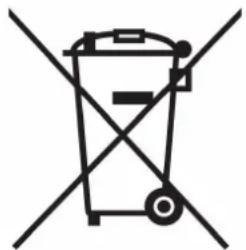
DO NOT dispose of electrical appliances as unsorted municipal waste, use separate collection facilities. Contact your local government for information regarding the collection systems available. If electrical appliances are disposed of in landfills or dumps, hazardous substances can leak into the groundwater and get into the food chain, damaging your health and well-being.
natural_image
Symbol of a trash bin crossed with no text or labels
- Dimplex Pedestal Air Circulator
- CAUTION: FAILURE TO FOLLOW THESE INSTRUCTIONS MAY CAUSE INJURY AND/OR DAMAGE AND MAY INVALIDATE YOUR GUARANTEE
- WARNING
- Installation Instructions
- STRUCTURE
- ASSEMBLY INSTRUCTIONS
- Remote and Display
- REMOTE
- DISPLAY/CONTROL PANEL
- Operation Instructions
- ON/OFF
- FAN SPEED
- MODES
- TIMER
- SWING/OSCILLATION
- Maintenance Instructions
- Cleaning
- Disposal
Brand : DIMPLEX
Model : DCACP25
Category : Household Fan