
DCPFAC40 - Household Fan DIMPLEX - Free user manual and instructions
Find the device manual for free DCPFAC40 DIMPLEX in PDF.


| Product Type | Domestic Fan |
| Brand | Dimplex |
| Model | DCPFAC40 |
| Fan Type | Pedestal Fan |
| Blade Diameter | 40 cm |
| Power Supply | 220-240 V ~ 50 Hz |
| Power Consumption | 45 W |
| Airflow | 40 m³/min |
| Speed Settings | 3 |
| Oscillation | Yes, 90° |
| Adjustable Height | Yes, from 110 to 140 cm |
| Material | Plastic blades, metal stand |
| Weight | 5.5 kg |
| Dimensions (H x W x D) | 140 cm x 45 cm x 45 cm |
| Noise Level | 55 dB (max speed) |
| Safety Features | Overheat protection, tip-over switch |
| Cleaning | Unplug, wipe with damp cloth; do not immerse |
| Spare Parts | Blade, motor, stand, guard available |
| Repairability | User-replaceable parts; technical support available |
| Certifications | CE, RoHS |
Frequently Asked Questions - DCPFAC40 DIMPLEX
User questions about DCPFAC40 DIMPLEX
0 question about this device. Answer the ones you know or ask your own.
Ask a new question about this device
Download the instructions for your Household Fan in PDF format for free! Find your manual DCPFAC40 - DIMPLEX and take your electronic device back in hand. On this page are published all the documents necessary for the use of your device. DCPFAC40 by DIMPLEX.
USER MANUAL DCPFAC40 DIMPLEX
40cm Multidirectional Pedestal Fan
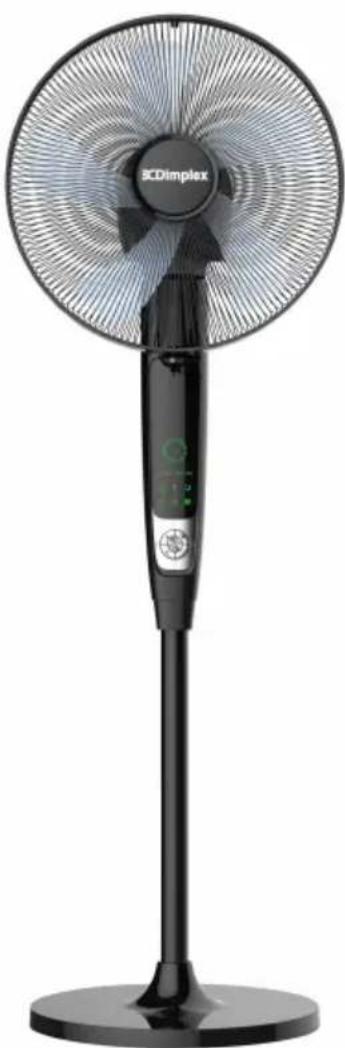
natural_image
Black and white photo of a SCDimplex electric fan with a digital display stand (no visible text or symbols on the fan body)INSTRUCTION MANUAL
PLEASE READ THE INSTRUCTION MANUAL CAREFULLY BEFORE USING THE UNIT.
WARNINGS
AND
PRECAUTIONS
STRUCTURE
3
OPERATION
4
CLEANING
AND
MAINTENANCE
TECHNICAL
REFERENCE
DATA
WARRANTY
13
Warnings
- Never place the unit near gas appliances, flames or flammable liquids
- Never hit or shake the unit. Doing so may cause damage.
- Never cover or obstruct the air inlet or outlet. Doing so may cause overheating.
- Never spray water on or place the unit near water. Doing so may cause electric shock.
- Never connect other appliances to the same power outlet.
- Never connect or disconnect the power plug with wet hands. Doing so may cause electric shock.
- Never insert fingers or objects through the guards when the unit is operating.
- Never use an extension cord.
• Always have a professional technician, manufacturer or service agent replace a damaged power cord.
Precautions
• This appliance is for indoor use only.
- Do not use the unit near windows or where water collects. Rain and water collection may lead to a risk of fire or electric shock.
- Do not place the unit in a damp place or where humidity is high (such as a bathroom).
- Do not leave the unit operating while unattended.
- Do not place the unit in direct sunlight to avoid surface discolouration.
- This appliance is not intended for use by persons (including children) with reduced physical, sensory or mental capabilities, or lack of experience and knowledge, unless they have been given supervision or instruction concerning use of the appliance by a person responsible for their safety.
- Children should be supervised to ensure they do not play with the appliance.
- Avoid electromagnetic interference. Keep the unit at least 1 metre away from electric appliances such as televisions and radios.
- Avoid scratching and damaging the surface. Do not use chemical solvents (i.e. Benzene, alcohol) to clean the surface.
- Place the unit on a stable surface when operating.
- Unplug the unit before cleaning, servicing or maintenance.
- Electrical connections must be in accordance with National or Local Codes.
- The rear of the unit must be at least 50cm away from the wall.
- If the supply cord is damaged, it must be replaced by the manufacturer, its service agent or similarly qualified persons in order to avoid a hazard.
- The product design and specifications are subject to change without prior notice.
WARNING - KEEP BATTERIES OUT OF REACH OF CHILDREN
- Swallowing may lead to serious injury in as little as 2 hours or death, due to chemical burns and potential perforation of the oesophagus.
- f you suspect your child has swallowed or inserted a button battery immediately call the 24-hour Poisons Information Centre on 13 11 26 (in Australia) or 0800 764 766 (in New Zealand) for fast, expert advice.
- Examine devices and make sure the battery compartment is correctly secured, e.g. that the screw or other mechanical fastener is tightened. Do not use if the compartment is not secure.
- Dispose of used button batteries immediately and safely. Flat batteries can still be dangerous.
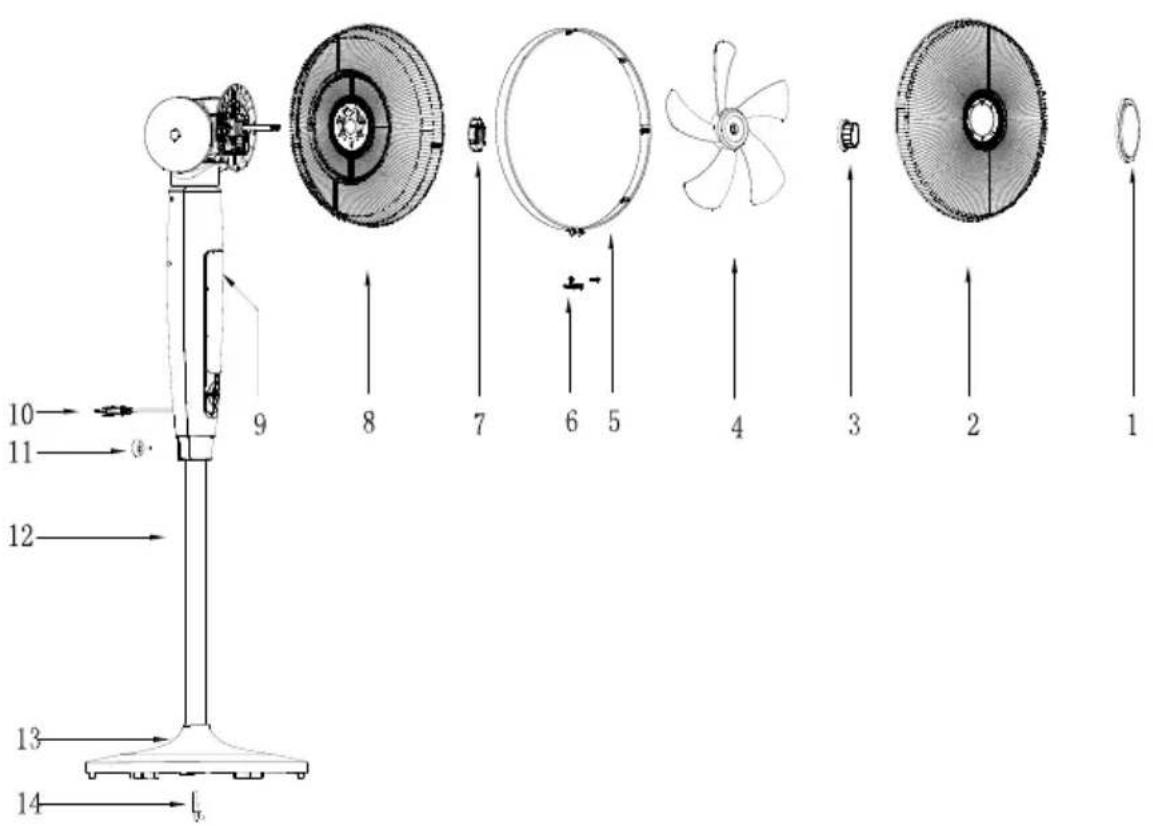
- Cover plate
- Front grill
- Fan blade knob
- Fan blade
- Fan ring
- Fan ring clip
-
Rear grill mounting nut
-
Rear grill
- Fan body
- Power cord
- Locking screw
- Lower pole
- Base
- L-type locking screw
DISPLAY PANEL & REMOTE CONTROL
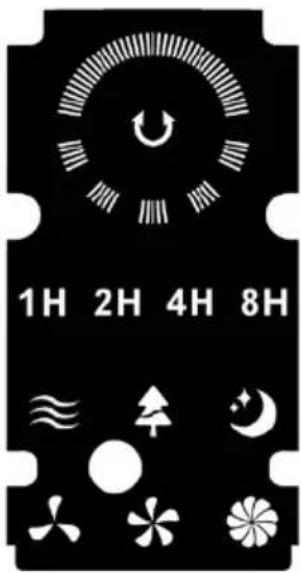
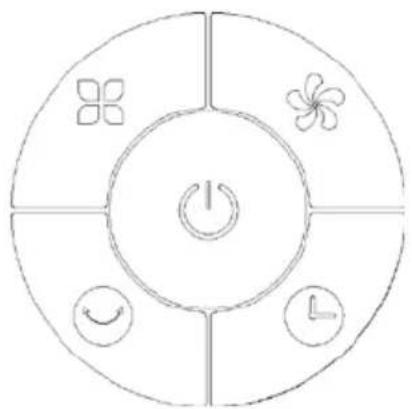
flowchart
graph TD
    A["Power"] --> B["Clock Icon"]
    A --> C["Clock Icon with Arrow"]
    A --> D["Clock Icon with Circle"]
    A --> E["Clock Icon with Flower"]
    A --> F["Clock Icon with Flower"]
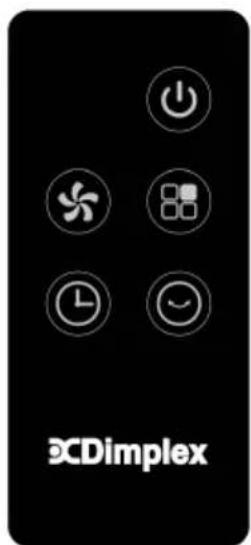
| ICON Description | |
 | Power ON/OFF button/indicator |
 | Fan speed (Low, Medium & High) |
 | Swing button |
 | Mode button (Normal, Natural & Sleep) |
 | Timer Button (1H, 2H, 4H, 8H hour indicator lights) |
BEFORE FIRST USE
- Please read these instructions carefully before use and keep them for future reference.
- Check your local main voltage whether it is the same as stated on the appliance.
-
Before using for the first time, remove any protective films or stickers from the appliance and ensure the power supply is "Off".
-
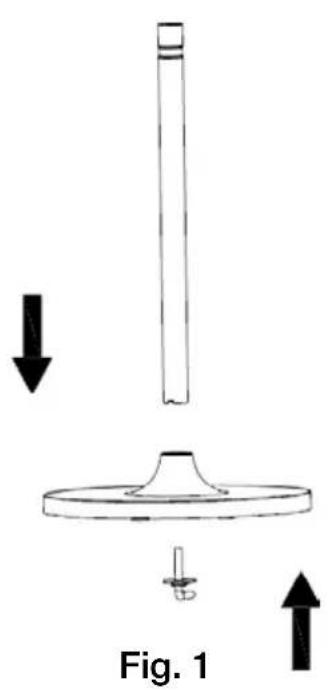
Insert the lower pole into the hole of the base, then tighten using the L-type screw. (Fig.1)
-
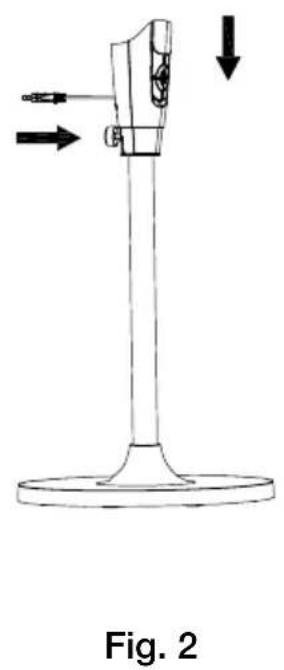
Place the fan body over the lower pole, then tighten using the locking screw. (Fig. 2)
-
Position the rear grill over the motor body head, making sure that the 3 holes are aligned with the 3 prongs, then firmly screw on the rear grill mounting nut by turning in a clockwise direction.(Fig. 3)
natural_image
Technical line drawing of a mechanical device with directional arrows indicating movement or force (no text or symbols)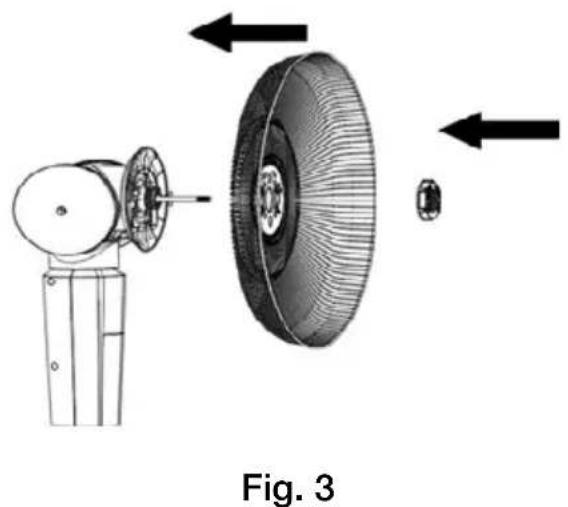
natural_image
Technical illustration of a mechanical assembly with labeled components and directional arrows (no text or symbols on the diagram itself)-
Mount the fan blade onto the motor shaft; and fasten the fan blade knob firmly by turning in an anti-clockwise direction. (Fig. 4)
-
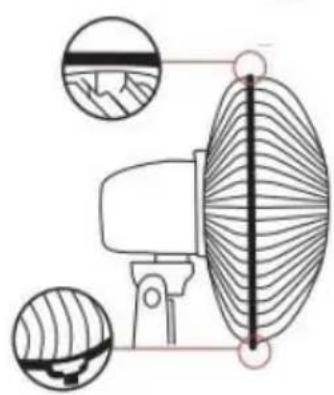
Attach the front grill with fan ring to the rear grill by pushing the round edges of the grills firmly together, then lock the fan ring clip attached to the fan ring. Using a phillips head screwdriver, tighten the fan ring clip screw provided. (Fig.5)
-
After assembly, plug into a power outlet.
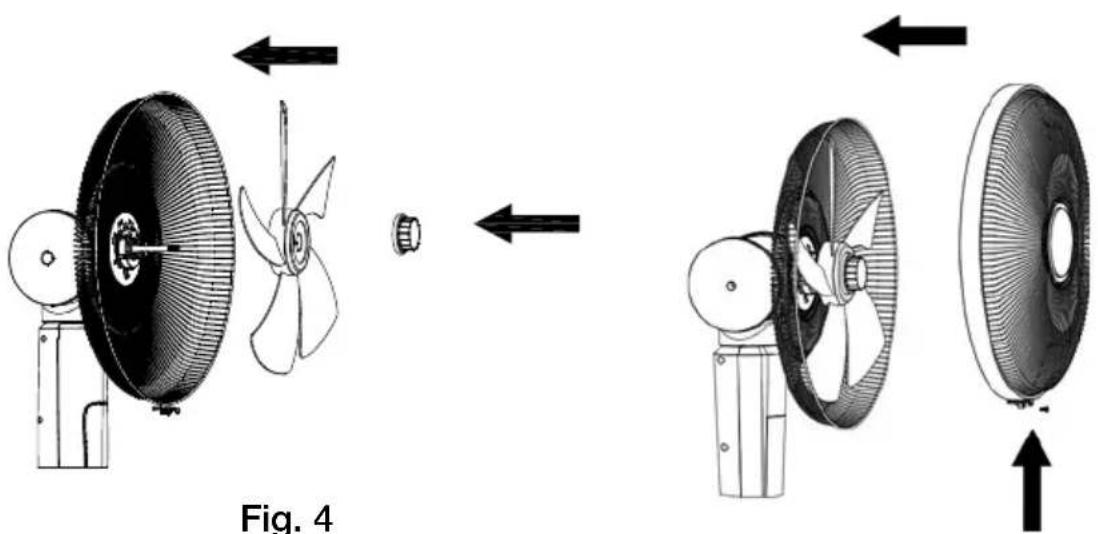
Fig. 4
Fig. 5
natural_image
Diagram of a radar or sensor system with two circular components and a central vertical axis, showing field lines (no text or symbols)On/Off Button
Press the On/Off button to turn the unit "On". A beeping sound should be heard when the fan is first plugged in and it will be in standby mode. To turn the unit "Off" press this button again. The unit may take a few seconds to power off completely.
Fan Speed Button
The fan speed can be selected in the following sequence: Low > medium > high. The selected fan speed will show on the display panel.
Swing Button
Press the “Swing” button to set the desired horizontal oscillation angle. Pressing this button will cycle through 0^ (no oscillation) > 60^ > 90^ > 180^ > 360^ . The display panel will show the selected oscillation angle.
NOTE: Vertical oscillation is set manually up to 90°. Horizontal oscillation can also be set manually to any angle from 0-360°. Press the button again to turn off the swing function.
Timer Button
The timer can be set via the following sequence: 1H > 2H > 4H > 8H > Off. The time isn't accumulated and the MAX timer is 8H. The set time will be indicated by the LED lights on the display panel.
LED Display
The LED lights will dim after there is no operation for 1 minute (33% less than original brightness). As soon as a button is pressed, the lights will return to normal brightness.
Mode Button
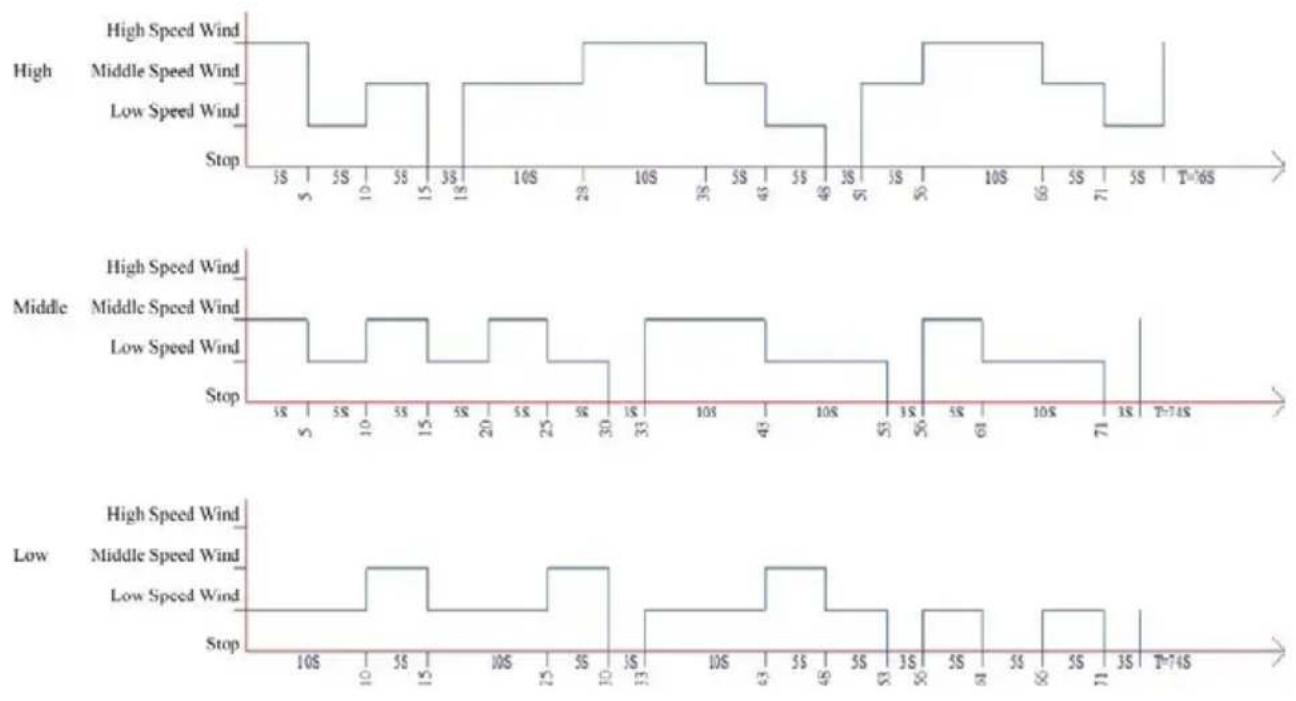
The default mode after turning “On” is normal. Press this button to select modes in this sequence: normal > natural > sleep. The display panel will show the selected mode.
Normal: Constant wind speed.
Natural: Changing wind speeds (the indicator lights only show the initial wind speed when the speed changes, and other changes are not indicated).
Sleep: In natural sleep mode, the wind speed LED changes with the 30-minute cycle change, but does not indicate with the change of natural wind.
High: 30 minutes high speed natural wind > 30 minutes medium level natural wind > low level natural wind (until turned off).
Medium: 30 minutes medium level natural wind > low level natural wind (until turned off).
Low: Low level natural wind (until turned off).
Using the Remote Control
-
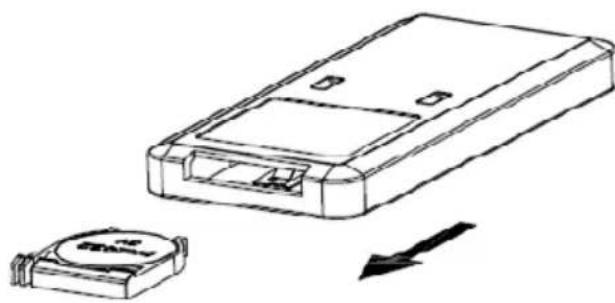
Open the battery cover of the remote control, and insert a 3V CR2032 battery.
-
Please point to the receiver when using the remote control.
-
If the battery voltage is low, please open the battery cover as per the diagram and replace with a new battery (CR2032). Then replace the battery cover.
natural_image
Technical line drawing of a device housing and a battery component with an arrow indicating direction (no text or symbols)CLEANING
Over time, dust can accumulate on the surface, air outlet and filters, which can affect the performance. It is recommended to clean the unit at least once a week of any dust build up.
- Turn the unit OFF and disconnect the appliance from the main power supply before commencing any cleaning.
- Remove any dust build up with a soft brush or vacuum cleaner.
- Wipe the surface of the unit with a soft damp cloth. Mild detergent can be used for any stubborn marks.
- Do not allow electrical parts to come in contact with water or any other liquids.
- Do not use abrasive sponges, scouring pads, or a stiff brush to clean this appliance.
- When the unit is not being used for long periods, it's recommended pack the unit away in a dry, well ventilated space - preferably in its original box.
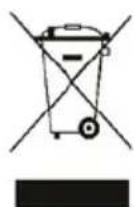
- Do not dispose of electrical appliances as unsorted municipal waste.
- Use separate collection facilities.
- Contact your local government for information regarding the collection systems available.
- If electrical appliances are disposed of in landfills or dumps, hazardous substances can leak into the ground water, polluting the food chain and damaging health and well-being.
MAINTENANCE
If the unit fails to operate efficiently, is broken or other problems arise, unplug and do not operate. Ask for advice by calling your local after sales service agent or the Customer Care Centre on 1300 556 816 (AU) / 0800 666 2824 (NZ).
| MODEL NO. DCPFAC40 | |
| Rated Power 65W | |
| Voltage/Frequency 220-240V~50/60Hz | |
| Noise Level (MAX) | ≤55dB |
| Net Weight 8.6kg | |
| Dimensions Body (HxWxDmm) 1400 x 414 x 453 |
WARRANTY
The warranty period is 12 months from the date of purchase. For service advice, please contact the Customer Care Centre on 1300 556 816 (AU) / 0800 666 2824 (NZ).
Glen Dimplex Australia Pty Ltd Glen Dimplex New Zealand Ltd 1340 Ferntree Gully Road, 38 Harris Road, East Tamaki, Scoresby 3179, Victoria Auckland 2013
Australia
Ph: 1300 556 816
New
Zealand
Ph: 0800 666 2824
Brand : DIMPLEX
Model : DCPFAC40
Category : Household Fan