IET400 - Baby product Oricom - Free user manual and instructions
Find the device manual for free IET400 Oricom in PDF.


| Product Type | Infrared In-Ear Thermometer |
| Model | IET400 (Supplier Model PG-IRT1601) |
| Dimensions | 32 × 158 × 55 mm |
| Weight | Approximately 65 g (batteries not included) |
| Power Supply | 2 x 1.5V AAA alkaline batteries |
| Measuring Range (Ear) | 34.0°C – 43.0°C (93.2°F – 109.4°F) |
| Object Temperature Range | 0°C – 93.2°C (32°F – 199.7°F) |
| Accuracy | ±0.2°C for 35.0°C – 42.0°C; ±0.3°C for other temperatures |
| Resolution | 0.1°C or 0.1°F |
| Display | LCD, 4-digit, with color backlight (white, green, orange, red) |
| Memory | Stores up to 9 temperature readings |
| Auto Power Off | After 30 seconds of inactivity |
| Measurement Time | Within 2 seconds |
| Sound | On/off function; beeps for power, measurement, error, and fever alert |
| Cleaning | Wipe probe with 75% alcohol swab after each use; dry for 10 minutes |
| Safety Features | Auto-off, low battery indicator, error codes, fever alert, IP22 |
| Intended Use | For measuring human body temperature via ear canal (not for diagnosis) |
| Warranty | 12 months from date of purchase (Australia) |
| Customer Support | Australia: 02 4574 8888 / New Zealand: 0800 674 266 |
| Package Contents | Thermometer, user manual (batteries not included) |
| Regulatory Approval | ARTG No. 338230 (Australia) |
| Operating Conditions | 10°C – 40°C, 15% – 93% RH |
Frequently Asked Questions - IET400 Oricom
User questions about IET400 Oricom
0 question about this device. Answer the ones you know or ask your own.
Ask a new question about this device
Download the instructions for your Baby product in PDF format for free! Find your manual IET400 - Oricom and take your electronic device back in hand. On this page are published all the documents necessary for the use of your device. IET400 by Oricom.
USER MANUAL IET400 Oricom
ORICOM CUSTOMER SUPPORT
Oricom have a trained and dedicated team of Customer Support Representatives, here to assist in answering your questions quickly and efficiently with regard to the operation of this product.
Oricom Support - Australia
For all product enquiries, troubleshooting or to discuss the range of Oricom products, feel free to contact Oricom or visit our website for answers to frequently asked questions.
02 4574 8888
Monday - Friday 8am – 6pm AEST
Email: support@oricom.com.au
www.oricom.com.au
Oricom Support - New Zealand
0800 674 266
Monday - Friday 10am - 8pm NZST
Email: support@oricom.co.nz

Ref:21102020
IET400 Infrared In Ear Thermometer Model No. PG-IRT1601
IET400 is included as a medical device on the Australian
Register of Therapeutic Goods (ARTG No. 338230).
IET400 is intended for use as a measuring device for determining the patient's body temperature.
ALWAYS READ THE LABEL AND USER GUIDE, USE ONLY AS DIRECTED.
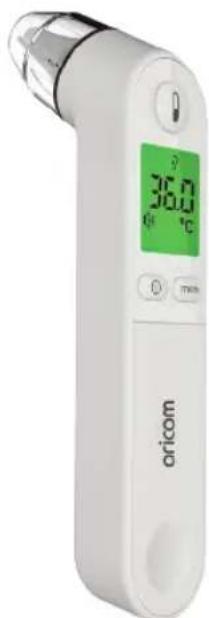
natural_image
White medical orific meter device with digital display showing temperature reading of 36.0°C (no visible text beyond brand name)USER MANUAL
Keep this user guide for future reference. Always retain your proof of purchase in case of warranty service.
Warnings ....3
Product introduction....5
Cautions 6
Body temperature measurement methods....7
Product layout....8
Display description 8
Battery installation....9
Basic instructions....10
Measurement methods....11
Cleaning instructions....13
Frequently Asked Questions ....14
Troubleshooting....15
Specifications ....16
Warranty....17
⚠ Warning
Temperature readings are for reference only. They do not replace the diagnosis of a medical professional. If you have any concern about the temperature readings, please seek advice from a medical professional.
Please allow device to reach room temperature for 30 minutes before use. Failure to do so may result in incorrect measurement results.
Need Help?
If you need assistance setting up or using your Oricom product now or in the future, call Oricom Support.
Australia (02) 4574 8888
www.oricom.com.au
Mon-Fri 8am – 6pm AEST
New Zealand 0800 67 42 66
Mon-Fri 10am – 8pm NZST
⚠Warnings
The warning signs and illustrations indicated in the manual below are intended to enable you to use the product safely and correctly, and to prevent any harm to you and others.
Caution: Refer to below reference chart.
| Legends | |
| Warning: Please follow specific instructions. | |
| General warning. | |
| Prohibited actions. | |
| Do not disassemble. | |
| Type BF Applied part | |
| Water or moisture resistance. | |
| Please read the manual carefully before use. | |
| The packaging of this unit complies with the requirements of environmental protection. | |
| Product is recyclable. | |
| Do not discard in general rubbish. | |
IP Classification: IP22 | |
| Please discuss measured values with a medical professional if required.The product is only intended to be used for temperate measurement in humans.Do not use this product for purposes other than body temperature measurement.Mobile phones may interfere with accurate readings. Do not use mobile phones when using this product.Do not use equipment that generates electromagnetic fields near the product. |  |
| Do not attempt to disassemble or repair this product.Do not bend or stretch the device.Do not drop this product or subject it to shock. |  |
| Not to be used to determine a medical diagnosisCannot be used for emergency or continuous measurement in surgery.Product should not be used by those suffering from diagnosed ear ailments.Do not leave the thermometer with infants or children at any time.Follow all directions advised by a medical professional. |  |
If you use or store this product beyond the range of specified temperature and humidity, it may not reach intended performance specifications.
Operating temperature: from +10°C \~ +40°C
Humidity: from 15%RH \~ 93%RH
Storage temperature: from +10°C \~ +40°C
Humidity: from 0%RH \~ 93%RH
Product introduction
Intended use: Infrared Ear Thermometer is intended to measure human body temperature by measuring ear canal temperature.
Scope of application: This product is suitable for displaying the body temperature by measuring the heat radiation in the ear canal.
Infrared Ear Thermometer Features:
- Multiple colours and backlight display: White, Green, Orange and Red.
- Stores up to 9 readings.
- Temperature measurement in Fahrenheit ^ F and Celsius ^ C. (original setting is degree Celsius ^ C)
- Measuring time within 2 seconds.
- Sound on / off function.
- Auto power off after 30 seconds in idle mode.
Warning:
Temperature readings are for reference only. They do not replace the diagnosis of a medical professional. If you have any concern about the temperature readings, please seek advice from a medical professional.
Cautions
Warning
- Allow device to reach room temperature for 30 minutes before use.
◆ Failure to do so may result in incorrect measurement results. - Do not touch with your hands or exhale directly on the infrared sensor.
If the infrared sensor is damaged or dirty, it may cause abnormal measurement results. - Keep this product out of the reach of children.
- When measuring body temperature, keep away from direct exposure to air conditioning as this may affect the measurement accuracy.
- Before and after each use, use a cotton swab gently dipped in 75% alcohol, to wipe the probe surface.
Do not use toilet paper or facial tissue, as it will scratch the infrared sensor, resulting in incorrect readings. - Do not use if damaged.
◆ Any type of damage may affect reading accuracy. - Product may not function correctly if wet.
Caution:
- Product should not be used by those suffering from diagnosed ear ailments as it may cause further irritation.
- Do not use this product if ears are wet.
◆ Temperature readings may be low.
- Replace battery when indicated.
◆ Low battery will affect temperature reading accuracy.
- Ensure correct mode is selected.
◆ Wrong mode will result in inaccurate readings.
Suggestions
- Do not subject this device to mechanical shock.
- Please do not disassemble, repair or modify thermometer.
- Do not immerse in liquid. Do not allow liquid into this product.
- Store in a clean dry place.
- Please contact Oricom Support for troubleshooting.
- Please do not use around RF transmitting devices.
- Please dispose of this device according to local requirements.
Body temperature measurement methods
The comparison of different measurement methods
Measured readings differ depending on the measurement method used. See the below table for typical readings based on different measurement methods.
| Measurement methods Normal body temperature | |
| Anal temperature 36.6°C~38°C | |
| Oral temperature 35.5°C~37.5°C | |
| Axillary temperature 34.7°C~37.3°C | |
| Cochlear temperature 35.8°C~38°C | |
| Oral temperature 35.5°C~37.5°C(IET400 measured value) |
Product layout
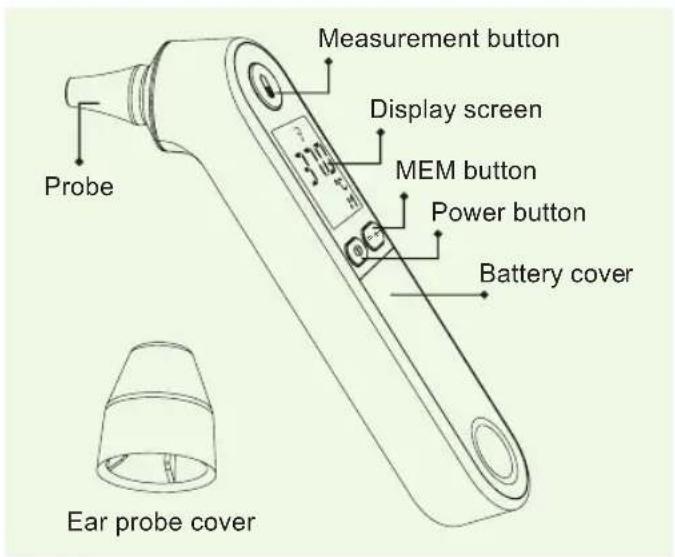
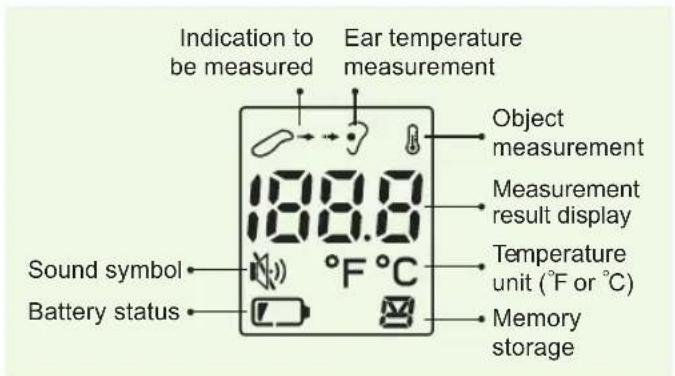
Display description
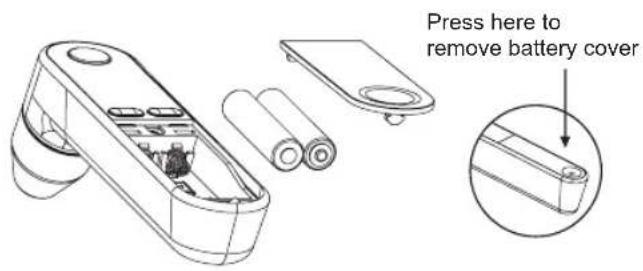
Battery installation
- Press battery cover and the battery cover will release automatically.
- Insert two 1.5V (AAA) batteries as indicated below. Observe the correct polarity of batteries.
Low battery warning:
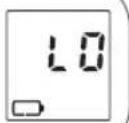
When battery voltage is low, LCD shows "L0" and battery indicator is permanently on, you will need to replace batteries.
Note:
Remove batteries if device will not be used for a prolonged period of time.
- It is recommended to use alkaline batteries.
- Please dispose of batteries as per local requirements.

Basic instructions
Sound function: turn on/off
- In the power-on state, press "mem" key to set the sound on or off.
- Press "mem" button - LCD screen will show "☐" and sound is now turned on.
- Press "mem" button a second time - " 🔊 " will change to " 🔊 " and sound is now turned off.
Switch between °F or °C
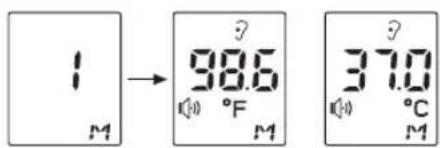
In off status, press and hold "mem" button for six seconds. The screen will power on. Briefly press the "mem" button to switch between Fahrenheit (°F) and Celsius (°C) temperature display modes.
Memory storage function
In off status, press "mem" button to view the stored measurements (up to 9 readings).
Back light status
When measured temperature is < 34°C, display will show LO with red backlight.
When measured temperature value is 34^ C\~ 37.1^ C, display will show green backlight.
When measured temperature value is 37.2^ C\~ 38.1^ C, display will show orange backlight.
When measured temperature value is 38.2^ C\~ 43.0^ C, display will show red backlight.
When measured temperature value is > 43.0°C, display will show red backlight and "HI".
Note:
This backlight feature is for reference only.
Measurement methods

Gently pull up the outer ear for children under the age of one.

Gently pull up and back on the outer ear in the direction of the rear of the head, for children over the age of one.
Ear temperature Ear temperature
Ear temperature measurement
- After removing cover, press "①" button to turn on the thermometer and enter the ear temperature measurement mode. LCD will now display previous measurement. Place in ear as described above, and press " 🔍 " button to take temperature measurement.
- Within 2 seconds, the temperature reading will be displayed.
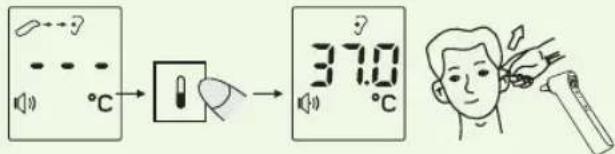
LCD is flashing when reading is in progress.
Result of measurement
Note: When temperature reading is complete, a beep will sound and the temperature reading will be displayed. (If in silent mode, no sound will be heard.)
Object measurement
Note:
- Press and hold “①” button for 6 seconds, to enter the object measurement mode and then aim the thermometer at the object. The temperature of the target object can be measured directly by pressing “☐” button.
- Within 2 seconds, you will see the result of the measurement on the LCD screen.
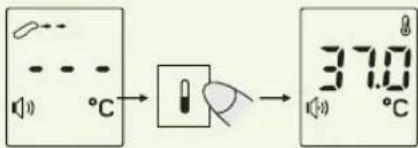
LCD is flashing when reading is in progress.
Result of measurement
Cleaning instructions
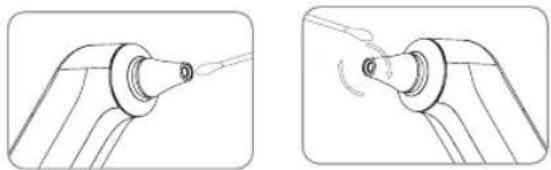
In order to ensure precise measurements, its recommended that the device is cleaned after each use.
Using a cotton swab containing a 75% alcohol, wipe the thermometer probe and remove any residue that may affect operation. Cleaning action should be maintained for at least 5 seconds. Wipe the remainder of the thermometer with a soft and dry cloth for a minimum of 10 seconds. After cleaning, please ensure that there is no visible dirt or residue on your thermometer. Wait 10 minutes before using after cleaning.
natural_image
Technical line drawing showing two mechanical joint configurations (no text or symbols)Why should you clean after each use?
Infrared temperature reading technology adopts a highly sensitive technique to detect temperature. Any dust or ear wax will affect measurement accuracy and can also increase the risk of bacterial infection.
Frequently Asked Questions
| Screen display | Reasons Solutions | |
| HI | When the target object temperature is higher than measurement range. If ear temperature is more than 43.0°C, the LCD screen will show "HI" indication. | 1. (When the measurement probe is not properly placed in the ear canal or if the measurement distance is too far during the measurement process, the measurement result may be low.)2. When measurement probe is dirty, the measurement value may be low; (See cleaning instructions above). |
| Lo | When the target object temperature is lower than measurement range. If ear temperature is less than 34°C, the LCD screen will show "Lo" indication. | |
| Er.H | This product has an upper limit operating temperature of 40°C. When the ambient temperature exceeds this temperature point, the LCD screen will display an error message "Er.H". | When you operate this product, the environment temperature cannot be greater than 40°C. |
| Er.L | This product has a lower limit operating temperature of 10°C. When the ambient temperature exceeds this temperature point, the LCD screen will display an error message "Er.L". | When you operate this product, the environment temperature can not be lower than 10°C. |
| Err | When the environment temperature changes rapidly about 5 degrees, it will show “Err” during measurement in object temperature mode, then shutdown automatically. | When it shows “Err”, please place this product and keep steady in current environment for 30 minutes before next measurement. |
| When the operation is wrong, if the sound is turned on, then the sound will read the value and remind at this moment. (A short beep will be heard.) | ||
Troubleshooting
| Issue Reasons Solutions | ||
| When the power is turned on, the screen can not be displayed. | The battery is flat. | Replace the new battery. |
| The battery polarity may be incorrect. | Check battery polarity, as per markings on the case. | |
| The measurement temperature is low. | The measurement position is not correct. | Measure the temperature correctly according to the instructions. |
| Possible dust on sensor or ear wax in ear. | Clean thermometer and ear canal. | |
| Big temperature fluctuations with continuous measurement. | Measurement interval is too short. | Wait at least 10 seconds between measurements. |
Specifications
Product name: Infrared In Ear Thermometer
Model number: IET400
Supplier model no. PG-IRT1601
Product appearance dimensions: 32 × 158 × 55mm
Product weight: Approx. 65g (not including batteries)
Measuring range: 34.0°C-43.0°C.(93.2°F-109.4°F)
Object temperature: 0°C-93.2°C (32°F-199.7°F)
Resolution ratio: 0.1°C/°F
Measurement Location: Laboratory
Accuracy: (35.0^42.0^)±0.2^ , (95.0^107.9^)±0.4^ , other temperature ±0.3^ .
Operation temperature: 10.0°C\~40.0°C
(50.0°F\~104.0°F), relative maximum humidity 15%RH\~93%RH
Atmospheric pressure: 70kPa\~106kPa
Transportation/storage temperature: -25°C\~55°C (-13°F\~131°F), relative maximum humidity 0%RH\~93%RH
Atmospheric pressure: 50kPa\~106kPa
Display screen: LCD display screen, 4 bit numbers and icons.
Sound: On power up, a short beep is heard when thermometer is ready to measure temperature. A long beep is heard when measurement is complete. System error or fault: three short beeps. Fever alert: 10 short beeps.
Memory: thermometer can store up to nine temperature readings.
Automatically shut down: If no operation for 30 seconds, thermometer will shutdown automatically.
Batteries: 2 x 1.5V AAA batteries (alkaline batteries are recommended).
Packing parts list
-
Infrared ear thermometer
-
User guide
Manufactured by Shenzhen Pango Electronic Co Ltd (China) [57886].
No 25, 1st Industry Zone Fenghuang Rd, Xikeng Village, Henggang Town, Shenzhen Guangdong 518115 China S [237294]
How to make a claim under your Express Warranty in Australia
Oricom has a simple warranty process for you to follow:
- Please call or email our Customer Support Team, 02 4574 8888 or support@oricom.com.au.
- A Customer Support Team member will verify after troubleshooting with you if your product qualifies under warranty. If so, they will give you a Product Return Authorisation number.
- We will then email a Return Authorisation form and a Repair Notice (if necessary), together with instructions on how to return the product for warranty service.
Please note that if a Customer Support Team member advises that your product does not qualify for return, this warranty does not apply to your product. Products that are authorised to be returned to Oricom in Australia must include all of the following:
• A completed Return Authorisation form
- A copy of your Proof of Purchase (please keep your original copy)
- The faulty product, including all accessories.
Send the approved returns to:
Oricom International Pty Ltd
Locked Bag 658
South Windsor NSW 2756 Australia
Please note that this Express Warranty excludes expenses incurred by you in returning any faulty product to us. You must arrange and pay any expenses incurred (including postage, delivery, freight, transportation or insurance of the product) to return the faulty product to us, however, we will arrange delivery of the repaired or replaced faulty product to you.
Important Information Repair Notice
Please be aware that the repair of your products may result in the loss of any user-generated data (such as stored telephone numbers, text messages and contact information). Please ensure that you have made a copy of any data saved on your product before sending for repair. Please also be aware that products presented for repair may be replaced by refurbished products or parts of the same type rather than being repaired.
Express Warranty (Australia)
This Express Warranty is provided by Oricom International Pty Ltd ABN 46 086 116 369, Unit 1, 4 Sovereign Place, South Windsor NSW 2756, herein after referred to as "Oricom".
Oricom warrants that the product is free from defects in materials or workmanship during the Express Warranty Period. This Express Warranty does not extend to any product from which the serial number has been removed or was purchased outside of Australia.
The benefits of this Express Warranty are in addition to other rights and remedies you may have under the Australian Consumer Law. Our goods come with guarantees that cannot be excluded under the Australian Consumer Law. You are entitled to a replacement or refund for a major failure and compensation for any other reasonably foreseeable loss or damage. You are also entitled to have the goods repaired or replaced if the goods fail to be of acceptable quality and the failure does not amount to a major failure. In the event of a minor failure, Oricom reserves the right to choose to repair or replace the product.
The Express Warranty Period will be a period of 12 months beginning on the date of purchase of the product evidenced by your dated sales receipt. You are required to provide proof of purchase as a condition of receiving Express Warranty services.
You are entitled to a replacement product or repair of the product at our discretion according to the terms and conditions of this document if your product is found to be faulty within the Express Warranty Period. This Express Warranty extends to the original purchaser only and is not transferable.
Products distributed by Oricom are manufactured using new materials or new and used materials equivalent to new in performance and reliability. Spare parts may be new or equivalent to new. Spare parts are warranted to be free from defects in material or workmanship for thirty (30) days or for the remainder of the Express Warranty Period of the Oricom branded product in which they are installed, whichever is longer. During the Express Warranty Period, Oricom will where possible repair and if not replace the faulty product or part thereof. All component parts removed under this Express Warranty become the property of Oricom. In the unlikely event that your Oricom product has a recurring failure, Oricom may always, subject to the Competition and Consumer Act 2010, at its discretion, elect to provide you with a replacement product of its choosing that is at least equivalent to your product in performance.
No change to the conditions of this Express Warranty is valid unless it is made in writing and signed by an authorised representative of Oricom.
Oricom will not be liable under this Express Warranty, and to the extent permitted by law will not be liable for any defect, loss, damage or injury arising out of or in connection with a:
- Failure by you to adhere to the warnings and follow the instructions set out in this user guide for the proper installation and use of the product;
- Willful misconduct or deliberate misuse by you of the product;
- Any external cause beyond our control, including but not limited to power failure, lightning or over voltage; or
- Modification to the product or services carried out on the product by anyone other than Oricom or Oricom's authorised service provider.

- ORICOM CUSTOMER SUPPORT
- Oricom Support - Australia
- 4574 8888
- Oricom Support - New Zealand
- 674 266
- IET400 Infrared In Ear Thermometer Model No. PG-IRT1601
- USER MANUAL
- ⚠ Warning
- Need Help?
- ⚠Warnings
- Caution: Refer to below reference chart.
- Product introduction
- Infrared Ear Thermometer Features:
- Warning:
- Cautions
- Warning
- Caution:
- Suggestions
- Body temperature measurement methods
- The comparison of different measurement methods
- Battery installation
- Low battery warning:
- Note:
- Basic instructions
- Sound function: turn on/off
- Switch between °F or °C
- Memory storage function
- Back light status
- Measurement methods
- Ear temperature measurement
- Object measurement
- Cleaning instructions
- Why should you clean after each use?
- Specifications
- Packing parts list
- How to make a claim under your Express Warranty in Australia
- Important Information Repair Notice
- Express Warranty (Australia)
Brand : Oricom
Model : IET400
Category : Baby product