CPP-802 - Pump Ozito - Free user manual and instructions
Find the device manual for free CPP-802 Ozito in PDF.


| Product Type | Constant Pressure Pump |
| Model | CPP-802 |
| Brand | Ozito |
| Motor Power | 800W |
| Max Flow Rate | 3,200 l/h |
| Max Lift | 8m |
| Max Head | 38m |
| Max Delivery Pressure | 3.8 bar |
| Inlet & Outlet Size | 25.4mm (1" BSP) Female |
| Water Temperature Range | 1°C to 35°C |
| IP Rating | IPX4 |
| Weight | 8.4 kg |
| Power Supply | 230V/240V AC, 50Hz |
| Cut-In Pressure | 1.5 bar |
| Cut-Off Pressure | 3.8 bar (factory set) |
| Pressure Gauge | 0-6 bar |
| Suction In-Line Filter Required | Yes, min 3000 l/hr, 150-250 micron |
| Non-Return Valve Included | Yes |
| Teflon Tape Included | Yes |
| Warranty | 3-Year Replacement |
| Recommended Application | Domestic water supply, garden watering, car washing |
Frequently Asked Questions - CPP-802 Ozito
User questions about CPP-802 Ozito
0 question about this device. Answer the ones you know or ask your own.
Ask a new question about this device
Download the instructions for your Pump in PDF format for free! Find your manual CPP-802 - Ozito and take your electronic device back in hand. On this page are published all the documents necessary for the use of your device. CPP-802 by Ozito.
USER MANUAL CPP-802 Ozito
Positioning the hose or pipe
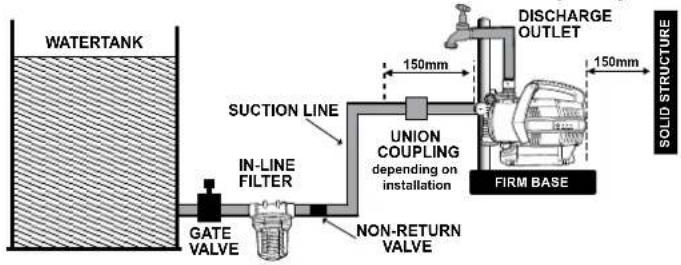
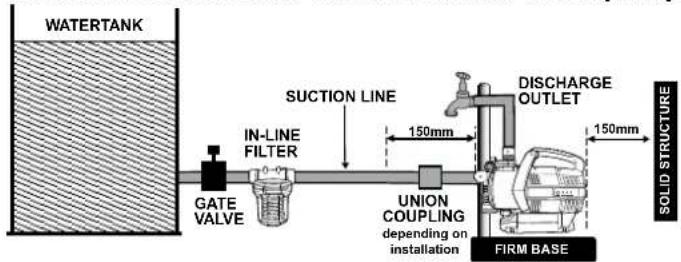
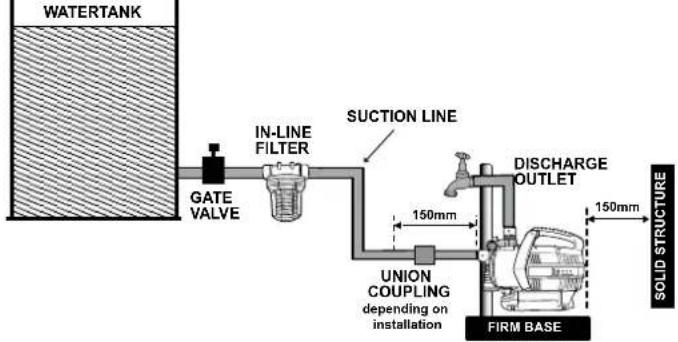
Position the input hose or pipe so that it rises from the water drawing source to the pump. Where possible, avoid positioning the input hose or pipe higher than the pump, as this would delay the escape of air bubbles from the input hose or pipe and impede the priming process (see section 'Priming the pump' for description on priming the pump)
- The suction line should be as short as possible, since the conveying capacity decreases as the length of the line increases.
Note: A leaking hose or pipe will draw in air and therefore not draw in any water.
Note: A non-return valve is recommended so that the water does not run off when the pump is shut off.
Note: A suction in-line filter with a 3000l/hour min flow rate, and 150 to 250 micron mesh must be used to protect the pump from sand, dirt etc. The Ozito PAPF-001 Pre-filter or equivalent is available from Bunnings stores.
Note: During the initial set-up, please purge all air from the system via the discharge outlet highest in the system.

WARNING! TO ENSURE CORRECT PUMP OPERATION IT IS ESSENTIAL THAT A SUCTION IN-LINE FILTER BE USED FOR A CLEAN WATER SUPPLY.
Recommended set-up
Connection with tank base below water pump
Connection with tank base level with water pump
Connection with tank base above water pump
MAINTENANCE

WARNING! MAKE SURE THE PUMP IS DISCONNECTED FROM ELECTRIC POWER SUPPLY BEFORE FORMING MAINTENANCE PROCEDURES.

WARNING! MAKE SURE THAT THE DEVICE AND CONNECTED ACCESSORIES ARE DEPRESSURIZED. MORE CARRYING OUT ANY WORK ON THE DEVICE.
Cleaning
Use a moist cloth to wipe down the pump housing. Allow to dry thoroughly before storing in a dry location that is protected from bad weather conditions.
Storage
If there is danger of frost, dismantle the device and accessories, clean and store them in a place protected from frost.
Dismantle and store
- Disconnect the device from the mains supply.
- Fully open any shut-off mechanisms (spray nozzles, valves, etc.) in the pressure line so that the air can escape without obstruction.
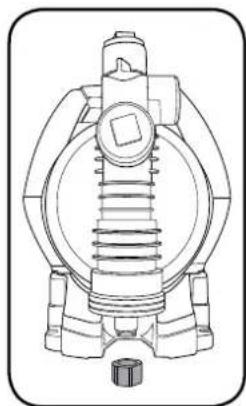
- Completely empty the pump by unscrewing the water drain plug.
- Dismantle the suction and pressure lines from the device.
- Store device in a frost-free room (at least 5 °C).
natural_image
Technical line drawing of a mechanical pump or valve assembly (no text or symbols)TROUBLESHOOTING
| Problem LED Display Possible Cause Solution | |||
| The pump operates but water is not flowing | Yellow, green and red LEDs are on | There is air in the pump head | Disconnect from power supply, open the priming screw and fill the pump head with water |
| Verify the joints are sealed tightly with Teflon tape | |||
| The suction pipe is blocked | Disconnect from power supply, clean the suction pipe | ||
| The pump is not primed | Following instructions “Priming The Pump” | ||
| The in-line filter is blocked | Clean the filter | ||
| The inlet and outlet are not connected with the pipe or hose correctly | Connect the inlet and outlet with pipe or hose correctly, ensure there is no leakage. Use Teflon tape on all connections. | ||
| No water flow from supply | Check if the supply source has sufficient water | ||
| The pump won’t start | No LEDs on | Power not switched on | If the yellow light doesn’t illuminate, check the mains supply |
| Yellow LED on | On button has not been pressed | Once connected with the mains power, the yellow light will illuminate. When this occurs, press the On button. | |
| Pumps stops | No LEDs on | The mains power is disconnected | Check the mains power |
| Power failure | When power is restored, the yellow light will illuminate, press the On button | ||
| Yellow and red LEDs are on | There is air in the pump head | Disconnect from power supply, open the priming screw and fill the pump head with water | |
| Verify all joints are sealed tightly with Teflon tape | |||
| The suction pipe is blocked | Disconnect from power supply, clean the suction pipe | ||
| The pump is not primed | Follow instructions “Priming The Pump” | ||
| The external in-line filter is blocked | Clean the external filter | ||
| The inlet and outlet are not connected with the pipe or hose correctly | Connect the inlet and outlet with pipe or hose correctly, ensure there is no leakage. Use Teflon tape on all connections | ||
| No water flow from supply | Check if the tank has plenty of water | ||
| Yellow LED flashing | System has reached cut off pressure of 3.8 bar | This is normal operation. The pump will start automatically once the outlet system pressure is below 1.5 bar. Open outlet. | |
| Pump cannot be started by pressing On button | Yellow LED on and red LED flashing | Pump has gone to self protection mode due to frequent on/off cycle | Check if there are any leaks in the outlet system. Fix any leaks found. Ensure Teflon tape is used on all connections. Pump must be disconnected from mains power to reset. |
DESCRIPTION OF SYMBOLS
| V | Volts | Hz | Hertz |
| ~ | Alternating current | W | Watts |
| /min | Revolutions orreciprocation per minute | No | No load speed |
| Hp | Horse power | °C | Degrees Celsius |
| p/hr | Per hour | kPa | Pressure rating (kilopascals) |
| bar | Pressure rating | L | Litres |
| PVC | Polyvinyl chloride | ||
 | Regulator compliance mark | IPX4 | Ingress protection from water |
 | Warning | Read instruction manual |
CARING FOR THE ENVIRONMENT

Power tools that are no longer usable should not be disposed of with household waste but in an environmentally friendly way. Please recycle where facilities exist. Check with your local council authority for recycling advice.

Recycling packaging reduces the need for landfill and raw materials. Reuse of recycled material decreases pollution in the environment. Please recycle packaging where facilities exist. Check with your local council authority for recycling advice.
SPARE PARTS
Spare parts can be ordered from the Special Orders Desk at your local Bunnings Warehouse.
For further information, or any parts not listed here, visit www.ozito.com.au or contact Ozito Customer Service:
Australia 1800 069 486
New Zealand 0508 069 486
E-mail: enquires@ozito.com.au

ELECTRICAL SAFETY

WARNING! When using mains-powered tools, basic safety precautions, including the following, should always be followed to reduce risk of fire, electric shock, personal injury and material damage.
Read and understand the manual prior to operating this pump.
Save these instructions and other documents supplied with this pump for future reference.
The electric motor has been designed for 230V and 240V only. Always check that the power supply corresponds to the voltage on the rating plate.
Note: The supply of 230V and 240V on Ozito pumps are interchangeable for Australia and New Zealand. This pump is earthed in accordance with AS/NZS 60335-2-41.
Note: The power outlet used for the water pump must be protected by a 30mA residual
current device or earth leakage circuit breaker. If the power outlet is external, ensure that
it is weather proof. If the supply cord is damaged, it must be replaced by an electrician or a power tool repairer to avoid a hazard. The water pump has a built-in thermal protection overload switch. The water pump stops if an overload occurs. The motor restarts automatically after it has cooled down.
Using an Extension Lead
Always use an approved extension lead suitable for the power input of this product. Before use, inspect the extension lead for signs of damage, wear and ageing. Replace the extension lead if damaged or defective. Then using an extension lead on a reel, always unwind the lead completely. Use of an extension lead not suitable for the power input of this product or which is damaged or defective may result in a risk of fire and electric shock.

GENERAL POWER TOOL SAFETY WARNINGS

WARNING! Read all safety warnings and all instructions. Failure to follow the warnings and instructions may result in electric shock, fire and/or serious injury.
Save all warnings and instructions for future reference. The term "power tool" in the warnings refers to your mains-operated (corded) power tool or battery-operated (cordless) power tool.
- Work area safety
a. Keep work area clean and well lit. Cluttered or dark areas invite accidents.
b. Do not operate power tools in explosive atmospheres, such as in the presence of flammable liquids, gases or dust. Power tools create sparks which may ignite the dust or fumes.
c. Keep children and bystanders away while operating a power tool. Distractions can cause you to lose control.
- Electrical safety
a. Power tool plugs must match the outlet. Never modify the plug in any way. Do not use any adapter plugs with earthed (grounded) power tools. Unmodified plugs and matching outlets will reduce risk of electric shock.
b. Avoid body contact with earthed or grounded surfaces, such as pipes, radiators, ranges and refrigerators. There is an increased risk of electric shock if your body is earthed or grounded.
c. Do not expose power tools to rain or wet conditions. Water entering a power tool will increase the risk of electric shock.
d. Do not abuse the cord. Never use the cord for carrying, pulling or unplugging the power tool. Keep cord away from heat, oil, sharp edges or moving parts. Damaged or entangled cords increase the risk of electric shock.
e. When operating a power tool outdoors, use an extension cord suitable for outdoor use. Use of a cord suitable for outdoor use reduces the risk of electric shock.
f. If operating a power tool in a damp location is unavoidable, use a residual current device (RCD) protected supply. Use of an RCD reduces the risk of electric shock.
- Personal safety
a. Stay alert, watch what you are doing and use common sense when operating a power tool. Do not use a power tool while you are tired or under the influence of drugs, alcohol or medication. A moment of inattention while operating power tools may result in serious personal injury.
b. Use personal protective equipment. Always wear eye protection. Protective equipment such as dust mask, non-skid safety shoes, hard hat, or hearing protection used for appropriate conditions will reduce personal injuries.
c. Prevent unintentional starting. Ensure the switch is in the off-position before connecting to power source and/or battery pack, picking up or carrying the tool. Carrying power tools with your finger on the switch or energising power tools that have the switch on invites accidents.
d. Remove any adjusting key or wrench before turning the power tool on. A wrench or a key left attached to a rotating part of the power tool may result in personal injury.
e. Do not overreach. Keep proper footing and balance at all times. This enables better control of the power tool in unexpected situations.
f. Dress properly. Do not wear loose clothing or jewellery. Keep your hair, clothing and gloves away from moving parts. Loose clothes, jewellery or long hair can be caught in moving parts.
g. If devices are provided for the connection of dust extraction and collection facilities, ensure these are connected and properly used. Use of dust collection can reduce dust-related hazards.
- Power tool use and care
a. Do not force the power tool. Use the correct power tool for your application. The correct power tool will do the job better and safer at the rate for which it was designed.
b. Do not use the power tool if the switch does not turn it on and off. Any power tool that cannot be controlled with the switch is dangerous and must be repaired.
c. Disconnect the plug from the power source and/or the battery pack from the power tool before making any adjustments, changing accessories, or storing power tools. Such preventive safety measures reduce the risk of starting the power tool accidentally.
d. Store idle power tools out of the reach of children and do not allow persons unfamiliar with the power tool or these instructions to operate the power tool. Power tools are dangerous in the hands of untrained users.
e. Maintain power tools. Check for misalignment or binding of moving parts, breakage of parts and any other condition that may affect the power tool's operation. If damaged, have the power tool repaired before use. Many accidents are caused by poorly maintained power tools.
f. Keep cutting tools sharp and clean. Properly maintained cutting tools with sharp cutting edges are less likely to bind and are easier to control.
g. Use the power tool, accessories and tool bits etc. In accordance with these instructions, taking into account the working conditions and the work to be performed. Use of the power tool for operations different from those intended could result in a hazardous situation.
- Service
a. Have your power tool serviced by a qualified repair person using only identical replacement parts. This will ensure that the safety of the power tool is maintained.
b. If the supply cord is damaged, it must be replaced by the manufacturer, its service agent or similarly qualified persons in order to avoid a hazard.

PRESSURE PUMP SAFETY WARNINGS

WARNING! This product is intended for pumping water in a Home Domestic application. Do not use it for corrosive, abrasive, explosive or dangerous liquids.
Fluids other than water will damage the water pump and/or create a fire hazard. Failure to follow all instructions listed below may result in electric shock, fire and/or serious injury.

WARNING! This product is not suitable for use with drinking (potable) water.
This appliance is not intended for use by person (including children) with reduced physical, sensory or mental capabilities, or lack of experience and knowledge, unless they have been given supervision or instruction concerning use of the appliance by a person responsible for their safety.
Children should be supervised to ensure that they do not play with the appliance.
- Ensure the water pump is disconnected from mains power when installing.
- Do not install or operate the water pump in an explosive environment or near flammable material.
• Do not operate the water pump without liquid.
• Do not run the water pump dry.
WARNING! The water pump together with associated pipework operate under pressure. Do not disconnect water pump or pipework until internal pressure has been released. Failure to do this could result in personal injury and damage to property.
- Avoid inserting hands into the inlets/outlets of the water pump while it is connected to power.
• Before using the water pump, always inspect it visually. Do not use the pump if it is cracked and/or damaged. If the water pump is damaged, contact Ozito customer service. - The water pump has a built-in thermal protection overload switch. The water pump stops if an overload occurs. The motor restarts automatically after it has cooled down.
• The pump must not be used when people are in the water. - Never work or perform maintenance on the pump without first making sure it has been disconnected from the mains power.
• Pollution of the liquid could occur due to leakage of lubricants
IMPORTANT:
- Avoid inserting hands into the mouth of the pump if it is connected to the mains.
- The electrical connection must always be made in a dry area. Make sure that electrical connections are protected from inundations.
- Protect the plug and the power cable from heat, oil or sharp edges.
• If damaged, The power cable must be replaced by a qualified electrician. - When operating in swimming pools, garden ponds and similar places, the device must be provided with a residual current of not more than 30 mA by means of a residual-current-operated protective device.

CONSTANT PRESSURE PUMP
800W
INSTRUCTION MANUAL
SPECIFICATIONS
Motor: 800W
Max. Flow Rate: 3,200 l/h
Max. Lift: 8m
Max. Head: 38m
Inlet & Outlet: 25.4mm (1"BSP) Female
Max. Delivery Pressure: 3.8 bar
Water Temp.: 1°C to 35°C
IP Rating: IPX4
Weight: 8.4kg
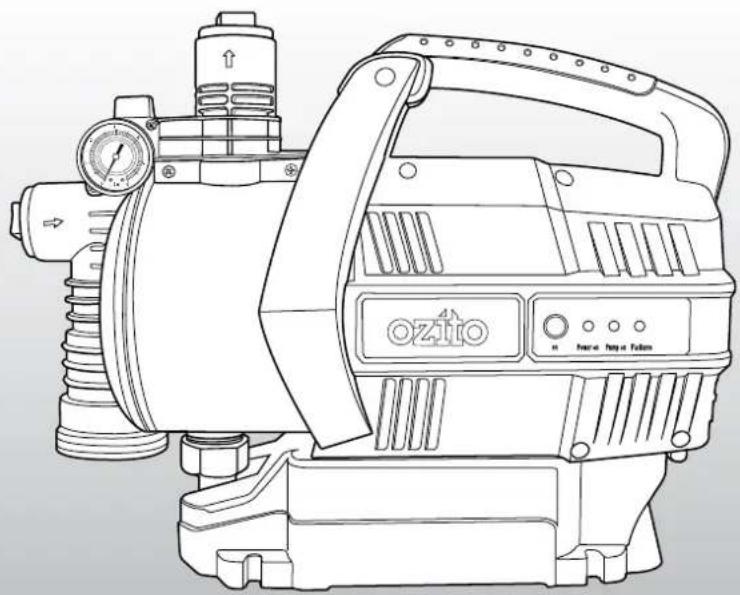
natural_image
Line drawing of a mechanical pump or motor assembly with no visible text or symbolsWHAT'S IN THE BOX
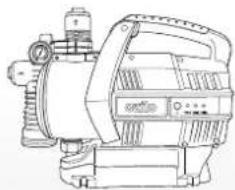
natural_image
Technical line drawing of a mechanical pump or motor assembly (no text or symbols)Constant Pressure Pump
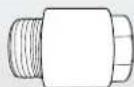
Non-Return Valve
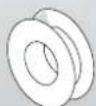
Teflon Tape
ozito.com.au
3
YEAR REPLACEMENT WARRANTY
CPP-802
WARRANTY
IN ORDER TO MAKE A CLAIM UNDER THIS WARRANTY YOU MUST RETURN THE PRODUCT TO YOUR NEAREST BUNNINGS WAREHOUSE WITH YOUR BUNNINGS REGISTER RECEIPT. PRIOR TO RETURNING YOUR PRODUCT FOR WARRANTY PLEASE TELEPHONE OUR CUSTOMER SERVICE HELPLINE:
Australia 1800 069 486
New Zealand 0508 069 486
TO ENSURE A SPEEDY RESPONSE PLEASE HAVE THE MODEL NUMBER AND DATE OF PURCHASE AVAILABLE. A CUSTOMER SERVICE REPRESENTATIVE WILL TAKE YOUR CALL AND ANSWER ANY QUESTIONS YOU MAY HAVE RELATING TO THE WARRANTY POLICY OR PROCEDURE.
The benefits provided under this warranty are in addition to other rights and remedies which are available to you at law.
Our goods come with guarantees that cannot be excluded at law. You are entitled to a replacement or refund for a major failure and for compensation for any other reasonably foreseeable loss or damage. You are also entitled to have the goods repaired or replaced if the goods fail to be of acceptable quality and the failure does not amount to a major failure.
Generally you will be responsible for all costs associated with a claim under this warranty, however, where you have suffered any additional direct loss as a result of a defective product you may be able to claim such expenses by contacting our customer service helpline above.
3 YEAR REPLACEMENT WARRANTY
Your product is guaranteed for a period of 36 months from the original date of purchase. If a product is defective it will be replaced in accordance with the terms of this warranty. Warranty excludes consumable parts, for example: O-rings, bearing, seals gaskets.
WARNING
The following actions will result in the warranty being void.
- If the tool has been operated on a supply voltage other than that specified on the tool.
- If the tool shows signs of damage or defects caused by or resulting from abuse, accidents or alterations.
- Failure to perform maintenance as set out within the instruction manual.
- If the tool is disassembled or tampered with in any way.
• Professional, industrial or high frequency use.
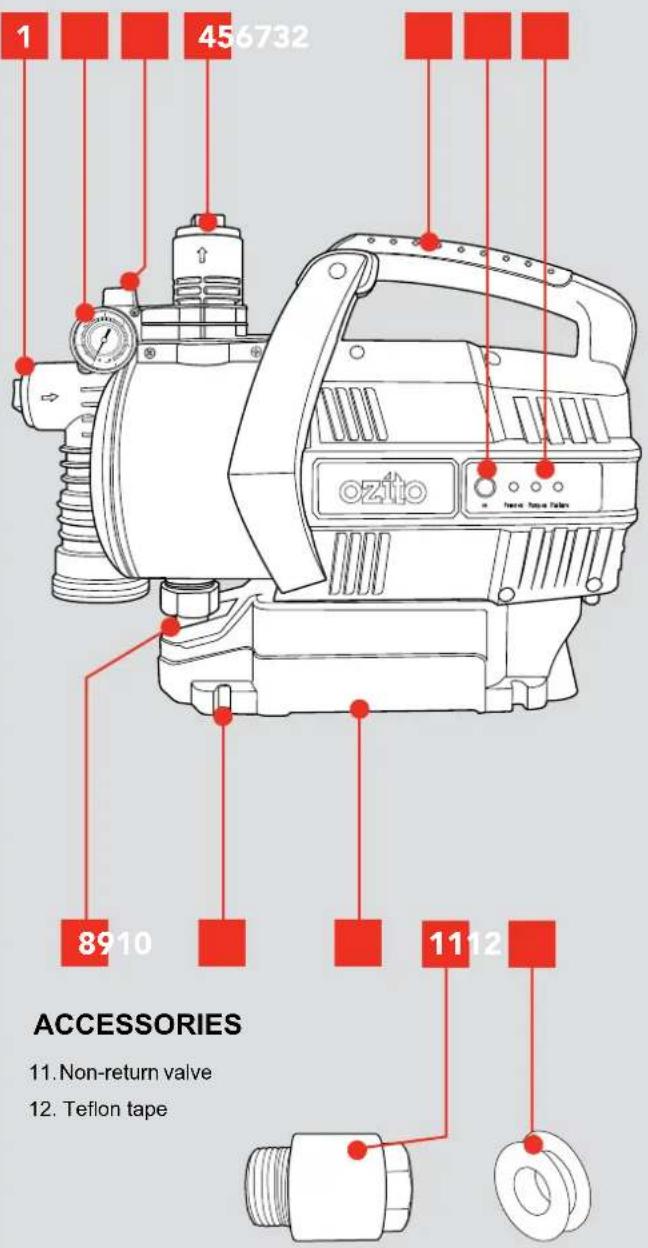
KNOW YOUR PRODUCT
CONSTANT PRESSURE PUMP
-
Suction inlet
-
On button
-
Pressure gauge
-
Indicator lights
-
Priming plug
-
Water drain plug
-
Discharge outlet
-
Mounting recesses
-
Carry handle
-
Base
ONLINE MANUAL
Scan this QR Code with your mobile device to take you to the online manual.

SETUP & PREPARATION
1. SETTING UP

WARNING: ENSURE THE PUMP IS DISCONNECTED FROM THE POWER SUPPLY BEFORE PERFORMING OF THE FOLLOWING OPERATIONS.
This constant pressure pump is designed for pumping clean water in the house and garden. It is ideal for providing domestic water supply to laundries, toilets and outdoor taps, combined with a trigger nozzle and hose for garden watering and washing cars.
Your pump requires no assembly before use other than the connection of suitable inlet/outlet hose or pipe adaptors (not included).
Positioning the pump
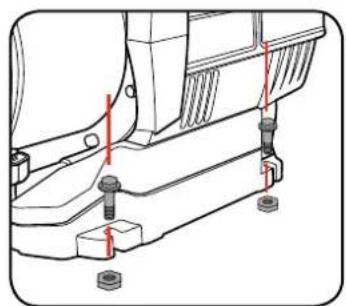
The device must be placed on a horizontal, level surface that is sufficiently capable of supporting the total weight of the device when filled with water.
Four mounting recesses allow for fixing the base to the mounting surface (bolts not supplied).
natural_image
Technical line drawing of a vehicle chassis with mounting hardware and red annotations indicating points of interest (no text or symbols present)Note: The installation site must be well ventilated and protected from the effects of weather.
Note: When operating indoors you must ensure that there is a drain in the floor or a mechanism to prevent leakage.
2. SUCTION INLET 3. DISCHARGE OUTLE
Connecting to the suction inlet
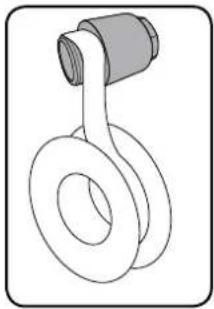
- Teflon tape is required on threads to ensure a water tight seal and prevent any leakage. Wind Teflon clockwise on fittings.
natural_image
Line drawing of a mechanical component with a coiled spring and cylindrical shaft (no text or symbols)-
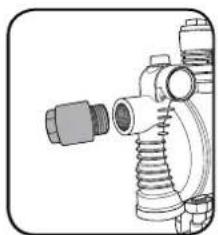
Remove the plastic protection cover from the suction inlet.
-
Insert non-return valve. Tighten firmly with a spanner (not included).
natural_image
Technical line drawing of a mechanical coupling or connector assembly (no text or symbols)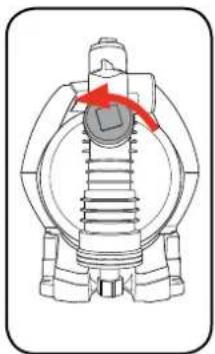
natural_image
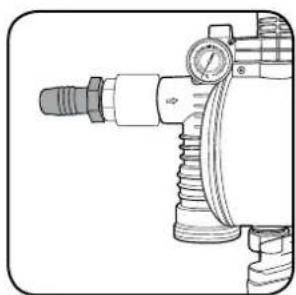
Mechanical component diagram showing a piston and crankshaft mechanism with red arrows indicating rotation (no text or labels)- Insert a 1" male threaded hose adaptor (not included). Tighten firmly with a spanner (not included).
natural_image
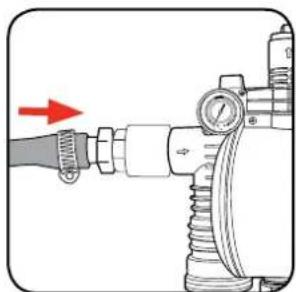
Technical line drawing of a mechanical device with no visible text or symbols- Securely attach the input hose or pipe not included) to the other end of the adaptor. Ensure you have the correct diameter hose or pipe that is compatible with your water drawing source
natural_image
Mechanical assembly diagram showing a pipe fitting with a red arrow indicating direction (no text or symbols)Note: The suction pipe should have an internal diameter of at least 25.4mm (1"); it must be kink resistant and suitable for pump use. Ensure the input hose or pipe is not restricted in any way.
Connecting to the discharge outlet
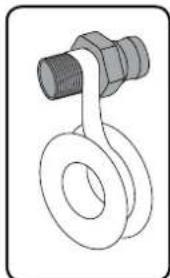
- Teflon tape is required on threads to ensure a water tight seal and prevent any leakage. Wind Teflon clockwise on fittings
natural_image
Simple line drawing of a mechanical clamp or hook with no text or symbols- Remove the plastic protection cover from the discharge outlet.
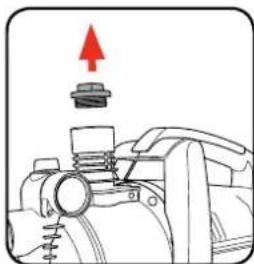
natural_image
Mechanical assembly diagram showing a valve with a red upward arrow indicating motion (no text or symbols)- Insert a 1" male threaded hose adaptor (not included).
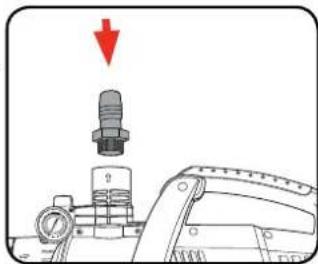
natural_image
Mechanical assembly diagram showing a valve component with a red downward arrow indicating motion (no text or symbols present)- Securely attach the output hose or pipe (not included) to the other end of the adaptor. Ensure you have the correct diameter hose or pipe that is compatible with your water discharge application.
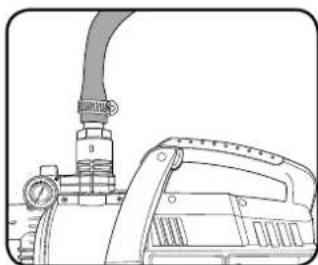
natural_image
Technical line drawing of a mechanical device with a pipe and lever (no text or symbols)Note: The discharge hose or pipe you are using must have a minimum diameter of 19mm (3/4").
Note: Ensure the discharge hose or pipe is not restricted in any way and nothing is obstructing the hose or pipe when the pump is in operation.
WARNING! RISK OF INJURY! IF THE COMPONENTS ARE NOT COMPRESSION-PROOF OR IF THEY ARE IMPROPERLY INSTALLED, THE PRESSURE LINE COULD BURST DURING OPERATION.
CAUTION. THE PUMP SHOULD BE FILLED WITH WATER AFTER EACH NEW CONNECTION OR IF WATER LOSS OR AIR INTAKE HAS OCCURRED. EXTENDED OPERATION WITHOUT A WATER REFILL WILL DAMAGE THE PUMP!
Priming the pump is required to purge air from the hose. Don't operate the pump without it being primed.
- Ensure the pump is switched off at the mains power.
- Remove the priming plug from the top of the pump housing by turning the screw anti clockwise.
- Fill the pump completely with water. Ensure the pump and inlet pipe or hose are full. Replace the priming plug.
- Fully open any (shut-off mechanisms, spray nozzles, valves, etc. in the pressure line) so that the air can escape without obstruction.
- Switch the device on at the mains plug. Press the "On" button.
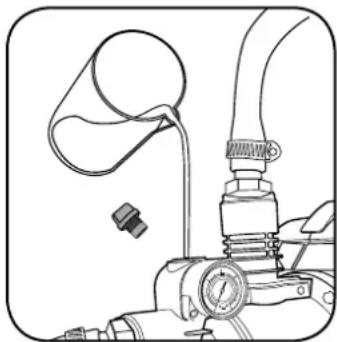
natural_image
Technical line drawing of a mechanical device with hoses and a valve (no text or symbols)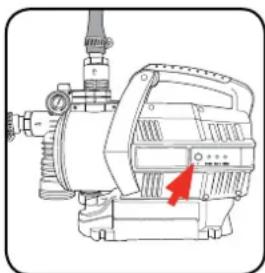
natural_image
Technical line drawing of a mechanical pump or motor assembly (no text or symbols)Note: When the pump is fully primed and air is flushed out of the suction cycle, the pump is ready to operate. The pump may take several minutes to fully prime air from the suction line and inside the pump.
6. When water runs out evenly, close any shut-off mechanisms, spray nozzles etc. in the pressure line. The pump will now pressurize and be ready for use.
WARNING! THIS PRODUCT IS INTENDED FOR PUMPING WATER IN A HOME DOMESTIC APPLICATION. DO NOT USE IT FOR CORROSIVE, ABRASIVE, EXPLOSIVE OR DANGEROUS LIQUIDS.
WARNING!: DANGER DUE TO ELECTRIC SHOCK! DO NOT OPERATE THE DEVICE IN WET SURROUNDINGS!
5. STARTING4. PRIMING THE PUMP
Note: When the pump is fully primed and the air has been flushed out, the pump is ready to operate.

WARNING!: THIS PUMP MUST BE USED WITH A RESIDUAL CURRENT DEVICE WITH RATED DUAL CURRENT OF 30MA OR LESS.
Starting the pump
The pump and suction line must be connected and filled.
- Plug in at the mains power.
-
Press the "On" button.
-
Fully open any shut-off mechanisms (spray nozzles, valves, etc.) in the pressure line so that the air can escape without obstruction.
- Check to make sure that water is coming out.
Note: If the pressure line is closed, (such as shutting off a tap down stream) the pump will build up pressure, then switch off at the preset cut off when the pressure line is opened again, the pump will automatically restart.
If the motor does not start up or the pump does not build up any pressure or if similar faults occur, turn the device off and refer to TROUBLESHOOTING section to find a remedy.
CAUTION. THE PUMP MUST NOT BE ALLOWED TO RUN DRY. SUFFICIENT WATER MUST BE ON HAND AT ALL TIMES.
'YELLOW Power on' LED solid.
This indicates that there is power to the pump, but the pump is currently not on.
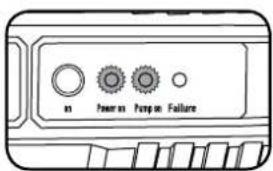
'YELLOW Power on' and 'GREEN Pump on' LEDs solid
This indicates that there is power to the pump and the pump is running.
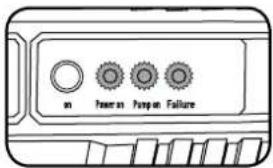
'YELLOW Power on', GREEN Pump on' and 'RED Failure' LEDs solid.
There is power to the pump, the pump motor is running but flow is stalled. The pump will continue to run for another 30 seconds to try to restore flow.
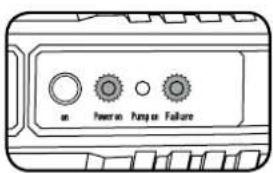
'YELLOW Power on' and 'RED Failure' LEDs solid.
After 30 seconds of no flow, the pump motor turns off. This status indicates that there has been a failure and that something needs to be changed to correct the problem. The problem could be that there is no water flow into the pump (upstream tap off) or that there is an air lock that needs to be bled out.
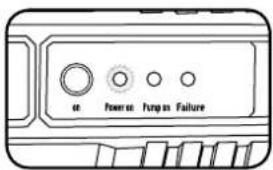
'YELLOW Power on' LED flashing
A tap downstream of the pump has been turned off increasing the water pressure to the pump's maximum. The pump motor switches off and is in a standby mode until the tap is opened again.
Pressure gauge
The constant pressure pump also features an inbuilt pressure gauge (0-6 bar).
This is useful in helping to diagnose problems such as leaks, lost pressure, bad check valve etc.
Cut off pressure is 3.8 bar and cut in pressure is \~1.5 bar.
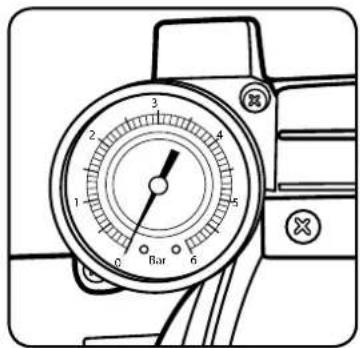
Note: The cut in or cut out pressures are factory set and cannot be adjusted.
Flow Curve
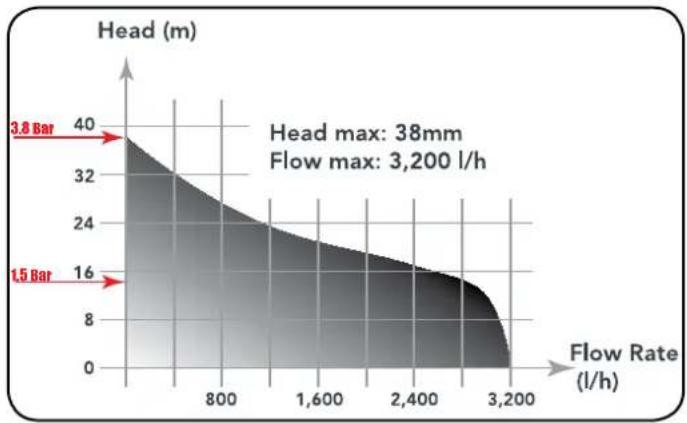
area
| Flow Rate (l/h) | Head (m) | | --------------- | -------- | | 3,8 | 40 | | 1,5 | 16 | | 3,200 | 0 |- Positioning the hose or pipe
- Recommended set-up
- MAINTENANCE
- Cleaning
- Storage
- Dismantle and store
- TROUBLESHOOTING
- DESCRIPTION OF SYMBOLS
- CARING FOR THE ENVIRONMENT
- SPARE PARTS
- ELECTRICAL SAFETY
- Using an Extension Lead
- GENERAL POWER TOOL SAFETY WARNINGS
- PRESSURE PUMP SAFETY WARNINGS
- IMPORTANT:
- CONSTANT PRESSURE PUMP
- SPECIFICATIONS
- WARRANTY
- YEAR REPLACEMENT WARRANTY
- WARNING
- KNOW YOUR PRODUCT
- SETUP & PREPARATION
- SETTING UP
- Positioning the pump
- SUCTION INLET 3. DISCHARGE OUTLE
- Connecting to the suction inlet
- Connecting to the discharge outlet
- STARTING4. PRIMING THE PUMP
- Starting the pump
- Pressure gauge
Brand : Ozito
Model : CPP-802
Category : Pump