MED-110 - Scale Steren - Free user manual and instructions
Find the device manual for free MED-110 Steren in PDF.


| Product Type | Digital Scale |
| Brand | Steren |
| Model | MED-110 |
| Dimensions (approx.) | 30 x 30 x 2.5 cm (11.8 x 11.8 x 1 in) |
| Weight | 1.5 kg (3.3 lb) |
| Power Source | 2 x AAA batteries (not included) |
| Platform Material | Tempered glass |
| Maximum Capacity | 180 kg (396 lb) |
| Graduation (Accuracy) | 0.1 kg / 0.2 lb |
| Measurement Units | kg / lb / st |
| Functions | Weight measurement, tare, auto-off, low battery indicator, overload indicator |
| Display | LCD, backlit |
| Sensor Type | High precision strain gauge |
| Start-Up | Step-on activation |
| Auto-Off | After approx. 10 seconds of inactivity |
| Usage Surface | Hard, flat, and level floor |
| Cleaning | Wipe with a soft damp cloth; do not immerse in water |
| Safety Notes | Do not exceed maximum capacity; avoid impact or dropping; not suitable for commercial use |
| Battery Replacement | Standard AAA batteries; easy access compartment |
| Included Accessories | None (batteries not included) |
Frequently Asked Questions - MED-110 Steren
User questions about MED-110 Steren
0 question about this device. Answer the ones you know or ask your own.
Ask a new question about this device
Download the instructions for your Scale in PDF format for free! Find your manual MED-110 - Steren and take your electronic device back in hand. On this page are published all the documents necessary for the use of your device. MED-110 by Steren.
USER MANUAL MED-110 Steren
natural_image
Mechanical component diagram with four mounting holes and a central housing (no text or symbols)Parte inferior
natural_image
Close-up of a mechanical component with a red arrow pointing to a small circular feature (no text or symbols visible)MANTENIMIENTO DE LA BÁSCULA
natural_image
Simple black silhouette of a human figure standing with one leg raised (no text or symbols)
natural_image
Silhouette of a human figure standing on a pedestal (no text or symbols)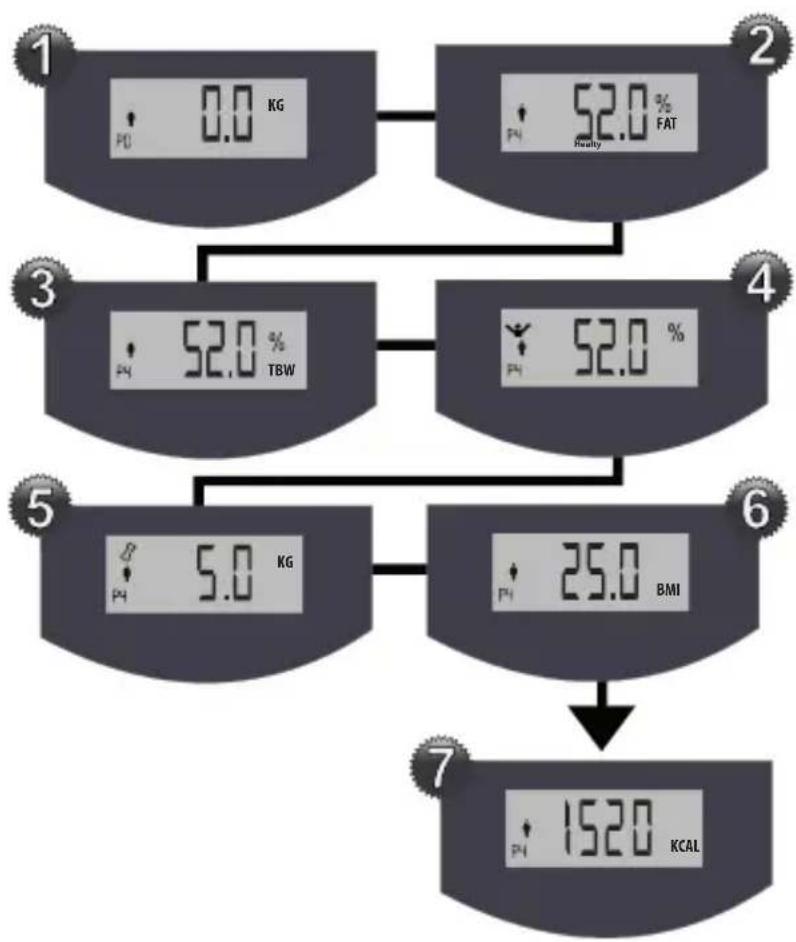
flowchart
graph TD
    A["1: 0.0 kg"] --> B["2: 52.0 % FAT"]
    A --> C["3: 52.0 % TBW"]
    B --> D["4: 52.0 %"]
    C --> E["5: 5.0 kg"]
    D --> F["6: 25.0 BMI"]
    E --> F
    F --> G["7: 152.0 KCAL"]
| Edad E | sencial Competición Excelente Bueno Promedio Pobre Obeso | ||||||
| 19-24 | <2-3% 3-6% | <9% 10-14% 15 | -19% 20-23% | >24% | |||
| 25-29 | <2-3% 3-6% | <10% 11-16% | 7-20% 21-24% | >25% | |||
| 30-34 | <2-3% 3-6% | <11% 12-17% | 18-21% 22-25% | >26% | |||
| 35-39 | <2-3% 3-6% | <12% 13-18% | 19-22% 23-26% | >27% | |||
| 40-44 | <2-3% 3-6% | <13% 14-19% | 20-23% 24-27% | >28% | |||
| 45-49 | <2-3% - | <15% 16 | -21% 22-25% | 26-28% | >29% | ||
| 50-54 | <2-3% - | <17% 18 | -23% 24-26% | 27-29% | >30% | ||
| 55-59 | <2-3% - | <19% 20 | -24% 25-28% | 29-30% | >31% | ||
| 60+ | <2-3% - | <20% | 21-25% 26-29% | 30-31% | >32% | ||

| Edad | Esencial | Competición | Excelente | Bueno | Promedio | Pobre | Obeso |
| 19-24 | <7-8% | 9-12% | <15% | 16-20% | 21-25% | 26-30% | >31% |
| 25-29 | <7-8% | 9-12% | <16% | 17-21% | 22-26% | 27-31% | >32% |
| 30-34 | <7-8% | 9-12% | <17% | 18-22% | 23-27% | 28-32% | >33% |
| 35-39 | <7-8% | 9-12% | <19% | 20-23% | 24-28% | 29-33% | >34% |
| 40-44 | <7-8% | 9-12% | <21% | 22-24% | 25-29% | 30-34% | >35% |
| 45-49 | <7-8% | - | <23% | 24-26% | 27-31% | 32-36% | >37% |
| 50-54 | <7-8% | - | <25% | 26-28% | 29-33% | 34-37% | >38% |

| 55-59 | <7-8% - <26% | 27-29% 30-34% | 35-38% | >39% | |||
| 60+ | <7-8% - <26% | 27-29% 30-34% | 35-38% | >39% |
Instruction manual
V0711b
S4-B
Body mass index scale
MED-110
Thank You
on purchasing your new Steren product.
This manual includes all the feature operations and troubleshooting necessary to install and operate your new Steren Body mass index scale. Please review this manual thoroughly to ensure proper installation and operation of this product. For support, shopping, and everything new at Steren, visit our website:
www.steren.com
INDEX
HIGHLIGHTS 4.
CONTROLS 5.
SCREEN MESSAGES 8....
INSTALLING / REPLACING BATTERIES 10.
MAINTENANCE 11.
BEFORE MEASURING WEIGHT 11.
SETTING MEASURE UNIT 12....
SETTING MEMORIES 13.
HOW TO MEASURE WEIGHT AND MASS INDEX 15.
REFERENCE TABLES 17.
SPECIFICATIONS 22.
HIGHLIGHTS
The scale has a fancy design and is very easy to use, you just need to press slightly to power it on, and after measuring will power off automatically.
The scale can measure up to 150kg.
- Index Mass measuring.
- Tempered glass.
- Digital scale.
- Big display.

CAUTION

Read this instruction manual before using the scale.
- The scale has delicate and high precision parts. Avoid extreme temperatures, humidity, direct sun light, drops or hits and dust.
- Do not place the scale in wet places. Place over solid and flat surfaces.
- Do not use the scale if you have wet feet. Place it in the middle of the scale for better stability.
- Keep the scale free of dust and strange materials.
- Indoor use only.
• People with pacemaker cannot use the scale.
• People with metallic implants may obtain inaccurate measures. - We suggest using the scale at the same time, always.
CONTROLS
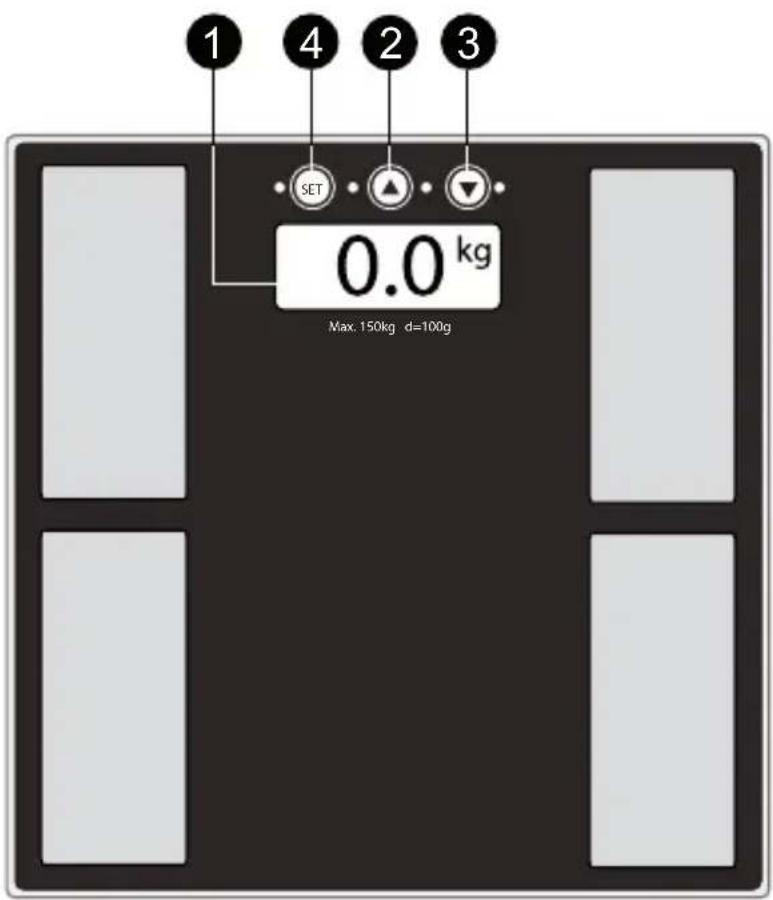
Top
1.- Screen
Display several information.
2.- Up ▲
In Measuring mode press to change measure unit. You can select from kg, lb, st:lb.
In Programming mode, can set different parameters.
3.- Down ▼
In Measuring mode press to change measure unit. You can select from kg, lb, st:lb.
In Programming mode, can set different parameters.
4.- Set
Press to enter Programming mode. Each time you press the button will change in this way:
- Program.
- Gender.
- Age.
- Height.
natural_image
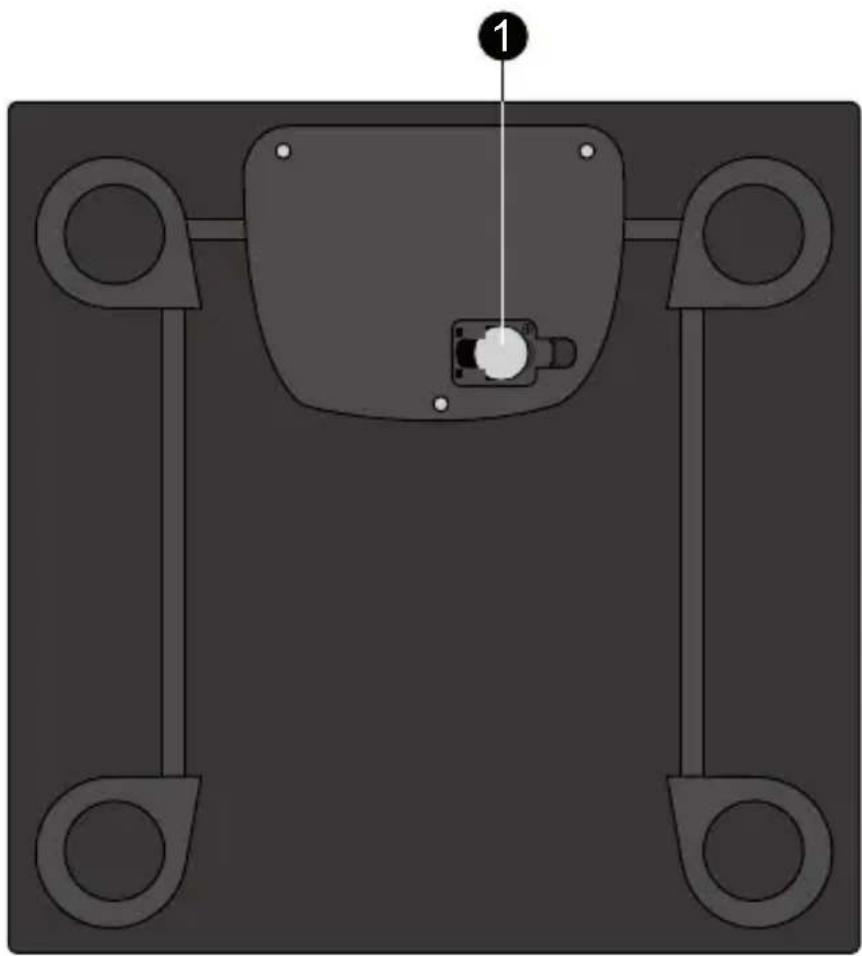
Mechanical component diagram with four mounting holes and a central housing (no text or symbols)Bottom
1.- Battery compartment
Allow you to place 1 CR2032 battery.
SCREEN MESSAGES
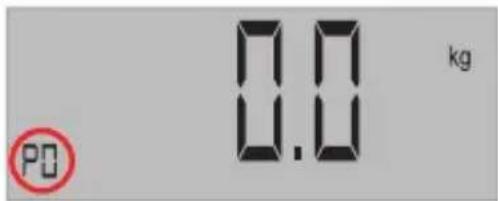
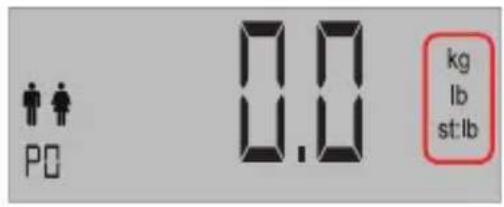
1.- Program
The scale can store up to 10 memories for 10 different users with individual information.
In programming mode allows you to select the memory to modified
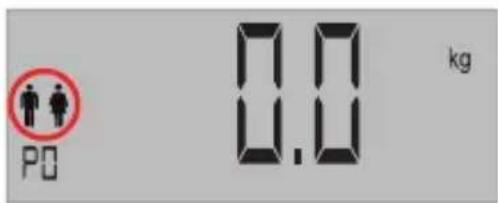
2.- Gender
In programming mode use it to select between Male or Female.
In Viewing mode, displays current gender.
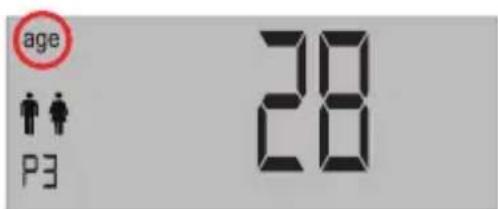
3.-Age
In programming mode use it to set the age.
In Viewing mode, displays current age.
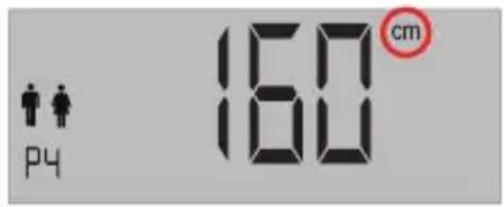
4.-Height
In programming mode use it to set the height.
In Viewing mode, displays current height.
5.- Measure unit
Displays current measure unit.
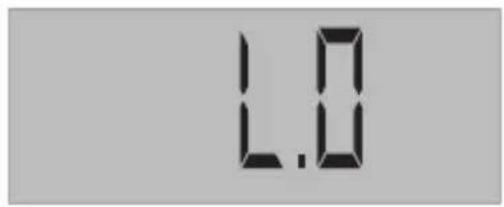
6.-LO
Low battery.
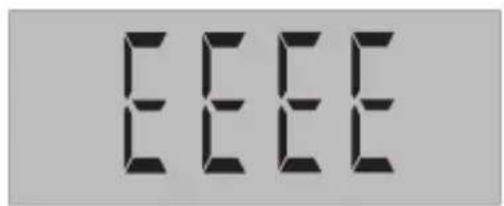
7.- EEEE
Overload error.
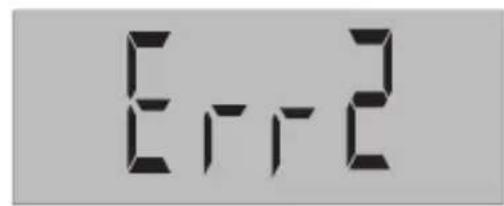
8.-Err2
Body mass index error.
INSTALLING / REPLACING BATTERIES

Caution
Place each battery with positive and negative terminals, correctly.
Replace the battery when the screen shows low battery indicator.
When the battery are empty, any message will be displayed in the screen.
Remove the battery if you don't plan to use the scale for long periods of time.
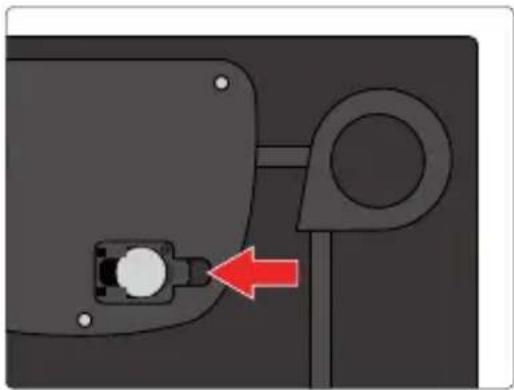
1.- Remove the battery compartment cover, push slightly up.
2.- Place one CR2032 battery with positive polarity up.
3.- Replace the battery compartment cover.
If the screen shows LO message, you must replace the batteries.
natural_image
Close-up of a mechanical component with a red arrow pointing to a small circular feature (no text or symbols visible)MAINTENANCE
Clean with a soft, dry cloth.
Do not use abrasive liquids.
Remove the battery if you don't plan to use the scale for long periods of time.
BEFORE MEASURING WEIGHT
You can store a program to get your mass index. For more information, please refer to 16.
What is Mass Index?
Underweight: Under 18.5
Normal: from 20 to 25
Overweight: 25.0 to 29.9
Obesity: 30.0 and higher
Hard obesity: Higher than 40
BMI= 703 X weight (lb) / height (inches) x height (inches)
BMI= weight (kg) / height (metres) x height (metres)
Go to page 21 to know more about Muscle fat and Body mass.
The scale can save up to 10 people data information.
SETTING MEASURE UNIT
The scale has the option to select the measure unit, use ▼ button to select from:
Kg: kilograms
Lb: pounds
Lb:st: pounds: stones
If you choose lb, the weight will be measured in pounds and the height in feet and inches.
If you choose kg, the weight will be measured in kilograms and the height in centimetres.
SETTING MEMORIES
The scale can save up to 10 different data information from 10 different people, including: age, height and gender. This allows you to get mass index.
1.- Turn the scale on.
2.- Press SET. P? icon will blinks in the screen.
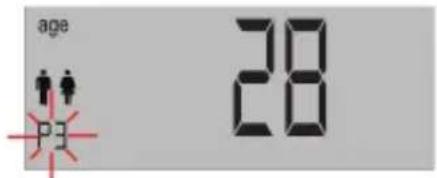
3.- Use ▲, ▼ buttons to select a memory.
4.- Press SET. Gender icon will blink.
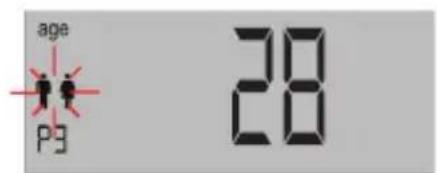
5.- Choose Male or Female, using ▲, ▼ buttons.
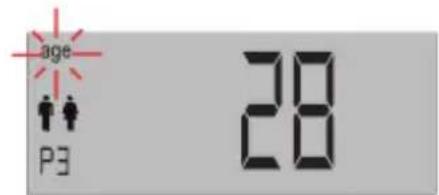
6.- Press SET, word AGE will blink.

STEREN
7.- Enter your age.
8.- Press SET, height will blink.
9.- Use ▲, ▼ to set height.
10.- Press SET to store changes.
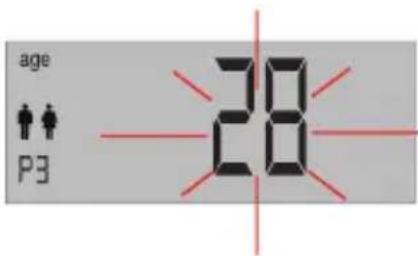
HOW TO MEASURE WEIGHT AND MASS INDEX

Note: To measure mass index it is necessary to remove your shoes.
1.- Place the scale in a flat surface.
2.- Press slightly in the middle of the scale to turn it on, the message 0.0 will be displayed.
3.- Press Set to select a memory (remember, you must entered information previously), the number of the memory will blink. Use ▲, ▼ buttons to select a memory.
4.- Press the bottom SET three times until the message 0.0 appears.
5.- Step on the scale, your weight will be measured.
6.- Keep static for 10 seconds, after the measure, your weight will blink.
7.- Keep on the scale, mass index measure will start.
8.- After measuring, the screen will show next information:
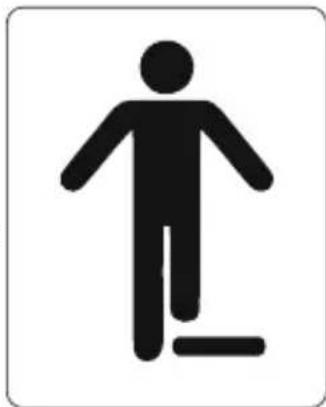
natural_image
Black silhouette of a person standing with one leg raised, indicating walking or fitness (no text or symbols)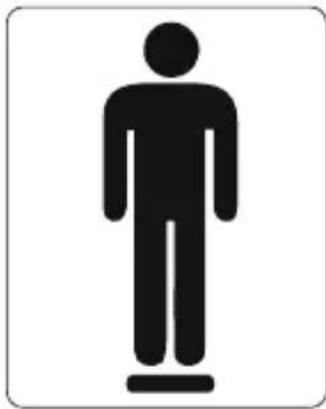
natural_image
Silhouette of a human figure standing on a platform (no text or symbols)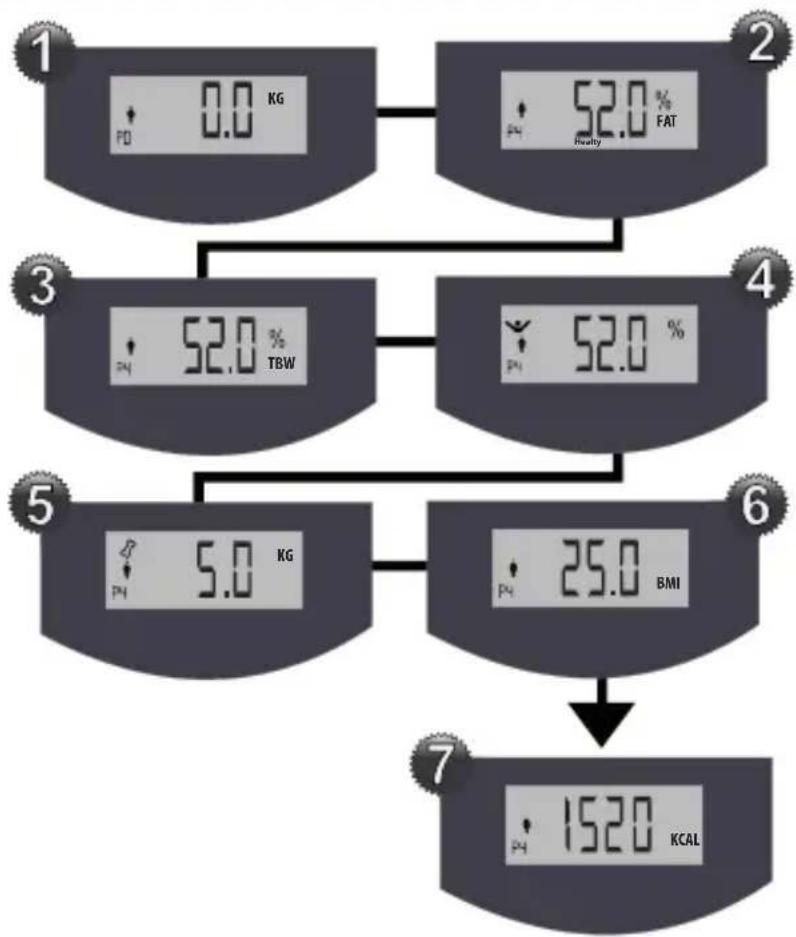
flowchart
graph TD
    A["1: PD 0.0 KG"] --> B["2: 52.0% FAT"]
    B --> C["3: 52.0% TBW"]
    C --> D["4: 52.0%"]
    D --> E["5: 5.0 KG"]
    E --> F["6: 25.0 BMI"]
    F --> G["7: 1520 KCAL"]
-If the screen shows EEEE, means an overload error.
-If the screen shows Err2, means a mass index error, it could be less than 5% or bigger than 50%.
REFERENCE TABLES
Tables and info only for reference.

Body fat percentage - Men
| Age Essential Competición Excellent Good Average Low Obese | |||||||
| 19-24 | <2-3% 3-6% | <9% 10-14% 15 | -19% 20-23% | >24% | |||
| 25-29 | <2-3% 3-6% | <10% 11-16% 17 | -20% 21-24% | >25% | |||
| 30-34 | <2-3% 3-6% | <11% 12-17% 18 | -21% | 22-25% | >26% | ||
| 35-39 | <2-3% 3-6% | <12% 13-18% | 19-22% | 23-26% | >27% | ||
| 40-44 | <2-3% 3-6% | <13% 14-19% | 20-23% | 24-27% | >28% | ||
| 45-49 | <2-3% | - | <15% | 16-21% | 22-25% | 26-28% | >29% |
| 50-54 | <2-3% | - | <17% | 18-23% | 24-26% | 27-29% | >30% |
| 55-59 | <2-3% | - | <19% | 20-24% | 25-28% | 29-30% | >31% |
| 60+ | <2-3% | - | <20% | 21-25% | 26-29% | 30-31% | >32% |

Body fat percentage - Women
| Age | Essential | Competición | Excellent | Good | Average | Low | Obese |
| 19-24 | <7-8% | 9-12% | <15% | 16-20% | 21-25% | 26-30% | >31% |
| 25-29 | <7-8% | 9-12% | <16% | 17-21% | 22-26% | 27-31% | >32% |
| 30-34 | <7-8% | 9-12% | <17% | 18-22% | 23-27% | 28-32% | >33% |
| 35-39 | <7-8% | 9-12% | <19% | 20-23% | 24-28% | 29-33% | >34% |
| 40-44 | <7-8% | 9-12% | <21% | 22-24% | 25-29% | 30-34% | >35% |
| 45-49 | <7-8% | - | <23% | 24-26% | 27-31% | 32-36% | >37% |
| 50-54 | <7-8% | - | <25% | 26-28% | 29-33% | 34-37% | >38% |
| 55-59 | <7-8% - <26% | 27-29% 30-34% | 35-38% | >39% | |||
| 60+ | <7-8% - < | 26% 27-29% | 30-34% | 35-38% | >39% |

Bone structure and height relation-Men
| Height (m) | Small bone Structure (Kg) | Medium bone Structure (Kg) | Big bone Structure (Kg) |
| 1.57 51 | -54 53-58 57-64 | ||
| 1.59 52 | -56 55-60 58-65 | ||
| 1.62 53 | -57 56-61 60-67 | ||
| 1.64 55 | -58 57-63 61-69 | ||
| 1.67 56 | -60 59-65 62-70 | ||
| 1.69 58 | -62 60-66 64-73 | ||
| 1.72 60 | -64 62-69 66-75 | ||
| 1.74 61 | -66 64-70 68-77 | ||
| 1.77 63 | -68 66-72 70-79 | ||
| 1.8 65 | -70 68-75 72-81 | ||
| 1.82 67 | -71 70-77 74-83 | ||
| 1.84 69 | -73 71-79 76-85 | ||
| 1.87 70 | -75 73-81 78-88 | ||
| 1.89 72 | -77 75-84 80-90 | ||
| 1.92 78 | -86 82-92 |

Bone structure and height relation-Women
| Height (m) | Small bone Structure (Kg) | Medium bone Structure (Kg) | Big bone Structure (Kg) |
| 1.46 41 | -44 43-48 47 | 54 | |
| 1.49 42 | -46 44-50 48 | 55 | |
| 1.52 43 | -47 46-51 49 | 56 | |
| 1.54 45 | -48 47-52 51 | 58 | |
| 1.57 46 | -50 48-54 52 | 59 | |
| 1.59 47 | -51 50-55 53 | 61 | |
| 1.62 49 | -52 51-57 55 | 62 | |
| 1.64 50 | -54 52-59 56 | 64 | |
| 1.67 51 | -55 54-61 58 | 66 | |
| 1.69 53 | -57 56-63 60 | 68 | |
| 1.72 55 | -59 58-65 62 | 70 | |
| 1.74 57 | -61 60-66 64 | 71 | |
| 1.77 59 | -63 61-68 65 | 74 | |
| 1.8 60 | -65 63-70 67 | 76 | |
| 1.82 62 | -67 65-72 69 | 78 |
B.M.R. Basal metabolism rate
| Children | ||||||
| Age Weight (kg) | Height (cm) | B.M.R. (kcal/day) | B.M.R. Multiple | Medium portion of kcal (per kg) | Medium portion of kcal (per day) | |
| 0.0 - 0.56 | 60 320 - 108 | 650 | ||||
| 0.5 - 197 | 71 500 - 98 850 | |||||
| 1 - 3 13 | 90 740 - 102 | 1300 | ||||
| 4 - 6 20 | 112 950 - 90 | 1800 | ||||
| 7 a 10 | 28 132 | 1130 | -70 2000 | |||
| Men | ||||||
| Age | Weight (kg) | Height (cm) | B.M.R. (kcal/day) | B.M.R. Multiple | Medium portion of kcal (per kg) | Medium portion of kcal (per day) |
| 11 - 14 | 45 | 157 | 1440 | 1.7 | 55 | 2500 |
| 15 - 18 66 | 176 | 1760 | 1.67 | 45 3000 | ||
| 19 - 24 72 | 177 | 1780 | 1.67 | 40 2900 | ||
| 25 - 50 79 | 176 | 1780 | 1.6 | 37 2900 | ||
| 51 + 77 | 173 | 1530 | 1.5 | 30 2300 | ||
| Women | ||||||
| Age Weight(kg) | Height(cm) | B.M.R.(kcal/day) | B.M.R.Multiple | Medium portion of kcal (per kg) | Medium portion of kcal (per day) | |
| 11 - 14 46 | 157 1310 1.67 | 47 2200 | ||||
| 15 - 18 55 | 163 1370 1.6 | 40 2200 | ||||
| 19 - 24 58 | 164 1350 1.6 | 38 2200 | ||||
| 25 - 50 63 | 163 1380 1.55 | 36 2200 | ||||
| 51 + 65 1 | 60 1280 1.5 30 | 1900 | ||||
| Pregnant women | ||||||
| Age Weight (kg) Height | (cm) | B.M.R. (kcal/day) | B.M.R. Multiple | Medium portion of kcal (per kg) | Medium portion of kcal (per day) | |
| 1o trimester -- | - | - | 0 | |||
| 2o trimester -- | - | - | 300 | |||
| 3o trimester -- | - | - | 300 | |||
| Nursing mothers | ||||||
| Age Weight(kg) | Height(cm) | B.M.R.(kcal/day) | B.M.R.Multiple | Medium portion of kcal (per kg) | Medium portion of kcal (per day) | |
| 1o trimester | -- | - | - | 500 | ||
| 2o trimester | -- | - | - | 500 | ||
Muscle fat
The human body requires certain amount of body fat for staying healthy, because this substance is important to regulate body temperature, providing energy, protect and isolate organs (as if a mattress), as well as to produce hormones (particularly in women).
To enable these functions, there are stored two different fat types in the body; one of them is called the essential, and it is stored (in small amounts) in the muscles, central nervous system (spinal cord and brain), organs and bone marrow (soft and spongy material found in the bones interior). For man, this type of lipid covers between 3% and 4% of total body weight, while in women it adds about 10% or 12%. In females, the percentage is higher because it includes the fat of the breast tissue and deposits on hips, abdomen and pelvis, where it is necessary for the functioning of the reproductive system.
On the other hand, there are also stored fat, which is where the body stores reserve energy throughout the body.
The healthy men percentage must be between 8 and 19 per cent, and women from 11% to 21% .
Body mass
It is a widely used parameter to evaluate weight loss and know if a person suffers or not obesity. However, you cannot use it as the sole indicator.
If a person has an excess of body fat and has a normal body mass index, we must be very careful, because it can be a sedentary individual who carries great risks in his body and if this happens, our ally must be physical activity to eliminate fat and increase lean mass while maintaining the weight.
On the other hand, we can have a BMI that indicates obesity, but assessing body fat, we find that the person has a normal proportion or even lower which should, as it can be the case among athletes, for example: in people with moderate levels of physical activity and balanced diet, BMI may show a value very similar to the percentage of fat in the body and this clearly indicates that both can go together, or not, depending on the levels of exercise and the diet that we carry.
By this we mean that BMI is useful, but in addition, we need to know how is our body and most importantly, the amount of fat in the body, because an excess implies serious health consequences.
Bone mass
The “bone mass” is defined as the amount of bone that a particular person has at a specific time of its life, and “peak bone mass” the maximum amount of bone that acquires an individual in his life.
SPECIFICATIONS
Input: 3V --- (CR2032)
Dimensions: 300x300x20mm

Product design and specifications are subject to change without obvious notice.
Product: Body mass index scale
Part number: MED-110
Brand: Steren
WARRANTY
This Steren product is warranted under normal usage against defects in workmanship and materials to the original purchaser for one year from the date of purchase.
CONDITIONS
1.- This warranty card with all the required information, invoice, product box or package, and product, must be presented when warranty service is required.
2.-If the product stills on the warranty time, the company will repair it free of charge.
3.- The repairing time will not exceed 30 natural days, from the day the claim was received.
4.- Steren sell parts, components, consumables and accessories to customer, as well as warranty service, at any of the addresses mentioned later.
THIS WARRANTY IS VOID IN THE NEXT CASES:
If the product has been damaged by an accident, acts of God, mishandling, leaky batteries, failure to follow enclosed instructions, improper repair by unauthorized personnel, improper safe keeping, among others.
a) The consumer can also claim the warranty service in the purchase establishment.
b) If you lose the warranty card, we can reissue it, if you show the invoice or purchase ticket.
RETAILER INFORMATION
Name of the retailer ____
Address
Product
Brand
Part number
Serial number
Date of delivery ____
In case your product fails or have questions, please contact your nearest dealer. If you are in Mexico, please give a call to our Call Center. Call Center
01 800 500 9000
www.steren.com

natural_image
Abstract blue geometric logo design with horizontal stripes (no text or symbols)STEREN
Help us to improve this instruction manual, call at:
natural_image
Illustration of a classic office telephone with keypad and ear (no text or symbols)01800 500 9000
Customer Service Center

- Parte inferior
- MANTENIMIENTO DE LA BÁSCULA
- Body mass index scale
- Thank You
- INDEX
- HIGHLIGHTS
- CAUTION
- CONTROLS
- Top
- 1.- Screen
- 2.- Up ▲
- 3.- Down ▼
- 4.- Set
- Bottom
- 1.- Battery compartment
- SCREEN MESSAGES
- 1.- Program
- 2.- Gender
- 3.-Age
- 4.-Height
- 5.- Measure unit
- 6.-LO
- 7.- EEEE
- 8.-Err2
- INSTALLING / REPLACING BATTERIES
- MAINTENANCE
- BEFORE MEASURING WEIGHT
- What is Mass Index?
- SETTING MEASURE UNIT
- SETTING MEMORIES
- STEREN
- HOW TO MEASURE WEIGHT AND MASS INDEX
- REFERENCE TABLES
- Muscle fat
- Body mass
- Bone mass
- SPECIFICATIONS
- Product: Body mass index scale
- Part number: MED-110
- Brand: Steren
- WARRANTY
- CONDITIONS
- THIS WARRANTY IS VOID IN THE NEXT CASES:
- RETAILER INFORMATION
Brand : Steren
Model : MED-110
Category : Scale