
DCM601B - Coffee maker BLACK & DECKER - Free user manual and instructions
Find the device manual for free DCM601B BLACK & DECKER in PDF.


| Product Type | Drip Coffee Maker |
| Brand | Black & Decker |
| Model | DCM601B |
| Capacity | 5 cups (25 oz / 740 ml) |
| Voltage | 120 V AC, 60 Hz |
| Power Consumption | 600 W (estimated) |
| Water Reservoir | With cup-level markings |
| Filter Type | Permanent filter (included) |
| Warming Plate | Nonstick KEEP HOT plate |
| One-Piece Cover | For water reservoir and brew basket |
| Carafe | Glass carafe with lid |
| Control Type | On/Off switch with red indicator light |
| Dishwasher Safe Parts | Filter, carafe, and carafe lid (top rack only) |
| Decalcification | Recommended every 3 months using white vinegar |
| Safety Features | Polarized plug, tamper-resistant screw, short power cord |
| Warranty | 2 years limited (US and Canada only) |
| Country of Manufacture | Mexico |
Frequently Asked Questions - DCM601B BLACK & DECKER
For mineral deposits, run a vinegar cycle: fill reservoir to 2-cup mark with white vinegar, add water to 5-cup line, brew halfway, let soak 15 minutes, then finish brewing. Rinse by brewing fresh water.
User questions about DCM601B BLACK & DECKER
0 question about this device. Answer the ones you know or ask your own.
Ask a new question about this device
Download the instructions for your Coffee maker in PDF format for free! Find your manual DCM601B - BLACK & DECKER and take your electronic device back in hand. On this page are published all the documents necessary for the use of your device. DCM601B by BLACK & DECKER.
USER MANUAL DCM601B BLACK & DECKER
natural_image
Black and white photo of a black HACK BECKER coffee maker with no visible text or symbols on the device body.
Mexico 01-800-714-2503
Modelos
When using electrical appliances, basic safety precautions should always be followed to reduce the risk of fire, electric shock, and/or injury to persons, including the following:
Read all instructions.
Do not touch hot surfaces. Use handle or knobs.
To protect against electric shock, do not place cord, plug or appliance in water or other liquids.
☐ Close supervision is necessary when any appliance is used by or near children.
☐ Unplug from outlet when not in use and before cleaning. Allow to cool before putting on or taking off parts and before cleaning the appliance.
☐ Do not operate any appliance with a damaged cord or plug or after the appliance malfunctions, or has been damaged in any manner. Return the appliance to the nearest authorized service facility for examination, repair, or adjustment. Or, call the appropriate toll-free number on the cover of this manual.
☐ The use of an accessory not evaluated for use with this appliance may cause injuries.
Do not use outdoors.
☐ Do not let cord hang over the edge of table or counter, touch with hot surfaces.
Do not place on or near a hot gas or electric burner or in a heated oven.
To disconnect, turn any control to OFF then remove plug from wall outlet.
Keep the lid on the carafe when in use.
The carafe is designed for use with the appliance. It must never be used on a range top.
Do not set a hot carafe down on a wet or cold surface.
☐ Do not use the carafe if the glass is cracked or has a loose or weakened handle.
Do not clean the carafe with abrasive cleansers, steel wool, or other abrasive material.
Do not use this appliance for anything other than intended use.
POLARIZED PLUG (120V Models Only)
This appliance has a polarized plug (one blade is wider than the other). To reduce the risk of electric shock, this plug is intended to fit into a polarized outlet only one way. If the plug does not fit fully into the outlet, reverse the plug, if it still does not fit, contact a qualified electrician. Do not attempt to modify the plug in any way.
TAMPER-RESISTANT SCREW
Warning: This appliance is equipped with a tamper-resistant screw to prevent removal of the outer cover. To reduce the risk of fire or electric shock, do not attempt to remove the outer cover. There are no user-serviceable parts inside. Repair should be done only by authorized service personnel.
ELECTRICAL CORD
a) A short power-supply cord (or detachable power-supply cord) is to be provided to reduce the risk resulting from becoming entangled in or tripping over a longer cord.
b) Longer detachable power-supply cords or extension cords are available and may be used if care is exercised in their use.
c) If a long detachable power-supply cord or extension cord is used,
1) The marked electrical rating of the detachable power-supply cord or extension cord should be at least as great as the electrical rating of the appliance,
2) If the appliance is of the grounded type, the extension cord should be a grounding-type 3-wire cord, and
3) The longer cord should be arranged so that it will not drape over the countertop or tabletop where it can be pulled on by children or tripped over.
Note: If the power supply cord is damaged, it should be replaced by qualified personnel or in Latin America by an authorized service center.
Product may vary slightly from what is illustrated.
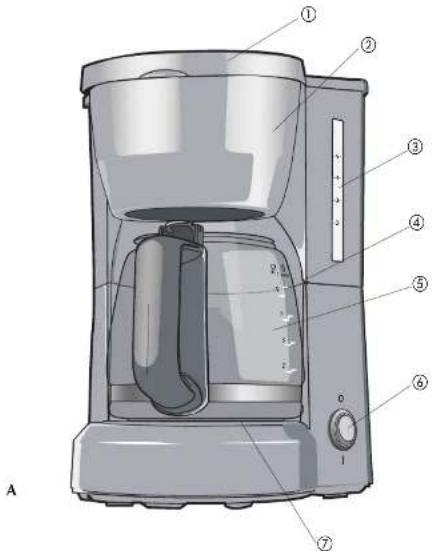
- One-piece reservoir and brew basket cover
- Brew basket with permanent filter (inside)
- Water reservoir with cup-level markings
- Water-fill and brewed coffee markings
- 5-cup/25-oz. (740 ml) carafe
- On/Off switch
- Nonstick KEEP HOT plate
How to Use
This unit is for household use only.
GETTING STARTED
- Remove all packing materials and any stickers from the product.
- Remove and save literature.
- Open one-piece cover for water reservoir and brew basket.
- Pour fresh cold water up to 5-cup level mark into the water reservoir.
- Place permanent filter into brew basket.
- Uncoil power cord and plug into standard electrical outlet.
- Brew water through appliance without adding coffee grounds. This removes any dust or residue that may remain in the system during the manufacturing process.
- Discard the water from the carafe.
- Wash all removable parts as instructed in CARE AND CLEANING section of this manual.
- Turn off the appliance; unplug it and allow appliance to cool down.
BREWING COFFEE:
- Open one-piece cover for water reservoir and permanent filter basket.
- Pour fresh cold water up to desired level mark into water reservoir.
- Insert permanent filter into brew basket.
- Add desired amount of ground coffee.
Note: Not sure how much coffee to use. Begin by using 1 level tablespoon of medium grind coffee for each cup of coffee to be brewed.
-
Close lid securely.
-
Place empty carafe on the KEEP HOT plate.
- Plug cord into standard electrical outlet.
- Press OFF/ON button; red light comes on and brewing begins.
-
Replace the carafe on the KEEP HOT plate when not serving to keep coffee hot.
-
Unplug appliance when not in use.
COFFEE BREWING TIPS
- Stir coffee in carafe before serving to evenly distribute the flavor.
- For variety add a 1-inch piece of lemon or orange peel to the coffee grounds before brewing.
- Add a 2-inch piece of vanilla bean to the sugar bowl. You'll be surprised at how good it tastes.
- Keep your coffee maker very clean, you'll be pleased with the flavor
Care and Cleaning
This appliance contains no user-serviceable parts. Refer service to qualified service personnel.
CLEANING
- Be sure the unit is unplugged and cooled.
- Open the one-piece cover, remove the permanent filter basket (lift straight up), and discard the grounds.
- Wash the filter, carafe and carafe lid in the dishwasher, top-rack only or hand-wash in warm, sudsy water.
- To clean inside of reservoir cover, open the one-piece cover allowing it to rest in the open position.
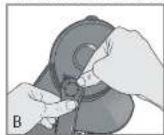
- Pull water showerhead out from under the guide, wipe surfaces with a damp cloth, then place water spreader under guide and close the cover (B).
Mineral deposits left by hard water can clog your coffeemaker. Cleaning with vinegar is recommended every 3 months.
USING VINEGAR
- Pour white vinegar into water reservoir up to 2-cup level on water window.
- Add cold water up to 5-cup line.
- Set empty carafe on the KEEP HOT plate.
- Turn on coffeemaker and let half the cleaning solution brew into carafe (until water level goes down to around "3"). Turn off coffeemaker and let it soak for at least 15 minutes to soften the deposits.
- Turn on coffeemaker and brew remaining cleaning solution into carafe.
- Turn off coffeemaker, empty carafe and wash permanent filter.
- Fill reservoir with cold water to 5-cup line, replace empty carafe, then turn on coffeemaker for a complete brew cycle to flush out remaining cleaning solution. You may have to repeat this to eliminate the vinegar smell/taste.
- Wash the brew basket, the permanent filter and carafe as instructed in CLEANING.
CLEANING TIPS
- Exercising (*staining or a prolonged breathing cycle is a sign that a clearing
NOTAS/NOTES
NOTAS/NOTES
¡NECESITA AYUDA?
For service, repair or any questions regarding your appliance, call the appropriate 800 number on the cover of this book. DO NOT return the product to the place of purchase. Also, please DO NOT mail product back to the manufacturer, nor bring it to a service center. You may also want to consult the website listed on the cover of this manual.
Two-Years Limited Warranty
(Applies only in the United States and Canada)
What does it cover?
- Any defect in material or workmanship; provided; however, Applica's liability will not exceed the purchase price of the product.
For how long?
- Two years after the date of original purchase.
What will we do to help you?
- Provide you with a reasonably similar replacement product that is either new or factory refurbished.
How do you get service?
- Save your receipt as proof of the date of sale.
- Check our on-line service site at www.prodprotect.com/applica, or call our toll-free number, 1-800-231-9786, for general warranty service.
- If you need parts or accessories, please call 1-800-738-0245.
What does your warranty not cover?
• Damage from commercial use
• Damage from misuse, abuse or neglect
• Products that have been modified in any way
- Products used or serviced outside the country of purchase
• Glass parts and other accessory items that are packed with the unit
- Shipping and handling costs associated with the replacement of the unit
- Consequential or incidental damages (Please note, however, that some states do not allow the exclusion or limitation of consequential or incidental damages, so this limitation may not apply to you.)
How does state law relate to this warranty?
- This warranty gives you specific legal rights, and you may also have other rights that vary from state to state or province to province.
Póliza de Garantía
San Jose, Costa Rica
Tel: (506) 257-5716
223-0136
Ecuador
Jesus P. Piñero #1013
Puerto Nuevo, SJ PR 00920
City Market Nivel Plaza Local
153
Diagonal Hotel Media.
Caucis
Tel (582) 324-0969
(1)
- 2017年1月1日
www.appnica-latam.com
serviclo@applicatran.com.mx
Col. Chapultepec Morales, Mexico D.F
Deleg. Miguel Hidalgo
P11570
MEXICO
The lightning symbol refers to "dangerous voltage"; the exclamation symbol refers to maintenance instructions. See below.
WARNING: To reduce the risk of fire or electric shock, do not remove the cover of the coffeemaker. There are no user-serviceable parts inside. Repair should be done by authorized service personnel only.
BLACK&DECKER. marca registrada de The Black & Decker Corporation, Towson, Maryland, E.U. Is a trademark of The Black & Decker Corporation, Towson, Maryland, USA
Copyright © 2008 Applica Consumer Products, Inc.
C.U.I.T No. 30-69729892-0
Importado por / Imported by:
APPLICA MANUFACTURING, S. DE R. L. DE C. V.
Presidente Mazarik No111, 1er Piso
Col. Chapultepec Morales, Mexico D.F
- POLARIZED PLUG (120V Models Only)
- TAMPER-RESISTANT SCREW
- ELECTRICAL CORD
- How to Use
- GETTING STARTED
- BREWING COFFEE:
- COFFEE BREWING TIPS
- Care and Cleaning
- CLEANING
- USING VINEGAR
- CLEANING TIPS
- NOTAS/NOTES
- ¡NECESITA AYUDA?
- Two-Years Limited Warranty
- (Applies only in the United States and Canada)
- What does it cover?
- For how long?
- What will we do to help you?
- How do you get service?
- What does your warranty not cover?
- How does state law relate to this warranty?
- Póliza de Garantía
- Ecuador
- (1)
Brand : BLACK & DECKER
Model : DCM601B
Category : Coffee maker