
BBOX-2 - Radio BRIGMTON - Free user manual and instructions
Find the device manual for free BBOX-2 BRIGMTON in PDF.


| Product Type | Portable Radio with Built-in Speaker |
| Model | BBOX-2 |
| Brand | Brigmton |
| Power Supply | DC 9V charging |
| Playback Modes | FM Radio, USB/TF Card, AUX |
| Recording | AUX and FM recording to USB/TF |
| Microphone Input | Yes, with separate volume control |
| Guitar Input | Yes, 6.35mm jack |
| Remote Control | Included, with numeric keys, mode, volume, etc. |
| Track Selection | Numeric keys (0-9) and 100+ button |
| Playback Modes | All, Random, One Repeat, Folder Repeat |
| Equalizer Presets | Square, Meeting, Home, Hall, Personal |
| FM Tuning | Manual or auto search |
| Charging Indicator | LED: red charging, green full |
| Microphone/Headset Indicator | Blue LED when connected |
| Dimensions | Not specified (estimate: 25 x 15 x 10 cm) |
| Weight | Not specified (estimate: 1 kg) |
Frequently Asked Questions - BBOX-2 BRIGMTON
User questions about BBOX-2 BRIGMTON
0 question about this device. Answer the ones you know or ask your own.
Ask a new question about this device
Download the instructions for your Radio in PDF format for free! Find your manual BBOX-2 - BRIGMTON and take your electronic device back in hand. On this page are published all the documents necessary for the use of your device. BBOX-2 by BRIGMTON.
USER MANUAL BBOX-2 BRIGMTON
natural_image
Close-up of a blue and black outdoor portable electronic device with speaker grille and control panel (no visible text or symbols)CONTROLES
natural_image
Blue and black portable electronic device with speaker grille and control panel (no visible text or symbols)CONTROLS
-
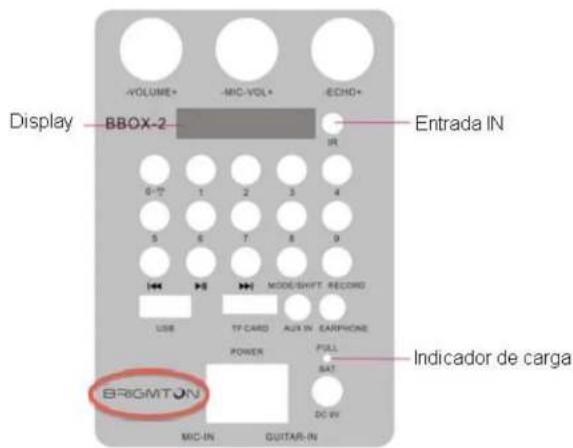
In state of FM reception, press briefly to select the previous program after a season full search was run.
-▶▶: In state reading USB / TF card, press briefly to go to the previous track. FM reception state. press briefly to select the next channel after a -
Volume of the microphone: Press the microphone volume setting.
- Microphone input: microphone input jack.
- Guitar input: Input Port electric guitar:
- Load DC 9V: 9V DC charging port.
- Power Switch: "" - ON (on); "" - OFF (off).
- Selection of track using the numeric keys, is used in the same way with the 0-9 keys on the remote control.
- Charging light / microphone: When the charger is connected, the red light comes on. When the device is fully charged, the light turns green. When a microphone or headset is connected, the light turns blue.
OPERATION
Turn on by pressing the ON / OFF button speaker.
Press the MODE button to select the desired playback mode.
RECORDING MODE
AUX recording mode:
Connect a storage device (USB / TF card) and press the MODE key to enter AUX mode.
Briefly press the Record button to start recording for a length of time depending on the storage capacity. During recording, the input signal must be of appropriate intensity to your liking.
FM recording mode:
Connect a storage device (USB / TF card) and press the MODE key to enter
REMOTE CONTROL
Power button: Press briefly to enter standby mode; briefly press again to resume. If no device is connected, the system will display "-HI-".
Buttons V + / V-: In USB / TF / FM / AUX mode, press them to increase / decrease the volume.
0-9 numerical buttons: In status read USB / TF card to play track 12, enter the numbers "1" and "2", after 2 seconds the system will go to the track 12 and start playing. No valid enter a number greater than the total number of tracks available. In FM state, to hear the 107.5MHZ channel, enter "1075".
Button environment: In status read USB / TF card, press briefly to switch between modes Square (square), Meeting (meeting), Home (home), Hall (hall) and Personal.
Button sequence: In status read USB / TF card, press briefly to switch between four modes of sequential playback (All - plays all tracks in sequence; RAND - randomly plays; ONE - repeats a track, FOL - repeats all the tracks a folder).
: In USB / TF / FM / AUX mode, press briefly to mute the device.
100+: select key number - MP3 (USB / TF card) mode, briefly press to add "100" to the current track number.
"Features can change without notice"
BRIGMTON
surfing technology
IMPORTED
FERSON ELECTRÓNICA, S.A.
CIF: A-41111881
SANTA CLARA DE CUBA 12
SEVILLA
ESPAÑA
DECLARATION OF CONFORMITY
Ferson Electrónica, S.A. declares under our responsibility that the
equipment meets the requirements indicated in the following directives:
EMC DIRECTIVES
EN 60065:2002+A1:2006+A11:2008+A2:2010+A12:2011
Description of apparatus:
BRIGMTON Model BBOX-2
Radio with built-in speaker
Brand : BRIGMTON
Model : BBOX-2
Category : Radio