
BT-126 - Radio BRIGMTON - Free user manual and instructions
Find the device manual for free BT-126 BRIGMTON in PDF.


| Product Type | Portable AM/FM Digital PLL Radio |
| Brand | Brigmton |
| Model | BT-126 |
| Frequency Bands | FM (87.5-108 MHz), AM (520-1710 kHz) |
| Tuning Method | Digital PLL with automatic and manual search |
| Memory Presets | 25 stations per band (A and B memory banks) |
| Speaker Output | Built-in speaker, approx. 1W |
| Audio Output | 3.5 mm earphone/headphone jack (jack acts as FM antenna) |
| Power Supply | DC 3V (2 x AA batteries, not included) or optional AC adapter (not specified) |
| Battery Indicator | Low battery indicator on LCD |
| Display | LCD with frequency, time, memory address, and sleep symbol |
| Clock | 12-hour display; time setting via long press of B button (when off) |
| Sleep Timer | Yes, adjustable from 10 to 90 minutes in 10-minute steps |
| Alarm (Timed Play) | Yes, programmable turn-on via long press when off |
| Controls | ON/OFF/BAND selector, UP/DOWN, VOL+/-, M=O (memory), and A/B buttons |
| Dimensions (approx.) | 130 x 75 x 35 mm (estimated based on typical portable radio) |
| Weight (approx.) | 200 g (excluding batteries) |
| Materials | Plastic casing |
| Key Features | Digital PLL tuning, automatic/manual station storage, sleep timer, clock with alarm, earphone jack |
Frequently Asked Questions - BT-126 BRIGMTON
User questions about BT-126 BRIGMTON
0 question about this device. Answer the ones you know or ask your own.
Ask a new question about this device
Download the instructions for your Radio in PDF format for free! Find your manual BT-126 - BRIGMTON and take your electronic device back in hand. On this page are published all the documents necessary for the use of your device. BT-126 by BRIGMTON.
USER MANUAL BT-126 BRIGMTON
natural_image
Abstract curved shape with smooth gradient, no text or symbols presentBRIGMTON
surfing technology

natural_image
Digital BRIGHTON radio device with digital display showing 10:43 PM (no text or symbols on device body)BÚSQUEDA MANUAL Y ALMACENAMIENTO EN MODO FM

flowchart
graph TD
    A["Control Panel"] --> B["Pulsación corta en FM"]
    B --> C["P03"]
    C --> D["P04"]
    D --> E["P05"]
    E --> F["968"]
    G["Pulsación corta en FM"] --> H["P04"]
    H --> I["P03"]
    I --> J["968"]
    J --> K["998"]
BÚSQUEDA AUTOMÁTICA Y ALMACENAMIENTO EN MODO AM
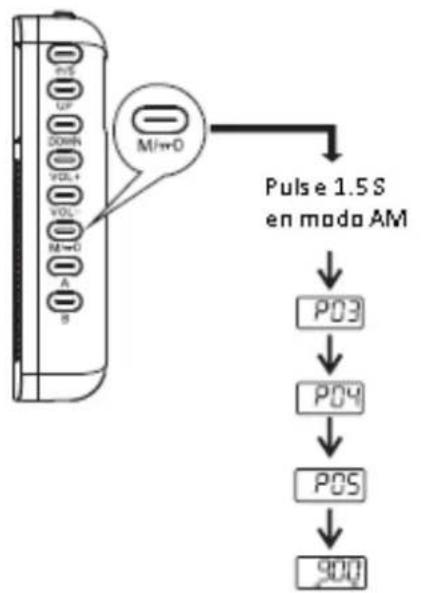
flowchart
graph TD
    A["Device with M/O ports"] --> B["Pulse 1.5 S en modo AM"]
    B --> C["P03"]
    C --> D["P04"]
    D --> E["P05"]
    E --> F["900 MHz"]
    G["Input: M/O"] --> H["Output: 900 MHz"]
BÚSQUEDA MANUAL Y ALMACENAMIENTO EN MODO AM

flowchart
graph TD
    A["Port M=O"] --> B["Pulsación corta en AM"]
    A --> C["Pulsación corta en AM"]
    B --> D["P03"]
    B --> E["P04"]
    C --> F["UP"]
    C --> G["DOWN"]
    D --> H["P04"]
    E --> I["P05"]
    F --> J["900"]
    G --> K["1602"]
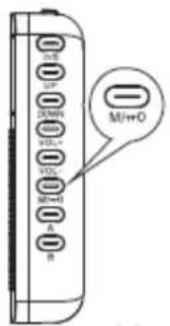
BORRADO DE EMISORAS
ADVERTENCIAS

natural_image
Abstract curved shape with smooth gradient, no text or symbols presentBRIGMTON
surfing technology

INSTRUCTION MANUAL
BT-126-B-N
AM/FM DIGITAL PLL RADIO- SPEAKER
ON/OFF-BAND SELECTOR

flowchart
graph TD
    A["Power Supply"] --> B["Short-press"]
    B --> C["Turn on"]
    B --> D["Short-press"]
    D --> E["Turn off"]
    D --> F["Short-press again"]
    F --> G["Selection FM/FM(ST)/AM band"]
    H["Load"] --> I["1/25"]
    H --> J["UP"]
    H --> K["DOWN"]
    H --> L["FOL*"]
    H --> M["VOL*"]
    H --> N["M=O"]
    H --> O["A"]
    H --> P["B"]
Note: The unit only displays time at the turn off state.
MANUAL/AUTOMATIC SELECTION STATION
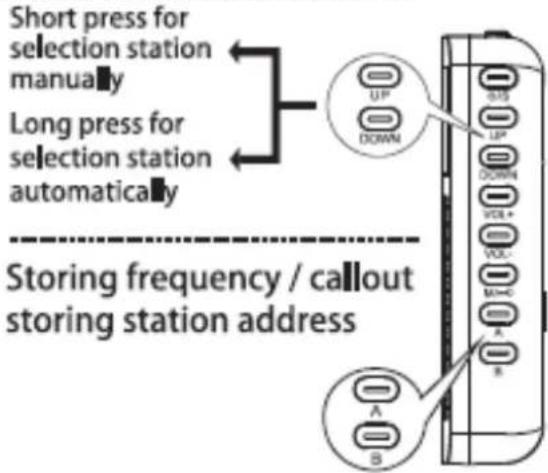
1- Long prees ☐/☐key, LCD screen shows storing address of P01 P02 and flicker 5 seconds, short press ☐/☐key to select storing address, short press ☐/☐key again store station into address.
2- At the any listening state, Short press 🔔/ 🔔 key, you can callout and listen the station of corresponding address in A or B.
AUTOMATIC SEARCH AND STORAGE FM STATION

flowchart
graph TD
    A["Device with M1=0"] --> B["Long press 1.5 S under listening FM state"]
    B --> C["P03"]
    C --> D["P04"]
    D --> E["P05"]
    E --> F["968"]
Locked / Unlock: Long press at the turn off state.
MANUAL SELECT STORED FM STATION

flowchart
graph TD
    A["Device 1"] -->|M=0| B["Short press under listening FM state"]
    A -->|M=0| C["Short press under listening FM state"]
    B --> D["P03"]
    C --> E["P04"]
    D --> F["P05"]
    E --> G["P04"]
    F --> H["P05"]
    G --> I["P04"]
    H --> J["P03"]
    I --> K["P05"]
    D --> L["P04"]
    E --> M["P04"]
    F --> N["P05"]
    G --> O["P04"]
    H --> P["P03"]
    I --> Q["P05"]
    J --> R["968"]
    K --> S["998"]
AUTOMATIC SEARCH AND STORAGE AM STATION

flowchart
graph TD
    A["M/D"] --> B["Long press 1.5 S under listening AM state"]
    B --> C["P03"]
    C --> D["P04"]
    D --> E["P05"]
    E --> F["900"]
MANUAL SELECT STORED AM STATION
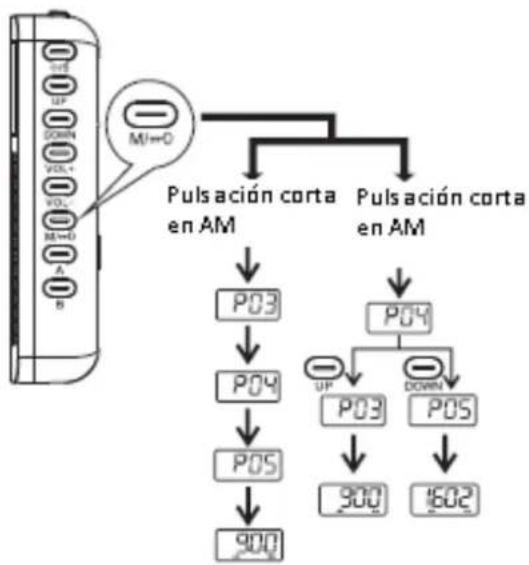
flowchart
graph TD
    A["Control Panel"] --> B["Pulsación corta en AM"]
    B --> C["P03"]
    B --> D["P04"]
    C --> E["P03"]
    C --> F["P04"]
    D --> G["P03"]
    D --> H["P04"]
    E --> I["900"]
    F --> J["900"]
    G --> K["1602"]
DELETE STORED STATION

- When turning on, short press M=0 key to callout the stored station address individually, when showing the address in display screen, long press for 3 seconds key to delete the station address, the LCD displays "---." after deleting.
ADJUST THE VOLUME

NOTE: Tips: Long press UP and VOL- key at the same time can restore to factory settings.
LISTEN TO THE RADIO BY EARPHONE

NOTE: The earphone can be used as FM antenna.
SET TIMING TURN ON
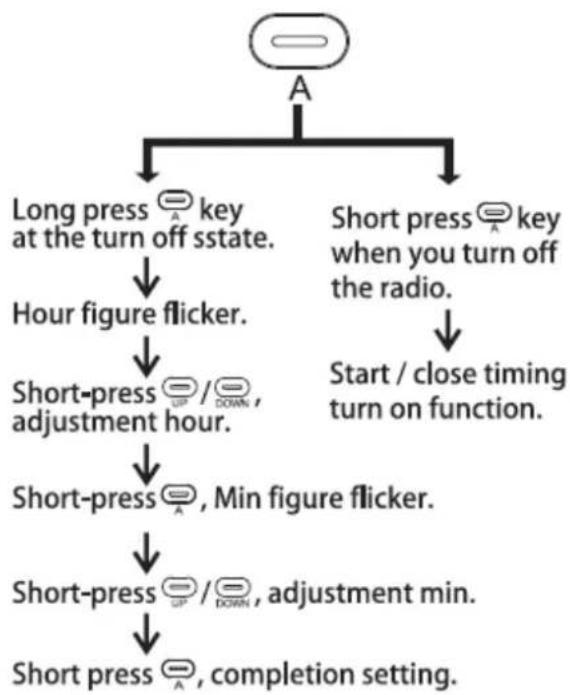
flowchart
graph TD
    A["Start"] --> B["Long press key at the turn off sstate."]
    A --> C["Short press key when you turn off the radio."]
    B --> D["Hour figure flicker."]
    C --> E["Start / close timing turn on function."]
    D --> F["Short-press UP/DOWN, adjustment hour."]
    F --> G["Short-press Min figure flicker."]
    G --> H["Short-press UP/DOWN, adjustment min."]
    H --> I["Short press completion setting."]
TIME SETTING
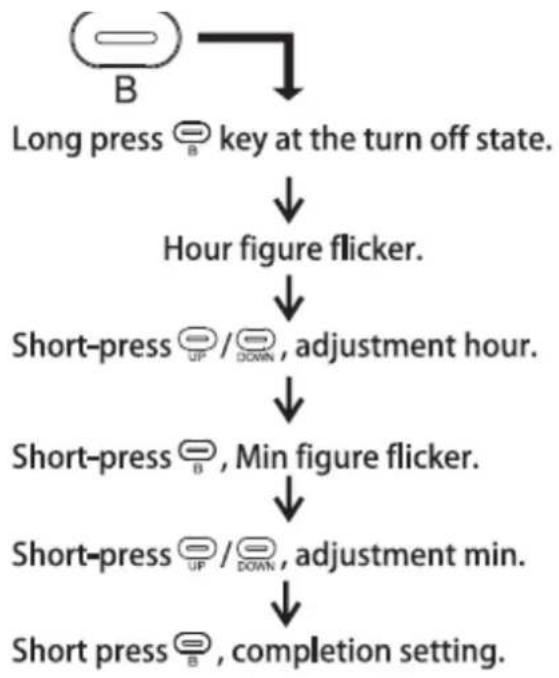
flowchart
graph TD
    A["Long press B"] --> B["key at the turn off state."]
    B --> C["Hour figure flicker."]
    C --> D["Short-press UP/DOWN, adjustment hour."]
    D --> E["Short-press B, Min figure flicker."]
    E --> F["Short-press UP/DOWN, adjustment min."]
    F --> G["Short press B, completion setting."]
SLEEP
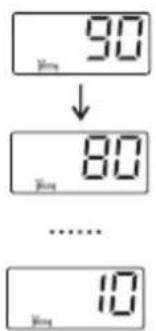
Long press key and hold on in the turn off mode, The LCD displays symbols, also cycle shows 90-80-70 ..... 10-0 ["0" means no sleep (SLEEP)], each set of numbers will show one second, and you can release key until show to your desired sleep time. and sleep time is activated and radio will be turned on at the same time, when reach to setting sleep time. the radio will auto turn off.
LOW BATTERY INDICATOR

WARNING
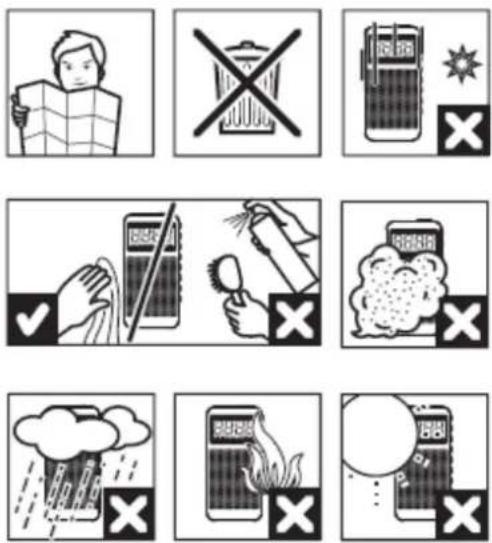
"Features can change without notice"
BRIGMTON
surfing technology
IMPORTED
FERSON ELECTRÓNICA, S.A.
CIF: A-41111881
SANTA CLARA DE CUBA 12
SEVILLA
ESPAÑA
DECLARATION OF CONFORMITY
Ferson Electrónica, S.A. declares under our responsibility that the equipment meets the requirements indicated in the following directives:
DIRECTIVAS EMC
EN55013:2001+A1:2003+A2:2006
EN55020:2007
Description of apparatus:
Model BRIGMTON BT-126
Portable radio


BRIGMTON
surfing technology


- BRIGMTON
- BÚSQUEDA MANUAL Y ALMACENAMIENTO EN MODO FM
- BÚSQUEDA AUTOMÁTICA Y ALMACENAMIENTO EN MODO AM
- BÚSQUEDA MANUAL Y ALMACENAMIENTO EN MODO AM
- BORRADO DE EMISORAS
- ADVERTENCIAS
- INSTRUCTION MANUAL
- ON/OFF-BAND SELECTOR
- MANUAL/AUTOMATIC SELECTION STATION
- AUTOMATIC SEARCH AND STORAGE FM STATION
- MANUAL SELECT STORED FM STATION
- AUTOMATIC SEARCH AND STORAGE AM STATION
- MANUAL SELECT STORED AM STATION
- DELETE STORED STATION
- ADJUST THE VOLUME
- TIME SETTING
- SLEEP
- LOW BATTERY INDICATOR
- WARNING
- DECLARATION OF CONFORMITY
Brand : BRIGMTON
Model : BT-126
Category : Radio