
BT-251 - Radio BRIGMTON - Free user manual and instructions
Find the device manual for free BT-251 BRIGMTON in PDF.


| Product Type | Portable Digital Radio |
| Brand | Brigmton |
| Model | BT-251 |
| Power Supply | AC 110-240V or 3 x R14/UM-2/C batteries (not included) |
| Radio Bands | FM |
| Clock Function | 12h/24h format, adjustable via front panel |
| Alarm Function | Yes, with snooze (9 min) and sleep timer (15-90 min) |
| Playback Sources | USB flash drive, Micro SD card (MP3 files) |
| Preset Stations | Up to 20 (manual or automatic tuning) |
| Audio Output | Built-in speaker, 3.5mm headphone jack |
| Antenna | Telescopic antenna for FM |
| Dimensions (Approx.) | 250 x 150 x 80 mm (estimated) |
| Weight (Approx.) | 0.8 kg (estimated) |
| Display | LED digital display |
| Control Buttons | ON/STANDBY, VOLUME +/-, TUNING +/-, PROGRAM, PRESET +/-, AL SET, CLOCK SET, SLEEP, SNOOZE |
| Cleaning & Maintenance | Wipe with a soft, dry cloth. Do not use solvents or water. Remove batteries if not used for long periods. |
| Safety Precautions | Use only supplied power cord. Avoid extreme temperatures and humidity. Do not attempt to repair yourself. |
| Certifications | CE compliant (EMC, LVD directives) |
Frequently Asked Questions - BT-251 BRIGMTON
User questions about BT-251 BRIGMTON
0 question about this device. Answer the ones you know or ask your own.
Ask a new question about this device
Download the instructions for your Radio in PDF format for free! Find your manual BT-251 - BRIGMTON and take your electronic device back in hand. On this page are published all the documents necessary for the use of your device. BT-251 by BRIGMTON.
USER MANUAL BT-251 BRIGMTON
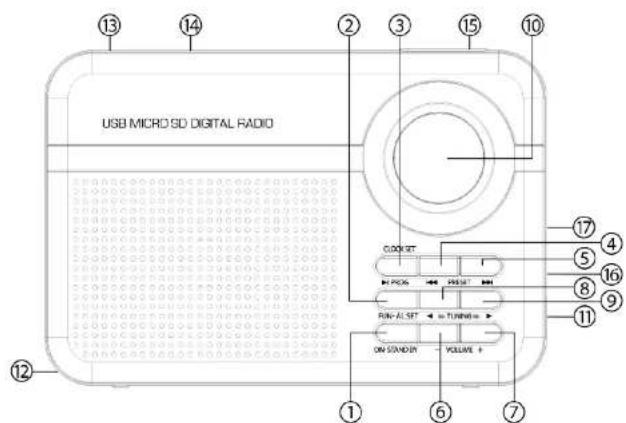
- ON / STANDBY
- FUNCTION / AL SET
- PROGRAM / CLOCK SET / USB PLAY PAUSE BUTTON
- PRESET - / USB PREVIOUS BUTTON
- PRESET + / USB NEXT BUTTON
- VOLUME -
OPERATING
Open the battery compartment and insert the batteries as indicated in the battery compartment.
AC
Plug the cord into the power outlet.
To unplug the appliance completely from the mains, unplug it from the mains.
CLOCK ADJUSTMENT
- Check that the radio is off.
- Press CLOCK SET for 3 seconds on the front panel to start clock setting.
- Press the PRESET + button to select 12 hours / 24 hours.
- Press CLOCK SET on the front panel to set the hour.
- To set the hours, press PRESET + or PRESET - while the display continues to flash.
- Press CLOCK SET on the front panel until the minute setting.
- To adjust the minutes, press PRESET + or PRESET - while the display continues to flash.
- Press CLOCK SET on the front panel to complete the clock setting.
ADJUSTING THE ALARM
- Check that the radio is off.
- Press AL SET for 3 seconds on the front panel to start alarm setup.
SNOOZE FUNCTION
- When the alarm sounds, you can press the Snooze button to temporarily turn the alarm off for 9 minutes. The radio will turn on again.
- The repeat can be repeated until the ALARM button is pressed.
SLEEP FUNCTION
- Press the SLEEP button to select a time. For example, when the LED display shows 15 minutes. The radio will automatically turn on and off after 15 minutes.
- To select a longer play time, press the SLEEP button to select 15/30/45/60/75/90 minutes.
- To turn the radio off at any time, press the ON / STAND BY button.
RADIO
- Press ON / STAND BY to turn on the radio.
- Press FUNCTION once or more to select Radio.
- The display shows the details of the radio station.
- Select your station using TUNING + or TUNING -
- Adjust the sound with VOLUME.
- To turn off the radio, press ON / STAND BY once.
TUNING
Manual tuning
Press TUNING + or TUNING - briefly. one or more times until the correct
AUTOMATIC PRESELECTION
- Press and hold PROGRAM until the display frequency starts.
MANUAL PRESET
- Select the waveband and tune to the desired station (See TUNING).
- Press PROGRAM once to enter the programming mode.
- Press PRESET + or PRESET - to select the desired memory location.
- Press PROGRAM again to confirm the selected station.
- To listen to a preset station, select the band and press PRESET + or PRESET - to select the desired station.
To improve reception: For FM, remove the telescopic antenna. To improve FM reception tilt and rotate the antenna, shorten its length if the FM signal is too strong (very close to a transmitter).
VOLUME
Adjust the sound with the VOLUME + or VOLUME -
You can connect the 3.5mm headphones to the PHONES jack. The speaker will be muted.
USB / MICRO SD CARD
Tese inputs can decide and playa MP3 files Storey en a USB device or a Micro SD card.
MICRO SD card. A blocked MICRO SD card can not be detected or played back.
PRECAUTIONS:
- For running to current, make sure the voltage is compatible. Always use the supplied power cable; Never use another power cord. For battery operation, simply insert three "R14 / UM-2 / C" batteries for unit and clock operation.
- Always unplug the power cord from the power source when not in use or when the DC power is running.
- Do not leave batteries in the compartment for a long period of time. Remove the batteries to prevent leakage and damage.
- Do not expose the unit to extreme temperatures or high humidity to ensure normal operation for a long life. For example, never place the unit in bathroom areas or around stoves and radiators.
- If you notice that the unit is malfunctioning, take it to the nearest service center. Do not attempt to repair yourself.
WARNING :
"Features can change without notice"
BRIGMTON
surfing technology
IMPORTED
FERSON ELECTRÓNICA, S.A.
CIF: A-41111881
SANTA CLARA DE CUBA 12
SEVILLA
ESPAÑA
DECLARATION OF CONFORMITY
Ferson Electrónica, S.A. declares under our responsibility that the equipment meets the requirements indicated in the following directives:
EMC DIRECTIVES
EN60065: 2002+A1:2006+A11:2008+A2:2010+A12:2011
EN55013:2013
EN6100-3-2:2006+A1:2009+A2:2009, EN61000-3-3:2013
EN55020:2007+A11:2011
EN61000-4-2 :2009, EN61000-4-3 :2006+A1:2008+A2:2010
EN61000-4-4 :2012, EN61000-405 :2006,
EN61000-4-6: 2014. EN61000-4-8 :2010. EN61000-4-11 :2004
BRIGMTON
surfing technology
Brand : BRIGMTON
Model : BT-251
Category : Radio