
SWV3534 - Câbles pour ordinateurs et périphériques PHILIPS - Free user manual and instructions
Find the device manual for free SWV3534 PHILIPS in PDF.


| Product Type | High-Speed HDMI Cable |
| Model | SWV3534 |
| Connector Type | HDMI Type A Male to Male |
| Cable Length | 1.8 m (6 ft) |
| HDMI Version | HDMI 2.0 |
| Maximum Resolution | 4K @ 60Hz (3840x2160) |
| Data Transfer Rate | 18 Gbps |
| Audio Support | Multi-channel digital audio (DTS-HD, Dolby TrueHD) |
| Shielding | Triple shielding (foil + braid) |
| Connector Plating | Gold-plated contacts |
| Conductor Material | Oxygen-free copper (OFC) |
| Outer Jacket Material | PVC |
| Compatibility | HDMI devices (TVs, monitors, projectors, computers, game consoles) |
| HDCP Support | Yes (HDCP 2.2) |
| Plug Type | Straight |
| Weight | Approximately 100 g |
| Cable Diameter | 8 mm |
| Color | Black |
| Warranty | 2 years (manufacturer) |
Frequently Asked Questions - SWV3534 PHILIPS
User questions about SWV3534 PHILIPS
0 question about this device. Answer the ones you know or ask your own.
Ask a new question about this device
Download the instructions for your Câbles pour ordinateurs et périphériques in PDF format for free! Find your manual SWV3534 - PHILIPS and take your electronic device back in hand. On this page are published all the documents necessary for the use of your device. SWV3534 by PHILIPS.
USER MANUAL SWV3534 PHILIPS
natural_image
White Philips 1900 flatbread toaster with black handle and control buttons (no visible text or symbols on device body)PHILIPS
natural_image
Diagram of a folded panel with grid patterns and directional arrows indicating movement (no text or symbols)1
ENGLISH 6
БЪЛГАРСКИ 12
ČEŠTINA 19
EESTI 25
HRVATSKI 31
MAGYAR 37
ҚАЗАҚША 43
LIETUVIŠKAI 50
LATVIEŠU 56
POLSKI 62
ROMÂNĂ 69
РУССКИЙ 75
SLOVENSKY 82
SLOVENŠČINA 88
SRPSKI 94
УКРАЇНСЬКА 100
Introduction
Congratulations on your purchase and welcome to Philips! To fully benefit from the support that Philips offers, register your product at www.philips.com/welcome.
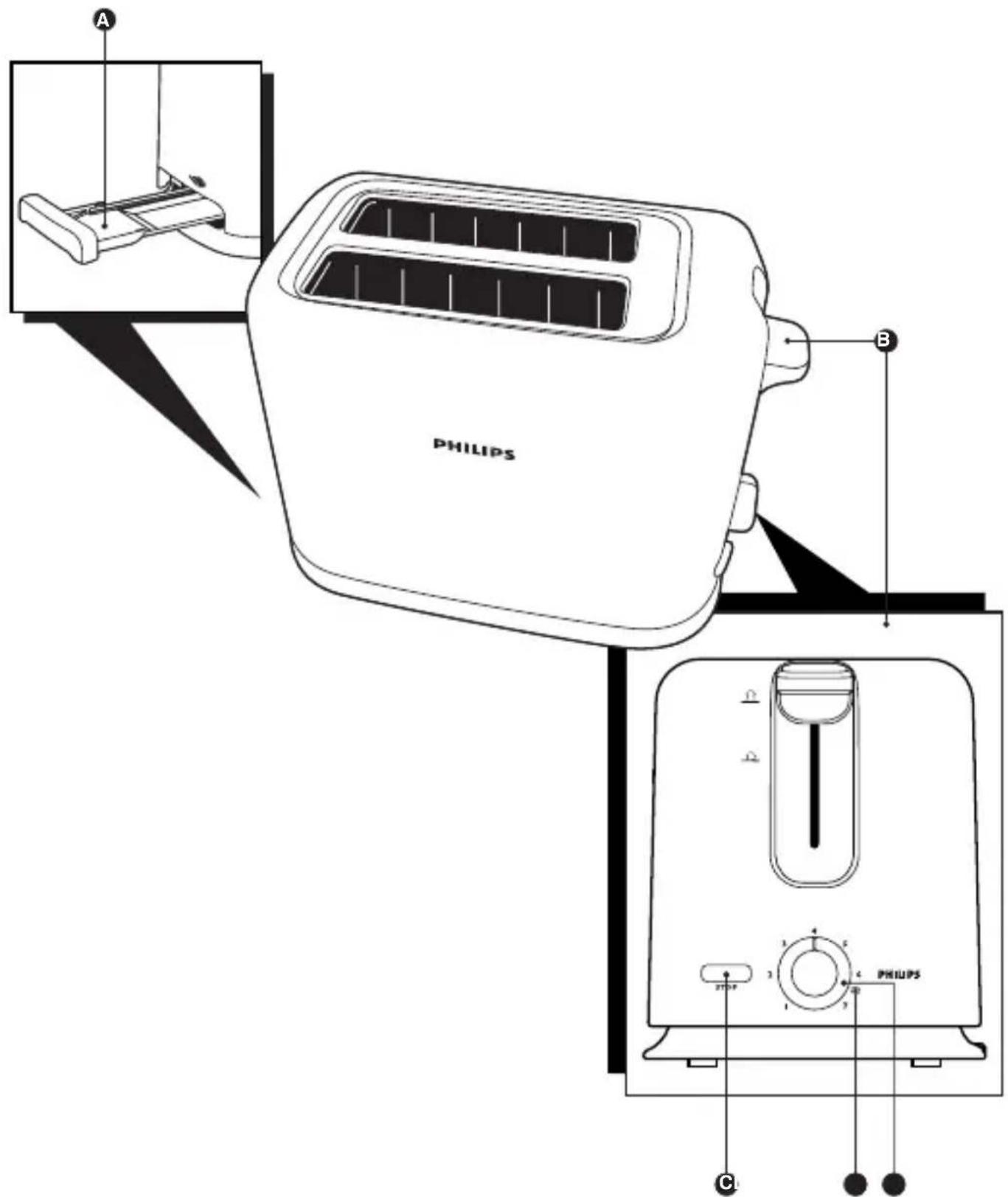
General description (Fig. 1)
A Crumb tray
B Toasting lever
© Stop button
D Defrost function
E Browning control
Important
Read this user manual carefully before you use the appliance and save it for future reference.
Danger
- Never immerse the appliance in water.
- Do not insert oversized foods and metal foil packages into the toaster, as this may cause fire or electric shock.
Warning
- Check if the voltage indicated on the bottom of the appliance corresponds to the local mains voltage before you connect the appliance.
- This appliance is not intended for use by persons (including children) with reduced physical, sensory or mental capabilities, or lack of experience and knowledge, unless they have been given supervision or instruction concerning use of the appliance by a person responsible for their safety.
- Children should be supervised to ensure that they do not play with the appliance.
- Never connect the appliance to an external timer switch in order to avoid a hazardous situation.
- Never let the appliance operate unattended.
- Do not operate the appliance under or near curtains or other flammable materials or under wall cabinets, as this may cause fire.
- Do not place the dust cover (specific types only) or any other object on top of the toaster when the appliance is switched on or when it is still hot, as this can cause damage or fire.
- To avoid the risk of fire, frequently remove crumbs from the crumb tray. Make sure the crumb tray is correctly placed.
- Immediately unplug the toaster if fire or smoke is observed.
- Keep the mains cord away from hot surfaces.
- If the mains cord is damaged, you must have it replaced by Philips, a service centre authorised by Philips or similarly qualified persons in order to avoid a hazard.
- This appliance is only intended for toasting bread. Do not put any other ingredients in the appliance, as this may lead to a hazardous situation.
Caution
- Do not let the mains cord hang over the edge of the table or worktop on which the appliance stands.
- Avoid touching the metal parts of the toaster, as they become very hot during toasting. Only touch the controls and lift the appliance by its plastic body.
- Do not place the toaster on a hot surface.
- Only connect the appliance to an earthed wall socket.
- Always unplug the appliance after use.
- The toaster is intended for household use only and may only be used indoors. It is not intended for commercial or industrial use.
- If a slice of bread gets stuck inside the toaster, unplug the appliance and let it cool down before you try to remove the bread. Do not use a knife or a sharp tool, as these may cause damage to the heating elements.
Electromagnetic fields (EMF)
This Philips appliance complies with all standards regarding electromagnetic fields (EMF). If handled properly and according to the instructions in this user manual, the appliance is safe to use based on scientific evidence available today.
ENGLISH8
Before first use
Remove any stickers and wipe the body of the toaster with a damp cloth. Before you use the appliance for the first time, we advise you to let the appliance complete a few toasting cycles without slices of bread on the highest browning setting in a properly ventilated room. This burns off any dust that may have accumulated on the heating elements and prevents unpleasant smells when toasting bread.
Using the appliance
1 Put the appliance on a stable and flat surface, away from curtains and other combustible materials. Put the plug in the wall socket.
2 To adjust the length of the cord, wind part of it round the brackets in the base of the appliance (Fig. 2).
Toasting bread
Never let the toaster operate unattended.
1 Put one or two slices of bread in the toaster (Fig. 3).
2 Select the desired browning setting. (Fig. 4)
- Select a low setting (1-2) for lightly toasted bread and a high setting (5-7) for darkly toasted bread.
- Select the defrost function ⚙ (settings 6 to 7, depending on the desired browning degree) for toasting frozen bread.
3 Push the toasting lever down to switch on the appliance. (Fig. 5)
The toasting lever will only stay down if the appliance has been connected to the mains.
Caution: The metal parts of the toaster become hot during toasting. Do not touch them.
Note: You can stop the toasting process and pop up the bread at any time by pressing the stop button on the toaster (Fig. 6).
4 To adjust the browning setting during toasting, turn the browning control.
5 When the toast is ready, it pops up and the toaster switches off.
6 Remove the toasted bread. To remove smaller items, you can move the toasting lever upwards a little further.
- If bread gets stuck inside the toaster, remove the plug from the wall socket and let the appliance cool down completely. Then carefully remove the bread from the toaster.
Caution: Do not use a knife or another sharp metal tool to remove bread from the toaster and do not touch the metal internal parts of the toaster.
Cleaning
1 Unplug the appliance and let it cool down.
2 Clean the appliance with a damp cloth.
Danger: Never immerse the appliance in water.
Caution: Never use scouring pads, abrasive cleaning agents or aggressive liquids such as petrol or acetone to clean the appliance.
3 To remove crumbs from the appliance, slide the crumb tray out of the appliance and empty it (Fig. 7).
Caution: Do not hold the appliance upside down and do not shake it to remove the crumbs.
Environment
- Do not throw away the appliance with the normal household waste at the end of its life, but hand it in at an official collection point for recycling. By doing this, you help to preserve the environment (Fig. 8).
Guarantee & service
If you need service or information or if you have a problem, please visit the Philips website at www.philips.com or contact the Philips Consumer Care Centre in your country (you find its phone number in the worldwide guarantee leaflet). If there is no Consumer Care Centre in your country, go to your local Philips dealer.
Troubleshooting
If problems should arise with your toaster and you are unable to solve them by means of the information below, contact the Philips Consumer Care Centre in your country.
Problem Solution
- The toaster does not work.
Check if the plug has been properly inserted into the wall socket.
If the toaster still does not work, take it to a service centre authorised by Philips for examination.
- Bread gets stuck in the appliance.
Unplug the appliance and let it cool down. Carefully remove the slice or slices from the toaster. Take care not to damage the heating elements while removing the slice or slices of bread. Never use a metal object for this purpose.
| Problem Solution | ||
| 3. The toast is too dark/too light. | Check the browning setting selected for toasting. Select a lower setting next time if your toast is too dark and a higher setting if your toast is too light. | 4. Smoke comes out of the toaster. |
| You have selected a too high setting for the type of bread inserted. Press the stop button to stop the toasting process. | 5. The mains cord is damaged. | If the mains cord of this appliance is damaged, it must always be replaced by Philips, a service centre authorised by Philips or similarly qualified persons in order to avoid a hazard. |
Y_BOA
Brand : PHILIPS
Model : SWV3534
Category : Câbles pour ordinateurs et périphériques