DAX-202 - Professional audio equipment USL - Free user manual and instructions
Find the device manual for free DAX-202 USL in PDF.


| Product Type | Digital to Analog Converter for HI/VI-N Audio |
| Brand | USL |
| Model | DAX-202 |
| Input Voltage | 12VDC, 1A |
| AES Source Options | Dolby 7/8, DCI 7/8, DCI 9/10, DCI 13/14, DCI 15/16, BNC (internally selectable via DIP switches) |
| Audio Inputs | AES/EBU via DB25 or BNC; HI analog via Phoenix connector |
| Audio Outputs | HI and VI-N analog via Phoenix connector (balanced or unbalanced) |
| Frequency Response | 20-20kHz +/- 0.5dB (all inputs) |
| Noise (A-weighted) | < -80dB (all inputs) |
| THD | < 0.005% (all inputs) |
| HI Source Selection | Via Phoenix connector pin 9: grounded for AES, open for analog from cinema processor |
| Connectors | 2 x DB25 (pass-through), BNC, 10-pin Phoenix, power jack |
| LED Indicator | Green = analog HI source, Red = AES HI source |
| Pin Configurations | Supports DCI and Dolby AES pinouts |
| Operation | Loops AES through to sound processor; extracts HI/VI-N audio |
Frequently Asked Questions - DAX-202 USL
User questions about DAX-202 USL
0 question about this device. Answer the ones you know or ask your own.
Ask a new question about this device
Download the instructions for your Professional audio equipment in PDF format for free! Find your manual DAX-202 - USL and take your electronic device back in hand. On this page are published all the documents necessary for the use of your device. DAX-202 by USL.
USER MANUAL DAX-202 USL
Hearing impaired audio has traditionally been generated by the cinema processor as a mix of the left, center, and right audio channels. With digital cinema, it is possible to include a separate hearing impaired (HI) and visual narration (VI-N) track in the digital cinema package. Most digital cinema servers place the HI/VI-N pair on AES channels 7/8 or AES channels 15/16. If your existing cinema sound processor does not convert these AES signals to analog to drive your HI/VI-N system, a digital to analog converter such as the DAX-202 is required.
AES audio using either the Dolby DMA8 or DCI pinouts is looped through the DAX-202 on its way to the cinema sound processor. Typically, the DAX-202 is located near the sound processor. The existing AES cable is unplugged from the cinema processor and plugged into the DAX-202. A 25 conductor jumper cable then connects the DAX-202 to the sound processor. The AES audio is "looped through" the DAX-202.
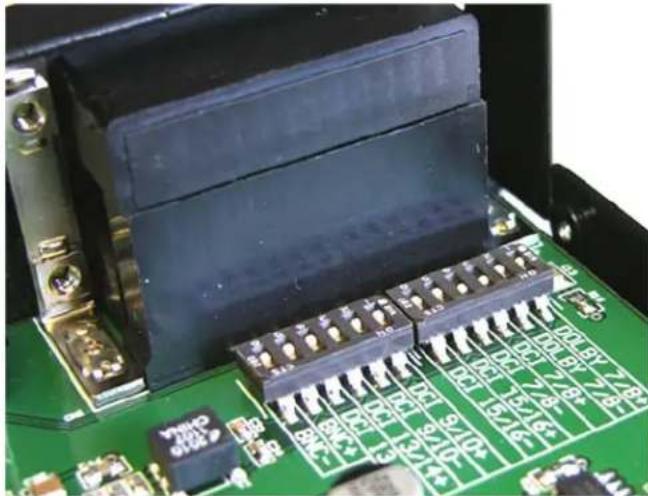
DIP switches inside the DAX-202 determine which pins on the DB25 connector the HI/VI-N audio will be connected to. As mentioned above, this is typically 7/8 or 15/16, but the DAX-202 provides several other options as well.
The HI track in a digital cinema package is "dialog centric" audio that may include the dialog at a higher level than the main audio, may include special equalization, or may include compression. However, not all content includes an HI track. Because of this, it is currently "safer" to use the existing HI output of the cinema processor to drive the HI portion of the HI/VI-N transmitter. The DAX-202 includes a terminal that must be grounded to use the HI audio from the AES pair. If this terminal is not grounded, the DAX-202 audio output is driven by the HI audio output from the sound processor. The control terminal may be permanently open or grounded, or may be driven by an open drain output or contact closure from the server or cinema sound processor to change the source of the HI audio "on the fly."
Description
The DAX-202 is designed to process signals for Hearing Impaired (HI) and Visual Narration (VI-N).
AES sources may be selected from a DB25 or BNC connector. The DB25 connectors are pass-through configured; either may be used as an input or output.
The HI/VI-N signals can be sourced from either DCI or Dolby pin configurations.
Setup
- Using the chart below, determine where the HI/VI-N AES sources will come from.
| Source DB25 pins | |
| Dolby 7/8 6 / 19 | |
| DCI 7/8 7 / 20 | |
| DCI 15/16 1 / 14 | |
| DCI 9/10 18 / 6 | |
| DCI 13/14 15 / 3 | |
| BNC | — |
- Remove the four cover screws holding the DAX box together.
- Close the PAIR of DIP switches that correspond to your source selection. See Figure 3.
- Replace the cover screws.
- Connect the HI output of the cinema processor to the HI input on the Phoenix connector.
Assemble the Phoenix Connector Plug as Required:
| Pin Function Comments | |
| 1 VI-N + (Output) | |
| 2 VI-N - (Output) Connect to Gnd for unbalanced | |
| 3 Gnd | |
| 4 HI - (Output) Connect to Gnd for unbalanced | |
| 5 HI + (Output) | |
| 6 Earth Gnd | |
| 7 HI - (Input) Connect to Gnd for unbalanced | |
| 8 HI + (Input) | |
| 9 HI CTL (Control) Connect to Gnd for AES | |
| 10 Gnd | |
- Connect the VI-N and HI outputs to the IR or RF transmitter. If the system has an unbalanced input, be sure to jump the “-” signal output
to the Gnd pin.
- The HI signal can be sourced from either the cinema processor or the cinema server. With no connection to the HI CTL (Pin 9 Phoenix Connector), the HI source will be the cinema processor. If HI CTL is grounded, the source will be the cinema server. The cinema automation system can also be used to select HI sources.
Connect and Test
- Plug in the Phoenix connector, BNC, DB25 input and output as needed.
- Plug in the power supply into the DAX and into the line.
- Check the LED for the correct HI source: Green = Analog, Red = AES
- Run source material and verify proper levels and audio quality at the user end.
Specifications
Input Voltage: 12VDC, 1A
HI/VI-N AES Source:
-20dBFS reference
Internally selectable choice between
Dolby 7/8
DCI 7/8, 9/10, 13/14, 15/16
BNC
HI Analog Input: 300mVrms = 0dBv via Phoenix type connector
HI Source selection: via Phoenix type connector
Analog Outputs: 300mVrms = 0dBr via Phoenix type connector
Frequency Response (all inputs): 20-20kHz +/- 0.5dB
Noise (A wtd'd) (all inputs): <-80dB
THD (all inputs): <0.005%
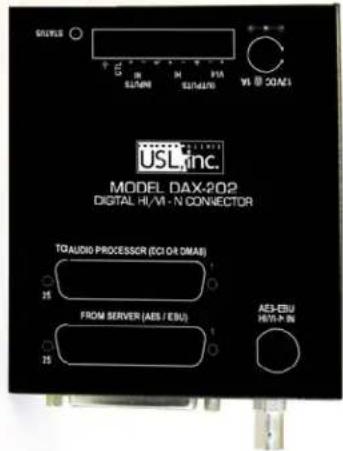
Figure 1 - Connection Description on Cover

natural_image
Close-up of a black electronic device rear panel showing two VGA connectors and a coaxial connector (no text or symbols visible)Figure 2 - AES Connectors
natural_image
Close-up of an electronic circuit board with black components and connectors (no visible text or symbols)Figure 3 - AES Source DIP Switches (DCI 7/8 Shown)

natural_image
Black industrial electronic device with green connector pin and control buttons (no visible text or symbols)Figure 4 - Power and HI / VI-N I/O Connectors
Additional DAX-202 User Manuals may be viewed / downloaded at: www.uslinc.com


Precision Sound • Light • Color
USL, Inc.
181 Bonetti Drive
San Luis Obispo, CA 93401
Brand : USL
Model : DAX-202
Category : Professional audio equipment