
Steady Butler Pocket - Tripod ROLLEI - Free user manual and instructions
Find the device manual for free Steady Butler Pocket ROLLEI in PDF.


| Product Type | 3-Axis Handheld Gimbal with Integrated Camera |
| Dimensions (W x D x H) | 129.5 x 38 x 41.5 mm |
| Weight | 134 g |
| Power Input | 5 V / 2 A or 5 V / 1 A (USB-C) |
| Power Output | 5 V / 500 mA (USB-C) |
| Battery Capacity | 1600 mAh / 5.53 Wh Li-ion |
| Operating Time | 140 min (1080P/30fps) |
| Charging Time | 90 min (5V/2A adapter) |
| Gimbal Angular Vibration Range | ±0.005° |
| Controllable Range (Pan/Tilt/Roll) | Pan: -230° to +50°, Tilt: -95° to +50°, Roll: ±45° |
| Mechanical Range (Pan/Tilt/Roll) | Pan: -250° to +70°, Tilt: -110° to +98°, Roll: ±90° |
| Max Controllable Speed | 110°/s |
| Camera Sensor | 1/3.06" CMOS, 12 MP effective |
| Lens | FOV 110°, F2.0 |
| ISO Range | 100–1600 |
| Max Photo Resolution | 4000 x 3000 (JPG) |
| Video Resolution | 4K/30fps, 2.7K/30fps, 1080P/60fps, 720P/30fps (MP4) |
| Photo Modes | Single Shot, Self-timer |
| Video Modes | Normal, Timelapse, Slow Motion (1080P) |
| Storage | microSDHC/microSDXC up to 128 GB, UHS-3 |
| Connectivity | WiFi 2.4 GHz, USB-C, App (iOS 10+/Android 5+) |
| Operating Temperature | 0–40°C |
| Included Accessories | Gimbal, Protective Cover, USB Cable, Manual |
| Maintenance | Clean with soft dry cloth; keep away from dust, sand, and water |
Frequently Asked Questions - Steady Butler Pocket ROLLEI
User questions about Steady Butler Pocket ROLLEI
0 question about this device. Answer the ones you know or ask your own.
Ask a new question about this device
Download the instructions for your Tripod in PDF format for free! Find your manual Steady Butler Pocket - ROLLEI and take your electronic device back in hand. On this page are published all the documents necessary for the use of your device. Steady Butler Pocket by ROLLEI.
USER MANUAL Steady Butler Pocket ROLLEI
Steady Butler Pocket
Verpackungsinhalt 3
Einführung 3
Übersicht 4
Butler Pocket App. 12
Wartung. 13
Technische Daten 14
User Manual in English 18
Verpackungsinhalt
Einführung


Kippachse: -110° to +98°
effective Pixel: 12 Megapixel
Cd = Cadmium, Hg = Quecksilber, Pb = Blei
Konformität
Shutter/Record Button 22
Manual alignment of the gimbal 23
Operating the Touch Screen 23
Wipe Down 23
Wipe Up 24
Wipe Left 25
Wipe Right 25
Save Photos and Videos 26
Transfer Photos and Videos 26
App Butler Pocket 27
Maintenance 28
Technical data. 29
Battery Warning 30
Disposal 31
Conformity 31

Available on the
App Store
Box Content
Rollei Steady Butler Pocket Cover USB cable Manual

Introduction
With the new Steady Butler Pocket from Rollei you get absolute stability and mobility in one.
It not only enables you to take brilliant photos with a resolution of 12 megapixels, but also videos with up to 4K and 30 frames per second. This of course happens absolutely wobble-free, which is made possible by the device's 3-axis stabilization.
The video timelapse functions can be easily adjusted via the high-resolution touch display.
But it is also possible to operate it using a smartphone. All you need is the app "Butler Pocket", which supports iOS 10.0 or higher and Android 5.0 or higher.

GET IT ON
Google Play
Overview

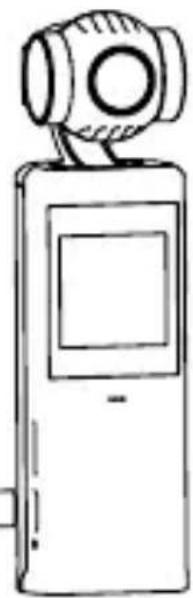
1 Roll Motor
2 Tilt Motor
3 Pan Motor
4 Camera
5 Ventilation Area
6 Touchscreen
7 Microphone*
8 microSD Card Slot
9 USB-C Port
10 Charging Indicator
11 Lanyard Hole

12 Power/Function Button
13 Shutter/Record Button
14 Speaker
15 1/4 Inch Tripod Thread
16 Microphone*
*For better audio quality, do not block the microphone during video recording.
Steady Butler Pocket Recharge
The battery must be fully charged before using the unit for the first time. Charging time is approximately 1.5 hours if the unit is charged directly from a wall outlet. (We recommend using a 5V/2A USB adapter which is not part of the delivery). The charging indicator lights red when the gimbal is charging, the indicator changes to green when charging is complete.
Note: No Quick-chargers and/or Super-chargers may be used to charge the Gimbal, only power adapters with a maximum of 5V, 2A. Please use only the USB cable included in the package to charge the device. Otherwise, there is a danger of fire or electric shock
Operation
Power/Function Button
Press and hold the Power/Function button (12) for two seconds to turn the gimbal on/off. Press the Power/Function button twice briefly to switch the gimbal to forward orientation and recenter. Press the Power/Function button briefly three times to reverse the camera.

Operation
Shutter/Record Button
Press the Shutter/Record button (13) once to take a picture or start or stop video recording.
Manual alignment of the gimbal
The Steady Butler Pocket's Tilt motor and Pan motor can be manually adjusted by hand in any mode.

Operating the Touch Screen
The touch screen displays the Steady Butler Pocket camera view, recording mode, battery level, and microSD card information.
Wipe Down
Wipe down the display to open the settings. Here you can make the following settings:
WiFi Settings ( () )
Tap the icon to turn on/off the gimbal's WiFi option. WiFi must be turned on to use the app.
Frequency: 2.4-2.484 GHz, transmit power: 15 dBm
Screen Settings 15:9 1x1
Tap the icon to switch between full screen and 16:9 display.
Brightness

Tap the icon to switch between the three brightness levels.
Sound Settings

Tap the icon to turn the beeps on/off.
Operating the Touch Screen
Storage

Shows the remaining capacity of the microSD card. Tap here to format the microSD card.
System Settings

Tap the icon to go to the system settings.
Wipe Down
Anti-Flicker: Use this to prevent flickering of lights by adjusting the frequency to local conditions.
Auto Power: Tap the icon to set Auto Power Off.
Calibration: Tap the icon to recalibrate the gimbal. Calibration is used to reduce drift or tilt caused by operating errors or close magnetic interference. Place the Steady Butler Pocket upright on a flat surface and do not touch it during calibration.
Auto-Dormant: Tap the icon to set the display to turn off automatically.
Language: Tap the icon to set the language of the menu.
Info: Shows the serial number and firmware version of the gimbal.
Reset: Tap the icon to reset all settings.
Wipe Up
Wipe left or right to scroll through photos and videos. Tap the center to play the video. Tap the trash can icon to delete the photo or video.
Wipe Left
Wipe left on the touch panel to enter Capture mode.
Photo
Tap here to take photos.
In addition, you can set the aspect ratio and the count-down timer.
Video
Tap here to record videos. You can also set the video resolution.
Slow motion SLO
Tap here to record slow motion videos. In addition, you can set the slow motion speed.
Time-lapse
Tap here to set the time lapse. You can set the duration and interval time.
Wipe to the right on the touch screen to exit the menu.
Wipe Right
Wipe right on the touch screen to open the gimbal settings.
Re-center
Tap this option to recenter the gimbal.
Flip
Tap here to change the orientation to selfie mode.
Wipe Right
Follow

Tap to toggle between slow and fast episodes. If you follow slowly, the gimbal will react slower, but the movement will be smoother. When following fast, the gimbal reacts faster, but also more abruptly.
Follow / FPV / Half follow

- Follow: pan and tilt axes follow.
• FPV: Pan, tilt and roll axes follow.
• Half follow: Only the pan axis follows.
Note: The default mode is Follow.
Save Photos and Videos
The images recorded on the Rollei Steady Butler Pocket can only be stored on a microSD card (not included). It is recommended to use a microSD card with a minimum speed of u3 or v30. Insert the microSD card into the memory card slot as shown.

Transfer Photos and Videos
Connect the gimbal to a PC or Mac using the supplied USB-C cable to transfer the captured images and videos. Connect the gimbal to your smartphone via WiFi using the "Butler Pocket" app.
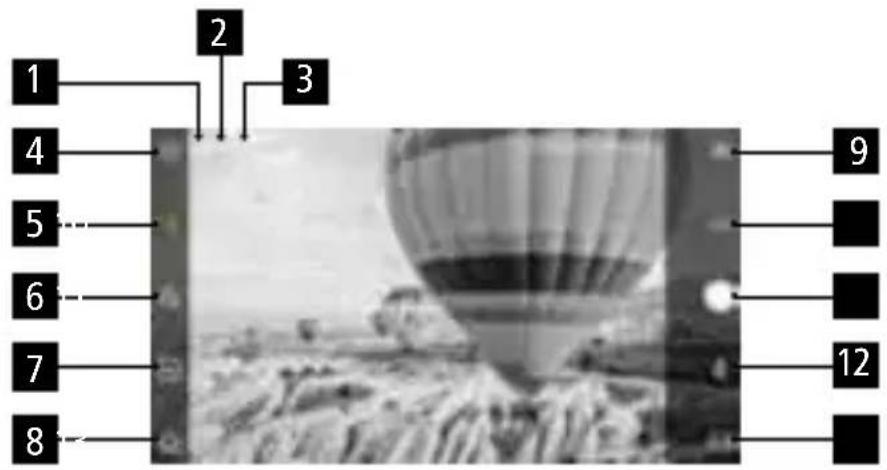
- WiFi: Shows the wifi connection to the smartphone.
- Battery level: Displays the current battery level of the Steady Butler Pocket.
- microSD memory information: Displays either the remaining number of photos that can be taken or the remaining time of the video.
- Settings
- Gimbal settings: Tap here to switch between the different gimbal modes.
- Quick Setting: Tap here to make different parameter settings depending on the recording mode.
- Exposure: Tap here to switch between auto matic and manual exposure.
- Home page: Tap here to return to the home page.
- Flip: Tap here to change the orientation of the gimbal forwards or backwards.
- Re-center: Tap this option to recenter the gimbal.
- Record button: Tap here to record a photo or start/stop video recording.
- Follow: Tap here to toggle between slow and fast sequences. If you follow slowly, the gimbal will react slower, but the motion will be smoother. When following fast, the gimbal reacts faster, but also more abruptly.
- Playback: Tap here to open the playback menu.
App Butler Pocket
Gimbal settings: Tap on the calibration symbol, the cardan ring will be calibrated automatically.
General Settings: Displays the hardware version and Micro SD settings.
Please note: Since the Rollei App is often updated, not all functions of the app can be described in detail in this manual. Therefore, some functions and their settings may change.
Maintenance
Place the Steady Butler Pocket in the protective cover as shown above to make transport and storage safer.
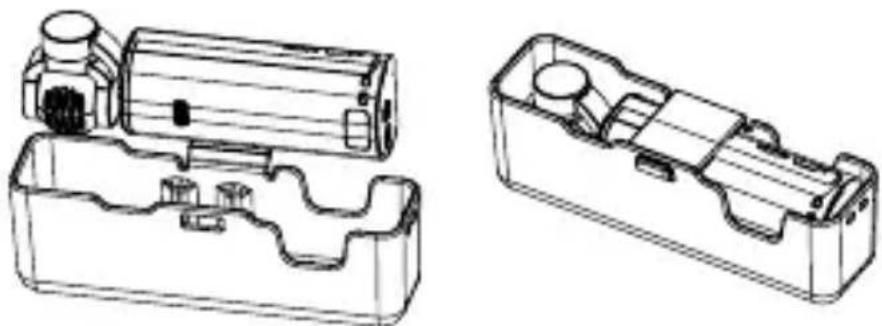
- The Steady Butler Pocket contains sensitive components that can be damaged in an impact, resulting in gimbal malfunction.
- Ensure that the Steady Butler Pocket is not obstructed when turned on.
- The gimbal is not waterproof. DO NOT use liquid detergents. Use only a soft, dry cloth to clean the Pocket Gimbal.
- Keep the gimbal away from sand and dust to protect sensors and motors.
- Do not cover or touch the ventilation area of the gimbal as it may become hot during use. The Steady Butler Pocket Gimbal will stop recording if it begins to overheat.
- Place the Steady Butler Pocket in the protective cover to avoid unnecessary gimbal damage.
General information
Name Steady Butler Pocket
Size | Weight 129.5 x 38 x 41.5 mm | 134 g
Input 5 V / 2 A or 5 V / 1 A
Output 5 V / 500 mA
Gimbal
Angular Vibration Range ±0.005°
Controllable Tilt Pan axis: -230° to +50° ,
Roll axis: ±45° ,
Tilt axis: -95° to +50°
Mechanical Range Pan axis: -250° to +70° ,
Roll axis: ±90°,
Tilt axis: -110° to +98°
Speed Max. 110°/s controllable
Camera
Sensor 1/3.06" CMOS, Effective Pixel:
12 Megapixel
Lens FOV 110°, F2.0
ISO Photo / Video: 100 – 1600
Electronic Shutter 1/1000
Image Size Max. 4000 x 3000
Photo Modes Single Shot, Self-timer
Video Resolution 4K/30 fps, 2.7K/30 fps,
1080P/60 fps, 720P/30 fps
Video Modes Timelapse / Slow Motion (video
resolution 1080P) / Normal
Supported File Format FAT32
Photo Format JPG
Video Format MP4 (MPEG-4 AVC/H.264)
Memory Supports SD memory cards
up to max. 128 GB
microSDHC / microSDXC
UHS-3
Operating temperature 0 – 40°C
Battery
Type Lithium-ion battery
Capacity 1600 mAh
Energy 5.53 Wh
Voltage 3.7V
Charging Voltage Limit 5V
Ambient Temperature
During Charging 0 – 45°C
Operating Temperature 0 – 40°C
Operating Time 140 minutes (1080P/30fps)
Charging Time 90 minutes (when using a USB adapters from 5 V/2 A)
Subject to technical changes without notice.
Battery Warning
- Never dismantle, crush, or pierce the battery, or allow the battery to short-circuit. Do not expose battery being placed in high temperature environment, if battery leaks or bulges, stop continue to use.
- Always charge using the charger. Risk of explosion if battery is replaced by an incorrect typ.
- Keep the battery out of the reach of children.
- Batteries may explode if exposed to fire. Never through batteries into the fire.
- Never exchange batteries by yourself, please let it be done by the retailer.
- Dispose used batteries by observing local regulations.
- Before disposing the device, please remove the battery.
Attention: It is not allowed to exchange the battery independently!

Dispose of packaging: For disposal, separate packaging into different types. Cardboard and board must be disposed of as paper and foil must be recycled.

Disposal of old devices: Applicable in the
European Union and other European countries with systems for the separate collection of reusable materials. Do not dispose old devices into the household waste! If the Rollei Steady Butler Pocket is no longer used, every consumer is legally obligated to dispose them separately from the household waste, for example, at a collection site of his community / city district. This ensures that devices are properly recycled and negative effects on the environment are avoided. Therefore, electrical and electronic equipment needs to be marked with the shown symbol.
Batteries and power packs may not be disposed

of in domestic waste! As a consumer, you are legally obliged to correctly dispose of all batteries and power packs irrespective of whether they contain contaminants or not, at a collection point of your municipality/council or in shops, in order to ensure an environmentally friendly disposal.
*marked with: Cd = Cadmium, Hg = Mercury, Pb = Lead
Conformity
Hereby, Rollei GmbH & Co. KG declares that the radio equipment type "Rollei Steady Butler Pocket" is in compliance with:
2011/65/EC RoHs Directive
2014/53/EU RED-Directive

The complete text of the EU Declaration of
Conformity can be downloaded at the following
Internet address:
http://www.rollei.com/EGK/Steadybutlerpocket
- STEADY BUTLER POCKET
- VERPACKUNGSINHALT
- EINFÜHRUNG
- KONFORMITÄT
- BOX CONTENT
- INTRODUCTION
- OVERVIEW
- STEADY BUTLER POCKET RECHARGE
- OPERATION
- POWER/FUNCTION BUTTON
- SHUTTER/RECORD BUTTON
- MANUAL ALIGNMENT OF THE GIMBAL
- OPERATING THE TOUCH SCREEN
- WIPE DOWN
- WIFI SETTINGS ( () )
- SCREEN SETTINGS 15:9 1X1
- BRIGHTNESS
- SOUND SETTINGS
- STORAGE
- SYSTEM SETTINGS
- WIPE UP
- WIPE LEFT
- PHOTO
- VIDEO
- SLOW MOTION SLO
- TIME-LAPSE
- WIPE RIGHT
- RE-CENTER
- FLIP
- FOLLOW
- FOLLOW / FPV / HALF FOLLOW
- SAVE PHOTOS AND VIDEOS
- TRANSFER PHOTOS AND VIDEOS
- APP BUTLER POCKET
- MAINTENANCE
- GENERAL INFORMATION
- GIMBAL
- CAMERA
- BATTERY
- BATTERY WARNING
- BATTERIES AND POWER PACKS MAY NOT BE DISPOSED
- CONFORMITY
Brand : ROLLEI
Model : Steady Butler Pocket
Category : Tripod