
BS40BK - Pregnant BLAUPUNKT - Free user manual and instructions
Find the device manual for free BS40BK BLAUPUNKT in PDF.


| Product Type | Portable Bluetooth Speaker |
| Model | BS40BK |
| Brand | Blaupunkt |
| Dimensions (approx.) | 18.0 x 7.0 x 7.0 cm |
| Weight | 500 g |
| Power Output | 5 W RMS |
| Battery Capacity | 2000 mAh |
| Battery Life | Up to 10 hours |
| Charging Time | Approx. 3 hours |
| Bluetooth Version | 5.0 |
| Wireless Range | Up to 10 meters |
| Frequency Response | 100 Hz - 20 kHz |
| Water Resistance | IPX5 |
| Controls | Power, Volume +/-, Play/Pause, Skip, Hands-free |
| Microphone | Built-in |
| Supported Audio Codecs | SBC, AAC |
| Inputs | 3.5 mm AUX, Micro USB (charging) |
| Material | Plastic with fabric grille |
| In the Box | Speaker, USB charging cable, AUX cable, Manual |
| Compatible Devices | Smartphones, tablets, laptops |
| Cleaning Instructions | Wipe with a soft, dry cloth. Do not use water or solvents. |
| Safety Notice | Do not disassemble. Avoid extreme temperatures. Do not expose to fire. |
Frequently Asked Questions - BS40BK BLAUPUNKT
User questions about BS40BK BLAUPUNKT
0 question about this device. Answer the ones you know or ask your own.
Ask a new question about this device
Download the instructions for your Pregnant in PDF format for free! Find your manual BS40BK - BLAUPUNKT and take your electronic device back in hand. On this page are published all the documents necessary for the use of your device. BS40BK by BLAUPUNKT.
USER MANUAL BS40BK BLAUPUNKT
natural_image
Black textured surface with no visible text or symbols, labeled 'BLAUPUNIT' and '© STRAWLL' at bottom (no other readable text)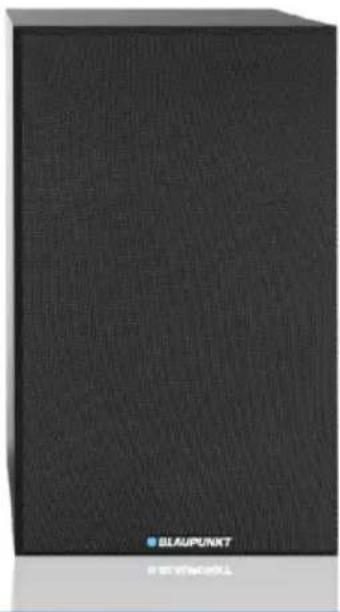
natural_image
Black textured rectangular object with no visible text or symbols on its surfaceEnjoy it.
Important Safety Instructions



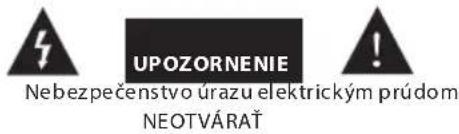
RISK OF ELECTRIC SHOCK DO NOT OPEN
Caution:
To reduce the risk of electric shock, do not remove cover (or back). No user serviceable parts inside. Refer servicing to qualified service personnel.
Explanation of Graphical Symbols:

The lightning flash within an equilateral triangle is intended to alert you to the presence of uninsulated dangerous voltage within the product's enclosure that may be of sufficient magnitude to constitute an electric shock to a person or persons.

The exclamation point within an equilateral triangle is intended to alert you to the presence of important operating and maintenance (servicing) instructions in the literature accompanying the product.
To achieve the utmost in enjoyment and performance, and in order to become familiar with its features, please read this manual carefully before attempting to operate this product. This will assure you years of trouble free performance and listening pleasure.
Important Notes
• This safety and operating instruction should be retained for future reference.
• The apparatus should not be exposed to dripping or splashing or placed in a humid atmosphere such as a bathroom.
• Do not install the product in the following areas:
- Places exposed to direct sunlight or close to radiators.
• On top of other stereo equipment that radiate too much heat.
- Blocking ventilation or in a dusty area.
- Areas where there is constant vibration.
• Humid or moist places.
• Do not place near candles or other naked flames.
• Operate the product only as instructed in this manual.
• Before turning on the power for the first time, make sure the power adaptor is properly connected.
• Plug-in the USB stick directly or use an USB-extension cable which is not longer than 25 cm.
For safety reasons, do not remove any covers or attempt to gain access to the inside of the product. Refer any servicing to qualified personnel.
Do not attempt to remove any screws, or open the casing of the unit; there are no user serviceable parts inside. Refer all servicing to qualified service personnel.
SAFETY INSTRUCTIONS
- Read Instructions - All the safety and operating instructions must be read before the product is operated.
- Retain Instructions - The safety and operating instructions should be kept with the product for future reference.
- Heed warnings - All warnings on the product and in the operating instructions should be adhered to.
- Follow instructions - All operating and users' instructions should be followed.
- Installation - Install in accordance with the manufacturer's instructions.
- Power sources - This product should be operated only from the type of power source indicated by the marking adjacent to the power cord entry. If you are not sure of the type of power supply to your home, consult your product dealer or local power company.
- Grounding or polarization - the product is not required to be grounded. Ensure that the plug is fully inserted into the wall outlet or extension cord receptacle to prevent blade or pin exposure. Some versions of the product are equipped with a power cord fitted with a polarized alternating line plug (a plug having one blade wider than the other). This plug will fit onto the power outlet only one way. This is a safety feature. If you are unable to insert the plug fully into the outlet, try reversing the plug. If the plug should still fail to fit, contact your electrician to replace your obsolete outlet. Do not defeat the safety purpose of the polarized plug. When using an extension power-supply cord or a power-supply cord other than that supplied with the appliance, it should be fitted with the appropriate molded plugs and carry safety approval appropriate to the country of use.
- Power cord protection - Power-supply cords should be routed so that they are not likely to be walked on, kinked or pinched by items placed on or against them, paying particular attention to cords from plugs, receptacles and the point where they exit from the product.
- Overloading - Do not overload wall outlets, extension cords, or multiple sockets, as this can result in a risk of fire or electric shock.
- Ventilation - The product must be properly ventilated. Do not place the product on a bed, sofa, or other similar surface. Do not cover the product with any items such as tablecloths, newspapers, etc.
- Heat - The product should be situated away from heat sources such as radiators, heat registers, stoves, or other products, including amplifiers that produce heat. No naked flame sources, such as lighted candles, should be placed on the apparatus.
-
Water and moisture - To reduce the risk of fire or electric shock, do not expose the product to train, dripping, splashing or excessive moisture such as in a sauna or bathroom. Do not use this product near water, for example, near a bathtub, washbowl, kitchen sink, laundry tub, in a wet basement or near a swimming pool (or similar).
-
Object and Liquid Entry - Never push objects of any kind into this product through openings, as they may touch dangerous voltage points or short-circuit parts that could result in a fire or electric shock. Never spill liquid of any kind on the product. Do not place any object containing liquid on top of the product.
-
Cleaning - Unplug the product from the wall outlet before cleaning. Dust in the woofer may be cleaned with a dry cloth. If you wish to use an aerosol cleaning spray, do not spray directly on the cabinet; spray onto the cloth. Be careful not to damage the drive units.
-
Attachments - Do not use attachments not recommended by the product manufacturer, as they may cause hazards.
-
Accessories - Do not place this product on an unstable cart, stand, tripod, bracket or table. The product may fall, causing serious injury to a child or adult, and serious damage to the product. Use only with a cart, stand, tripod, bracket or table recommended by the manufacturer or sold with the product. Any mounting of the product should follow the manufacturer's instructions and should use a mounting accessory recommended by the manufacturer.
-
Moving the product - A product and cart combination should be moved with care. Quick stops, excessive force and uneven surfaces may cause the product and cart combination to overturn.
-
Unused periods - The power cord of the appliance should be unplugged from the outlet during lightning storms or when the apparatus is left unused for a long period of time.
-
Servicing - Do not attempt to service this product yourself, as opening or removing covers may expose you to dangerous voltage or other hazards. Refer all servicing to qualified service personnel.
-
Please remove the power plug form the main power source or wall power source when not in use. When plugged in to a power source, the system is in standby mode, so the power is not entirely cut off.
-
Replacement parts - When replacement parts are required, ensure that the service technician has used replacement parts specified by the manufacturer or have the same characteristics as the original part. Unauthorized substitutions may result in fire, electric shock or other hazards.
-
Mains fuses - For continued protection against fire hazard, use fuses only of the correct type and rating. The correct fuse specification for each voltage range is marked on the product.
-
Do not turn up the volume while listening to a section with very low level inputs or no audio signals. If you do, the speaker may be damaged when a peak level section is suddenly played.
-
The only means of completely disconnecting the product from the power supply is by removing the power cord from the wall outlet or the product. The wall outlet or the power cord entry to the product must remain freely accessible at all times while the product is in use.
-
Try to install the product near a wall socket or extension cord and shall be easily accessible.
-
The highest environmental temperature suitable for this product is 35°C.
-
ESD hints - If the product maybe reset or not reset to operation of control due to electrostatic discharge, just switch off and reconnect again, or move the product to another location.
-
Battery
a. The batteries must not be exposed to excessive heat such as sunshine, fire or the like.
b. The batteries should be drawn to the environmental aspects of battery disposal.
c. Battery usage CAUTION-to prevent battery leakage which may result in body injuries, property damage, or damage to the apparatus:
. Install all batteries correctly, + and - as marked on the apparatus.
. Do not mix batteries (old and new or carbon and alkaline, etc.)
. Remove batteries when the unit is not used for a long time.
ERP2 (Energy Related Products) note
This product with ecodesign complies with the stage 2 requirements of Commission Regulation (EC) NO. 1275/2008 implementing Directive 2009/125/EC regard to standby and off mode electric power consumption of electronic household and office equipment. After 30 minutes without any audio input, the device will automatically switch into standby mode. Follow up the instruction manual to resume the operation.
Important note:
This device is equipped with an energy saving mode: if no signal is given during 30 minutes the device will switch automatically into standby mode in order to save energy (ERP 2 standard). Please note that low volume setting in the audio source may be recognized as "no audio signal": this will affect the capability of signal detection from the device and can also originate an automatic switch into standby mode. If this happens please reactivate the audio signal transmission or increase the volume setting on the audio source player (MP3 player, etc.), in order to resume playback. Please contact the local service center if the problem remains.
WARNING
This appliance is not intended for use by persons (including children) with reduced physical sensory or mental capabilities, or lack of experience and knowledge, unless they have been given supervision or instruction concerning use of the appliance by a person responsible for their safety. Children should be supervised to ensure that they do not play with the appliance.
-
Never use the device unsupervised! Switch off the device whenever you are not using it, even if this only for a short while.
-
The appliance is not intended to be operated by means of an external timer or separate remote control system.
-
If the supply cord is damaged, it must be replaced by the manufacturer, its service agent or similarly qualified persons in order to avoid a hazard.
-
Before operating this system, check the voltage of this system to see if it is identical to the voltage of your local power supply.
-
The unit should not be impeded by covering the ventilation opening with items such as newspaper, table-cloths, curtains etc. Make sure that there are at least 20 cm of space above and at least 5 cm of space on each side of the unit.
- The apparatus must not be exposed to dripping or splashing and that objects filled with liquids, such as vases, must not be placed on the apparatus.
- To prevent fire or shock hazard, do not expose this equipment to hot places, rain, moisture or dust.
- Do not locate this unit near any water sources e.g. taps, bathtubs, washing machines or swimming pools. Ensure that you place the unit on a dry, stable surface.
- Do not place this unit close to a strong magnetic field.
- Do not place the unit on a amplifier or receiver.
- Do not place this unit in a damp area as the moisture will affect the life of electric components.
- If the system is brought directly from a cold to a warm location, or is placed in a very damp room, moisture may condense on the lens inside the player. If this occurs, the system will not operate properly. Please leave the system turned on for about an hour until the moisture evaporates.
- Do not attempt to clean the unit with chemical solvents as this might damage the finish. Wipe with a clean, dry or slightly damp cloth.
- When removing the power plug from the wall outlet, always pull directly on the plug, never pull on the cord.
- Depending on the electromagnetic waves used by a television broadcast, if a TV is turned on near this unit while it is also on, lines might appear on the TV screen. Neither this unit nor the TV is malfunctioning. If you see such lines, keep this unit well away from the TV set.
- The mains plug is used as the disconnect device, the disconnect device must remain readily operable.
- To prevent possible hearing damage, do not listen at high volume levels for long periods.
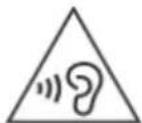
NOTICE

Conformity
Hereby, Blaupunkt Competence Center 2N-Everpol Sp. z o.o., declares that this equipment is in compliance with the essential requirement and other relevant provisions of Directive 2014/53/EU. Declaration of conformity can be obtained from the product page at www.blaupunkt.com.
Responsible party: 2N-Everpol Sp. z o.o, Puławska 403A, 02-801 Warsaw, Poland, Phone: +48 22 688 08 00, E-mail: info@everpol.pl

Your products is designed a manufactured with high quality materials and components, which can be recycled and reused.
If there is a crossed-out bin symbol on your device, it means that the product is covered by the provisions of European Directive 2012/19/EU. Based on this, please follow local regulations and familiarize yourself with the requirements for your local electrical and electronic waste collection system and, in the case of this product, comply with them.
DO NOT DISPOSAL THIS PRODUCT WITH YOUR HOUSEHOLD WASTE!
THIS PRODUCT CONTAINS HAZARDOUS SUBSTANCES, MIXTURES AND COMPONENTS WHICH, IF UNAUTHORIZED, CAN BE A SOURCE OF POTENTIAL EFFECTS ON THE NATURAL ENVIRONMENT AND HUMAN HEALTH!
Correct disposal of the used product will prevent negative effects on the environment and human health.
Your product contains batteries covered by the European Directive 2006/66/EC, which cannot be dispose with normal
household waste. Please inform yourself about the local rules on separate collection of batteries because correct disposal helps to prevent negative consequences for the environmental and human health.
Environmental information
All unnecessary packaging has been omitted. We have tried to make the packaging easy to separate into three materials:
cardboard (box), polystyrene foam(buffer) and poly ethylene (bags, protective foam sheet). Your system consists of material which can be recycled and reused if disassembled by a specialized company. Please observe the local regulations regarding the disposal of packaging materials, exhausted batteries and old equipment.
Recording and playback of material might require consent. See Copyright Act 1956 and The Performer's Protection Acts 1958 to 1972.

Bluetooth
The Bluetooth® wordmark and logos are registered trademarks owned by Bluetooth SIG, Inc. and any use of such marks by us is under license. Other trademarks and trade names are those of their respective owners.
Many thanks to buy our model, please read and reference this manual carefully before operate the unit. Please keep the manual for future operation reference.
Control panel
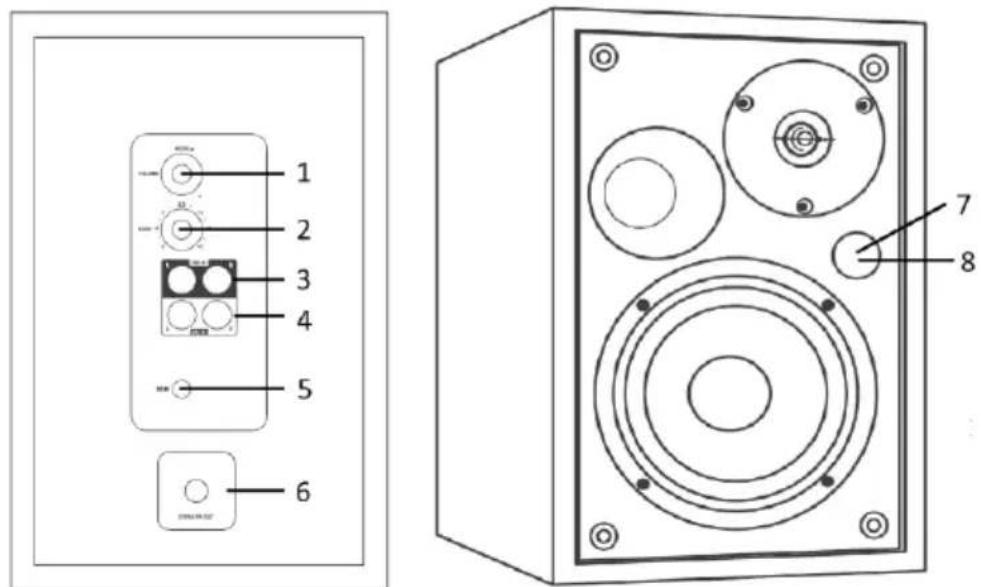
- Power/volume/mode knob: short press it to power on the unit after connect with power adaptor; long press 3 seconds to standby off the unit; Short press it repeatedly to switch the play mode; rotate the knob to adjust the main volume.
- Bass knob: rotate it to increase or decrease bass. 3. RCA Line in 1 jack. 4. RCA line in 2 jack.
- DC input power jack.
- Speaker out terminal: connect to satellite speaker as stereo.
7-8: IR sensor for remote controller and signal LED window.
RED color: in standby mode.
Light blue color: in Line in 1 mode.
Blue color: In Bluetooth mode.
Yellow color: in Line in 2 mode.
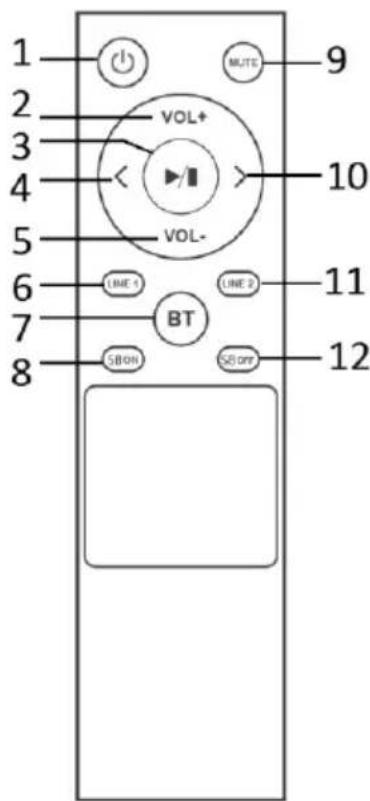
Remote controller:
1-Power button: press it to standby on/off the unit.
2,5-Volume+/- button: press it to adjust the output volume.
3- Play/pause: press it to play or pause the sound output in Bluetooth mode.
4,10- Previous/next button: press it to switch previous/next track in Bluetooth.
6,7,11- Line in 1/Bluetooth/Line in 2 button: press it skip to relevant play mode directly.
8,12-3D on/off button: press it to turn on or off super bass function.
9- Mute button: press it to silence the speaker, press again to resume the output.
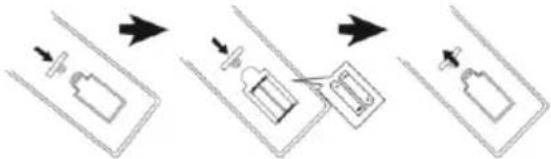
Remote control battery installation
Open up the battery door and insert 2 x AAA dry battery(included) into the compartment; please make sure the polarity of battery will aim and correspond to the positive and negative silkscreen-printed symbol in the compartment. Then close the battery door.
flowchart
graph TD
    A["Device with plug"] --> B["Battery with plug"]
    B --> C["Packaging with plug"]
    C --> D["Storage with plug"]
Notes:
a. The best working distance of remote control is within 5 meters without any obstacle in between. Please aim to the remote control sensor locates on the front of unit during operation.
b. The sensitivity of remote control will become weak when the battery power exhausted. Please replace it with fresh one for operation.
c. Please take out the battery in case of none-operation in a long time.
d. Please dispose the battery in an environment friendly way. Please reference the local government requirement for the detail.
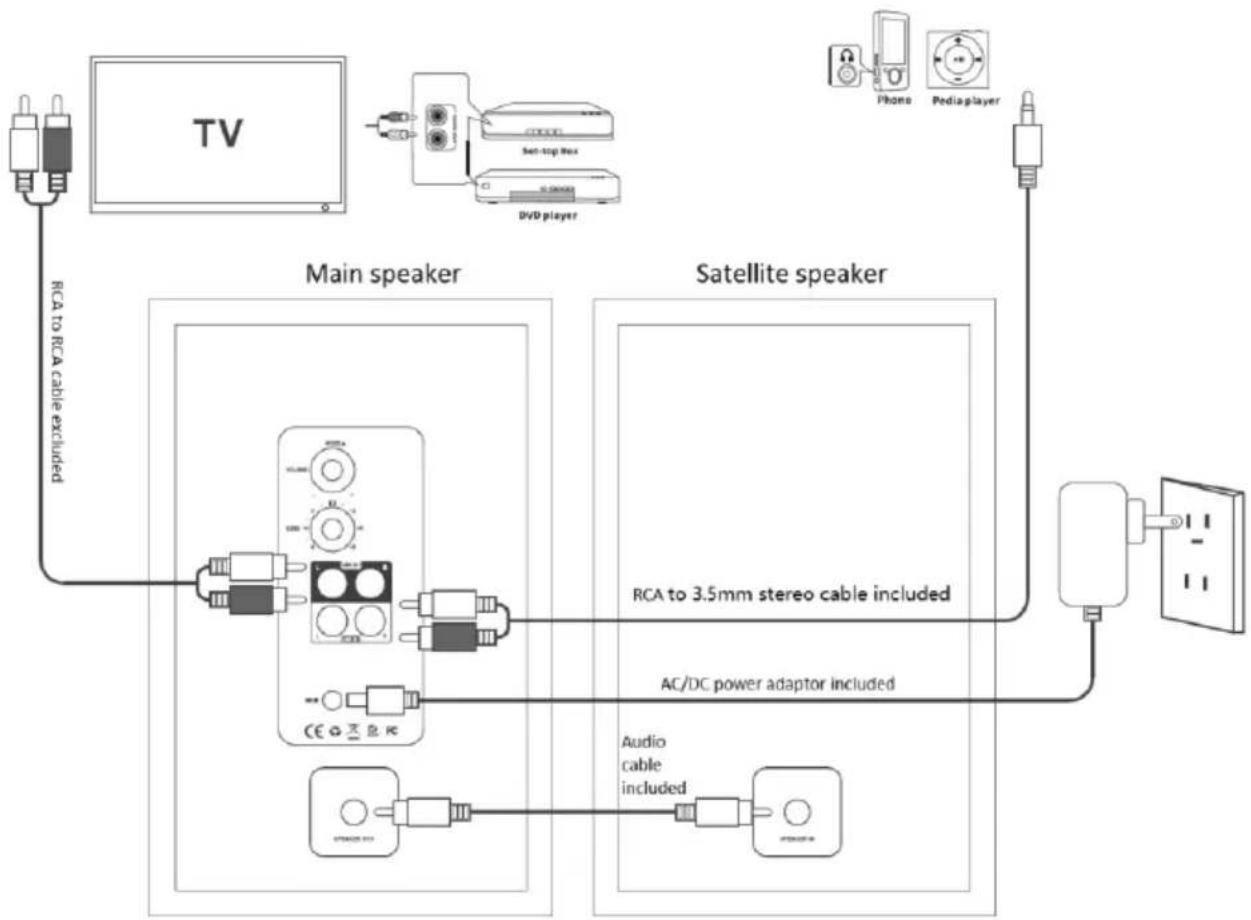
Main and satellite speaker connection: Before power on the unit, please kindly connect the unit first. Using the supplied RCA to RCA(single connector) audio cable connect the speaker out and speaker in terminal on rear panel between main and satellite speaker. Then the speaker will get stereo output.
Power setting and power on/off: Plug in the supplied AC/DC power adaptor to an AC household outlet in order to get power source, and plug the DC connector of power adaptor to power jack on the rear panel of main unit. Then the unit will enter to standby mode, and ready work for you. Short press the power knob from rear panel of main unit or remote controller can power on the speaker. Long press(3 seconds) the power knob from rear panel, or short press power button from remote controller can standby off the unit.
flowchart
graph TD
    TV["TV"] -->|RCA to RCA cable excluded| MainSpeaker["Main speaker"]
    MainSpeaker -->|RCA to 3.5mm stereo cable included| SatelliteSpeaker["Satellite speaker"]
    SatelliteSpeaker -->|AC/DC power adaptor included| Antenna["Antenna"]
    Antenna --> AudioCableAudio["Cable included"]
    Antenna --> AudioCableAudioAudio
    Antenna --> AudioCableAudioAudio
    Antenna --> AudioCableAudioAudio
    Antenna --> Phone["Phone"]
    Antenna --> Pediapower["Pediapower"]
    Antenna --> PhonePedsLayer["Radio/PedsLayer"]
Speaker connect with outsourcing devices like TV, TV set-top, DVD, Blue-ray DVD player, MP3 player etc.
The speaker has included 2 x RCA analogue (Line in) inputs for different source. You can reference above drawing for the connection depends on what kind of connector has on your device. The RCA to 3.5mm stereo cable is included.
Bluetooth operation
This product includes Bluetooth function which can wireless playback the music from other Bluetooth device (like smart phone, tablet, TV etc).
- Power on the unit, press mode button repeatedly on rear panel or Bluetooth button from remote controller to enter Bluetooth mode. The blue color LED will flare on the signal LED window which means the unit is ready to pair.
- Enable the Bluetooth function on your device, and search the available device (please reference your device manual for operation), then check the available Bluetooth device on the list. Select "BP BS40" for pairing, and the blue color signal LED will become stable after paired successful.
- Select and play the music from your Bluetooth device, adjust the volume level properly, then the sound will come out from the speaker.
- In Bluetooth mode, you can do operation like previous/next track selection, play/pause, mute etc. by pressing relevant button from remote controller.
Notices:
a. All Bluetooth devices are not guaranteed for pairing successfully due to different design and brand.
b. The best working distance of Bluetooth is within 10 meters without any obstacle in between.
c. The unit only can pair and work with one Bluetooth device in one time.
d. In case of an incoming phone call during Bluetooth playback; the music will stop temporary, and resume to playback after end the phone call.
Bluetooth connect with TV: In case of your TV device has Bluetooth function, the Bookshelf speaker can wireless playback with your TV as well. You have to turn on the Bluetooth function on your TV screen and searching "BP BS40" for connection. Please reference your TV's manual for the details.
Trouble shooting
-
The speaker cannot turn on.
a. Please check if the power connection is correct. -
No sound output.
a. Please try to adjust the volume knob, mute button and check the play source.
b. please contact service center for support if the issue remained.
- Sound distortion.
a. Please try to adjust and play the music at a lower volume level.
b. Check the status of treble/bass setting.
c. Please try to decrease the volume level on outsourcing player like TV etc.
- The sound is sounding intermittently in Bluetooth mode.
a. Please try to move the Bluetooth device closer to speaker.
b. Please try to repair the speaker with Bluetooth device.
Specifications
General
Power requirements: DC IN 19V/1.65A Power consumption (on mode): xxx Watt working mode Standby power consumption : < 0.5 Watt
Output power RMS: 2 x 20W Total harmonic distortion: <1% (1 kHz, 1W) Audio input sensitivity: LINE IN 1: 550MV, LINE IN 2: 750MV Frequency response: 45 Hz – 20 KHz; S/R:>/= 80dB
USB support music: MP3/WAV/WMA( not guarantee) USB support device: up to 32GB max. Unit dimensions: 155 x 248 x 175mm (W x H x D) Inputs: 2 x RCA Line in
Speakers
Tweeter:1.25"/4Ω Woofer impedance: 4"/4 Ω
Bluetooth
Bluetooth version: V5.3 Work range: approx.10 meters Transmission frequency: 2.402\~2.480GHz Protocols: 2DP/AVCTP/AVDTP/AVRCP/GAVDP/HFP/HID/OPP/RFCOMM/SPP A2DP/AVRCP (Notes: the product spec may change without prior notice).
Accessories
Remote Controller x 1pcs Remote control battery x 1 pair Instruction Manual x 1pcs Warranty card x 1 pcs Audio cable (3.5mm stereo to RCA) x 1pcs RCA to RCA single connector audio cable x 1pcs AC/DC Power adaptor x 1pcs
flowchart
graph TD
    A["Device with plug"] --> B["Load"]
    B --> C["Battery with plug"]
    C --> D["Storage unit with plug"]
    D --> E["Packaging unit with plug"]
Uwagi:
flowchart
graph TD
    TV["TV"] -->|RCA to RCA cable excluded| MainSpeaker["Main speaker"]
    MainSpeaker -->|RCA to 3.5mm stereo cable included| SatelliteSpeaker["Satellite speaker"]
    SatelliteSpeaker -->|AC/DC power adaptor included| Antenna["Antenna"]
    Antenna --> AudioCableAudio["Cable including"]
    Antenna --> AudioCableAudioAudio["Audio cable included"]
    Antenna --> Phone["Phone"]
    Antenna --> Pediapower["Pediapower"]
    Phone --> Antenna
    Pediapower --> Antenna
DÔLEŽITÉ BEZPEČNOSTNÉ POKYNY
flowchart
graph TD
    TV["TV"] -->|RCA to RCA cable excluded| MainSpeaker["Main speaker"]
    MainSpeaker -->|RCA to 3.5mm stereo cable included| SatelliteSpeaker["Satellite speaker"]
    SatelliteSpeaker -->|AC/DC power adaptor included| Antenna["Antenna"]
    Antenna --> AudioCableAudio["Cable included"]
    Antenna --> AudioCableAudioAudio
    Antenna --> Phone["Phone"]
    Antenna --> PediaPlayer["Pedia player"]
    MainSpeaker -->|Sect-tag Rox| DVD_Player["DVD player"]
    SatelliteSpeaker -->|Radio Cable to 3.5mm stereo cable included| Antenna
flowchart
graph TD
    A["Add Bottle"] --> B["Add Pump"]
    B --> C["Add Valve"]
    C --> D["Add Bottle with Valve"]
Megjegyzések:
VAŽNE SIGURNOSNE UPUTE



UGROŽENJE OD ELEKTRIČNOG UDARA NEMOJTE OTVARATI
Oprez:
Kako bi se smanjila opasnost od električnog udara, nemojte skidati poklopac niti stražnj dio uređaja. Unutar uređaja ne postoje komponente za popravak od strane korisnika. Održavanje i popravak opreme izvršava isključivo kvalificirano servisno osoblje.
Objašnjenje grafičkih simbola:

Simbol munje sa sa strelicom koji se nalazi u jednakostraničnom trokutu upozorava na prisutnost neizoliranog „opasnog napona” unutar kućišta uređaja koja može postići veličinu uzrokujuću strujni udar.

Uskličnik unutar jednakostraničnog trokuta upozorava korisnika da ovdje su prezentirane važne poruke za rad i održavanjeopreme u dokumentaciji priloženoj uređaju.
natural_image
Technical line drawing of a speaker chamber with two circular components and labeled parts (7 and 8), no text or symbols present.-
Tipka za uključivanje/kontrolu glasnoće/odabir načina reprodukcije: kratko nju pritisnite da biste uključili uređaj kada je prethodno spojen na napajanje; pritisnite i zadržite 3 sekunde da biste uređaj stavili u pripravno stanje; pritisnite ga kratko nekoliko puta da biste promijenili način reprodukcije; okrenite tipku za podešavanje glavne glasnoće.
-
Regulator za podešavanje niskih tonova: okrenite ga kako biste povećali ili smanjili razinu niskih tonova.
-
RCA linijska ulazna utičnica 1
-
RCA linijska ulazna utičnica 2
-
Utičnica za istosmjernu struju.
-
Izlazni priključak zvučnika: spojite ga na satelitski zvučnik za stereo stereo način rada.
7-8: Infracrveni senzor za daljinski upravljač i prozor led indikatora:
Crvena: u stanju pripravnosti.
Svjetloplava: u načinu rada linijskog unosa 1.
Plava: u Bluetooth načinu rada.
flowchart
graph TD
    A["Step 1: Initial bottle"] --> B["Step 2: Arrow pointing to bottle"]
    B --> C["Step 3: Arrow pointing to bottle"]
    C --> D["Step 4: Arrow pointing to bottle"]
Σημειώσεις:
flowchart
graph TD
    TV["TV"] -->|RCA to RCA cable excluded| MainSpeaker["Main speaker"]
    MainSpeaker -->|RCA to 3.5mm stereo cable included| SatelliteSpeaker["Satellite speaker"]
    SatelliteSpeaker -->|AC/DC power adaptor included| AudioCable["Audio cable included"]
    AudioCable -->|Audio cable included| SmartWater["Smart Water"]
    SmartWater -->|Radio/Radio cable included| Phone["Phone"]
    Phone -->|Radio/Radio cable included| PediaPlayer["Pedia player"]
    PediaPlayer -->|Radio/Radio cable included| SmartWater
    MainSpeaker -->|RCA to 3.5mm stereo cable included| SatelliteSpeaker
flowchart
graph TD
    A["Start"] --> B["Step 1: Bottle with arrow"]
    B --> C["Step 2: Device with arrow"]
    C --> D["Step 3: Device with arrow"]
Märkused:
DRAUDŽIAMA ATIDARY TI
Ispėjimas:
flowchart
graph TD
    A["Step 1: Bag with arrow"] --> B["Step 2: Bag with arrow"]
    B --> C["Step 3: Bag with arrow"]
Pastabos
| Power adaptor information | ||
| Information published | Value and precision | Unit |
| Manufacturer's name or trade markCommercial registration number Address | SHEN ZHEN FIT- POWER TECHNOLOGYCO.,LTD. 201, No. 7, Rifu Road, East District, baishixiaCommunity, Fuyong Street, Bao'an District, SHENZHENCITY Guangdong Province 518103 | |
| Model identifier | TP04-190165E | |
| Input voltage | 100-240 | V |
| Input AC frequency | 50/60 | Hz |
| Output voltage | Dc19 | V |
| Output current | 1.65 | A |
| Output power | 31.4 | W |
| Average active efficiency | ≥89.28 | % |
| Efficiency at low load (10 %) | 83.85% | % |
| No-load power consumption | ≤0. 09 | W |
Competence Center
2N-Everpol Sp. z o.o.
ul. Puławska 403A
02-801 Warsaw, Poland
phone:+48 22 688 08 00
e-mail: info@everpol.pl
www.blaupunkt.com
Enjoy it.
In case of questions or problems please contact our service.
Tel. 00 48 22 688 08 33 E-mail: info@blaupunkt-audio.pl
All rights reserved. All brand names are registered trademarks of their respective owners. Specifications are subject to change without prior notice.
This product has been manufactured and sold under the responsibility of 2N-Everpol Sp. z o.o..BLAUPUNKT, BLAUPUNKT logo, and the 100 YEARS BLAUPUNKT logo are trademarks used under license by 2N-Everpol Sp. z o.o. - further information at brand.blaupunkt.com.All other products, services, companies, trademarks, trade or product names and logos referenced herein are the property of their respective owners.
- Important Safety Instructions
- Caution:
- Explanation of Graphical Symbols:
- Important Notes
- SAFETY INSTRUCTIONS
- ERP2 (Energy Related Products) note
- Important note:
- WARNING
- NOTICE
- Bluetooth
- Remote controller:
- Remote control battery installation
- Notes:
- Bluetooth operation
- Notices:
- Trouble shooting
- Specifications
- General
- Speakers
- Accessories
- Uwagi:
- DÔLEŽITÉ BEZPEČNOSTNÉ POKYNY
- Megjegyzések:
- VAŽNE SIGURNOSNE UPUTE
- UGROŽENJE OD ELEKTRIČNOG UDARA NEMOJTE OTVARATI
- Oprez:
- Objašnjenje grafičkih simbola:
- Σημειώσεις:
- Märkused:
- Ispėjimas:
- Pastabos
- Enjoy it.
Brand : BLAUPUNKT
Model : BS40BK
Category : Pregnant