
Mode2 - Car charger Absina - Free user manual and instructions
Find the device manual for free Mode2 Absina in PDF.


| Product Type | Electric Vehicle Charging Cable Mode 2 |
| Brand | Absina |
| Model | Mode2 |
| Input Voltage | 220-240V AC, 50Hz, 16A |
| Output Power | 3.7 kW (230V AC, 16A, 1-phase) |
| Charging Plug | IEC 62196-2 Type 2 |
| Primary Plug | Schuko Type E & F |
| Cable Length | 6 meters |
| Control Box Dimensions | 185 x 67 x 44 mm |
| Weight | 2000 g |
| Protection Rating | IP55 (plugged in), IP54 (control box) |
| Safety Functions | Overvoltage, undervoltage, overcharge, overheat (85°C cut-off), residual current, PE monitoring |
| Flammability Standard | UL94 V-0 |
| Operating Temperature | -25°C to +55°C |
| Humidity Range | 5% - 95% non-condensing |
| Contact Resistance | ≤0.3 mΩ |
| Isolation Resistance | 500 MΩ (1000V AC) |
| High Voltage Resistance | 2600V AC |
| Withdrawal Force | 45N - 80N |
| Plugging Cycles | ≥10,000 (no load) |
| Standards Compliance | CE, IEC 61851-1, IEC 62752 |
| Intended Use | Charging electric/hybrid vehicles with AC, via household socket (16A) |
| Maintenance | Clean with dry cloth only; do not use water or abrasives; store in dry place with protective caps |
| Spare Parts | Not provided by manufacturer |
Frequently Asked Questions - Mode2 Absina
User questions about Mode2 Absina
0 question about this device. Answer the ones you know or ask your own.
Ask a new question about this device
Download the instructions for your Car charger in PDF format for free! Find your manual Mode2 - Absina and take your electronic device back in hand. On this page are published all the documents necessary for the use of your device. Mode2 by Absina.
USER MANUAL Mode2 Absina
natural_image
Electric vehicle charging cable with ABSINA brand label, no visible text or symbols on the device itselfWILLKOMMEN
Thank you for purchasing your new ABSINA EV charging cable mode 2. With the help of the operating instructions you can make the best use of the functions of your charger cable. We wish you much pleasure with this new device. Your ABSINA team.
EXPLANATIONOFSYMBOLS
CE The product meets the requirements the EU Directive.

Do not throw the device in the household waste! Dispose of the device via an approved waste disposal company or your local authority waste disposal facility. Observe the currently applicable regulations. If in doubt, contact your local waste disposal facility.

Caution! A dangerous situation can occur and can lead to dangerous injuries if the measures are not observed.
INTENDED USE
Only use the article for charging electric and hybrid vehicles with alternating current (AC) at standard household mains sockets with a load capacity of 16A. The article may only be used together with standard vehicle inlets conforming to IEC 62196-2.
Compliance with all information in these operating instructions is also part of the intended use. Any use beyond this or any other use is considered misuse and can lead to dangerous situations. The user is liable for any damage caused by improper use.
SAFETYINSTRUCTIONS
DANGER: Risk of death, serious injury and burns.
Improper handling of the charging cable can cause explosions, electric shock and short circuits. Observe the generally applicable safety precautions and the following instructions.
- Before each use, check the charging cable and contacts for damage and dirt.
- Never charge with a damaged charging cable, control box, vehicle inlet or a damaged household socket.
- Never charge with contacts that have become dirty or damp.
- Only connect the charging cable to vehicle inlets and household sockets that are protected from water, direct sunlight, moisture and other liquids.
- When the charging process is finished, you can disconnect the vehicle charging plug and the charging plug. Never pull them by force. Dangerous electric arcs can cause death and serious injury.
- There are electric vehicles that allow the vehicle to be started with the charging cable plugged in. Always make sure that the charging cable is disconnected before starting.
- Do not use the charger cable with an extension cable or adapter. Modifications or alterations are life-threatening and lead to the immediate exclusion of the warranty.
- If the plug connection smokes or melts, never touch the charger cable. If possible, interrupt the charging process. In any case, operate the emergency stop switch on the charging station.
- Make sure that the charging cable is not accessible to children. Only persons with a valid driving licence for motor vehicles may operate the charger cable.
OPERATIONS
- Switch off the vehicle.
- Connect the mains plug of the charging cable to a suitable socket (230V 16A).
- The charging cable carries out a self-test in which all the LEDs light up briefly.
- The POWER LED lights up to indicate that the battery is ready for charging.
- Pull the protective cap off the charger plug.
- Connect the charging plug of the charging cable to the charging socket of your vehicle.
- The charging process starts automatically as soon as the CHARGE LED starts flashing green.
- The charging process is completed when the CHARGE LED is permanently lit up green.
- When the charging process is finished, remove the mains plug from the mains socket and then the charging plug of the charging cable from the charging socket of your vehicle.
- Put the protective cap on the charging plug and roll up the cable without kinks.
LOADING TIME
The duration of the charging process depends on the capacity and state of charge of the high-voltage battery of your vehicle and on the permissible charging capacity of the charging cable and the mains socket. At very low and very high temperatures the charging capacity can be impaired.
CLEANING AND STORAGE
Only clean the charger cable if it is not connected to the vehicle or the power socket. Only clean the charging cable and dirty contacts with a dry cloth. Never use abrasive cleaning agents, water or steam jet cleaners. Never immerse the item in liquids.
Store the charger cable with the protective caps attached in a dry and clean place.
LED CHARGE STATUS DISPLAY
The charger cable has several monitoring functions, which are indicated by the signal LEDs.
| STATUS | POWER LED | CHARGE LED | SIGNAL1LED | SIGNAL2 LED |
| INITIALIZATION | ON | FLASH 1SEC | FLASH 1SEC | FLASH 1SEC |
| CONNECTED ON OFF OFF OFF | ||||
| CHARGING ON FLASH OFF OFF | ||||
| CHARGING COMPLETED | ON | AN | OFF OFF | |
| FAILED SELF TEST | ON | OFF | OFF | ON |
| COMMUNICATION ERROR | ON OFF OFF ON | |||
| OVER VOLTAGE | ON | OFF | ON | OFF |
| LOW VOLTAGE | ON | OFF | ON | OFF |
| PE ERROR | ON | OFF | OFF | FLASH 1SEC |
| OVER-CURRENT | ON | OFF | FLASH 1SEC | OFF |
| LEACKAGE CURRENT | ON | OFF | FLASH 1SEC | FLASH 1SEC |
| CHARGER OVERHEATED | ON | ON | ON | ON |
TECHNICALDATA
| Input: | 220-240V AC 50Hz |
| Charging plug: | IEC62196-2 type 2 |
| Primary plug: | Schuko type E & F |
| ICCPD: | IEC 62752 |
| Nominal power: | 3.7kW |
| Output: | 230V AC 16A |
| No. of phases: | 1-phase |
| Contact resistance: | ≤0.3mΩ(L/N) |
| Isolation resistance: | 500MΩ(1000V AC) |
| High voltage resistance: | 2600V AC |
| Contact thermal rise: | ≤50K |
| Charge mode: | IEC 62196-2, IEC 61851-1 |
| Working humidity: | 5% -95% non condensed |
| Protection type: | IP55 (plugged in)IP54 (control box) |
| Flammability standard: | UL94 V-0 |
| Protection function: | Overvoltage, undervoltage, overcharge and overheat protection (interrupt charging at +85°C, continue at 60°C), residual current, PE control |
| Withdrawal force: | 45N...80N |
| Plugging cycles: | ≥10.000x (no load) |
| Dimensions ICCPD: | 185x67x44mm |
| Operating temperature: | -25°C...+55°C |
| Cable: | 6m length, 3*2.5mm2+0.75mm2 |
| Weight: | 2000g |
DECLARATION OF CONFORMITY

Wir HGPower GmbH
We Kurpfalzstr. 28
97944 Boxberg - Germany
Herewith we declare, that our product
following the provisions of the Directive(s)
(EMV) 2014/30/EU
(LVD) 2014/35/EU
(RoHS) 2011 / 65 / EU
Boxberg, 01. February 2021

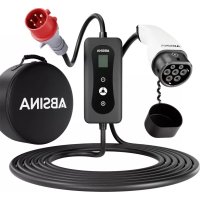
Brand : Absina
Model : Mode2
Category : Car charger