
TT 53 - Turntable MAJESTIC - Free user manual and instructions
Find the device manual for free TT 53 MAJESTIC in PDF.


| Product Type | Turntable with built-in speakers |
| Model | TT 53 |
| Dimensions (W x D x H) | 43.0 x 34.0 x 12.5 cm |
| Weight | 3.9 kg |
| Power Supply | AC 100-240V 50/60Hz, output DC 5V 2A (adapter included) |
| Speed Settings | 33, 45, 78 RPM (45 RPM adapter included) |
| Built-in Speakers | 2 x 2.5", RMS 2W x 2 |
| Wireless Audio | Bluetooth 5.4, range approx. 10 m |
| USB Playback & Recording | MP3 format, FAT16/FAT32, max 32 GB; records audio from turntable or Bluetooth |
| Audio Outputs | RCA line out (R/L); Wireless audio to external speakers/headphones |
| Autostop Function | Yes, switchable ON/OFF |
| Cartridge | With stylus (replaceable) |
| Tonearm | With raise/lower lever and lock hook |
| Dust Cover | Included, hinges for attachment |
| Controls | On/Off and volume knob, MODE button, Play/Pause, Next/Previous, REC, DEL |
| Indicators | LED status light |
| Compliance | CE, RED Directive 2014/53/EU, WEEE |
| Cleaning | Use a soft, dry cloth; avoid liquids and solvents |
| Safety Notes | Do not expose to rain or moisture; keep away from heat sources; no user-serviceable parts |
| Warranty | 24 months (consumer) or 12 months (commercial) from purchase; accessories 12 months |
Frequently Asked Questions - TT 53 MAJESTIC
User questions about TT 53 MAJESTIC
0 question about this device. Answer the ones you know or ask your own.
Ask a new question about this device
Download the instructions for your Turntable in PDF format for free! Find your manual TT 53 - MAJESTIC and take your electronic device back in hand. On this page are published all the documents necessary for the use of your device. TT 53 by MAJESTIC.
USER MANUAL TT 53 MAJESTIC
WIRELESS AUDIO IN INGRESSO E USCITA
natural_image
Line drawing of a vintage CD or DVD stand with open lid and circular dial (no text or symbols)New MAJESTIC S.p.A.
Via Rossi Martini, 41
26013 Crema (CR) – Italia
www.newmajestic.com
MADE IN CHINA
CE

To download the instruction manual frame QR code:

natural_image
Technical diagram of a device with two ports and a base panel, showing internal components (no text or symbols)CONFIGURAZIONE INIZIALE COLLEGAMENTO ALLA RETE
natural_image
Diagram of a robotic hand gripping a mechanical component, showing two different states of force or movement (no text or symbols present)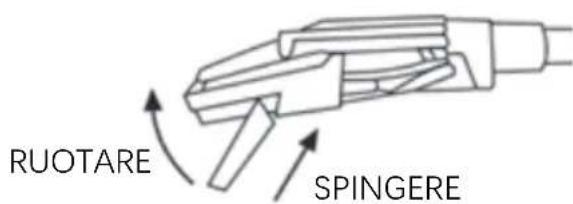
26013 CREMA(CR) Italy
www.newmajestic.com
VADC IN CHINA


MADE IN CHINA
MAJESTIC
NEW MAJESTIC S.P.A.
Via Rossi Martini 41
26013 CREMA(CR)
Italy
www.newmajestic.com


TURNTABLE Mod. TT 53 complies with the directive:
2014/53/EU – Direttiva RED/ RED Directive
TT 53 Instruction manual
33-45-78RPM TURNTABLE WIRELESS AUDIO IN AND OUT PLAYBACK AND RECORDING FROM USB
natural_image
Line drawing of a vintage CD or DVD disc with open lid and base plate (no text or symbols)New MAJESTIC S.p.A.
Via Rossi Martini, 41
26013 Crema (CR) - Italia
www.newmajestic.com
MADE IN CHINA


To download the instruction manual frame QR code:
For safe use and maximum performance, please read this manual carefully before use.
SAFETY WARNINGS
CAUTION: TO REDUCE THE RISK OF ELECTRIC SHOCK, DO NOT DISASSEMBLE THE APPLIANCE. THERE ARE NO USER SERVICEABLE PARTS. FOR REPAIRS, CONTACT QUALIFIED TECHNICAL PERSONNEL.
To prevent electric shock or fire hazard, do not expose to rain or moisture.

This symbol warns that before using the unit it is necessary to read the instruction manual carefully.
IMPORTANT NOTES
- Use must be permitted only to adults and responsible persons, adequately trained on damages deriving from incorrect use.
- This appliance can be used by children aged 8 and over under supervision or if they have received instructions regarding the use of the appliance in safety and if they understand the dangers involved. The cleaning and maintenance operations by the user must not be carried out by children unless they are older than 8 years and are supervised. Keep the appliance and its cord out of the reach of children under the age of 8.
- The appliances can be used by people with reduced physical, sensory or mental capabilities or with lack of experience and knowledge if they are supervised or if they have received instructions regarding the safe use of the appliance and understand the dangers involved.
• Children must not use the appliance as a toy. - Do not allow the appliance to be used by children or disabled people without supervision.
- Keep away from pets.
- Never use the appliance in places where the cable, plug and the product itself can come into contact with water or wet surfaces. Do not use the appliance outdoors, as rain could create short circuits. Do not touch the appliance with wet hands.
-
Avoid installing the unit in the locations listed below:
-
Locations exposed to direct sunlight or near heat-generating equipment, such as radiators;
– On top of other appliances that may radiate excessive heat; - Places that block ventilation or are humid or dusty;
-
Environments subject to constant vibration.
-
Do not place accessories with naked flames, such as lighted candles, on the appliance.
- Do not try to repair or intervene on the appliance yourself. Incorrect interventions or tampering can invalidate the guarantee. In case of damaged parts or suspected malfunction, stop using immediately and consult qualified personnel. Never immerse the appliance in water or other liquids. Do not place vessels filled with liquids (e.g. vases) on top of the apparatus.
- Do not touch the appliance with wet hands and do not place it near sinks, tubs or containers of liquids. Only use the product if it is in perfect condition. If the appliance has been immersed in water or is damaged, contact qualified personnel.
- The product should not be used if it has been dropped or if there are visible signs of damage.
- Exposure to high volume levels can cause hearing problems, including permanent damage. Susceptibility to hearing loss varies from person to person, however constant exposure to high volume levels is harmful to everyone. Moderate the volume level.
- Refer only to qualified service personnel to avoid voiding the warranty. For information and questions, contact the New Majestic SpA technical assistance service.
Gift Box content
| 1 TT 53 | 1 piece |
| 2 Power adapter | 1 piece |
| 3 Power cord | 1 piece |
| 4 Instruction manual | 1 piece |
| 5 Warranty card | 1 piece |
DESCRIPTION


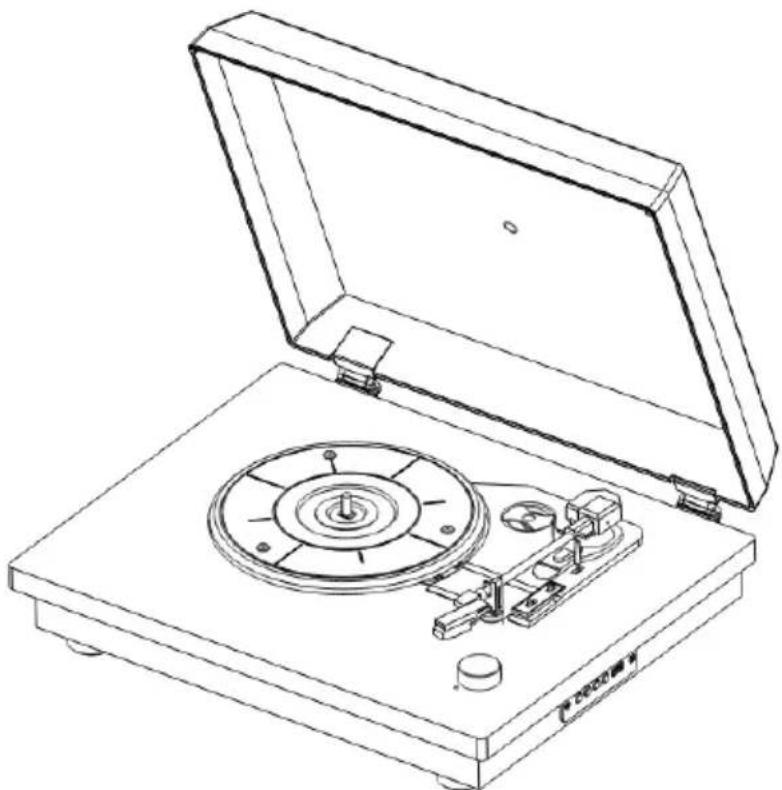
- Dust cover
- 45RPM Adaptor holder
- Tone arm
- Raise/lower lever
- Turntable arm lock hook
- Auto stop switch
- Speed selector for 33, 45 and 78 RPM
- Cartridge with Stylus
- USB port
- Mode: REC Key
- Pause/play key/DEL
- Next music
- Previous music
- Platter
- LED status
- On / Off switch and volume control
- Line out R channel
- Line out L channel
- DC-IN power jack (5V, 2A)
DUST COVER ASSEMBLE
Install the hinge clamp in the position of the dust cover slot in the correct direction (Hinges are in the attachment).
Then install the dust cover on the turntable, note the hinge clamp should be aligned with the hinge base on the turntable.

natural_image
Diagram of a device with two connectors and a base panel, showing internal components (no text or symbols)INITIAL SET-UP
MAINS CONNECTION
Plug in the provided power adapter and cable into the power outlet and the product, then turn the Power On/Off knob to the ON position (the status LED will light up). Adjust the desired volume by rotating the dedicated knob. To switch between sources, choosing between Wireless Audio and USB, briefly press the MODE button. To activate the turntable mode, position the tone arm over the platter. NOTE: The USB source is selectable only when a compatible USB device is inserted. To turn off the product, return the Power On/Off knob to the OFF position (the LED indicator will turn off).
PLAYING A RECORD
- Place the record on the platter. If using a 45 RPM record, use the provided adapter.
- Use the turntable speed selector to choose between 33, 45, or 78 revolutions per minute, depending on the type of vinyl you want to play.
- Remove the stylus guard by sliding it outward carefully to avoid damaging the needle (any breakages are not covered by warranty).
- Open the arm lock hook, lift the tonearm using the dedicated lever, and position it above the record. The platter will start rotating automatically.
- Lower the tone arm with the dedicated lever to engage the needle with the surface of the record and start playback.
- To stop or resume playback, raise or lower the tonearm using the dedicated lever.
- At the end of use, return the tonearm to the initial position, lower it using the dedicated lever, and lock it with the arm lock hook.
AUTOSTOP
The Autostop switch allows you to choose whether to stop the record at the end (ON) or let it spin (OFF).
On some types of discs the Autostop function may not be compatible and may stop the disc prematurely. In those cases, keep the Autostop function in the OFF position to avoid unwanted interruptions during playback.
Wireless Audio Mode
- Make sure the turntable arm is in the rest position.
- After turning on the product, the speaker will emit a sound to confirm that the Wireless Audio function is activated.
- Start the relevant function on the external device and search for the name “TT 53” (enter 0000 if required).
• After pairing, start playback from the external device. - Press the NEXT TRACK / PREVIOUS TRACK buttons to go to the next song / return to the previous song
- During music playback you can briefly press the Play/Pause button to pause playback. To resume playback, press the Play/Pause button again.
Audio playback on external devices via Wireless Audio
- Make sure the turntable arm is in the rest position.
- After turning on the product, triple click the MODE button to activate the search for
external devices, the status LED will quickly flash blue.
- Turn on a compatible external device (e.g. speakers, headphones, etc.), activate the Wireless Audio function and make sure it is in search mode.
- The turntable will automatically connect to the external device if compatible and the status LED will turn solid blue.
- Start playback on the turntable or USB stick.
USB mode
- Make sure the turntable arm is in the rest position.
- Insert a USB stick (containing songs in MP3 format) into the appropriate input after turning on the product, playback will start automatically.
- Press the PLAY / PAUSE button to pause / resume playback.
- Press the NEXT TRACK / PREVIOUS TRACK buttons to go to the next song / return to the previous song or hold them down for a long time to fast forward / fast rewind through the song being played.
Note:
- Compatibility with all commercially available USB storage devices cannot be guaranteed.
- External devices that require a rated voltage greater than 5V and a rated current greater than 200mA are not supported.
- If you use a USB extension cable, the connected storage device may not be recognized or work properly.
- Only use USB storage devices formatted with the FAT16/FAT32 file system.
Vinyl/Wireless Audio Recording on USB
- Insert a USB stick into the appropriate slot and start playback from the source you want to record (Turntable / Wireless Audio).
- Long press the REC button to start recording, a sound will confirm the start of recording.
- To stop recording, long press the REC button again, a double sound will confirm the end of recording.
- The recordings are saved in the “RECORD” folder of the inserted USB stick.
- To play saved recordings, select the USB source and long press the MODE button.
Deleting recordings from USB
Start playback of the recording to be deleted then press and hold the DEL button, an acoustic signal will confirm the deletion.
RCA audio output
It is possible to connect the device to an external amplifier or amplified speakers via the RCA output located on the rear of the product and an RCA audio cable (not included).
STYLUS REPLACEMENT

natural_image
Diagram showing two mechanical components with arrows indicating motion or assembly (no text or symbols)To remove the stylus, firmly grasp the tonearm and plastic stylus holder with two fingers and gently pull the red stylus holder towards you, away from the cartridge.

To reposition the stylus, hold the sides of the red stylus holder, make sure the stylus is facing downwards, and gently push the holder at a minimal angle towards the head at the end of the tonearm until it is securely fastened.
TROUBLESHOOTING
| Defect | Possible cause | Solution |
| No sound when the product is turned on. | The selected source is wrong.Volume too low.Playback paused. | Select the correct source.Increase the volume level.Start playback. |
| Distorted sound. | Volume too high. | Decrease the volume level. |
| No sound after inserting a USB device. | Device not inserted correctly.Non supported format. | Verify that the USB device is inserted correctly.Check that the file you want to play is in MP3 format and that the connected device has a FAT32 type file system. |
| The device makes noises/rustles. | There are electronic devices (amplified speakers, chargers, etc...) too close to the speaker. | Move the product away from other electronic devices. |
TECHNICAL SPECIFICATIONS
Built-in 2 x 2.5" speakers
RMS power: 2Wx2 RMS
Wireless Audio Technology V5.4
Wireless Audio Distance approximately 10m
USB Supported file systems: FAT16/FAT32
Max capacity: 32GB
USB supported formats: MP3
Supported MP3 recording format 128 kbps
Support for 33/45/78 rpm records (adapter for 45 rpm records included)
Autostop function
RCA audio output
Compatible with external speakers/headphones via Wireless Audio
Power supply AC 100 - 240V 50/60Hz - DC 5V 2A (included)
Unit sizes 43.0 (W) x 34.0 (D) x 12.5 (H) cm
Weight 3.9kg
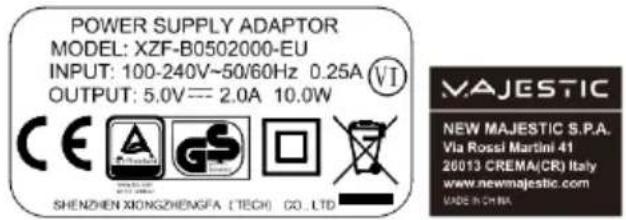


WEEE Logo (Waste electrical and electronic equipment)
Six levels of energy efficiency


Class II, double insulation
Intertek logo
INFORMATION TO USERS OF DOMESTIC APPLIANCES
Pursuant to art. 25 Paragraph 1 of Legislative Decree 14 March 2014, n. 49 "Implementation of Directives 2011/65/EU and 2012/19/EU relating to the reduction of the use of hazardous substances in electrical and electronic equipment, as well as waste disposal".
The crossed-out bin symbol shown on the appliance or on its packaging indicates that the product at the end of its useful life must be collected separately from other waste. The user must therefore deliver the equipment that has reached the end of its life to the appropriate separate collection centers for electronic and electrotechnical waste, or return it to the retailer when purchasing a new equipment of an equivalent type, on a one to one basis.
Adequate differentiated collection for the subsequent sending of the decommissioned equipment to environmentally compatible recycling, treatment and disposal helps to avoid possible negative effects on the environment and health and promotes the reuse and/or recycling of the materials of which the equipment is made.
Illegal disposal of the product by the user involves the application of the sanctions set out in the current legislation.
Any batteries or rechargeable batteries contained in the device must be disposed of separately in the appropriate containers for the collection of used batteries.

Disposal of used batteries must take place at the appropriate separate collection centers or according to local regulations. Batteries compliant with directive 2013/56/EC.
WEEE eco-fee paid where due - EEE Register No.: IT08020000001647
BATTERY eco -contribution paid where due - BATTERY Register No.: IT19070P00005533
GENERAL WARRANTY CONDITIONS FOR PRODUCTS OF New MAJESTIC SpA
Dear Customer, Thank you for your purchase and we remind you that the product complies with current construction and safety regulations.
- Should anomalies or defects in the product be found, New Majestic SpA offers a conventional Guarantee subject to the conditions set out here (specifying that the conventional Guarantee does not affect the consumer's rights pursuant to Legislative Decree no. 206 of 06/09/2005). The Warranty exclusively refers to the free repair or replacement of the individual components or of the entire good recognized as defective in manufacturing.
- The Warranty period will not be renewed or extended following subsequent resale, repair or replacement of the product itself.
- The parts repaired, replaced or the total exchange of the product will be guaranteed for a period of 60 days starting from the date of the repair or replacement and naturally for the remaining duration of the Guarantee itself.
- The Guarantee is valid from the date proven by a valid fiscal document (receipt or purchase invoice) for a period of 24 months in case of purchase with fiscal receipt and 12 months in case of purchase with fiscal invoice (VAT number).
- There are some goods which, due to their normal characteristics, are perishable over time or subject to wear and tear deriving from use, therefore, for the accessories included in the sales package, the Warranty is valid for 12 months.
- A rechargeable accumulator is considered defective and can be replaced under the 12-month warranty only when it is interrupted, i.e. it no longer supplies energy and the voltage at its ends is Zero Volt. In the event that the ability to deliver energy is reduced compared to the new product (consumption/wear) the Warranty period will be 6 months.
Not covered by Warranty:
- Deterioration due to wear of the aesthetic parts and of all the components that may be defective due to negligence or negligence in use, incorrect maintenance or circumstances that cannot be traced back to manufacturing defects of the appliance.
- User manuals, third party software, configurations, applications or data downloaded by the customer.
- Defects caused by improper use of the product (drops, pressure, deformation or use of sharp objects).
- Opening, modification or repair of the product by persons other than the Authorized Assistance Centre.
- Serial numbers, date of manufacture, barcode or IMEI * that appear to be erased, altered or illegible.
For interventions under Warranty, please contact one of the Authorized Service Centres
of New Majestic SpA, the complete list of which can be consulted on the website www.newmajestic.com, or at the point of sale where the product was purchased, by delivering the duly completed Warranty coupon and attaching the receipt relating to the purchase.
WARNING:
It is advisable to keep both the packaging and all the accessories contained therein intact, since in case of sending to the technical laboratory it is better to use the original packaging with all its accessories.
New Majestic SpA
- CONFIGURAZIONE INIZIALE COLLEGAMENTO ALLA RETE
- MAJESTIC
- 2014/53/EU – Direttiva RED/ RED Directive
- TT 53 Instruction manual
- 33-45-78RPM TURNTABLE WIRELESS AUDIO IN AND OUT PLAYBACK AND RECORDING FROM USB
- SAFETY WARNINGS
- IMPORTANT NOTES
- DUST COVER ASSEMBLE
- INITIAL SET-UP
- MAINS CONNECTION
- PLAYING A RECORD
- AUTOSTOP
- Wireless Audio Mode
- Audio playback on external devices via Wireless Audio
- USB mode
- Note:
- Vinyl/Wireless Audio Recording on USB
- Deleting recordings from USB
- RCA audio output
- STYLUS REPLACEMENT
- TROUBLESHOOTING
- TECHNICAL SPECIFICATIONS
- INFORMATION TO USERS OF DOMESTIC APPLIANCES
- GENERAL WARRANTY CONDITIONS FOR PRODUCTS OF New MAJESTIC SpA
- Not covered by Warranty:
- WARNING:
Brand : MAJESTIC
Model : TT 53
Category : Turntable