HPm - Receiver SPL - Free user manual and instructions
Find the device manual for free HPm SPL in PDF.


| Product Type | Headphone Monitoring Amplifier (500 Series Module) |
| Brand | SPL |
| Model | HPm |
| Dimensions (Approx.) | 76 x 133 x 152 mm (3" x 5.25" x 6") |
| Weight | 1.76 lbs (0.8 kg) |
| Power Supply | Powered by 500 Series rack |
| Frequency Range (-3 dB) | 10 Hz – 100 kHz |
| Common Mode Rejection (1 kHz, 0 dBu) | >82 dB |
| THD + N (0 dBu, 10 Hz – 22 kHz) | 0.03% |
| Noise (A-weighted) | -92.3 dBu |
| Dynamic Range | 113 dB |
| Input Impedance (Balanced) | 10 kΩ |
| Output Impedance (Balanced) | 150 Ω |
| Max Output Power (600 Ω) | +18 dBu |
| Max Output Power (300 Ω) | +15 dBu |
| Max Output Power (32 Ω) | +5 dBu |
| Headphone Outputs | 2 x 1/4" (6.35 mm) TRS Jack |
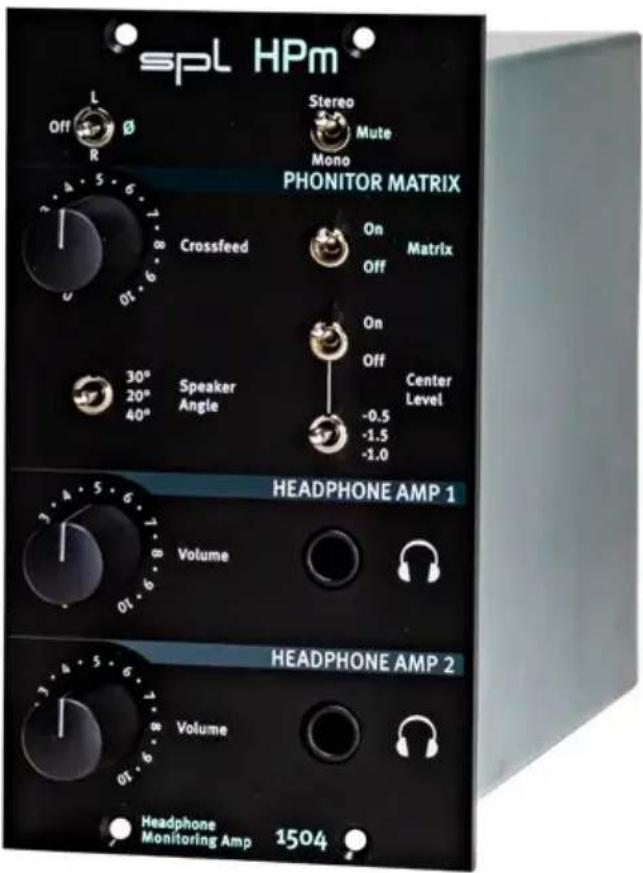
| Phonitor Matrix | Crossfeed, Speaker Angle (20° / 30° / 40°), Center Level (-0.5 / -1.0 / -1.5 dB) |
| Phase Inversion | Left or right channel invertible (180°) |
| Stereo / Mono / Mute | Switchable |
| Volume Controls | Separate pots for Headphone Amp 1 and 2 |
| Cleaning | Dry cloth, no solvents or acids |
| Safety | Do not open; avoid water, fire, lightning; qualified service only |
| Spare Parts & Repairability | No user-serviceable parts; contact qualified professional |
| Environmental Compliance | WEEE-Reg.-No. 973 349 88; dispose according to EU Directive 2012/19/EU |
Frequently Asked Questions - HPm SPL
User questions about HPm SPL
0 question about this device. Answer the ones you know or ask your own.
Ask a new question about this device
Download the instructions for your Receiver in PDF format for free! Find your manual HPm - SPL and take your electronic device back in hand. On this page are published all the documents necessary for the use of your device. HPm by SPL.
USER MANUAL HPm SPL
HPm
Headphone Monitoring Amplifier
Headphone monitoring amplifier with Phonitor Matrix for two headphones as 500 Series module
Introduction
Developer
Bastian Neu
Version 2.0 - 12/2022
This manual contains a description of the product. In no way it represents a guarantee of particular characteristics or results of use. The information in this document has been carefully compiled and verified and, unless otherwise stated or agreed upon, correctly describes the product.
Specifications are subject to change without notice.
Specifications
General
| Frequency range (-3 dB): 10 Hz – 100 kHz |
| Common mode rejection (1 kHz, 0 dBu): >82 dB |
| THD + N (0 dBu, 10 Hz – 22 kHz): 0.03% |
| Noise (A-weighted): -92.3 dBu |
| Dynamic range: 113 dB |
Input & Output (balanced)
| Input impedance: 10 kΩ |
| Output Impedance: 150 Ω |
Headphone Outputs, 1/4" (6,35 mm) TRS Jacks
| Max output power (600 Ω) +18 dBu |
| Max output power (300 Ω) +15 dBu |
| Max output power (32 Ω) +5 dBu |
Scope of Delivery
HPm module, 500 Series
Manual
Measurement & Weight
Double-slot module, 500 Series
Weight: 1.76 lbs (0.8 kg)
Please keep the original packaging. In a service case the original packaging ensures a safe transport.
Installation
Installation into a 500 Series rack:
- Please read the manual that comes with the 500 Series rack. You should receive all necessary information for the installation process.
- For the installation or exchange of HPm, your 500 Series rack should be switched off and the power cable should not be connected.
- Insert the HPm module into two adjacent free slots of your rack. Make sure the connectors of the HPm is precisely aligned with the rack connectors.
- Press the HPm module carefully into the rack connectors and tighten the screws.
- Connect the HPm module with your audio environment using the connections from your 500 Series rack.
- Connect Headphones.
- Insert the power cable to the 500 Series rack and switch it on.
Control Elements
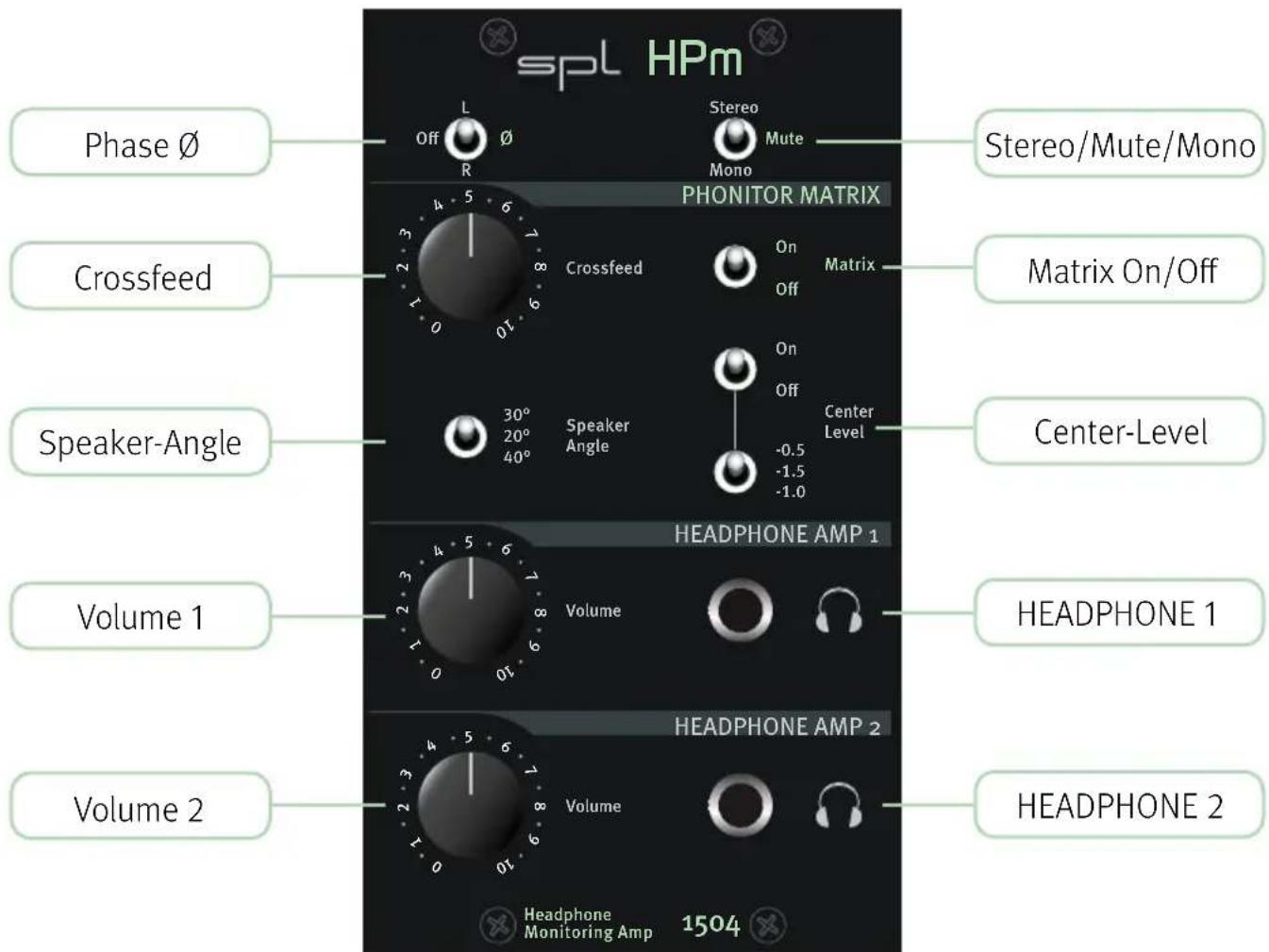
Phase ∅
With the phase inversion switch the phase the of the left or right channel can be inverted (180°).
Stereo/Mono/Mute
The audio signal can be switched between stereo and mono. In the Mute position, the headphone outputs are muted.
Crossfeed
The Crossfeed parameter of the HPm is continuously adjustable via the crossfeed control.
Matrix On/Off
With the Matrix switch, the Phonitor Matrix (Crossfeed, Speaker Angle, Center Level) can be activated or deactivated.
Speaker Angle
The Angle parameter can be adjusted in three settings: 20^ , 30^ and 40^ . The studio standard is 30^ .
Center Level
To make the listening experience even more perfect, the level of the center of the stereo image needs to be attenuated when the Phonitor Matrix is active. This ensures that not only the position of all sound sources is correct but also their volume. With HPm, this parameter, which we call “Center” in the Phonitor Matrix, can also be adjusted in three settings. You can choose between an attenuation of -0.5dB, -1 dB or -1.5 dB. The standard for an authentic representation of the stereo image is -1 dB.
HEADPHONE AMP 1
With the Volume poti for the HEADPHONE AMP 1 the volume for headphone 1 can be adjusted.
HEADPHONE AMP 2
With the Volume poti for the HEADPHONE AMP 2 the volume for headphone 2 can be adjusted.
Security Advices
Before starting up the device:
- Read thoroughly and follow the security advices.
- Read thoroughly and follow the manual.
- Observe all warning instructions on the device ad on your 500 Series rack.
- Please keep the user manual as well as the security advices in a safe place for future reference.
- Module installation and replacement should only be carried out by qualified technicians.
- Please refer to and heed the safety and assembly instructions of your 500 series rack.

Warning
Always follow the security advices listed below to avoid serious injuries or even deadly accidents due to electric shocks, short circuit, fire or other dangers. The following are examples of such risks and do not represent an exhaustive list:
Do not open
This device contains no user-serviceable parts. Do not open the device or attempt to disassemble the internal parts or modify them in any way. If it should appear to be malfunctioning, turn off the power of your 500 Series rack immediately, unplug the power cord from the mains socket outlet and have it inspected by a qualified professional.
Water warning
Do not expose the device to rain, or use it near water or in damp or wet conditions, or place anything on it (such as vases, bottles or glasses) containing liquids which might spill into any openings. If any liquid such as water seeps into the device, turn off the power of your 500 Series rack immediately and unplug the power cord from the mains socket outlet. Then have the device inspected by a qualified professional.
Fire warning
Do not put burning items, such as candles, on the unit. A burning item may fall over and cause a fire.
Lightning
Before thunderstorms or other severe weather, disconnect your 500 Series rack from the mains socket outlet; do not do this during a storm in order to avoid life threatening lightning strikes. Similarly, disconnect all the power connections of other devices, antenna and phone/network cables which may be interconnected so that no damage results from such secondary connections.
If you notice any abnormality
When one of the following problems occur, immediately turn off the power switch and disconnect the electric plug of your 500 Series rack from the mains socket outlet. Then have the device inspected by a qualified professional.
- The device emits unusual smells or smoke.
- An object has fallen into the unit.
- There is a sudden loss of sound during the use of the device.

Caution
Always follow the basic precautions listed below to avoid the possibility of physical injury to you or others, or damage to the device or other property. These precautions include, but are not limited to, the following:
Location
Do not place the device in a location where it may come into contact with corrosive gases or salty air. This may result in malfunction.
Before moving the device, remove all connected cables.
Connections
Before connecting the device to other devices, power down all devices. Before power on or off the devices, set all volume levels to minimum.
Only use appropriate cables to connect the device with other devices. Make sure that the cables you use are intact and comply with the electrical specifications of the connection. Other connections can lead to health risks and damage the equipment.
Handling
Operate the controls and switches only as described in the manual. Incorrect adjustments outside safe para meters can lead to damage.
Never use excessive force on the switches or controls.
Do not insert your fingers or hands in any gaps or openings of the device.
Avoid inserting or dropping foreign objects (paper, plastic, metal, etc.) into any gaps or openings of the device. If this happens, power down immediately and unplug the power cord from the mains socket outlet. Then have the device inspected by a qualified professional.
Do not expose the device to excessive dust or vibrations or extreme cold or heat (such as direct sunlight, near a heater or in a car during the day) to prevent the possibility of causing damage to the housing, the internal components or unstable operation.
If the ambient temperature of the device suddenly changes, condensation can occur (if for example the device is relocated or is affected by a heater or air conditioning).
Using the device while condensation is present may result in malfunction. Do not power on the device for a few hours until the condensation is gone. Only then it is safe to power on.
Cleaning
Disconnect the device from your mains socket outlet before cleaning.
Do not use any solvents, as these can damage the chassis finish. Use a dry cloth, if necessary, with an acid-free cleaning oil.
Disclaimer
The company names and product names in this manual are the trademarks or registered trademarks of their respective companies.
SPL and the SPL Logo are registered trademarks of SPL electronics GmbH.
SPL cannot be held responsible for damage caused by improper use or modification of the device or data that is lost or destroyed.
Notes on Environmental Protection

At the end of its operating life, this product must not be disposed with regular household waste but must be returned to a collection point for the recycling of electrical and electronic equipment.
The wheelie bin symbol on the product, user manual and packaging indicates that.
For proper treatment, recovery and recycling of old products, please take them to applicable collection points in accordance with your national legislation and the Directives 2012/19/EU.
The materials can be reused in accordance with their markings. Through reuse, recycling of raw materials, or other forms of recycling of old products, you are making an important contribution to the protection of our environment.
Your local administrative office can advise you of the responsible waste disposal point.
This directive only applies to countries inside the EU. If you wish to discard devices outside the EU, please contact your local authorities or dealer and ask for the correct method of disposal.
WEEE-Reg-No.: 973 349 88
Support & Contact
help.spl.audio
SPL electronics GmbH
Sohlweg 80
SPL can of course also be found on Facebook, Instagram, Twitter and Youtube and we are happy to welcome new friends, followers and viewers.
Website & Blog: www.spl.audio
Videos: youtube.spl.audio
Instagram: instagram.spl.audio
Twitter: twitter.spl.audio
Facebook: facebook.spl.audio
© 2022 SPL electronics GmbH
This manual/document is protected by copyright. All rights, technical modifications and printing errors reserved.
Copying, reproduction, translation or conversion into any electronic medium or machine-readable form in whole or in part is only permitted with the express written consent of SPL electronics GmbH.
Declaration of CE Conformity
The construction of this unit is in compliance with the standards and regulations of the European Community.
HPm
© 2022 SPL electronics GmbH
- HPm
- Headphone Monitoring Amplifier
- Introduction
- Developer
- Version 2.0 - 12/2022
- Specifications
- Scope of Delivery
- Measurement & Weight
- Installation
- Installation into a 500 Series rack:
- Control Elements
- Phase ∅
- Stereo/Mono/Mute
- Crossfeed
- Matrix On/Off
- Speaker Angle
- Center Level
- HEADPHONE AMP 1
- HEADPHONE AMP 2
- Security Advices
- Before starting up the device:
- Warning
- Do not open
- Water warning
- Fire warning
- Lightning
- If you notice any abnormality
- Caution
- Location
- Connections
- Handling
- Cleaning
- Disclaimer
- Notes on Environmental Protection
- Support & Contact
- Declaration of CE Conformity
Brand : SPL
Model : HPm
Category : Receiver