
KidJamz KJ45BT - Headphones MEE audio - Free user manual and instructions
Find the device manual for free KidJamz KJ45BT MEE audio in PDF.


| Product Type | Kids Bluetooth Headphones |
| Brand | MEE audio |
| Model | KidJamz KJ45BT |
| Connectivity | Bluetooth 5.0 |
| Wireless Range | Up to 10 meters (33 feet) |
| Battery Life | Up to 24 hours playtime |
| Charging Time | Approximately 2 hours |
| Charging Port | Micro USB |
| Driver Size | 40mm |
| Frequency Response | 20Hz - 20kHz |
| Impedance | 32 ohms |
| Headphone Type | Over-ear, closed-back |
| Weight | Approx. 150 grams |
| Dimensions | Adjustable headband, foldable design |
| Microphone | Built-in microphone for calls |
| Controls | On-ear volume and playback controls |
| Safety | Volume limited to 85dB for hearing safety |
| Material | Padded headband and ear cushions |
| Cleaning Instructions | Wipe with a soft, dry cloth. Do not use liquid cleaners. |
| Spare Parts | Replacement ear cushions available |
| Warranty | 1 year limited warranty |
| Included Accessories | Micro USB charging cable, audio cable (3.5mm), user manual |
Frequently Asked Questions - KidJamz KJ45BT MEE audio
User questions about KidJamz KJ45BT MEE audio
0 question about this device. Answer the ones you know or ask your own.
Ask a new question about this device
Download the instructions for your Headphones in PDF format for free! Find your manual KidJamz KJ45BT - MEE audio and take your electronic device back in hand. On this page are published all the documents necessary for the use of your device. KidJamz KJ45BT by MEE audio.
USER MANUAL KidJamz KJ45BT MEE audio
WIRELESS SAFE LISTENING
HEADPHONES FOR KIDS
model: KJ45BT
www.MEEaudio.com/KidJamz
YOUR KIDJAMZ
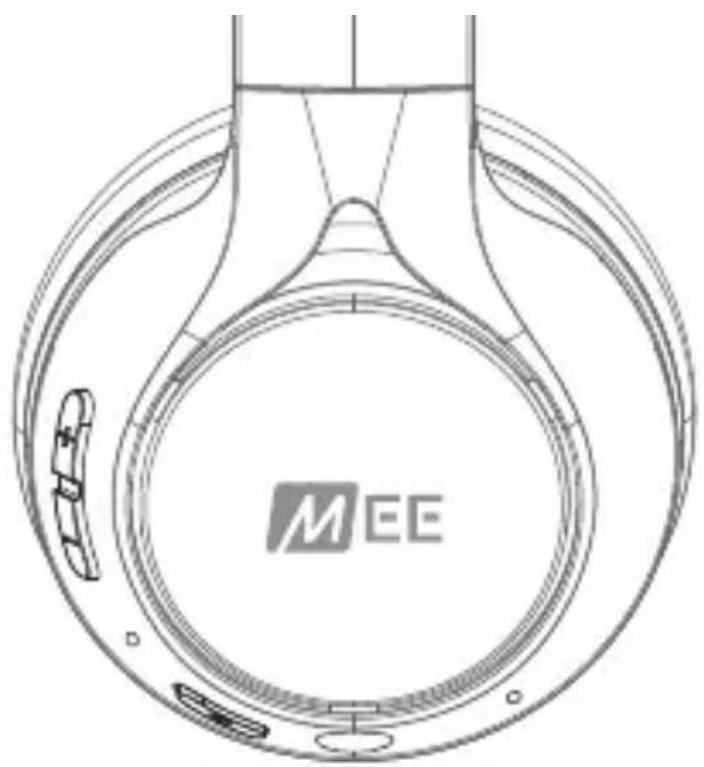
Right EarcupLeft Earcup

A B C D E F G
A. USB-C charging port
B. Volume up / skip track button (+)
C. Volume down / previous track button (-)
D. Status indicator light
E. On / off / multifunction button ( ⏻ )
F. 3.5mm audio jack
G. Microphone
GETTING STARTED
Charge for 2 hours. The indicator will turn blue once fully charged

Press and hold the multifunction ( ⏻ ) button for approximately 5 seconds until you hear the KidJamz say “Pairing” and the light flashes red and blue.

natural_image
Line drawing of a pair of white headphones with earbuds and headband (no text or symbols)Select "MEE audio KidJamz" from the Bluetooth menu of your device

natural_image
Technical line drawing of a circular mechanical component with MEE branding, no readable text or symbols beyond the logo[TAP ALL THREE] - Volume limiter on / off
Volume Up / Skip Track button (+)
[TAP] - Increase volume [HOLD 2 sec] - Next track
Volume Down / Previous Track button ( - )
[TAP] - Decrease volume [HOLD 2 sec] - Previous track
Multifunction button ( ⏻ )
[HOLD 2 sec] - Power on [TAP] - Play / pause / answer / hang up call [HOLD 5 sec] - Power off
[HOLD 2 sec] - Reject incoming call
[TAP twice] - Siri®/ Google Assistant™/ voice command*
ABOUT OUR VOLUME-LIMITING TECHNOLOGY
Regular headphones and earphones can easily exceed safe listening volumes by as much as 30% when used with portable audio devices, and may cause permanent hearing damage with lengthy or repeated exposure. KidJamz headphones utilize an integrated volume limiter to maintain the sound pressure level (SPL) at 85dB as recommended by most medical organizations, protecting young ears and helping create lifelong good listening habits.
Note: 85dB limit is based on average SPL measurement of a typical portable device's audio output (1mW). While the limiter is designed to restrict the volume to a safe level with a typical portable audio device, some high power audio systems may still produce sound levels that are above safe levels for children. It is important for parents and guardians to periodically check children's use of these headphones and ensure that they are being used in a safe and responsible manner.
SAFE LISTENING VOLUME
FOR ALL AGES: 85 dB

bar
| Category | Value (dB) | |---|---| | quiet | 63 | | 85db | 74 | | 8 HR SAFE | 85 | | 96db | 96 | | 30 MIN SAFE | 30 | | 1 MIN SAFE | 107 | MAX VOL FOR MP3 PLAYERSVOLUME LIMITER ON/OFF CONTROLS
KidJamz headphones allow the volume limiter to be disabled in noisy environments.
There are two options: volume-limited (85dB) and unlimited.
To disable and re-enable the volume limiter, press the ⏻, + and - buttons simultaneously.
Note: Using headphones at higher volume levels for extended periods of time may result in listening fatigue and hearing damage. When using the KidJamz in unlimited mode, set the volume on the media device you are using to the lowest level before connecting the headphones, then gradually raise the volume until an acceptable level is reached. Children should take a 10-minute break every hour of listening in unlimited mode and switch back to the volume-limited mode when possible.

flowchart
graph TD
    A["+"] --> B["-"]
    B --> C["⊕"]
    C --> D["Volume limiter on / off"]
    style A fill:#fff,stroke:#000
    style B fill:#fff,stroke:#000
    style C fill:#fff,stroke:#000
    style D fill:#fff,stroke:#000
TROUBLESHOOTING
Factory Reset
Press and hold the + and ⏻ buttons for 5 seconds.
All previously paired devices will be cleared from memory and a new pairing will need to be created.

PRESS AND HOLD BOTH FOR 5 SECONDS
TROUBLESHOOTING (CONTINUED)
Safety and Care
- Clean with a soft cloth, damp with diluted soap water solution if necessary. Do not use chemical cleaners
- The lifetime of the battery will be significantly reduced if your device is not charged for a long time. It is recommended to charge your device at least once a month.
- Do not expose to liquids. If the device comes in contact with liquids, quickly wipe away. If submerged in water, do not power the device on until completely dried.
Note: liquid submersion voids the warranty.
Warranty
MEE audio products purchased from authorized resellers are covered by a 1-year manufacturer warranty. For more information, contact your local MEE audio dealer or visit
MEEaudio.com/support.
WARNINGS
Choking hazard: small parts. Not for children under 3 years.
Keep the packaging out of the reach of children.
Do not use while driving a car, cycling, operating machinery, or performing other activities that require hearing surrounding sounds.
This device is designed and manufactured to operate within its defined design limits. Misuse may result in electric shock or fire.
Read and follow these instructions carefully.
- If submersed in water, do not turn the device on until completely dried. Note: liquid submersion voids the warranty.
- Danger of explosion or fire if batteries are damaged. Keep away from direct sunlight, naked flames, flammable gasses, or heat sources such as radiators or stoves.
- Battery performance will be severely decreased when stored in extreme temperatures: below -10°C/14°F or above 45°C/113°F including direct sunlight.
- Do not use around flammable gasses as fire or explosion may occur.
- There are no user replaceable/reparable parts in the device. Disassembling it will void your warranty.
- Only use attachments/accessories specified by the manufacturer.
Changes or modifications to this unit not expressly approved by MEE audio could void the user's authority to operate the equipment.
MEE audio and its logo are registered trademarks of S2E, Inc.
All rights reserved.
Siri ^® is a registered trademarks of Apple Inc.
Android ^™ is a registered trademark of Google Inc.
QUESTIONS?
WE'RE HERE TO HELP!
Phone Support: 626-965-1008
Monday \~ Friday 9:00 am to 5:00 pm PST
Email Support: support@MEEaudio.com
All emails are responded to within 2 business days
- WIRELESS SAFE LISTENING
- HEADPHONES FOR KIDS
- YOUR KIDJAMZ
- GETTING STARTED
- Volume Up / Skip Track button (+)
- Volume Down / Previous Track button ( - )
- Multifunction button ( ⏻ )
- ABOUT OUR VOLUME-LIMITING TECHNOLOGY
- VOLUME LIMITER ON/OFF CONTROLS
- TROUBLESHOOTING
- Factory Reset
- TROUBLESHOOTING (CONTINUED)
- Safety and Care
- Warranty
- WARNINGS
- QUESTIONS?
- WE'RE HERE TO HELP!
Brand : MEE audio
Model : KidJamz KJ45BT
Category : Headphones