AirHooks Pro - Headphones MEE audio - Free user manual and instructions
Find the device manual for free AirHooks Pro MEE audio in PDF.


Pick your language and provide your email: we'll send you a specifically translated version.
| Product Type | Wireless Earbuds with Ear Hooks |
| Model | AirHooks Pro |
| Brand | MEE audio |
| Connectivity | Bluetooth 5.0 |
| Driver Size | 6 mm |
| Frequency Response | 20 Hz – 20 kHz |
| Impedance | 16 Ω |
| Battery Life (Earbuds) | 8 hours |
| Battery Life (with Case) | 32 hours |
| Charging Time | 1.5 hours |
| Charging Port | USB-C |
| Water Resistance | IPX5 (sweatproof) |
| Weight (Each Earbud) | 4.5 g |
| Weight (Charging Case) | 36 g |
| Dimensions (Charging Case) | 60 × 40 × 25 mm |
| Controls | Touch (play/pause, volume, track skip, voice assistant) |
| Microphone | Built-in, with noise reduction |
| Compatibility | iOS, Android, Windows, Mac |
| Included Accessories | USB-C cable, silicone ear tips (3 sizes), ear hooks, charging case |
| Special Features | Low latency mode, passive noise isolation |
Frequently Asked Questions - AirHooks Pro MEE audio
How long does the battery last on the AirHooks Pro?
The earbuds provide up to 8 hours of playback on a single charge, and the charging case extends total listening time to 32 hours.
How do I pair the AirHooks Pro with my phone?
Remove the earbuds from the charging case. They will enter pairing mode automatically. On your phone, enable Bluetooth and select "AirHooks Pro" from the list. If pairing fails, press and hold the touch sensor on both earbuds for 5 seconds until the LED flashes.
Are the AirHooks Pro waterproof?
They have an IPX5 rating, meaning they are sweatproof and can withstand light rain, but should not be submerged in water.
How do I wear the earbuds correctly?
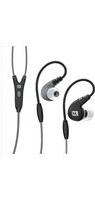
Place the ear hook over your ear, then gently twist the earbud into your ear canal. Choose the correct ear tip size for a secure fit. The ear hooks provide additional stability during movement.
How do I charge the AirHooks Pro?
Place the earbuds back into the charging case. Connect the included USB-C cable to the case and a power source. The case LED will indicate charging status. A full charge takes about 1.5 hours.
What controls are available on the earbuds?
Each earbud has a touch sensor. Tap once to play/pause, twice to skip forward, three times to go back, and long press to adjust volume or activate voice assistant (depending on settings).
Can I use the AirHooks Pro with non-Apple devices?
Yes, they are compatible with any Bluetooth device, including Android, Windows, and Mac. Simply pair via Bluetooth settings.
What is the warranty period for MEE audio AirHooks Pro?
MEE audio offers a 1-year limited warranty against defects in materials and workmanship. Retain your purchase receipt for warranty claims.
How do I reset the AirHooks Pro?
Place the earbuds in the charging case. Press and hold the touch sensors on both earbuds for 10 seconds until the LED flashes red and blue. This clears the pairing list and restores factory settings.
Do the AirHooks Pro have noise cancellation?
They feature passive noise isolation provided by the silicone ear tips, which block ambient noise. They do not have active noise cancellation (ANC).
User questions about AirHooks Pro MEE audio
0 question about this device. Answer the ones you know or ask your own.
Ask a new question about this device
No questions yet. Be the first to ask one.
Download the instructions for your Headphones in PDF format for free! Find your manual AirHooks Pro - MEE audio and take your electronic device back in hand. On this page are published all the documents necessary for the use of your device. AirHooks Pro by MEE audio.
USER MANUAL AirHooks Pro MEE audio

Manual assistant
Powered by Anthropic
Waiting for your message
Product information
Brand : MEE audio
Model : AirHooks Pro
Category : Headphones