BCPL22M1 - Lock Be Cool - Free user manual and instructions
Find the device manual for free BCPL22M1 Be Cool in PDF.


| Product Type | Fingerprint Padlock |
| Model | BCPL22M1 |
| Brand | Be Cool |
| Dimensions (H x W x D) | 76 x 46 x 13 mm |
| Weight | 96 g |
| Material | Zamak alloy |
| Shackle Diameter | 5 mm |
| Unlocking Method | Fingerprint (up to 10 fingerprints) or Emergency Morse Code |
| Battery Type | Rechargeable Li-ion, 3.7V, 140 mAh (built-in) |
| Charging Port | Micro USB |
| Input Rating | 5V / 100 mA |
| Charging Time | Approx. 2 hours |
| Standby Time | Up to 6 months |
| Ingress Protection | IP56 (indoor and protected outdoor) |
| Operating Temperature | -10°C to 50°C |
| Fingerprint Recognition | Self-developed micro-chip, unlock < 1s |
| Emergency Code | 2-digit Morse code (default 33) |
| Factory Reset | Yes, via long press after unlocking until red light |
| Indicators | LED (blue, green, red, white) for status |
| Maintenance | Keep sensor clean, grease-free and dry; avoid salt water |
| Spare Parts / Repairability | Battery not replaceable; repair via authorized workshop |
Frequently Asked Questions - BCPL22M1 Be Cool
User questions about BCPL22M1 Be Cool
0 question about this device. Answer the ones you know or ask your own.
Ask a new question about this device
Download the instructions for your Lock in PDF format for free! Find your manual BCPL22M1 - Be Cool and take your electronic device back in hand. On this page are published all the documents necessary for the use of your device. BCPL22M1 by Be Cool.
USER MANUAL BCPL22M1 Be Cool
natural_image
Metallic padlock with a fingerprint symbol on its shank, isolated on white background (no text or symbols)natural_image
Metallic padlock with a fingerprint symbol on its side (no text or symbols present)
Self-Developed Micro-Chip

Fingerprint Unlock < 1s
USB
Rechargeable

Weight Only 96g
CONGRATULATIONS!
THANK YOU FOR CHOOSING THIS PRODUCT FROM BE COOL.
BE COOL

TABLE OF CONTENTS
| Important information on safety, location and electrical connection |
| Scope of delivery |
| Description of the device, display/control panel |
| Quick guide |
| Commissioning and function |
| Technical information |
| Recycling, disposal, declaration of conformity |
| Warranty |
PLEASE READ THE OPERATING INSTRUCTIONS CAREFULLY BEFORE STARTING ASSEMBLY, INSTALLATION, OPERATION OR MAINTENANCE. PROTECT YOURSELF AND OTHERS BY FOLLOWING THE SAFETY INSTRUCTIONS. FAILURE TO FOLLOW INSTRUCTIONS COULD RESULT IN PERSONAL INJURY AND/OR PROPERTY DAMAGE AND/OR LOSS OF WARRANTY COVERAGE.
Intended use
The product is mainly used for access protection of doors (e.g. of an office) and or containers.
When you place a finger stored in the system on the fingerprint sensor, the lock is unlocked.
The product is suitable for indoor and protected outdoor operation (IP56).
For safety reasons, you must not convert and/or modify the product.
Read the operating instructions carefully and keep them.
Only pass the product on to third parties together with the operating instructions.
BE COOL
IMPORTANT INFORMATION ON SAFETY, STANDARD AND ELECTRICAL CONNECTION
- The fingerprint sensor is a sensitive component and should always be kept clean, grease-free and dry for best possible function.
- The finger that touches the sensor should also be clean, grease-free and dry.
- Injuries to the finger or abrasions to the skin can result in this fingerprint not being recognized.
• We recommend that you save at least two fingers.
- Charge the device only with the supplied or compatible USB cable.
- Do not use the device in the presence of flammable anesthetic gas mixtures with air, oxygen or nitric oxide or near flammable substances, gases and vapors.
- Fingerprints remain stored even when battery power runs low or batteries need to be changed.
- A new programming after a battery change is not necessary.
- Operate the product only in a dry environment. Avoid tropical climate and high humidity.
- The product is suitable for indoor and protected outdoor operation (IP56). However, it must not be operated in or under water, this will destroy it.
- Use this padlock only indoors or in environments where it is not exposed to direct weather conditions.
- Heavy rain and especially salt water can damage the electronics, prevent proper functioning and make the lock impossible to open.
- Do not place the device on or store it near hot surfaces. Always place it on a flat and stable surface out of reach of children and mentally disabled persons.
• The product is not a toy. Keep it away from children and pets.
- This appliance is not intended to be used by persons (including children) with reduced physical, sensory or mental capabilities, or lack of experience and/or knowledge, unless they have been given supervision or instruction concerning use of the appliance, they are supervised by, or have received instructions from, a person responsible for their safety on how to use the device.
- Children should be supervised to ensure that they do not play with the device. The product is not a toy. Keep it away from children and pets.
- Danger of suffocation! Keep all packaging materials away from small children and infants. Ensure proper disposal of packaging materials. Inform yourself about collection points or waste separation at your local authority. This device is intended for private household use only and must not be used for commercial purposes.
- Handle the product with care. Shocks, blows or falling from even a small height will damage it.
BE COOL
Notes on batteries / rechargeable batteries
- The battery is permanently installed in the product, you cannot change the battery. Never damage the battery. There is a risk of explosion and fire if the battery casing is damaged! Never short-circuit the contacts/connections of the rechargeable battery. Do not throw the battery or the product into a fire. There is a risk of explosion and fire! Recharge the battery regularly, even if the product is not needed. Due to the battery technology used, it is not necessary to discharge the battery beforehand.
- Batteries must not get into the hands of children. Children can put batteries/battery packs in their mouths and swallow them. This can lead to serious damage to health. In such a case, consult a physician immediately! Risk of burns to the skin and damage to the eyes on contact with leaking or damaged batteries! In this case, use suitable protective gloves and clean the battery compartment with a dry cloth. Batteries must not be dismantled, punctured, damaged, short-circuited, heated or thrown into an open fire (risk of explosion!).

BATTERY DISPOSAL
In accordance with Legislative Decree 188 of 20 November 2008 implementing Directive 2006/66/EC on batteries, accumulators and related waste, the crossed-out wheeled garbage can symbol on the battery indicates that it is prohibited to dispose of used batteries in household waste. Batteries and accumulators contain highly polluting substances. The user is obliged to dispose of used batteries at the collection points in the municipality or in the appropriate containers. The service is free of charge. In this way, the legal requirements are met and the environment is protected.
You can find these signs on batteries:
Li = battery contains lithium
Al = battery contains alkali
Mn = battery contains manganese
CR 2025 (Li); AA (Al, Mn); AAA (Al, Mn)
BE COOL
Scope of delivery:
Padlock
Instruction manual
Micro USB charging cable
Description of the device:
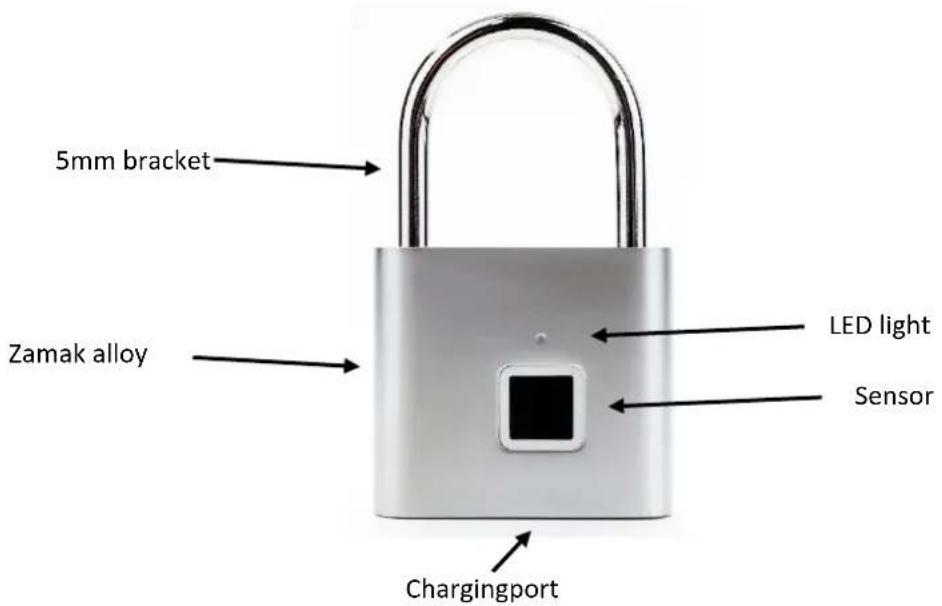
BE COOL
Quick guide
LED lights blue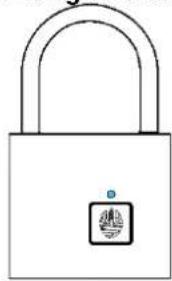 | Register fingerprint2. enter emergency unlocking digit |
LED lights/flashes green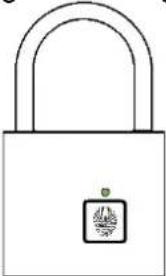 | Fingerprint successfully registered1. enter emergency unlocking digitUnlocking successful |
LED flashes red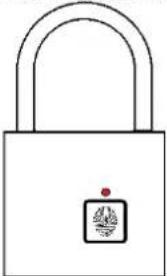 | Unregistered fingerprintIncorrect emergency unlocking codeTimeout |
LED flashes white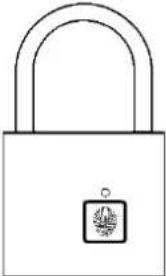 | Ready to enter the emergency unlocking code |
BE COOL
Fingerprint registration
Before you have registered a fingerprint, the lock can be opened with any fingerprint.
- Press your finger against the sensor to register it as a fingerprint. Do not release it until the blue light is on.
- Now press the finger against the sensor in about 10 different positions. If the position is too similar, this is indicated by the red light. Continue changing the finger positions until the green light is illuminated.
- Once the first fingerprint is registered, you can add more using the following procedure.
Register additional fingerprints
- Unlock the lock with an already registered fingerprint. Hold your finger on the sensor until the blue light illuminates.
- Select a new finger and press the sensor several times as in "Fingerprint enrollment step 2" until the blue light turns off. The attempt will automatically fail if a timeout occurs. In this case, you must repeat the above steps.
Setting the emergency code (Morse code)
- To set an emergency code for your lock, unlock it and do not release your finger until the white light flashes. When you release your finger, the light will turn green.
- When the green light is on, you can start entering the first number of your 2-digit long code. Set the number by pressing the sensor once for each number step. For example, if you press the sensor twice, the number 2 will be entered. After entering the number, wait until the light changes to blue.
- At the blue light, use the same finger to set the second number. After you have entered the desired number, wait until the blue light goes out.
- You have now set your two-digit emergency code.
Unlocking by means of the emergency unlocking code (Morse code)
- If you cannot open the lock with your fingerprint, press on the lock with any finger until the white light is displayed. Then release your finger. The light turns green.
- You can now enter the first digit of the emergency unlocking code. After entering the first digit, the light changes to blue. You can now enter your second number.
If you enter an incorrect number, the light flashes red. In this case, repeat the above steps to enter the correct code. After unlocking the lock with the emergency code, the lock is reset to the factory settings.
- If you do not set a code, the default code is 33 (press green light 3 times, press blue light 3 times).
Restore factory settings
- To reset the lock to factory settings, hold your finger on the sensor after unlocking until the red light is on.
- As soon as the red light is on, all fingerprints and changed emergency code settings are deleted. The lock is now reset to the factory settings.
BE COOL
Specifications
| Article | BCPL22M1 |
| Unlocking | Fingerprint |
| Fingerprint storage | 10 piece |
| Type of charging | Micro USB |
| Micro-USB Input | 5V / 100 mA |
| Battery capacity | 3,7V, 140 mAh |
| Charging time | 2 Hours |
| Emergency release | Morse code |
| Standby time | half year |
| Raw material | Zamak alloy |
| Size | 76*46*13 mm |
| IP class | IP56 |
| Temperature range | -10~50°C |
| Contact information | Schuss Home Electronic GmbHScheringgasse 3, A-1140 WienServiceline: +43 (1) 97 0 21www.schuss-home.atFB-Nr: 236974 t / FB-Gericht: Wien |
BE COOL
Recycling, disposal and Declaration of Conformity
 | RECYCLINGThe packaging materials can be recycled. It is recommended that you dispose of them in separated waste. |
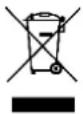 | DISPOSALThe pictogram with the crossed out dustbin indicates that electrical and electronic appliances must be disposed of separately from household waste (WEEE). Electrical and electronic appliances can contain harmful and environmentally hazardous materials. Do not dispose of them in unsorted residual waste, but at a registered collection centre for waste electrical and electronic equipment. By doing so, you will help to conserve resources and protect the environment. For further information please consult your dealer or your local authorities. Directive 2012/19/EU |
 | DECLARATION OF CONFORMITYWe hereby confirm that this article complies with the essential requirements, regulations and guidelines of the EU. The detailed declaration of conformity can be viewed at any time via following link:https://www.schuss-home.at/downloads |
Errata and technical changes reserved.
BE COOL
WARRANTY
With this quality product from BE COOL you have made a decision for innovation, durability and reliability.
For this BE COOL appliance, we grant a warranty period of 2 years from the date of purchase, valid in Austria!
For the integrated rechargeable battery in the BE COOL appliance, we grant a warranty period of 1 year from the date of purchase, valid in Austria!
If, contrary to expectations, service work should nevertheless be necessary on your unit during this period, we hereby guarantee you a repair free of charge
(spare parts and labour) or (at the discretion of Schuss) replacement of the product. If neither repair nor replacement is possible for economic reasons,
we reserve the right to issue a current value credit note.
In any case, please contact the customer hotline as a first step (see instruction manual - "Contact addresses for further information and service line").
We would like to point out that repair work that has not been carried out by authorised contract workshops immediately terminates the validity of this guarantee.
This warranty does not cover:
- Damage due to non-observance of the operating instructions
- repair or replacement of parts due to normal wear and tear
- appliances that are used - even only partially - for commercial purposes
- Mechanically damaged devices due to external influence (fall, impact, breakage, improper use, etc.) as well as wear and tear of an aesthetic nature.
- Equipment that has been improperly handled
- Damage as a result of cracking, breakage, short circuits, extrusion deformation, penetration of foreign bodies, moisture and other visible damage.
- Units that have not been opened by our authorised service centre.
- In addition, other condition damage, such as fire, water, general corrosion, biological ingress or excessive
input voltages, produce operating conditions in excess of the maximum value and below the minimum value of the product's charging requirements.
- Failure to meet consumer expectations
- Damage caused by force majeure, water, lightning, overvoltage
- Units where the type designation and/or serial number on the unit has been altered, erased, defaced or removed.
- Defects due to extraordinary pollution
- Services outside our authorised workshops, the transport costs to an authorised workshop or to us and back, as well as the associated risks.
We expressly point out that within the warranty period, a lump sum of € 30 (indexed on the basis of CPI 2015, June 2020) will be charged in the event of operating errors or if no error was detected.
The absolute warranty period of 2 years from the date of purchase is not extended by the provision of a warranty service (repair or replacement of the appliance).
The 2-year warranty is only valid on presentation of the purchase receipt (must contain the name and address of the dealer as well as the complete designation of the appliance) and the associated warranty certificate,
BE COOL
on which the type of unit and the serial number (visible on the box and on the back or underside of the unit) must be noted! Without presentation of the guarantee certificate, only the legal guarantee applies!
We expressly point out that the statutory warranty rights are not affected by this warranty and continue undiminished.
Schuss Home Electronic GmbH and its vicarious agents shall only be liable for damages in the event of gross negligence or intent.
In any case, liability for loss of profit, expected but not realised savings, consequential damages and damages from third party claims is excluded.
Congratulations on your choice. We wish you much pleasure with your Be Cool appliance!
ADDRESS
BE COOL Sales
Schuss Home Electronic GmbH
A-1140 Vienna, Scheringgasse 3
- CONGRATULATIONS!
- BE COOL
- TABLE OF CONTENTS
- Intended use
- IMPORTANT INFORMATION ON SAFETY, STANDARD AND ELECTRICAL CONNECTION
- Notes on batteries / rechargeable batteries
- BATTERY DISPOSAL
- Scope of delivery:
- Description of the device:
- Quick guide
- Fingerprint registration
- Register additional fingerprints
- Setting the emergency code (Morse code)
- Unlocking by means of the emergency unlocking code (Morse code)
- Restore factory settings
- WARRANTY
Brand : Be Cool
Model : BCPL22M1
Category : Lock