
BSSU2 - Speaker stand SANUS - Free user manual and instructions
Find the device manual for free BSSU2 SANUS in PDF.


| Brand | Sanus |
| Model | BSSU2 |
| Product Type | Speaker Stand |
| Compatibility | Roku, Sonos Era 100, Samsung, Sony, Denon, and others |
| Adjustable Height | Yes, via sliding collars |
| Cable Management | Internal routing for speaker power cable and optional USB |
| Mounting Options | Bottom-mounted, back-mounted, Sonos Era 100 specific |
| Base Options | Rubber pads (hard floors) or carpet spikes (carpet) |
| Included Hardware | Tube, base, collars, rubber pads, carpet spikes, mounting hardware |
| Tools Required | Screwdriver |
| Installation Steps | 7 steps: slide collars, attach base, route cables, install pads/spikes, mount speaker (3 styles), adjust cables, position collars |
| Safety Features | Weight limit warning, sharp spike warning, small parts choking hazard |
| Material | Steel (tube and base), plastic (collars), rubber (pads) |
| Warranty | Refer to Sanus/Legrand AV for warranty details |
Frequently Asked Questions - BSSU2 SANUS
User questions about BSSU2 SANUS
0 question about this device. Answer the ones you know or ask your own.
Ask a new question about this device
Download the instructions for your Speaker stand in PDF format for free! Find your manual BSSU2 - SANUS and take your electronic device back in hand. On this page are published all the documents necessary for the use of your device. BSSU2 by SANUS.
USER MANUAL BSSU2 SANUS
BSSU2
Speaker Stand
Works with Roku ^® , Sonos ^® Era 100 ^™ , Samsung ^® , Sony ^® , Denon ^® , and others.
INSTRUCTION MANUAL
natural_image
Four circular diagrams showing different mechanical or architectural components, including a door and pedestal (no text or symbols)
natural_image
Line drawing of a pole with a base, no text or symbols presentWe'll Make It Stress-Free
If you have any questions along the way,
just give us a call.
+1 (800) 359-5520
We're ready to help!
IMPORTANT SAFETY INSTRUCTIONS
— PLEASE READ ENTIRE MANUAL PRIOR TO USE — SAVE THESE INSTRUCTIONS
Before getting started, let's make sure this product is perfect for you!

CAUTION: Avoid potential personal injuries and property damage!
- Check your speaker owner's manual to see if there are any special requirements for mounting your speaker.
- Please read through these instructions completely to be sure you're comfortable with this easy install process.
- Do not use this product for any purpose not explicitly specified by manufacturer.
■ Manufacturer is not responsible for damage or injury caused by incorrect assembly or use. - If you do not understand these instructions or have doubts about the safety of the installation, assembly or use of this product, contact Customer Service at US: +1 (800) 359-5520
Speaker Weight Limit
DO NOT EXCEED

Tool Needed

Screwdriver
Dimensions

3-D

natural_image
Three identical stand-mounted legs with base plates, arranged vertically (no text or symbols visible)FRONT VIEW
![6.00 in. [152.5mm] 8.17 in. [207.5mm] 2.46 in. [62.5mm] 5.81 in. [147.5mm] 5.18 in. [131.5mm] 3.15 in. [80.0mm]](/content/2026/05/900329/images/dfe910a00852d41f96f34a91b2dfa61aff0814ab1760ea6ed752d07ebb0f82f3.jpg)
SIDE VIEW
![6.37 in. [161.9mm] 8.54 in. [216.9mm] 34.41 in. [874.1mm] 34.08 in. [865.6mm]](/content/2026/05/900329/images/1e647aed94570cc12108e54ebaaab3e5799b62a54ebea922a5e8d36450e7d2c8.jpg)
Parts and Hardware
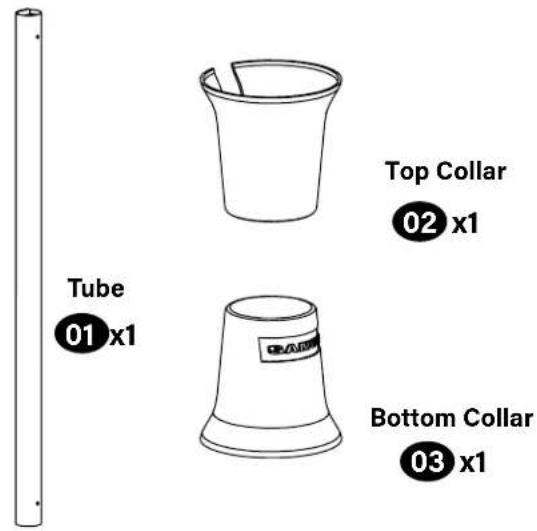
⚠ WARNING: This product contains small items that could be a choking hazard if swallowed.
Before starting assembly, verify all parts are included and undamaged. If any parts are missing or damaged, do not return the damaged item to your dealer; contact Customer Service. Never use damaged parts!

NOTE: Not all hardware included will be used.
Quantities shown are for one speaker stand.
STEP 1
STEP 2


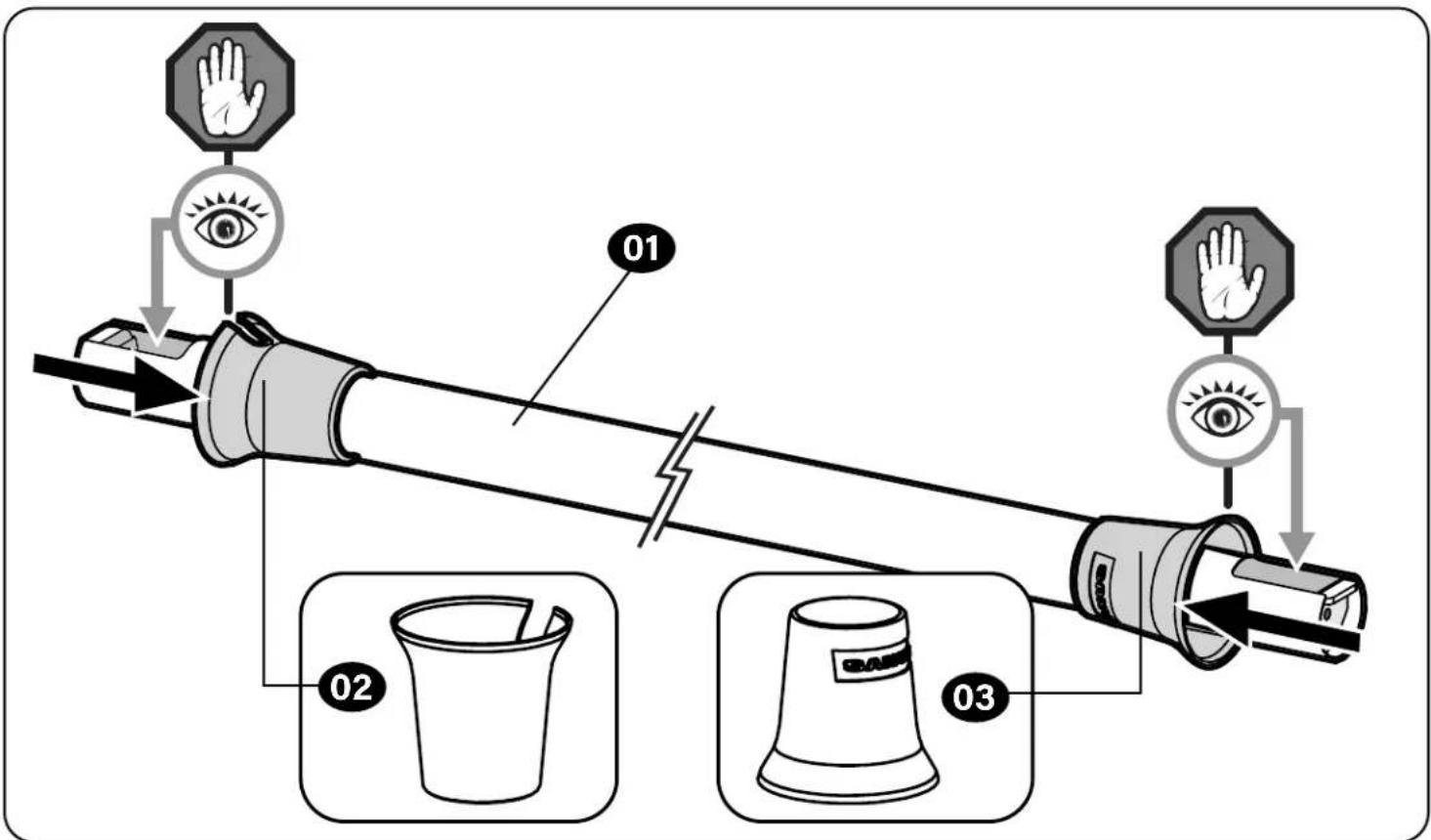
STEP 1
Slide Collars onto Tube
flowchart
graph TD
    A["Hand Position 01"] --> B["Eye"]
    B --> C["Hand Position 02"]
    C --> D["Hand Position 03"]
    D --> E["Hand Position 04"]
    style A fill:#f9f,stroke:#333
    style B fill:#ccf,stroke:#333
    style C fill:#cfc,stroke:#333
    style D fill:#fcc,stroke:#333
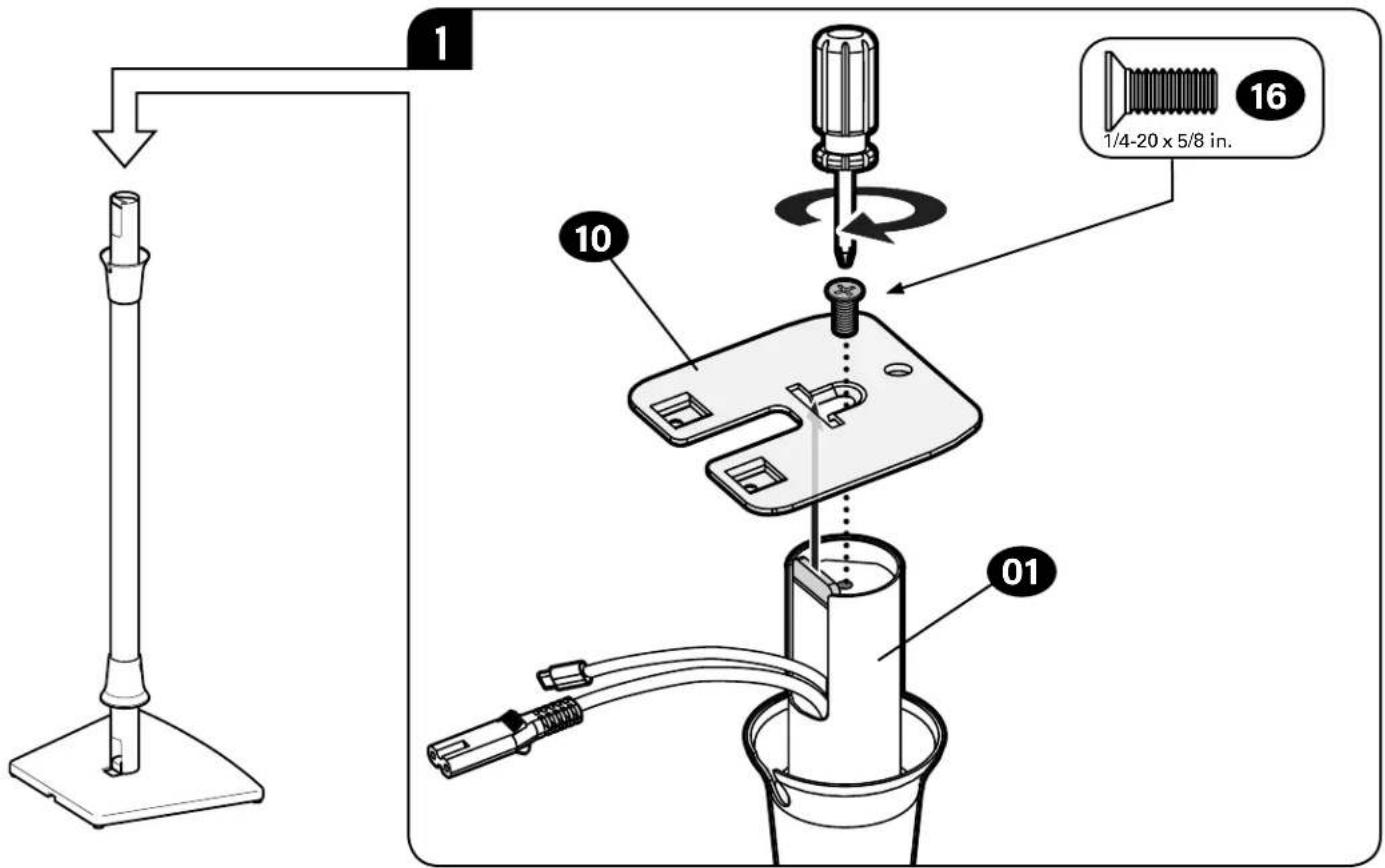
STEP 2
Attach Base to Tube

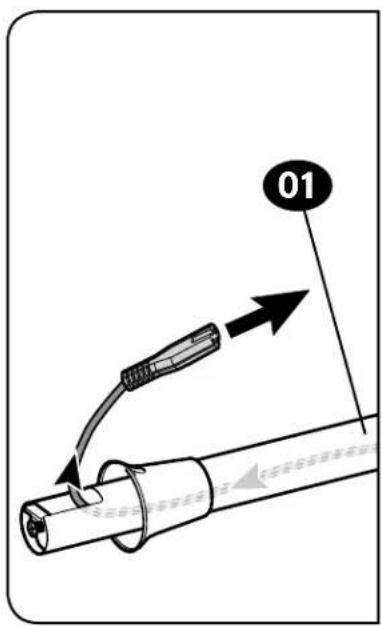
STEP 3
Route Speaker Power Cable


USB [OPTIONAL]
NOTE: USB, if required (see your speaker manual), installs easier AFTER the power cable.

STEP 4
Install Rubber Pads -or- Carpet Spikes
Rubber Pads
Twist rubber pads 07 into the base 04.

Optional Carpet Spikes
WARNING: The ends of carpet spikes 08 are sharp and may scratch flooring, damage wiring, or be hazardous to children.


STEP 5
Mounting the Speaker
Follow the next steps based on your speaker style.
STEP 5-A [PAGE 11]
Bottom-mounted
Speakers

natural_image
Simple line drawing of a 3D cube with an arrow pointing upward (no text or symbols)STEP 5-B [PAGE 12]
Back-mounted
Speakers

natural_image
Line drawing of a portable water heater with a black arrow pointing to the side panel (no text or symbols)STEP 5-C [PAGE 16]
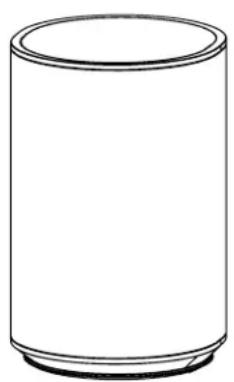
Sonos® Era 100™
natural_image
Simple line drawing of a cylindrical container (no text or symbols)STEP 5-A
Bottom-Mounted Speakers


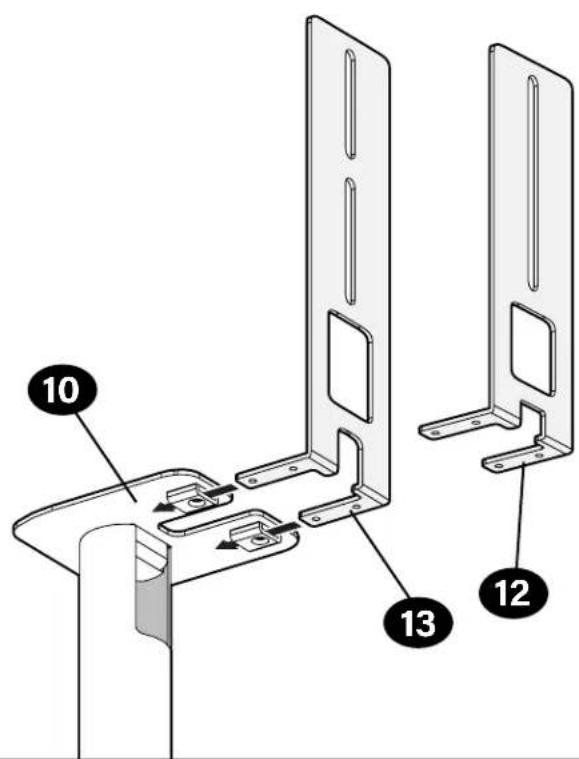
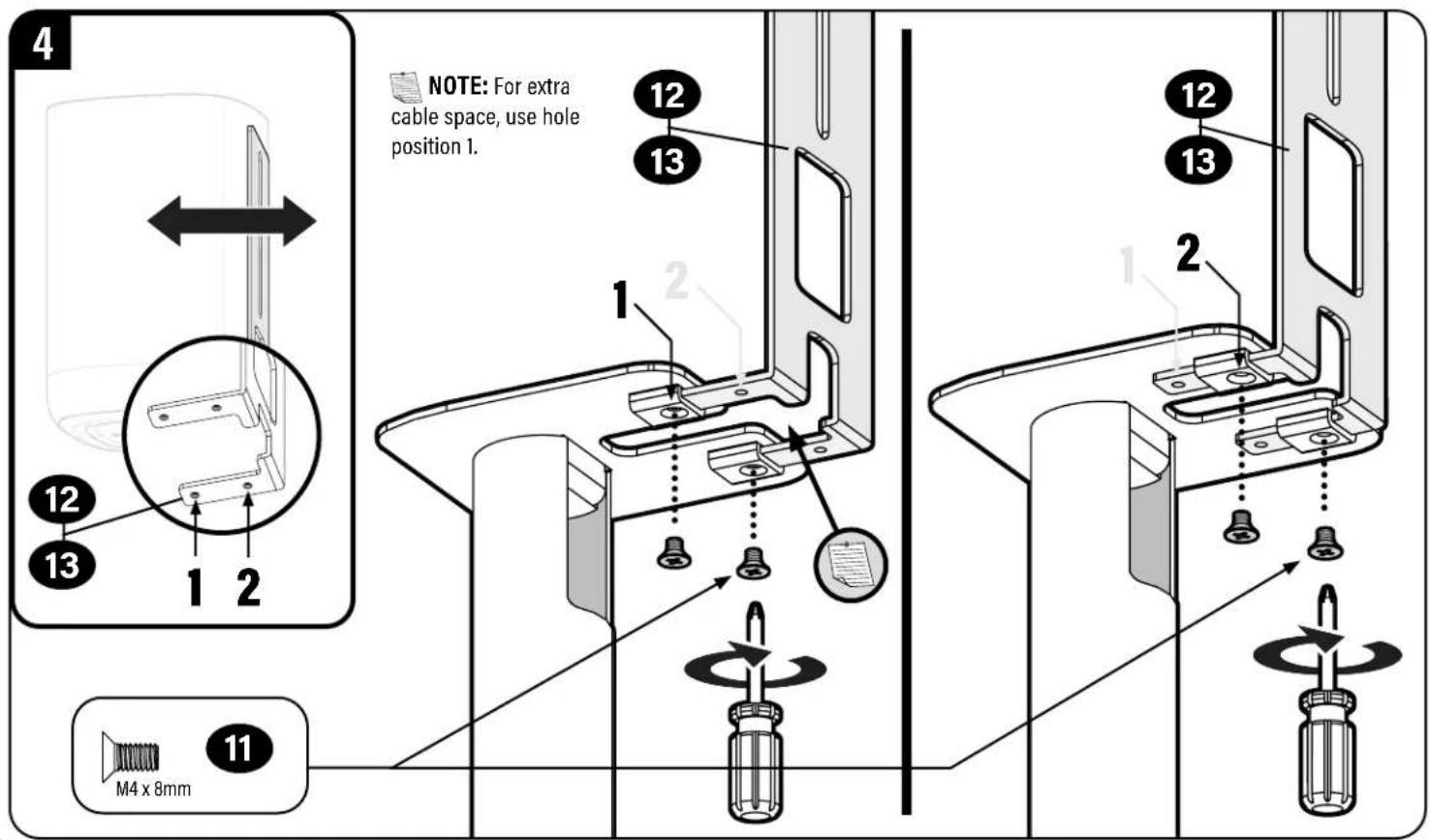
STEP 5-B
Back-Mounted Speakers

3

STEP 5-C
Sonos® Era 100 Speakers


natural_image
Diagram of a kitchen sink with a tool inserted, showing the blade and handle (no text or symbols)


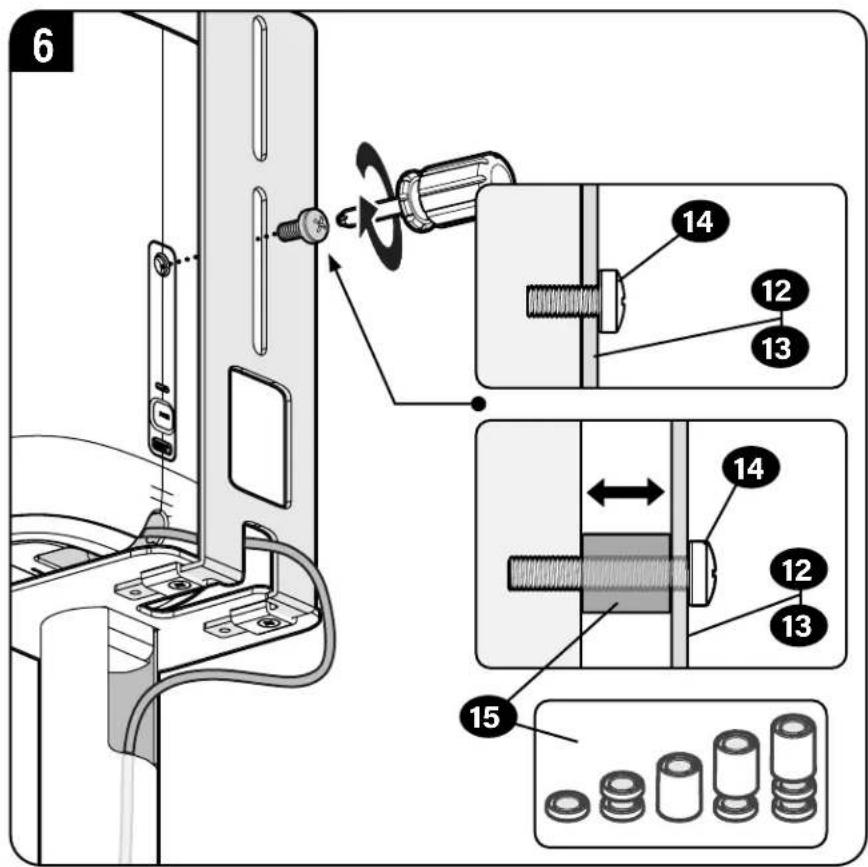
STEP 6
Adjust Cables

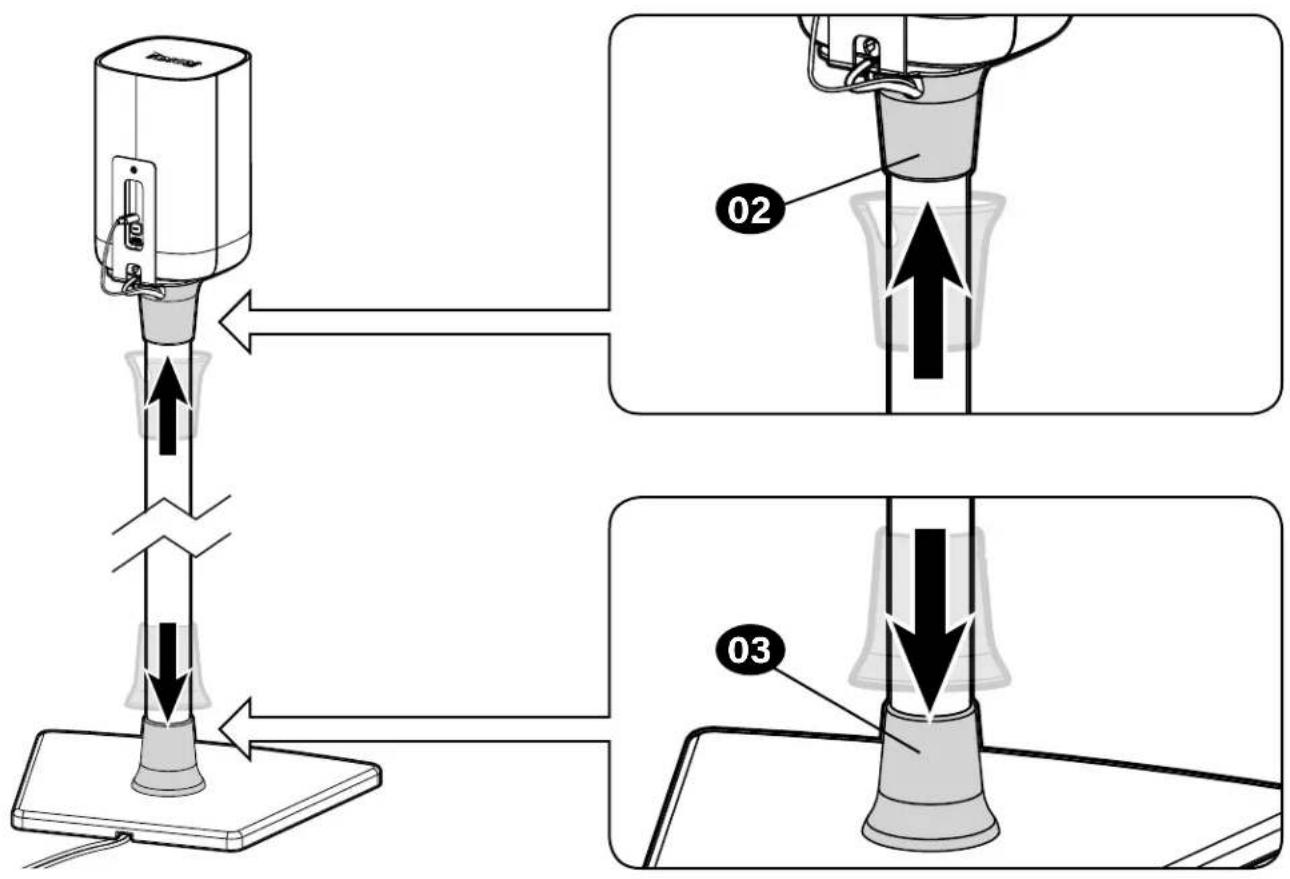
STEP 7
Position Collars
ESPAÑOL
Thank you for choosing SANUS! Please take a moment to let us know how we did: +1 (800) 359-5520
Legrand AV Inc. and its affiliated corporations and subsidiaries (collectively, "Legrand"), intend to make this manual accurate and complete. However, Legrand AV makes no claim that the information contained herein covers all details, conditions, or variations. Nor does it provide for every possible contingency in connection with the installation or use of this product. The information contained in this document is subject to change without notice or obligation of any kind. Legrand AV makes no representation of warranty, expressed or implied, regarding the information contained herein. Legrand AV assumes no responsibility for accuracy, completeness or sufficiency of the information contained in this document.
©2023 Legrand AV Inc. All rights reserved. SANUS is a brand of Legrand.
All other brand names or marks are used for identification purposes and are trademarks of their respective owners.
Legrand AV Inc. · 6436 City West Parkway · Eden Prairie, MN 55344 USA
6901-603170 00


- BSSU2
- Speaker Stand
- INSTRUCTION MANUAL
- We'll Make It Stress-Free
- IMPORTANT SAFETY INSTRUCTIONS
- — PLEASE READ ENTIRE MANUAL PRIOR TO USE — SAVE THESE INSTRUCTIONS
- Before getting started, let's make sure this product is perfect for you!
- CAUTION: Avoid potential personal injuries and property damage!
- Speaker Weight Limit
- Tool Needed
- Dimensions
- Parts and Hardware
- STEP 1
- Slide Collars onto Tube
- STEP 2
- Attach Base to Tube
- STEP 3
- Route Speaker Power Cable
- USB [OPTIONAL]
- STEP 4
- Install Rubber Pads -or- Carpet Spikes
- Rubber Pads
- Optional Carpet Spikes
- STEP 5
- Mounting the Speaker
- Follow the next steps based on your speaker style.
- STEP 5-A
- Bottom-Mounted Speakers
- STEP 5-B
- Back-Mounted Speakers
- STEP 5-C
- Sonos® Era 100 Speakers
- STEP 6
- Adjust Cables
- STEP 7
- Position Collars
- ESPAÑOL
- Thank you for choosing SANUS! Please take a moment to let us know how we did: +1 (800) 359-5520
Brand : SANUS
Model : BSSU2
Category : Speaker stand