
ST-12F-DDF-E - Fan STANLEY - Free user manual and instructions
Find the device manual for free ST-12F-DDF-E STANLEY in PDF.


| Product Type | Stand Fan |
| Model | ST-12F-DDF-E |
| Brand | Stanley |
| Fan Diameter | 12 inches (30 cm) |
| Height | Approx. 135 cm (53 inches) |
| Width | Approx. 40 cm (15.7 inches) |
| Depth | Approx. 40 cm (15.7 inches) |
| Weight | Approx. 4.5 kg (9.9 lbs) |
| Power Supply | AC 230V ~ 50Hz |
| Power Consumption | 45 Watts |
| Speed Settings | 3 speeds (Low, Medium, High) |
| Oscillation | Yes, automatic 90° oscillation |
| Tilt Adjustment | Manual tilt adjustment |
| Grille Material | Metal with protective coating |
| Blades Material | ABS plastic |
| Control Type | Manual rotary knobs on base |
| Cleaning | Unplug before cleaning; wipe with damp cloth; do not immerse |
| Safety Features | Overheat protection; stable base; finger guard |
| Spare Parts Availability | Replacement blades, grille, and motor available from authorized service centers |
| Repairability | Repairable by qualified technician; user-replaceable fuse |
Frequently Asked Questions - ST-12F-DDF-E STANLEY
User questions about ST-12F-DDF-E STANLEY
0 question about this device. Answer the ones you know or ask your own.
Ask a new question about this device
Download the instructions for your Fan in PDF format for free! Find your manual ST-12F-DDF-E - STANLEY and take your electronic device back in hand. On this page are published all the documents necessary for the use of your device. ST-12F-DDF-E by STANLEY.
USER MANUAL ST-12F-DDF-E STANLEY
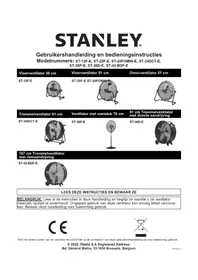
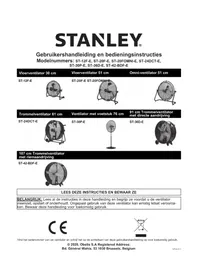
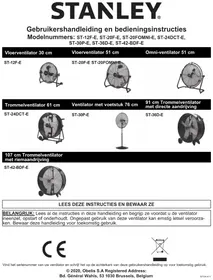
User's Manual and Operating Instructions
Model Numbers: ST-12F-DDF-E, ST-20F-DDF-E, ST-20FO-DDF-E, ST-24-DDF-E, ST-42-BDF-E, ST-36-DDF-E, ST-30P-DDF-E
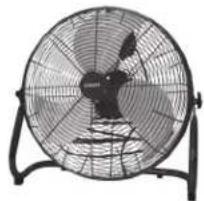
12" Floor Fan
ST-12F-DDF-E

42" Belt-Drive Barrel Fan
ST-42-BDF-E

24" Floor Fan
ST-24-DDF-E

natural_image
Front view of a large industrial fan with visible blades and mounting base (no text or symbols)20" Floor Fan
ST-20F-DDF-E
natural_image
Front view of a large industrial fan with visible blades and blades, mounted on a stand (no text or symbols)20" Omni Floor Fan
ST-20FO-DDF-E

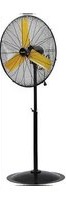
30" Pedestal Fan
ST-30P-DDF-E

natural_image
Front view of a four-blade desktop fan with visible blades and mounting base (no text or symbols)36" Direct-Drive Barrel Fan
ST-36-DDF-E

natural_image
Circular mechanical fan with radial blades and a handle, no visible text or symbolsREAD AND SAVE THESE INSTRUCTIONS
IMPORTANT: Read and understand all of the instructions in this manual before assembling, starting, or servicing the fan. Improper use of this fan can cause serious injury. Keep this manual for future reference.
CE
STXE-400
Please note the serial number of your fan, and write it on the back of this User's Manual for future reference.
© 2018, Obelis S.A Registered Address: Bd. Général Wahis, 53 1030 Brussels, Belgium
Safety Information
IMPORTANT: READ ALL INSTRUCTIONS CAREFULLY BEFORE ASSEMBLY, SERVICE OR USE OF THIS FAN. FAILURE TO COMPLY WITH THESE INSTRUCTIONS COULD RESULT IN SERIOUS PERSONAL INJURY AND / OR PROPERTY DAMAGE.
⚠️ CAUTION For General Ventilating Use Only. Do Not Use To Exhaust Hazardous Or Explosive Materials And Vapors. Never use the fan in spaces which contain products such as gasoline, solvents, paint thinners, dust particles, volatile or airborne combustibles, or any unknown chemicals.
⚠ WARNING Do not operate any fan with a damaged cord or plug.
Discard fan or return to an authorized service facility for examination and/or repair.
Do not run under carpeting.
Do not cover with throw rugs, runners, or similar coverings.
Do not route cord under furniture or appliances.
Arrange cord away from traffic area where it will not be tripped over.
To reduce the risk of electric shock, do not expose to water/rain or use in damp locations.
▲CAUTION To reduce risk of fire and to properly exhaust air, be sure to duct air outside.
Do not vent exhaust air into spaces within walls or ceilings or into attics, crawl spaces or garages.
▲WARNING THIS IS A FAN - NOT A TOY! TO REDUCE THE RISK OF PERSONAL INJURY AND ELECTRIC SHOCK, FANS SHOULD NOT BE PLAYED WITH OR PLACED WHERE SMALL CHILDREN CAN REACH IT.
⚠ WARNING To guard against electric shock while operating, do not allow fan to come in contact with other grounded objects such as pipes, radiators, etc.
▲WARNING Risk of fire, electric shock, or personal injury when performing service or maintenance. Unplug or disconnect the fan from the power supply before servicing.
WARNING CAUTION Automatically Operated Device - To Reduce The Risk Of Injury Disconnect From Power Source Before Servicing
⚠ WARNING To Reduce The Risk Of Fire Or Electric Shock, Do Not Use This Fan With Any Solid-State Speed Control Device.
⚠ WARNING To Reduce The Risk Of Electric Shock And Injury To Persons, Do Not Use In a Window.
STANLEY.
STANLEY
STANLEY, The STANLEY Logo, The Notched Rectangle and the Yellow and Black Diagonal Package Design are all trademarks of Stanley Black & Decker, Inc. or an affiliate thereof.
Safety Information
To Reduce The Risk Of Electric Shock, Do Not Expose To Water Or Rain or use in damp locations.
Do not operate any fan with a damaged cord or plug. Discard fan or return to an authorized service facility for examination and/or repair. Do not run cord under car-cover cord with throw rugs, runner, or similar coverings. Do not route cord under fur-nces. Arrange cord away from traffic areas and where it will not be tripped over.
Installation work and electrical wiring must be done by qualified person (s) in accordance with all applicable codes and regulations.
When servicing or replacing a component requires the removal or disconnection of a safety device, the safety device is to be reinstalled or remounted as previously operating this fan.
Use this fan only in the manner intended by the manufacturer.
- Before operating always check fan for loose or damaged parts. Inspect power cord for any damage. Never use fan if any parts are damaged or missing. Never use fan without safety guards attached.
- Operate only on 220-240 volt, 50 Hz (cycle) current with a minimum of a 15 amp circuit.
- When used with an extension cord, use only cord of proper size (Amp rating), UL listed, and with receptacle to accept three prong grounded plug furnished on the fan's power cord. Always keep power cord and extension cords away from heat, oil, and sharp edges. Inspect cords periodically and replace if damaged.
WARNING
WARNING
WARNING
WARNING
▲ WARNING
Installation and Assembly
ST-12F-DDF-E / ST-20F-DDF-E / ST-20FO-DDF-E / ST-24-DDF-E
- Place the fan on level ground in a safe, desired position then connect to an approved power source.
ST-36-DDF-E / ST-42-BDF-E
- Slide wheel axle through wheel support frame.
- Slide one (1) wheel onto either side of axle.
- Secure wheel with one (1) cotter pin.
- Place the fan on level ground in a safe, desired position then connect to an approved power source.
30" PEDESTAL FAN: ST-30P-DDF-E
Installation and Assembly
Tools Needed:
Pliers
Phillips head screwdriver
10mm spanner or adjustable wrench
Hex Wrench
Parts Included In Box:
(1) Base
(1) Front Guard
(1) Rear Guard
(1) Motor Assembly
(1) Fan Blade Assembly
(1) Locking Collar
(1) Upper Support Pole
(1) Lower Support Pole
(1) Nut (M12) and Washer
(1) Pivot Bolt (M12*40)
(9) Flange Screws
(1) Support Spring

Figure 1: Attaching Motor to Motor Support Assembly

Figure 2: Attaching Rear Guard to Motor
- Place the Base on level ground
- Place the Support Spring and Spring Seat inside the bottom of the Support Pole, and mount the Support Pole to the Base. Make sure the holes line up.
-
Secure tightly with (5) Flange Screws using the wrench/Phillips head screwdriver.
-
Put down the base cover.
-
Loosen the locking collar screw using the adjustable handle. Extract the Upper Support Pole slowly to adjust the height of the fan. Retighten with the adjustable handle.
-
Loosen the set screw on the motor support. Mount the Motor Assembly to the connector on the Upper Support Pole. Make sure the holes line up.
-
Secure Motor Assembly with Pivot Bolt (M12*40), Nut (M12), and Washer (see Fig. 1). Tighten the bolt firmly using the wrench. Tighten the set screw.
-
Slide the Rear Guard on to Motor Assembly and secure it with (4) Flange Screws (see Fig. 2). Tighten the screws firmly using the wrench/Phillips head screwdriver.
-
Loosen the screw on the back of the Fan Blade Assembly using the Allen wrench (hex wrench). Slide the Fan Blade Assembly onto the motor shaft. Retighten the screw on the Fan Blade Assembly.
-
Attach the Front Guard to the Back Guard and secure with the fasteners on the front guard.
▲ CAUTION
Do NOT slide fan blade screw beyond the groove on the shaft!
This will cause the fan blade to not spin properly and can cause damage to your fan! Be sure that fan shaft is flush with front of fan blade assembly.
NOTE: This model CAN NOT be wall mounted
STANLEY®
Pinnacle Climate Technologies, Inc.
Sauk Rapids, MN 56379 USA
EC REP
Obelis S.A.
Registered Address:
1030 Brussels, Belgium
© 2018 Stanley Black & Decker, Inc.

- User's Manual and Operating Instructions
- 12" Floor Fan
- 42" Belt-Drive Barrel Fan
- 24" Floor Fan
- 20" Floor Fan
- 20" Omni Floor Fan
- 30" Pedestal Fan
- 36" Direct-Drive Barrel Fan
- READ AND SAVE THESE INSTRUCTIONS
- Safety Information
- WARNING
- ▲ WARNING
- Installation and Assembly
- ST-12F-DDF-E / ST-20F-DDF-E / ST-20FO-DDF-E / ST-24-DDF-E
- ST-36-DDF-E / ST-42-BDF-E
- 30" PEDESTAL FAN: ST-30P-DDF-E
- Parts Included In Box:
- ▲ CAUTION
- STANLEY®
Brand : STANLEY
Model : ST-12F-DDF-E
Category : Fan