
DN-16032 - Security Camera Digitus - Free user manual and instructions
Find the device manual for free DN-16032 Digitus in PDF.


| Product Type | Security Camera |
| Brand | Digitus |
| Model | DN-16032 |
| Resolution | 1920 x 1080 (Full HD) |
| Lens Focal Length | 3.6 mm |
| Field of View | 80° |
| Night Vision Range | Up to 30 meters |
| Day/Night Function | Auto IR Cut Filter |
| Motion Detection | Yes |
| Video Compression | H.265+ |
| Power Supply | DC 12V 1A |
| Power Consumption | Max 6W |
| Operating Temperature | -20°C to 50°C |
| Dimensions (W x H x D) | 70 x 70 x 120 mm |
| Weight | 400 g |
| Mounting Type | Wall or ceiling |
| Waterproof Rating | IP66 |
| Connectivity | Ethernet (RJ45) |
| Audio Support | Built-in microphone |
| Storage | MicroSD up to 128 GB (not included) |
| Compatible Systems | Windows, Mac, iOS, Android |
| Cleaning | Wipe with dry cloth; avoid solvents |
| Safety Certifications | CE, RoHS |
Frequently Asked Questions - DN-16032 Digitus
User questions about DN-16032 Digitus
0 question about this device. Answer the ones you know or ask your own.
Ask a new question about this device
Download the instructions for your Security Camera in PDF format for free! Find your manual DN-16032 - Digitus and take your electronic device back in hand. On this page are published all the documents necessary for the use of your device. DN-16032 by Digitus.
USER MANUAL DN-16032 Digitus
Pan/Tilt Remote Control &
With Audio & Night Vision
User's Guide

TABLE OF CONTENTS
1. OVERVIEW....3
1.1 PRODUCT DESCRIPTION .... 3
1.2 PRODUCT FEATURE....3
1.3 PRODUCT SPECIFICATION 3
1.4 PRODUCT ACCESSORIES INCLUDE....4
1.5 SYSTEM REQUIREMENT 5
1.6 DN-16032 EXTERIOR FUNCTION INTRODUCE....5
1.7 TV_OUT FUNCTION INTRODUCE....6
1.8 PRODUCT SET-UP....7
2. UTILITIES AND TOOLS 8
2.1 CAM EZ SEARCH....8
2.2 USE IP-CAM AND TEST THE IMAGE FUNCTION FOR THE FIRST TIME....8
2.3 HOW TO SET UP IP CAM 10
2.4 SETTING THE WAY TO OBTAIN THE IP ADDRESS OF IP-CAM....10
2.5 IP-CAM NETWORK FRAMEWORK INSTALLATION....17
2.6 INSTALLATION FOR IP SHARE 24
2.7 INTERNET IP SHARING & AUDIO SETTING 27
3. GETTING STARTED.... 28
3.1 SYSTEM LOGIN....28
3.2 LIVEVIEW....29
3.3 TAKE A SHOT....32
4. ADVANCED FUNCTION WITH LIVEVIEW 33
4.1 IMAGE ADJUSTMENT 33
4.2 AVI RECORD SETUP....34
4.3 ZOOM IN DISPLAY 35
4.4 MOTION DETECTION SETUP 35
4.5 MOTOR CONTROL 36
5. ADVANCED APPLICATION 36
5.1 IMAGE SETUP....37
5.2 CAPTURE VIEW 37
5.3 EVENT TRIGGER....38
5.4 NETWORK SETUP....39
5.5 SERVER SETUP....41
5.6 ADMINISTRATION SETUP 44
5.7 SOFTWARE UPDATE....45
APPENDIX 48
APPENDIX A. USING A PPPoE DIALUP CONNECTION AND DDNS WITH THE DN-16032 EZ IPCAM (USING A HUB) 48
APPENDIX B. FAQ : 57
1. OVERVIEW
1.1 PRODUCT DESCRIPTION
DN-16032 is an easy and effective IP Camera product for remote monitoring
/administrating. The setup for this device is simply. Built-in Web server allows you to use web browser (e.g., Microsoft ID) through LAN or broadband network in any time and any place. Type the IP address of the IP-CAM camera on the network address line to carry out the works of remote image monitoring and administration. Meanwhile, the user can remote control the motor of the camera to change the direction of monitoring and handle the real-time image of the monitored location.
In addition, the camera supports many network protocols such as PPPoE, DHCP, STATIC IP, DDNS, SMTP, FTP and NTP with high-performance SDRAM control and memory card access. The built-in TV Out decoding/coding device can display the most popular TV screen (supporting NTSC and PAL) in families with combining fast Motion Detection and SD Expansion Card in hardware. Moreover, DN-16032 is equipped with IR LED lightening, so it has the function of night vision. Besides, this device also has the function of recording and real-time photographing. To a family, such remote monitoring can reach professional security and have great fun.
1.2 PRODUCT FEATURE
Use standard Web Browser ID to monitor, record, and shot remotely
➢ Maximum 640x480 Full screen
- Allow to view images from multi-camera
- Allow on-line image viewing remotely for multi-user simultaneously
➢ Motion Detect, monitor and store triggered photographs at any time for the whole day
Remote real-time recoding to the device and trigger to sending images to FTP & E-Mail & SD Card & PC
➢ Support virtual IP and port switch in IP DSALM
➢ Support several communication protocols, TCP/IP, DHCP, SMTP, FTP, PPPoE, DDNS,
Use functional authority setting, name registration and password protection
➢ Support the dynamic IP network function of DHCP
➢ Support ADSL network of PPPoE user
➢ Standard RJ-45 network connector, support 10/100 Base-T network transmission
1.3 PRODUCT SPECIFICATION
◆ Image Size: 160x120、320x240、640x480 adjustable
◆ Image Quality: Fine、Normal、Basic adjustable
◆ Video Frequency: 50 Hz for PAL、60 Hz for NTSC
◆ Image Compression Format : M-JPEG
◆ Focal Distance Range : From 30mm to infinity adjustable
◆ Digital Zoom : 4X
◆ Video Recording : Video Frame rate setting : auto; 1, 3, 5, 10, fps
◆ Motion Detect Trigger Function, image sent to FTP & E-Mail & SD Card & PC
◆ Support TCP/IP、SMTP、FTP、PPPoE、DHCP Protocol
◆ Network DHCP or manual setting network IP, and support ADSL network of PPPoE user
◆ Build-in web server and the functions of Active-X and Java
◆ Remote single picture captured with JPG file format, remote continuous screen recorded with AVI format
◆ Microphone : High touch 10φ-40db±3
◆ TV OUT Video Output: support 50 Hz for PAL、60 Hz for NTSC
◆ Night visio-lightening illumination: Auto and Manual selection, IR LED x 6/5φ/850λ
◆ Monitoring angle: Vertical angle: Up/Down Tilt +180 to -35 degrees
Horizontal angle: Left / Right Pan +/- 175 degrees
◆ Standard RJ-45 network connector, support 10/100 Base-T network transmission
◆ 5V/ 1.5A exterior switching power adaptor
◆ Power Consumption : 650mA(max)2.5W(max)
◆ Operating environment : 5°C\~40°C
◆ Storage temperatures : -0°C\~55°C
◆ Humidity : 5%\~85% non-condensing
1.4 PRODUCT ACCESSORIES INCLUDE

- Rimax DN-16032
- Power adaptor, 5V/1.5A Switching Power adaptor
-
Ethernet Cable (red), used to connect to the network card of PC for testing and configuring the product
-
Ethernet Cable (blue), used to connect to Hub, ADSL modem, IP Share
- TV OUT A/V Cable
- Setup CD
- This User's Guide
- Accessory for hanging and fastening
1.5 SYSTEM REQUIREMENT
PC
◆ Processor: Intel Pentium 4 ® 1.4GHz or above is recommended
◆ RAM: 256MB or above
◆ Operation System: Windows 2000 ® or Windows XP ®
◆ Hard Disk: Minimum 10MB or above
◆ Network Card: 10/100 base-T
◆ Network Setup: Accessing Internet normally
◆ Web Browser: Microsoft Internet Explorer 6.0 or above
◆ Connect Network Equipment: ADSL modem, IP Share or Hub
◆ Active-X for activating control items and plug-in
Network
1.6 DN-16032 EXTERIOR FUNCTION INTRODUCE

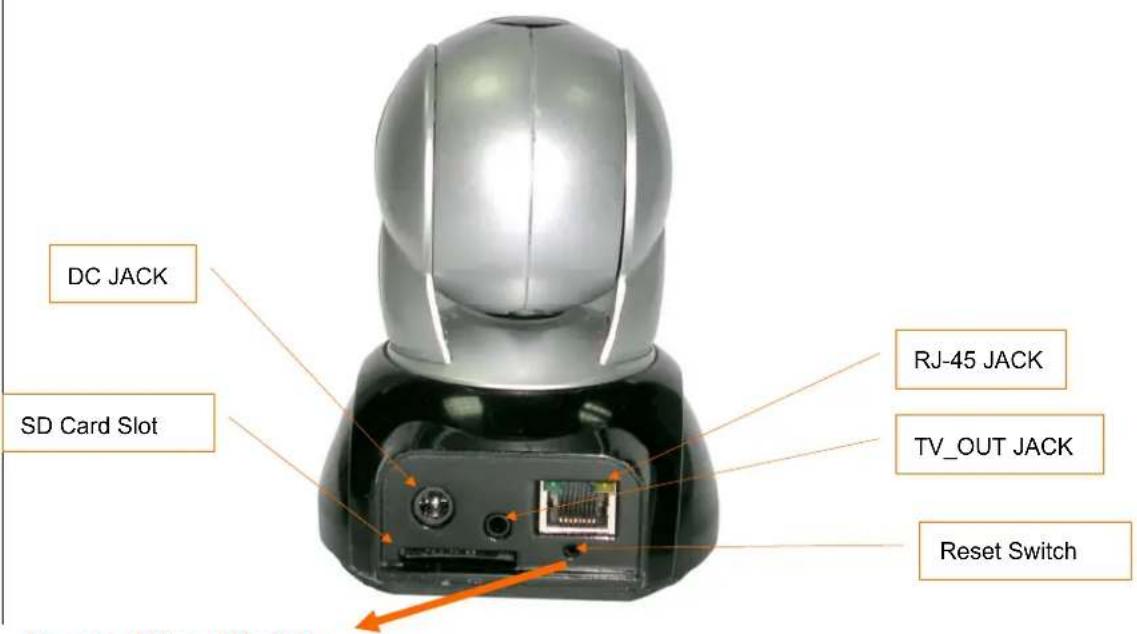
Usage of Reset Switch:
While the system is active normally, press and hold Reset Switch for a short time (about 3 to 5 seconds) till Status LED lights up. The system will restart the device and recover to the factory default settings.
SD Card Usage Diagram:
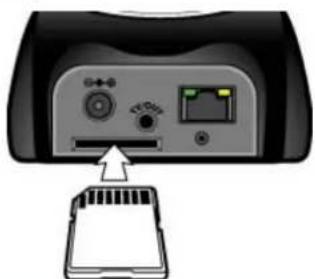
1.7 TV_OUT FUNCTION INTRODUCE

-
- First, insert the TV_OUT cable to the place as shown in Figure 1.
-
- Next, plug in power adapter as shown in Figure 2. Press and hold Reset switch for three seconds. Then, release it. The IP-CAM will access into TV_OUT mode.
● 3.TV_OUT operation description:
- Next, plug in power adapter as shown in Figure 2. Press and hold Reset switch for three seconds. Then, release it. The IP-CAM will access into TV_OUT mode.
a. Hold to change mode: For the default setting for TV_OUT is NTSC system, if you want to use PAL system, please press and hold Reset switch about three seconds to switch between NTSC and PAL systems.
b. Push to exit : Press Reset to access into TV screen and adjustable
50Hz, 60Hz, Outdoor
1.8 PRODUCT SET-UP

2. UTILITIES AND TOOLS
2.1 CAM_EZ SEARCH
CAM_EZ Search is an IP search engine offered by this product. It can search IP CAM connected in LAN. Through sending the inquiry of broadcasting packets, after IP CAM responds the question, the window will display a list of all IP CAMs in the network. And it allows you to modify the network settings of specified IP CAM, such as IP address or IP CAM naming.
CAM EZ Search Screen

figure 1
2.2 USE IP-CAM AND TEST THE IMAGE FUNCTION FOR THE FIRST TIME
The following connection is suitable for IP-CAM test/fixed IP address change/program code update (strongly recommended).
The operation steps are listed below:
A. Installing the Product for the first time:
- You computer must be equipped with network card and RT-45 network connector.
- Connect the RJ-45 terminator on the rear of IP-CAM to the red test network cable. One end is connected to the network card of computer; the other end is connected to the rear side of the IP-CAM.
- Connect the power adaptor to the power port (on the rear) of IP-CAM. Now, the status LED on the top of IP-CAM will light up.

B. Check if the IP addresses for PC network and CAM_EZ Search are on the same network section:
- Usually, static IP address will be used to access into Internet, so the IP address will vary. When you want to change IP address, please write down the original IP address on your computer first. Then you have to modify the IP address of your computer for testing if the IP-CAM can be operated normally or not. After finishing the test, IP address for your computer should be recovered to original settings.
- In general, the IP address for your computer in LAN will be set with "Auto Obtain IP address". To test if the IP-CAM is normal or not, the IP address of your computer must be changed temporarily. After finishing the test, it can be recovered to original settings.
C. Next, choose Control Panel->Network Connections->choose the activated area
Network Connections----> right click your mouse ---->select Properties(P)---->Select Internet Protocol (TCP/IP)----> Select Properties(R), then you can check the current IP address status for the computer. The way to modify IP address is:

D. Open and execute CAM_EZ Search (as shown in Figure 2). The system will scan the IP-CAM that you just installed automatically. Then, you will find 255DN-16032 in the column of Camera Lists. Click 255DN-16032 with left mouse button. You can see the default settings for IP-CAM.
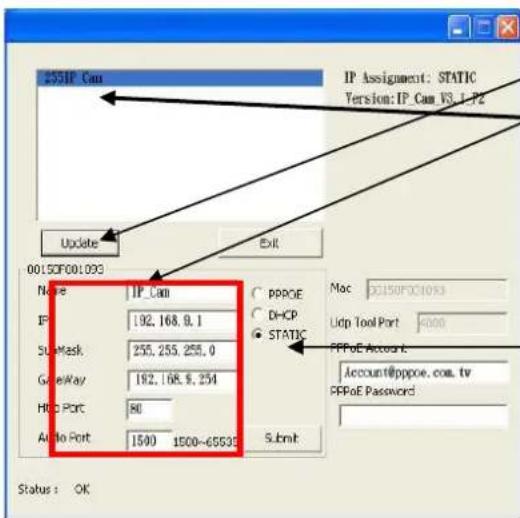
Figure 2
Step 1. Click Update. You can see 255DN-16032. Step 2. Click 255DN-16032. You can see
Name : DN-16032
IP : 192.168.9.1
SubMask : 255.255.255.0
GateWay : 192.168.9.254
HTTP Port : Http communication port. The default setting is 80.
UDP Port : UDP port, Pre-setting is 1500
Step 3. Make sure the IP setting is STATIC.
Step 4. Double click on 255DN-16032 to open the browser. Type ID/Password to access into network monitoring screen (for detailed information, please refer to 3.1). If you can see the image screen, it
2.3 HOW TO SET UP IP CAM
Before you set up IP CAM, you have to know the network environment and if the IP address is fixed or float that provided by your ISP. If you do not know, please contact with your ISP. Section 2.5 will list the common network structure (1 \~ 7 types). Users can refer to the structure to find out what type is suitable for his/her computer and finish the setting up according to the instructions. To set up IP-CAM and IP address, the common way that people use is to change the obtaining of IP address of IP-CAM. Detailed information is listed as 2.4-1 \~ 2.4.3.
2.4 SETTING THE WAY TO OBTAIN THE IP ADDRESS OF IP-CAM
2.4-1 STATIC - IP Address Setting
- You computer must be equipped with network card and RT-45 network connector.
- Connect the RJ-45 terminator on the rear of IP-CAM to the red test network cable. One end is connected to the network card of computer; the other end is connected to the rear side of the IP-CAM.
- Connect the power adaptor to the power port (on the rear) of IP-CAM. Now, the status LED on the top of IP-CAM will light up.

- Open and execute CAM_EZ Search (as shown in Figure 3). The system will scan the IP-CAM that you just installed automatically. Then, you will find 255DN-16032 in the column of Camera Lists. Click 255DN-16032 with left mouse button. You can see the default settings for IP-CAM.

Figure 3
Step 1. Click Update. You can see 255DN-16032.
Step 2. Click 255DN-16032. You can see
Name : DN-16032
IP : 192.168.9.1
SubMask : 255.255.255.0
GateWay : 192.168.9.254
HTTP Port : Http communication port. The default setting is 80.
(If you have multiple IP-CAMs installed in the same network, you have to divide them with different Port numbers, e.g., 1025、1026、1039....)
UDP Port : UDP port , Pre-setting is 1500
Step 3. Make sure the IP setting is STATIC.
- Fill in Fixed IP Address as below. (If you do not know your fixed IP address, please contact with your ISP. Below is an example of Fixed IP Address modification.)

Step 4. Type Fixed IP.
Name : DN-16032
IP : 211.78.174.94
SubMask : 255.255.255.248
GateWay : 211.78.174.89
HTTP Port : Http communication port. The default setting is 80.
(If you have multiple IP-CAMs installed in the same network, you have to divide them with different Port numbers, e.g, 1025, 1026, 1039.....)
UDP Port : UDP Port , Pre-setting is 1500
Step 5. Choose STATIC.
Step 6. After finishing the settings, click Submit. The network settings for DN-16032 IP-CAM will
Example:
- Set up the IP CAM with fixed IP address.
- Turn on your computer and open IE browser. Type 211.78.174.94:(1025、1026、1039...) in the Address line. Now you can access into the monitoring screen of network.
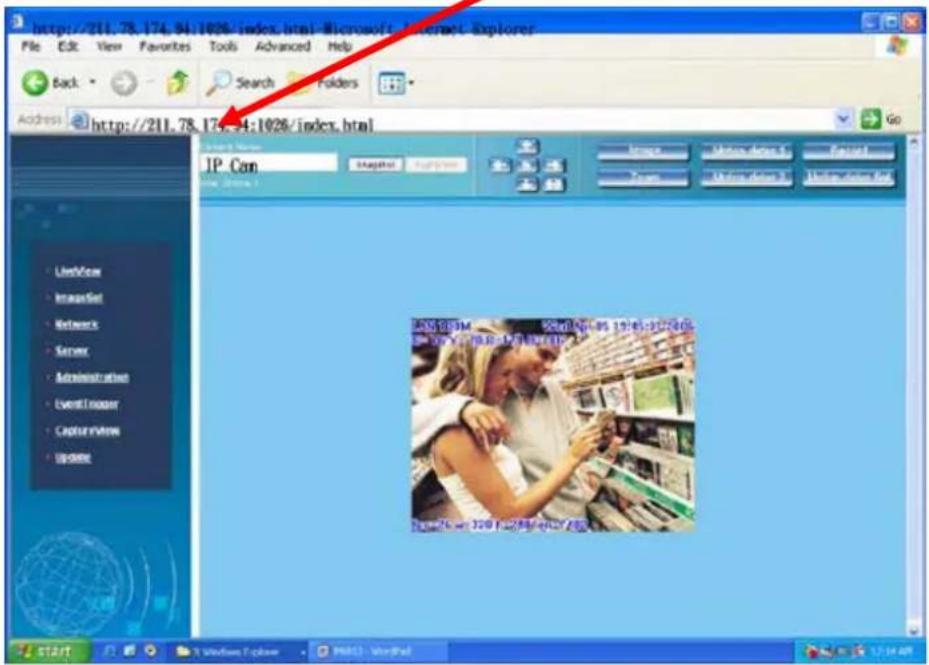
2.4-2 DHCP - IP Address Setting:
- Use RJ-45 Ethernet cable (red) to connect ADSL host and switching hub. Then use RJ-45 Ethernet cable (blue) to connect PC and IP CAM (as shown below).
![graph LR A["INTERNET"] --> B["ADSL / CABLE MODEM"] B --> C["LAN HJB"] C --> D["Laptop"] D --> E["NOTEBOOK"]](/content/2026/05/898338/images/0807c5a89a06e1784e82ee1f3713b3c3b6d64b553af7da2b4d7716086bd5cfc1.jpg)
- Connect the power adaptor to the power port (on the rear) of IP-CAM. Now, the status LED on the top of IP-CAM will light up.
- Set up the connection way inside the PC network: Please go to Control Panel ---> Network Connections ---> Choose Activated LAN connection ---> right click your mouse ---> Select Properties(P)---> Select
Internet Protocol (TCP/IP) ---> Select Properties(R)
--->Click Obtain an IP address automatically(O), Obtain DNS server address automatically(B).

Obtain an IP address automatically (O)
Obtain DNS server address automatically (B)
- Open and execute CAM_EZ Search (as shown in Figure 3). Press Update to scan the IP-CAM that you just installed automatically. Then, you will find 255DN-16032 in the column of Camera Lists. Click 255DN-16032 with left mouse button. You can see the default settings for IP-CAM.

Step 1. Click Update. You can see 255DN-16032.
Step 2. Click 255DN-16032. You can see
Name : DN-16032
IP : 192.168.9.1
SubMask : 255.255.255.0
GateWay : 192.168.9.254
HTTP Port : Http communication port. The
default setting is 80.
Step 3. Choose DHCP.
Step 4. After finishing the settings, click Submit. The network settings for DN-16032 IP-CAM will be renewed. (That is, you can obtain a virtual IP address)

Figure 5
Step 5. Click Update. You can see 255DN-16032.
Step 6. Click 255DN-16032. You can see the change of IP-CAM:
Name : DN-16032
IP : 10.1.10.82
SubMask : 255.255.0.0
default setting is 80.
Step 7. The IP setting is DHCP.
Step 8. Double click 255DN-16032 to open IE browser to access into network monitoring
Example:
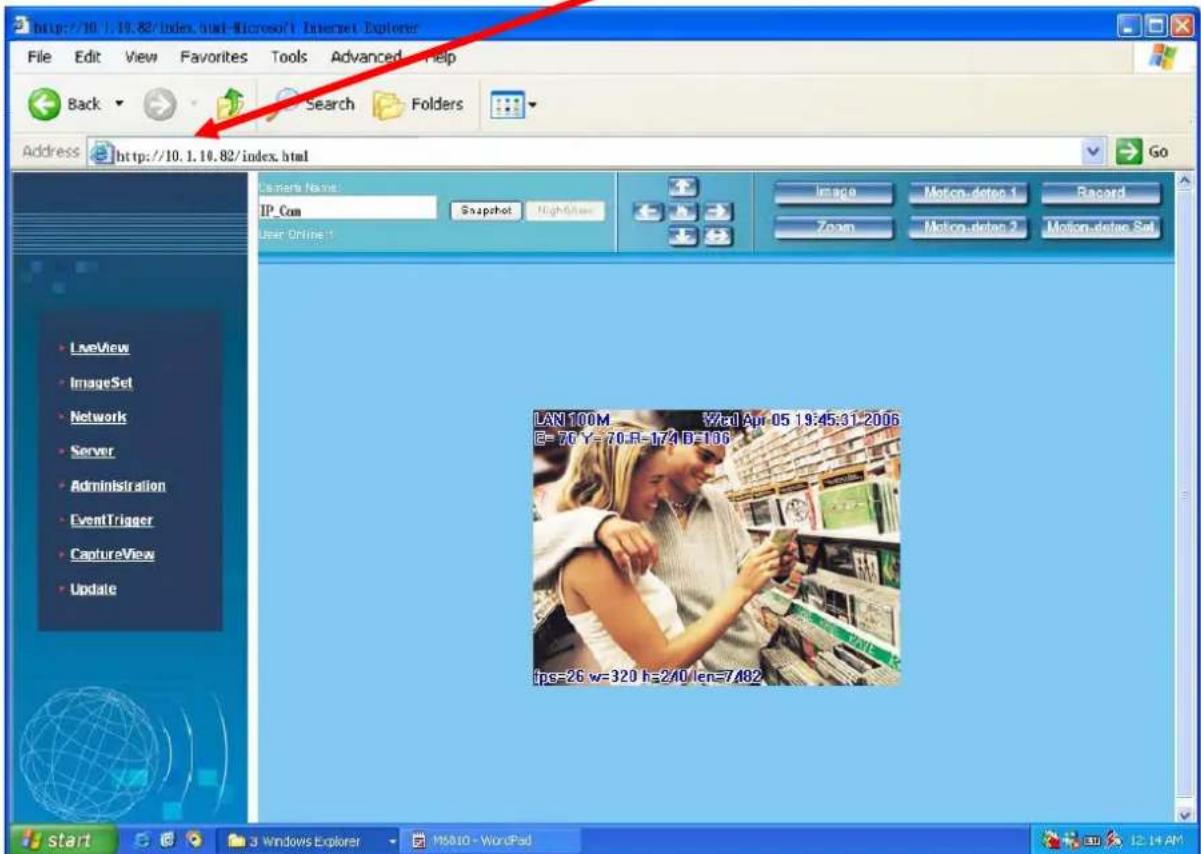
- Now, IP-CAM is set up with the IP address in LAN.
- Or, use CAM_EZ Search to access into monitoring screen of network according to the instructions in Figure 5.
- Or, turn on your PC and open IE Browse. Type 10.1.10.82 in Address lint to access into monitoring screen of network.
2.4-3 PPPoE - IP Address Setting
- Access into monitoring screen of network by following the way stated in 2.2.
- Click Network and open Network menu. Please choose PPPoE and key in the Account and Password. (the following example uses ADSL account from AT&T), press Submit to finish key in and then, please reboot and re-enter.

- Open CAM_EZ Search and click Update. Wait for 60 seconds (it varies according to the connection quality). Then the system will search DN-16032 IP-CAM automatically. 1. Click the searched IP-CAM. 2. Check the IP address and Gateway. Floating IP address, SubMask and Gateway will be shown in dimmed color. It means that DN-16032 IP-CAM in LAN has been searched successfully with PPPoE.

-
You can also directly use CAM_EZ Search and key in PPPoE Account & Password.
-
Select PPPoE. Click Submit to send out. The DN-16032 IP-CAM network settings will be renewed.
- Now you can click the searched IP-CAM to open IE Browser for accessing into IP-CAM web configurator automatically.
2.5 IP-CAM NETWORK FRAMEWORK INSTALLATION
IP-CAM Network Framework Installation 1
| Way to access Internet Use Permanent ADSL or Cable Modem | |
| Physical IP Address Owns several physical IP addresses | |
| IP Share or LAN Hub General model is OK. | |
| Network Setup for IP -CAM LAN Enable / Manually | |
| Suitable Objects Users with several physical fixed IP addresses and several IP-CAMs installed |
![graph TD A["INTERNET"] --> B["ADSL / CABLE MODEM"] B --> C["IP SHAREING OR LAN HUB 211.78.174.01"] B --> D["PC FOR IP CAM SETUP 211.78.174.02"] D --> E["IP CAM 211.78.174.03"] D --> F["IP CAM 211.78.174.04"] D --> G["IP CAM 211.78.174.05"] D --> H["3G MOBILE PHONE"] D --> I["NOTEBOOK"] D --> J["PDA"…](/content/2026/05/898338/images/cab35630d5b00046607b469f713de1a1c648fe84c688606179267961aa6ee0d1.jpg)
- Connect the RJ-45 terminator on the rear of IP-CAM to the red test network cable. One end is connected to the network card of computer; the other end is connected to the rear side of the IP-CAM.
- Refer to 2.4-1 STATIC – IP Address Settings to type the IP address properly.
- Set a physical IP address for each IP-CAM.
- Set up the IP-CAM with fixed IP address.
- For viewing images in IP-CAM from remote computer: Open IP browser and type in the physical IP address of the IP-CAM, e.g., http://211.78.174.03.
二. IP-CAM Network Framework Installation 2
| Way to access Internet Use Permanent ADSL or Cable Modem | |
| Physical IP Address Owns more than one IP address | |
| IP Share or LAN Hub Must be equipped with DHCP function | |
| Network Setup for IP -CAM LAN Enable / ManuallyWeb Server Port Number, need to be adjusted | |
| Suitable Objects | Users with one physical fixed IP addresses, IP Share and several IP-CAMs installed |
![graph TD A["INTERNET"] --> B["ADSL / CABLE MODEM"] B --> C["PC FOR IP CAM SETUP 192.168.0.1"] C --> D["IP CAM 192.168.0.2:1025"] C --> E["IP CAM 192.168.0.3:1026"] C --> F["IP CAM 192.168.0.4:1027"] C --> G["3G MOBILE PHONE"] C --> H["NOTEBOOK"] C --> I["PDA"] C --> J["DESKTOP PC"]](/content/2026/05/898338/images/d86b68e6847acb063d3bbd7df85e58cb03ad96fe53c6d8f6727f3c795b176861.jpg)
- Set a real physical IP address (e.g., 211.78.174.01) for the public IP of IP Share. Then, set another private IP address and activate the DHCP server function of IP Share.
- In the IP configuration for each IP-CAM, please assign different virtual IP address internally and respectively. In the Http Port setting, please specify different port parameters. (Please refer to 2.4-1 STATIC - IP Address Settings to type the IP address properly.)
- For the port transformation in IP Share, please refer to IP and port settings of camera to configure accordingly.
- For viewing images in IP-CAM from remote computer: Open IP browser and type in the physical IP address of the IP Share and the port number of IP-CAM, e.g., http://211.78.174.01:1025.
三. IP-CAM Network Framework Installation 3
| Way to access Internet Use dial-up | ADSL or Cable Modem |
| Physical IP Address | Owns one float IP address (dispatched by ISP dynamically) |
| IP Share or LAN Hub Must be equipped with DHCP and NAT functions | |
| Network Setup for IP -CAM LAN Enable / Manually Web Server Port Number, need to be adjusted | |
| Suitable Objects Users with dial-up | ADSL, one float IP address and several IP-CAMs installed |
![graph TD A["INTERNET"] --> B["ADSL / CABLE MODEM"] B --> C["PC FOR IP CAM SETUP 192.168.0.1"] C --> D["IP CAM 192.168.0.2:1025"] C --> E["IP CAM 192.168.0.3:1026"] C --> F["IP CAM 192.168.0.4:1027"] C --> G["3G MOBILE PHONE"] C --> H["NOTEDBOOK"] C --> I["PDA"] C --> J["DESKTOP PC"]](/content/2026/05/898338/images/2ea1415343eec425a2430707fa6f487fb63ca8ad70bc05c49cc7891e7f3c0997.jpg)
- Activate PPPoE function of IP share. Then, set another private IP address and activate the DHCP server function of IP Share. When the dial-up of ADSL is successful, you will get an float IP address from your ISP.
- In the IP configuration for each IP-CAM, please assign different virtual IP address internally and respectively. In the Http Port setting, please specify different port parameters. (Please refer to 2.4-1 STATIC - IP Address Settings to type the IP address properly.)
- For the port transformation in IP Share, please refer to IP and port settings of camera to configure accordingly.
- For viewing images in IP-CAM from remote computer: Open IP browser and type in the float IP address of ADSL and the port number of IP-CAM, e.g., http://211.78.174.01:1025.
四. IP-CAM Network Framework Installation 4
| Way to access Internet | Use Permanent ADSL or Cable Modem |
| Physical IP Address Owns one physical IP address | |
| IP Share or LAN Hub Not necessary | |
| Network Setup for IP -CAM LAN Enable / ManuallyWeb Server Port Number, no need to be adjusted | |
| Suitable Objects Users with permanent ADSL, one fixedphysical IP address and one IP-CAM installed | |
![graph TD A["INTERNET"] --> B["ADSL / CABLE MODEM"] B --> C["IP CAM 211.78.174.94"] D["DESKTOP PC"] --> E["PDA"] D --> F["NOTEBOOK"] D --> G["3G MOBILE PHONE"]](/content/2026/05/898338/images/be10872cf0b92043cf9450b257405e5ce95b5db7d3bcdbcc054a4c7428b6049e.jpg)
- Connect the RJ-45 terminator on the rear of IP-CAM to the red test network cable. One end is connected to the network card of computer; the other end is connected to the rear side of the IP-CAM.
- Refer to 2.4-1 STATIC – IP Address Settings to typing the IP address properly.
- Set up the IP-CAM with fixed IP address.
- For viewing images in IP-CAM from remote computer: Open IP browser and type in the physical IP address of the IP-CAM, e.g., http://211.78.174.94.
五. IP-CAM Network Framework Installation 5
| Way to access Internet | Use dial-up ADSL or Cable Modem |
| Physical IP Address | Owns one float IP address (dispatched by ISP dynamically) |
| IP Share or LAN Hub | Not necessary |
| Network Setup for IP -CAM | PPPoE function should be set, LAN Enable Web Server Port Number, no need to be adjusted |
| Suitable Objects | Users with dial-up ADSL, and one IP-CAM installed |
![graph TD A["INTERNET"] --> B["Dial up ADSL Modem"] B --> C["IP CAM PPPoE Function enable"] A --> D["DESKTOP PC"] A --> E["PDA"] A --> F["NOTEBOOK"] A --> G["3G MOBILE PHONE"]](/content/2026/05/898338/images/5c4a2fc1c4785d6878f1584e73169358bb573d56898548c6915338988c18ffa5.jpg)
- Please acquire the necessary information of ADSL dial-up from your ISP. ISP relational information: ADSL dial-up account name and password
- Connect the RJ-45 terminator on the rear of IP-CAM to the red test network cable. One end is connected to the network card of computer; the other end is connected to the rear side of the IP-CAM.
- Refer to 2.4-3 PPPoE - IP Address Settings for typing account name and password.
- Please type the Mail server setup information of IP-CAM.
- Set up the IP-CAM to Dial up ADSL Modem.
- When the dial-up is successful, IP-CAM will send a notification e-mail of float IP Address to the users.
- Open IP browser and type in the physical IP address (such float IP is dispatched by ISP) of the IP-CAM, e.g., http://211.78.174.94.
六. IP-CAM Network Framework Installation 6
| Way to access Internet | Use dial-up ADSL or Cable Modem |
| Physical IP Address Owns several float IP addresses (dispatched by ISP dynamically) | |
| IP Share or LAN Hub Must be equipped with DHCP and NAT functions | |
| Network Setup for IP -CAM LAN Enable / Manually Web Server Port Number, need to be adjusted | |
| Suitable Objects | Users with several float IP addresses and several IP-CAMs installed |
![graph TD A["INTERNET"] --> B["DIAL UP ADSL MODEM"] B --> C["LAN HUB"] C --> D["IP CAM PPPoE FUNCTION ENABLE"] C --> E["IP CAM PPPoE FUNCTION ENABLE"] C --> F["IP CAM PPPoE FUNCTION ENABLE"] B --> G["PC FOR IP CAM SETUP"] G --> H["3G MOBILE PHONE"] G --> I["PDA"] G --> J["NOTEBOOK"] G --> K["DESKTOP…](/content/2026/05/898338/images/0b7b05836b2ad24ac7a19ef32d08045368994405ff47f21f32542591e2a99a57.jpg)
- Please acquire the necessary information of ADSL dial-up from your ISP. ISP relational information: ADSL dial-up account name and password
- Connect the RJ-45 terminator on the rear of IP-CAM to the red test network cable. One end is connected to the network card of computer; the other end is connected to the rear side of the IP-CAM.
- Refer to 2.4-3 PPPoE - IP Address Settings for typing account name and password.
- Please type the Mail server setup information of IP-CAM.
- Install IP-CAM on LAN Hub.
- Use CAM_EZ Search tool to find out the float IP address assigned by ISP for the ADSL currently.
- Open IP browser and type in the physical IP address (such float IP is dispatched by ISP) of the IP-CAM, e.g., http://211.78.174.94.
- Follow the steps above to configure for each IP-CAM.
七. IP-CAM Network Framework Installation 7
| Way to access Internet | Use Permanent ADSL or Cable Modem |
| Physical IP Address Owns one physical IP address | ical IP address |
| IP Share or LAN Hub Must be equipped with DHCP and NAT functions | ped with DHCP and NAT functions |
| Network Setup for IP -CAM LAN Enable / Manually Web Server Port Number, need to be configured | able / ManuallyWeb Server Port Number, need to be configured |
| Suitable Objects Users with one fixed physical IP, IP Share and several IP-CAMs installed | d physical IP, IP Share and several IP-CAMs installed |
![graph TD A["INTERNET"] --> B["IP SHAREING"] B --> C["ADSL/CABLE MODEM"] B --> D["LAN HUB"] D --> E["IP CAM 192.168.0.2:1025"] D --> F["IP CAM 192.168.0.3:1026"] D --> G["IP CAM 192.168.0.4:1027"] D --> H["IP CAM 192.168.0.5:1028"] D --> I["IP CAM 192.168.0.6:1029"] D --> J["IP CAM 192.168.0.7:1030"]…](/content/2026/05/898338/images/172210f679416163065e988adb1c8b5cb47fc9d966fe328e69e73d7e6dd82fdb.jpg)
- Set a real physical IP address (e.g., 211.78.174.01) for the public IP of IP Share. Then, set another private IP address and activate the DHCP server function of IP Share.
- In the IP configuration for each IP-CAM, please assign different virtual IP address internally and respectively. In the Http Port setting, please specify different port parameters. (Please refer to 2.4-1 STATIC - IP Address Settings to fill in the IP address properly.)
- For the port transformation in IP Share, please refer to IP and port settings of camera to configure accordingly.
- For viewing images in IP-CAM from remote computer: Open IP browser and type in the IP address of IP Share and the port number of IP-CAM, e.g., http://211.78.174.01:1025.
2.6 INSTALLATION FOR IP SHARE
When IP-CAM is installed under IP Share, it can obtain a dynamic IP address from DHCP server. If you want to install the IP-CAM in WAN interface, you have to set a fixed IP address for the device. No matter whether your IP Share has the function of virtual server, it is necessary for IP-CAM to set a fixed IP address.
(1) Please use CAM_EZ Search to set a fixed IP address for IP-CAM, e.g., 192.168.0.120 and change the http port number (1025\~35534). (refer to Figure 1)
Figure 1

(2) Type admin to access into ADSL router's web configuration. (Refer to Figure 2)
Figure 2

(3) Enable DHCP function of IP Share. (Refer to Figure 3. The range of available IP address is 192.168.0.100\~192.168.0.199)
Figure 3

(4) Access into the web page of Virtual Server. Add the fixed IP address specified by CAM_EZ Search in step (1) and enable it. (Refer to Figure 4.1)
Figure 4.1

(5) After adding the IP address, you can see jeffipcam1 in the virtual server list (refer to Figure 4.2).
Figure 4.2
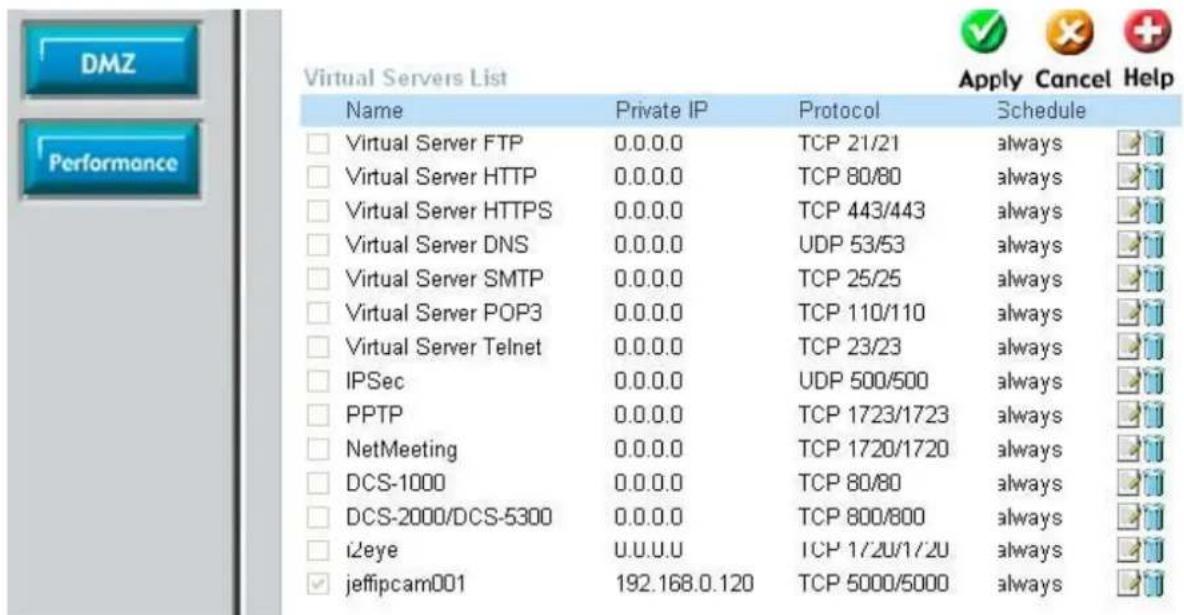
(6) Restart PC and IP Share. After restarting, if you want to connect IP-CAM from WAN interface, please go to Status\WAN\IP Address of the router's web configurator.
(http://59.104.28.251:5000, refer to Figure 5)
Figure 5

2.7 INTERNET IP SHARING & AUDIO SETTING
Please use the following steps for setting up if your IP cam does not have Audio
Step 1, setting Audio Part: the Pre-setting is 1500 (setting range is 1500\~65535) and press Submit
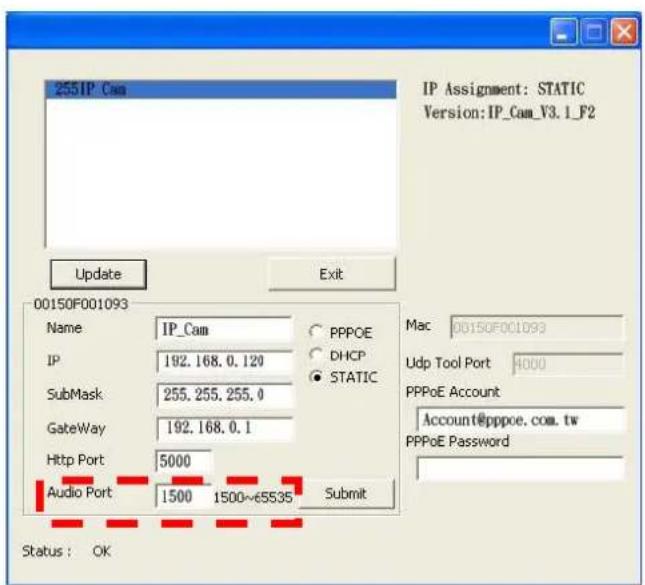
step 2, add one new UDP part 1500 in router (UDP port setting range is 1500\~65535) as one port can only appoint to the use of one IP cam. Therefore, please assign other ports if you have more than two IP cams.

3. GETTING STARTED
3.1 SYSTEM LOGIN
The system login is the process of identifying all users trying to log into the system to confirm user identify and grant permission to access to the system's functions. This system provides two layers of security access: "administer" and "general user". After a successful login to the system, users can begin to access both surveillance and setting functions, Follow the steps below to log in as an "admin" user:
Step 1: Open the login window, as shown below.
Using the CAM_EZ Search application, select the DN-16032 from the menu, and Double Click on it;

Step 2: The system login window will appear in Internet Explorer as shown below:

Step 3: Enter Account ID and Password (the default settings are "admin" and "password");
Step.4 Press Submit to confirm, and then follow the instructions for the LiveView
feature show on the next page ;
Step.5 If a mistake has been made, press Cancel, and enter login information again.
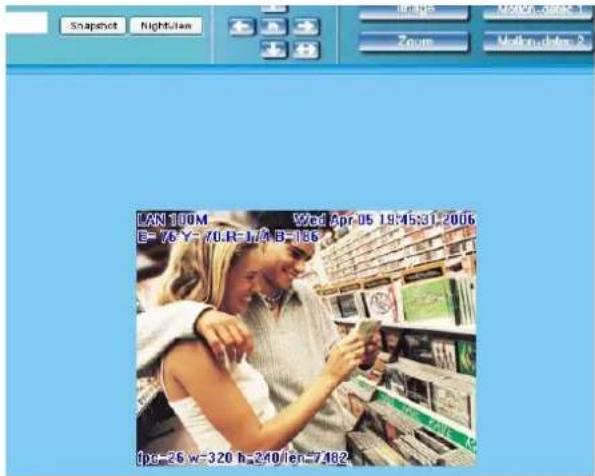
3.2 LIVEVIEW
When using IP Cam for the first time, users must change the Internet Explorer security settings (please refer to settings step 3.2.1). Otherwise, the system will display the following warning, and be unable to display the surveillance feeds.

After having successfully set up the IP CAM settings during the first use, users do not need to change the settings again for later use.
3.2.1 The IE security settings can be changed by following the steps below:
Step 1. IE Toolbar ---> Tools ---> Internet Options ---> Security ---> Custom Level ...
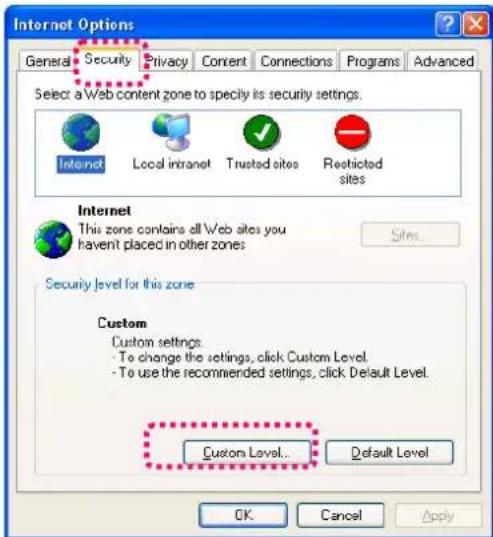
Step 2. After clicking on Custom Level ..., a security settings window shall appear. Change ActiveX Control Options and Plug-ins settings to the following :
- Download signed ActiveX controls: Enable
- Download unsigned ActiveX controls: Enable
- Initialize and script ActiveX controls not marked as safe: Enable
- Run ActiveX controls and plug-ins: Enable
- Script ActiveX controls marked safe for scripting: Enable

Step 3. After pressing "ok", a warning window shall appear. Click on "Yes", and you shall return to the last window. Press "OK", and the setup is complete.

Step 4. At this time, the computer should display a warning window, as shown above: Press "Yes", to begin;
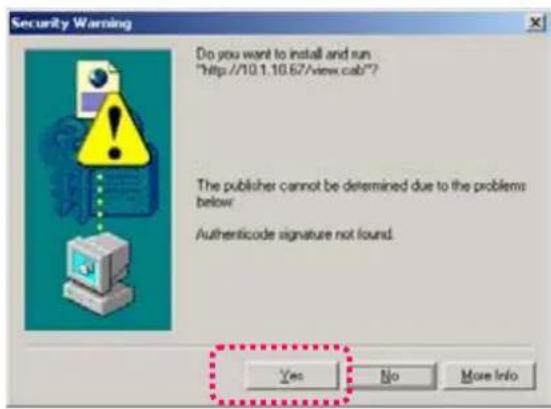
Step 5. When the installation is complete, you may begin viewing the surveillance image for the first time, as shown below.
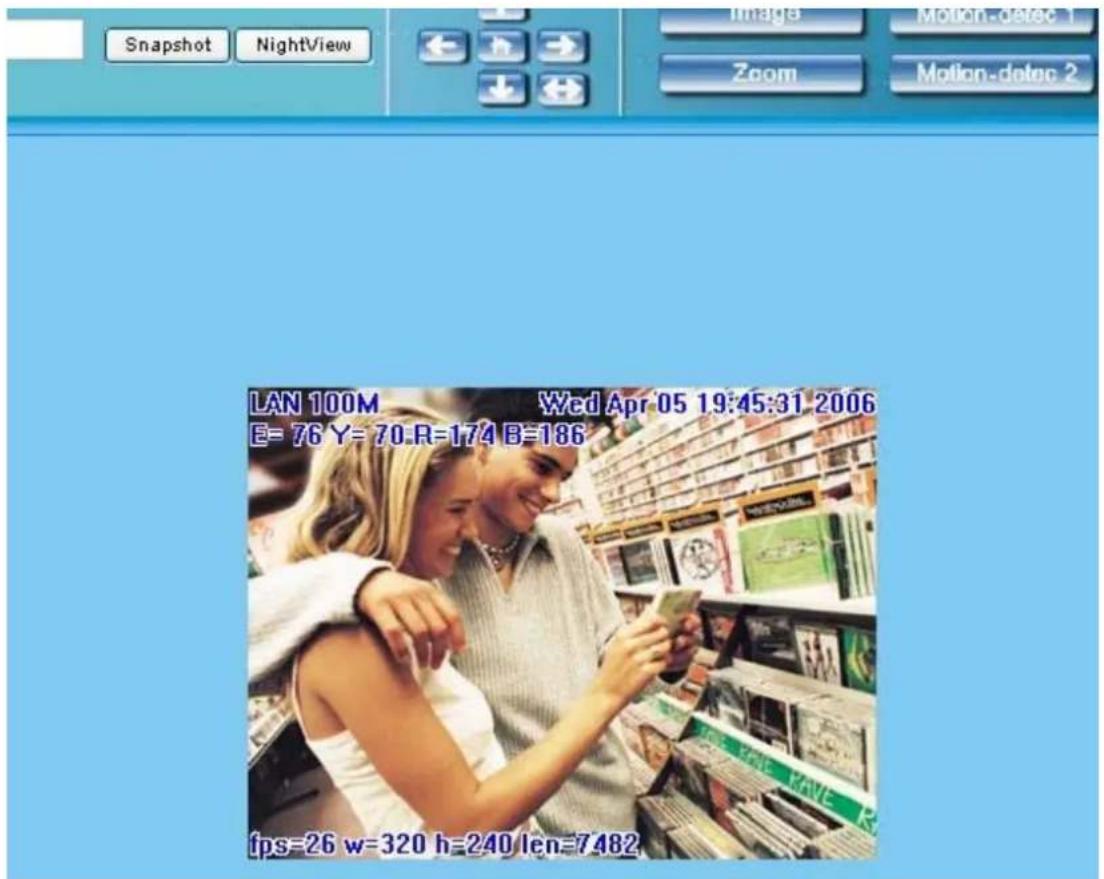
Note: This action loads ActiveX components from the DN-16032 System to the local machine. To ensure your machine cannot run malicious ActiveX content from the Internet without authorization, you will be prompted to allow the ActiveX component of your browser to interact with the Rimax DN-16032 each time you access it. When you view the stream from the IP Cam and you see the prompts regarding downloading, running or enabling ActiveX content from the IP address of the DN-16032, click "Yes" to allow your computer to display the video from your camera. If you are prompted to allow ActiveX content when you are not connected to your DN-16032, ensure the provider of the content is a reliable and secure source for running programs on your PC. If you are in doubt about the source of the ActiveX program you are being requested to allow to run on your system, click "No" to ensure you don't allow malicious programs to interfere with your PC.
3.3 TAKE A SHOT
This function allows users to capture the screenshot as a photo, and save it on the computer.
Directions:

Step 1. Go to the LiveView menu, and go to the live image.
Step 2: Hold down the Ctrl key on your keyboard;
Step 3. Place the cursor on the surveillance image and left click with your mouse. The captured image should flash momentarily, as shown below:

Step 4. Release the Ctrl key, and the single still shot image will have been successfully captured.
Step 5. Select the CaptureView menu to browse through the captured images. Refer to Chapter 5.2 for details.
Note: Snapshot can only be stored to PC, can't store to SD Card
4. ADVANCED FUNCTION WITH LIVEVIEW
Move the cursor to the live image, and right click with your mouse. A small menu should appear with four options.

- Image : Adjust image values
- Record : Setup for recording into AVI format.
- Zoom : Select digital zoom value for window.
- Motion Detect Set : Settings for motion detection
These settings are described in detail in the next chapter
4.1 IMAGE ADJUSTMENT
After selecting an Image, you may change various image settings, as shown below:


4.2 AVI RECORD SETUP
By selecting "Record", you can adjust the AVI Frame Rate settings ad file name.

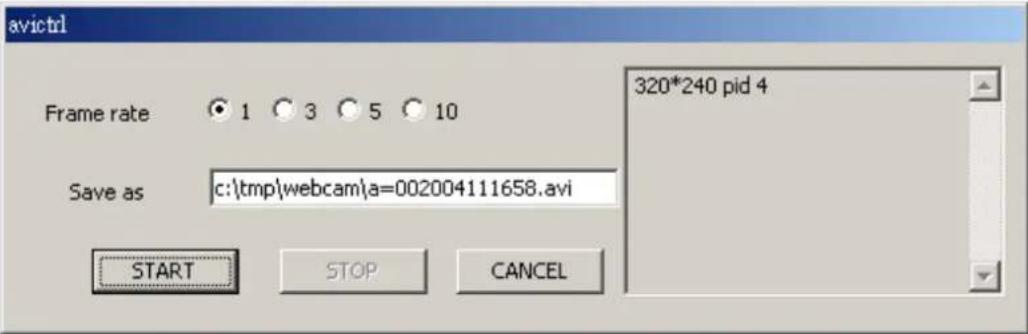
4.3 ZOOM IN DISPLAY
Using your mouse, click and drag out a box to select the portion of video that you wish to view as shown by the grey box in the image below. The image will zoom in according to
the dimensions entered and will show an image similar to this below (Zoom):

4.4 MOTION DETECTION SETUP
Setting up the Motion Detection (MD) values, including the first area (red border) and second area (green border).
Please check to see whether the Event Trigger has been enabled. If so, you can set up Motion Detection as described below:
- Reset MD range: Select motion detect 1or2, and hold down on the left mouse button (this will appear as the upper left corner of the MD range). Then, drag out the desired
range, and release when finished. ( _ ) Motion-detec 1 Motion-detec 2
- Cancel MD: Same as above, but just left click once and release. This will cancel the MD (Motion Detection).
- Motion_detec_set: This sets the MD (Motion Detection) sensitivity, which is usually set to a value of 5. This means that the motion detection will be toggled with as little of a 5% change in the MD range. The lower the number entered, the higher the sensitivity
of the MD. () Motion-datec Set
When motion is detected, the screen should display an MD warning in red in the upper left hand corner if there is movement within MD1 or MD2, as shown in below:


- Any motion detection range can be selected in 640x480 and 320x240 resolutions
- In 160x120 resolution, the motion detection is fixed to the entire image.
Note:
- Motion Detection can exist PC and SD Card
- Image that MD reaches PC is stored to C: \tmp\webmd
4.5 MOTOR CONTROL
- — Home, return to the middle place.
- — Up, press it to move up.
- Down, press it to move down.
- — Left press it to move left.
- Right, press it to move right.
- — Detection, After press the bottom, IP Cam will detect horizon automatically
5. ADVANCED APPLICATION
This chapter explains the advanced settings for the DN-16032, including:
- Image Setup
- Capture View
- Network Setup
- Server Setup
- Event Trigger Setup
- Administration Setup
- Software Update
5.1 IMAGE SETUP
This includes :
- Resolution : Users can select between image resolution of 160x120, 320x240, and 640x480. The default resolution is 320x240.
- Quality : Users can select between "fine", "normal", and "basic" image quality. The default image quality is "basic".
- Anti-Flicker : Users can select between 60Hz for USA and Canada, 50Hz for Australia and Europe, or Outdoor for when you are observing a naturally lit outside area; The default setting is 50Hz.
- Audio : Audio output. Default setting is "off".
- Rotate 180 : This setting turns the image upside-down for when the camera is mounted to a ceiling; Default setting is "off".
- IR Auto Detection : IR LED auto activation in low light. Default setting is “on”
- Message : liveView characters are hidden, Default setting is "on"
Image Setup Directions :
Step 1. Click on ImageSet to view the menu, the default settings are shown below;

Step 2. After entering the desired values, click on Submit.
Step 3. If you wish to cancel your changes, click on Cancel
5.2 CAPTURE VIEW
This view includes :
- Manual capture of still images usingLiveView.
- Automatic capture of still images via MD.
How to Use Capture View :
Step 1. Click on CaptureView to enter the menu. The menu is capable of saving up to
48 images, viewable on three pages of. Images saved using Motion Detection will not be shown here;
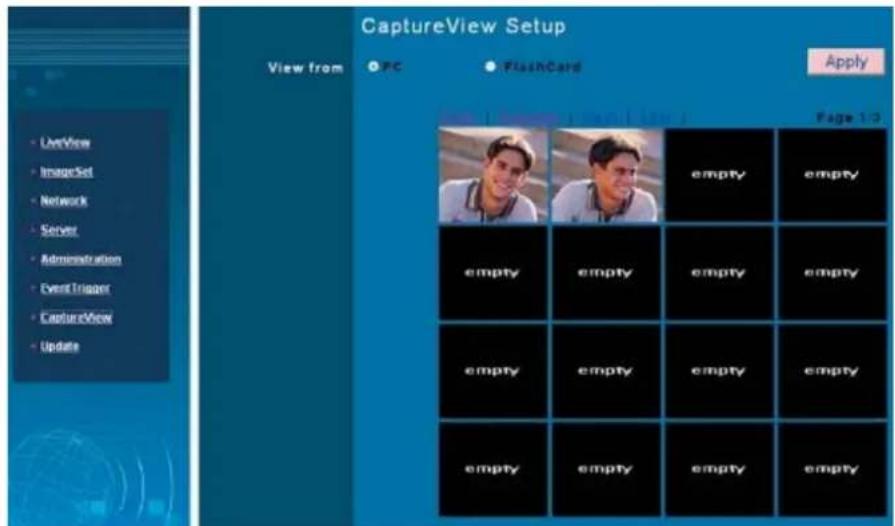
Step 2. You can set the system to read from either your computer or your SD Memory card. After making your selection, click on Apply.
Step 3. Select desired thumbnail image using the cursor to view image at the default dimensions.


Note: Images seen in : PC is the image of Snapshot; FlashCard is the image of MD; The image of MD to PC is stored in C:\tmp\webmd
5.3 EVENT TRIGGER
This includes both event trigger settings and display, including:
- Event : Entering events
- Trigger : Setting trigger and picture capture times

Detailed explanations are presented in the next chapter.
5.3.1 Event
Event settings, including:
- Motion Detection (set 1)
- Motion Detection (set 2)
Individual or both set signal input triggers can be selected.
How to Use Event Settings :
Step 1. Activate Event for either set (MD will automatically display the trigger sensitivity)
Step 2. After you are finished, click on Submit, otherwise;
Step 3. Click on Default to use factory default settings (sets all to off).
Note: After engaging either type of event, "Save in PC" will automatically turn on.
5.3.2 Trigger
Event trigger image transfer settings, including:
- Save in PC : The image file is saved in your computer.
- Save in Flash Card : The image file is saved in the SD card.
- Mail Image : Send captured event trigger image file by e-mail.
- FTP Image : Send captured event trigger image file by FTP.
- Shutter Timer : Change shutter time for event trigger image capture. two (2) seconds is the default setting.
5.4 NETWORK SETUP
Network Setup can be used to change the network connection settings of the IP CAM.
The default value for IP assignment is "static". These settings also include:
- IP Assignment : Static, DHCP, or PPPoE
-
PPPoE settings (PPPoE is the most common type of Broadband Internet connection, where your ISP assigns a different IP address to your connection each time you log on)
-
Http Server port settings
- Set the port of UDP Server and also Audio Port
- DNS settings
MAC Address : Displays the Mac address of the IP CAM

5.4.1 IP Assignment :
Static IP Assignment refers to the fixed settings of the ISP or network engineering department.
IP Address: Includes Static, DHCP and PPPoE. DHCP and PPPoE are typically dynamic IPs where a DHCP server or your ISP designates an IP address each time you log on.
When using the "Static" setting, you must enter the following information:
- IP Address : The IP address of the IP CAM
- Subnet Mask : Set by default to 255.255.255.0
- Gateway : Default gateway
When using the “DHCP” setting, you do not need to enter any of the above settings. You must only enter the address of the DHCP Server in the “Server” field.
When using the "PPPoE" setting, you must correctly enter your ISP Login name and password. Please refer to unit 5.4.2 for details.
5.4.2 PPPoE
This menu allows you to enter the dial-up settings during PPPoE IP assignment. This usually refers to entering your ID account name and password. Remember that you must
also enter your ISP log-in settings.
How to Setup PPPoE
Step 1. Enter your correct user ID in the "Account" field.
Step 2. Enter your correct password in the "Password" field.
Step 3. Click on Submit to complete your settings.
Note: Because PPPoE utilizes a dynamic IP address from an ISP, the IP settings for the DN-16032 could differ for each use. It is suggested that an IP Router be used to connect to the PPPoE or DDNS. This will assist your computer in finding the IPCAM.
5.4.3 HTTP Server
This menu allows you to enter the port number of the DN-16032 IPCAM internal web server (or HTTP Server) via HTTP protocol. The default port number is “80”.
5.4.4 DNS Server
This menu allows you to enter the IP address of the DNS (Domain Name Server).
By doing this, you can replace the IP address of the IP CAM with an http name (such as myIPCAM.XXX), making it easier to remember. The default DNS1 value is "168.95.1.1" (Hinet). If the connection fails, the system will automatically attempt to connect to DNS2.
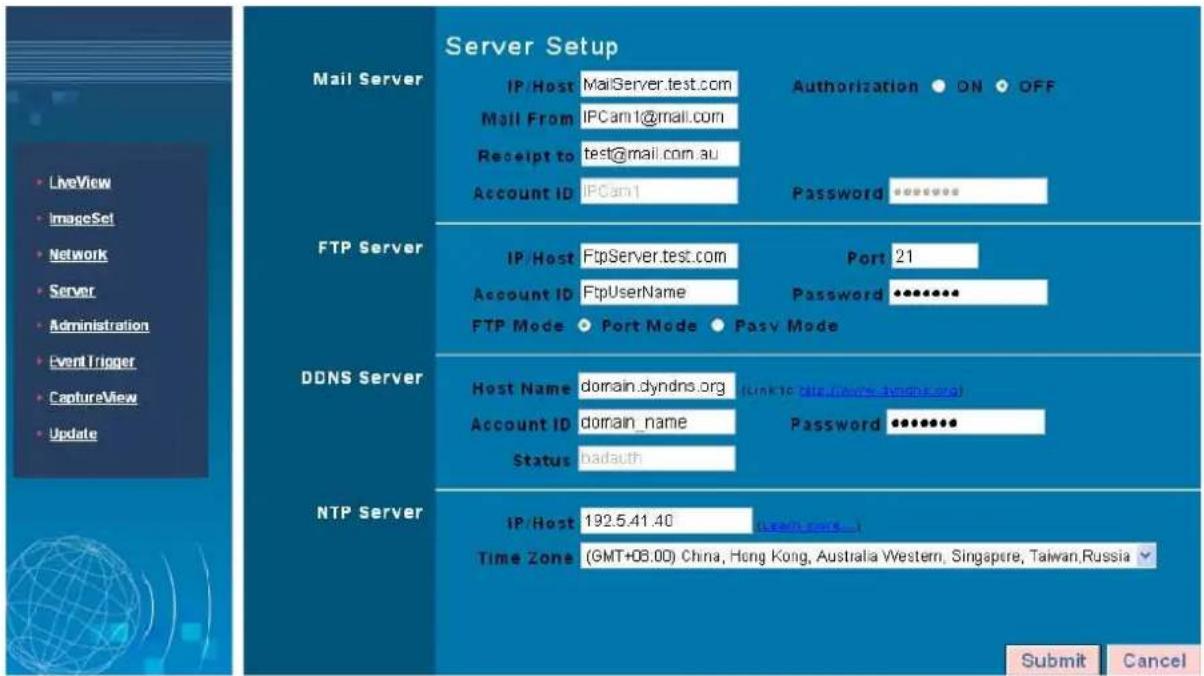
5.5 SERVER SETUP
This menu allows you to enter various server settings, including:
- Mail Server
- FTP Server
- DDNS Server
- NTP Server
5.5.1 Mail Server
This refers to settings pertaining to sending image files via a mail server. You must also make sure that the Mail Image settings from EventTrigger are enabled to e-mail a file to the designated address upon event trigger. This system supports SMTP (Simple Mail Transfer Protocol) servers.
How to use mail server settings:
Step 1: Enter the IP address or http web address of the mail server in "IP/Host".
Step 2: Enter the e-mail address of the sender in "Mail From".
Step 3: Enter the e-mail address of the recipient in "Receipt to".
Step 4: Enter the registered account ID of the mail server in "Account ID"
Step 5: Enter the correct mail server password in "Password"
Step 6: Enter whether or not your mail server requires authorization in "Authorization"
Step 7: Click on Submit when you are finished.
5.5.2 FTP Server
This menu allows you to enter the FTP (File Transfer Protocol) Server settings. You must also make sure that the FTP Image settings from EventTrigger are enabled to send a file to the designated FTP server via FTP upon event trigger. This system supports Port
Mode and Passive Mode. You must be able to write to the root folder of the ftp site to use this feature.
How to use FTP Server settings:
Step 1: Enter the IP or HTTP address of the FTP server in "IP/Host"
Step 2: Enter the designated FTP port number in "Port"
Step 3: Enter the account ID of the FTP server in "Account ID"
Step 4: Enter the FTP server password in "Password"
Step 5. Select whether you wish to use "Port Mode" or "Passive Mode" transfer protocol.
Step 6. Click on Submit when you are finished.
5.5.3 DDNS Server
This menu allows you to enter your DDNS (Dynamic Domain Name Server) Settings. You can also use a PPPoE (with dynamic IP) to connect to the http address of the IPCAM (such as sqipcam.dyndns.org) by entering the registered HTTP address of the DDNS Server. This is convenient for viewing IPCAMS with non-fixed IP addresses.
Entering the DDNS Server Settings :
Step 1: Find a DDNS service (such as http://www.dyndns.org), and register a user account, password, and HTTP user address.
Step 2: Enter the address (IP or HTTP) of the DDNS server. Enter the host name, account ID, and password in each appropriate field.
Step 3: Enter the account ID of the DDNS server in "Account ID"
Step 4: Enter the DDNS server password in "Password"
Step 5. Select the DDNS server connection status automatic display setting.
Step 6. Click on Submit when you are finished.
5.5.4 NTP Server
NTP(Network Time Protocol) allows you to calibrate the IP CAM timing.
Using the NTP Server settings :
Step 1: Enter the NTP Server IP or HTTP address in "IP/Host"
Step 2: Select the correct time zone in the "Time Zone" menu
Step 3: Click on Submit when finished.
5.6 ADMINISTRATION SETUP
This menu allows you to designate an IP CAM name, administrator password and other user passwords. Administrators may access all IP CAM functions and settings, while
general users may only utilize the ▶LiveView view and may not access any of the settings.

5.6.1 Camera Name
This allows you to set a name for the IPCAM name that will be displayed on the video for identification purposes.
5.6.2 General User
This menu allows you to change the account ID and password for general users.
Using the General User settings:
Step 1: Enter the user name in the "Account ID" field.
Step 2: Enter existing password you wish to change in the "Old Password" field.
Step 3: Enter the new password in the "New Password" field.
Step 4: Confirm the password by entering it once more in the "Re-type" field;
Step 5: Click on Submit to finish.
5.6.3 Administrator
This menu allows you to change the account ID and password for administrators.
Using the Administrator Settings:
Step 1: Enter the registered IP CAM name in the "Account ID" field.
Step 2: Enter you're the password you wish to change in the "Old Password" field.
Step 3: Enter the new password in the "New Password" field.
Step 4: Confirm the password by entering it once more in the "Re-type".
Step 5: Click on Submit to finish.
5.7 SOFTWARE UPDATE
This menu allows you to update the IP Cam software online. You may use this feature to update the internal DN-16032 software in order to make sure you have the newest version available, as well as updates to fix any software glitches.

Using the Update Feature:
Step 1. Camera Name: The system will detect the name of current IP CAM automatically.
Step 2. Current Version: The system will detect the software version of current IP CAM
automatically.
Step 3. New File Name: The filename (including directory) that you want to upload for update.
Step 4. Click Browse... to select the file.
Step 5. Check the above settings and then click Submit.
Step 6. The system will upload the file right away. It might take 7\~10 seconds in LAN of 100Mbps.
Step 7. The system will count down about 50 seconds automatically. If it succeeds, the message of Update completed! System will auto reset after 3 seconds! will be displayed on the screen.
Step 8. After finishing update, please close the window of Internet Explorer and delete CSQ objects in the following path:
My Computer\Control Panel\Internet Options\ Settings...(Figure1)\View
Objects...(Figure2)\CSQ Object (Figure3)

(Figure1)
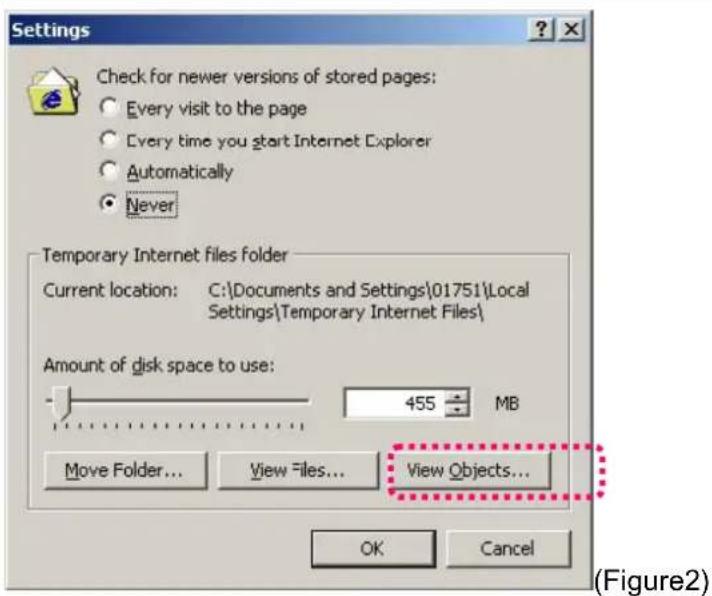

(Figure3)
Step 9. Re-login IP CAM and type the Account ID and Password.
Step10. View Current Version to check if the upgrade is successful or not.
Note: After finishing Step 6., do not operate IPCAM and cause it disconnected. Otherwise, it would be damaged and needed to be repaired by factory.
※ Strongly recommend: Please follow the connection method in 2.2. Open the browse and access into network monitoring screen. Then, execute the work of upgrade. (The reason is that the worse stability of the network might cause update failed and damage the device. Then the device would be repaired by the factory.)
APPENDIX
APPENDIX A. USING A PPPOE DIALUP CONNECTION AND DDNS WITH THE DN-16032 EZ IPCAM (USING A HUB)
This section is intended to help users connect to a computer to the DN-16032 via a hub. It also describes how to connect to ADSL with a PPPoE type IP address and also how to connect to the DN-16032 using DDNS. The directions are as described below:
A. Apply for a DDNS account using your home computer.
B. Connect to the DN-16032 with your home computer (using the CAM_EZ Search Tool).
C. Setup your DN-16032 to connect via PPPoE, and enter your DDNS settings.
D. You may now view your EZ IPCAM with DDNS viewer.
A. Applying for a DDNS Account with Your Home Computer
To do this, you must first have a Cable/ADSL Ethernet modem (with RJ-45 connectors), and make sure that your broadband provider (ISP) is properly connected to the Internet.
Step 1: Turn on your home computer and connect to the Internet. Open Internet Explorer and type in http://www.dyndns.org/ website.
Step 2: Go to the "Account" Menu, and click on "Create Account".
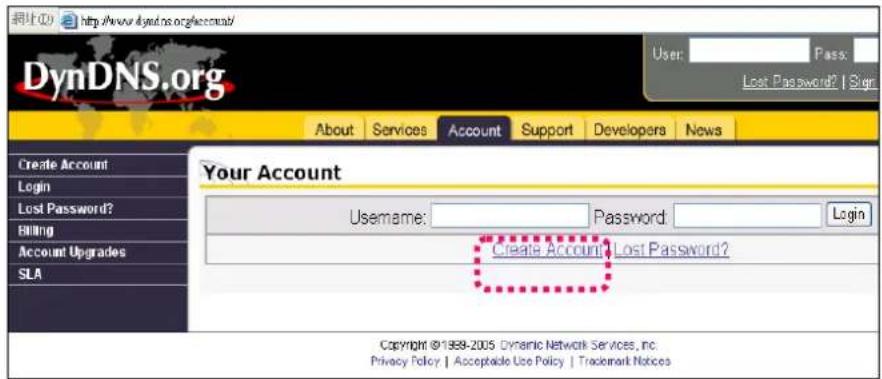
Step 3: Enter the desired account name (the account name "domain" is used in this example). Enter your E-mail address and password application. Click on "Create Account" to complete the application.

Step 4. mark the following two selects and press Create Account to complete the application

Step 5: If the application is successful, the following shall appear on your screen.

Step 6: After your application has been completed successfully, respond by E-mail to confirm, and go back to http://www.dyndns.org/ to enter your user name and password.
Step 7: Go to Dynamic DNS from the "Account" menu, and click on "Add Host". The following should appear:
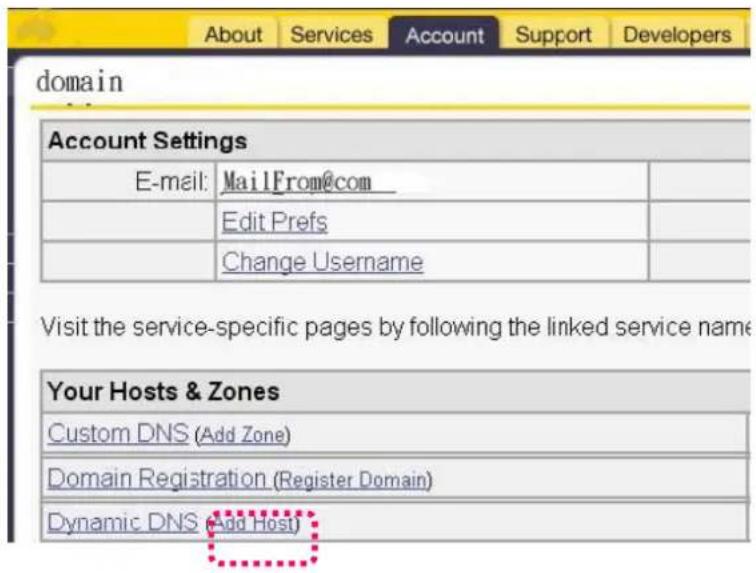
Step 8: The "Services" menu should automatically appear. Choose your Domain Name (gotdns.com has been used in this example for your reference).

Step 9: Enter your Host Name (domain has been used in this example for your reference). Click on "Add Host" to finish.

Step 10: After the new hostname has successfully created, the following screen should appear:

B. Connecting to the IP CAM EZ IPCAM with Your Home Computer (Using the CAM_EZ Search Tool)
Step 1: Please connect the IP CAM EZ IPCAM to the HUB as shown in following chart :
![graph LR A["INTERNET"] --> B["ADSL / CABLE MODEM"] B --> C["LAN HUB"] C --> D["Laptop"] D --> E["Camera"] E --> C style A fill:#f9f,stroke:#333 style D fill:#ccf,stroke:#333](/content/2026/05/898338/images/9864ed4ce7fd5b79b9adeac8cd7e438cfdff41c2503c152744c8f4bde31e6343.jpg)
Step 2: Open CAM_EZ Search. Click on "Update" to begin searching for any IP CAM EZ IPCAM connected to the local network. The menu should automatically display the EZ IPCAM under the name "IP CAM". It is recommended that you first change its IP address to 192.168.9.1 (factory default). For gateway, it is recommended that you use 192.168.9.254. Click "submit" to update.

Step 3: Go to My Computer > Control Panel > Network and Dialup Connection > Local Connection > click on "Preferences (P)".

Step 4: Select "Internet Protocol (TCP/IP)", and click on the preferences (R). Click on "Ok".

Step 5: Change the IP Address to 192.168.9.2. Change Subnet mask to 255.255.255.0. The default gateway is 192.168.9.254 (Change the IP address to any numbers within the range of 192.168.9.2 – 192.168.9.253). Click on "ok".

Step 6: In EZ Search Tool, click on Update once more to search for IPCAM on the local network. Double click on "IP CAM" from the list, and your browser will automatically take you to the IP CAM EZ IPCAM login window.
Please refer to P.10 for information on how to browse the surveillance video from the IP CAM EZ CAM.

C. Changing the IP CAM EZ IPCAM Settings to PPPoE / Using DDNS
Step 1: Select "Network" to open the network menu. Enter your account ID and password in the appropriate field in "PPPoE" (in this example, we have used Chung Hwa Telecom ADSL for your reference). Click on "Submit".

Step 2: Go to the "Server" menu. Enter the host name, account ID, and password in the appropriate field in "DDNS Server". Click on "Submit" to finish.

Step 3: At this time, you must change the IP settings of your home computer back to their original values (automatically retrieve IP address). To do this, click on “Network Neighborhood”, right click on the preferences (R). Select your local connection and right click to view the preferences (R).

Step 4: Select "Internet Protocol (TCP/IP)", and click on the preferences (R). Click on "ok".

Step 5: Select "automatically retrieve IP Address (O)" and "Automatically retrieve DNS server address (B)". Click on "ok".

D. Using the IP CAM EZ IPCAM with DDNS Viewer.
Step 1: Open CAM_EZ Search, and Click on Update. Wait for about 60 seconds (actual time dependant on the quality of your connection), and the IP CAM EZ IPCAM should be detected automatically. Click on the EZ IPCAM to view its IP and Gateway settings. If the system detects a floating IP address, submask, or gateway that cannot be changed, it means that the IP CAM EZ IPCAM on the local network has been successfully connected via a PPPoE connection, as shown
below:

At this time, you may select the EZ IPCAM that has been detected. Your browser should automatically open to the EZ IPCAM login window.
Step 2: You may also view the surveillance video from the IP CAM EZ IPCAM via a browser from a remote connection (such as your office) by entering a preset DDNS address (such as domain.gotdns.com).

APPENDIX B. FAQ :
General questions for IP Camera
Q1 : What is IP Camera?
A: IP Camera is an independent system that can connect to network or wireless network directly. It is different with general camera. It is an all-in-one system with built-in CPU and transmits high-quality video monitoring images via browser control and network. The IP Camera can setup or view the Web browser of remote PC/Notebook through network.
Q2: How many IP Cameras are allowed to be connected in LAN?
A: Eight IP Cameras are allowed to be connected in LAN at one time. Transmitting too many packets through LAN might lower down the efficiency of the network.
Q3: What algorithm that IP CAM uses for compressing images?
A: IP CAM uses JPEG file format to compress the images and uses dynamic JPEG image compressing technology to process dynamic videos. Thus it can ensure both high-quality screen and high-compression ratio of the images. JPEG is a standard industry image compression technology, which can apply in various programs of browsers and does not need any plug-in software for viewing.
Q4 : How can I promote the image quality?
A1: Please make sure the color setting for your monitor display is 16 bits or above. 16 color or 256 color will reduce the image quality for your monitor display and result in bad quality of the video images,
Q5: Can I capture the static images from IP Camera manually?
A: Yes. You can capture the static image form the IP Camera. While browsing the screen on
network, right click the mouse on the static image or click Snapshot Snapshot button on the screen to save the picture with another filename. You can click the Re-arrange button on the browser to re-capture the new screen via IP Camera.
Q6: Can I use IP CAM outdoors?
A: The IP CAM is not waterproof. You have to attach waterproof cover on it for using outdoors. By the way, we do not recommend you to do so.
Q7: What kind of network cable is necessary for IP CAM?
A: Standard RJ-45 Category 5 UTP twisted pair is necessary for IP CAM IP CAM to connect 10 Base-T and 100 Base-T network communication.
Q8: Can I use IP CAM as general PC camera?
A: No. IP CAM IP CAM can connect and transmit through network or wireless network only, and cannot be used with the same usage as a general PC Camera.
Q9: Why the time setting for the image is incorrect?
A: Please confirm the setting of SNTP is correct or not, especially Gateway must be able to connect Internet. And make sure SNTP server can work normally. In addition, while initiating the system, it will connect to SNTP sever to synchronize watches. Later it will be performed again for every hour.
Q10: Why the IP Address cannot be renewed?
A: Please make sure if there is any IP address of certain device uses the same IP address with IP CAM. If yes, please connect IP CAM to your computer to get rid of the interference of other devices. Then, the update of IP address can be carried out.
Q11: Why IP CAM can be searched by IP Search Tool but cannot be linked by IE browser?
A: The reason is that the configuration for IE Browser is incorrect and results in browsing IP CAM properly. Please close the Proxy server function.
To close the Proxy Server function, please do the following:
Internet Options(O)→Connections→LAN Settings(L), check the box of Bypass proxy server for local address
Q12: If I do not want to use SC card, can I send mail out?
A: Yes, currently, save in Flash Card and Mail Image can be used at the same time.
Q13: Why the video films cannot be shown from Internet?
A1: The ActiveX control might be invalid. If you use Internet Explorer 4.0 or above, please make sure ActiveX control is invoked on network setting. Please refer to 3.2LiveView – real time monitoring network browse settings to set your Internet Explorer.
A2: Please make sure your IE browser supports ActiveX control. If you use Internet Explorer 4.0 or old version, you have to upgrade your network browser software to view the video images from IP Camera.
Q14: It seems that my network browser cannot be used with IP CAM smoothly. Why?
A1: Please make sure the version of your Internet Explorer is 6.0 or above. If the problem still exists, please visit Microsoft web site for obtaining newest Internet Explorer.
Q15: How can I know the Active X control having been installed in the computer?
A1: Check if the program code of Cam Image Class is installed in C : \Windows\Downloaded Program files folder of your hard disk. At the same time, "Installed" should be displayed on the status bar. If the file is not listed on the above folder, please make sure the security settings of
Internet Explorer are properly or not. Then reload the web page of IP Camera for trying again.
Q16: Page Error message is shown in the status bar on the left side of the web page of Internet Explorer.
A1: The ActiveX control was not downloaded and installed correctly for the IP Camera. Please check the security settings of Internet Explorer and close it. Restart Internet Explorer and try to browse and login again.
Q17: There is something wrong with the focal distance of IP CAM. How can I improve it?
A1: Focus the IP CAM manually. You can adjust the focal distance to a proper focal length.
Q18: If I forget IP password and IP address, how can I connect and access IP CAM?
A: For the user, who forget IP password and IP address, please press and hold reset for five seconds to return to the factory default settings.
Q19: When I complete the factory default setting recovering, what should I type for Account ID and Password?
A: Account ID=admin, Password = password (small letter)
Q20: When the mails cannot be sent out, what things will IP CAM do for it?
A: If IP CAM found that the mails could not be sent out due to some reasons, it would stop the action of sending this mail out and return to the status of normal operation. It will not execute the work of retry.
Installation Problems of IP Camera
Q1: Can IP Camera be operated in the environment of virtual IP (general local network)?
A: Sure. IP CAM IP Camera can be operated in the environment of virtual IP (general local network).
Q2: Can IP CAM IP Camera be installed inside the firewall of network?
A: If the IP Camera is behind the firewall, port 80 usually is used for common web page communication. You can change the port number for the IP Camera with 80 simply. And the system will be active normally. Also, you can modify the firewall settings manually to make IP Camera passing through the firewall easily. Or you can modify the NAT Route setting, and invoke NAT forward function or DMZ function. It can forward the internal packets on the external network to the virtual IP address in the network.
Q3: I cannot connect IP Camera through IE browser.
A1: It might be that the IP address has been used by other device. To solve this problem, you have to disconnect the IP Camera with network. Then, use CAM_EZ Search to assign another IP address that no device uses to the IP Camera.
A2: Check the LED on the network. Green and orange LEDs should blink. The green LED in the front side will light or dark regularly. If not, please check the connection of the network between two ends.
A3: Please make sure IP address and communication port that you connect are correct. You can use CAM_EZ Search tool to inspect the settings of IP Camera. Please confirm the gateway settings of IP Camera matching the settings on gateway/router. It might be errors in the gateway, please refer to the description of the gateway.
A4: Please check if there is any conflict happened among the communication port (initialing value =80) of IP Camera, the IP setting/Gateway setting, and your gateway/router. Please modify the settings manually.
A5: If the IP Camera is installed inside LAN (behind NAT Router), then the external Internet Explorer of NAT Router cannot join to this IP Camera. You can modify DMZ or NAT forwarding function of the router to assist the packets in Internet to be directed to this IP Camera correctly. At the same time, you can open DDNS function to make the network address connecting to this IP Camera easily and conveniently.
Q4: The power LED blinks for a long time. What's wrong with it?
A: It might have trouble in power supply. Please make sure the power supply is offered by IP CAM. The specification is DC 5V1.5A. In addition, please check if power cord connection and power adaptor are installed properly. If there are problems still, please contact with your dealer quickly.
Q5: The network LED indicates there is a problem occurred, why?
A1: It might be something wrong with your network cable. Please make sure the network cable is OK. If the network cable is not normal, please replace a new and normal cable. Then the problem can be solved.
A2: There might be something wrong with the network equipment connecting to IP Camera, e.g., hub or switch. Please make sure the power of these devices is connected correctly. Then, shut down and restart the device for initiating test.
Q6: IP Camera cannot move smoothly in LAN, why?
A1: It might be that a firewall protects it. Please use the highest administrator of the system to inspect the firewall settings. When you want to connect IP Camera of inner network from external network, you probably need to change the firewall settings.
A2: Please make sure there is no conflict between IP Camera and other devices in the network.
A3: The default router might result in such problem. Please check your router's settings and adjust to allow IP Camera connecting to external area of LAN. (For example, you use NAT forwarding or DMZ function of the router to make the inner network connecting to outside world.)
Q7: Why the image is in the black after you properly set up your IP cam?
A: It could be the effected by the safety re-new program from Microsoft, please check with your local dealer for the update information.


- USER'S GUIDE
- TABLE OF CONTENTS
- OVERVIEW....3
- UTILITIES AND TOOLS 8
- GETTING STARTED.... 28
- ADVANCED FUNCTION WITH LIVEVIEW 33
- ADVANCED APPLICATION 36
- APPENDIX 48
- OVERVIEW
- 1.1 PRODUCT DESCRIPTION
- 1.2 PRODUCT FEATURE
- 1.3 PRODUCT SPECIFICATION
- 1.4 PRODUCT ACCESSORIES INCLUDE
- 1.5 SYSTEM REQUIREMENT
- PC
- NETWORK
- 1.6 DN-16032 EXTERIOR FUNCTION INTRODUCE
- 1.8 PRODUCT SET-UP
- UTILITIES AND TOOLS
- 2.1 CAM_EZ SEARCH
- 2.2 USE IP-CAM AND TEST THE IMAGE FUNCTION FOR THE FIRST TIME
- 2.3 HOW TO SET UP IP CAM
- 2.4 SETTING THE WAY TO OBTAIN THE IP ADDRESS OF IP-CAM
- 2.4-1 STATIC - IP ADDRESS SETTING
- EXAMPLE
- 2.4-2 DHCP - IP ADDRESS SETTING
- 2.4-3 PPPOE - IP ADDRESS SETTING
- 2.5 IP-CAM NETWORK FRAMEWORK INSTALLATION
- 六. IP-CAM NETWORK FRAMEWORK INSTALLATION 6
- 2.6 INSTALLATION FOR IP SHARE
- 2.7 INTERNET IP SHARING & AUDIO SETTING
- GETTING STARTED
- 3.1 SYSTEM LOGIN
- 3.2 LIVEVIEW
- 3.2.1 THE IE SECURITY SETTINGS CAN BE CHANGED BY FOLLOWING THE STEPS BELOW
- 3.3 TAKE A SHOT
- ADVANCED FUNCTION WITH LIVEVIEW
- 4.1 IMAGE ADJUSTMENT
- 4.2 AVI RECORD SETUP
- 4.3 ZOOM IN DISPLAY
- 4.4 MOTION DETECTION SETUP
- NOTE
- 4.5 MOTOR CONTROL
- ADVANCED APPLICATION
- 5.1 IMAGE SETUP
- 5.2 CAPTURE VIEW
- 5.3 EVENT TRIGGER
- 5.3.1 EVENT
- 5.3.2 TRIGGER
- 5.4 NETWORK SETUP
- 5.4.1 IP ASSIGNMENT
- 5.4.2 PPPOE
- 5.4.3 HTTP SERVER
- 5.4.4 DNS SERVER
- 5.5 SERVER SETUP
- 5.5.1 MAIL SERVER
- 5.5.2 FTP SERVER
- 5.5.3 DDNS SERVER
- 5.5.4 NTP SERVER
- 5.6 ADMINISTRATION SETUP
- 5.6.1 CAMERA NAME
- 5.6.2 GENERAL USER
- 5.6.3 ADMINISTRATOR
- 5.7 SOFTWARE UPDATE
- APPENDIX
- APPENDIX A. USING A PPPOE DIALUP CONNECTION AND DDNS WITH THE DN-16032 EZ IPCAM (USING A HUB)
- APPLYING FOR A DDNS ACCOUNT WITH YOUR HOME COMPUTER
- STEP 4. MARK THE FOLLOWING TWO SELECTS AND PRESS CREATE ACCOUNT TO COMPLETE THE APPLICATION
- STEP 5: IF THE APPLICATION IS SUCCESSFUL, THE FOLLOWING SHALL APPEAR ON YOUR SCREEN
- STEP 6: AFTER YOUR APPLICATION HAS BEEN COMPLETED SUCCESSFULLY, RESPOND BY E-MAIL TO CONFIRM, AND GO BACK TO HTTP://WWW.DYNDNS.ORG/ TO ENTER YOUR USER NAME AND PASSWORD
- STEP 7: GO TO DYNAMIC DNS FROM THE "ACCOUNT" MENU, AND CLICK ON "ADD HOST". THE FOLLOWING SHOULD APPEAR
- CONNECTING TO THE IP CAM EZ IPCAM WITH YOUR HOME COMPUTER (USING THE CAM_EZ SEARCH TOOL)
- CHANGING THE IP CAM EZ IPCAM SETTINGS TO PPPOE / USING DDNS
- USING THE IP CAM EZ IPCAM WITH DDNS VIEWER
- APPENDIX B. FAQ
- GENERAL QUESTIONS FOR IP CAMERA
- INSTALLATION PROBLEMS OF IP CAMERA
Brand : Digitus
Model : DN-16032
Category : Security Camera