
CLIMATE FA 9 CM - Air conditioner POLTI - Free user manual and instructions
Find the device manual for free CLIMATE FA 9 CM POLTI in PDF.


| Product type | Detachable Split Air Conditioner |
| Cooling power | 8500 BTU/h (2500 W/h) |
| Power consumption | 1100 W |
| Refrigerant | R 22 |
| Maximum air flow | 420 m³/h |
| Fan speeds | 3 (Low, Medium, High) |
| Dehumidification | 1.5 l/h at 80% RH and 30°C |
| Timer | Operating time 1 to 12 h, Delayed start 1 to 12 h |
| Dust filter | Removable and washable (clean every 2 weeks) |
| Duct length | 3 meters |
| Casters | 4 swivel casters, 2 with brakes |
| Dimensions (W x H x D) | 46 x 88 x 42 cm |
| Weight | 44 kg |
| Included accessories | 1 remote control |
| Operating modes | Cooling, Dehumidification, Auto, Sleep |
| Deflector oscillation | Automatic or manual (via SWING button) |
| Safety delay | 3 minutes before compressor restart |
| Power supply | 230 V / 50 Hz |
| Maintenance | Clean exterior with damp sponge, wash filter with warm water |
| Warranty | 1 year (upon presentation of original invoice) |
Frequently Asked Questions - CLIMATE FA 9 CM POLTI
User questions about CLIMATE FA 9 CM POLTI
0 question about this device. Answer the ones you know or ask your own.
Ask a new question about this device
Download the instructions for your Air conditioner in PDF format for free! Find your manual CLIMATE FA 9 CM - POLTI and take your electronic device back in hand. On this page are published all the documents necessary for the use of your device. CLIMATE FA 9 CM by POLTI.
USER MANUAL CLIMATE FA 9 CM POLTI
natural_image
Exterior view of a white industrial air conditioner unit (no visible text or symbols)PANNELLO DI CONTROLLO E TELECOMANDO
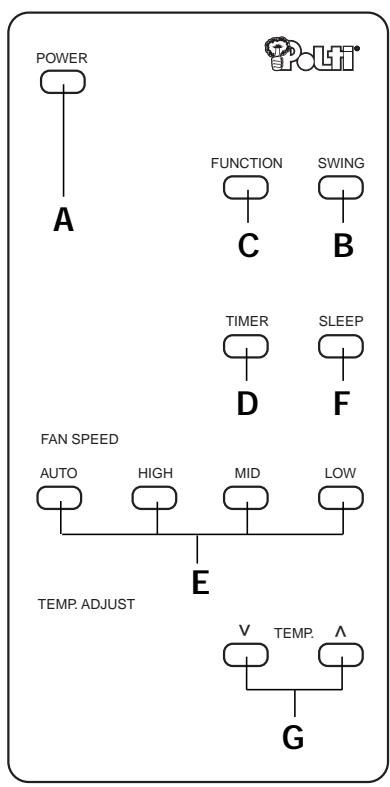
flowchart
graph TD
    A["POWER"] --> B["A"]
    C["FUNCTION"] --> D["C"]
    E["SWING"] --> F["B"]
    G["TIMER"] --> H["D"]
    I["SLEEP"] --> J["F"]
    K["FAN SPEED"] --> L["AUTO"]
    K --> M["HIGH"]
    K --> N["MID"]
    K --> O["LOW"]
    P["TEMP. ADJUST"] --> Q["E"]
    R["TEMP."] --> S["V"]
    R --> T["TEMP."]
    R --> U["G"]
PULSANTI
natural_image
Line drawing of a door with a curved ramp and a smaller container nearby, labeled 'Fig. 1' (no text or symbols on the diagram itself)natural_image
Simple gray downward arrow shape with no text or symbolsnatural_image
Simple gray downward arrow shape with no text or symbolsnatural_image
Diagram of a door opening with a curved ramp and a smaller container nearby, labeled 'Fig. 1' (no text or symbols on the diagram itself)natural_image
Simple gray downward arrow shape with no text or symbolsnatural_image
Simple gray downward arrow shape with no text or symbolsnatural_image
Diagram of a door opening with a curved ramp and a smaller container nearby, labeled 'Fig. 1' (no text or symbols on the diagram itself)natural_image
Simple gray downward arrow shape with no text or symbolsnatural_image
Simple gray downward arrow shape with no text or symbols2 programmations horaires possibles:
SOLUTIONS EN CAS DE DYSFONCTIONNEMENT
natural_image
Diagram of a door with a curved ramp and a smaller container, labeled 'Bild 1' (no text or symbols on the diagram itself)natural_image
Simple gray downward arrow shape with no text or symbolsnatural_image
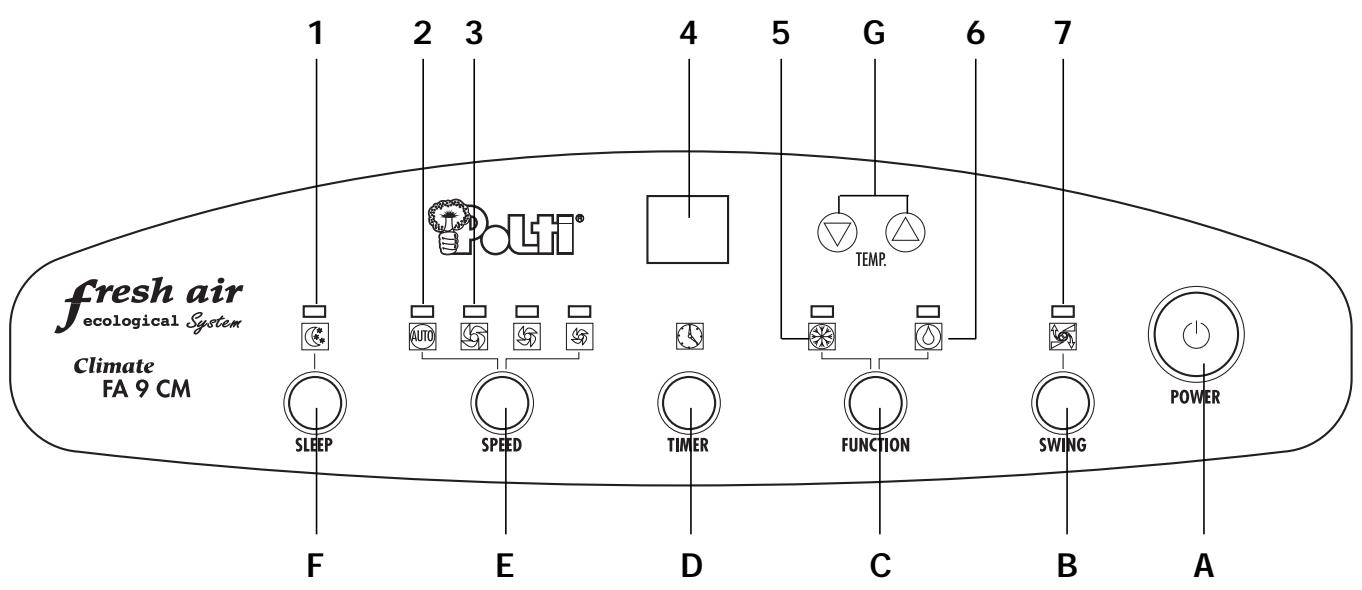
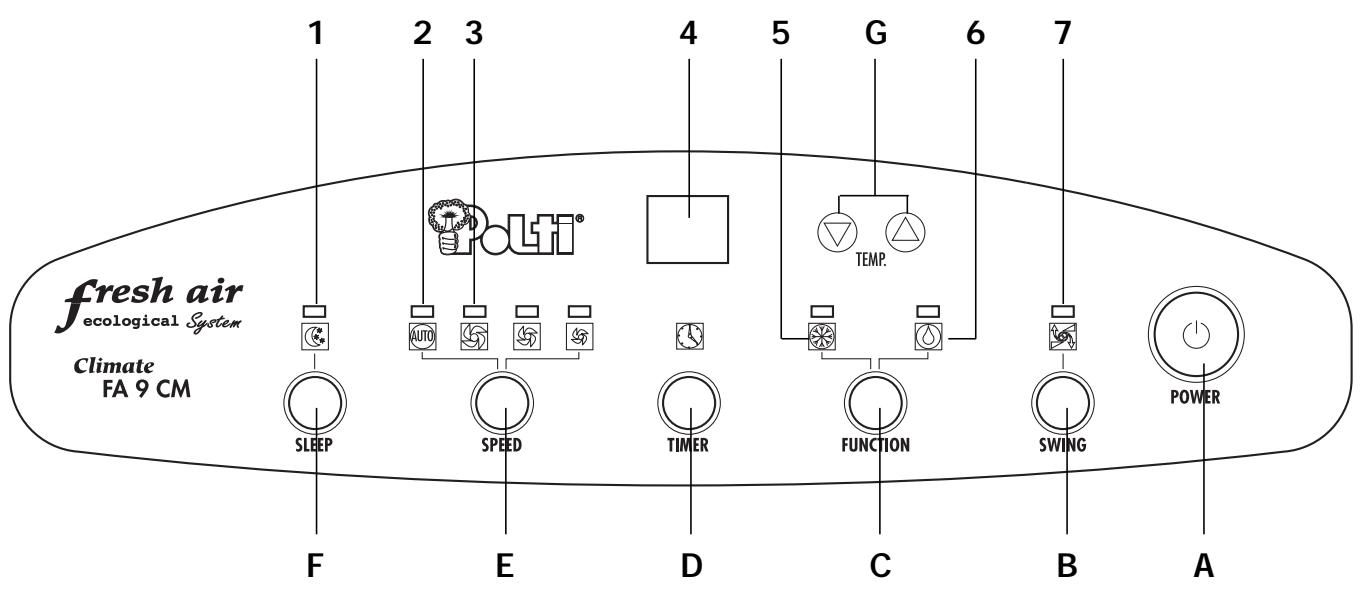
Simple gray downward arrow shape with no text or symbolsE. ○️ Fan speed selector and automatic operation SPEED
INDICATORS
- 📞 Indicator light night function
- AUTO AUTO Indicator light AUTO function
- Indicator lights fan speeds:
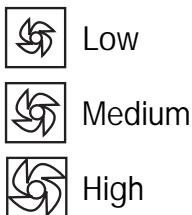
- Temperature/time display
- Air conditioning function indicator
- Dehumidification function indicator
- Deflector oscillation indicator
.VERY IMPORTANT.
Do not install and use your air conditioner before carefully reading this instruction guide. This will help you to get the optimal and safe operation of your air conditioner FA9CM.
The following advice and instructions must be followed:
- After unpacking place your appliance vertically upright to allow the cooling agent to stabilize and if it important to wait 3 hours before use.
- Your air conditioner FA9CM must always be used in an upright position, as it contains a cooling agent.
Failure to respect these 2 instructions may damage the appliance and would invalidate the Polti guarantee.
- The air conditioner must not be used in wine cellars or in any room with a temperature under 16^ C.
TECHNICAL DATA
| Type | Split air conditioner |
| Cooling capacity | 8500 BTU / H - 2500 W /h |
| Power requirement | 1100W |
| Cooling agent | R22 - 480 g |
| Maximum air flow | 420 m3/hour |
| Fan speed | 3 |
| Distribution of air flow | Automatic or manual oscillation |
| Dehumidification | 1,5 l/h at 80% RH and at 30°C |
| Controls | electronic |
| Thermostat | accurate to 0,5°C |
| Operating time | programmable from 1 to 12 hours |
| Delayed start | programmable from 1 to 12 hours |
| Air filter to collect dust | easily removable, washable |
| Length of the connecting sleeve | 3 meters |
| Unit | 4 swivel castors, 2 with a brake |
| Dimensions | L 46 cm x H 88 cm x D 42 cm |
| Weight | 44 kg |
| Accessories provided | 1 remote control |
This appliance complies with the relevant requirements of the directives 89/336/CEE relating to electromagnetic compatibility and 73/23/CEE relating to low voltage.
PRESENTATION OF THE SPLIT AIR CONDITIONER FA9CM
AIR CONDITIONING WITH FA9CM
Your air conditioner FA9CM is entirely electronically controlled which allows precise programming and adjustment of the room temperature.
LEARN INTELLIGENT AIR CONDITIONING
Air conditioning does not mean over-cooling.
The use of an air conditioner allows you to have a pleasant atmosphere by reducing the temperature.
The conditions for optimal comfort in a room are determined by 4 factors:
The temperature, the humidity rate, the air purity and the air flow. Your FA9CM air conditioner allows you to control these factors, so as to create a constantly pleasant room atmosphere.
- Temperature: the main function of an air conditioner is to draw off the hot air and evacuate it to the outside.
- Humidity rate: the humidity in a room also causes a sensation of stifling and heat in the summer. Your FA9CM air conditioner not only cools down the temperature but also dehumidifies the air.
- Air purity: thanks to the air filter, your FA9CM retains dust creating a healthier room atmosphere.
- Air flow: your FA9CM air conditioner regulates the air flow, allowing the flow to be directed and ensuring an optimal air circulation: without any draught, the air is distributed to avoid temperature differences inside the room (hot and cold zones).
Example: for an outside temperature of 30^ C it is recommended not to select a temperature below 24^ C.
Avoid being in a cold air flow and do not direct it onto people.
To ensure the optimal efficiency of the appliance, we advise you to keep doors and windows closed and to take into account the surface of the walls and windows exposed to the sun. In this case, so as to optimize the functioning of your FA9CM air conditioner, we recommend to partially close the shutters.
SAFETY INSTRUCTIONS
- Your FA9CM air conditioner has been designed to be used only in household conditions and it should not be used for any other purpose.
- Plug the appliance in a properly earthed socket.
- Never unplug the unit while it is working. This could damage the electronic circuits. To turn off your FA9CM, always use the switch on the control panel.
- Never lay down the appliance while it is working. Always keep it in an upright position to avoid any damage of the cooling system.
- Ensure that the air inlets and outlets are not blocked or covered up.
- Never place anything on the unit and do not cover it with any kind of cloth.
- Do not place the air conditioner near the curtains (minimum distance 50 cm.).
- When used for the first time, and and each time it is turned on, it takes 3 minutes for the air conditioner to become operational.
- It's dangerous to modify or change the characteristics of the appliance.
- In case of technical problems, contact our approved after sales service.
PLACING THE FA9CM
- The air conditioner must be connected to an electrical socket providing 220-240V/50Hz.
- Install the indoor unit in the room where the air conditioner is to operate. It has to be placed on "a flat surface".
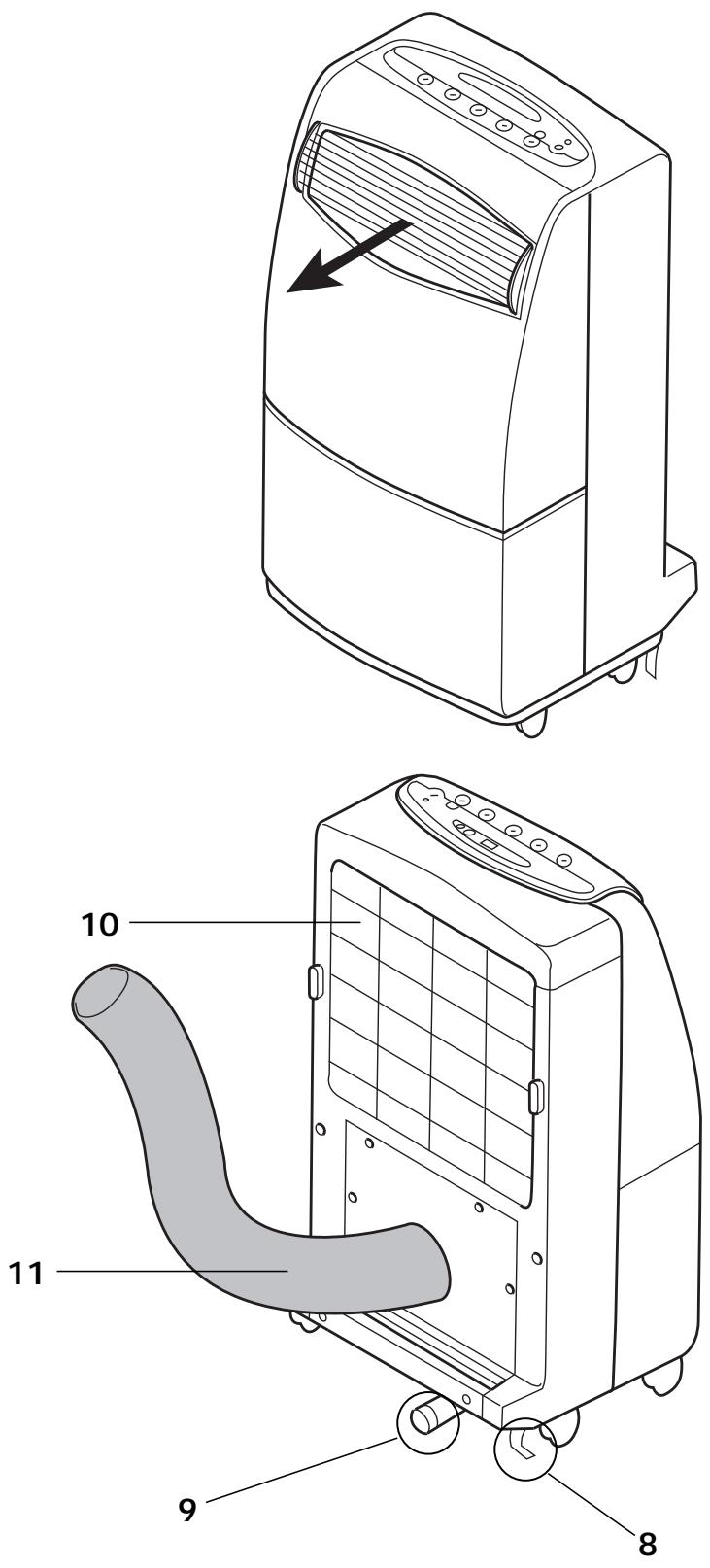
- The 2 rear rollers are fitted with a brake (8) allowing the FA9CM to be locked in a stable position. Do not forget to release the brake whenever you wish to move your FA9CM air conditioner.
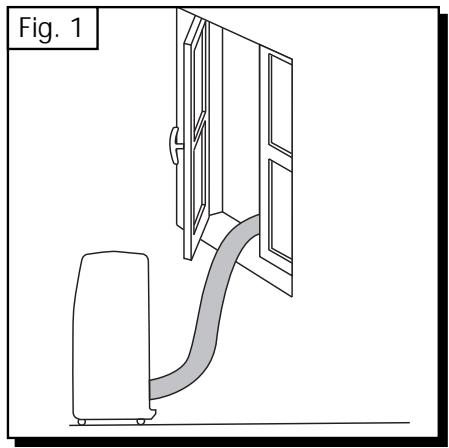
- Place the air conditioner near a window, extend the hot air outlet tube (11) enough to reach the opening, half-close the window (Fig. 1).
Note: do not put objects in front of the hot air outlet tube which obstruct it (e.g. shutters).
Make sure that the air is not directed onto plants or animals.
- Your FA9CM is fitted with a water evacuation pipe, the opening being situated on the right hand side of the connections of the indoor unit (9).
natural_image
Line drawing of a door opening with a curved ramp and a smaller container nearby (no text or symbols)If the hot air outlet tube is positioned at a height higher than 1,60 m. it is recommended to evacuate the water through the (9) hose, which is placed on the body of the appliance, by removing the cap.
- Failure to comply with these two instructions may hinder the correct functioning of the condensation water evacuation (dehumidification) and in this case, water leakages, coming from the inside unit, may occur.
TIME PROGRAMMING
You can either program how long you want your FA9CM air conditioner to operate or when you want it to come on. However, it is not possible to combine these two functions.
Length of operation
- Switch the appliance on by pressing (A).
- Press the hourly programming switch (D).
- The temperature display disappears: you can now program from 1 to 12 hours by pressing button (D) several times. The selected operating time is displayed.
Example: You want your air conditioner to go on working another 2 hours after you have gone to bed: use the hourly programming switch (D) to display 2. Your air conditioner will now switch itself off 2 hours later.
Delayed start
Switch your FA9CM air conditioner off before programming the delayed start. The appliance will operate according to the parameters memorised on setting.
- With the appliance switched off, press the programming switch (D).
- You can now display from 1 to 12 hours by pressing a switch (D) several times. The number displayed indicates the number of hours remaining before the appliance turns on.
Example: you leave the house at 8 a.m. and you want to find a pleasant temperature at 6 p.m. You therefore want your FA9CM to start working 3 hours before.
Proceed as follows:
- With the appliance switched off, use the programming switch (D) to display the number 7 (there are 7 hours between 8 a.m. and 3 p.m.). That's all! Your FA9CM will start working in automatic mode 7 hours later, i.e. 3 p.m., and will continue operating until you decide to switch it off.
TURNING ON THE FA9CM
Before reading, fold out the first cover page with the illustrations.
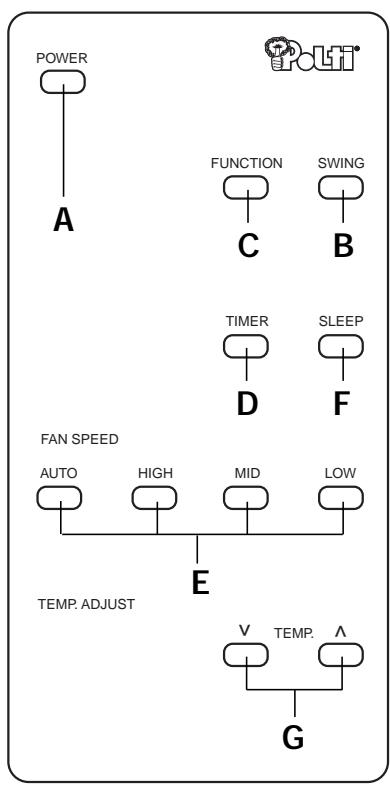
Note: the functions on the remote control and on the control panel indicated with the same letter perform the same function.
Insert the plug into the socket.
Press the switch (A)
Choose the operating function using the switch (C). To select another function, press the switch (C) until the indicator for the desired function lights up.

AIR CONDITIONING


AUTO

HIGH

MEDIUM

LOW
Adjust the desired temperature level using the switch G

DEHUMIDIFICATION

low ventilation speed is automatically selected
natural_image
Simple gray downward arrow shape with no text or symbolsAdjust the air flow using switch B for the oscillation of the louvers (never move them manually!).
Press switch B once more to stop the louvers in a particular oscillation position.
The night operating function can be selected by pressing switch F
natural_image
Simple gray downward arrow shape with no text or symbols2 hourly programming possible:
- length of operation
• delayed start by pressing switch D
OPERATING FUNCTIONS OF THE FA9CM
The previous page provides instructions in a simple chast.
AUTOMATIC AIR CONDITIONING
- When switched on, the appliance will operate according to the previously stored parameters.
- To change these parameters, refer to the diagram page 48.
- It is important that the difference between the outside temperature and the chosen temperature is less than 6^ C. It is recommended to select a temperature of 24^ C, which is ideal for the human body.
- The appliance will stop providing air conditioning as soon as the selected temperature is reached. The ☑ lamp will start flashing and the appliance will continue to provide ventilation. It will revert to air conditioning if the room temperature once again exceeds the selected temperature.
- It is possible to choose AUTO, whereby the appliance will operate automatically as required, at one of the 3 fan speeds.
You can also choose one of the 3 fan speeds yourself.
This speed will then operate constantly.
- Enables optimum night-time operation.
• Automatic and progressive temperature control and particularly silent operation. - As the night-time temperature gradually decreases, your FA9CM regulates the selected temperature by increasing it at 0.5^ C intervals every 30 minutes. In this way, the temperature will not drop too sharply.
- This increase in the selected temperature will not exceed 2^ C in total. The appliance will then start providing air conditioning at this temperature.
Example: if you set your temperature at 23^ C at 11 p.m., it will provide air conditioning progressively until the temperature reaches 25^ C and will maintain this temperature during the night.
DEHUMIDIFICATION
- Enables you to use your FA9CM as a dehumidifier.
- The FA9CM automatically selects the low fan speed.
- It is normal for the appliance to operate in cycles: the appliance stops and starts again automatically.
SPECIAL FEATURES
Your FA9CM is fitted with thermal protection which only allows the compressor to start in air conditioning mode ☐ after a three-minute time delay. The ☐ light flashes during this time.
TROUBLE SHOOTING
When the air conditioner does not work, it is sometimes a minor problem which the user can easily deal with himself.
Before calling the After Sales Service, you should check the following points and see if you can solve the problem by yourself.
| PROBLEM | PROBABLE CAUSES | SOLUTIONS |
| The air conditioner does not work | no electrical supplyplug not properly inserted in socketbutton I/O not pressed | wait and check the fuseplug the appliance properly inpress the button I/O |
| Poor performance | 3 minutes delaywrong selection of the modeair filter blocked with dust | wait for 3 minutesselect the correct functionclean the air filter |
| The air conditioner makes a bubbling noise | the cooling agent circulates in the circuits | this is normal |
| Motor noise when the appliance is turned off | automatic operating of the pump to evacuate the water of condensing | this is normal |
MAINTENANCE OF FA9CM
CLEANING
Before cleaning and maintenance operations, turn off and unplug the unit.
For safety reasons, never wet the air conditioner.
EXTERIOR SURFACES OF THE APPLIANCE
- Clean the air conditioner by using a damp sponge, and dry it with a clean cloth afterwards.
- Never use petrol, alcohol or any product containing solvents.
AIR FILTER
The air filter collects the dust contained in the air so that dust does not clog up the appliance, your FA9CM must always be used with its air filter.
The build-up of dust reduces the efficiency of the air conditioner. Against this, the air filter needs to be cleaned fortnightly or more often if the unit operates in a dusty atmosphere.
- Remove the filter by lifting it slightly to disengage it and pull it downwards.
- Clean the filter with a vacuum cleaner. If the filter is very dirty, you can wash it in warm water.
Make sure that the air filter is completely dry before replacing.
GUARANTEE
The Climate FA9CM is guaranteed to the original purchaser for one year from purchase date against manufacturing or raw material defects. The guarantee is not valid if the appliance has been misused in any way. Unauthorised alterations or repairs to the machine will automatically invalidate this guarantee.
Polti declines liability for any damage or accident derived from any use of Climate FA9CM which is not in conformity with the instructions contained in this booklet.
ATTENTION
The appliance is built according to the current recycling rules.
NEDERLANDS
flowchart
graph TD
    A["POWER"] --> B["A"]
    C["FUNCTION"] --> D["C"]
    E["SWING"] --> F["B"]
    G["TIMER"] --> H["D"]
    I["SLEEP"] --> J["F"]
    K["FAN SPEED"] --> L["AUTO"]
    K --> M["HIGH"]
    K --> N["MID"]
    K --> O["LOW"]
    P["TEMP. ADJUST"] --> Q["E"]
    R["TEMP."] --> S["V"]
    R --> T["TEMP."]
    R --> U["G"]
BEDIENING
natural_image
Diagram of a door opening with a curved ramp and a smaller container nearby, labeled 'Fig. 1' (no text or symbols on the diagram itself)natural_image
Simple gray downward arrow shape with no text or symbolsnatural_image
Simple gray downward arrow shape with no text or symbols
- PULSANTI
- SOLUTIONS EN CAS DE DYSFONCTIONNEMENT
- INDICATORS
- .VERY IMPORTANT.
- PRESENTATION OF THE SPLIT AIR CONDITIONER FA9CM
- AIR CONDITIONING WITH FA9CM
- LEARN INTELLIGENT AIR CONDITIONING
- SAFETY INSTRUCTIONS
- PLACING THE FA9CM
- TIME PROGRAMMING
- Length of operation
- Delayed start
- TURNING ON THE FA9CM
- OPERATING FUNCTIONS OF THE FA9CM
- AUTOMATIC AIR CONDITIONING
- DEHUMIDIFICATION
- SPECIAL FEATURES
- TROUBLE SHOOTING
- MAINTENANCE OF FA9CM
- CLEANING
- EXTERIOR SURFACES OF THE APPLIANCE
- AIR FILTER
- GUARANTEE
- ATTENTION
- BEDIENING
Brand : POLTI
Model : CLIMATE FA 9 CM
Category : Air conditioner