KDVR3204 - Audio recorder Kunft - Free user manual and instructions
Find the device manual for free KDVR3204 Kunft in PDF.


| Product Type | Digital Voice Recorder |
| Model | KDVR3204 |
| Brand | Kunft |
| Dimensions (W x H x D) | 12 x 33 x 101 mm |
| Weight | Approx. 50 g |
| Power Supply | Built-in lithium battery / USB powered |
| Recording Format | WAV |
| Music Playback Formats | MP3, WMA, WAV, OGG, APE, MPC, FLAC, MS ADPCM |
| Recording Bit Rates | 32, 64, 128, 192, 384 Kbps |
| Maximum Recording Time (2 GB / 4 GB at 32 Kbps) | Approx. 142 hours / 284 hours |
| Maximum Number of Recording Files | 999 |
| Speaker Power | 1 W, 8 ohm |
| Frequency Response (Recording Playback) | 200 Hz – 10000 Hz |
| Recording Distortion | < 10% (max) |
| Display | 128 x 64 dot matrix LCD |
| USB Standard | High-speed 2.0 |
| Supported Languages | Over 20 including English, Chinese, Japanese |
| Recording Sources | Built-in microphone, external microphone, line recording, telephone recording |
| Playback Modes | Normal, Single Repeat, Directory Play, Directory Repeat, Repeat All, Random, Browse |
| Sound Effects | Natural, Rock, Pop, Classical, Soft, Jazz, Heavy Bass |
| AB Repeat Playback | Supported |
| Operating Temperature Range | 0°C – 40°C |
| Included Accessories | Manual, transcription line, telephone connection, headphones, USB cable |
Frequently Asked Questions - KDVR3204 Kunft
User questions about KDVR3204 Kunft
0 question about this device. Answer the ones you know or ask your own.
Ask a new question about this device
Download the instructions for your Audio recorder in PDF format for free! Find your manual KDVR3204 - Kunft and take your electronic device back in hand. On this page are published all the documents necessary for the use of your device. KDVR3204 by Kunft.
USER MANUAL KDVR3204 Kunft
digital voice recorder
is perfectly enough
KDVR3204
kunft.®
Dear client,
We thank you for purchasing this product.
This appliance was submitted to several laboratorial tests, which certify its quality. To simplify the use of this appliance, this instruction manual has been provided.
The instructions must ensure a quick and safe use.
Please read carefully the instructions and safety measures described in this manual.
We wish our clients great satisfaction in using their new appliance.

digital voice recorder
KDVR3204
EN
INDEX
- SAFETY INSTRUCTIONS .... 4
1.1. Power Supply 5
1.2. Power Cord and Other Cables 6
1.3. Humidity and Water 6
1.4. Cleaning 6
1.5. General Precautions ...... 6
- OPERATING INSTRUCTIONS 8
2.1. Product Description....8
2.2. Using the Product ...... 9
2.3. Troubleshooting 14
- TECHNICAL SPECIFICATIONS 15
- POST-SALE SERVICE 16
- ENVIRONMENTAL PROTECTION 16
kunft.®
1. SAFETY INSTRUCTIONS
 | WARNING |  |
| Risk of Electric ShockDo Not Open | ||
| Warning: to avoid the risk of electric shock, do not remove the cover.The interior does not contain any parts that can be repaired by the user. Ask for assistance by qualified personnel. | ||
Important Warnings
Before using your appliance read this instructions manual carefully and keep it in a safe place as you may need to consult it in the future.
Before turning on your appliance, and to ensure a safe and correct operation, do not use if:
- It has fallen to the ground;
- You notice any evidence of damage;
- Any anomaly occurs during its operation.
To avoid hazards or deterioration of your appliance through incorrect use it is advisable to read these instructions thoroughly.
Your appliance may not be used for other purposes than the ones intended and solely for household use. Any damage resulting from using the appliance outside this scope, any incorrect use, as well as any ma-

digital voice recorder
KDVR3204
EN
nual modifications to the product will not be covered and automatically voids the warranty.
Assistance
In case of malfunction, take your appliance to a qualified technician for assistance.
This appliance can be used by children from the age of 8 and by people with reduced physical, sensorial or mental capabilities and/or lack of experience and knowledge if they have been given instructions on using the appliance safely and if they understand the hazards involved. Children may not play with the appliance. Cleaning and maintenance must not be carried out by children without supervision.
These instructions are also available at www.suporteworten.pt
1.1. Power Supply
Make sure the main voltage is compatible with the appliance's. If this is not the case please consult the Customer Support Service.
kunft.®
1.2. Power Cord and Other Cables
Do not tangle the cord or pull it to disconnect the appliance. Also, keep the cord away from warm surfaces.
Never use the appliance if it has a damaged cable or socket.
Take it to the Technical Support Service for replacement.
1.3. Humidity and Water
Do not use your appliance in humid places. Do not allow the appliance to become wet under any circumstances as this may be dangerous. To avoid fire hazard or electric shock do not expose your appliance to humidity or water. Furthermore, do not place your appliance under water (e.g. for cleaning).
1.4. Cleaning
Before cleaning, be sure to switch off the appliance and remove the plug from the main power supply. Always allow the unit to cool down before cleaning.
To clean the exterior of the product use a dry soft cloth only.
1.5. General Precautions
- Please follow the instructions in the user manual which help to properly install and operate this product and enjoy its advan-

digital voice recorder
KDVR3204
EN
ced features. Please keep the instructions for future reference.
- Read all instructions before using the product.
- Maintenance and service operations are only to be carried out by authorized professionals.
- Any damage caused by manual modifications to the product is not covered by the warranty.
- If this product is used for other purposes than the ones originally intended, or if it is not correctly connected, the product may become damaged and the warranty will be voided.


kunft®
2. OPERATING INSTRUCTIONS
WELCOME STATEMENTS:
Firstly, we wish to thank you for choosing to use the company's products!
Please read this manual carefully regarding the correct use of this product before use
- In order to provide a better service changes may be made to the contents of this manual.
- Changes may be made without notice to ensure the product's performance and functionality.
If the actual settings and use of the products are inconsistent with this manual, please visit the Company's website for the latest product information.
2.1. Product Description
View, appearance and function name
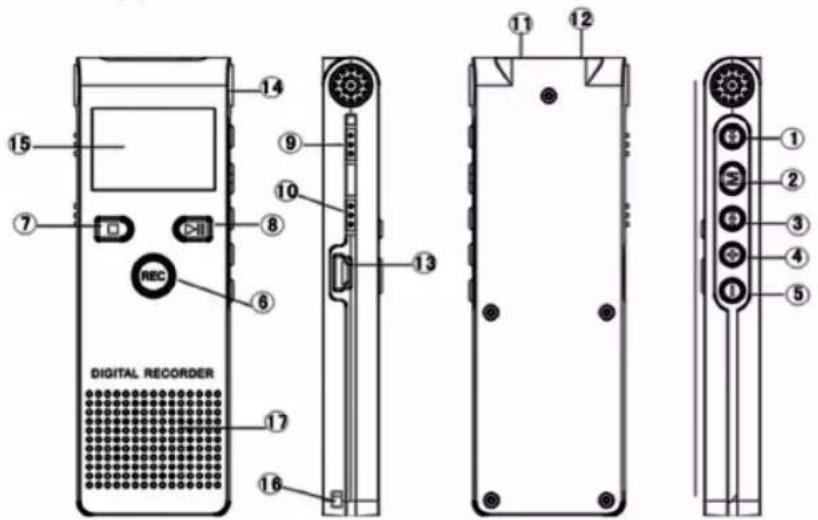
① ◀◀ Previous track / Rewind keys
② M Confirmation key / Menu option key
③ ▶▶| Next track / fast forward button
④ + Increase volume key
⑤ - Decrease volume key
⑥ REC Record button / Recording pause button
⑦ ■ Stop key / Enter key
⑧ ▶▶▶II Play / Pause key

digital voice recorder
KDVR3204
EN
⑨ Music / Voice - Music mode and voice mode key
⑩ ON / OFF - Power switch
⑪ AUX-In - LINE / Telephone recording / External microphone jack
⑫ Earphone - Headphone output jack
⑬ USB interface
⑭ Built-in microphone
⑮ LCD Screen
⑯ Lanyard hole
⑰ Built-in speakers
2.2. Using the Product
Functional Characteristics and Use
This machine is a whole new generation of digital recording equipment. It supports MP3, WMA, WAV, OGG, APE, MPC, OGG, FLAC, MS ADPCM format music player, high quality WAV audio format recording and Telephone recording. This machine's perfect sound quality, high cost-effective and sophisticated appearance complement each other, it is really a boutique. We sincerely hope that it will bring you the extraordinary comfort of the digital era.
- Supporting one-button recording function, pressing the record button in any interface will commence recording.
- You can store up to 999 audio files;
- You can switch between three modes, i.e. music mode / voice mode / system settings.
- There are five kinds of recording quality options in the system setup from which you can select, 32Kbps, 64Kbps 128Kbps, 192Kbps and 384Kbps (defaults to 64Kbps quality).
- Clock function
- Long recording time up to 40 hours (under 32Kbps bit rate mode).
- Compact, lightweight, exquisite and unique design, with a comfortable feel
- Seven sound modes: Natural, Rock, Pop, Classical, Soft, Jazz, Heavy Bass;
- Seven play modes: Normal Mode, Single Repeat, Directory Play, Directory Repeat, Repeat All, Random Play, Browse Play;
- Timer: You can set the sleep mode and power saving mode, for greater convenience.
- Low Voltage Tips and recording file save functions.
• Supports MP3/WMA format player - Document Management: The machine comes with file deletion.
• To choose A--B between two points in time, repeat play


kunft.®
- Supports internal / external microphone (condenser) recording.
• Supports telephone recording, LINE recording and voice recording. - The built-in high-quality speaker allows direct play the need for headphones
- Use computer USB port as a power supply for the machine to work properly.
- Firmware upgrade function: you can download the latest software upgrade from the website to ensure that the device is performing at its best.
1. Power on / off
- Power supply: The machine uses an internal lithium battery-powered, you can use a USB cable to connect a computer or charger (supplied by the Company) for direct charging (or to charge using the charger supplied by the Company), and set the power switch to the "on" position when charging.
- Boot: push the power switch to the "On" position to enter the boot screen and enter the main menu, standby mode; in sleep shutdown state, hold down the ▶▶| key to enter standby mode
- Shutdown: Hold down ▶ the key for five seconds to enter sleep shutdown state, or push the switch to the "off" position. If the machine is not in use for long periods, turn off the power switch to avoid the battery from discharging.
- Switching menu: Press the Music / voice key for “music” to enter the music mode, scroll to “voice” to enter the voice mode. In the main interface standby mode, press the ◀◀ / ▶▶ key to switch between music mode / System Settings / Voice mode / system settings.
2. Music player
- Press the [music / voice recorder] key to switch to "music" to enter music mode:
- Download music - you can download music using the USB data cable supplied by the company to connect the device to the computer.
- Music play / pause / stop: In music mode, press the ▶▶| key to start playing music, and then press the ▶▶| key to pause music playback and in standby mode, press the ■ key to stop playback.
- Previous / next track selection and fast forward / rewind: in play or stop mode, press the ◀◀ / ▶▶| key, you can choose previous / next track, during playback, press the ◀◀ / ▶▶| keys for fast forward / rewind operation.
- Volume increase and decrease: Press the+ / - buttons to increase and decrease the volume.
- Cycle mode: Playing status, press the M key to enter the sub-menu, select the "Cycle mode" and once again press the M key to enter, select "normal mode, single cycle, directory player, directory cycle, all cycles, random play, browse "seven repeat mode" play, press the M key to confirm and exit.



digital voice recorder
KDVR3204
EN
NOR Normal mode: after playing all files in all directories within the folder once, stop automatically.
ONE Single repeat: only repeat playback of the selected file.
FOLD Directory play: finish playing all music files within the selected directory folder once, stop automatically.
FD-A Directory repeat: repeat the music within the selected directory folder.
ALL All Repeat: Repeat all music files within all directory folders.
RAND Random play: play this file in the folder randomly
INTR Browse play: brow play all music files in all directory folders for 10 seconds.
Note: On the computer proceed to the removable directory and create a multiple directory file folder to store songs or songs can be stored directly in the root directory.
- A-B repeat playback: To play music, press the REC key to select point A, then press the REC key to select point B, this will repeat play between the two points A--B; While AB is in repeat playback mode, press the REC key to exit AB repeat playback;
- Sound mode: In the play state, press theM key to select the sound modes: natural, rock, pop, classical, soft, jazz, heavy bass from among the seven modes (set in the same way as repeat mode).
- Quickly find songs: in stop playing mode, press the M key to display the pop-up sub-menu, select the "main disk directory" press the M key to enter the main disk directory, press the ◀◀◀ / ▶▶◀ keys to quickly find and select songs, press the M button to confirm the position of the selected songs.
- View lyrics: When the 🎯 icon changes to the 📊 meaning the selected songs have lyrics, long press the M key to display the lyrics in the playing status, press + / - keys view lyrics before and after, short press M key cancel lyrics display.
3. Voice Mode
- Press Music / Voice to switch to "voice" in the voice mode:
I. Recording mode
In any menu interface standby mode, press recording shortcutsREC to enter the recording mode state.
II. Microphone recording (built-in microphone and external microphone):
- Select the recording source: In the "System Settings" / "Record Source" select the recording microphone in "recording mode, the recording icon is", microphone recording is set as the factory default; Please consult system settings / recording source settings.
- Selecting recording quality: Before recording, please select recording quality, selection is made in "System Settings" / "Record Type", the default factory value is set at 64Kbps; please refer to system settings / recording type setting.


kunft.®
- Start recording: In voice mode's standby state, press the REC key to start recording, the recording time is shown in the timer.
- Pause recording: In the recording state, press the REC key to pause recording, the recording timer flashes and the second timer stops, then press the REC key to continue recording.
- Stop / save the recording: In recording mode, press the ■ button to stop recording and save the recording file automatically.
- To use an external recording microphone, connect the external microphone's jack to the [input] jack to start recording.
** If the battery is very low, the device saves the current recording file automatically.
III. Line recordings (Line) / telephone recording:
** Connecting external audio devices: connect one end of the transcription line supplied by the company to the device [input] jack and the other end to the audio output jack of the external device; for telephone recording, connect the telephone line into a special connector, then use one end of the transcription line to insert it into the connector, and the other end is inserted into the device's input jack:
** Select the recording source: before recording on the line, select" audio recording "recording mode in System Settings "/" recording source ", recording icon is displayed as ⚪.
- Before recording, adjust (Test) the size of the external device output signal, in conjunction with the device in order to achieve better recording quality.
- In the same manner as for recording using the microphone;
IV. One button recording: In the arbitrary menu interface standby mode, pressing the REC key can initiate fast and convenient recording.
V. Voice (recording) file playback
Once recordings have been saved, these are automatically stored in the voice mode, and you can replay the audio files.
4. Delete recording / Music files
Warning: This action will permanently delete recorded files and cannot be undone, proceed with caution!!!
I. Deleting a file:
In standby mode, stop playing state (enter delete music mode in the same way), press the ◀◀◀ / ▶▶▶ key to select the files you want to delete, press M key to bring up the sub-menu, select "Delete Files" and "Delete All".
II. Press the ◀◀ / ▶▶ key to select “Delete Files” (currently selected), or “delete all” function (all files in this folder are deleted).
III. Delete files
Select the method of deletion, press the M key to enter the delete confirmation screen, select "NO" to return to the idle screen,


digital voice recorder
KDVR3204
EN
select "YES" to display "in the delete." and the audio file(s) will be permanently deleted;
IV. To exit the delete files interface
** If you do not want to delete any files, please select "exit", or if in the delete confirmation interface select "ON".
** If after 10 seconds no button has been selected, and no file deleted, the device will automatically return to the standby state;
** Or in the deletion interface, press the ■ key to return to standby
Note: The deletion of large files (which takes a long time) is not recommend when the battery is very low (the battery may discharge).
* You can also delete a file by using a computer.
5. System Settings
In the main interface, select "System Settings", press the M key to switch to the system settings, press the ◀◀ or ▶▶ key to select the menu, press the M menu key to confirm, press ■ key to exit. As shown below:
I. Recording time
Press the ◀◀ or ▶▶ key to select the year / month / day, hour / minute / second, location, and number that flashes when selected, press the + / - keys to adjust the year, month, day, hour, minute, and second values, press the M key to confirm and exit. If you do not press the M key to confirm the modified value after 10 seconds, it will automatically exit, and no changes will be made.
II. Recording type (quality): In the "Record Type" menu, press the |◀◀ / ▶▶| key to select "32Kbps", "64Kbps", '128Kbps, '192Kbps' and '384Kbps', press the M key to confirm and exit.
III. Recording Source: Select "Record Source" menu to enter, press the ◀◀/▶▶ key to select "microphone recording" and "audio recording" and press the M key to confirm.
IV. Voice settings: press the ◀◀ / ▶▶| key to select "voice off" and "voice enabled", press the M key to confirm and exit. **The factory default is: voice off.
V. Monitor settings: press the ◀◀ / ▶▶ key to select "Monitor off" and "Monitor enabled", press the M key to confirm and exit. **The factory default is: monitor enabled.
VI. Backlight time: press the + / - keys and slide to adjust the number of seconds between 0 to 30 seconds, press the M key to confirm, when the time is set to 0 seconds, the backlight lights up for long time.
VII. Language Selection: press the ◀◀ / ▶▶ keys to select the language, press the M key to confirm, you can set the language for Simplified Chinese / Traditional Chinese / English / Japanese etc. There are more than 20 languages.
kunft.®
VIII. Shutdown Setting
Press the ◀◀◀ / ▶▶▶ key to select “Shutdown Setting”, press the ■ key to enter the ‘power saving mode’ and “sleep mode” interface
IX. Contrast adjustment: adjust the brightness of the screen display, by pressing the + / - keys to select a value between 1 to 30, press the M key to confirm the setting
X. Storage conditions: Before recording, you can determine the available storage space in the local memory for recording, select the "Storage conditions" and press the M key, you can check how much space (in MB) is available, press the ■ key to exit.
XI. Firmware version: press the M key to confirm, you can check the firmware version number, press the ■ key to exit
XII. Exit: Exit to the main menu after press the M key to confirm.
2.3. Troubleshooting
Troubleshooting and Solutions
Common Faults and Solutions:
Cannot boot: Check that the device's battery is fully charged. Or if the device is not working properly.
Device crashed: Please slid power switch to reboot.
Does not play: Please check that the player has enough battery. Please ensure that the volume is not set to the lowest, and that there are no defects with the earphone connection, and make sure that the earphones are clean. Damaged music files may produce different noise levels, and even fail to play, check the integrity of the file. Please reformat the disk.
Cannot upload/download files or cannot find the disk on computer: Please ensure that USB cable is properly connected. Please re-install the driver correctly.
Cannot record: Please check if the device has enough memory, and check the battery.
Text is garbled: Please ensure that you have selected the correct language.
After an upgrade the device is not working: you need to follow the procedure to return the device to a service centre.
digital voice recorder
KDVR3204
EN
- TECHNICAL SPECIFICATIONS
| Specifications Recording mode | 2 GB 4 GB | |
| Recording time | 384 Kbps Mono about 11 hours about 22 hours | |
| 192 Kbps about 22 hours about44 hours | ||
| 128 Kbps about 35 hours about 71 hours | ||
| 64 Kbps about 71 hours about 142 hours | ||
| 32 Kbps about 142 hours about 284 hours | ||
| Maximum number of recording segments | A total of 999 segments | |
| The maximum output power of speaker | 1 W 8 ohm | |
| Recording source Telephone recording, built-in microphone, external microphone recording, line recording | ||
| Recording output format | WAV | |
| Proposed use environment | 0°C - 40°C | |
| Power supply Built-in lithium battery / USB powered | ||
| Recording Playback frequency response range | 200Hz-10000Hz | |
| Music playback format | MP3(MPEG1 / 2 / 2.5 AUDIO LAYER 3) /WMA | |
| Recording distortion <10% (max) | ||
| Music media stream rate | WMA: 32~192 Kbps; MP3: 8~320 Kbps | |
| Display 128 x 64 dot matrix display | ||
| Battery power consumption | Maximum recording time about 40 hours | |
| USB communication standards | High-speed 2.0 | |
| Main accessories Manual (including warranty card), transcription lines, dedicated telephone connection, headphones, USB line | ||
| Body weight | About 50 grams | |
| Size | About 12 x 33 x 101mm | |
* Due to improvements in the performance and functionality of the product, the recording time may change, without notice.
If the actual settings and use of the products is inconsistent with the information in the manual, please visit the Company's Website to obtain the latest information on the product.


kunft®
4. PoSt-SaLE SErVlcE
KUNFT has designed this appliance in order to guarantee maximum reliability. However, if a problem occurs do not attempt to open the appliance - there is a risk of electrical shock. If you are not able to solve the problem, please contact the Costumer Support Service of any Worten, Modelo or Continente store in order to be assisted. Worten Equipamentos para o Lar provides a 2-year warranty for manufacturing defects from the date of purchase of the appliance.
WARNING: Any attempt to repair the appliance without contacting the manufacturer or seller will void the warranty.
All users must be familiar with these instructions. Knowing what could go wrong can help prevent problems from occurring.
5. ENViroNMENtaL ProtEctIoN

In order to protect the environment we strive to reduce the volume of packaging used, limiting it to three easily sorted materials: cardboard, paper and plastic. The appliance is manufactured using recyclable materials after disassembled by a specialized company. Please comply with local regulations concerning the recycling of all materials.

grabadora digital
KDVR3204
ES
digital voice recorder
is perfectly enough
KDVR3204
- digital voice recorder
- kunft.®
- KDVR3204
- EN
- INDEX
- SAFETY INSTRUCTIONS
- Important Warnings
- Assistance
- Power Supply
- Power Cord and Other Cables
- Humidity and Water
- Cleaning
- General Precautions
- kunft®
- OPERATING INSTRUCTIONS
- WELCOME STATEMENTS:
- Product Description
- Using the Product
- Functional Characteristics and Use
- Power on / off
- Music player
- Voice Mode
- Recording mode
- Microphone recording (built-in microphone and external microphone):
- Line recordings (Line) / telephone recording:
- One button recording: In the arbitrary menu interface standby mode, pressing the REC key can initiate fast and convenient recording.
- Voice (recording) file playback
- Delete recording / Music files
- Deleting a file:
- Delete files
- To exit the delete files interface
- System Settings
- Recording time
- Shutdown Setting
- Troubleshooting
- Troubleshooting and Solutions
- PoSt-SaLE SErVlcE
- ENViroNMENtaL ProtEctIoN
- grabadora digital
Brand : Kunft
Model : KDVR3204
Category : Audio recorder