
AT-200B - Audio accessory PEAVEY - Free user manual and instructions
Find the device manual for free AT-200B PEAVEY in PDF.


| Product Type | Breakout Box for AT-200 Auto-Tune Guitar |
| Power Supply | DC 9V, 500mA, negative tip (included) |
| Input Connector | 8-pin DIN (to guitar) |
| Output Connector | 1/4" audio output |
| MIDI Connectors | MIDI IN, MIDI THRU, MIDI OUT |
| Included Cable | 8-pin DIN cable |
| Primary Function | Remotely powers AT-200 guitar, carries audio signal, enables MIDI control |
| Firmware Update | Via MIDI interface and computer (using MIDI IN and OUT) |
| Compatibility | AT-200 guitar, generic self-powered MIDI controllers |
| Compliance | FCC Part 15 |
| Safety Features | Protective earthing, no user serviceable parts, do not expose to rain or moisture |
| Cleaning Instructions | Clean only with a dry cloth |
| Warranty | 1 year limited warranty for original purchaser |
| Environmental Disposal | Do not dispose with household waste; recycle responsibly |
| Optional Upgrades | Alternate tunings, virtual capo, tone control (available from Antares) |
Frequently Asked Questions - AT-200B PEAVEY
User questions about AT-200B PEAVEY
0 question about this device. Answer the ones you know or ask your own.
Ask a new question about this device
Download the instructions for your Audio accessory in PDF format for free! Find your manual AT-200B - PEAVEY and take your electronic device back in hand. On this page are published all the documents necessary for the use of your device. AT-200B by PEAVEY.
USER MANUAL AT-200B PEAVEY
for use with the AT-200™ Auto-Tune® Guitar
Owner's Manual

Intended to alert the user to the presence of uninsulated "dangerous voltage" within the product's enclosure that may be of sufficient magnitude to constitute a risk of electric shock to persons.
Intended to alert the user of the presence of important operating and maintenance (servicing) instructions in the literature accompanying the product.
CAUTION: Risk of electrical shock — DO NOT OPEN!
CAUTION: To reduce the risk of electric shock, do not remove cover. No user serviceable parts inside. Refer servicing to qualified service personnel.
WARNING: To prevent electrical shock or fire hazard, this apparatus should not be exposed to rain or moisture, and objects filled with liquids, such as vases, should not be placed on this apparatus. Before using this apparatus, read the operating guide for further warnings.

Protective earthing terminal. The apparatus should be connected to a mains socket outlet with a protective earthing connection.

IMPORTANT SAFETY INSTRUCTIONS
WARNING: When using electrical products, basic cautions should always be followed, including the following:
- Read these instructions.
- Keep these instructions.
- Heed all warnings.
- Follow all instructions.
- Do not use this apparatus near water.
- Clean only with a dry cloth.
- Do not block any of the ventilation openings. Install in accordance with manufacturer's instructions.
- Do not install near any heat sources such as radiators, heat registers, stoves or other apparatus (including amplifiers) that produce heat.
- Do not defeat the safety purpose of the polarized or grounding-type plug. A polarized plug has two blades with one wider than the other. A grounding type plug has two blades and a third grounding plug. The wide blade or third prong is provided for your safety. If the provided plug does not fit into your outlet, consult an electrician for replacement of the obsolete outlet.
- Protect the power cord from being walked on or pinched, particularly at plugs, convenience receptacles, and the point they exit from the apparatus.
- Only use attachments/accessories provided by the manufacturer.
- Use only with a cart, stand, tripod, bracket, or table specified by the manufacturer, or sold with the apparatus. When a cart is used, use caution when moving the cart/apparatus combination to avoid injury from tip-over.
- Unplug this apparatus during lightning storms or when unused for long periods of time.
- Refer all servicing to qualified service personnel. Servicing is required when the apparatus has been damaged in any way, such as power-supply cord or plug is damaged, liquid has been spilled or objects have fallen into the apparatus, the apparatus has been exposed to rain or moisture, does not operate normally, or has been dropped.
- Never break off the ground pin. Write for our free booklet "Shock Hazard and Grounding." Connect only to a power supply of the type marked on the unit adjacent to the power supply cord.
- If this product is to be mounted in an equipment rack, rear support should be provided.
- Note for UK only: If the colors of the wires in the mains lead of this unit do not correspond with the terminals in your plug, proceed as follows: a) The wire that is colored green and yellow must be connected to the terminal that is marked by the letter E, the earth symbol, colored green or colored green and yellow. b) The wire that is colored blue must be connected to the terminal that is marked with the letter N or the color black. c) The wire that is colored brown must be connected to the terminal that is marked with the letter L or the color red.
- This electrical apparatus should not be exposed to dripping or splashing and care should be taken not to place objects containing liquids, such as vases, upon the apparatus.
- The on/off switch in this unit does not break both sides of the primary mains. Hazardous energy can be present inside the chassis when the on/off switch is in the off position. The mains plug or appliance coupler is used as the disconnect device, the disconnect device shall remain readily operable.
- Exposure to extremely high noise levels may cause a permanent hearing loss. Individuals vary considerably in susceptibility to noise-induced hearing loss, but nearly everyone will lose some hearing if exposed to sufficiently intense noise for a sufficient time. The U.S. Government's Occupational Safety and Health Administration (OSHA) has specified the following permissible noise level exposures:
Duration Per Day In Hours Sound Level dBA, Slow Response
| 8 90 | |
| 6 92 | |
| 4 95 | |
| 3 97 | |
| 2 100 | |
| 1 1/2 102 | |
| 1 105 | |
| 1/2 110 | |
| 14 or less 115 |
According to OSHA, any exposure in excess of the above permissible limits could result in some hearing loss. Earplugs or protectors to the ear canals or over the ears must be worn when operating this amplification system in order to prevent a permanent hearing loss, if
a) The wire that is colored green and yellow must be connected to the terminal that is marked by the letter E, the earth symbol, colored green or colored green and yellow.
b) The wire that is colored blue must be connected to the terminal that is marked with the letter N or the color black.
c) The wire that is colored brown must be connected to the terminal that is marked with the letter L or the color red.
a) The wire that is colored green and yellow must be connected to the terminal that is marked by the letter E, the earth symbol, colored green or colored green and yellow.
b) The wire that is colored blue must be connected to the terminal that is marked with the letter N or the color black.
c) The wire that is colored brown must be connected to the terminal that is marked with the letter L or the color red.
a) The wire that is colored green and yellow must be connected to the terminal that is marked by the letter E, the earth symbol, colored green or colored green and yellow.
b) The wire that is colored blue must be connected to the terminal that is marked with the letter N or the color black.
c) The wire that is colored brown must be connected to the terminal that is marked with the letter L or the color red.
a) The wire that is colored green and yellow must be connected to the terminal that is marked by the letter E, the earth symbol, colored green or colored green and yellow.
b) The wire that is colored blue must be connected to the terminal that is marked with the letter N or the color black.
c) The wire that is colored brown must be connected to the terminal that is marked with the letter L or the color red.
Logo referenced in Directive 2002/96/EC Annex IV(OJ(L)37/38,13.02.03 and defined in EN 50419: 2005
The bar is the symbol for marking of new waste and is applied only to equipment manufactured after 13 August 2005
Correct Disposal of this product. This marking indicates that this product should not be disposed with other house hold wastes throughout the EU. To prevent possible harm to the environment or human health from uncontrolled waste disposal, recycle it responsibly to promote the sustainable reuse of material resources. To return your used device, please use the return and collection systems, or contact the retailer where the product was purchased. They can take this product for environmental safe recycling.

FCC Compliancy Statement
This device complies with part 15 of the FCC Rules. Operation is subject to the following two conditions: (1) This device may not cause harmful interference, and (2) this device must accept any interference received, including interference that may cause undesired operation.
Warning: Changes or modifications to the equipment not approved by Peavey Electronics Corp. can void the user's authority to use the equipment.

Peavey Electronics Corporation • 5022 Hartley Peavey Drive • Meridian, MS • 39305
(601) 483-5365 • FAX (601) 486-1278 • www.peavey.com
Peavey® AT-200B Breakout Box for use with the AT-200™ Auto-Tune® Guitar
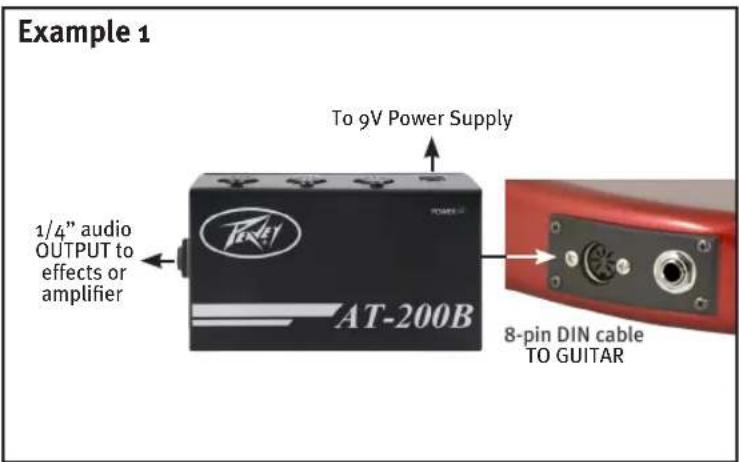
Congratulations on your purchase of the Peavey AT-200B Breakout Box for the AT-200 powered by Antares® Auto-Tune for Guitar! With the AT-200B, you can greatly enhance the experience of playing your AT-200 guitar. No need for batteries—the AT-200B remotely powers the AT-200, ensuring no problems with dead batteries! The included 8-pin DIN cable also carries the guitar's output back down to the box, where a 1/4" output allows you to direct your signal to your effects or amplifier. In addition, the MIDI jacks on the AT-200B connect the AT-200 guitar to the world of MIDI control! Software upgrade packages available from Antares will offer a myriad of great new features for the AT-200, all of which can be controlled via MIDI. Please visit http://autotuneforguitar.com for more information about software upgrades. By registering your AT-200 at the Antares' Auto-Tune for Guitar web site, http://autotuneforguitar.com, you become eligible to download any future firmware updates into your guitar using the AT-200B Breakout Box and a MIDI interface for your computer.
AT-200B Features
- 9V POWER: This is where you plug in the included 9V power supply. The power supply is a 9V, 500mA, negative tip supply.
- OUTPUT: By using the AT-200B, there is no need to use a 1/4" cable from the guitar. The included 8-pin DIN cable carries the audio down to the breakout box. From there it is routed to this output, which can then be connected to your effects or directly to your amplifier. (See example 1)
- TO GUITAR: This is where you plug the included 8-pin DIN cable. Plug the other end into the AT-200 guitar's 8-pin DIN connector.
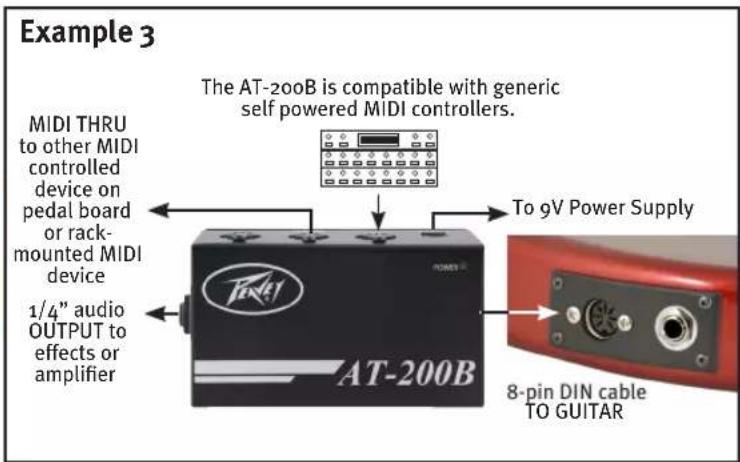
- MIDI IN: If you are using an external MIDI pedal or computer to control the features on the AT-200, plug your MIDI pedal in here. (See example 2)
- MIDI THRU: This is a buffered copy of the MIDI IN and is provided for connecting your MIDI controller pedal to a rack device or MIDI controllable amplifier. (See example 3)
- MIDI OUT: This output is provided to use along with the MIDI IN to connect your AT-200 to your computer for the purpose of firmware and software upgrades. Software upgrades are available exclusively from Antares at http://autotuneforguitar.com. You will need to plug the MIDI IN and OUT to a MIDI interface that is in turn connected to your computer. Refer to Antares' website for complete instructions. (see example 4)



flowchart
graph TD
    A["AT-200B"] -->|1/4" audio OUTPUT to effects or amplifier| B["MIDI OUT to MIDI interface IN"]
    B --> C["MIDI IN to MIDI interface OUT"]
    C --> D["to computer"]
    D --> E["Laptop"]
    B --> F["To 9V Power Supply"]
    F --> G["8-pin DIN cable TO GUITAR"]
Optional Software Upgrades (available from Antares® Audio Technologies)
By registering your AT-200 ^™ at the Antares Auto-Tune ^® for Guitar web site, http://guitar.auto-tune.com, you become eligible to download any future firmware updates into your guitar using the AT-200B Breakout Box and a MIDI interface for your computer. (Be sure to check the Auto-Tune for Guitar web site for the most current list of certified compatible MIDI interfaces.) Additionally, you will be able to purchase optional software upgrades from Antares that will add new features to your guitar and allow you to control those features via MIDI from MIDI foot controllers, programmable control surfaces, iPhones or iPads, computers or other sources of MIDI. For more detailed information about the upgrades and how they operate, please visit http://autotuneforguitar.com.
Non-Standard Tunings
Using Auto-Tune's proprietary pitch detection and extremely high-quality pitch shifting, Auto-Tune for Guitar's optional Alternate Tuning upgrade lets you quickly select from among popular alternate tunings as well as dramatic new tunings that would be physically impossible without Auto-Tune for Guitar. Plus, you can also create your own arbitrary tunings, so let the creativity flow! The difference between upgraded alternate tunings and the ones mentioned earlier in the manual is that these are saved and can be recalled instantly via a MIDI controller through the Peavey AT-200B breakout box.
Examples of available alternate tunings include:
| Drop D | Seven String (low B doubled on low E string) |
| DADGAD | Twelve String |
| Open G | Bass Guitar |
| Open D | Octave Guitar |
Virtual Capo
Auto-Tune for Guitar provides a virtual capo that allows you to shift pitch both up and down a full octave so you can play in any key or range. This allows you to play open chords in different keys at their traditional positions down at the bottom of the neck. Imagine playing 12th fret hammer-ons and pull-offs in the open position, or switching to baritone guitar, bass, or even sub-bass with the push of a button!
Guitar Upgrades
With Auto-Tune for Guitar technology, you can have a virtually unlimited variety of classic and modern tones at your fingertips.
Auto-Tune for Guitar also offers a tone control that can boost or cut the pickups' frequency response, dramatically changing the guitar.
PEAVEY ELECTRONICS CORPORATION LIMITED WARRANTY
Effective Date: 06/01/2012
What This Warranty Covers
Your Peavey Warranty covers defects in material and workmanship in Peavey products purchased and serviced in the U.S.A. and Canada.
What This Warranty Does Not Cover
The Warranty does not cover: (1) damage caused by accident, misuse, abuse, improper installation or operation, rental, product modification or neglect; (2) damage occurring during shipment; (3) damage caused by repair or service performed by persons not authorized by Peavey; (4) products on which the serial number has been altered, defaced or removed; (5) products not purchased from an Authorized Peavey Dealer.
Who This Warranty Protects
This Warranty protects only the original purchaser of the product.
How Long This Warranty Lasts
The Warranty begins on the date of purchase by the original retail purchaser. The duration of the Warranty for this product is 1 year..
What Peavey Will Do
We will repair or replace (at Peavey's discretion) products covered by Warranty at no charge for labor or materials. If the product or component must be shipped to Peavey for Warranty service, the consumer must pay initial shipping charges. If the repairs are covered by Warranty, Peavey will pay the return shipping charges.
How To Get Warranty Service
(1) Take the defective item and your sales receipt or other proof of date of purchase to your Authorized Peavey Dealer or Authorized Peavey Service Center.
OR
(2) Ship the defective item, prepaid, to Peavey Electronics Corporation, International Service Center, 412 Highway 11 & 80 East, Meridian, MS 39301. Include a detailed description of the problem, together with a copy of your sales receipt or other proof of date of purchase as evidence of Warranty coverage. Also provide a complete return address.
Limitation of Implied Warranties
ANY IMPLIED WARRANTIES, INCLUDING WARRANTIES OF MERCHANTABILITY AND FITNESS FOR A PARTICULAR PURPOSE, ARE LIMITED IN DURATION TO THE LENGTH OF THIS WARRANTY.
Some states do not allow limitations on how long an implied Warranty lasts, so the above limitation may not apply to you.
Exclusions of Damages
PEAVEY'S LIABILITY FOR ANY DEFECTIVE PRODUCT IS LIMITED TO THE REPAIR OR REPLACEMENT OF THE PRODUCT, AT PEAVEY'S OPTION. IF WE ELECT TO REPLACE THE PRODUCT, THE REPLACEMENT MAY BE A RECONDITIONED UNIT. PEAVEY SHALL NOT BE LIABLE FOR DAMAGES BASED ON INCONVENIENCE, LOSS OF USE, LOST PROFITS, LOST SAVINGS, DAMAGE TO ANY OTHER EQUIPMENT OR OTHER ITEMS AT THE SITE OF USE, OR ANY OTHER DAMAGES WHETHER INCIDENTAL, CONSEQUENTIAL OR OTHERWISE, EVEN IF PEAVEY HAS BEEN ADVISED OF THE POSSIBILITY OF SUCH DAMAGES.
Some states do not allow the exclusion or limitation of incidental or consequential damages, so the above limitation may not apply to you.
This Warranty gives you specific legal rights, and you may also have other rights which vary from state to state.
If you have any questions about this Warranty or services received or if you need assistance in locating an Authorized Service Center, please contact the Peavey International Service Center at (601) 483-5365.
Features and specifications are subject to change without notice.

Features and specifications are subject to change without notice.
Peavey Electronics Corporation • 5022 Hartley Peavey Drive • Meridian, MS 39305 (601) 483-5365 • FAX (601) 486-1278 • www.peavey.com
© 2012 EX000152
Mac ^® , iPhone ^® , iPad ^® , iPodtouch ^® , and GarageBand ^® are registered trademarks of Apple Inc., registered in the U.S. and other countries..
Microsoft ^® and Windows ^® are registered trademarks of Microsoft Corporation in the United States and/or other countries.

- IMPORTANT SAFETY INSTRUCTIONS
- FCC Compliancy Statement
- Peavey® AT-200B Breakout Box for use with the AT-200™ Auto-Tune® Guitar
- AT-200B Features
- Optional Software Upgrades (available from Antares® Audio Technologies)
- Non-Standard Tunings
- Virtual Capo
- Guitar Upgrades
- PEAVEY ELECTRONICS CORPORATION LIMITED WARRANTY
- What This Warranty Covers
- What This Warranty Does Not Cover
- Who This Warranty Protects
- How Long This Warranty Lasts
- What Peavey Will Do
- How To Get Warranty Service
- Limitation of Implied Warranties
- Exclusions of Damages
Brand : PEAVEY
Model : AT-200B
Category : Audio accessory