
Tablo Evo - Fan Argoclima - Free user manual and instructions
Find the device manual for free Tablo Evo Argoclima in PDF.


| Product Type | Fan |
| Brand | Argoclima |
| Model | Tablo Evo |
| Power Supply | 220-240V~50Hz |
| Speed Settings | 3 (Low, Medium, High) |
| Operating Modes | Normal, Natural, Sleep |
| Timer | Up to 7 hours (1h, 2h, 4h sequence) |
| Swing Function | Yes, oscillating |
| Remote Control | Yes, requires 2x AAA batteries (not included) |
| Control Panel | Electronic with LED indicators |
| Assembly Required | Yes, base and fan assembly |
| Material | Plastic |
| Color | White (model shown) |
| Weight (estimated) | Approx. 4 kg |
| Dimensions (estimated) | Approx. 40 x 40 x 120 cm |
| Power Cord Length (estimated) | Approx. 1.8 m |
| Cleaning | Wipe with damp cloth; vacuum grilles |
| Storage | Cool, dry place |
| Safety Features | Overheat protection, tip-over prevention (stable base) |
| Disposal | WEEE compliant; do not dispose with household waste |
Frequently Asked Questions - Tablo Evo Argoclima
User questions about Tablo Evo Argoclima
0 question about this device. Answer the ones you know or ask your own.
Ask a new question about this device
Download the instructions for your Fan in PDF format for free! Find your manual Tablo Evo - Argoclima and take your electronic device back in hand. On this page are published all the documents necessary for the use of your device. Tablo Evo by Argoclima.
USER MANUAL Tablo Evo Argoclima
natural_image
Black and white photo of a large outdoor fan with radial blades and a black base (no text or symbols visible)TABLO EVO WHITE

natural_image
Front view of a gray electric fan with visible blades and top base (no text or symbols)OPERATING
INSTRUCTIONS
Read the instructions carefully before operating the appliance or carrying out maintenance operations. Observe all the safety instructions; failure to observe the instructions may lead to accidents and/or damage. Keep these instructions in a safe place for future reference.
GENERAL SAFETY INFORMATION
- Use this fan only as outlined in this manual. Any other use not recommended by the manufacturer may cause fire, electric shock or injury to people.
- Ensure that the mains power complies with the voltage specified on the fan's data plate (220-240V\~/50Hz).
- This product is not a toy. Children should be adequately supervised to ensure that they do not play with the appliance.
- This appliance is not suitable for use by people (including children) with reduced physical, sensory or mental abilities, or without the necessary experience and knowledge, unless they have been adequately supervised and instructed concerning use of the appliance by a person responsible for their safety.
- Do not restrict the air inlet and outlet grilles.
- Disconnect the mains power when the appliance is not used or for cleaning operations.
- Do not place anything on the appliance, use the appliance to dry clothing.
- Avoid placing fingers or foreign objects in the air inlet/outlet grilles, as this may lead to electric shock or fire and may damage the appliance.
- To avoid the risk of fire, do not block the grilles or tamper with them in any way while the fan operates.
- Do not use the appliance if the cord or plug are damaged. If the power supply cord is damaged, it must be replaced by the manufacturer, dealer or a similarly qualified person so as to avoid any safety risks.
-
Do not operate the appliance if it has fallen from a height or has suffered damage in any way. Contact qualified technical personnel to examine the appliance or perform any electrical or mechanical repairs.
-
The most common cause of overheating is the build-up of dust in the appliance. Remove dust deposits by unplugging the appliance and cleaning the air outlets and grilles with the aid of a vacuum cleaner.
- Do not use abrasive detergents for cleaning this appliance. Clean the appliance with the aid of a damp (not wet) cloth rinsed in hot soapy water. Always remove the plug from the mains socket before cleaning.
- To disconnect the fan, push the switch to OFF and remove the plug from the socket. Pull on the plug only. Avoid pulling on the cord when disconnecting the fan.
- Do not place any objects on the cord and do not bend it.
- It is not advisable to use extension cords, as these may overheat and cause the risk of fire. Do not use a single extension cord to operate multiple appliances.
- Do not immerse the cord, plug or any other element of the appliance in water or other liquids.
- Do not touch the plug with wet hands.
- Do not place the fan above or near another heat source such as radiators, stoves or other products that produce heat.
- Do not connect the appliance to the mains power before it has been properly assembled and positioned.
- Do not run the cord under carpets. Do not cover the cord with blankets, carpets or similar materials. Place the cord far away from busy areas or where it cannot be accidentally pulled-out.
- Do not position the fan below a socket outlet.
- Do not operate the appliance outdoors.
WARNING: DO NOT DEPEND ON THE ON/OFF BUTTON SWITCH AS THE SOLE MEANS OF DISCONNECTING POWER. WHEN SERVICING OR MOVING THE FAN, ALWAYS UNPLUG THE POWER CORD.
- A fan has hot and arcing or sparkling parts inside. It must not be used in potentially dangerous locations such as flammable, explosive, chemical-laden or wet atmosphere.
- Do not place the fan on soft surfaces, like a bed, where openings may become blocked. Always place the fan on a stable, flat, level surface when operating, to avoid the chance of the overturning.
Locate the power cord so the fan or other objects are not resting on it.
• Always unplug the fan when not in use.
• In order to avoid accidents turn unit off if unattended.
- In the event of any problems (abnormal noise or a strange smell) switch off the appliance immediately, do not attempt to repair it and take it to your local after sales service.
• To move the product, use the handle on the back of the product.
DESCRIPTION OF PARTS

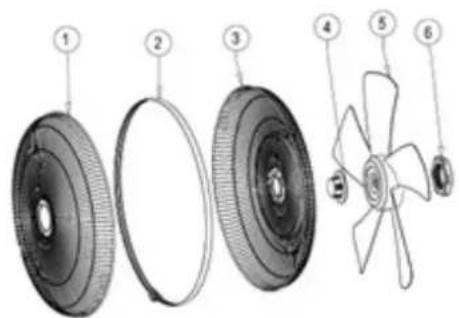
Fan assembly components:
- Front grill
- Grill ring
- Rear grill
- Blade cap
- Blade
- Plastic mounting nut
FAN ASSEMBLY INSTRUCTIONS
The device does not require installation. For its use it is necessary to assemble the parts, as per the instructions below.
Open the package and take out the parts of the appliance.
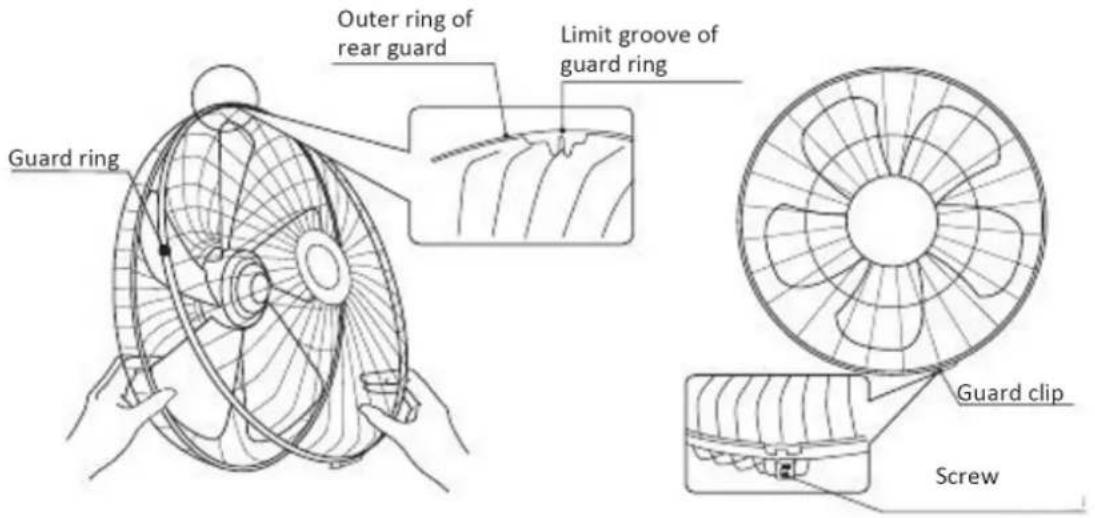
Remove the Blade Cap from the Motor Shaft by turning it clockwise, and remove the Plastic Mounting Nut from the Fan Head by rotating anti-clockwise. Put the Rear Fan Grill on the Fan Head by align the Position Holes and Lock the Plastic Mounting Nut on to the Fan Head to fix the Rear Fan Grill on to the Fan Head. Do not over force the Plastic Mounting Nut.

Make the fan blade Groove aligns with a T-bar on the motor shaft to ensure correct positioning and fix the fan blade into place by hand tightening the blade cap anticlockwise gently onto the end of the motor shaft.

Finally, before place the front fan grill into right position of the guard ring with guard self-clip, please make sure the Limit groove of guard Ring is on the upward side and the guard self-clip is on the downward side. The screw at the bottom of the guard ring must be fixed after the assembly of front fan.
BASE ASSEMBLY INSTRUCTIONS
Place the power cable in the appropriate groove (between points E F in figure 1), then assemble the 4 points (figure 1) by rotating the base clockwise. Make sure that the base is correctly assembled, as shown in figure 2.

natural_image
Technical line drawing of a circular mechanical component with concentric rings and mounting holes (no text or symbols)Figure 1

natural_image
Technical line drawing of a mechanical component with concentric rings and a central shaft (no text or symbols)Figure 2
HOW TO USE THE APPLIANCE
Connect the power cable to an appropriate power socket (220-240V \~).
Place the fan upright on a flat, stable surface.
Do not use this fan in an area with high humidity, rich in dust or water.
Press ON / OFF on the control panel or remote control. The emission of a sound will indicate that the device is on, the ventilation speed will be high for 1 second, and then switch to low ventilation speed, which will remain so until a different ventilation speed is selected.
This ventilator can be used in 3 ventilation modes: NORMAL, NATURAL and SLEEP.
In each of the 3 modes by pressing the SPEED button you can change the fan speed between low, medium and high.
CONTROL PANEL

ON/OFF BUTTON

Press ON/OFF on control and on remote control to switch of or switch off the appliance.
After turning on the unit, it will start to operate at high fan speed for 1 second (H icon will light up), then switch to low fan speed (L icon will light up).
It will then be possible to select the desired fan speed by pressing the Speed button.
SPEED BUTTON

Repeatedly press the Speed button on the control panel or remote control to adjust the fan speed in the following sequence: low - medium - high
On the control panel the corresponding LEDs will light up according to your selection and will be visible as follows:
L=low speed M=medium speed H=high speed
SWING BUTTON

To activate or deactivate the swing function, press the button 🤕 on the control panel or the SWING button on the remote control.
It is possible to adjust the angle of inclination of the fan assembly. Turn off the fan, slightly loosen the adjustable screw by turning it counter-clockwise. Place the fan assembly in the desired angle, then tightly screw the adjustable screw by turning it clockwise.

TIMER BUTTON

Press the button ⏻ on the control panel or the TIMER button on the remote control to select the fan shutdown interval in the following sequence: 1 hour, 2 hours, 4 hours up to a maximum of 7 hours. The LEDs on the control panel will light up according to your selection.
MODE BUTTON (activated only by remote control)
Press this button on the remote control (function not present on the control panel) to select the desired ventilation mode between Normal, Natural and Sleep:
- Normal Mode: By pressing the Mode button on the remote control once, the ventilation speed is constant and the L icon remains lit on the control panel. It is possible to select the ventilation speed between high, medium and low (the corresponding LEDs light up according to the speed in progress).
- Natural mode: By pressing the Mode button on the remote control twice, the fan speed varies according to a predefined program. It is possible to select the ventilation speed between high, medium, low, stop, the icons light up according to the current ventilation speed. The corresponding icon on the control panel is NAT.
- Sleep mode: Press the Mode button on the remote control three times, the fan speed varies according to a preset program. It is possible to select the ventilation speed between high, medium, low, stop, the icons light up according to the current ventilation speed. The corresponding icon on the control panel is SLP.
REMOTE CONTROL


The functions on the remote control correspond to the functions on the control panel.
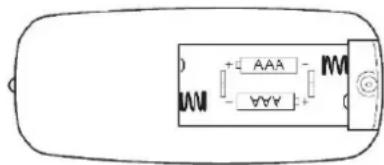
HOW TO INSERT / REMOVE THE REMOTE CONTROL BATTERIES (refer to the drawing below).
Open the battery door on the back of the remote control and remove the door. Insert the batteries in the remote control (not supplied), taking care to check the correct positioning of the polarity. Replace the cover in the remote control. Use 2 LR03 (AAA) 1.5V batteries compliant with Battery Directive no. 2006/66 / EC and amendments to Directive 2013/56 / EC.
Remove the batteries if the remote control is not used for a long time.



INFORMATION FOR CORRECT DISPOSAL OF THE BATTERIES IN ACCORDANCE WITH EUROPEAN DIRECTIVE 2006/66/EC and amendments Directive 2013/56/EC
Please replace the battery when its electrical charge has been exhausted: at the end of its useful life, it must not be disposed of together with unsorted waste. It must be must be delivered to appropriate separated waste disposal plants or to dealers that provide a similar service. Separate waste disposal of batteries prevents potential negative effects on the environment and human health resulting from inadequate disposal, and also allows the materials from which it is made to be recovered and recycled in order to achieve significant savings in terms of energy and resources. The separate disposal obligation is underlined by the crossed-out dustbin symbol appearing on the battery. Illegal disposal of the product by the user shall result in the application of of administrative sanctions as defined by current regulations.
MAINTENANCE AND STORAGE
ALWAYS UNPLUG THE APPLIANCE BEFORE CLEANING OR MAINTENANCE. IMPORTANT: DO NOT SUBMERGE THE FAN IN WATER.
Cleaning the outside surface of the appliance
Turn the switch off and unplug before carrying out any maintenance work or moving the appliance.
Use a soft cloth to remove any dust from the fan.
If the fan is excessively dirty, use a soft cloth moistened with water and a mild detergent at a temperature lower than 50°C.
Let the fan dry completely before use.
Do not use corrosive detergents or solvents such as petrol. Do not wash the appliance with water. Do not use oils, chemical substances or other items to clean that may damage the surface.
Use a vacuum cleaner to remove dust from the air inlet/outlet grilles.
STORAGE
If the appliance is not used for prolonged periods, disconnect the power cord and store the appliance with this manual in its original packaging, in a cool and dry place.
Remove the batteries if the remote control is not used for a long time.

INFORMATION FOR THE CORRECT DISPOSAL OF THE PRODUCT IN ACCORDANCE WITH EUROPEAN DIRECTIVE 2012/19/EU
This appliance may not be scrapped with domestic waste at the end of its life cycle. We call your attention to the crucial role played by the consumer in the re-use, recycling and other forms of recovery of such waste.
The appliance must be scrapped by a sorted waste disposal centre or by returning it to the retailer (no charge is levied for this service), when you purchase a new equivalent appliance.
Sorted disposal of electric and electronic equipment prevents the negative effects on the environment and human health resulting from improper scrapping, and also allows the materials from which it is made to be recovered and recycled, with significant savings in terms of energy and resources.
The sorted disposal requirement is indicated by the crossed waste bin label affixed to the appliance.

improve your life
www.argoclima.com


- TABLO EVO WHITE
- OPERATING
- INSTRUCTIONS
- GENERAL SAFETY INFORMATION
- WARNING: DO NOT DEPEND ON THE ON/OFF BUTTON SWITCH AS THE SOLE MEANS OF DISCONNECTING POWER. WHEN SERVICING OR MOVING THE FAN, ALWAYS UNPLUG THE POWER CORD.
- DESCRIPTION OF PARTS
- Fan assembly components:
- FAN ASSEMBLY INSTRUCTIONS
- BASE ASSEMBLY INSTRUCTIONS
- HOW TO USE THE APPLIANCE
- CONTROL PANEL
- ON/OFF BUTTON
- SPEED BUTTON
- SWING BUTTON
- TIMER BUTTON
- MODE BUTTON (activated only by remote control)
- REMOTE CONTROL
- INFORMATION FOR CORRECT DISPOSAL OF THE BATTERIES IN ACCORDANCE WITH EUROPEAN DIRECTIVE 2006/66/EC and amendments Directive 2013/56/EC
- MAINTENANCE AND STORAGE
- ALWAYS UNPLUG THE APPLIANCE BEFORE CLEANING OR MAINTENANCE. IMPORTANT: DO NOT SUBMERGE THE FAN IN WATER.
- Cleaning the outside surface of the appliance
- STORAGE
- INFORMATION FOR THE CORRECT DISPOSAL OF THE PRODUCT IN ACCORDANCE WITH EUROPEAN DIRECTIVE 2012/19/EU
Brand : Argoclima
Model : Tablo Evo
Category : Fan