
Palladium - Fan Argoclima - Free user manual and instructions
Find the device manual for free Palladium Argoclima in PDF.


| Product Type | Stand/pedestal fan |
| Brand | Argoclima |
| Model | Palladium |
| Power Supply | 220-240V~ 50Hz |
| Speed Settings | 3 (Low, Medium, High) |
| Oscillation | Yes, with manual knob |
| Blade Material | Plastic |
| Guard Material | Metal |
| Base Material | Plastic |
| Stand Material | Metal tube |
| Safety Features | Thermal protector, overheat auto shut-off |
| Cleaning | Soft cloth, mild detergent, vacuum grilles |
| Usage | Indoor only |
| Assembly Required | Yes, base, tube, guards, blades |
| Noise Level | Low noise operation |
| Certifications | CE compliant (EU Directive 2012/19/EU) |
| Disposal | Do not dispose with household waste; recycle at WEEE collection point |
| Warranty | Contact manufacturer or dealer for service |
Frequently Asked Questions - Palladium Argoclima
User questions about Palladium Argoclima
0 question about this device. Answer the ones you know or ask your own.
Ask a new question about this device
Download the instructions for your Fan in PDF format for free! Find your manual Palladium - Argoclima and take your electronic device back in hand. On this page are published all the documents necessary for the use of your device. Palladium by Argoclima.
USER MANUAL Palladium Argoclima
natural_image
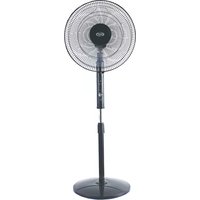
Modern office fan with a metallic stand and four blades, no visible text or symbolsOPERATING INSTRUCTIONS
Read the instructions carefully before operating the appliance or carrying out maintenance operations. Observe all the safety instructions; failure to observe the instructions may lead to accidents and/or damage. Keep these instructions in a safe place for future reference.
GENERAL SAFETY INFORMATION
- Use this fan only as outlined in this manual. Any other use not recommended by the manufacturer may cause fire, electric shock or injury to people.
- Ensure that the mains power complies with the voltage specified on the fan's data plate (220-240V\~/50Hz).
- This appliance can be used by children aged from 8 years and above and people with reduced physical, sensory or mental capabilities or lack of experience and knowledge if they have been given supervision or instruction concerning use of the appliance in a safe way and understand the hazards involved.
• Children shall not play with the appliance. - Cleaning and user maintenance shall not be made by children without supervision.
- This product is not a toy. Children should be adequately supervised to ensure that they do not play with the appliance.
- Disconnect the mains power when the appliance is not used or for cleaning operations.
- Do not restrict the air inlet and outlet grilles.
- Do not place anything on the appliance, use the appliance to dry clothing.
- Avoid placing fingers or foreign objects in the air inlet/outlet grilles, as this may lead to electric shock or fire and may damage the appliance.
- To avoid the risk of fire, do not block the grilles or tamper with them in any way while the fan operates.
- Do not use the appliance if the cord or plug are damaged. If the power supply cord is damaged, it must be replaced by the manufacturer, dealer or a similarly qualified person so as to avoid any safety risks.
- Do not operate the appliance if it has fallen from a height or has suffered damage in any way. Contact qualified technical personnel to examine the appliance or perform any electrical or mechanical repairs.
- To disconnect the fan, push the switch to OFF and remove the plug from the socket. Pull on the plug only. Avoid pulling on the cord when disconnecting the fan.
-
Do not place any objects on the cord and do not bend it.
-
It is not advisable to use extension cords, as these may overheat and cause the risk of fire. Do not use a single extension cord to operate multiple appliances.
- Do not immerse the cord, plug or any other element of the appliance in water or other liquids.
- Do not touch the plug with wet hands.
- Do not place the fan above or near another heat source.
- Do not run the cord under carpets. Do not cover the cord with blankets, carpets or similar materials. Place the cord far away from busy areas or where it cannot be accidentally pulled-out.
- Do not position the fan below a socket outlet.
- Do not operate the appliance outdoors.
- Do not place the fan on soft surfaces, like a bed, where openings may become blocked. Always place the fan on a stable, flat, level surface when operating, to avoid the chance of the overturning. Locate the power cord so the fan or other objects are not resting on it.
• Always unplug the fan when not in use. - In order to avoid accidents turn unit off if unattended.
- In the event of any problems (abnormal noise or a strange smell) switch off the appliance immediately, do not attempt to repair it and take it to your local after sales service.
DESCRIPTION OF PARTS

- Nut
- Front guard
- Blade
- Screw
- Rear guard
- Power switch
- Oscillation knob
- Motor
- Power cord
- Tube
- Joint screw
- Base additional part
- Base
ASSEMBLY INSTRUCTIONS
- After removing everything from the carton, locate the motor unit and separate the front guard and back guard if they are connected.
- Take the rear guard, mount it in the two holes of the motor unit, and tighten it with only one locking screw provided; the rear guard will only fit one way: with the handle facing up.
- Take the fan blades and align the centre of the blades over the metal spindle protruding from the motor unit. The intent on the metal spindle aligns with the locking screw on the fan blades. After the blade has been put on, tighten the locking screw on the fan blades and ensure that the blades is secured to the motor unit.
- Align the front guard to the rear guard and lock into place with 3 locking tabs that are located on the guard. Locate the security nut and bolt and secure the front and rear guards together with security nut and bolt. This is a safety precaution to prevent the accidental dismantling of the fan.
- Locate the pedestal base of the fan. Insert the base of the stand into the pedestal base, then fasten the base and the pole with the screws provided.
- Undo the thumbscrew at the top of the stand(item 10) and align the motor unit complete with guards before fastening.
BASE AND TUBE INSTRUCTIONS
The appliance does not need to be installed.
Take the base and tube parts from the packing box and loose the 4 joint screws. Fix the tube on the base plate by the joint screws. Position the unit on a flat, stable surface.
HOW TO USE THE APPLIANCE
Connect the power cord to a suitable power socket (220-240 V\~).
This fan can be used both as 3 fan speed options: low, medium and high.
This fan has a swivel action head giving a smooth oscillation action along with low noise levels, low electrical usage, reliability with safety, while still providing efficient air flow.
The power switch is incorporated in the speed control switch on the top of the fan.
0- The Fan is switched Off
1- The Fan operates at the lowest speed
2- The Fan operates at the medium speed
3- The Fan operates at the highest speed
The fan can operate in oscillation or static mode. To make the fan head oscillate, push down the Oscillation Knob.
To stop the fan head from oscillating, pull-up the Oscillation Knob.
A Thermal protector device was mounted in the motor. When overheats due to various reasons, the temperature of the motor reaches the fusing point, it will cut off automatically, make the fan safe efficiently. When the protector is fused, the fan should be eliminated trouble and replace a new thermal protector before the fan is used again.
ALWAYS UNPLUG THE APPLIANCE BEFORE CLEANING OR MAINTENANCE. IMPORTANT: DO NOT SUBMERGE THE FAN IN WATER.
MAINTENANCE AND STORAGE
Cleaning the outside surface of the appliance
Turn the switch off and unplug before carrying out any maintenance work or moving the appliance.
Use a soft cloth to remove any dust from the fan.
If the fan is excessively dirty, use a soft cloth moistened with water and a mild detergent at a temperature lower than 50°C.
Let the fan dry completely before use.
Do not use corrosive detergents or solvents such as petrol. Do not wash the appliance with water. Do not use oils, chemical substances or other items to clean that may damage the surface.
Use a vacuum cleaner to remove dust from the air inlet/outlet grilles.
STORAGE
If the appliance is not used for prolonged periods, disconnect the power cord and store the appliance with this manual in its original packaging, in a cool and dry place.

INFORMATION FOR THE CORRECT DISPOSAL OF THE PRODUCT IN ACCORDANCE WITH EUROPEAN DIRECTIVE 2012/19/EU
This appliance may not be scrapped with domestic waste at the end of its life cycle. We call your attention to the crucial role played by the consumer in the re-use, recycling and other forms of recovery of such waste.
The appliance must be scrapped by a sorted waste disposal centre or by returning it to the retailer (no charge is levied for this service), when you purchase a new equivalent appliance.
Sorted disposal of electric and electronic equipment prevents the negative effects on the environment and human health resulting from improper scrapping, and also allows the materials from which it is made to be recovered and recycled, with significant savings in terms of energy and resources.
The sorted disposal requirement is indicated by the crossed waste bin label affixed to the appliance.

improve your life
www.argoclima.com


- OPERATING INSTRUCTIONS
- GENERAL SAFETY INFORMATION
- DESCRIPTION OF PARTS
- ASSEMBLY INSTRUCTIONS
- BASE AND TUBE INSTRUCTIONS
- HOW TO USE THE APPLIANCE
- ALWAYS UNPLUG THE APPLIANCE BEFORE CLEANING OR MAINTENANCE. IMPORTANT: DO NOT SUBMERGE THE FAN IN WATER.
- MAINTENANCE AND STORAGE
- Cleaning the outside surface of the appliance
- STORAGE
- INFORMATION FOR THE CORRECT DISPOSAL OF THE PRODUCT IN ACCORDANCE WITH EUROPEAN DIRECTIVE 2012/19/EU
Brand : Argoclima
Model : Palladium
Category : Fan