
Call4U Pro - Phone dnt - Free user manual and instructions
Find the device manual for free Call4U Pro dnt in PDF.


| Product Type | Telephone headset with multifunction box |
| Brand | DNT |
| Model | Call4U Pro |
| Compatibility | Most telephones with RJ11 connection; adjustable compatibility switch |
| Power Source | Batteries only (no external power) |
| Main Functions | Microphone mute, headset/handset selector |
| Microphone | Flexible boom microphone |
| Earpiece | Adjustable headband with ear cushions |
| Materials | Plastic, metal (headband), foam ear cushions |
| Cable Length | Approximately 1.5 m (curly cord) |
| Weight | Approximately 100 g (headset only) |
| Dimensions | Not specified |
| Color | Black (typical) |
| Safety | Keep away from children; avoid high humidity, dust, temperatures above 60°C; not a toy |
| Maintenance | Clean with dry, soft cloth; store in clean, dry place |
| Environmental | Keep away from magnetic cards; avoid electromagnetic fields |
| Warranty | European warranty regulations; 2 years typical from date of receipt |
| Package Contents | Headset, multifunction box, cables, compatibility switch cover |
| Certification | CE, EMC Directive 89/336/EEC |
Frequently Asked Questions - Call4U Pro dnt
User questions about Call4U Pro dnt
0 question about this device. Answer the ones you know or ask your own.
Ask a new question about this device
Download the instructions for your Phone in PDF format for free! Find your manual Call4U Pro - dnt and take your electronic device back in hand. On this page are published all the documents necessary for the use of your device. Call4U Pro by dnt.
USER MANUAL Call4U Pro dnt


Inhalt
Deutsch
Inhalt
Einleitung....2
Allgemeines....4
Allgemeines
Deutsch

Sicherheitshinweise
Sicherheitshinweise
Anschließen
Anschließen
Inbetriebnahme
Inbetriebnahme
Deutsch
Telefonieren
Telefonieren
Fehlerbehebung
Fehlerbehebung
EC-Declaration of Conformity

We, Manufacturer/Importer
D-63128 Dietzenbach, Germany
Declare that the product
Telephone Headset with Confi guration Module
Call4U Pro
Is in conformity with
Council Directive 89/336/EEC (EMC Directive)
EN55022:1998 Class B
EN50024:1998
Dietzenbach April 30, 2002 H.Flugel
-13-


Introduction
Dear customer
The Call4U Pro is designed to improve convenience and productivity of a telephone user. In the long run it aims to make effective use of a firm's operational resources by allowing a multitasking environment. This enables the frequently telephone users to perform other tasks and work on the computer while simultaneously talking on the phone.
One part of the Call4U Pro is the multifunction box, which allows you to adapt the headset to your telephone. The additional functions are:
- Microphone mute
- Headset/handset selection
All parts like boom microphone, earset and headband are fl exible and therefore can be adapted perfectly to your head.
Experience a lot of pleasure and comfort with our headset Call4U Pro.
dnt GmbH


-14-

Contents
Introduction......14
General....16
Security instructions....17
Product information.... 18
Installation....20
Operation
Operation....22
Mute....22
Headset/handset selector.... 22
Troubleshooting....23
Declaration of Conformity....13
English

-15-
C4U pro D-E-NL.indd 15
15

29.03.2006 17:04:52
General
General instructions
- Don't place the unit on unstable places, if falling down, people may be injured.
● The unit is not a toy, please beware of children. - If you connect the unit to other electronic devices, please read also the security instruction of that device.
- If you have any question regarding the unit, how it works, the safety or the correct connection please contact our technical support or ask any specialist.
● The seller will not be liable for any damages caused by misuse of the product and any claim from third parties.
● The product can not be used with external power sources, only batteries are allowed.
Environmentel conditions
- Don't leave the product close to magnetic cards like credit cards. The magnet of the loudspeaker can damage the information on this card.
- Don't drop or shake the unit, it might be damaged.
- Don't leave the unit on places where the temperature is higher than 60°C, e.g. near heaters or any other type of heat source.
- Don't use the unit in rooms with high humidity e.g. bathrooms.
- Don't use the unit at dusty places.

Security instructions
- If you use the unit close to electromagnetic fields or mobile phones, unwanted noise could be heared.
● Parts of the appliance or accessories may contain so-called softeners, which may damage sensitive furniture and plastic surfaces. Avoid direct contact with sensitive surfaces.
Technical problems
- In case any foreign material or liquid gets into the product, please immediately remove the unit from the telephone. Before you use it again, ask your authorised dealer to check the product carefully.
- Please do not hesitate to contact our service center.
Packaging material
- Please don't keep any packaging material within reach of small children. It can become a dangerous toy.
Maintenance
- Please store the product at a clean and dry place in case you don't use the product for a longer period of time.
- For cleaning use dry and soft cloth.
English
-17-





Installation
Installation
- Unplug the telephone's handset cord from the telephone base.
- Plug your telephone's handset cord into the amplifier handset jack which is marked with 📋.
- Connect your telephone base to the amplifier's telephone jack with the RJ11 plug. On your telephone base, plug the short curly cord into the jack where you have unplugged the handset before.
- Connect the headset plug into the jack in front of the amplifier which is marked with
- Switch the headset/handset selector into the headset position and make sure that the Mute-switch is released.
- When wearing the headset, slide the head-band up or down until speaker cushion(s) are centered on your ear(s).
- Position the fl exible microphone boom at the corner of your mouth.
Getting started
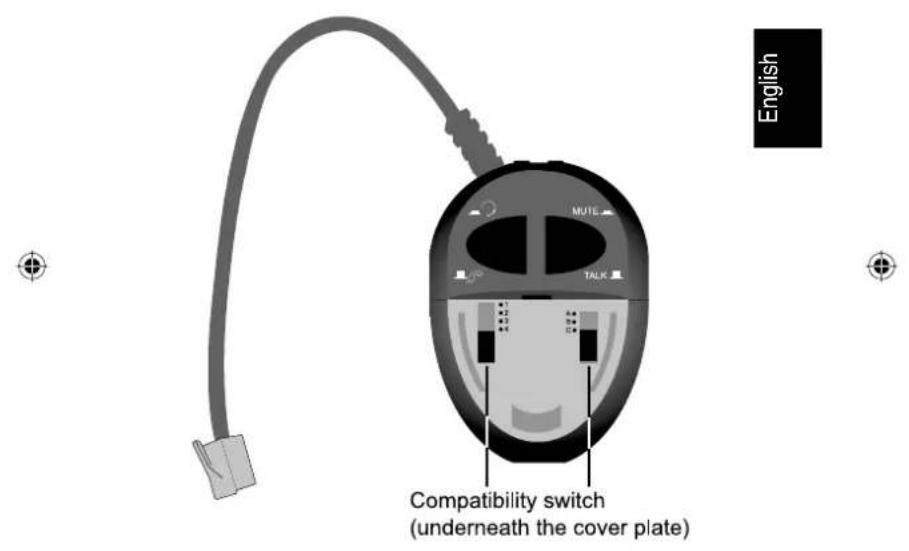
The Call4U Pro can work with most available telephones on the market. To make the Call4U Pro workable with your telephone you have to find the right position of the compatibility switch at the top of the multifunction box underneath the plastic cover. Please check all positions until you can hear the dial tone at the best.

Installation
- Wear the headset and adjust the microphone position.
- Remove the compatibility switch cover with low pressure at the marked area at the top of the multifunction box and pull it downwards.
- Press the headset/handset selection switch to select the headset and make sure that the Mute-button is released.
- Lift and place the telephone handset beside the telephone and check the dial tone.
- Please check all switch combination where you can hear the dial tone at its best. You have the correct position when you can hear the dial tone and you hear your own voice (at a low level) when you speak into the microphone.
English

-21-

Operation
Operation
- To make a phone call with the Call4U Pro lift and place the handset beside the telephone.
- Make sure that the headset/handset switch is in the headset position.
- To fi nish a call, just hang up the handset on the telephone.
Mute
You can switch off the microphone during a telephone call by pressing the Mute button, so your partner cannot hear your internal conversation.
Headset/handset selector
With the Call4U Pro either the headset or the handset of your telephone can be used. This is done by the headset/handset selector. It is also possible to change during a telephone call.
Troubleshooting
-22-

Troubleshooting
-
No dial tone / caller and you can't hear each other.
-
Check whether the headset/handset selector switch is pressed.
- Check whether the telephone handset is placed in cradle.
- Check whether the telephone handset cord and the short curly cord to telephone are connected to the correct jacks of the amplifier.
- Check whether the telephone/compatibility switch is in the correct setting for your phone and if not, adjust the position of switch.
English
-
Caller cannot hear me.
-
Check whether the microphone is positioned near your mouth.
-
Check if all cables are connected.
-
If a whistle is heared.
- Adjust telephone compatibility switch.
- The headset feels too tight or loose on my ear
- Slide the headband up or down.

-23-
C4U pro D-E-NL.indd 23

29.03.2006 17:04:54
Inleiding
Geachte klant,
Inhoud
Inleiding....24
Algemene informatie
Aansluiten
Aansluiten
Ingebruikneming
Ingebruikneming
Telefoneren
Telefoneren
Garantiebedingungen
Warranty regulations
- In general the European warranty regulations are valid. Warranty starts with receipt of unit. In a warranty case, please submit the unit together with invoice, unit pass and error description. Without these documentary evidence we are not obliged to a warranty performance.
- During warranty period we repair all constructional or material defects which are caused by a manufacturing fault. It is in the decision of the manufacturer to change or replace defective parts/units. Further claims are excluded. Changed parts will automatically go over into our property. We will not be held responsible for future damages.
- Manipulation on the unit through non-authorized companies/persons automatically leads to an end of warranty period.
- Excluded of warranty claims are damages due to improper treatment, not following the manual, oxidation of batteries, permanent usage.
-
The initial warranty period is not extended because of repair or replacement of parts.
-
These warranty regulations are valid in the Federal Republik of Germany.
Garantiebepalingen


- INHALT
- DEUTSCH
- ALLGEMEINES
- SICHERHEITSHINWEISE
- ANSCHLIESSEN
- INBETRIEBNAHME
- TELEFONIEREN
- FEHLERBEHEBUNG
- EC-DECLARATION OF CONFORMITY
- INTRODUCTION
- DEAR CUSTOMER
- CONTENTS
- GENERAL
- GENERAL INSTRUCTIONS
- ENVIRONMENTEL CONDITIONS
- SECURITY INSTRUCTIONS
- TECHNICAL PROBLEMS
- PACKAGING MATERIAL
- MAINTENANCE
- INSTALLATION
- GETTING STARTED
- OPERATION
- MUTE
- HEADSET/HANDSET SELECTOR
- TROUBLESHOOTING
- INLEIDING
- INHOUD
- ALGEMENE INFORMATIE
- AANSLUITEN
- INGEBRUIKNEMING
- TELEFONEREN
- GARANTIEBEDINGUNGEN
- WARRANTY REGULATIONS
- GARANTIEBEPALINGEN
Brand : dnt
Model : Call4U Pro
Category : Phone