WAKEit S - Radio SACK it - Free user manual and instructions
Find the device manual for free WAKEit S SACK it in PDF.


| Product Type | Radio with Alarm Clock |
| Brand | SACK it |
| Model | WAKEit S |
| Dimensions (approx.) | 15 cm x 10 cm x 5 cm |
| Weight (approx.) | 300 g |
| Power Source | AC adapter (DC 5V) or 3 x AA batteries |
| Radio Bands | FM (87.5-108 MHz), AM (520-1710 kHz) |
| Display Type | LED digital clock |
| Alarm Features | Dual alarm, snooze (9 min), alarm via buzzer or radio |
| Audio Output | Built-in speaker (3W), 3.5mm headphone jack |
| Additional Functions | Sleep timer, nap timer, station presets (10 FM, 10 AM) |
| Materials | ABS plastic body, glass display window |
| Care Instructions | Clean with a soft dry cloth; avoid liquids and abrasives. |
| Safety Warnings | Do not expose to water or extreme heat. Use only specified power adapter. |
| Spare Parts Available | Battery cover, AC adapter (model SP-WAKEitS) |
| Repairability | Designed for easy battery replacement; internal components not user-serviceable. |
| Warranty | 1 year limited warranty |
| Country of Origin | China |
Frequently Asked Questions - WAKEit S SACK it
User questions about WAKEit S SACK it
0 question about this device. Answer the ones you know or ask your own.
Ask a new question about this device
Download the instructions for your Radio in PDF format for free! Find your manual WAKEit S - SACK it and take your electronic device back in hand. On this page are published all the documents necessary for the use of your device. WAKEit S by SACK it.
USER MANUAL WAKEit S SACK it
Cleaning of the product 11
Technical specifications 11
Important safety information 12
Disposal of the product 12

Tak! 13
Indhold i kassen.... 13
Quick Start Guide 13
Produkt overblik 14
Knappernes funktioner.... 16
natural_image
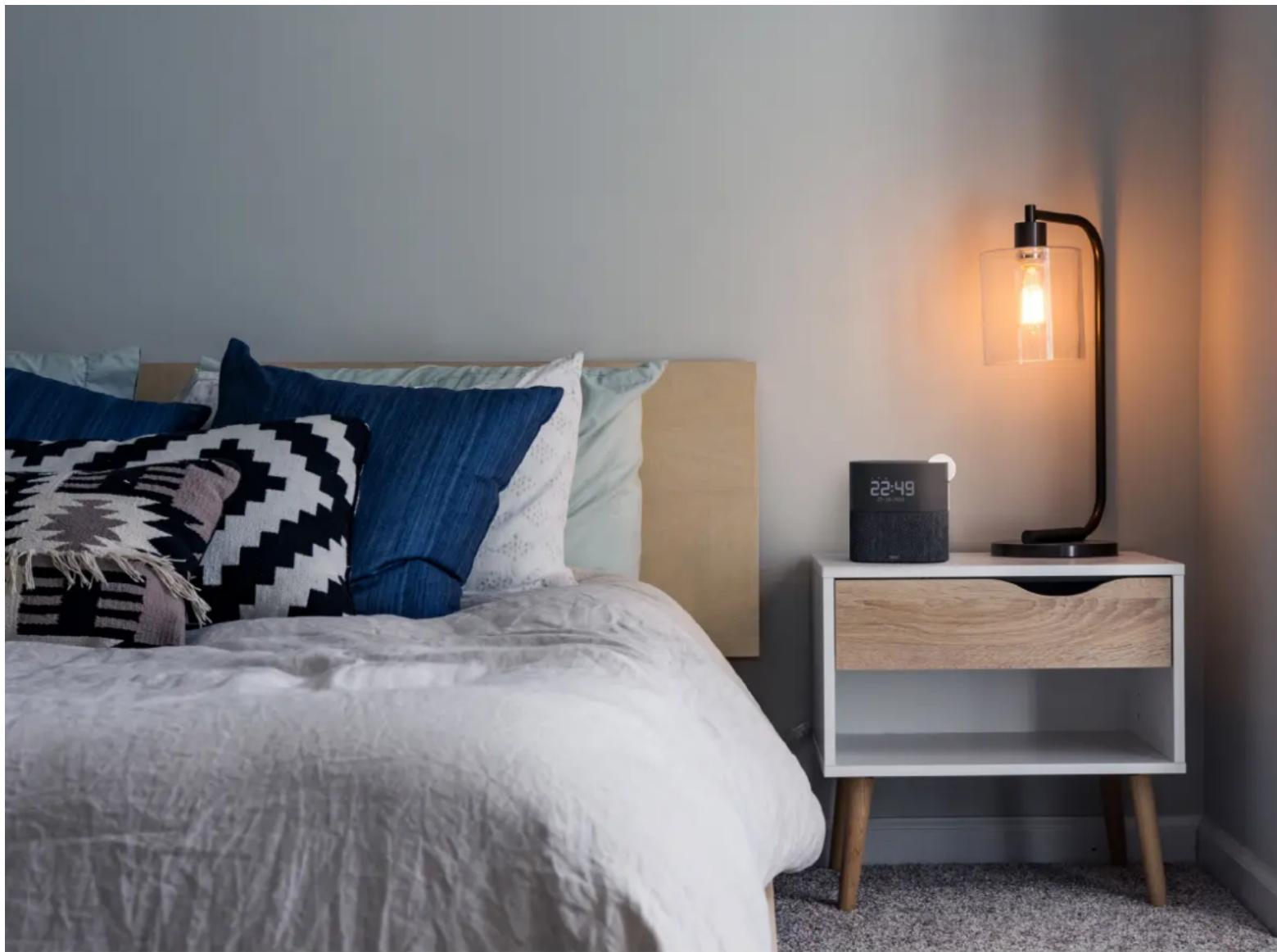
Interior bedroom scene with a bed, patterned pillows, and a desk lamp (no visible text or symbols)THANK YOU!
Thank you for purchasing the WAKEit S from SACKit. Please read the entire instruction manual before using the product and save it for future reference. We reserve the right to change or update information and to correct errors, inaccuracies, or omissions in text, images, and technical data. If you have any questions regarding technical problems, please contact our customer services. We hope you will enjoy your new WAKEit S.
Enjoy the music!
BOX CONTENTS
1 x WAKEit S
1 x Quick start guide
1 x Power supply AC/DC
QUICK START GUIDE
To get you started follow these two easy steps:
- Plug WAKEit S to a power supply with the supplied adapter.
- Turn on WAKEit S by rotating the dial button clockwise
(Remember to unfold the antenna on the backside before playing any radio channels)
natural_image
Simple line drawing of a rectangular block with a curved arrow labeled '1' pointing to its top face (no text or symbols beyond the number)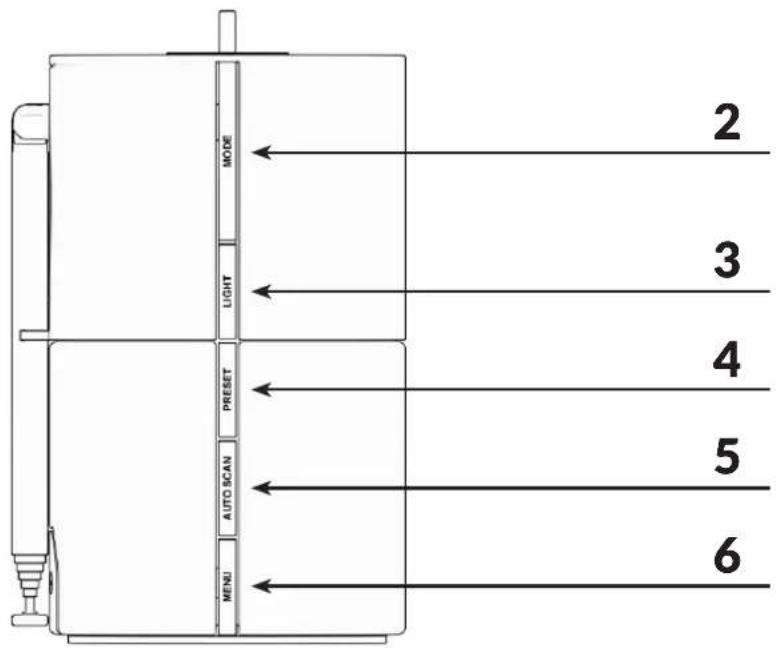
BUTTON FUNCTIONALITY
Here follows a description of all buttons and features. Please use the Overview in the beginning of this user manual to locate them on the WAKEit S (page 4-5).
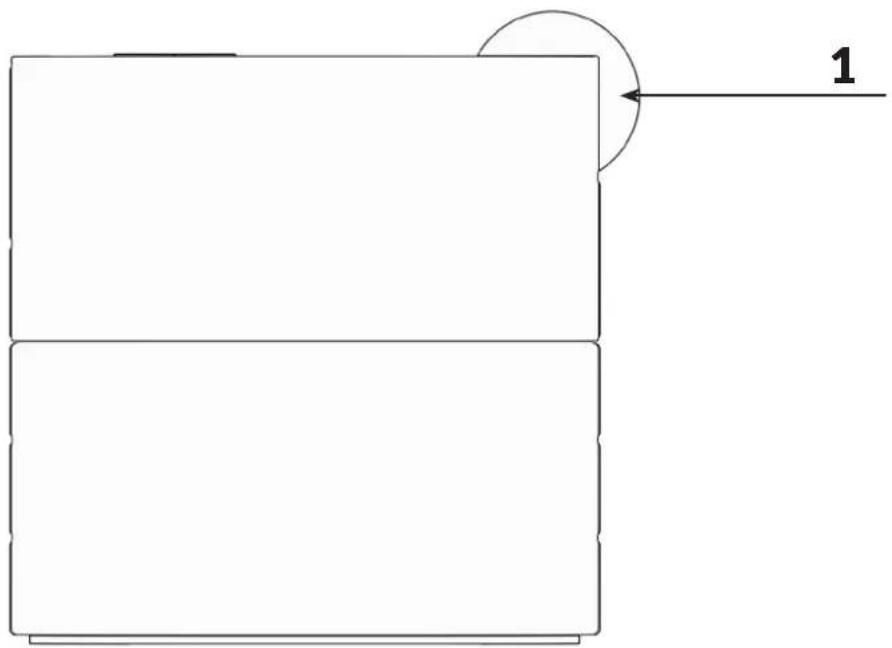
1. Dial button
- Rotating the dial button clockwise to turn WAKEit S On. Counter clockwise to turn Off.
- When WAKEit S S is turned on, rotate the dial button to adjust the volume.
2. MODE
- Press the MODE button to switch between the two functions: FM and Bluetooth.
- Press and hold MODE button to enter Standby mode (turns of any radio or music playing).
3. LIGHT
- Press the LIGHT button to adjust the screen brightness.
- Press and hold LIGHT button to turn the wakeup light (8) on/off.
4. PRESET
- In FM mode, press the PRESET button to access the preset list.
- The PRESET button only work when the WAKEit S is in FM mode.
• We go through the steps of storing radio channels on page 8.
5. AUTO SCAN
- In FM mode, press the AUTO SCAN button to automatically scan for stations.
6. MENU
- Press the MENU button to access the settings of WAKEit S
- Settings are explained on page 9.
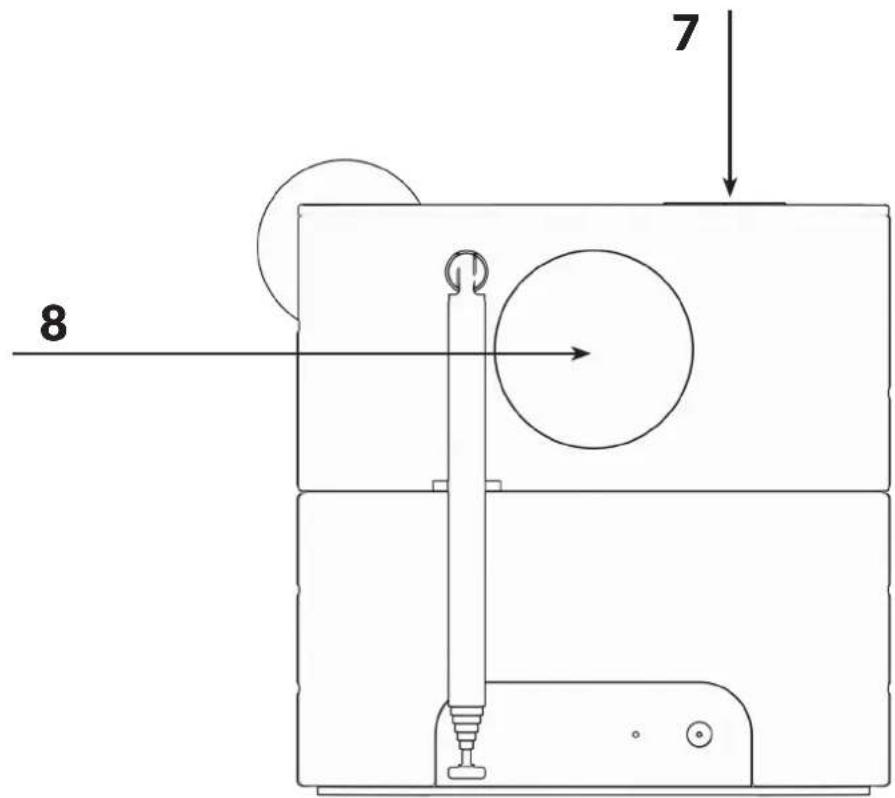
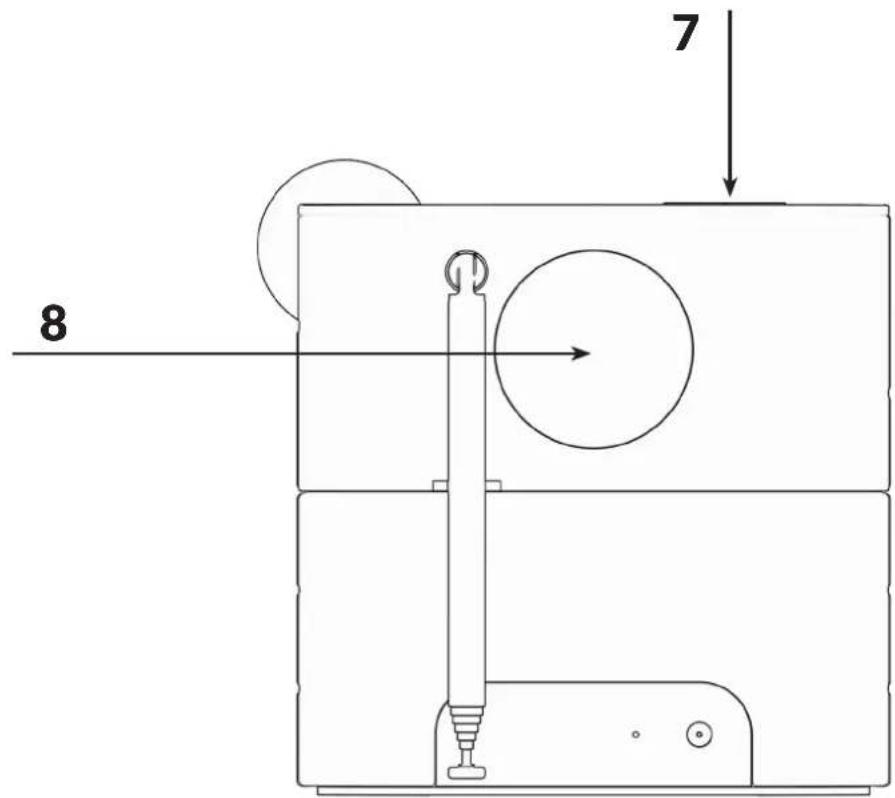
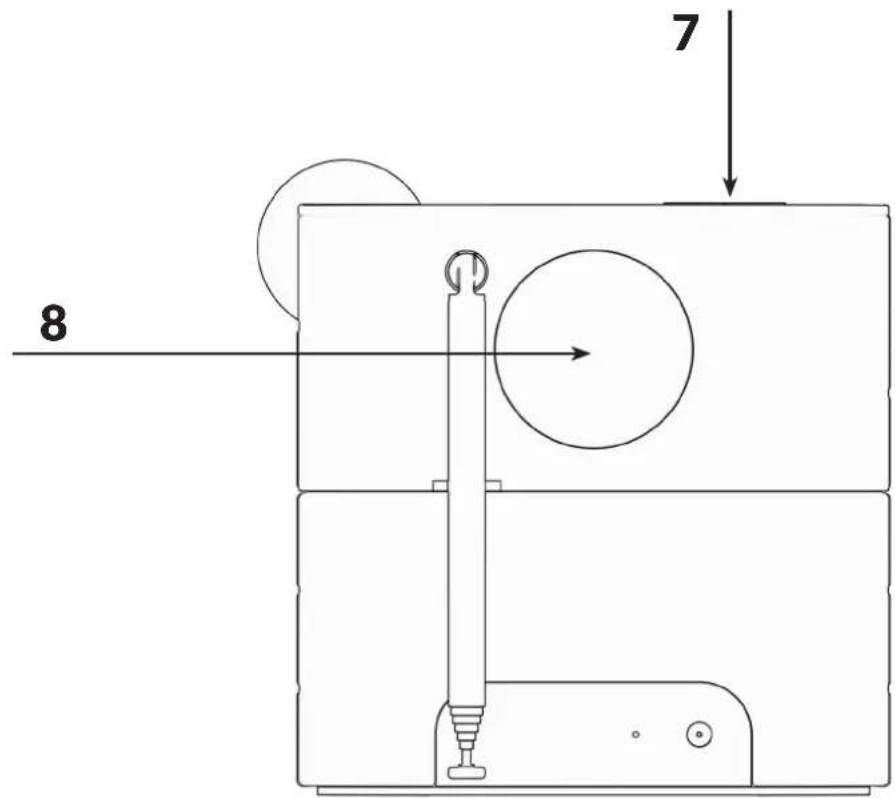
7. Wireless charging pad
- On top of the WAKEit S you will find the wireless charger (marked by the X).
- When the WAKEit S is turned on, place a device that supports wireless charging on the charging pad. The device will start charging automatically.
NOTE:
Wireless charging can interfere with radio signals. It is therefore not recommended to charge any device while in FM mode. Be aware of this if you wish to use the radio channels as an alarm while you are charging your phone.
8. Wake-up light
- On the back of WAKEit you will find the wake-up light.
- When activated, the wake-up light will begin before your alarm and emulate the sun coming up.
- The wake-up light can also be used as a night lamp, turning it on/off with the LIGHT button.
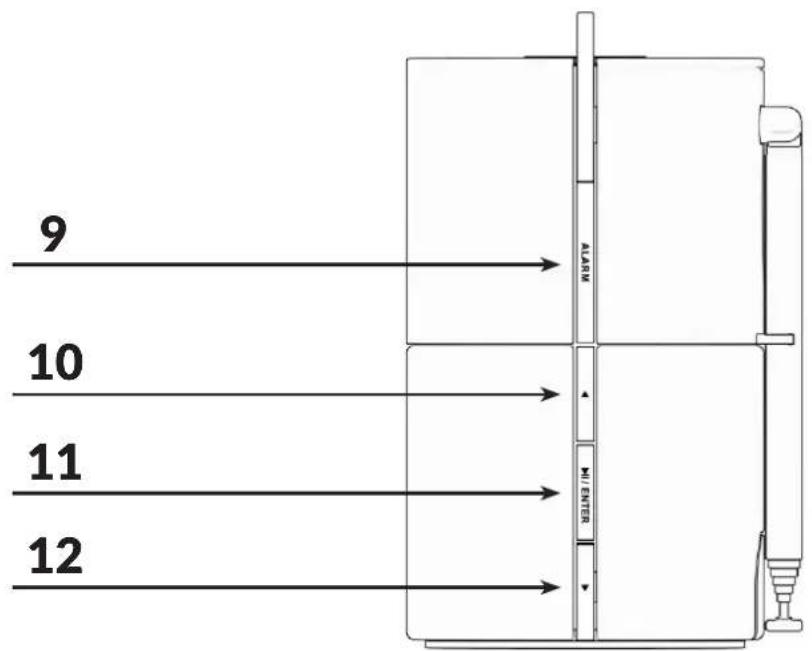
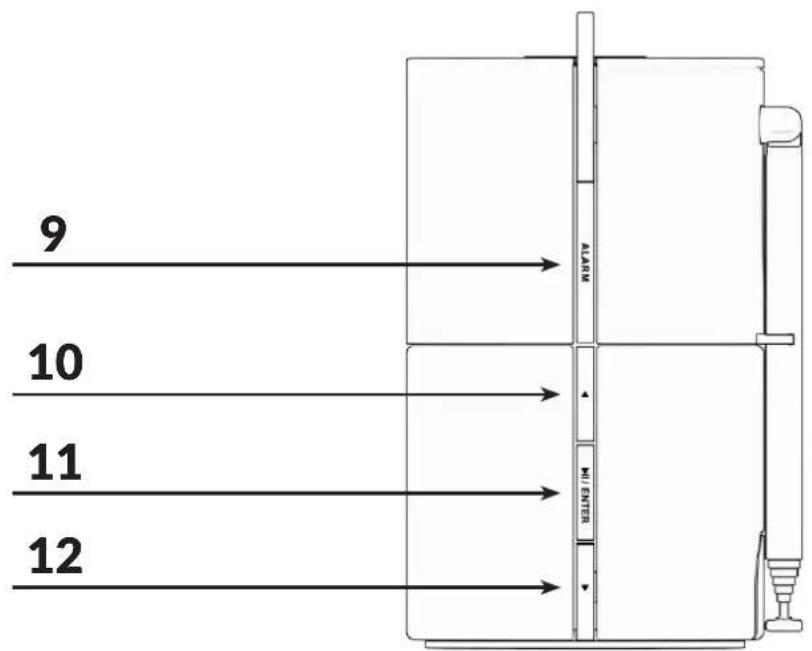
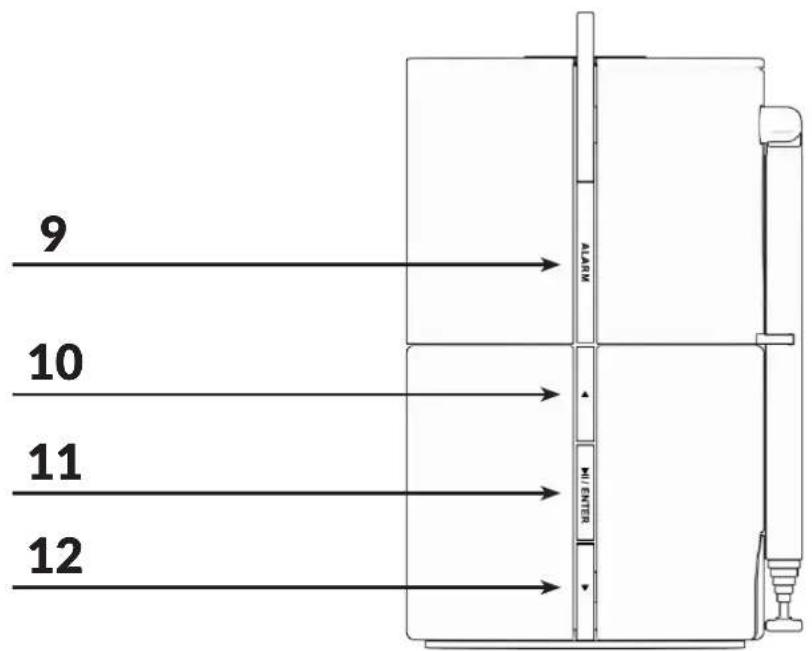
9. ALARM
- Press the ALARM button to set an alarm. You can set up to 2 alarms at the same time.
- When an alarm plays, press the ALARM button to stop it. (All other buttons snooze the alarm for 5 minutes)
- On page 8 you can see how you set an alarm.
The Arrow Up & Down and The Play/Pause/ENTER buttons are used to control and navigate the WAKEit S:
10 & 12. Arrow Up & Down
- In FM mode, press and hold to scan the band for the next station.
- In Bluetooth mode, press to play previous or next track.
- Under settings or alarm menu list, press to navigate or adjust settings.
11. Play/Pause/ENTER
• In FM mode, press to mute the sound.
• In Bluetooth mode, press to play or pause music.
- Under the Menu or Alarm menu list, press to select & confirm.
- During an incoming call (If connected to Bluetooth):
Press to pick up the call Press and hold to refuse the call In a call press to hang up
PRODUCT SETUP
Here follows a description of the setup of the product. A detailed description of the button's and functionality can be found at pages 6 to 7.
How to play music or radio
WAKEit S allows you to listen to FM radio channels and to music through Bluetooth if connected to a phone or other device.
- Choose between FM or Bluetooth by pressing the MODE button.
- Use the arrow keys to change channels or music track.
- Enjoy the music!
Pairing a Bluetooth device to the WAKEit
- Put the WAKEit S in Bluetooth mode.
- If no device is connected, "Connecting" will show on the display. This means your WAKEit S is searching for Bluetooth devices.
- Go to the Bluetooth settings of your phone/device and ensure Bluetooth is switched on.
- Find "WAKEit S" in the Bluetooth device list and connect to it. WAKEit S will emit a sound as soon as it is paired and "Connected" will be displayed on the display.
Preset favorite stations
WAKEit S allows you to store 32 of your favorite FM stations as presets.
- Select your desired radio station.
- Press the PRESET button to open the empty list from 1-32 and choose any empty position.
- Press and hold the ENTER button until the LCD display "stored" in your desired position.
To listen to your favorite stored station:
- Press the PRESET button
- Select the preset station that you have stored.
- When the display shows your desired preset number.
- Press the ENTER button to confirm.
NOTE:
If you select a preset which have not been allocated a station, then "Empty" will be displayed.
Setting the alarm
- Press the ALARM button to enter the alarm menu.
- You can have up to two alarms set at a time. Start by selecting which alarm you want to set and press the ENTER button to confirm.
- The selected alarm can be turned on/off. If you want to set an alarm, you must put the alarm in "On" and press ENTER to confirm.
- Now, select the time for the alarm to go off. Confirm with ENTER.
- You must now select the alarm sound. You can chose between 5 different sounds under "Sounds" or use the FM radio as an alarm sound.
NOTE: Radio channels need to be saved in PRESET to be used. - Select what days the alarm is on. You can choose between "Daily", "Weekdays", "Weekends" or that it should only call "Once".
- You can now select how many minutes before your alarm, the wake-up light will turn on. You can choose between 5, 10, 15 and 30 minutes before, or choose not to activate the wake-up light at all by choosing "Off".
- Your alarm is now set and a "Saved" message will be displayed.
Now it's time to go to sleep!
NOTE:
- If you make a mistake during the setup of your alarm, you can press the ALARM button to go back to the previous step.
How to turn off an alarm
- Before the alarm goes off: Enter the alarm menu by pressing the ALARM button. Select which alarm you want to turn off. Set the alarm to "Off" and press the ENTER button to confirm.
- When the alarm goes off: - Press the ALARM button to disable the alarm. - Press any other button to Snooze the alarm for 5 minutes.
Clock memory backup
The clock memory backup allows your alarm and clock time settings to be stored for up to a day when there is a power interruption e.g. power failure. The complete clock radio and display illumination will be switched off. As soon as the power supply returns, the display will indicate the correct time.
Settings on WAKEit S:
Press the MENU button to enter settings on WAKEit S. Under settings you can find the following menu points:
- Time/date:
Here you can set the time and date for the WAKEit S. - SW version:
Shows the current software version installed on your WAKEit.
- Factory reset:
Here you can reset your WAKEit to its factory settings. If you experience any problems with the product, this is a good place to start.
- Display light / Backlight:
Sets the brightness of the display.
- Sleep: (Can only be found while you are playing radio)
When sleep is activated, the radio will stop playing automatically after the desired amount of time.
TROUBLESHOOTING
If you have trouble operating WAKEit S, please search the following options for solving the problem. If the solutions below do not help your problem, please contact customer service at info@sackit.dk.
No sound from my WAKEit S
- Please make sure, that the product is connected to a power outlet
- Try to increase the volume on your Bluetooth device or the speaker
- Please make sure that all cables are correctly connected
My WAKEit S have radio static
- If you are using a Bluetooth connection, then please make sure that the speaker and your Bluetooth device is within 10 meters of each other
- If you are using FM, then please check that the antenna is fully extended
Bluetooth connection failed
- Please make sure, that WAKEit S is in correct Bluetooth pairing mode.
- Reconnect after reboot
- Please make sure, that the speaker and your Bluetooth device is within 10 meters of each other
- Please make sure, that there is no obstructions between the speaker and your Bluetooth device
- Try connecting another Bluetooth device
Failure in station scanning in FM mode
- Check if the antenna is fully extended
WAKEit S has radio static or losses the signal when I listen to radio from FM mode
- Do not use wireless charging while listening to the radio as the wireless charger interferes with WAKEit Ss radio signal.
- Check if the antenna is fully extended to improve the radio signal
My device or WAKEit S is very warm
- The wireless charger must not be covered as this might result in overheating
- Do not charge your device wirelessly with a steel plate or magnetic back, this may damage your devices
CLEANING OF THE PRODUCT
- Kindly switch off WAKEit S before you clean it and remove it from the power supply
- Do not use any chemicals to clean the product. If you need to clean the power bank please use a soft cloth with a mild cleaner
- During cleaning please be aware to avoid water in the electric port.
- Large amounts of water and fluids may damage WAKEit S
TECHNICAL SPECIFICATIONS
• Model: WAKEit S Multifunctional Clock Radio
- Speaker output: 3W
- Display: 3.3" LCD
• Frequency response: 100Hz-15KHz (-10dB)
• FM-Frequency range: 87.5MHz\~108MHz
- Bluetooth version: 5.0
- Play mode: FM/Bluetooth
• Qi output: 5W, 7.5W, 10W
• Number of charging coils: 1
• Distance for Qi wireless pad: <8mm
• Product size: 150x95x150mm
- Weight: 740g
IMPORTANT SAFETY INFORMATION
Please read the following information and operate the clock radio and accessories accordingly to ensure correct and safe use of the product. We are not responsible for damage caused by failure to comply with the instructions or irresponsible use of the product.
Warning
To prevent any fires or electrical hazards please act according to the following guidelines:
- Do not disassemble or replace any parts of this device. Please contact professional maintenance or qualified service center if there is any damage to the device.
- Do not expose this device to rain, water or wet places. Do not place liquid containers on the product side.
- Do not place in or close to any liquid
- If any liquids flows inside the product, please shut down the product and contact customer service center
- Do not place this device in or close to sources of excessive heat or fire. (Such as: candles, fireplaces or direct sunlight)
- Please shut down in lightning weather
- Keep this device away from any dust and vibration.
- Do not use excessive force when using any of the control buttons.
- If the product is below 5°C when you receive it, please open the product packaging and wait for it to reach room temperature.
- To prevent overheating of the product is it necessary to keep a cleared area of 10 cm around the product
- Be sure to place this device on stable, flat and level surfaces only.
- Do not charge your device wirelessly with a steel plate or magnetic back, this may damage your devices
- To prevent overheating, please do not install the speaker in enclosed spaces. Be sure to set aside at least 10 cm around the product for ventilation
DISPOSAL OF THE PRODUCT
WAKEit S is made from recyclable and high quality materials. Do not dispose of together with living garbage. Please understand the local classification about collecting electrical products. Correct disposal of the product will help to prevent negative impact to the environment.
natural_image
Interior bedroom scene with a bed, patterned pillows, and a desk lamp (no visible text or symbols)TAK!
natural_image
Simple line drawing of a rectangular block with a curved arrow labeled '1' pointing to its top edge (no text or symbols on the block itself)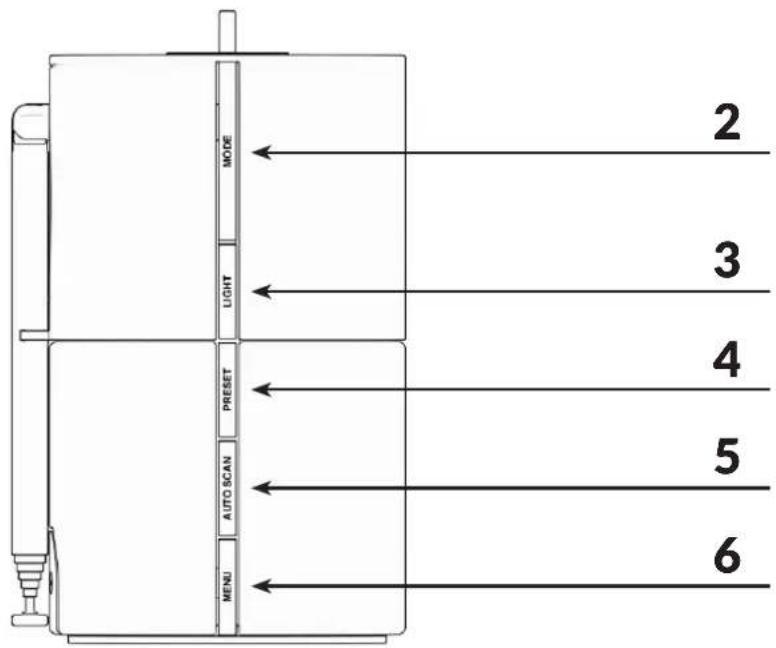
KNAPPERNES FUNKTIONER
Fejl i station scanning i FM
RENG∅RING AF PRODUKTET
natural_image
Interior bedroom scene with a bed, patterned pillows, and a desk lamp (no visible text or symbols)VIELEN DANK!
natural_image
Simple line drawing of a rectangular block with a curved arrow labeled '1' pointing to its top edge (no text or symbols on the block itself)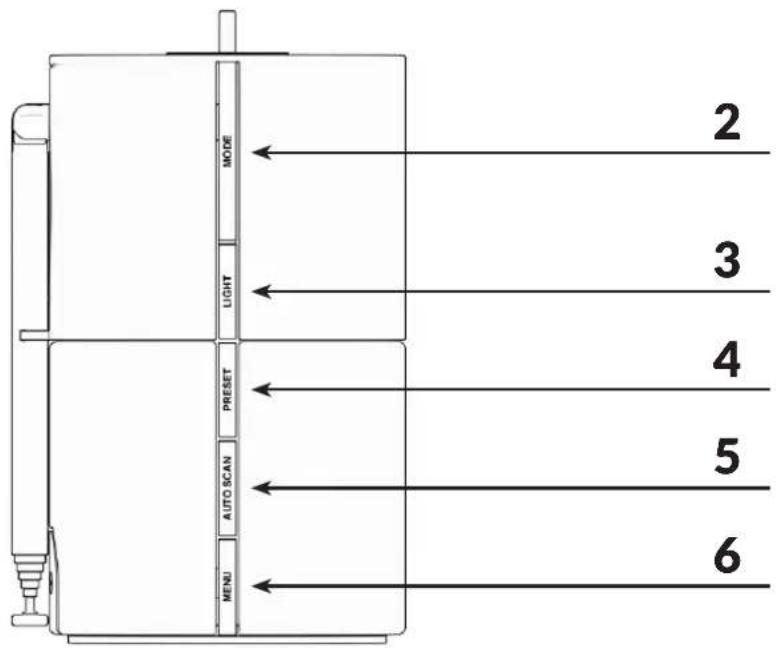
TASTENFUNKTIONEN


- THANK YOU!
- BOX CONTENTS
- QUICK START GUIDE
- BUTTON FUNCTIONALITY
- Dial button
- MODE
- LIGHT
- PRESET
- AUTO SCAN
- MENU
- Wireless charging pad
- NOTE:
- Wake-up light
- ALARM
- & 12. Arrow Up & Down
- Play/Pause/ENTER
- PRODUCT SETUP
- How to play music or radio
- Pairing a Bluetooth device to the WAKEit
- Preset favorite stations
- Setting the alarm
- How to turn off an alarm
- Clock memory backup
- Settings on WAKEit S:
- TROUBLESHOOTING
- No sound from my WAKEit S
- My WAKEit S have radio static
- Bluetooth connection failed
- Failure in station scanning in FM mode
- WAKEit S has radio static or losses the signal when I listen to radio from FM mode
- My device or WAKEit S is very warm
- CLEANING OF THE PRODUCT
- TECHNICAL SPECIFICATIONS
- IMPORTANT SAFETY INFORMATION
- Warning
- DISPOSAL OF THE PRODUCT
- TAK!
- KNAPPERNES FUNKTIONER
- Fejl i station scanning i FM
- RENG∅RING AF PRODUKTET
- VIELEN DANK!
- TASTENFUNKTIONEN
Brand : SACK it
Model : WAKEit S
Category : Radio