
WOOFit JAM - Docking Station SACK it - Free user manual and instructions
Find the device manual for free WOOFit JAM SACK it in PDF.


| Product Type | Docking Station |
| Brand | SACK it |
| Model | WOOFit JAM |
| Dimensions (approx.) | 15.0 x 10.0 x 5.0 cm |
| Weight (approx.) | 200 g |
| Power Supply | USB-C, 5V/2A |
| Power Cable Length | 1.2 m |
| Charging Output | 5V/1A for connected device |
| Audio Output | 3.5 mm auxiliary jack |
| Compatible Devices | WOOFit JAM portable speaker |
| Charging Time (device) | Approximately 3 hours |
| Protection Features | Overcharge, short circuit, overcurrent |
| LED Indicators | Power and charging status |
| Material | ABS plastic with non-slip base |
| Operating Temperature | 0°C to 40°C |
| Storage Temperature | -10°C to 50°C |
| Humidity Range | 20% to 80% non-condensing |
| Cleaning Instructions | Wipe with a soft, dry cloth. Do not use liquids. |
| Repairability | Not user-serviceable. Contact authorized support. |
| Warranty | 1 year limited warranty |
| Certifications | CE, RoHS |
Frequently Asked Questions - WOOFit JAM SACK it
User questions about WOOFit JAM SACK it
0 question about this device. Answer the ones you know or ask your own.
Ask a new question about this device
Download the instructions for your Docking Station in PDF format for free! Find your manual WOOFit JAM - SACK it and take your electronic device back in hand. On this page are published all the documents necessary for the use of your device. WOOFit JAM by SACK it.
USER MANUAL WOOFit JAM SACK it
Thank you for purchasing this WOOFit JAM speaker from SACKit.
Please read this manual carefully before use. We are not responsible for any person or property damage caused by improper use of this product. We hope you enjoy the louder, richer sound, and features from your WOOFit JAM device.
Box Contents
- WOOfit JAM speaker
- User manual
- Information USB charging cable 3.5mm
- Stereo cable

Quick Start Guide
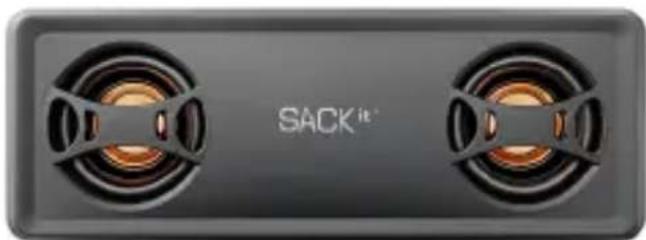
natural_image
Exterior view of a black rectangular electronic device with two side speakers (no text or symbols visible)-
Charge the WOOFit JAM Speaker using the included USB charging cable for no less than 2 hours
-
Turn on WOOFit JAM
-
Turn on Bluetooth on your device
-
Press "Play/Pause Button" on WOOFit JAM for 3 seconds
-
Choose WOOFit JAM in the Bluetooth settings on your device
-
Start playing music from your device
-
Nod your head and dance :-)

WOOFit JAM features

Connect WOOFit JAM to your pricey Hi-Fi system as a Bluetooth receiver and revive it with access to all music available online. Clever!

GREAT SOUND
You will not believe your own ears the first time you listen to WOOFit JAM! All that sound coming from such a small speaker? Yes, WOOFit JAM sounds great!

MICROPHONE
Yes, WOOFit JAM does give out a great sound, but you can actually also use it as a microphone. Connect WOOFit JAM to your phone via Bluetooth and use it for being on the phone hands free in your car.

VOICE ECHO CANCELLATION
WOOFit JAM is great for hands-free calling! The software voice echo cancellation enhances the sound quality and allows you to make crystal clear hands-free calls.


NFC
Connecting made real easy! Just touch the speaker with your NFC-enabled mobile device and you are ready to play.

RECHARGEABLE
Naturally, WOOFit JAM is rechargeable so you can take it anywhere – to the bathroom, the bed, the boat or Barcelona. Let it rip for 15 hours for each charge.

STEREO PAIRING
Pair two WOOFit JAM for a HUGE sound – in stereo! Everything is connected wirelessly. Get ready for a great left-and-right stereo listening experience.

WIRELESS
No strings attached! WOOFit JAM plays wireless music from all units via Bluetooth.

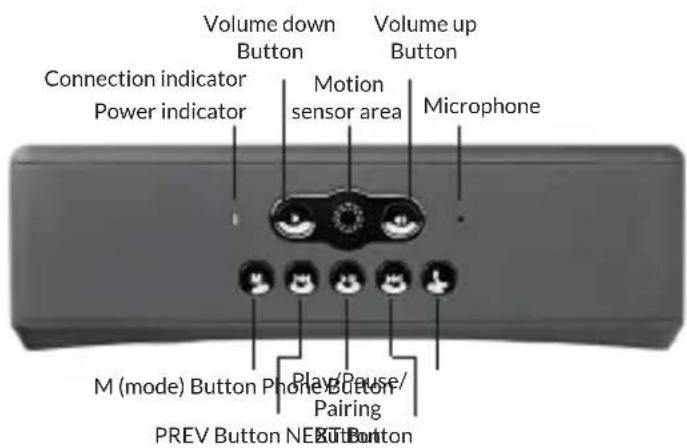
- Power indicator
- Connection indicator
- Volume buttons
- PREV/NEXT button
- Play/Pause/Pairing button
- M (mode) button
- Phone button
- Microphone
- Motion sensor area
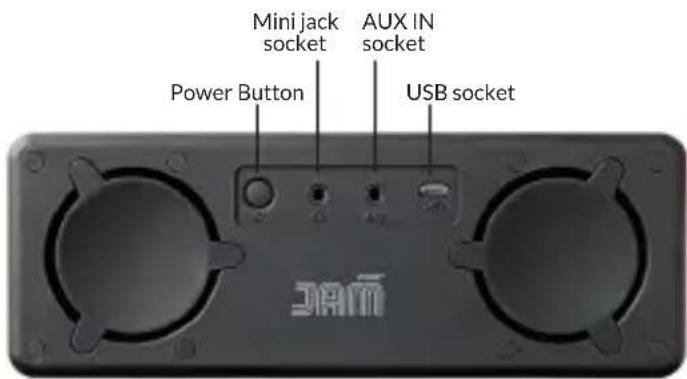
- Power Button
- AUX IN socket
- USB socket
- Mini jack socket
Buttons
Power Button
Long press “Power Button” to turn the system on/off. The “Power Indicator” (blue) lights up when the system is turned on.
Volume Buttons (-/ +)
Adjusts the volume. When WOOFit JAM is in Bluetooth mode, there will be a "Beep" sound alert at a maximum volume. When it is in AUX mode, there is no "Beep" sound alert.
PREV/NEXT Button
While in Bluetooth mode, press "PREV/NEXT Button" for previous/next song.
Play/Pause/Pairing Button
While in Bluetooth mode, short press this button for Play/Pause. Long press this button for first use of Bluetooth Pairing.
M (mode) Button
Press "M Button" for Bluetooth/AUX mode.
Phone Button
When connected via Bluetooth, phone calls can be answered simply by pressing the "Phone Button". Long press "Phone Button" to reject the call. During phone calls pressing the button switches your call to your phone. Pressing the button again switches the call back to the WOOFit JAM.

Connections
MINI JACK socket
Connects headphones to the speaker. When you connect headphones the sound will reduce immediately, but within 2 seconds, the sound level will increase gradually to protect against hearing damages.
AUX IN socket
Connects to the headphone socket of a computer, portable audio device, etc. or even your home stereo. If connected to your home stereos AUX IN, you can play sound wirelessly from your device (on your home stereo system).
USB socket
Charges the device by the USB cable. This socket is used for charging only, Audio signal, etc. cannot be sent via this socket.

Functionality Power source
Turn WOOFit JAM on/off
Long press "Power Button" to turn WOOFit JAM on/off. When turned on the blue "Power indicator" light is on.
Charge the device
Firmly connect the USB jack on the back of the device via the USB cable, and plug the USB cable to your computer or adaptor. Charging begins automatically, whether the system is turned on or off. The charging status is displayed on the device (the indicator light will show RED. Once the device is fully charged, the light will go out). It takes two hours to charge the speaker.
Motion sensor
When motion is registered in the "Motion sensor area" all buttons light up. This makes it possible to operate the device in darkness/low light.

Connect to WOOFit JAM Bluetooth connection
- Press "Play/Pause Button" for 3 seconds. When the indicator light shows fast blue and red flash alternatively, the WOOFit JAM enters pairing mode. (Notes: Pairing mode is cancelled after 3 minutes, along with a "Beep" sound. If you want to enter into pairing mode again, start over from step 1). As soon as your device is paired with the WOOFit JAM the indicator light turns flashing blue.
- Perform the pairing procedure on the Bluetooth device to detect the system. A list of detected devices appears on the display of the Bluetooth stereo audio source device. This system is displayed as
"WOOFit JAM". If "WOOFit JAM" is not displayed, repeat from step 1. (Note: When pairing, be sure to keep both Bluetooth devices within 1 meter range of each other.)
- Select "WOOFit JAM" shown in the display of the Bluetooth device.
- Option: If Passcode * input is required on the display of the Bluetooth device, input "0000". (Note: Passcode may be called "Passkey", "PIN code", "PIN number" or "Password")
-
Start the Bluetooth connection from the Bluetooth device. The system remembers the device as the last connected device. Some Bluetooth devices may connect with the system automatically when pairing is complete.
-
If you experience problems with connecting, you can reset the device by long pressing "PREV Button" and "NEXT Button" at the same time. When you have reset the device, start over from step 1.
NFC Connection
- Turn on NFC on your Bluetooth device (If your device has NFC function)
- Bring your device close to the WOOFit JAM NFC area (On the front of the speaker right above the SACKit logo.)
- The two devices will be connected by NFC of each other.
- Repeat this for disconnecting the NFC connection.
AUX connection
- Press "M Button" to select AUX mode and connect your music source to the AUX IN socket.
- If you want to change from Bluetooth mode, you have to turn off the Bluetooth to be able to switch to AUX mode, as the Bluetooth connection is always given the highest priority.
Listen to music
Bluetooth mode
- Turn on Bluetooth on your device
- Press "Play/Pause Button" on WOOFit JAM for 3 seconds
- Choose WOOFit JAM in the Bluetooth settings on your device
- Start playing music from your device
Adjust volume
Short or long press "V+"/"V-" for volume up & down.
Note: Volume can be adjusted separately on all the modes including Bluetooth, AUX and phone calls etc.
Navigate

Short press "PREV" or "NEXT Button" for previous or next song.
Connect two WOOFit JAM
When you have two WOOFit JAM speakers you can connect them wirelessly for an amazing stereo experience. When the two speakers are connected, one speaker will play left side sound and one speaker will play right side sound.
- When you have connected one WOOFit JAM to your Bluetooth device, it will play stereo.
- Turn on another WOOFit JAM
- Double press "M Button" at the same time on both devices. You can connect the speakers while listening to music. The speakers are now in pairing mode and the indicator light will be
flashing red and blue (it takes up to 30 seconds for the speakers to connect). When the speakers are connected the indicator light will again flash blue.
- The speakers will now be connected, and speaker A will only play right side sound and speaker B will only play left side sound.
- The speaker connected to your Bluetooth device will always play left side sound.
Note: When connecting two WOOFit JAM speakers, you may experience connectivity problems that cause bad sound. If this problem occurs, turn off the speaker connected to your Bluetooth device (the speaker playing left side sound). Turn the speaker back on, and the problem should be fixed.
Back to playing on one speaker
When two WOOFit JAM speakers have been connected, one speaker is playing right side sound and one speaker is playing left side sound. Therefore, it is sometimes necessary to reset the speaker, if you want to go back to playing on only one speaker.
Reset WOOFit JAM:
Press and hold "PREV Button" and "NEXT Button" at the same time until the speaker turn off.

Phone call
It is possible to control your phone when connected in Bluetooth mode. If there is an incoming call, the Bluetooth music automatically stops to enter into Call Function.
Answer incoming call
Short press "Phone Button" to answer call.
Reject/end call
Long press "Phone Button" to reject/end the call.
Switch call
When talking, short press "Phone Button" to switch over if another call is coming in.
Troubleshooting
Sound quality or connectivity problems
- If sound quality is not good then check battery level. If battery level goes below 10%, sound quality will decrease dramatically. - If sound quality is bad when two speakers are paired for stereo experience, please check battery level or try and power off both speakers and then turn on the main speaker (the one connected to your music device) and then turn on the second speaker. This procedure also goes for connectivity problems.
- Try to reset the speakers by pressing and holding the “PREV Button” and “NEXT Button” at the same time until the speakers turn off. Then the speaker is reset and needs new pairin
Passcode input is required when pairing with my device
- If Passcode * input is required on the display of the Bluetooth device, input "0000". (Notes: Passcode may be called "Passkey", "PIN code", "PIN number" or "Password".)
Safety precautions
To prevent any fires or electrical hazards, do not disassemble or replace any parts of this device. Please contact professional maintenance or qualified service center if there is any damage to the device.
- Charge the WOOFit JAM Speaker using the included USB charging cable and adapter for no less than 2 hours.
- Do not expose this device to rain, water or wet places.
- Do not place this device in or close to any liquid.
-
Do not place this device on or close to sources of fire. (Such as: candles, fireplaces or other exposed flames or fire.)
-
Keep this device away from any heat source, dust and vibration.
- Be sure to place this device on stable, flat and level surfaces only.
- Do not place any items on top of this device.
- Do not use excessive force when using any of the control buttons.
- Be sure to use and store the USB charging cable properly.
- If cleaning is required, use only a dry, soft cloth or a minimally damp cloth without any corrosive solvent or cleaning agent.
Technical Specifications
- Operation Voltage: 3.7 V
- Charging Voltage: 5V
- Output Power: 2 x 5 Watts
- Speaker Spec.: 50mm 2 Ohms 5W
- Frequency Response: 60HZ \~ 20 KHZ
- Lithium Battery Capacity: 2500 mA
- THD: ≤ 0.5%
- SNR: ≥ 90 dB
- Item Size: 60mm * 72mm* 196mm
WOOF ^it JAM
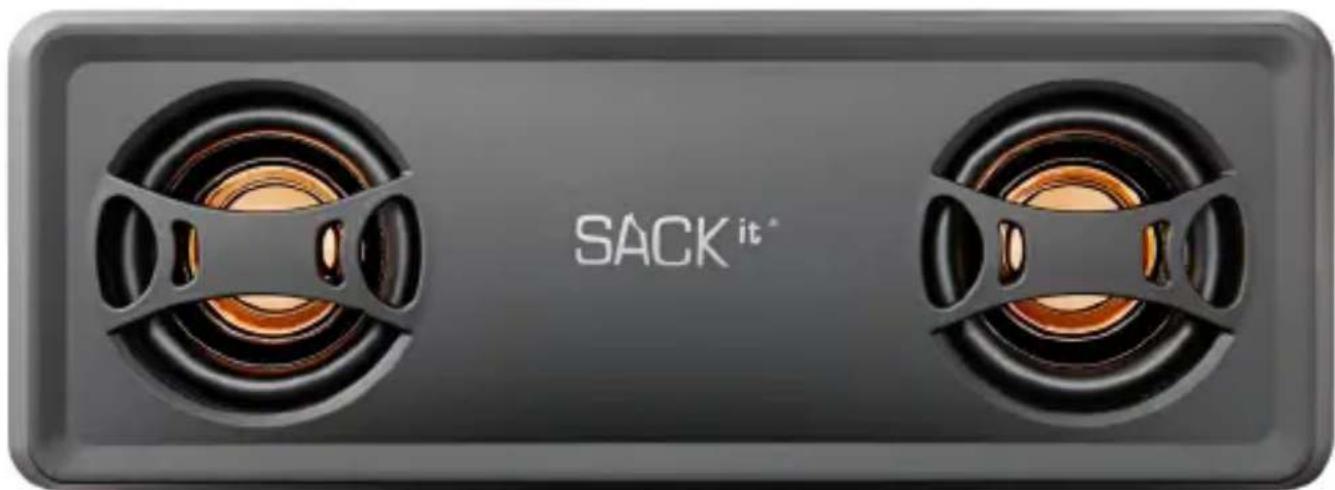
Brugermanual
Tak!
natural_image
Exterior view of a black rectangular electronic device with two side speakers emitting warm tones (no text or symbols visible)Play/Pause/Pairing knap
natural_image
Exterior view of a black rectangular electronic device with two side speakers (no text or symbols visible)Play/Pause/Pairing-Taste
NFC-Verbindung (Near Field Communication)
natural_image
Exterior view of a black rectangular electronic device with two side speakers emitting warm tones (no text or symbols visible on the device body)
- Box Contents
- Quick Start Guide
- WOOFit JAM features
- GREAT SOUND
- MICROPHONE
- VOICE ECHO CANCELLATION
- NFC
- RECHARGEABLE
- STEREO PAIRING
- WIRELESS
- Buttons
- Power Button
- Volume Buttons (-/ +)
- PREV/NEXT Button
- Play/Pause/Pairing Button
- M (mode) Button
- Phone Button
- Connections
- MINI JACK socket
- AUX IN socket
- USB socket
- Functionality Power source
- Turn WOOFit JAM on/off
- Charge the device
- Motion sensor
- Connect to WOOFit JAM Bluetooth connection
- NFC Connection
- AUX connection
- Listen to music
- Bluetooth mode
- Adjust volume
- Navigate
- Connect two WOOFit JAM
- Back to playing on one speaker
- Reset WOOFit JAM:
- Phone call
- Answer incoming call
- Reject/end call
- Switch call
- Troubleshooting
- Sound quality or connectivity problems
- Passcode input is required when pairing with my device
- Safety precautions
- Technical Specifications
- WOOF it JAM
- Tak!
- Play/Pause/Pairing knap
- Play/Pause/Pairing-Taste
- NFC-Verbindung (Near Field Communication)
Brand : SACK it
Model : WOOFit JAM
Category : Docking Station