
WOOFit S - Docking Station SACK it - Free user manual and instructions
Find the device manual for free WOOFit S SACK it in PDF.


| Product Type | Portable Wireless Speaker / Docking Station |
| Brand | SACKit |
| Model | WOOFit S |
| Dimensions | Diameter: 60 mm, Height: 54 mm |
| Weight | Approx. 150 g (estimated) |
| Power Source | Rechargeable lithium battery (3.7 V, 430 mA/H) |
| Charging Voltage | 5 V via Micro USB |
| Charging Time | Approximately 2 hours for full charge |
| Output Power | 3 W |
| Speaker Specification | 40 mm, 2.6 Ω, 3 W |
| Frequency Response | 60 Hz - 18 kHz |
| Bluetooth Version | Not specified (estimated Bluetooth 4.0 or later) |
| Wireless Range | Approximately 10 meters (estimated) |
| Playback Modes | Bluetooth, Micro SD card, FM Radio, AUX Out, Hands-free calling |
| Additional Inputs/Outputs | Micro USB (charging only), Mini jack (headphone), AUX out |
| Battery Indicator | Red (charging), Green (fully charged), Blue (connected) |
| Hands-Free Function | Yes, with built-in microphone |
| FM Radio | Yes, requires included Micro USB antenna |
| Micro SD Card Support | Yes, plays music directly from Micro SD card |
| Cleaning Instructions | Use a dry, soft cloth; avoid solvents |
| Safety Precautions | Do not expose to water, fire, or extreme temperatures |
| Box Contents | WOOFit speaker, user manual, 2-in-1 charging cable, storage bag, Micro USB antenna |
| Warranty | Register at www.SACKit.eu/reg for warranty |
Frequently Asked Questions - WOOFit S SACK it
User questions about WOOFit S SACK it
0 question about this device. Answer the ones you know or ask your own.
Ask a new question about this device
Download the instructions for your Docking Station in PDF format for free! Find your manual WOOFit S - SACK it and take your electronic device back in hand. On this page are published all the documents necessary for the use of your device. WOOFit S by SACK it.
USER MANUAL WOOFit S SACK it
natural_image
Close-up of a black SACK® speaker cone with concentric rings and red center (no text or symbols beyond branding)
Thank you!
Thank you for purchasing this WOOFit speaker from SACKit.
Please read this manual carefully before use. We are not responsible for any person or property damage caused by improper use of this product. We hope you enjoy the louder, richer sound, and features from your WOOFit device.
Please save this user manual for later supervision and guidance securing correct use of the product.
Embrace life with your new SACKit product!
Box Contents
- WOOFit speaker
- User manual
- 2-in-1 charging cable
- Storage bag
- Micro USB antenna
Remember
Remember to register your new SACKit product on our website:
www.SACKit.eu/reg

Quick Start Guide

natural_image
Close-up of a black circular speaker grille with red lens and 'SACK it' branding (no additional text or symbols)- Charge the WOOFit Speaker using the included micro USB charging cable for no less than 2 hours
- Turn on WOOFit
- Turn on Bluetooth on the device you wish to connect with
- Choose SACKit in the Bluetooth settings on your device
- Start playing music from your device
- Enjoy the music and dance

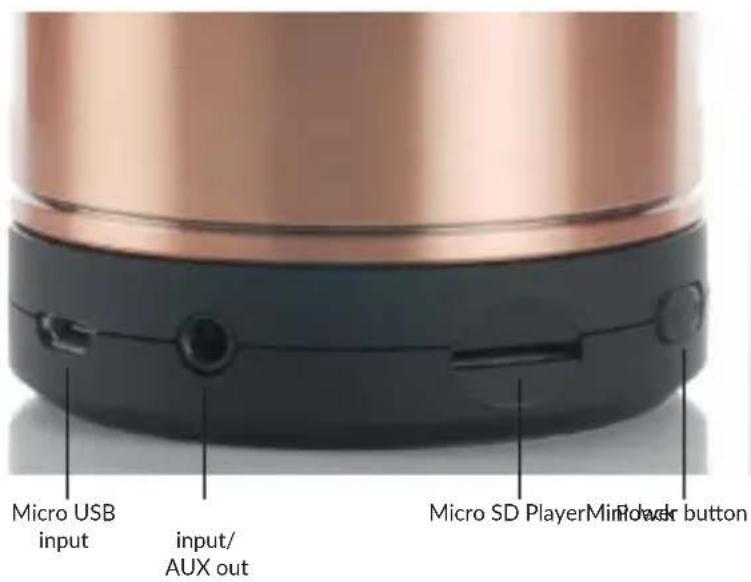
- Micro USB input
- Mini jack input
- AUX out
- Micro SD player
- Power button
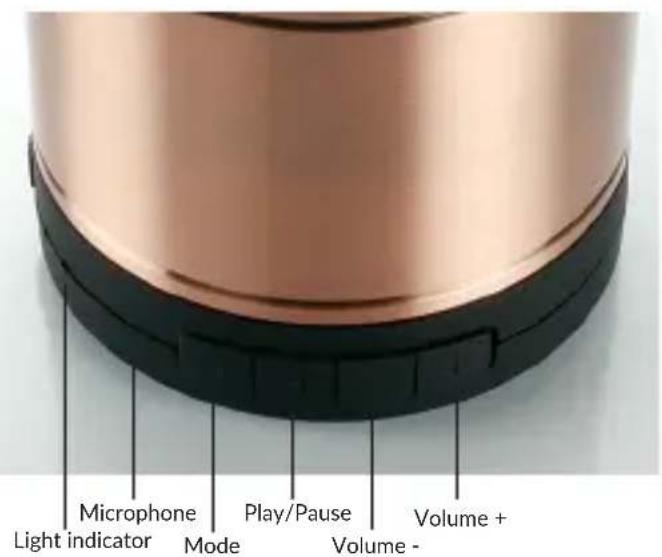
- Light indicator
- Microphone
- M (Mode) button
- Play/Pause button
- Volume (-) button
- Volume (+) button

Buttons
Power button
This button must be slid right to turn on the WOOFit speaker, and to the left to turn the device off.
M (mode) knap
Push the Mode button to switch between micro SD player, AUX OUT, FM Radio and Bluetooth mode. If there is no Micro SD card in the WOOFit speaker, this mode will automatically be skipped.
Play/Pause
When the device is in Bluetooth mode a push on the Play/Pause button will either play or pause the music.
Volume buttons (-/ +)
These buttons makes it possible to adjust the sound level. When WOOFit is in Bluetooth mode a "bip" sound will be given when the sound level reaches maximum. This warning sound will not occur when the speaker is in AUX OUT mode.

Charging
To charge the WOOFit speaker, the included Micro USB charging cable must be inserted in the Micro USB input on WOOFit and be connected to a computer or an adapter.
The charging begins automatically whether the system is on or off. The charging status can be seen on the light indicator. During charging the light indicator will light up red. When the battery is fully charged the light indicator will light up green. A full charge of WOOFit takes approximately two hours.
Connections
Bluetooth
-
WOOFit is turned on by sliding the power button to the right. When the light indicator alternately flashed blue and red, WOOFit is ready for pairing with desired device. Please notice that pairing mode automatically will voided after 5 minutes if not paired. If this happens, the WOOFit speaker will have to be restarted.
-
Perform the connection procedure on your Bluetooth device to find the WOOFit speaker. This system is indicated as "SACKit".

If "SACKit" does not appear on the list of found devices, the connection process must be started over. Note that the two units should be in one meter radius of each other during the connection.
-
Choose the "SACKit" connection on your Bluetooth device.
-
When the connection is established the light indicator will flash slowly in the colour blue. Next time the WOOFit speaker get turned on, a connection will automatically be made with the last paired device.
-
Notice: If passcode* input is demanded on your Bluetooth device enter "0000". Passcode may also appear under the synonyms as; "Passkey", "Pin Number" or "Password"
Phone call
If music is playing when in the Bluetooth mode and you have an incoming call, WOOFit will automatically switch to hands-free mode. Press the Play/Pause button to accept the call. To hang up press the Play/Pause button again. Two short pushes on the Play/Pause button will make WOOFit redial.

AUX connection
Press one time on the Mode button to choose "AUX OUT" as mode. The Light indicator will now light up green. To adjust the sound level the volume buttons +/- has to be pressed and hold down. A short push on the +/- buttons works as Play/Pause buttons in this mode.
Mini jack input
This input enables to connect headphone to WOOFit. When the headphones is connected, the sound level will be down adjusted immediately, but within two seconds the level will gradually increase to protect the user from hearing damage.
Micro USB input
This input is for charging only with the included Micro USB charging cable. Audio and other signals can not be sent or received from/to this input.
Micro SD player
This input enables the function of playing your music directly from a Micro SD card. Insert the Micro SD card and press the mode button to choose the correct mode. The light indicator will now flash green and blue to indicate the correct mode. The sound level is adjusted by holding the volume buttons down. One short push on the volume button will work as Play/Pause buttons in this mode.

Home Systems
It is possible to connect WOOFit to a home system. To do this, use a standard stereo mini-jack (3.5 mm.).
FM Radio
To use the FM Radio, please follow this guide.
- Turn on your WOOFit speaker.
- Connect the included Micro USB antenna with WOOFit via Micro USB input.
- The antenna is pulled out to its full length for optimal effect.
-
One push on the Mode button will switch to the FM Radio player mode.
-
The light indicator will flash blue and green when the speaker is ready to play your favorite radio!
Sound level adjustment
Hold down the +/- volume buttons to increase or decrease the sound level.
Channel Search
To find available channels, briefly press the Play / Pause button. The found channels will be stored.
Channel Switching
To switch between the stored channels briefly press the volume buttons.
- button will play the next channel and
- button will play the previous channel.

Light Indicator
No light: WOOFit speaker is turned off.
Green light: WOOFit is fully charged or WOOFit is turned on.
Blue and green flash: Micro SD Player is active or FM radio is seaching for stations.
Red and blue flash: WOOFit is searching for Bluetooth device.
Red light: WOOFit is charging.
Blue slow flash: Connection between WOOFit and Bluetooth device has failed.
Fast green flash: Music is playing from Bluetooth device.
Green light with blue flash: Music is playing from FM radio.

Troubleshooting
Connection problems
WOOFit Bluetooth locks on the last connected device, which requires the connection to be disconnected before a new unit to be connected to WOOFit. This can be done on the connected device (in Bluetooth settings) or by resetting the speaker. WOOFit speaker is reset by holding the mode button down for 3 seconds and disconnect the Bluetooth signal. The speaker is now ready to connect with a new Bluetooth device.
Audio quality problems
If the audio quality is poor, a reason might be low battery level. Therefor always try to fully charge WOOFit to secure the absolutely best audio quality.
Warning
To prevent damage, fire or electric shock, it is strictly forbidden to remove or replace parts of the unit. Always consult a professional workshop or a qualified service center if the unit has been damaged.

Safety Precautions
Please read and follow these instructions to ensure correct and safe use of WOOFit loudspeaker.
Charge WOOFit minimum of 2 hours using the supplied USB cable before you use the speaker for the first time.
Do not expose WOOFit to rain, water or store it in humid environments.
Do not place WOOFit in or near any sort of liquids.
Do not place WOOFit in or near sources of fire. (E.g.: Candles, fireplaces or other places with open fire.)
Avoid placing WOOFit on surfaces that are hot, dusty, or emit vibrations.
WOOFit must only be placed on stable, flat and horizontal surfaces.
Do not place objects on top of WOOFit.
Do not use excessive force or violence when operating the speaker buttons.
Use and store only the USB cable properly and safely, both during and after use.
If cleaning of the speaker is needed, use only a dry, clean and soft cloth without corrosive solvents or detergents.
Technical Specifications
Operation Voltage: 3.7 V
Charging Voltage: 5V
Output Power: 3 W
Speaker Spec.: 40 mm 2.6 Ω 3 W
Frequency Response: 60Hz - 18 KHz
Lithium Battery Capacity: 430 mA/H
THD: ≤ 0.5%
SNR: ≥ 95 dB
Dimensions: D: 60 mm. H: 54 mm.

Notice
The battery level of WOOFit will only show on Iphone and Ipad device. Other Bluetooth devices will not give information on the battery level.
The Bluetooth function has first priority, so when you play music from another Bluetooth device the audio from another mode (FM Radio, AUX OUT or Micro SD Player) stops.
When playing from a Bluetooth device stops, WOOFit automatically returns to the previous mode after 3 seconds.

www.SACKit.eu
WOOF ^it

natural_image
Close-up of a black circular speaker grille with red concentric rings and 'SACK it' branding on the front (no additional text or symbols)
Brugermanual
Tak!
natural_image
Close-up of a black circular speaker grille with red concentric rings and 'SACK it' branding on the top (no additional text or symbols)natural_image
Close-up of a black speaker cone with concentric rings and a central red component labeled 'SACK it' (no additional text or symbols visible)
Benutzerhandbuch
Danke!
natural_image
Close-up of a black circular speaker grille with red concentric rings and 'SACK it' branding on the front (no additional text or symbols)
- Thank you!
- Box Contents
- Remember
- Quick Start Guide
- Buttons
- Power button
- M (mode) knap
- Play/Pause
- Volume buttons (-/ +)
- Charging
- Connections
- Bluetooth
- Phone call
- AUX connection
- Mini jack input
- Micro USB input
- Micro SD player
- Home Systems
- FM Radio
- Sound level adjustment
- Channel Search
- Channel Switching
- Light Indicator
- Troubleshooting
- Connection problems
- Audio quality problems
- Warning
- Safety Precautions
- Technical Specifications
- Notice
- WOOF it
- Tak!
- Danke!
Brand : SACK it
Model : WOOFit S
Category : Docking Station