USER MANUAL GC-379BL LG
Please read this User's Guide carefully before operating and keep it handy for reference at all times.
BRUKSANVISNING KJ∅L/FRYS SKAP
| Introduction | Registration | 4 |
| Important Safety Instruction | 4 |
| Identification of Parts | 7 |
| Installation | Installation | 8 |
| Starting | 8 |
| Operation | Temperature Control | 9 |
| • Refrigerator | 9 |
| • Freezer | 9 |
| Function | 11 |
| • Super Freezer | 11 |
| • Vacation | 11 |
| • Lock | 12 |
| • Self Test | 12 |
| Ice Making | 12 |
| Defrosting | 12 |
| Aggestion On Food storage | Storing Food | 13 |
| Care and Maintenance | General Information | 14 |
| Lamp Replacement | 14 |
| Cleaning | 15 |
| able Shooting | Trouble Shooting | 16 |
| To Reverse the Doors | To Reverse the Doors | 18 |
Introduction
Introduction
Registration
The model and serial number are found on the rear of this unit. This number is unique to this unit and not available to others. You should record requested information here and retain this guide as a permanent record of your purchase. Staple your receipt here.
Date of Purchase : ____
Dealer Purchased From :
Dealer Address :
Dealer Phone No. :
Model No. :
Serial No. :
Precaution
Important Safety Instruction
This fridge-freezer must be properly installed and located in accordance with the Installation Instruction before it is used.
Never unplug your fridge-freezer by pulling on the power cord. Always grip plug firmly and pull straight out from the outlet.
When moving your appliance away from the wall, be careful not to roll over or damage the power cord.
After your fridge-freezer is in operation, do not touch the cold surfaces in the freezer compartment, particularly when hands are damp or wet. Skin may adhere to these extremely cold surfaces.
Children should be supervised to ensure that they do not play with the appliance.
Introduction
Important Safety Instruction
Precaution
Pull out the power plug prior to cleaning the fridge-freezer.
Never damage, serverely bend, pull out, or twist the power cord because power cord damage may cause a fire or electronic shock. Never place glass products in the freezer because they may be broken when their inner contents are frozen.
Do not modify or extend the Powe Cord length
Don't Use an Extension Cord
It will cause electric shock or fire.
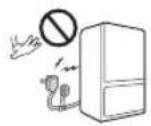
Accessibility of Supply Plug
If possible, connect the fridge-freezer to its own individual electrical outlet to prevent it and other appliances or household lights from causing an overload.
Supply Cord Replacement
The supply plug of the refrigerator-freezer should be placed in easy accessible position for quick disconnection in emergency.
Danger
If the supply cord is damaged, it must be replaced by the manufacturer or its service agent or a similarly qualified person in order to avoid a hazard.
Risk of child entrapment. Before you throw away your old refrigerator or freezer: Take off the doors.
Leave the shelves in place so that children may not easily climb inside.
Don't store
Don't store or use gasoline or other flammable vapors and liquids in the vicinity of this or any other appliance.
Grounding (Earthing)
In the event of an electric short circuit, grounding (earthing) reduces the risk of electric shock by providing an escape wire for the electric current. In order to prevent possible electric shock, this appliance must be grounded. Improper use of the grounding plug can result in an electric shock. Consult a qualified electrician or service person if the grounding instructions are not completely understood, or if you have doubts on whether the appliance is properly grounded.
⚠ Warning
Important Safety Instruction
Keep vent opedings, in the appliance enclosure or in heb util structure, clear of obstruction.
Do notus mechanical devices or other means to acceler the defrosting process, other than those needed by the manufacturer.
⚠️Do not damage the refrigeran ricuit.
Do not use electrical app dances inside the food storage compartments of the app dance, unless they are of the pereomended by the manufacturer.
Therefr aged insulation blowing gas used in the app dn ee uq special disposa rpcdeures. When disposal, ph esconsult with service agent or a similarly qualified person.

This appliance contains a small amount of isobutane refrigerant (R600 atur)al gas with high environmental idityput sda si ti combustible. When transporting an staldng the appliance, care sh atkeb to ensure that no parts of the refrigerating ci cuare dam .dega Refrigerant squir oftuo gnips ebtuld ignite or eyinajeryaalf a le sidetected, avoid any la dekan ettja ro sem ofsignition and air chhw noir eht naislppa eht rof gnidna .setunim love
In order to avoid the creatio oflamm albair
efiat kaitel iger ricugita sruccohite
he room in which the appl anc reay bid ed epen on the amount of refrigerator amused. The room is the 1m^2 in rev8gof R600ar ige an insi the appliance. The amount of re ige an in puocitlar appliance is wohon the id pitacifiereide the appliance.
ratspreveN abance showing signs of damage. If in doubt, consult your dealer.
Identification of Parts
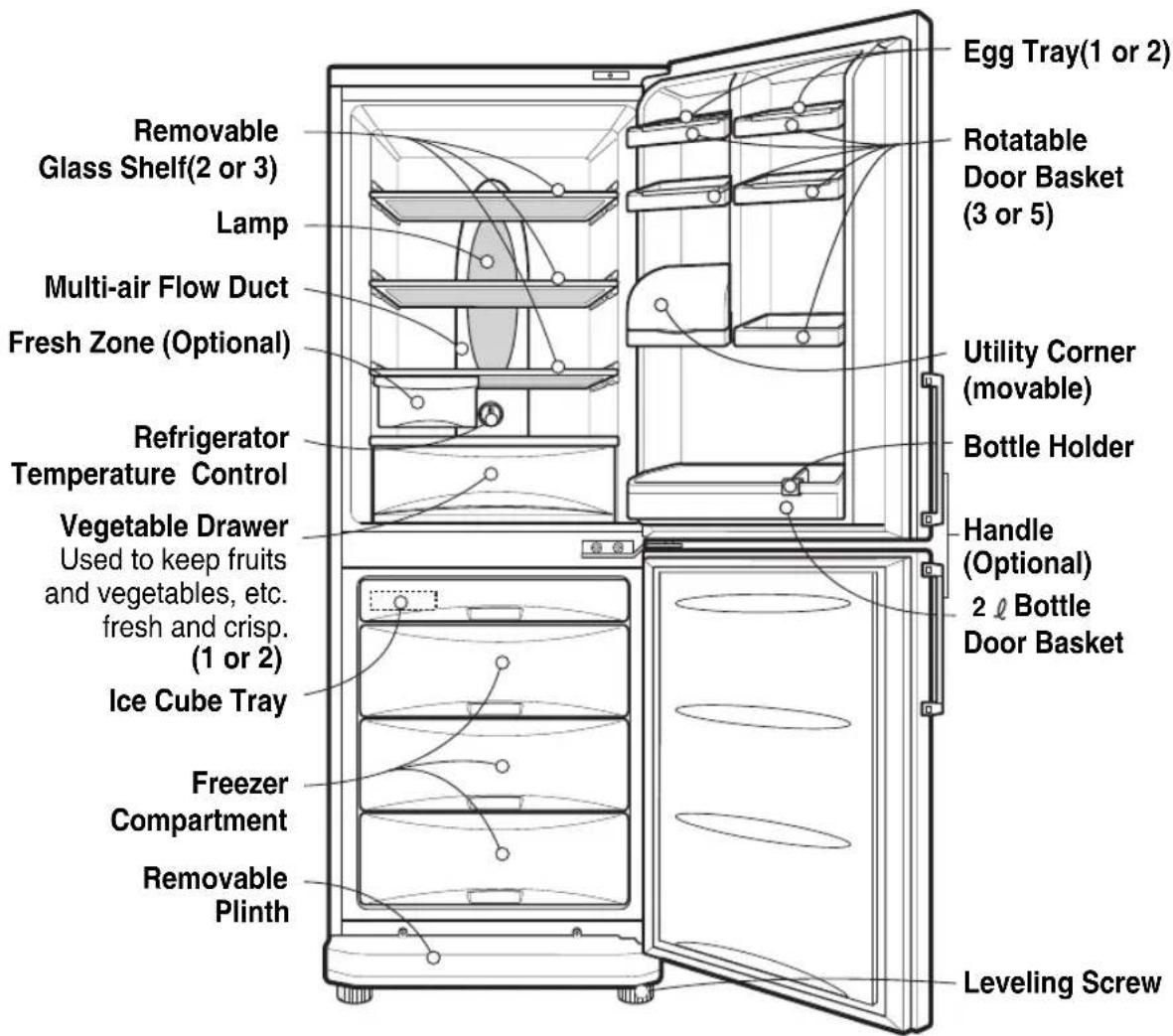
Note
If you find some parts missing from your unit, they may be parts only used in other models.
Installation
Installation
- Select a good location.
Place your fridge-freezer where it is easy to use.
- Avoid placing the unit near heat sources, direct sunlight or moisture.
- There must be proper air circulation around your fridge-freezer to keep it operating efficiently.
- To avoid vibration, the unit must be leveled.
If required, adjust the leveling screws to compensate for the uneven floor.
The front should be slightly higher than the rear to aid in door closing.
Leveling screws can be turned easily by tipping the cabinet slightly.
Turn the leveling screws counterclockwise( ) to raise the unit, clockwise( ) to lower it.
- Clean your fridge-freezer thoroughly and wipe off all dust accumulated during shipping.
- Install accessories such as ice cube box, etc., in their proper places. They are packed together to prevent possible damage during shipment.
- Connect the power supply cord (or plug) to the outlet. Don't double up with other appliances on the same outlet.
- To ensure proper air circulation around the fridge - freezer, please maintain sufficient space on both the sides as well as top and maintain at least 2 inches (5 cm) from the rear wall.
Starting
When your fridge-freezer is installed, allow it 2-3 hours to stabilize at normal operating temperature prior to filling it with fresh or frozen foods.
If power plug is disconnected, allow 5 minutes delay before restarting.
Your fridge-freezer is now ready for use.
Operation
Temperature Control
Refrigerator
Your fridge-freezer has two controls that let you regulate the temperature in the fridge and freezer compartments.
- Initially set the TEMP. CONTROL at "4". Then adjust the compartment temperature according to your desire.
- If you want an inside temperature slightly less cold or colder, turn the knob towards MIN or MAX, respectively. When the surrounding temperature is low, adjust the TEMF
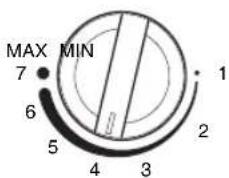
TEMP. CONTROL
Freezer
Display Panel For Temperature Control
| LED(88) | LED(BAR) |
| Function display board | 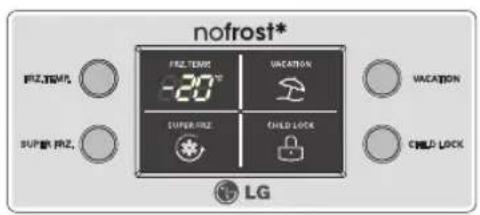 | 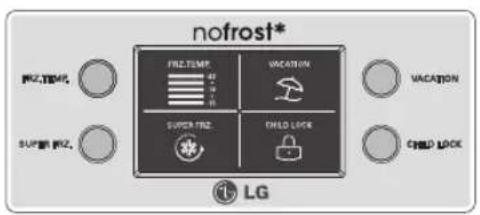 |
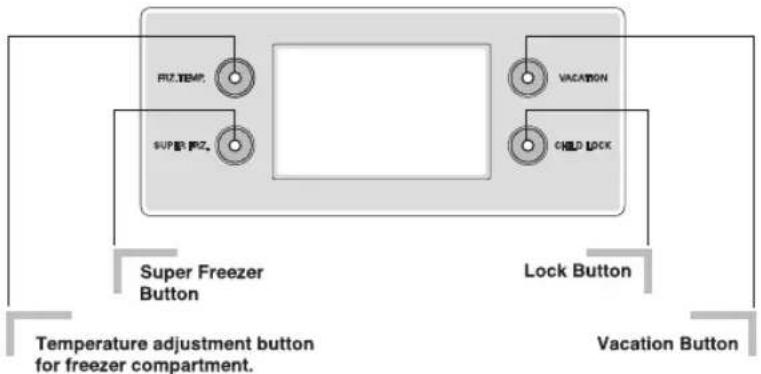 |
Operation
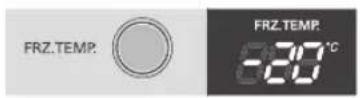
- The initial Temperature of the Freezer Compartment is -18°C. You can now adjust the temperature of the compartment as you want.
< LED 88 Type >
< LED BAR Type >
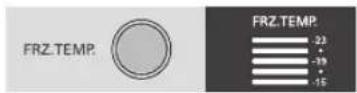
- When you press the temperature control buttons, the temperature of Freezer compartment is repeated in the following order.
LED 88 Type Freezer Compartment :
$$
\begin{array}{l} - 1 8 ^ {\circ} \mathrm{C} \rightarrow - 1 9 ^ {\circ} \mathrm{C} \rightarrow - 2 0 ^ {\circ} \mathrm{C} \rightarrow - 2 1 ^ {\circ} \mathrm{C} \rightarrow - 2 2 ^ {\circ} \mathrm{C} \rightarrow - 2 3 ^ {\circ} \mathrm{C} \ \rightarrow - 1 5 ^ {\circ} \mathrm{C} \rightarrow - 1 6 ^ {\circ} \mathrm{C} \rightarrow - 1 7 ^ {\circ} \mathrm{C} \ \end{array}
$$
LED BAR Type Freezer Compartment :
$$
- 1 9 ^ {\circ} \mathrm{C} \rightarrow - 2 1 ^ {\circ} \mathrm{C} \rightarrow - 2 3 ^ {\circ} \mathrm{C} \rightarrow - 1 5 ^ {\circ} \mathrm{C} \rightarrow - 1 7 ^ {\circ} \mathrm{C}
$$
Note
The actual inner temperature varies depending on the food status, as the indicated setting temperature is a target temperature, not actual temperature within refrigerator.
Refrigeration function is weak in the initial time. Please adjust temperature as above after using refrigerator for minimum 2\~3 days.
Operation
Super Freezer
Function
- Please select this function for prompt freezer.
- This function is used when you want to freeze the foods quickly. Press the 'SUPER FRZ' (Super Freezer) button once, and then the quick freeze operation starts with the lamp on.
- The Super Freeze operation takes about 3 hours. When its operation ends, it automatically returns to the previous temperature setting. If you want to stop the quick freeze operation, press the 'SUPER FRZ' button once more, the lamp goes out, and the Super Freeze operation stops and the refrigerator returns to the previous temperature setting.
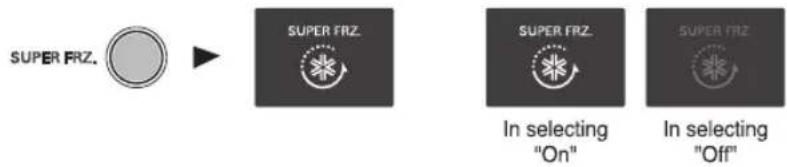
flowchart
graph LR
    A["SUPER FRZ."] --> B["SUPER FRZ."]
    B --> C["In selecting "On""]
    B --> D["In selecting "Off""]
Vacation
- This function makes the fridge-freezer work in a power saving mode which is useful for when you are away on holiday, by reducing energy consumption as much as possible.
Pressing 'VACATION' starts operation with lamp on and pressing it again stops the operation.
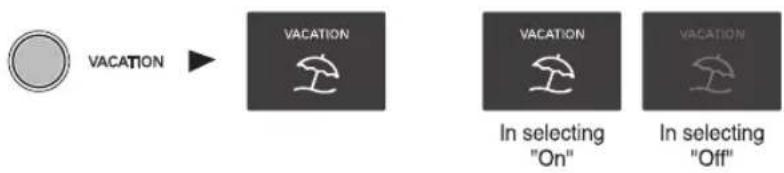
flowchart
graph LR
    A["Circle"] --> B["VACATION"]
    B --> C["△ In selecting "On""]
    B --> D["△ In selecting "Off""]
Operation
Lock
- Pressing this button stops operation of other buttons.
- "Locking" or "Un-Locking" is repeated whenever pressing the 'CHILD LOCK' button. (For "Locking" or "Un-Locking" press the 'CHILD LOCK' button for 2 secs.)
- When 'CHILD LOCK' is activated, pressing the other buttons would not work.
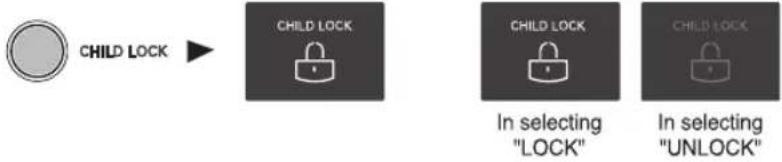
flowchart
graph LR
    A["CHILD LOCK"] --> B["CHILD LOCK"]
    B --> C["CHILD LOCK"]
    C --> D["In selecting "LOCK""]
    C --> E["In selecting "UNLOCK""]
Self Test
This function allows you to check for operational problems. If you think you have a problem with your fridge-freezer, then press the temperature control button:
- If the indicate lights move up or down, then there is no problem with your fridge-freezer.
- If the indicate lights do not move up or down, then please leave the power connected and call your nearest service agent.
Ice Making
• To make ice cubes, fill the ice tray to the water level and place it in the freezer.
- If ice cubes are required fast, press the 'SUPER FRZ.'button.
• To remove ice cubes, hold the tray at its ends and twist gently.
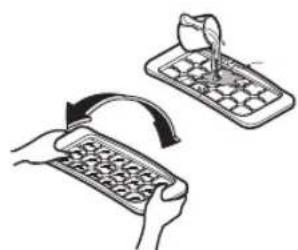
natural_image
Illustration of two hands using a handheld device to interact, showing the process with an arrow indicating rotation (no text or symbols present)
Tip
To remove ice cubes easily, run water on the tray before twisting.
Defrosting
Defrosting takes place automatically.
The defrosting water flows down to the evaporating tray and is evaporated automatically.
Suggestions on food storage
Storing Food
Storing Food
- Do not store food which goes bad easily at low temperature, such as banana, and melon.
- Allow hot food to cool prior to storing. Placing hot food in the fridge-freezer could spoil other food, and lead to higher electric bills.
- When storing the food, use a container with a lid. This prevents moisture from evaporating, and helps food to keep its taste and nutrients.
- Do not block air vents with food. Smooth circulation of cold air keeps fridge-freezer temperature even.
- Do not open the door frequently. Opening the door lets warm air enter the fridge-freezer, and cause temperature to rise.
- To adjust the temperature control easily, do not store food near the temperature control dial.
- Never keep too many foods in door rack, as this may stop the door from fully closing.
- Do not store bottles in the freezer compartment - they may break when frozen.
- Do not refreeze food that has been thawed. This causes loss of taste and nutrition.
Note
If you keep the fridge-freezer in a hot, and humid place, frequently open its door or put a lot of vegetables in it, dew may form in it, which has no effect on its performance.
Remove the dew with dust cloth free from care.
Care and Maintenance
Power Failure
If You Move
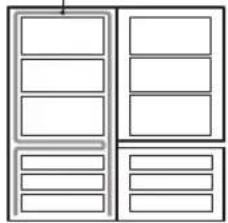
Anti Condensation Pipe
- 1\~2 hour power failure does no harm to the foods stores. Try to avoid opening and closing the door too frequently.
• Take out foods from the fridge-freezer and firmly fix the loose items with tape.
- Turn the leveling screws until they stop before moving the fridge-freezer. Otherwise the screw may scratch the floor or the fridge-freezer cannot move.
- The Anti-Condensation pipe is installed around the front side of fridge-freezer as well as on the partition between fridge compartment and freezer compartment to prevent dewing.
- Especially after installation or when ambient temperature is high, the fridge-freezer may feel hot, which is quite normal.
Anti-Condensation Pipe
natural_image
Pure architectural floor plan lines without any text, numbers, or symbols
Lamp Replacement
- Unplug the power cord from the outlet.
- Remove fridge shelves.
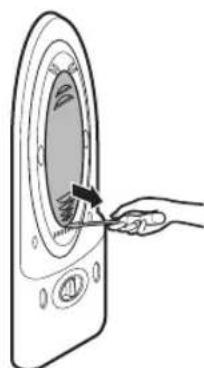
- To remove the lamp cover, insert ⊖ type driver in the underside of the lamp cover and pull it out forwards.
- Turn the lamp counterclockwise.
- Assemble in reverse order of disassembly.
Replacement lamp must be the same specification as original.
- You must check the O-RING, which is made by rubber and prevent electric spark.
natural_image
Illustration of a hand inserting a component into a circular device (no text or symbols)
Care and Maintenance
Cleaning
Before Cleaning
Be sure to unplug the power.
Exterior
Clean the outside of the fridge-freezer with a soft cloth soaked with hot water or liquid detergent. If you use a detergent, be sure to wipe it with a clean wet cloth.
Interior
As above.
After Cleaning
Check that the power cord is not damaged, power plug has not overheated, and that the power plug is tightly inserted into the outlet.
Warning
Be sure to dry the appliance with a cloth after washing it with water.
Do not use abrasive, petroleum, benzene, thinner, hydrochloride acid, boiling water, rough brush, etc, as they may damage parts of the fridge-freezer.
Trouble Shooting
Trouble Shooting
Before calling for service, check this list.
It may save you both time and expense.
This list includes common occurrences that are not the result of defective workmanship or materials in this appliance.
Problem
Fridge-Freezer does not operate
Possible Causes
• Power plug may be unplugged from the electric outlet.
Plug it in securely.
• House fuse has blown or circuit breaker has tripped.
Check and/or replace fuse and reset circuit breaker.
- Power cut.
Check house lights.
- Temperature control not set on proper position. Refer to Temperature Control section.
- Appliance is placed close to heat source.
- Warm weather-frequent door openings.
- Door left open for a long time.
- Package holding door open or blocking air duct in freezer compartment.
Fridge or Freezer Compartment Temperature too warm
Vibration or Rattling or Abnormal Noise
- The floor on which the fridge-freezer is installed may be uneven or the fridge-freezer may be unstable.
Make it even by rotating the leveling screw.
- Unnecessary objects placed in the back side of the fridge-freezer.
Frost or Ice Crystals on frozen Food
- Door may have been left ajar or package holding door open.
- Too frequent or too long door openings.
- Frost within package is normal.
- This phenomenon is likely to occur in a wet space. Wipe it with a dry towel.
Trouble Shooting
Problem Possible Causes
Moisture collects inside
Fridge has odor
Door not closing properly
Interior light does not work
- Too frequent or too long door openings.
-
In humid weather, air carries moisture into fridge when doors are opened.
-
Foods with strong odors should be tightly covered or wrapped.
- Check for spoiled food.
- Interior needs cleaning.
Refer to CLEANING section
- Food package is keeping door open.
Move packages that keep door from closing.
- Fridge-freezer is not level.
Adjust the leveling screws.
- The floor on which the fridge-freezer is installed may be uneven or the fridge-freezer may be unstable.
Slightly raise the front side with the leveling screw.
- No power at outlet.
• Light lamp needs replacing.
Refer to the Lamp Replacement section
natural_image
Symbol of a trash bin with crossed lines indicating no waste or discharge (no text or labels)
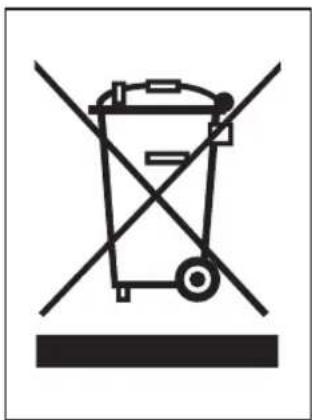
Disposal of your old appliance
- When this crossed-out wheeled bin symbol is attached to a product it means the product is covered by the European Directive 2002/96/EC.
- All electrical and electronic products should be disposed of separately from the municipal waste stream via designated collection facilities appointed by the government or the local authorities.
- The correct disposal of your old appliance will help prevent potential negative consequences for the environment and human health.
- For more detailed information about disposal of your old appliance, please contact your city office, waste disposal service or the shop where you purchased the product.
To Reverse the Doors
Your fridge-freezer is designed with reversible doors, so that they may open from either the left or right hand side to suit your kitchen design.
Precaution
- Before reversing the door, first of all, you should take out food and accessories like shelves or trays which are not fixed in the fridge-freezer.
- Use Torque Wrench or Spanner to fix or remove the bolt.
- Do not lay the fridge-freezer down. This will cause problems.
- Be careful not to drop the doors in disassembling or assembling.
How to Reverse the Door
-
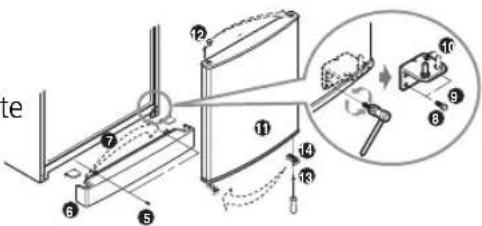
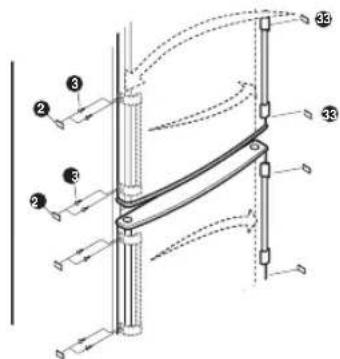
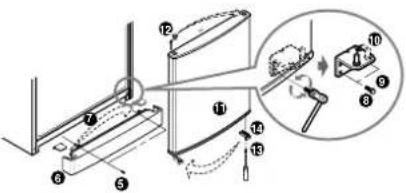
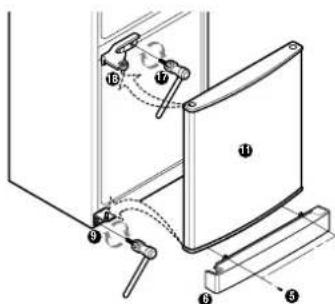
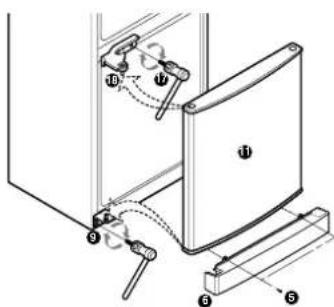
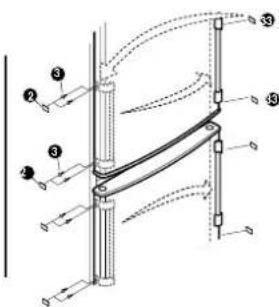
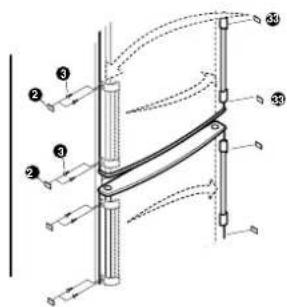
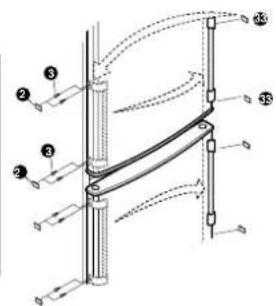
Separate the screw ③ after separating the n 2t on the left of the refrigerator door handle ①, then separate the refrigerator door handle ①. Separate the freezer of handle ④ in the order in which you separating the refrigerator door handle ①. (The hidden handle does not needshi procedure)
-
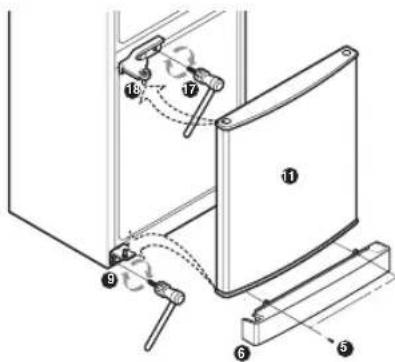
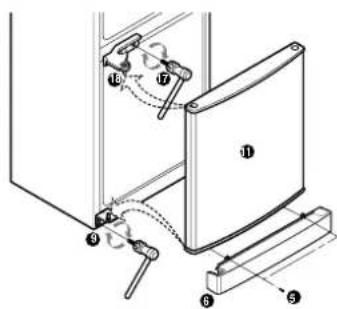
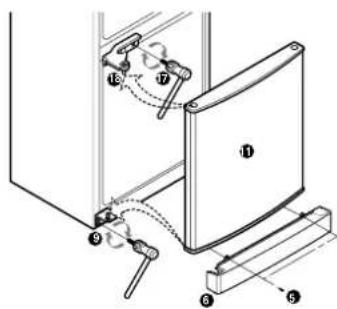
Separate the screw ^5 and bottom cover, then separate the cap ^7 of bottom cover and install it oneth corresponding position on the right side. Separate the hinge lower right ^9 and the pin ^10 after separating the screw ^8 . Install the pin ^10 into the corresponding lefthol on the hinge lower. Separate the freezer door, the remove the cap ^12 on the door and install it on the corresponding position on the right side. Separate the door stop ^14 after your separating the screw ^13 , then install the door stop on the corresponding position on the left
-
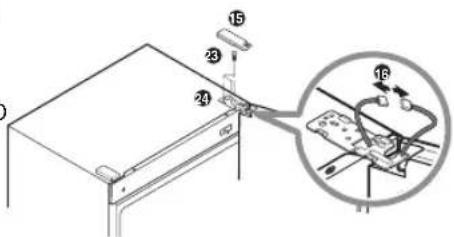
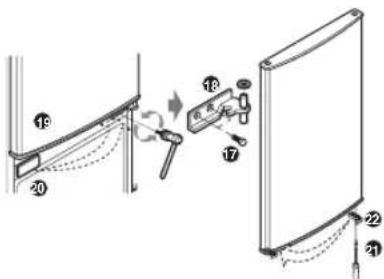
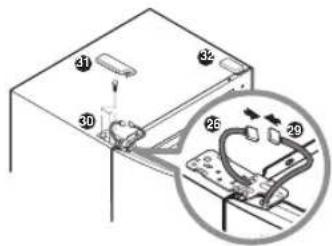
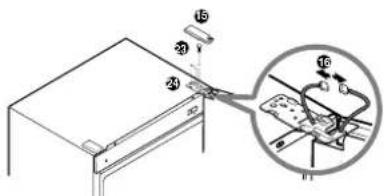
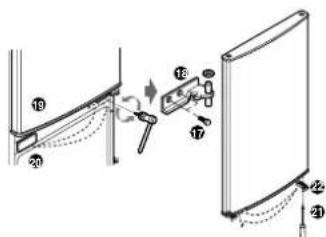
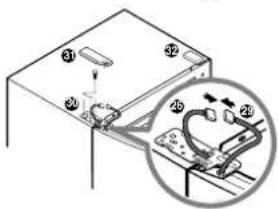
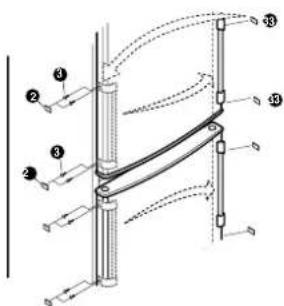
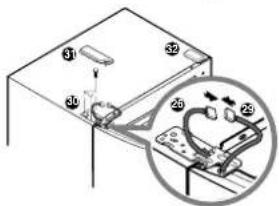
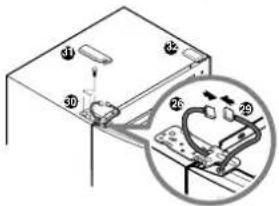
Separate the cover of hinge upp ^15 , separate the two wire ^16 . Separate the scre ^17 , separate the hinge miedl ^18 , then separate the refrigerator do ^19 . Separate 24p and install it on the corresponding position on the right Separate the door stop ^22 after your separating the scre ^21 , then install the door stop on the corresponding position on the left. Separate the scre ^23 , then separate the hing upper right ^24 .
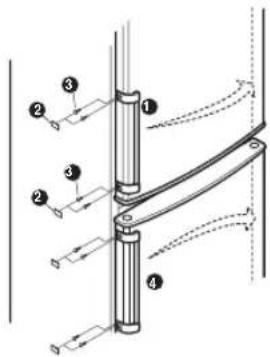
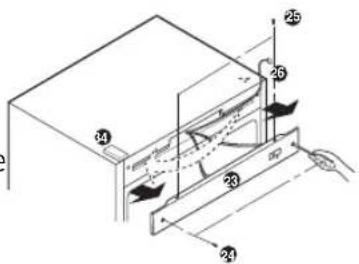
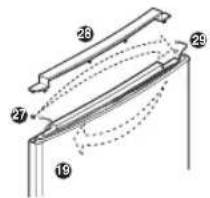
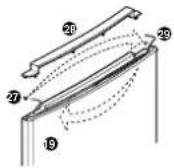
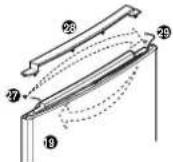
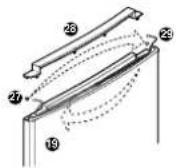
- Destroy the two small caps on the front of the cover front with a screw driver, then separate the screw and . Separate the cover front. Move the wire to left, install the cover front and the screw. Take the small caps out of the alternate bag, then install the small cap
- Remove the small cap of the refrigerator door, then separate the small cap. Move the cap from left he t corresponding position on the right. Install the small cap then install the small cap on the corresponding position the right.
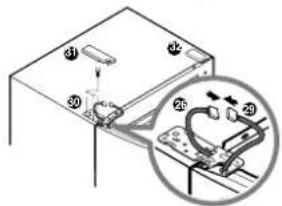
- Install the hinge lowe ^9 and the freezer door, then install the hinge middle ^18 . Separate the cap on upper left. Install the refrigerator door ^19 , take the hinge upper out of the alternate bag and install it on upper left. Pull out the walls from the individual holes and connect these cables. Take the small caps ^31 ^32 out of the alternate bag, then install the small caps. Install base cove ^6 .
- Separate the cap3 on the right side of the door, then install it into the left screw hole (you can see this hole after the left hand is removed). Install the handle and the screw which previous separated on the corresponding position on the right (T hidden handle does not need this procedure) Then Insta1 at completed.
Note
Reversing the doors is not covered by the warranty.
Memo
Innholdsfortegnelse
Innledning
Registrering 22
- Hurtiginnfrying 29
natural_image
Illustration of two hands using a keyboard to interact with a grid device (no text or symbols present)
TIPS
natural_image
Hand inserting a button into a circular device (no text or symbols visible)
Vedlikehold
Rengjøring
Før rengjøring
Utvendig
Strømkabelen frakobles stikkontakten.
KASTE DET GAMLE APPARATET
NB
Omhengsling av dører dekkes ikke av garantien.
Memo
natural_image
Illustration of two hands using a tool to interact with a grid-patterned device (no text or symbols present)
Tips
natural_image
Illustration of a hand inserting a component into a device (no text or symbols visible)
Skötselråd
Innan rengöring
Utsida
Rengöring
Obs:
natural_image
Illustration of two hands using a handheld device to interact with a grid-patterned device (no text or symbols present)
Tip
natural_image
Hand inserting a button into a circular device (no text or symbols visible)
Vedligeholdelse
Rengøring
Inden rengøring
Bemærk
natural_image
Illustration of two hands using a grid-based device to interact (no text or symbols present)
RUUANSÄILYTYSEHDOTUKSIA
Ruuansäilytys
natural_image
Hand inserting a component into a circular device (no text or symbols visible)
Hoito ja huolto
Puhdistus
Ennen puhdistusta
Ulkokuori
Irrota johto pistorasiasta.
Huomautus



