
MS23F302EAS - Microwave SAMSUNG - Free user manual and instructions
Find the device manual for free MS23F302EAS SAMSUNG in PDF.


| Product Type | Solo Microwave Oven |
| Model | MS23F302EAS |
| Capacity | 23 liters |
| Output Power | 800 W (IEC-705) |
| Power Consumption | 1150 W |
| Power Supply | 230 V ~ 50 Hz |
| Operating Frequency | 2450 MHz |
| Outside Dimensions (W x H x D) | 489 x 275 x 374 mm |
| Oven Cavity Dimensions (W x H x D) | 330 x 211 x 324 mm |
| Net Weight | Approx. 12 kg |
| Control Type | Dial (Time/Weight) + Knob (Power Level) |
| Display | Digital clock (12h/24h) |
| Clock Setting | Yes, with button and dial |
| Auto Defrost | Yes, with weight selection (200-1500 g) |
| Power Levels | 6 levels including High, Reheat, Medium High, Medium, Low, Keep Warm |
| Turntable | Yes, removable |
| Roller Ring | Yes |
| Power Steam Cooker | Included (for this model) |
| Safety Features | Door interlock, auto shut-off when empty, child lock (indirect) |
| Cleaning | Wipe with damp cloth; mild detergent; avoid abrasives |
| Accessories Included | Roller ring, turntable, steam cooker (bowl, insert tray, lid) |
| Warranty | Standard Samsung warranty (excludes service calls for explanation, correction, or maintenance) |
Frequently Asked Questions - MS23F302EAS SAMSUNG
User questions about MS23F302EAS SAMSUNG
0 question about this device. Answer the ones you know or ask your own.
Ask a new question about this device
Download the instructions for your Microwave in PDF format for free! Find your manual MS23F302EAS - SAMSUNG and take your electronic device back in hand. On this page are published all the documents necessary for the use of your device. MS23F302EAS by SAMSUNG.
USER MANUAL MS23F302EAS SAMSUNG
Byte (reparation)....9
UTSKIFTNING (REPARASJON)
ADVARSEL
natural_image
Three simple line drawings of cooking pots: a lid, a circular plate with circular holes, and a lid with a cube (no text or symbols)Kulho Pohjalevy Kansi
UDSKIFTNING AF DELE (REPARATION)
ADVARSEL
INDSTILLING AF KLOKKESLÆT
- For at vise tiden I...
24-hour Notation (24-timers visning)
12-hour Notation (12-timers visning)
Tryk på knappen Ur (J) en eller to gange.

- Drej Tid/Vægt (∅/g)-knappen for at indstille timer.

Owner's Instructions & Cooking Guide
Please be advised that the Samsung warranty does NOT cover service calls to explain product operation, correct improper installation, or perform normal cleaning or maintenance.
MS23F300E**
MS23F301E**
MS23F302E**
imagine the possibilities
Thank you for purchasing this Samsung product.
SAMSUNG
contents
Safety instructions....3
Installation 8
Accessories....8
Installation site 8
Turntable....8
Maintenance....9
Cleaning 9
Replacement (repair)....9
Care against an extended period of disuse 9
Oven features ....10
Oven....10
Control panel....10
Oven use....11
Setting the time....11
Cooking/Reheating 11
Power levels 11
Adjusting the cooking time 12
Stopping the cooking....12
Using the auto defrost feature....12
Using the Auto power defrost programmes....12
Power steam cooking guide
(ONLY MS23F301EF*, MS23F302EF* models)....12
Cookware guide ....14
Troubleshooting....15
What to do if you are in doubt or have a problem....15
Technical specifications....16
English - 2

safety instructions
IMPORTANT SAFETY INSTRUCTIONS
READ CAREFULLY AND KEEP FOR FUTURE REFERENCE.
WARNING: If the door or door seals are damaged, the oven must not be operated until it has been repaired by a competent person.
WARNING: It is hazardous for anyone other than a competent person to carry out any service or repair operation that involves the removal of a cover which gives protection against exposure to microwave energy.
WARNING: Liquids and other foods must not be heated in sealed containers since they are liable to explode.
WARNING: Only allow children to use the oven without supervision when adequate instructions have been given so that the child is able to use the oven in a safe way and understands the hazards of improper use.
This appliance is intended to be used in household only and it is not intended to be used such as:
- staff kitchen areas in shops, offices and other working environments;
- farm houses;
- by clients in hotels, motels and other residential environments;
• bed and breakfast type environments.
Only use utensils that are suitable for use in microwave ovens.
When heating food in plastic or paper containers, keep an eye on the oven due to the possibility of ignition.
The microwave oven is intended for heating food and beverages. Drying of food or clothing and heating of warming pads, slippers, sponges, damp cloth and similar may lead to risk of injury, ignition or fire.
If smoke is observed (emitted), switch off or unplug the appliance and keep the door closed in order to stifle any flames.
Microwave heating of beverages can result in delayed eruptive boiling, therefore care must be taken when handling the container.
The contents of feeding bottles and baby food jars shall be stirred or shaken and the temperature checked before consumption, in order to avoid burns. Eggs in their shell and whole hard-boiled eggs should not be heated in microwave ovens since they may explode, even after microwave heating has ended. The oven should be cleaned regularly and any food deposits removed.
Failure to maintain the oven in a clean condition could lead to deterioration of the surface that could adversely affect the life of the appliance and possibly result in a hazardous situation.
The microwave oven is intended to be used on the counter top (freestanding) use only, the microwave oven shall not be placed in a cabinet.
Metallic containers for food and beverages are not allowed during microwave cooking.
The care should be taken not to displace the turntable when removing containers from the appliance.
The appliance shall not be cleaned with a steam cleaner.
The appliance should not be cleaned with a water jet. The appliance is not intended for installing in road vehicles, caravans and similar vehicles etc.
This appliance is not intended for use by persons (including children) with reduced physical, sensory or mental capabilities, or lack of experience and knowledge, unless they have been given supervision or instruction concerning use of the appliance by a person responsible for their safety.
Children should be supervised to ensure that they do not play with the appliance.
This appliance can be used by children aged from 8 years and above and persons with reduced physical, sensory or mental capabilities or lack of experience and knowledge if they have been given supervision or instruction concerning use of the appliance in a safe way and understand the hazards involved. Children shall not play with the appliance. Cleaning and user maintenance shall not be made by children without supervision.
If the supply cord is damaged, it must be replaced by the manufacturer, its service agent or similarly qualified persons in order to avoid a hazard.
This oven should be positioned proper direction and height permitting easy access to cavity and control area.
Before using the your oven first time, oven should be operated with the water during 10 minute and then used.
If the oven generates a strange noise, a burning smell, or smoke is emitted, unplug the power plug immediately and contact your nearest service center. The microwave oven has to be positioned so that plug is accessible.
General safety
Any modifications or repairs must be performed by qualified personnel only. Do not heat food or liquids sealed in containers for the microwave function.
Do not use benzene, thinner, alcohol, or steam or high-pressure cleaners to clean the oven.
Do not install the oven: near a heater or flammable material; locations that are humid, oily, dusty or exposed to direct sunlight or water; or where gas may leak; or an uneven surface.
This oven must be properly grounded in accordance with local and national codes. Regularly use a dry cloth to remove foreign substances from the power plug terminals and contacts.
Do not pull, excessively bend, or place heavy objects on the power cord.
If there is a gas leak (propane, LP, etc) ventilate immediately. Do not touch the power cord.
Do not touch the power cord with wet hands.
While the oven is operating, do not turn it off by unplugging the power cord.
Do not insert fingers or foreign substances. If foreign substances enter the oven, unplug the power cord and contact a local Samsung service centre.
Do not apply excessive pressure or impact to the oven.
Do not place the oven over fragile objects.
Ensure the power voltage, frequency, and current matches the product specifications.
Firmly plug the power plug into the wall socket. Do not use multiple plug adapters, extension cords, or electric transformers.
Do not hook the power cord on metal objects. Make sure the cord is between objects or behind the oven.
Do not use a damaged power plug, power cord, or loose wall socket. For damaged power plugs or cords, contact a local Samsung service centre.
Do not pour or directly spray water onto the oven.
Do not place objects on the oven, inside, or on the oven door.
Do not spray volatile materials such as insecticide on the oven.
Do not store flammable materials in the oven. Because alcohol vapours can contact hot parts of the oven, use caution when heating food or drinks containing alcohol.
Children may bump themselves or catch their fingers on the door. When opening/closing the door, keep children away.
Microwave warning
Microwave heating of beverages may result in delayed eruptive boiling; always use caution when handling the container. Always allow beverages to stand at least 20 seconds before handling. If necessary, stir during heating. Always stir after heating. In the event of scalding, follow these First Aid instructions:
-
Immerse the scalded area in cold water for at least 10 minutes.
-
Cover with a clean, dry dressing.
-
Do not apply any creams, oils, or lotions.
To avoid damaging the tray or rack, do not put the tray or rack in water shortly after cooking.
Do not use the oven for deep fat frying because the oil temperature cannot be controlled. This could result in a sudden boil over of hot oils.
Microwave oven precautions
Only use microwave-safe utensils. Do not use metallic containers, gold or silver trimmed dinnerware, skewers, etc.
Remove wire twist ties. Electric arcing may occur.
Do not use the oven to dry papers or clothes.
Use shorter times for small amounts of food to prevent overheating or burning.
Keep the power cord and power plug away from water and heat sources.
To avoid the risk of explosion, do not heat eggs with shells or hard-boiled eggs. Do not heat airtight or vacuum-sealed containers, nuts, tomatoes, etc.
Do not cover the ventilation slots with cloth or paper. This is a fire hazard. The oven may overheat and turn off automatically and will remain off until it cools sufficiently.
Always use oven mitts when removing a dish.
Stir liquids halfway during heating or after heating ends and allow the liquid stand at least 20 seconds after heating to prevent eruptive boiling.
Stand at arms length from the oven when opening the door to avoid getting scalded by escaping hot air or steam.
Do not operate the oven when it is empty. The oven will automatically shut down for 30 minutes for safety purposes. We recommend placing a glass of water inside the oven at all times to absorb microwave energy in case the oven is started accidentally.
Install the oven in compliance with the clearances in this manual. (See Installing your microwave oven.)
Use caution when connecting other electrical appliances to sockets near the oven.
Microwave operation precautions
Failure to observe the following safety precautions may result in harmful exposure to microwave energy.
- Do not operate the oven with the door open. Do not tamper with the safety interlocks (door latches). Do not insert anything into the safety interlock holes.
- Do not place any object between the oven door and front face or allow food or cleaner residue to accumulate on sealing surfaces. Keep the door and door sealing surfaces clean by wiping with a damp cloth and then with a soft, dry cloth after each use.
- Do not operate the oven if it is damaged. Only operate after it has been repaired by a qualified technician.
Important: the oven door must close properly. The door must not be bent; the door hinges must not be broken or loose; the door seals and sealing surfaces must not be damaged. - All adjustments or repairs must be done by a qualified technician.
Limited warranty
Samsung will charge a repair fee for replacing an accessory or repairing a cosmetic defect if the damage to the unit or accessory was caused by the customer. Items this stipulation covers include:
- Door, handles, out-panel, or control panel that are dented, scratched, or broken.
- A broken or missing tray, guide roller, coupler, or wire rack.
Use this oven only for its intended purpose as described in this instruction manual. Warnings and Important Safety Instructions in this manual do not cover all possible conditions and situations that may occur. It is your responsibility to use common sense, caution, and care when installing, maintaining, and operating your oven.
Because these following operating instructions cover various models, the characteristics of your microwave oven may differ slightly from those described in this manual and not all warning signs may be applicable. If you have any questions or concerns, contact a local Samsung service centre or find help and information online at www.samsung.com.
Use this oven for heating food only. It is intended for domestic use only. Do not heat any type of textiles or cushions filled with grains. The manufacturer cannot be held liable for damage caused by improper or incorrect use of the oven.
To avoid deterioration of the oven surface and hazardous situations, always keep the oven clean and well maintained.

Product group definition
This product is a Group 2 Class B ISM equipment. The definition of group 2 which contains all ISM equipment in which radio-frequency energy is intentionally generated and/or used in the form of electromagnetic radiation for the treatment of material, and EDM and arc welding equipment.
For Class B equipment is equipment suitable for use in domestic establishments and in establishments directly connected to a low voltage power supply network which supplies buildings used for domestic purposes.
Correct Disposal of This Product (Waste Electrical & Electronic Equipment)

(Applicable in countries with separate collection systems)
This marking on the product, accessories or literature indicates that the product and its electronic accessories (e.g. charger, headset, USB cable) should not be disposed of with other household waste at the end of their working life. To prevent possible harm to the environment or human health from uncontrolled waste disposal, please separate these items from other types of waste and recycle them responsibly to promote the sustainable reuse of material resources.
Household users should contact either the retailer where they purchased this product, or their local government office, for details of where and how they can take these items for environmentally safe recycling.
Business users should contact their supplier and check the terms and conditions of the purchase contract. This product and its electronic accessories should not be mixed with other commercial wastes for disposal.
For information on Samsung's environmental commitments and product specific regulatory obligations e.g. REACH visit: samsung.com/uk/aboutsamsung/samsungelectronics/corporate citizenship/data_corner.html
English - 7


installation
ACCESSORIES
Depending on the model that you have purchased, you are supplied with several accessories that can be used in a variety of ways.
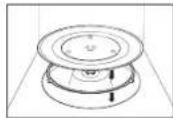
- Roller ring, to be placed in the centre of the oven.
Purpose: The roller ring supports the turntable.

- Turntable, to be placed on the roller ring with the centre fitting to the coupler.
Purpose: The turntable serves as the main cooking surface; it can be easily removed for cleaning.

DO NOT operate the microwave oven without the roller ring and turntable.
- Steam cooker, see page 12 to 14. (Only MS23F301EF*, MS23F302EF* models)
Purpose: The plastic steam cooker when using power steam function.
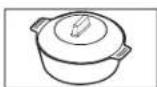
DO NOT operate the microwave oven without the roller ring and turntable.
INSTALLATION SITE
- Select a flat, level surface approx. 85 cm above the floor. The surface must support the weight of the oven.
- Secure room for ventilation, at least 10 cm from the rear wall and both sides, and 20 cm from above.
- Do not install the oven in hot or damp surroundings, such as next to other microwave ovens or radiators.
- Conform to the power supply specifications of this oven. Use only approved extension cables if you need to use.
- Wipe the interior and the door seal with a damp cloth before using your oven for the first time.
TURNTABLE
Remove all packing materials inside the oven. Install the roller ring and turntable. Check that the turntable rotates freely.

maintenance
CLEANING
Clean the oven regularly to prevent impurities from building up on or inside the oven. Also pay special attention to the door, door sealing, and turntable and roller ring (applicable models only).
If the door won't open or close smoothly, first check if the door seals have built up impurities. Use a soft cloth in soapy water to clean both the inner and outer sides of the oven. Rinse and dry well.
To remove stubborn impurities with bad smells from inside the oven
-
With an empty oven, put a cup of diluted lemon juice on the centre of the turntable.
-
Heat the oven for 10 minutes at max power.
-
When the cycle is complete, wait until the oven cools down. Then, open the door and clean the cooking chamber.
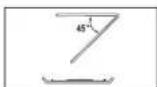
To clean inside swing-heater models
To clean the upper area of the cooking chamber, lower the top heating element by 45^ as shown. This will help clean the upper area. When done, reposition the top heating element.
CAUTION
- Keep the door and door sealing clean and ensure the door opens and closes smoothly. Otherwise, the oven's lifecycle may be shortened.
• Take caution not to spill water into the oven vents. - Do not use any abrasive or chemical substances for cleaning.
• After each use of the oven, use a mild detergent to clean the cooking chamber after waiting for the oven to cool down.
REPLACEMENT (REPAIR)
WARNING
This oven has no user-removable parts inside. Do not try to replace or repair the oven yourself.
- If you encounter a problem with hinges, sealing, and/or the door, contact a qualified technician or a local Samsung service centre for technical assistance.
- If you want to replace the light bulb, contact a local Samsung service centre. Do not replace it yourself.
- If you encounter a problem with the outer housing of the oven, first unplug the power cord from the power source, and then contact a local Samsung service centre.
CARE AGAINST AN EXTENDED PERIOD OF DISUSE
If you don't use the oven for an extended period of time, unplug the power cord and move the oven to a dry, dust-free location. Dust and moisture that builds up inside the oven may affect the performance of the oven.
oven features
OVEN

- DOOR HANDLE
- VENTILATION HOLES
- LIGHT
- TIME/WEIGHT DIAL
- DOOR LATCHES
-
DOOR
-
TURNTABLE
- COUPLER
- ROLLER RING
- SAFETY INTERLOCK HOLES
- VARIABLE COOKING POWER CONTROL KNOB
CONTROL PANEL

- DISPLAY
- TIME/WEIGHT DIAL
-
AUTO DEFROST
-
VARIABLE COOKING POWER CONTROL KNOB
- CLOCK SETTING BUTTON
English - 10

oven use
SETTING THE TIME
Your microwave oven has an inbuilt clock. When power is supplied, ":0", "88:88" or "12:00" is automatically displayed on the display. Please set the current time. The time can be displayed in either the 24-hour or 12-hour notation. You must set the clock:
- When you first install your microwave oven
• After a power failure
Do not forget to reset the clock when you switch to and from summer and winter lime.
Auto energy saving function
If you do not select any function when appliance is in the middle of setting or operating with temporary stop condition, function is canceled and clock will be displayed after 25 minutes. Oven Lamp will be turned off after 5 minutes with door open condition.
- To display the time in the...
24-hour notation
12-hour notation
Press the Clock ⏻ button once or twice.

- Turn the Time/Weight (9/g) dial to set the hour.

- Press the Clock (💡) button.
- Turn the Time/Weight (9/g) dial to set the minute.

- Press the Clock (💡) button.


COOKING/REHEATING
The following procedure explains how to cook or reheat food. ALWAYS check your cooking settings before leaving the oven unattended. First, place the food in the centre of the turntable. Then, close the door.
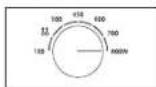
- Select the power level to maximum by turning COOKING POWER CONTROL knob. (MAXIMUM POWER : 800 W)
- Select the time by turning the Time/Weight (9/g) dial.
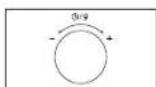
Result: The oven light comes on and the turntable starts rotating.
1) Cooking starts and when it has finished the oven beeps 4 times.
2) The end reminder signal will beep 3 times (once every minute).
3) The current time is displayed again.
Never switch the microwave oven on when it is empty.
You can change the power level during cooking by turning the COOKING POWER CONTROL knob.
POWER LEVELS
You can choose among the power levels below.
| Power Level Output Power Level Output | |||
| HIGH 800 W MEDIUM | LOW 300 W | ||
| REHEAT 700 W | AUTO DEFROST (12) | 180 W | |
| MEDIUM HIGH 600 W | LOW/KEEP | WARM 100 W | |
| MEDIUM 450 W | |||
If you select higher power level, the cooking time must be decreased.
If you select lower power level, the cooking time must be increased.

ADJUSTING THE COOKING TIME
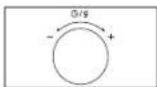
- Adjust the remaining cooking time by rotating the Time/Weight (Pd)al. Turn the dial right to increase the cooking time of your food during the cooking process.
STOPPING THE COOKING
You can stop cooking at any time to check the food.
- To stop temporarily; Open the door.
Result: Cooking stops. To resume cooking, close the door.

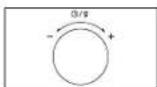
- To stop completely; Turn the Time/Weight (9/g) dial to the left. "Current time" will be displayed.
USING THE AUTO DEFROST FEATURE
The Auto Defrost feature enables you to defrost meat, poultry or fish. First, place the frozen food in the centre of the turntable and close the door.
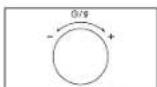
- Turn the COOKING POWER CONTROL knob to the Auto Defrost (© symbol.

- Turn the Timer/Weight (9/g) dial select the appropriate weight.
Result: The oven light comes on and the turntable starts rotating.
1) Cooking starts and when it has finished the oven beeps 4 times.
2) The end reminder signal will beep 3 times (once every minute).
3) The current time is displayed again.
Use only recipients that are microwave-safe.
USING THE AUTO POWER DEFROST PROGRAMMES
Remove all kinds of packaging material before defrosting. Place the frozen foods on a turntable. Turn the food over when the oven beeps. Keep the corresponding standing time after Auto Defrosting has finished.
Code/Food Serving size Standing time Recommendations
| Meat 200-1500 g 20-60 min. Shield the edges with aluminium foil.Turn the food over when the oven beeps. |
| Poultry 200-1500 g 20-60 min. |
| fish 200-1500 g 20-50 min. |
POWER STEAM COOKING GUIDE (ONLY MS23F301EF\*, MS23F302EF\* MODELS)
The Power Steamer is based on the principle of steam cooking, and is designed for fast, healthy cooking in your Samsung Microwave oven. This accessory is ideal for cooking rice, pasta, vegetables, etc. in record time, while preserving their nutritional values.
The Microwave Power steamer set is made up of 3 items:
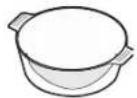
Bowl
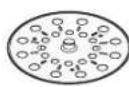
Insert tray

Lid
All parts withstand temperatures from -20 °C to 140 °C. Suitable for freezer storage. Can also be used separately or together.
CONDITIONS of USE:
Do not use:
• to cook foods with a high sugar or fat content,
• with the grill or rotating heat function or on a hob.
Wash all parts well in soapy water before first use.
To find out cooking times, please refer to the instructions in the table on next page.
English - 12
MAINTENANCE:
Your steamer can be washed in a dishwasher.
When washing by hand, use hot water and washing-up liquid. Do not use abrasive pads.
Some foods (such as tomato) may discolour the plastic. This is normal and not a manufacturing fault.
DEFROSTING:
Place the frozen food in the steam bowl without the lid. The liquid will remain in the bottom of the pot and will not harm the food.
COOKING:
| Food Portion | Power levels | Cooking time (min.) | Standing time (min.) | Handling | |
| Artichokes | 300 g(1-2 pcs) | 800 W 5 | -6 1-2 Bowl with insert | tray + Lid | |
| InstructionsRinse and clean artichokes. Put insert tray into bowl. Set artichokes on tray. Add one tablespoon lemon juice. Cover with lid. | |||||
| Fresh vegetables | 300 g 800 W 4-5 | 1-2 Bowl with insert | tray + Lid | ||
| InstructionsWeigh the vegetables (e.g. broccoli, cauliflower, carrots, pepper) after washing, cleaning and cutting into similar size. Put tray into bowl. Distribute vegetables on insert tray. Add 2 tablespoons water. Cover with lid. | |||||
| Frozen vegetables | 300 g 600 W 7-8 | 2-3 Bowl with insert | tray + Lid | ||
| InstructionsPut the frozen vegetables into the steam bowl. Put insert tray into bowl. Add 1 tablespoon water. Cover with lid. Stir well after cooking and standing. | |||||
| Food Portion | Power levels | Cooking time (min.) | Standing time (min.) | Handling | |
| Rice 250 g 800 W 15-18 5-10 Bowl + Lid | |||||
| Jacket potatoes | 500 g 800 W 7-8 | 2-3 Bowl + | Lid | ||
| InstructionsWeigh and rinse the potatoes and put them into steam bowl. Add 3 tablespoons water. Cover with lid. | |||||
| Stew(chilled) | 400 g 600 W 5-6 | 1-2 Bowl + | Lid | ||
| InstructionsPut stew into the steam bowl. Cover with lid. Stir well before standing. | |||||
| Soup(chilled) | 400 g 800 W 3-4 | 1-2 Bowl + | Lid | ||
| InstructionsPour into steam bowl. Cover with lid. Stir well before standing. | |||||
| Frozen soup | 400 g 800 W 8-10 | 2-3 Bowl + | Lid | ||
| InstructionsPut frozen soup into steam bowl. Cover with lid. Stir well before standing. | |||||
| Frozen yeast dumpling with jam filling | 150 g 600 W 1-2 | 2-3 Bowl + | Lid | ||
| InstructionsMoist the top of filled dumplings with cold water. Put 1-2 frozen dumplings side by side into the steam bowl. Cover with lid. | |||||
| Fruit compote | 250 g 800 W 3-4 | 2-3 Bowl + | Lid | ||
| InstructionsWeigh the fresh fruits (e.g. apples, pears, plums, apricots, mangoes or pineapple) after peeling, washing and cutting into similar sizes or cubes. Put into steam bowl. Add 1-2 tablespoons water and 1-2 tbsp. sugar. Cover with lid. | |||||
English - 13
Handling of power steam cooker
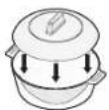
Bowl + Lid

Bowl with insert tray + Lid

PRECAUTIONS:
Take special care when opening the lid of your steamer, because the steam escaping may be very hot.
Use oven gloves when handling after cooking.
cookware guide
To cook food in the microwave oven, the microwaves must be able to penetrate the food, without being reflected or absorbed by the dish used. Care must therefore be taken when choosing the cookware. If the cookware is marked microwave-safe, you do not need to worry. The following table lists various types of cookware and indicates whether and how they should be used in a microwave oven.
| Cookware Microwave-Safe Comments | ||
| Aluminum foil | √ × | Can be used in small quantities to protect areas against overcooking. Arcing can occur if the foil is too close to the oven wall or if too much foil is used. |
| Browning plate | √ | Do not preheat for more than eight minutes. |
| China and earthenware | √ | Porcelain, pottery, glazed earthenware and bone china are usually suitable, unless decorated with a metal trim. |
| Disposable polyester cardboard dishes | √ | Some frozen foods are packaged in these dishes. |
| Fast-food packaging | ||
| • Polystyrene cups containers | √ | Can be used to warm food. Overhoating may cause the polystyrene to melt. |
| • Paper bags or newspaper | × | May catch fire. |
| • Recycled paper or metal trims | × | May cause arcing. |
| Glassware | ||
| • Oven-to-tableware | √ | Can be used, unless decorated with a metal trim. |
English - 14
| Cookware Microwave-Safe Comments | ||
| Fine glasswareGlass jars | √ | Can be used to warm foods or liquids. Delicate glass may break or crack if heated suddenly.Must remove the lid. Suitable for warming only. |
| √ | ||
| MetalDishesFreezer bag twist ties | ×× | May cause arcing or fire. |
| PaperPlates, cups, napkins and kitchen paperRecycled paper | √× | For short cooking times and warming. Also to absorb excess moisture.May cause arcing. |
| PlasticContainersCling filmFreezer bags | √√√× | Particularly if heat-resistant thermoplastic. Some other plastics may warp or discolour at high temperatures. Do not use Melamine plastic.Can be used to retain moisture.Should not touch the food. Take care when removing the film as hot steam will escape.Only if boilable or oven-proof.Should not be airtight. Prick with a fork, if necessary. |
| Wax or grease-proof paper | √ | Can be used to retain moisture and prevent spattering. |
√ : Recommended
√X : Use Caution
x : Unsafe
troubleshooting
WHAT TO DO IF YOU ARE IN DOUBT OR HAVE A PROBLEM
If you have any of the problems listed below try the solutions given.
This is normal.
• Condensation inside the oven
• Air flow around the door and outer casing
• Light reflection around the door and outer casing
• Steam escaping from around the door or vents
The oven does not start when you turn the Time/Weight (⑨/g) dial.
• Is the door completely closed?
The food is not cooked at all
- Have you set the timer correctly and/or pressed the Time/Weight (9/g) dual.
- Is the door closed?
- Have you overloaded the electric circuit and caused a fuse to blow or a breaker to be triggered?
The food is either overcooked or undercooked
- Was the appropriate cooking length set for the type of food?
- Was an appropriate power level chosen?
Sparking and cracking occur inside the oven (arcing)
• Have you used a dish with metal trimmings?
- Have you left a fork or other metal utensil inside the oven?
• Is aluminum foil too close to the inside walls?
The light bulb is not working.
- The Light bulb should not be replaced in person for safety reasons. Please contact nearest authorised Samsung customer care, to arrange for a qualified engineer to replace the bulb.
The oven causes interference with radios or televisions
- Slight interference may be observed on televisions or radios when the oven is operating. This is normal. To solve this problem, install the oven away from televisions, radios and aerials.
- If interference is detected by the oven's microprocessor, the display may be reset. To solve this problem, disconnect the power plug and reconnect it. Reset the time.
If the above guidelines do not enable you to solve the problem, then contact your local SAMSUNG customer service centre.
Please have the following information read.
- The model and serial numbers, normally printed on the rear of the oven
- Your warranty details
• A clear description of the problem
Then contact your local dealer or SAMSUNG after sales service.
technical specifications
SAMSUNG strives to improve its products at all times. Both the design specifications and these user instructions are thus subject to change without notice.
| Model MS23F300E**, MS23F301E**, MS23F302E** | |
| Power source 230 V ~ 50 Hz | |
| Power consumption Microwave 1150 W | |
| Output power 100 W / 800 W (IEC-705) | |
| Operating frequency 2450 MHz | |
| Magnetron OM75S(31) | |
| Cooling method Cooling fan motor | |
| Dimensions (W x H x D) | |
| Outside | 489 x 275 x 374 mm |
| Oven cavity | 330 x 211 x 324 mm |
| Volume 23 liter | |
| Weight | |
| Net 12 kg approx | |
memo memo


06 TeChnlCal SPeClflCaTlOnS


memo memo
memo memo
SAMSUNG
QUESTIONS OR COMMENTS?
| COUNTRY CALL OR VISIT US ONLINE AT | ||
| AUSTRIA | 0800-SAMSUNG (0800-7267864)[Only for KNOX customers] 0800 400848[Only for Premium HA] 0800-366661[Only for Dealers] 0810-112233 | www.samsung.com/at/support |
| BELGIUM 02-201 | -24-18 | www.samsung.com/be/support (Dutch)www.samsung.com/be_fr/support (French) |
| DENMARK 707 019 | 70 www.samsung.com/dk/support | |
| FINLAND 030-6227 | 515 www.samsung.com/fi/support | |
| FRANCE 01 48 63 | 00 00 www.samsung.com/fr/support | |
| GERMANY 06196 | 77 555 77 www.samsung.com/de/support | |
| ITALIA 800-SAMSUNG (800.7267864) www.samsung.com/it/support | ||
| CYPRUS 8009 4000 only from landline, toll free | www.samsung.com/gr/support | |
| GREECE | 80111-SAMSUNG (80111 726 7864) only from land line(+30) 210 6897691 from mobile and land line | |
| LUXEMBURG | 261 03 710 | www.samsung.com/be_fr/support |
| NETHERLANDS | 088 90 90 100 | www.samsung.com/nl/support |
| NORWAY | 815 56480 | www.samsung.com/no/support |
| PORTUGAL 808 207 | 267 www.samsung.com/pt/support | |
| SPAIN | 0034902172678 | www.samsung.com/es/support |
| SWEDEN 0771 726 786 | www.samsung.com/so/support | |
| SWITZERLAND | 0800 726 78 64 (0800-SAMSUNG) | www.samsung.com/ch/support (German)www.samsung.com/ch_fr/support (French) |
| UK | 0330 SAMSUNG (7267864) | www.samsung.com/uk/support |
| IRELAND (EIRE) | 0818 717100 | www.samsung.com/ie/support |

DE68-04179E-01
- UTSKIFTNING (REPARASJON)
- ADVARSEL
- UDSKIFTNING AF DELE (REPARATION)
- INDSTILLING AF KLOKKESLÆT
- Owner's Instructions & Cooking Guide
- contents
- safety instructions
- IMPORTANT SAFETY INSTRUCTIONS
- General safety
- Microwave warning
- Microwave oven precautions
- Microwave operation precautions
- Limited warranty
- Product group definition
- Correct Disposal of This Product (Waste Electrical & Electronic Equipment)
- (Applicable in countries with separate collection systems)
- installation
- ACCESSORIES
- INSTALLATION SITE
- TURNTABLE
- maintenance
- CLEANING
- CAUTION
- REPLACEMENT (REPAIR)
- WARNING
- CARE AGAINST AN EXTENDED PERIOD OF DISUSE
- oven features
- oven use
- SETTING THE TIME
- COOKING/REHEATING
- POWER LEVELS
- ADJUSTING THE COOKING TIME
- STOPPING THE COOKING
- USING THE AUTO DEFROST FEATURE
- USING THE AUTO POWER DEFROST PROGRAMMES
- POWER STEAM COOKING GUIDE (ONLY MS23F301EF\*, MS23F302EF\* MODELS)
- CONDITIONS of USE:
- MAINTENANCE:
- DEFROSTING:
- PRECAUTIONS:
- cookware guide
- troubleshooting
- WHAT TO DO IF YOU ARE IN DOUBT OR HAVE A PROBLEM
- This is normal.
- The food is not cooked at all
- Sparking and cracking occur inside the oven (arcing)
- The oven causes interference with radios or televisions
- SAMSUNG
Brand : SAMSUNG
Model : MS23F302EAS
Category : Microwave