
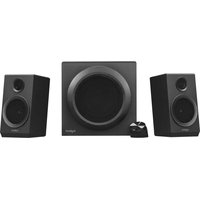
Z625 - Speakers LOGITECH - Free user manual and instructions
Find the device manual for free Z625 LOGITECH in PDF.
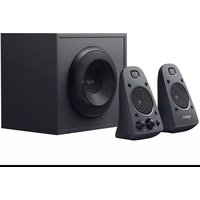


| Brand | Logitech |
| Model | Z625 |
| Product type | 2.1 speaker system |
| Configuration | 2 satellites + 1 subwoofer |
| Total power | 80 Watts RMS |
| Audio inputs | 3.5mm auxiliary, optical, RCA (not included) |
| Headphone output | 3.5mm jack on right satellite |
| Controls | Volume (rotary knob), Bass (rotary knob), Power (push button) |
| Power supply | Mains adapter (included) |
| Satellite connectivity | VGA cable for right satellite, RCA cable for left |
| Included cables | 3.5mm audio cable, optical cable |
| Subwoofer material | Wood (estimated) |
| Compatibility | PC, gaming console, TV, smartphone, tablet |
| Maintenance and cleaning | Clean with a soft dry cloth. Do not use abrasive products or liquids. |
| Safety instructions | Do not expose to moisture. Unplug before cleaning. Use only the supplied adapter. |
| Spare parts and repairability | Not available from the manufacturer. In case of failure, contact Logitech customer service. |
Frequently Asked Questions - Z625 LOGITECH
User questions about Z625 LOGITECH
0 question about this device. Answer the ones you know or ask your own.
Ask a new question about this device
Download the instructions for your Speakers in PDF format for free! Find your manual Z625 - LOGITECH and take your electronic device back in hand. On this page are published all the documents necessary for the use of your device. Z625 by LOGITECH.
USER MANUAL Z625 LOGITECH
Z625 SPEAKER SYSTEM WITH SUBWOOFER AND OPTICAL INPUT
SYSTÈME DE HAUT-PARLEURS Z625 AVEC CAISSON DE BASSES ET ENTRÉE OPTIQUE
Complete Setup Guide Guide d'installation complet

CONTENTS
English . . . . . . . . . . . . . . . . . . . . . . . . . 3
Français 7
Español....11
Português ..... 15
KNOW YOUR PRODUCT

- Plug the VGA connector on the right speaker to the VGA subwoofer port. Then plug the RCA connector on the left speaker into the corresponding jack on the back of the subwoofer.
- Plug the power plug into an electrical outlet.
- Press power button on the right satellite to turn on the Z625 speaker system.
1

2

3

CONNECT TO AUDIO SOURCE
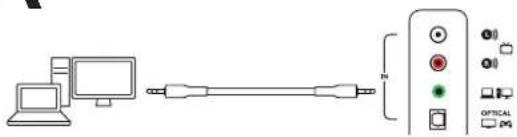
1A. Using a 3.5 mm cable:
Connect one end of the provided 3.5 mm cable to the auxiliary input jack on the back of the subwoofer and the other end to the 3.5 mm jack on your device.
1B. Connect one end of the provided 3.5 mm cable to the auxiliary input jack on the right satellite and the other end to the 3.5 mm jack on your device.
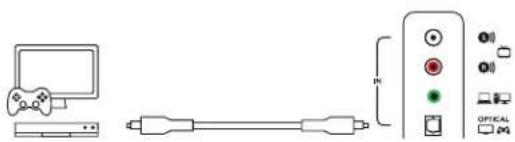
- Using an optical cable:
Connect one end of the provided optical cable to the optical input on the back of the subwoofer and the other end to your gaming console.
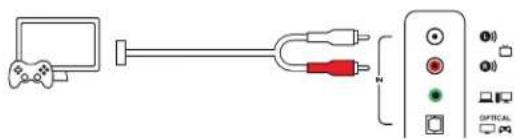
- Using a RCA cable:
Connect one end of the RCA cable to the corresponding RCA jack on the back of the subwoofer and the other end to the RCA outlet your device. NOTE: The RCA cable is not included in the box and must be purchased separately.
- Plug your headphones into the headphone jack on the right speaker. To adjust the volume of your headphones, use the volume control knob on the front of the right speaker.
1A
1B

2
3

4

ADJUST THE VOLUME
- To adjust the volume on the speakers, use the middle knob on the front of the right speaker. Turn clockwise (counterclockwise) to increase (decrease) the volume.
ADJUST THE BASS
- Adjust the bass level by turning the bass control knob on the right speaker. Turn bass knob to the right for deeper bass or to the left for less bass.


PRÉSENTATION DU PRODUIT

2

3

CONNEXION À LA SOURCE AUDIO
AJUSTEMENT DU VOLUME
COMPONENTES DEL PRODUCTO

CONECTA LOS ALTAVOCES
2

3

CONECTA A LA FUENTE DE AUDIO
1A. Con un cable de 3,5 mm:
1B

2

3

4

AJUSTA EL VOLUMEN
2

3

CONECTAR À FONTE DE ÁUDIO
1B

2

3
4

AJUSTAR O VOLUME
www.logitech.com/support/Z625
© 2019 Logitech, Logitech, Logi and other Logitech marks are owned by Logitech and may be registered. All other trademarks are the property of their respective owners. Logitech assumes no responsibility for any errors that may appear in this manual. Information contained herein is subject to change without notice.
WEB-621-001242.002
- Z625 SPEAKER SYSTEM WITH SUBWOOFER AND OPTICAL INPUT
- SYSTÈME DE HAUT-PARLEURS Z625 AVEC CAISSON DE BASSES ET ENTRÉE OPTIQUE
- CONTENTS
- CONNECT TO AUDIO SOURCE
- ADJUST THE VOLUME
- ADJUST THE BASS
- CONNEXION À LA SOURCE AUDIO
- AJUSTEMENT DU VOLUME
- CONECTA LOS ALTAVOCES
- CONECTA A LA FUENTE DE AUDIO
- AJUSTA EL VOLUMEN
- CONECTAR À FONTE DE ÁUDIO
- AJUSTAR O VOLUME
Brand : LOGITECH
Model : Z625
Category : Speakers