
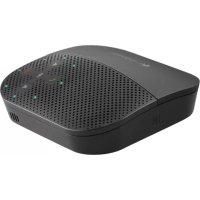
Zone 305 - Telephone LOGITECH - Free user manual and instructions
Find the device manual for free Zone 305 LOGITECH in PDF.


Pick your language and provide your email: we'll send you a specifically translated version.
| Type of product | Wireless Headset |
| Brand | Logitech |
| Model | Zone 305 |
| Product Color | Black |
| Headset Design | Single earpiece, over-the-head |
| Connectivity | Bluetooth 5.0 and USB dongle |
| Wireless Range | Up to 30 m (100 ft) |
| Speaker Size | 30 mm |
| Microphone | Noise-cancelling boom microphone |
| Talk Time | Up to 10 hours |
| Standby Time | Up to 15 days |
| Charging Time | Approximately 2 hours |
| Battery Type | Rechargeable Lithium-Ion |
| Charging Port | Micro USB |
| Compatibility | Windows, macOS, iOS, Android |
| Controls | Volume, mute, call management on earcup |
| Weight | 93 g |
| Dimensions (H x W x D) | 170 mm x 150 mm x 55 mm |
| Package Contents | Headset, USB adapter, charging cable, carrying pouch, user manual |
| Certifications | CE, FCC, RoHS |
| Cleaning | Use a soft dry cloth to clean the surfaces |
| Safety | Read the manual before use; avoid moisture |
| Spare Parts | Replaceable ear cushions and battery |
Frequently Asked Questions - Zone 305 LOGITECH
How do I pair the Zone 305 with my computer via Bluetooth?
Turn on the headset and put it in pairing mode by pressing and holding the call button for 5 seconds until the LED blinks red and blue. Then go to your computer's Bluetooth settings, select Logitech Zone 305, and click Pair.
How do I reset the Zone 305 headset?
To perform a factory reset, connect the headset to a power source, then press and hold the mute button and the volume up button simultaneously for 10 seconds. The LED will blink rapidly to confirm the reset.
How long does it take to charge the battery and how long does it last?
The headset takes about 2 hours to fully charge. It provides up to 10 hours of talk time and up to 15 days of standby time. Use the included Micro USB cable and any USB power adapter.
Can I use the Zone 305 with my smartphone?
Yes, the Zone 305 connects via Bluetooth to smartphones and tablets. You can also use the included USB Bluetooth adapter with a computer for a more stable connection.
How do I clean the Zone 305?
Use a soft, dry cloth to wipe the earpiece, headband, and microphone. Do not use liquids or chemical cleaners. Regularly remove ear cushions and clean the mesh to prevent debris buildup.
Can I replace the ear cushion?
Yes, the ear cushion is replaceable. Gently pull the old cushion to remove it, then snap the new one into place. Replacement cushions are available from Logitech's spare parts page.
How do I mute the microphone during a call?
Simply flip the boom microphone upward to mute the mic. The LED on the boom will turn red to indicate the mute is active. Alternatively, you can press the mute button on the earcup.
What is the wireless range of the Zone 305?
The wireless range is up to 30 meters (100 feet) in open spaces. Walls and obstacles may reduce the effective range.
Is the Zone 305 compatible with Microsoft Teams or Skype?
Yes, the headset works with all major softphone applications like Microsoft Teams, Skype, Zoom, and others. For the best experience, download the Logitech Tune software to customize settings.
Why is my headset not charging?
Ensure the charging cable is properly connected to the headset and a power source. If the LED does not turn on, try a different USB port or adapter. If the issue persists, the battery may need replacement.
User questions about Zone 305 LOGITECH
0 question about this device. Answer the ones you know or ask your own.
Ask a new question about this device
No questions yet. Be the first to ask one.
Download the instructions for your Telephone in PDF format for free! Find your manual Zone 305 - LOGITECH and take your electronic device back in hand. On this page are published all the documents necessary for the use of your device. Zone 305 by LOGITECH.
USER MANUAL Zone 305 LOGITECH
Manual assistant
Powered by Anthropic
Waiting for your message
Product information
Brand : LOGITECH
Model : Zone 305
Category : Telephone