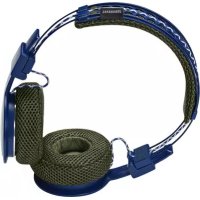
Stadion - Headphones URBANEARS - Free user manual and instructions
Find the device manual for free Stadion URBANEARS in PDF.


Pick your language and provide your email: we'll send you a specifically translated version.
| Product Type | Wireless Headphones |
| Brand | Urbanears |
| Model | Stadion |
| Dimensions | 160 x 180 x 50 mm |
| Weight | 210 g |
| Power | Rechargeable lithium-ion battery via USB-C |
| Battery Life | 30 hours |
| Charging Time | 2 hours |
| Connectivity | Bluetooth 5.0 |
| Frequency Range | 20 Hz - 20 kHz |
| Main Features | Wireless listening, built-in microphone, touch controls, passive noise reduction |
| Care and Cleaning | Wipe with a soft, dry cloth |
| Safety | Do not expose to water or extreme temperatures |
| Spare Parts and Repairability | USB-C cable included, replaceable ear cushions |
| General Information | Over-ear headphones, foldable, compatible with voice assistants |
Frequently Asked Questions - Stadion URBANEARS
How to turn the Urbanears Stadion headphones on and off?
To turn on, press and hold the Power button for 3 seconds. To turn off, press and hold the same button for 3 seconds until you hear a sound signal.
How to pair the headphones with my phone?
Make sure the headphones are off. Press and hold the Bluetooth button for 5 seconds until the LED flashes blue and red. Enable Bluetooth on your phone and select 'Urbanears Stadion' from the list.
What to do if the headphones won't connect?
Try to reset the headphones by pressing and holding the Power and Volume + buttons simultaneously for 5 seconds. Then remove the device from your phone's Bluetooth list and re-pair.
How to charge the Urbanears Stadion headphones?
Use the provided USB-C cable. Plug it into the headphones and a power adapter (not included). The LED turns red while charging and turns off when fully charged (about 2 hours).
What is the battery life?
The headphones offer up to 30 hours of continuous playback. A quick 15-minute charge gives about 3 hours of use.
How to clean the headphones?
Use a soft, dry cloth to wipe the surfaces. For the ear cushions, you can gently dust them. Avoid chemicals and moisture.
Can I use the headphones with a cable?
Yes, the headphones have a 3.5 mm jack. Use the included audio cable for wired use, even if the battery is depleted.
How to make a call with the headphones?
The headphones have a built-in microphone. To answer a call, press the multifunction button once. To hang up, press again. To reject a call, press and hold for 2 seconds.
Are the headphones water resistant?
No, the headphones are not waterproof. Avoid exposure to water, rain, or excessive sweat. Store in a dry place.
Where to find replacement parts like ear cushions?
The ear cushions are replaceable. You can order them from Urbanears customer service or approved spare parts websites. Check the manual for part numbers.
User questions about Stadion URBANEARS
0 question about this device. Answer the ones you know or ask your own.
Ask a new question about this device
No questions yet. Be the first to ask one.
Download the instructions for your Headphones in PDF format for free! Find your manual Stadion - URBANEARS and take your electronic device back in hand. On this page are published all the documents necessary for the use of your device. Stadion by URBANEARS.