
IAN 285762 - Power outlet POWERFIX - Free user manual and instructions
Find the device manual for free IAN 285762 POWERFIX in PDF.


| Product Type | Power Outlet |
| Brand | Powerfix |
| Model | IAN 285762 |
| Rated Voltage | 230 V AC |
| Rated Current | 16 A |
| Maximum Power Load | 3680 W |
| Number of Sockets | 1 |
| Child Protection | Yes (integrated safety shutters) |
| Indicator Light | Yes (power on) |
| Dimensions (approx.) | 60 x 60 x 80 mm |
| Weight (approx.) | 100 g |
| Cable Length | Not specified |
| Protection Class | IP20 (indoor use only) |
| Overload Protection | Yes (automatic shut-off) |
| Surge Protection | No |
| Compatible Plug Types | Type F (Schuko) / Type E |
| Operating Temperature | -10°C to 40°C |
| Certifications | CE, RoHS |
| Color | White |
Frequently Asked Questions - IAN 285762 POWERFIX
User questions about IAN 285762 POWERFIX
0 question about this device. Answer the ones you know or ask your own.
Ask a new question about this device
Download the instructions for your Power outlet in PDF format for free! Find your manual IAN 285762 - POWERFIX and take your electronic device back in hand. On this page are published all the documents necessary for the use of your device. IAN 285762 by POWERFIX.
USER MANUAL IAN 285762 POWERFIX
SOCKET WITH USB OUTLET / SOCKET WITH 2 USB PORTS
GB IE NI CY
SOCKET WITH USB OUTLET / SOCKET WITH 2 USB PORTS
Operation and Safety Notes
GR CY
Before reading, unfold the pages containing the illustrations and familiarise yourself with all functions of the device.
GR CY
GB/IE/NI/CY Operation and Safety Notes
Page 7
List of pictograms used......Page 8
Introduction......Page 11
Intended use Page 12
Parts Description......Page 13
Scope of Delivery......Page 14
Technical Data......Page 14
Safety notices ......Page 15
Installation......Page 23
Use......Page 25
Cleaning and Care......Page 27
Warranty and Service......Page 31
Service address ......Page 32
Manufacturer......Page 33
| List of pictograms used | |
 | Read the instructions! |
 | Volt (direct current) |
 | Hertz (frequency) |
 | Volt (alternating current) |
 | Observe the warnings and safety notices! |
 | Accident hazard and risk of fatal injury for infants and children! |
 | Warning! Danger of electric shock! |
 | Connection outer conductor |
 | Neutral conductor |
 | Ground conductor |
 | SMPS (Switch mode power supply unit) (switching power supply) |
 | Short-circuit proof safety transformer |
 | This product is suitable only for use indoors, in dry and enclosed rooms. |
 | Dispose of the packaging and the product in an environmentally friendly manner! |
Socket with USB Outlet / Socket with 2 USB Ports
- Introduction

We congratulate you on the purchase of your new product. You have chosen a high quality product. The instructions for use are part of the product. They contain important information concerning safety, use and disposal. Before using the product, please familiarise yourself with all of the safety information and instructions for use. Only use the product as described and for the specified applications. If you pass the product on to anyone else, please ensure that you also pass on all the documentation with it.
Intendeduse

This product is suitable only for use indoors, in dry and enclosed rooms.
10365A: The product charges the rechargeable batteries of mobile end devices via a USB cable. Mobile end devices include smartphones, tablets and headphones.
10365B: Alongside charging the rechargeable batteries of mobile end devices via USB, you can also operate regular electrical consumers via earthed wall sockets.
Any modifications to the product are considered improper use and may result in considerable hazards. The manufacturer assumes no liability for damages due to improper use. This product is not intended for commercial use.
12 GB/IE/NI/CY
Parts Description
10365A:
1 USB A socket
2 Socket casing with mounting plate
3 Assembly clasp
4 USB charge indicator
5 Cover frame
6 Socket cover
10365B:
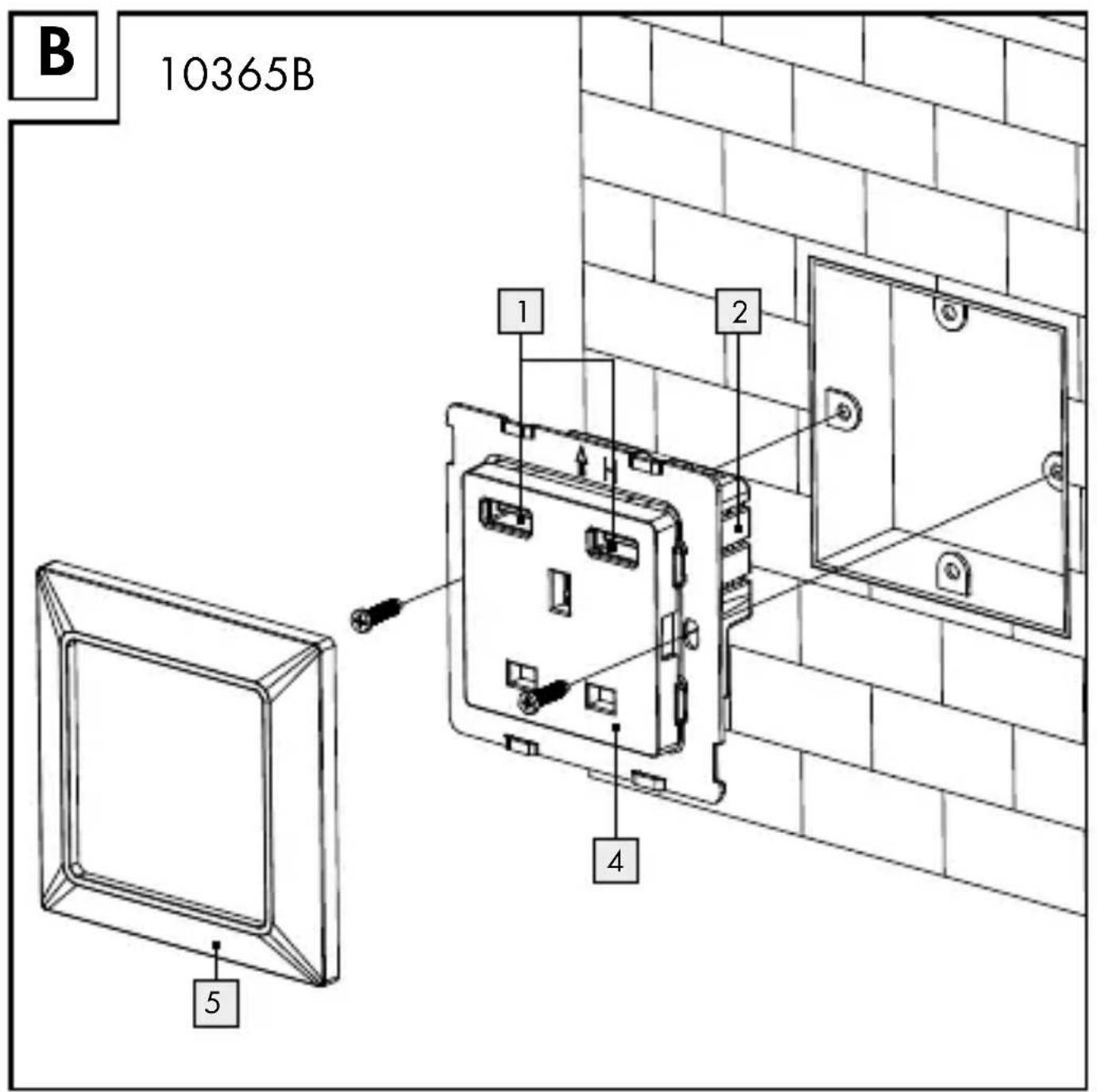
1 USB A socket
2 Socket casing with mounting plate
4 Earthed wall socket
5 Cover frame
Scope of Delivery
10365A:
1 3-port USB socket
1 Instructions for use
10365B:
1 Socket with 2 USB ports
1 Instructions for use
- Technical Data
Model/ Type number: 10365A: WFL-EU5-U3 10365B: WFL-UK5-01SU2
USB sockets: 2.0 Type A Input voltage: 250V \~ Frequency: 50 Hz Conductor cross-section: max. 2.5 mm² Protection class: II/
14 GB/IE/NI/CY
10365A:
USB output: Output current:
5 V ---, max. 3.1 A total, 1 A individually
10365B:
USB output: Output current:
5V---, max. 2.1 A total, 1 A individually
Earthed wall socket: Output current:
13 A/250V
Subject to technical changes without notice.

Safety notices
PLEASE READ THE INSTRUCTIONS PRIOR TO USE! PLEASE KEEP THE INSTRUCTIONS IN A
SAFE PLACE! IF PASSING THIS PRODUCT ON TO A THIRD PARTY, INCLUDE ALL DOCUMENTS!


natural_image
Simple line drawing of a human figure with arms raised, labeled 'R' (no text or symbols on the figure itself)RISNOWARNING!
DENT AND DANGER TO LIFE FOR INFANTS AND CHILDREN!
Never leave children unsupervised with the packaging materials. They pose a risk of suffocation as children may swallow or inhale small parts or films. Children frequently underestimate the dangers. Please always keep the product out of the reach of children. It is not a toy.

This product may be used by children aged 8 years and up, as well as by persons with reduced physical, sensory or mental capacities, or lacking experience and knowledge, so long as they are supervised or instructed in the safe use
of the product and understand the associated risks. Do not allow children to play with the product. Cleaning and user maintenance must not be performed by children without supervision.

Avoid the danger of death from electric shock!
Do not open the product's casing. The product does not contain parts which can be serviced by the user. In there are any faults, please contact the service centre.
■ Work to the power supply may only be carried out when it is in a deenergised state and only by a trained electrician.
WARNING!
Installation may only be performed by individuals with the appropriate amount of knowledge* and experience.
By incorrectly installing the product, you could endanger:
- Your own life - The lives of users of the electrical system.
By incorrectly installing the productyou risk serious property damage, i.e. due to fire.
You are personally liable for injuries to persons and property damage.
Consult an electrician!
* For installation, the following pieces of specialist knowledge in particular should be kept in mind:
- 5 safety rules for working on electrical systems: Disconnect, secure against restarting,
determine deenergised state, ground and short-circuit, cover or block off nearby live parts.
- Select the suitable tool, measuring device, and if necessary, personal protective equipment
- Evaluate measurement results
- Select electric installation material to guarantee system is switched off,
- IP code
- Assemble the electric installation material
- Type of mains supply (TN system, IT system, TT system) and the resulting connection requirements (grounding without a special grounding conductor, protective earthing, additional measures required, etc.)
If you do not have any expertise in this area, do not perform installation of the product yourself. Commission a trained electrician.
Do not use the product if it is visibly damaged. Only install the product in a deenergised state! Disconnect the electrical mains supply line by switching off the circuit breakers connected to it or unscrewing the fuse. Prevent this from being unintentionally re-started (e.g. with a warning sign).
Before assembly, check the mains supply line with a suitable measuring device to see that it is deenergised.
The local mains voltage must correspond to the technical data of the product (see Technical Data).
■ Only operate the product when it is stationary.
The product must be operated in a suitable flush-mounted box or surface mount box or assembled in another suitable casing to guarantee the necessary electric shock protection.
Only operate the product in a dry and dust-free environment.
■ Only operate the product indoors.
Do not expose the product to unfavourable conditions, such as
- Humidity, moisture
- Direct sunlight
- Heat radiation
- Flammable gases, steam, solvents
- Mechanical stresses.

Prevent fire and injury hazards!
We assume no liability for property damage or personal injury due to improper handling or
failure to observe the safety instructions. In such cases, the warranty/guarantee is voided.
Any use other than that described in these instructions could damage the product. Do not make structural modifications to the product. Otherwise, the safe operation of the product cannot be guaranteed.
The installation of the product may only be carried out by a qualified professional (i.e. an electrician), who is familiar with the relevant specifications (i.e. VDE). Improper installation poses the risk of severe property damage or personal injury i.e. due to fire or electric shock. In the case of personal injuries and property damages, you are personally liable.
■ Avoid overloading the product.
Overloading can cause fire hazards or cause damage to the product. The maximum load is approx. 3120W.
- Installation
⚠️ DANGER OF ELECTRIC SHOCK!
Only install the product in a deenergised state! Disconnect the electrical mains supply line by switching off the circuit breakers connected to it or unscrewing the fuse. Prevent this from being unintentionally re-started (e.g. with a warning sign).
Before assembly, check the mains supply line with a suitable measuring device to see that it is deenergised.
☐ Remove the socket cover 6 (only model 10365A) and the cover frame 5 from the mounting plate 2.
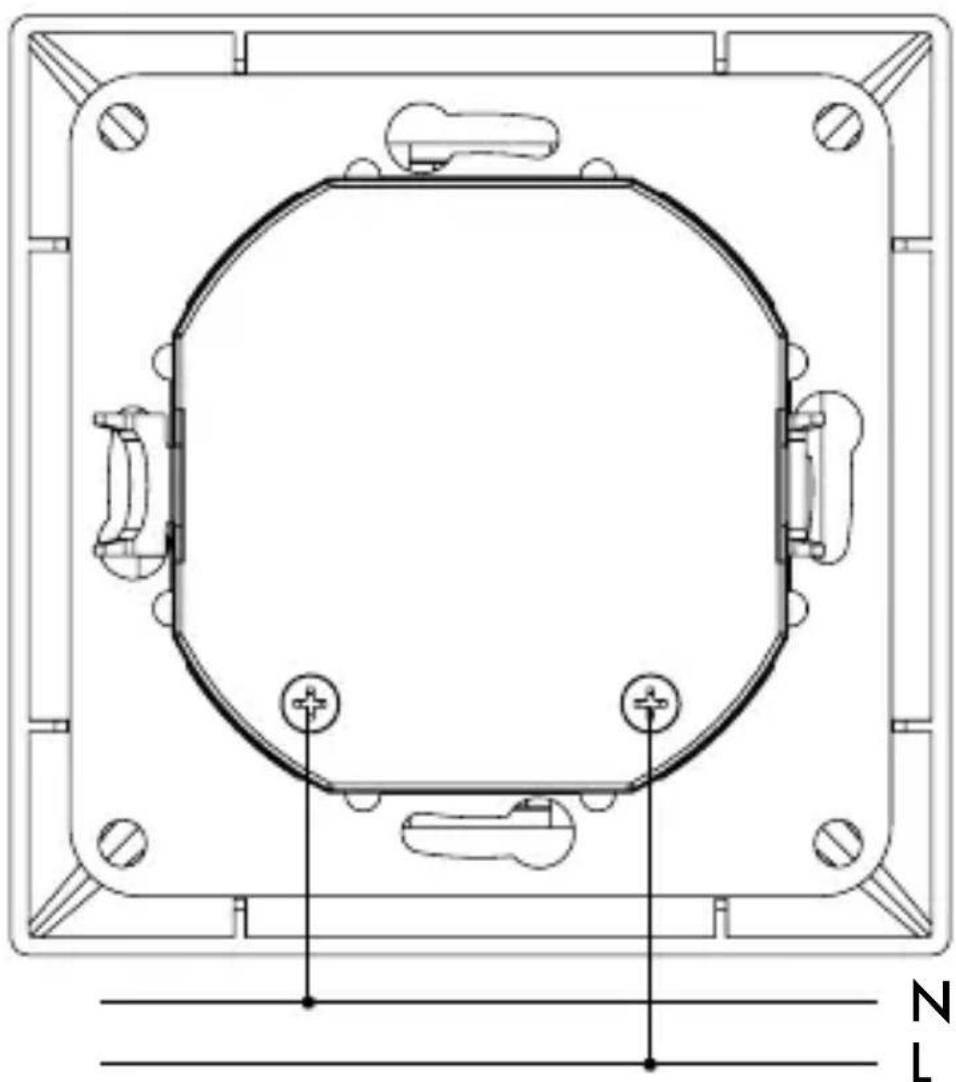
☐ Connect the mains supply line (wire cross-section 2.5 mm ^4 ) with the terminal connections (see Fig. C and D).
☐ Remove the insulation from the cable on a length of approx. 10 mm for this purpose.
☐ To remove a cable, loosen the screw of the terminal connection and pull out the cable.
☐ Fix the mounting plate 2 to the flush-mounted box or surface mount box used with 2 suitable screws. For model 10365A you can also clamp the mounting plate 2 with the assembly clasp 3. Ensure that the cable is not kinked or damaged.
☐ Place the cover frame 5 on the socket.
☐ Insert the socket cover 6 into the mounting plate.
☐ The product is ready to use after the mains voltage has been switched on again.
Use
⚠️CAUTION! Connected devices can malfunction due to the use of a non-standard charging cable and plug. The devices could be destroyed.
☐ Only use the permitted charging cable and plug.
⚠️CAUTION! The plug can malfunction due to twisting and tilting. The contacts could be damaged.
☐ Insert the plug into the socket correctly aligned, upright and with little force.
☐ Insert the USB plug into the USB charging socket 1.
☐ When using multiple USB charging output sockets, note the maximum output current (see Technical Data).
☐ Observe the manufacturer specifications on the charging time and charging behaviour of the connected device. If multiple devices are connected, the charging time according to the manufacturer specifications for the devices may be exceeded.
Note: The USB charging output socket is not for data transmission.
10365A:
☐ The red LED 4 displays if the electrical consumer has been charged.
10365B:
☐ Operate normal electrical consumers via earthed wall sockets. The local mains voltage must correspond to the type specification of the electrical consumer.
☐ Plug the mains plug as usual into the earthed wall socket.
The earthed wall socket is child-proofed.
☐ Insert each pin of the mains socket at the same time into the contact openings of the earthed wall socket to child-proof.
- Cleaning and Care
DANGER! RISK OF ELECTRIC SHOCK!
Before cleaning the product, disconnect the power supply (if necessary, via circuit breakers).
☐ Ensure that no liquids get into the product. Liquids which get into the product can cause it to short circuit.
□ Clean the product with a dry, lint-free cloth. For more stubborn dirt you can also lightly moisten the cloth.
☐ Do not use solvent-containing cleaners. Otherwise the surface of the product could be damaged.
☐ Never immerse the product in water or other liquids. Otherwise the product could be damaged.
☐ The product requires no maintenance. Allow repairs to be carried out by an electrician.
- Disposal

The packaging is made entirely of recyclable materials, which you may dispose of at local recycling facilities. The Green Dot is not valid for Germany.

Observe the marking of the packaging materials for waste separation, which are marked with abbreviations (a) and numbers (b) with following meaning: 1–7: plastics / 20–22: paper and fibre-board / 80–98: composite materials.

natural_image
Symbolic icon of a person recycling a circular arrow, no text or numbers presentThe product and packaging materials are recyclable, dispose of it separately for better waste treatment. The Triman logo is valid in France only.

Contact your local refuse disposal authority for more details of how to dispose of your worn-out product.
Do not dispose of electric equipment in the household waste!
In accordance with the European Directive 2012/19/EC on waste electrical and electronic equipment and its translation into national law, used electrical equipment must be collected separately and recycled in an environmentally responsible way.
When the product has reached the end of its useful life, dispose of it properly and not in the household bin, to help protect the environment. Please contact your municipality for information on collection facilities and their opening hours.
- Warranty and Service
Note: this product includes a 36 month warranty from the date of purchase. The product has been produced to the highest standards and thoroughly checked before dispatch. However, if defects in manufacturing or material arise during the warranty period, please contact your retailer immediately.
The warranty does not cover damages due to improper handling, failure to comply with the operating instructions, or manipulation by unauthorised persons. Most malfunctions are caused by incorrect operation. Therefore please first refer to the operating instructions if a malfunction occurs.
Please contact the Uni-Elektra GmbH service address with any questions. The product can only be returned to us after contacting us. Postage due shipments will not be accepted. Warranty services do not extend or restart the warranty period of 36 months.
• Service address
Uni-Elektra GmbH
Kirchstr. 48
DE-72145 Hirrlingen
GERMANY
Tel.: 00800 888 11 333
GB uni-service-GB@teknihall.com
IE uni-service-IE@teknihall.com
NI uni-service-NI@teknihall.com
CY uni-service-CY@teknihall.com
32 GB/IE/NI/CY
IAN 285762
Please have your receipt and the item number (e.g. IAN 12345) ready as your proof of purchase when enquiring about your product.
Manufacturer
Uni-Elektra GmbH
Kirchstr. 48
DE-72145 Hirrlingen
GERMANY
CE

natural_image
Simple line drawing of a human figure with arms raised, no text or symbols presentnatural_image
Symbolic icon of a person recycling a tree with arrows, enclosed in a circle (no text or numbers)natural_image
Silhouette of a person disposing of trash into a bin (no text or symbols)natural_image
Symbolic icon of a person recycling with arrows, enclosed in a circle (no text or numbers)natural_image
Silhouette of a person sorting trash into a bin (no text or symbols)natural_image
Symbol of a trash bin with crossed lines and a horizontal bar, no text or numbers present.C
10365A
natural_image
Technical line drawing of a mechanical component with mounting holes and a central octagonal frame (no text or symbols)D
10365B


ra GmbH
Kirchstr. 48
DE-72145 Hirrlingen
GERMANY


- SOCKET WITH USB OUTLET / SOCKET WITH 2 USB PORTS
- GR CY
- List of pictograms used......Page 8
- Introduction......Page 11
- Safety notices ......Page 15
- Installation......Page 23
- Use......Page 25
- Cleaning and Care......Page 27
- Warranty and Service......Page 31
- - Introduction
- Intendeduse
- GB/IE/NI/CY
- Parts Description
- 10365A:
- 10365B:
- Scope of Delivery
- - Technical Data
- Safety notices
- SAFE PLACE! IF PASSING THIS PRODUCT ON TO A THIRD PARTY, INCLUDE ALL DOCUMENTS!
- RISNOWARNING!
- DENT AND DANGER TO LIFE FOR INFANTS AND CHILDREN!
- Avoid the danger of death from electric shock!
- WARNING!
- Prevent fire and injury hazards!
- - Installation
- ⚠️ DANGER OF ELECTRIC SHOCK!
- Use
- - Cleaning and Care
- DANGER! RISK OF ELECTRIC SHOCK!
- - Disposal
- Do not dispose of electric equipment in the household waste!
- - Warranty and Service
- • Service address
- IAN 285762
- Manufacturer
- ra GmbH
Brand : POWERFIX
Model : IAN 285762
Category : Power outlet