
ST7202USB - USB Hub StarTech.com - Free user manual and instructions
Find the device manual for free ST7202USB StarTech.com in PDF.


| Product Type | USB Hub |
| Model | ST7202USB |
| Brand | StarTech.com |
| Number of Ports | 7 |
| USB Standard | USB 2.0 (Hi-Speed) |
| Data Transfer Rate | Up to 480 Mbps |
| Power Source | Bus-powered via USB |
| Input Voltage | 5V DC |
| Dimensions (W x D x H) | 4.5 x 1.5 x 0.75 in (11.4 x 3.8 x 1.9 cm) |
| Weight | 3.2 oz (90 g) |
| Cable Length | 12 in (30 cm) integrated cable |
| LED Indicators | Power and activity per port |
| Operating Temperature | 32°F to 104°F (0°C to 40°C) |
| Operating Humidity | 5% to 90% non-condensing |
| Supported Operating Systems | Windows, macOS, Linux, Chrome OS |
| Plug and Play | Yes, no drivers required |
| Maintenance | Clean with a soft, dry cloth |
| Safety Precautions | Do not expose to liquids or excessive heat |
| Spare Parts and Repairability | No user-serviceable parts; contact StarTech support |
| Warranty | 2 years limited warranty |
Frequently Asked Questions - ST7202USB StarTech.com
User questions about ST7202USB StarTech.com
0 question about this device. Answer the ones you know or ask your own.
Ask a new question about this device
Download the instructions for your USB Hub in PDF format for free! Find your manual ST7202USB - StarTech.com and take your electronic device back in hand. On this page are published all the documents necessary for the use of your device. ST7202USB by StarTech.com.
USER MANUAL ST7202USB StarTech.com
natural_image
Black electronic device labeled '4 Port USB 2.0 Hub' with StarTech.com branding, showing three connected cables (no readable text beyond branding)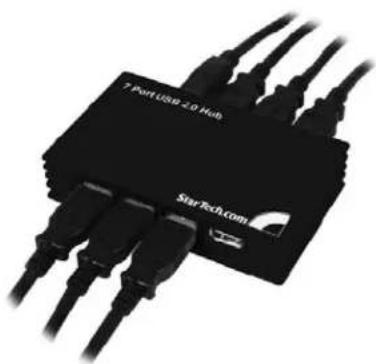
natural_image
Close-up of a black StarTech.com USB port with multiple Ethernet cables (no visible text or symbols on the device body)Actual product may vary from photo
StarTech.com
The Professionals' Source for Hard-to-Find Computer Parts
FCC Compliance Statement
This equipment has been tested and found to comply with the limits for a Class B digital device, pursuant to part 15 of the FCC Rules. These limits are designed to provide reasonable protection against harmful interference in a residential installation. This equipment generates, uses and can radiate radio frequency energy and, if not installed and used in accordance with the instructions, may cause harmful interference to radio communications. However, there is no guarantee that interference will not occur in a particular installation. If this equipment does cause harmful interference to radio or television reception, which can be determined by turning the equipment off and on, the user is encouraged to try to correct the interference by one or more of the following measures:
- Reorient or relocate the receiving antenna.
- Increase the separation between the equipment and receiver.
- Connect the equipment into an outlet on a circuit different from that to which the receiver is connected.
- Consult the dealer or an experienced radio/TV technician for help.
Use of Trademarks, Registered Trademarks, and other Protected Names and Symbols
This manual may make reference to trademarks, registered trademarks, and other protected names and/or symbols of third-party companies not related in any way to StarTech.com. Where they occur these references are for illustrative purposes only and do not represent an endorsement of a product or service by StarTech.com, or an endorsement of the product(s) to which this manual applies by the third-party company in question. Regardless of any direct acknowledgement elsewhere in the body of this document, StarTech.com hereby acknowledges that all trademarks, registered trademarks, service marks, and other protected names and/or symbols contained in this manual and related documents are the property of their respective holders.
Instruction Manual
Table of Contents
Introduction 1
Features 1
Before You Begin....1
System Requirements 1
Package Contents ....1
Installation 2
Windows 98SE 2
Windows 2000/XP ....3
Windows Vista 4
Specifications ....5
Accessory Products from StarTech.com ....6
Technical Support 7
Warranty Information ....7
Instruction Manual
Introduction
Thank you for purchasing a StarTech.com Multi-port USB 2.0 Hub. This product allows you to connect multiple USB 2.0 devices to your computer, while taking up minimal deskspace. Perfect for notebook users or those with confined workspaces, this product delivers the performance you expect from USB 2.0 while maintaining backward compatibility with the USB 1.1 standard, so your existing devices still function flawlessly. For added convenience, this product includes a USB-to-power converter so that unused USB ports on your computer can power your high performance devices.
Features
- Compact space-saving design
• Maximum data transfer rate of up to 480 Mbps - Backward compatible with USB 1.1 standard
- Quick, easy installation
Before You Begin
System Requirements
• A computer with one available USB 2.0 port
• Windows 98SE / ME / 2000 / XP / Vista, MAC 8.6/9.x/10.x and later
Package Contents
This package should contain:
- 1 x USB 2.0 Hub
- 1 x USB Cable
- 1 x Power Adapter
- 1 x User Manual
Instruction Manual
Installation
To begin the installation process, connect the USB 2.0 Hub to an available USB 2.0 port. Software installation will commence as follows:
Windows 98SE
-
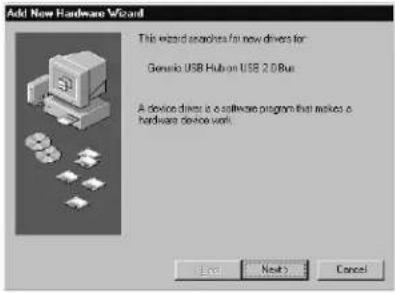
Windows will launch the Add New Hardware Wizard. Press Next to begin the software installation process.
-
When the Add New Hardware Wizard appears, click Next:
-
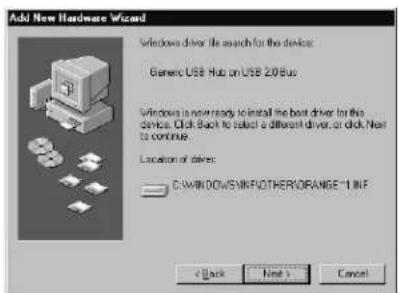
Windows will inform you that it is ready to install the driver for the device Generic USB Hub on USB 2.0 Bus. Click Next:
-
Follow any remaining prompts. When Windows informs you it has finished installing the drivers. Click Finish.
-
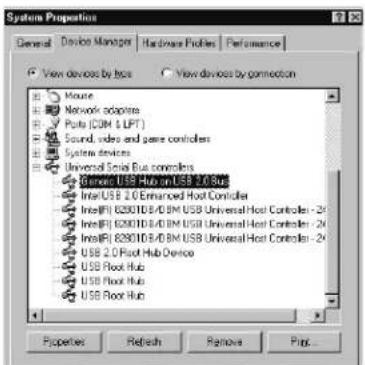
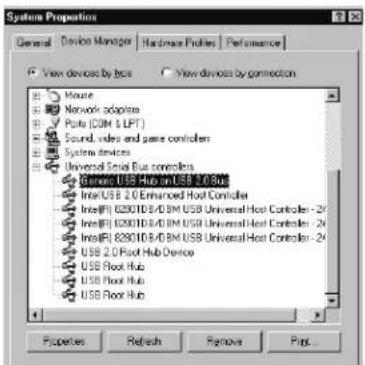
To verify that the drivers have successfully been installed, right-click on My Computer and select Manage. Select Device Manager, and click on the [+] symbol located next to Universal Serial Bus Controllers. Here, you should notice a listing for Generic USB Hub on USB 2.0 Bus:
-
You can now attach USB devices to the hub.
Instruction Manual
Windows 2000/XP
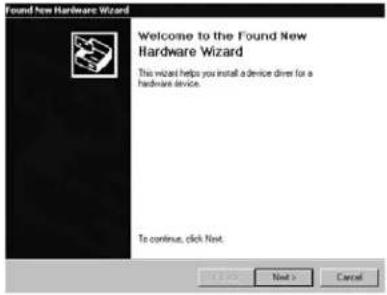
- Windows will launch the Add New Hardware Wizard. Press Next to begin the software installation process.
- When the Found New Hardware Wizard appears, click Next:
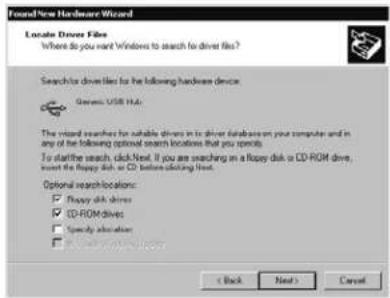
- Windows will then search for the driver files required for the Generic USB Hub. Click Next:
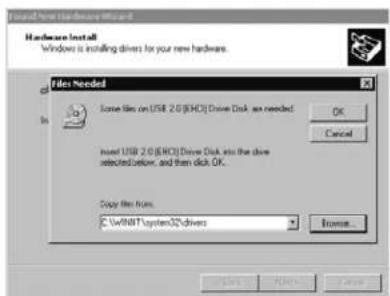
- Windows will locate the driver file. Click OK to proceed, and follow any remaining prompts to complete installation.
Instruction Manual
-
To verify that the drivers have successfully been installed, right-click on My Computer and select Manage. Select Device Manager, and click on the [+] symbol located next to Universal Serial Bus Controllers. Here, you should notice a listing for Generic USB Hub:
-
You can now attach USB devices to the hub.
Windows Vista
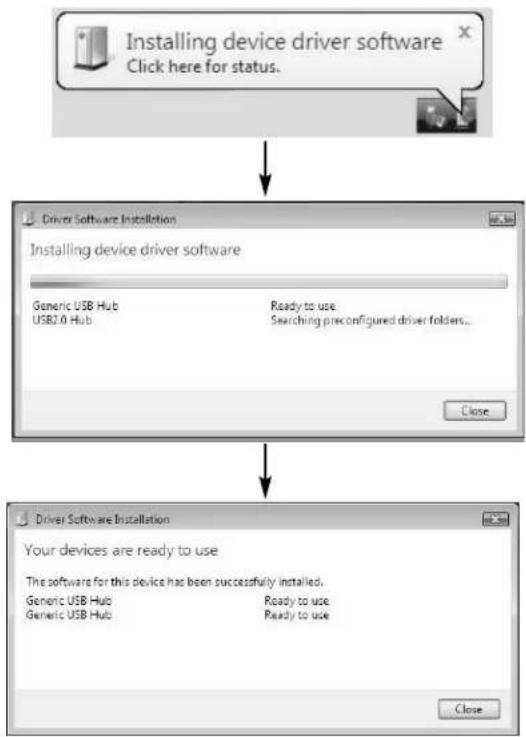
Windows Vista driver installation requires no interaction. Simply connect the USB Hub to an available USB port on the host computer, and wait for the Windows notification that your device is now installed:
flowchart
graph TD
    A["Installing device driver software Click here for status."] --> B["Driver Software Installation"]
    B --> C["Installing device driver software"]
    C --> D["Generic USB Hub\nUSB2.0 Hub"]
    C --> E["Ready to use\nSearching preconfigured driver folders..."]
    C --> F["Close"]
    B --> G["Driver Software Installation"]
    G --> H["Your devices are ready to use"]
    H --> I["The software for this device has been successfully installed."]
    I --> J["Generic USB Hub\nGeneric USB Hub"]
    I --> K["Ready to use\nReady to use"]
    I --> L["Close"]
Instruction Manual
Specifications
| Bus Type USB | |
| Connectors | 1 x USB Mini B Male4 x USB Type A Male (ST4202USB)7 x USB Type A Male (ST7202USB) |
| Cables 1 x 3 ft. USB Type B to Type A Cable | |
| Maximum Data Transfer Rate 480 Mbps | |
| Operating Temperature 0 to 70°C (0 to 158°F) | |
| Regulatory Certifications FCC, CE, ROHS |
Instruction Manual
Accessory Products from StarTech.com
Contact your local StarTech.com dealer or visit www.startech.com for cables or other accessories that will help you get the best performance out of your new product.
USB2HAB6
6 ft High Speed Certified USB 2.0 Cable
USB2HAB10
10 ft High Speed Certified USB 2.0 Cable
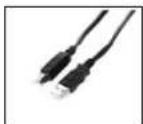
USB2HAB15
15 ft High Speed USB 2.0 Cable
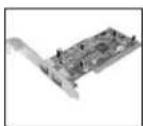
PCI225USB
Value 2 Port USB 2.0 PCI Card
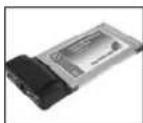
CBUSB220
2 Port USB 2.0 CardBus Adapter
Instruction Manual
Technical Support
StarTech.com's lifetime technical support is an integral part of our commitment to provide industry-leading solutions. If you ever need help with your product, visit
www.startech.com/support and access our comprehensive selection of online tools, documentation, and downloads.
Warranty Information
This product is backed by a one-year warranty. In addition, StarTech.com warrants its products against defects in materials and workmanship for the periods noted, following the initial date of purchase. During this period, the products may be returned for repair, or replacement with equivalent products at our discretion. The warranty covers parts and labor costs only. StarTech.com does not warrant its products from defects or damages arising from misuse, abuse, alteration, or normal wear and tear.
Limitation of Liability
In no event shall the liability of StarTech.com Ltd. and StarTech.com USA LLP (or their officers, directors, employees or agents) for any damages (whether direct or indirect, special, punitive, incidental, consequential, or otherwise), loss of profits, loss of business, or any pecuniary loss, arising out of or related to the use of the product exceed the actual price paid for the product. Some states do not allow the exclusion or limitation of incidental or consequential damages. If such laws apply, the limitations or exclusions contained in this statement may not apply to you.
About StarTech.com
StarTech.com is “The Professionals’ Source for Hard-to-Find Computer Parts”. Since 1985, we have been providing IT professionals with the quality products they need to complete their solutions. We offer an unmatched selection of computer parts, cables, server management solutions and A/V products and serve a worldwide market through our locations in the United States, Canada, the United Kingdom and Taiwan.
Visit www.startech.com for complete information about all our products and to access exclusive interactive tools such as the Parts Finder and the KVM Reference Guide. StarTech.com makes it easy to complete almost any IT solution. Find out for yourself why our products lead the industry in performance, support, and value.
- FCC Compliance Statement
- Use of Trademarks, Registered Trademarks, and other Protected Names and Symbols
- Instruction Manual
- Table of Contents
- Introduction
- Features
- Before You Begin
- System Requirements
- Package Contents
- Installation
- Windows 98SE
- Windows 2000/XP
- Windows Vista
- Accessory Products from StarTech.com
- USB2HAB6
- USB2HAB10
- USB2HAB15
- PCI225USB
- CBUSB220
- Technical Support
- Warranty Information
- Limitation of Liability
- About StarTech.com
Brand : StarTech.com
Model : ST7202USB
Category : USB Hub