
IAN 289558 - Phone holder ULTIMATE SPEED - Free user manual and instructions
Find the device manual for free IAN 289558 ULTIMATE SPEED in PDF.


| Product Type | Smartphone Holder for Vehicles |
| Intended Use | Mounting smartphones on the inside windscreen of vehicles |
| Mounting Method | Vacuum suction cup |
| Compatibility (Device Width) | 58 - 84 mm |
| Rotation | 360° via ball joint |
| Adjustable Holding Tabs | Yes, push-button adjustment |
| Clamp Mechanism | Press-to-lock and release |
| Cable Clips | For cable thicknesses 2.4-3.0 mm and 3.5-4.1 mm |
| Color | Black |
| Weight (Approximate) | 200 g |
| Material | High-quality plastic |
| Operating Temperature | Up to 70°C (158°F) |
| Safety Warning | Do not install within airbag deployment zone or obstruct driver's view |
| Cleaning Instructions | Use a dry, lint-free cloth; avoid alcohol or flammable liquids |
| Warranty | 3 years from date of purchase for first buyer |
| Spare Parts Availability | 3 years from date of purchase |
| Package Contents | Support bracket with arm and vacuum suction cup, user manual |
| Model Number | 220 106 51 |
| Serial Number (Example) | 43/2017 |
Frequently Asked Questions - IAN 289558 ULTIMATE SPEED
User questions about IAN 289558 ULTIMATE SPEED
0 question about this device. Answer the ones you know or ask your own.
Ask a new question about this device
Download the instructions for your Phone holder in PDF format for free! Find your manual IAN 289558 - ULTIMATE SPEED and take your electronic device back in hand. On this page are published all the documents necessary for the use of your device. IAN 289558 by ULTIMATE SPEED.
USER MANUAL IAN 289558 ULTIMATE SPEED

SMARTPHONE HOLDER
GB IE NI
SMARTPHONE HOLDER
Instructions for use and safety guidelines
DK
HOLDER TIL SMARTPHONE
Instructions for use and safety guidelines
- Intended use
Congratulations! You have chosen a high-quality product to purchase. This product is intended as a holder in vehicles for smartphones. The mount is designed for the inside windscreen pane. Use the product only for the intended use.
• Delivery content
1 support bracket with support arm and vacuum suction cup 1 user manual
- Parts Description
1 Vacuum suction cup
2 with vacuum tab
3 Support arm
4 Suction lever
5a Ball joint
5b Adjustment wheel
6 Holder
7 clamp
8 adjustable holding tabs
9 Cable clips for cable thicknesses of 2.4 - 3.0 mm & 3.5 - 4.1 mm

- Technical Data
Suitable for appliances with a width of approx. 58 - 84 mm
Safety Guidelines

WARNING!
- Do not install the product within the operating parameter of an airbag or near the steering wheel. This may lead to accidents and injuries, in particular in the impact zone of the head or body.
■ The positioning of the product must not impair the driver in any way. The field of view must be free. - Do not use, install or adjust whilst driving. Installation of the product or any accessories must not impair the driver whilst he/she is driving a vehicle.
■ Do not pick up or look for any fallen objects during the journey. Risk of an accident!
■ Lay all feed lines so that they pose no danger (tripping hazard) and cannot be damaged. Risk of an accident!
■ Supply cables may be damaged if incorrectly handled!
- Check the mounting support for stability before each time taking a ride.
In case of failure to observe the safety guidelines, the holder or the appliance may come loose and be damaged. Consequential damages cannot be ruled out. Risk of an accident!
■ When passing on to third parties, please include the user manual and safety guidelines. Store the safety guidelines together with the appliance.
- Notes
■ Strong sunlight can affect functioning of the product.
- Direct sunlight can damage the suction cup and adhesion if the temperature inside the vehicle exceeds 70°C (158°F).
■ The suction cup is suitable for attaching to a smooth and clean surface for a limited time only.
■ Free the suction cup at regular intervals (at least every 3 months) and reattach it to create a new vacuum.
- No liability is accepted for damages caused by misuse of the product or by failure to observe the safety guidelines.
- In order to avoid break-ins, you should not leave your device unattended in the holder.
• Installation Instructions
1. Fastening the suction cup to the windscreen
- The ambient temperature should be above 15°C (59°F) for an optimal and secure adhesion of the suction cup. If the ambient temperature is
not above 15°C (59°F), warm the surface with a hairdryer. Press the sucker 1 firmly onto
the base and move the suction lever 4 to create a vacuum between the base and the sucker.
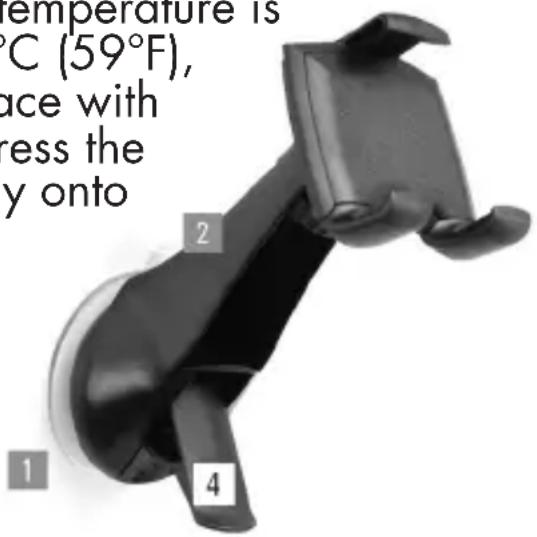
In order to remove the fastening system from the base, pull up the suction lever 4 and pull on the vacuum tab 2 to release the vacuum.
2. Setting the ball joint for the desired tilt angle
■ Loosen the adjustment wheel 5b on the ball joint 5a behind the support and set the desired vertical or horizontal position, as well as the prefer
Then fasten again the adjustment wheel 5b.

3. Attaching a device to the holder

- The lower holding tabs 8 can be adjusted to fit the size of the device. The tabs 8 can be pulled out and pushed in by pressing the buttons on the back of the holder 6 (marked "Press"). Adjust both the holding tabs to fit the size of your smartphone and make sure that both the holding tabs are set the same.
- Insert the desired device and press against the clamp 7. This will give and the device will simply be held by the holder 6. Now remove the pressure from the clamp so that the device is pressing against the holding tabs and is therefore locked. Place the device so that all side operating elements remain freely accessible.

natural_image
Hand holding a smartphone with a black strap, showing the grip and handle (no text or symbols visible)- To remove the device, simply press it against the clamp 7 again until it gives, then remove the device at a slight angle. The holder 6 can rotate through 360irc thanks to the ball joint 5a, so the device installed can be put in various positions e.g. vertical (for instance for use as a camera) or horizontal (for instance for the satnav function). On the back of the holder 6 there are two cable clips 9 with which a charging cable may be attached (cable not supplied with the holder).
Cable clips: narrow cable clip for cable thicknesses of 2.4 - 3.0 mm wide cable clip for cable thicknesses of 3.5 - 4.1 mm
- Cleaning and care
Do not use any cleaning agents with alcohol or other flammable liquids/substances. Clean the product with a dry, lint-free cloth.
- Disposal
The packaging consists of environmentally friendly materials that you can dispose of at local recycling points. Dispose of the product in the residual waste at the end of its lifespan in accordance with regulations and legislation applicable in your country.
- Warranty
3 years warranty on this product from the date of purchase, only applies to the first purchaser, not transferable. Please keep the receipt as proof. The warranty only applies to material or production faults, not for wear parts or for damage due to incorrect use. The warranty is void in the case of external intervention. Your legal rights remain unaffected by this warranty. In the case of a warranty claim, please contact the service point. This ensures that your device can be sent to us free of charge.
Availability of spare parts: 3 years from date of purchase.
Service / Manufacturer
IU Item no.: 97379-6
Model no.: 220 106 51
Serial no.: 43/2017
As at: 05/2017
Version: 2.0
HOLDER TIL SMARTPHONE
natural_image
Close-up of a black handheld device with four labeled parts (1, 2, 4) attached to its side (no visible text or symbols on the device itself)natural_image
Hand holding a smartphone with an upward arrow indicating action (no text or symbols visible)IU Item no.: 97379-6
Model no.: 220 106 51
Serial no.: 43/2017
As at: 05/2017
Version: 2.0
SMARTPHONEHOUDER
natural_image
Close-up of a hand holding a smartphone with a black strap, showing the grip and handle (no text or symbols visible)

- SMARTPHONE HOLDER
- HOLDER TIL SMARTPHONE
- - Intended use
- • Delivery content
- - Parts Description
- - Technical Data
- Safety Guidelines
- WARNING!
- - Notes
- • Installation Instructions
- Fastening the suction cup to the windscreen
- Setting the ball joint for the desired tilt angle
- Attaching a device to the holder
- - Cleaning and care
- - Disposal
- - Warranty
- Service / Manufacturer
- SMARTPHONEHOUDER
Brand : ULTIMATE SPEED
Model : IAN 289558
Category : Phone holder