
TL-SF1005P - Network switch TP-LINK - Free user manual and instructions
Find the device manual for free TL-SF1005P TP-LINK in PDF.
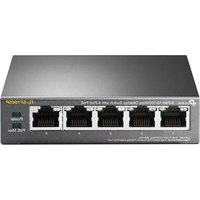


| Product Type | Network Switch |
| Brand | TP-Link |
| Model | TL-SF1005P |
| Number of Ports | 5 |
| Port Speed | 10/100 Mbps Fast Ethernet |
| PoE Ports | 4 (Ports 1-4) |
| PoE Standard | IEEE 802.3af |
| PoE Power Budget | 58 W |
| Switching Capacity | 1.0 Gbps |
| MAC Address Table Size | 2K |
| Dimensions (W x D x H) | 158 x 100 x 25 mm |
| Weight | 0.44 kg |
| Power Supply | External AC/DC adapter |
| Power Consumption | Maximum 63.5 W (with PoE) |
| Operating Temperature | 0°C to 40°C |
| Storage Temperature | -40°C to 70°C |
| Operating Humidity | 10% to 90% non-condensing |
| LED Indicators | Power, Link/Activity, PoE Status |
| Mounting | Desktop or wall mountable |
| Fanless Design | Yes |
| Standards | IEEE 802.3, 802.3u, 802.3x, 802.3af |
| Package Contents | Switch, Power adapter, User guide, Wall mount kit |
| Warranty | Limited lifetime |
| Maintenance and Cleaning | Disconnect power, wipe with dry cloth; do not use liquid cleaners |
| Safety Precautions | Place on flat surface, ensure ventilation, avoid moisture |
Frequently Asked Questions - TL-SF1005P TP-LINK
User questions about TL-SF1005P TP-LINK
0 question about this device. Answer the ones you know or ask your own.
Ask a new question about this device
Download the instructions for your Network switch in PDF format for free! Find your manual TL-SF1005P - TP-LINK and take your electronic device back in hand. On this page are published all the documents necessary for the use of your device. TL-SF1005P by TP-LINK.
USER MANUAL TL-SF1005P TP-LINK
Desktop Switch with 4-Port PoE
MODEL: TL-SF1005P Datasheet

Highlights
- With four PoE ports, transfers data and power on one single cable
- Working with IEEE 802.3af compliant PDs, expands home and office network
- Supports PoE Power up to 15.4W for each PoE port
- Supports PoE Power up to 58W for all PoE ports
- Plug and play, no configuration and installation required
Overview
TL-SF1005P is a 5 10/100Mbps ports unmanaged switch that requires no configuration and provides 4 PoE (Power over Ethernet) ports. It can automatically detect and supply power with all IEEE 802.3af compliant Powered Devices (PDs). In this situation, the electrical power is transmitted along with data in one single cable allowing you to expand your network to where there are no power lines or outlets, where you wish to fix devices such as APs, IP Cameras or IP Phones, etc.
Power Over Ethernet
4 of the 5 Auto-Negotiation RJ45 ports (port-1 to port-4) of the switch support Power over Ethernet (PoE) function. These PoE ports can automatically detect and supply power with those IEEE 802.3af compliant Powered Devices (PDs).
Overload Arrangement
TL-SF1005P has the priority function which will help protect the system when the system power is overloaded. If all PoE PDs power consumption is >= 58W, a priority will be arranged among the PoE ports, then the system will cut off the power of the lowest-priority port.
Port Priority Function
Priority (port-1=port-2=port-3>port-4): This function helps ensure the normal operation of the system. It means Port 4 will be cut off when the total power consumption of all PoE PDs exceeds 58W. For example, if Ports 1, 2, and 4 are using 15.4W each (the maximum power per port is 15.4W), the system power totals 46.2W. If an additional PD is inserted into Port 3 with 12W, the system will cut off the power to Port 4 due to overload. This means Ports 1 and 2 will use 15.4W each, Port 3 will use 12W, and no power will be supplied to Port 4.
Ease of Use
The TL-SF1005P is easy to install and use. It requires no configuration and installation is straightforward. With its desktop design, outstanding performance, and quality, TP-Link's TL-SF1005P 5-Port 10/100Mbps Desktop Switch with 4-Port PoE is an ideal choice for expanding your home or office network.
Specifications
Interface & Performance
| Product Picture |  |
| Model TL-SF1005P | |
| Standards IEEE 802.3, IEEE 802.3u, IEEE 802.3x, IEEE 802.3af | |
| Interface | 5*10/100Mbps RJ45 Ports with 4 PoE Ports(Port 1 to Port 4)AUTO Negotiation/AUTO MDI/MDIX |
| Network Media | 10BASE-T: UTP category 3, 4, 5 cable (maximum 100m)EIA/TIA-568 100Ω STP (maximum 100m)100BASE-TX: UTP category 5, 5e cable (maximum 100m)EIA/TIA-568 100Ω STP (maximum 100m) |
| Power Consumption | 63.51W (max. with 58w PD connected)1.70W (max. no PD connected) |
| PoE Ports (RJ45) | Standard: 802.3 af compliantPoE Ports: Port1- Port4Power Supply: 58W |
| Transmission Method Store-And-Forward | |
| Switching Capacity 1Gbps | |
| Mac Address Table 2K | |
| Fan Quantity Fanless | |
| External Power Supply | External Power Adapter (Output: 48VDC / 1.25A) |
| LED | Power, Link/Act, PoE Status, PoE Max |
| Dimensions (W x D x H) 3.9 x 3.9 x 1.0 in. (99.8 x 98 x 25 mm) | |
| Certification | FCC, CE, RoHS |
| Package Contents | TL-SF1005P, Power Adapter, User Guide |
| Environment | Operating Temperature: 0°C~40°C (32°F~104°F)Storage Temperature: -40°C~70°C (-40°F~158°F)Operating Humidity: 10% ~ 90%RH, non-condensingStorage Humidity: 5%~90%RH, non-condensing |


Brand : TP-LINK
Model : TL-SF1005P
Category : Network switch