
KI81FHDD0 - Dishwasher SIEMENS - Free user manual and instructions
Find the device manual for free KI81FHDD0 SIEMENS in PDF.


| Product type | Built-in dishwasher 60 cm |
| Dimensions (H × W × D) | 81.5 cm × 59.8 cm × 55.0 cm |
| Net weight | Approximately 38 kg |
| Power supply | 220‑240 V, 50/60 Hz, 10 A |
| Energy class | E (scale A‑G) |
| Number of place settings | 12 standard place settings |
| Basket levels | 3 (upper basket, lower basket, cutlery) |
| Wash programs | Eco 50°C, Glass 40°C, Quick 45°C, Intensive 70°C, Auto, Prewash |
| Additional functions | Delayed start (3‑9h), half load, extra dry |
| Noise level | 46 dB (A) in eco program |
| Child safety | Control lock button |
| Anti-overflow protection | Integrated aquaStop system |
| Filter maintenance | 3-mesh filter, manual cleaning recommended |
| Salt/rinse indicator | Display on control panel |
| Repairability | Repairability index 7.2/10 |
| Spare parts available | Filters, gaskets, wash arms, pump (via authorized service) |
| Manufacturer warranty | 2 years |
Frequently Asked Questions - KI81FHDD0 SIEMENS
User questions about KI81FHDD0 SIEMENS
0 question about this device. Answer the ones you know or ask your own.
Ask a new question about this device
Download the instructions for your Dishwasher in PDF format for free! Find your manual KI81FHDD0 - SIEMENS and take your electronic device back in hand. On this page are published all the documents necessary for the use of your device. KI81FHDD0 by SIEMENS.
USER MANUAL KI81FHDD0 SIEMENS
natural_image
Technical line drawing of a door frame with two inset views showing internal components (no text or symbols)
Ремонт

Пантите са свалени.
natural_image
Diagram showing two mechanical components with upward arrows indicating motion or assembly (no text or symbols)natural_image
Illustration of hands holding a tablet with a black curved arrow indicating rotation (no text or symbols)Рафтът е свален.
natural_image
Diagram showing a mechanical or structural component with an arrow indicating direction, no text or symbols presentnatural_image
Diagram of a mechanical assembly with a blue top component and a black upward arrow indicating motion (no text or symbols)natural_image
Close-up of a refrigerator interior showing the door, glass panel, and lid (no text or symbols visible)
Ремонт
natural_image
Interior view of a refrigerator showing the door, shelves, and a circular vent (no text or symbols visible)natural_image
Abstract graphic with a document icon and arrows, no readable text or symbols
Ремонт
natural_image
Diagram showing a tool interacting with a rectangular device, no text or symbols presentnatural_image
3D rendering of a rectangular device with attached red panel and white circular elements, no visible text or symbols
Nastavak Torx TX20 6.3 mm (1/4") [00340865]





Zahtjev:
Uređaj je isključen iz napajanja.
Vrata namještaja su uklonjena. Pogledajte upute za postavljanje.
Vrata su otvorena.
4.2.1 Uklanjanje ravnog zgloba
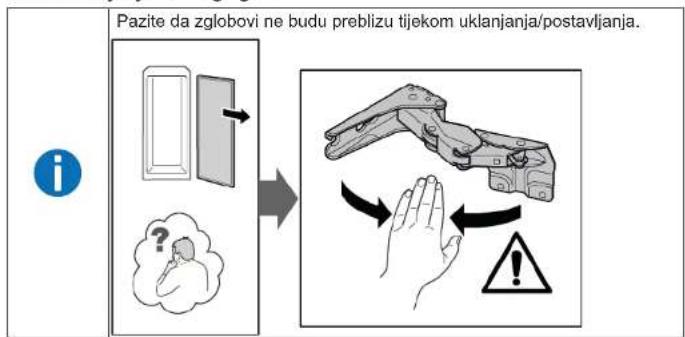
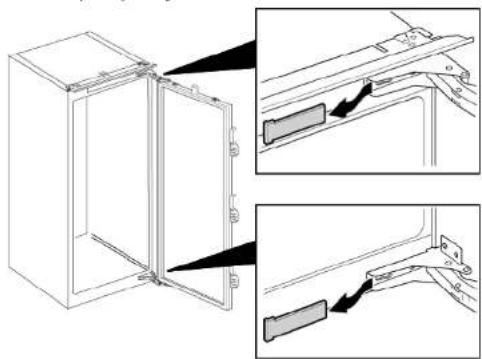
- Uklonite dva poklopca zgloba.
natural_image
Technical line drawing of a door frame with two inset views showing internal components (no text or symbols)
Popravak
-
- Otpustite četiri vijka (1).
-
Gurnite vrata prema van i uklonite ih (2).

-
- Uklonite četiri vijka (1).
-
Uklonite zglobove (2).


Zglobovi su uklonjeni.
4.2.2 Postavljanje ravnog zgloba
natural_image
Diagram showing two mechanical components with upward arrows indicating motion or assembly (no text or symbols)natural_image
Illustration of hands holding a tablet with a black curved arrow indicating rotation (no text or symbols)natural_image
Diagram showing a mechanical or structural component with an arrow indicating direction, no text or symbols present-
Spustite izvlačnu policu i zaokrenite je bočno.
-
Izvlačna je polica uklonjena.
4.5.2 Postavljanje izvlačne police
▶ Postavite obratnim redoslijedom.

Popravak
4.6 Zamjena spremnika za voće i povrće
Zahtjev:
Vrata su otvorena.
→ Spremnik je uklonjen.
natural_image
Diagram of a mechanical assembly with a blue component and an upward arrow, no text or symbols present-
Uklonite spremnik za voće i povrće.→31
-
- Pritisnite polugu ispod obje strane pregrade (1).
- Povucite pregradu prema naprijed (2).

- Podignite pregradu i zaokrenite je bočno prema van.
→ Pregrada je uklonjena.
Spremnik za održavanje svježine je uklonjen.
4.8.2 Postavljanje spremnika za održavanje svježine
natural_image
Close-up of a refrigerator interior showing a glass lid and door mechanism (no text or symbols visible)
Popravak
natural_image
Close-up of a refrigerator interior showing glass panels and a circular doorbell (no text or symbols visible)natural_image
Abstract graphic with a document icon and arrows, no readable text or symbols
Popravak
natural_image
Diagram of a screwdriver interacting with a rectangular device, showing internal components and wiring (no text or symbols)natural_image
3D rendering of a monitor mounted on a wall with a red panel, against a gray background (no text or symbols visible)natural_image
Technical line drawing of a door frame with two inset views showing internal components (no text or symbols)
Oprava

natural_image
Diagram showing two mechanical components with upward arrows indicating motion or assembly (no text or symbols)natural_image
Illustration of hands holding a tablet with a curved arrow indicating rotation (no text or symbols)natural_image
Diagram showing a mechanical or structural component with an arrow indicating direction, no text or symbols presentnatural_image
Diagram of a mechanical assembly with a blue component and an upward arrow, no text or symbols presentnatural_image
Close-up of a refrigerator interior showing a glass door and adjacent storage unit (no text or symbols visible)
Oprava
natural_image
Close-up of a refrigerator interior showing glass shelves and a circular door (no text or symbols visible)natural_image
Abstract graphic with a rectangular panel and two arrows pointing inward, set against a dark background with faint wave-like patterns (no text or symbols)
Oprava
natural_image
Diagram of a tool interacting with a device, showing motion lines and a red highlighted section (no text or symbols)natural_image
3D rendering of a rectangular electronic device with a red panel and white components, set against a gray background (no text or symbols visible)
natural_image
Technical line drawing of a door frame with two inset views showing internal components (no text or symbols)
Reparation
natural_image
Diagram showing two mechanical components with upward arrows indicating motion or assembly (no text or symbols)natural_image
Illustration of hands holding a tablet with a black curved arrow indicating rotation (no text or symbols)Hylden er fjernet.
natural_image
Diagram showing a mechanical or structural component with an arrow indicating direction, no text or symbols present→ Beholderen er fjernet.
natural_image
Diagram of a mechanical assembly with a blue top component and an upward arrow, no text or symbols presentnatural_image
Close-up of a refrigerator interior showing the door, glass panel, and lid (no text or symbols visible)
Reparation
natural_image
Close-up of a refrigerator interior showing glass shelves and a circular door (no text or symbols visible)natural_image
Abstract graphic with two arrows pointing to a rectangular object, no text or symbols present
Reparation
natural_image
Diagram of a tool interacting with a rectangular device, showing motion lines and no text or symbols- Afbryd LED-spotlampens elektriske tilslutning.

natural_image
3D rendering of a rectangular electronic device with a red panel and white components, set against a gray background (no text or symbols visible)natural_image
Technical line drawing of a door frame with two inset views showing internal components (no text or symbols)
Reparatie

natural_image
Diagram showing two mechanical components with upward arrows indicating motion or assembly (no text or symbols)natural_image
Illustration of hands holding a tablet with a curved arrow indicating rotation (no text or symbols)natural_image
Diagram showing a mechanical or structural component with an arrow indicating direction, no text or symbols presentnatural_image
Diagram of a mechanical assembly with a blue top component and a black upward arrow indicating motion (no text or symbols)natural_image
Close-up of a refrigerator interior showing a glass door and lid, with no visible text or symbols.
Reparatie
natural_image
Close-up of a refrigerator interior showing glass shelves and a circular button with an arrow pointing to the door (no text or symbols visible)natural_image
Abstract graphic with a document icon and arrows, no readable text or symbols
Reparatie
natural_image
Diagram of a screwdriver interacting with a rectangular device, showing internal components and wiring (no text or symbols)natural_image
3D rendering of a rectangular electronic device with a red panel and white components, set against a gray background (no text or symbols visible)Self-repair hints - Refrigerator
i Concerning this document....93
1.1 Important information....93
1.1.1 Purpose....93
1.2 Explanation of symbols 93
1.2.1 Danger levels.... 93
1.2.2 Hazard symbols 93
1.2.3 Structure of the warnings.... 94
1.2.4 General symbols.... 94
Safety....95
2.1 General Safety instructions 95
2.1.1 All domestic appliances 95
Tools and aids....96
Repair 97
4.6 Replacing fruit and vegetable container 103
4.6.1 Removing fruit and vegetable container.... 103
4.6.2 Installing fruit and vegetable container.... 103
4.7 Replacing partition and cover of fruit and vegetable container 104
4.7.1 Removing partition and cover of fruit and vegetable container ..... 104
4.7.2 Installing partition and cover of fruit and vegetable container 104
4.8 Replacing cool-fresh container 105
4.8.1 Removing cool-fresh container 105
4.8.2 Installing cool-fresh container.... 105
4.9 Replacing LED side bar light.... 106
4.9.1 Removing LED side bar light 106
4.9.2 Installing LED side bar light.... 107
4.10 Replacing LED spot light 108
4.10.1 Removing LED spot light.... 108
4.10.2 Installing LED spot light 109
i Concerning this document
1.1 Important information
1.1.1 Purpose
These repair hints support consumer to repair appliances by himself according to the applicable eco-design regulation (as of 03/2021).
They contain information how to exchange defined spare parts including warnings and risks.
In case of questions, please contact our customer service. We will only be liable for damages if the repair hints have been followed properly.
1.2 Explanation of symbols
1.2.1 Danger levels
The warning levels consist of a symbol and a signal word. The signal word indicates the severity of the danger.
| Warning level Meaning | |
| Danger | Non-observance of the warning message will result in death or serious injuries. |
| Warning | Non-observance of the warning message could result in death or serious injuries. |
| Caution | Non-observance of the warning message could result in minor injuries. |
| Notice | Non-observance of the warning message could result in damage to property. |
Table 1: Danger levels
1.2.2 Hazard symbols
Hazard symbols are symbolic representations which give an indication of the kind of danger.
The following hazard symbols are used in this document:
| Hazard symbol Meaning | ||
 | General warning message | |
 | Danger from electrical voltage | |
 | Risk of explosion | |
 | Danger of cuts | |
 | Danger of crushing |
i Concerning this document
| Hazard symbol Meaning | ||
 | Danger from hot surfaces | |
 | Danger from strong magnetic field | |
 | Danger from non-ionizing radiation | |
Table 2: Hazard symbols
1.2.3 Structure of the warnings
Warnings in this document have a standardised appearance and a standardised structure.

Type and source of danger!
Possible consequences of ignoring the danger / warning.
▶ Measures and prohibitions for preventing the danger.
The following example shows a warning that warns against electric shock due to live parts. The measure for avoiding the danger is mentioned.


Risk of electric shock due to live parts!
Death by electrocution
- Disconnect appliances from electrical supply at least 60 seconds before starting repairs.
1.2.4 General symbols
The following general symbols are used in this document:
| Gen. symbol Meaning | |
| Identification of a special tip (text and/or graphic) | |
| Identification of a simple tip (only text) | |
| Identification of a link to a video tutorial |
| Gen. symbol Meaning | |
| Identification of required tools | |
| Identification of required preconditions | |
| Identification of a condition (if ..., then ...) | |
| Identification of a result | |
| [Start] Identification of a key or button | |
| [00123456] Identification of a material number | |
| Status Identification of displayed text / window(in the appliance's display) | |
Table 3: General symbols
Safety
2.1 General Safety instructions
2.1.1 All domestic appliances
Risk of electric shock due to live parts!
- Errors by repairs involving electrical components can lead to electrical shock!
■ Disconnect the appliance from the mains for at least 60 seconds before starting work.
■ After the repair have a safety test according VDE 0701 or country-specific regulations performed.
Risk of injury from sharp edges!
■ Wear protective gloves.
Risk of crushing during repair, maintenance, troubleshooting and service due to heavy and moving components
■ Wear protective shoes.
■ Secure heavy components from falling down.
■ Do not stick body parts into moving components.
Risk to the appliance's safety / function!
■ Only use original spare parts.
Risk of damage to electrostatically sensitive components (ESDs)!
- Do not touch the modules, including connections and conductor paths.

Tools and aids
| Designation Details Images | ||
| Protection cloth[00342013] | 60 cm x 50 cm |  |
| Suction cup[00342224] | ∅ 50 mm | 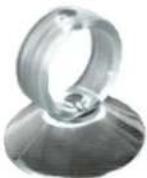 |
| Auxiliary tool[00342180] | For disassembly of plastic parts,"magic tool" | 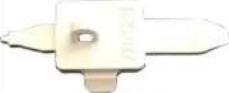 |
| Torx Bit TX20[00340865] | 6,3 mm (1/4") | 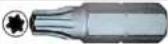 |
Repair


Prerequisite:
√ Appliance is disconnected from power supply.
√ Furniture door is removed. See Installation Instruction.
√ Door is open.
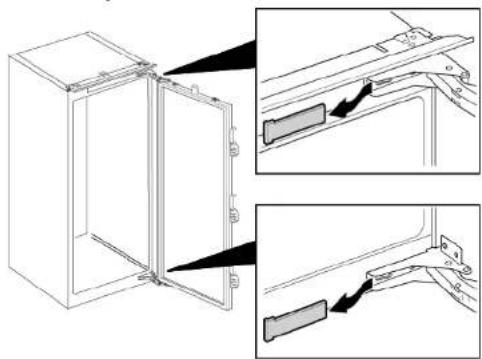
4.2.1 Removing flat hinge

- Remove two hinge covers.
natural_image
Technical line drawing of a door frame with two inset views showing internal components (no text or symbols)
Repair
-
- Loosen four screws (1).
-
Slide out and remove door (2).

-
- Remove four screws (1).
-
Remove hinges (2).


Hinges are removed.
4.2.2 Installing flat hinge
▶ Install in reverse order.

Repair
4.3 Replacing door rack
Prerequisite:
√ Door is open.
▶ Lift door rack upwards.

natural_image
Diagram showing two mechanical components with upward arrows indicating motion or assembly (no text or symbols)Door rack is removed.
▶ Install in reverse order.

Repair
4.4 Replacing shelf
Prerequisite:
Door is open.
4.4.1 Removing shelf
▶ Pull out shelf.

natural_image
Illustration of hands holding a tablet with a black curved arrow indicating rotation (no text or symbols)Shelf is removed.
4.4.2 Installing shelf
▶ Install in reverse order.

Repair
4.5 Replacing extendable shelf
Prerequisite:
√ Door is open.
4.5.1 Removing extendable shelf
- Pull out extendable shelf until the locking catch is released.

natural_image
Diagram showing a mechanical or structural component with an arrow indicating direction, no text or symbols present-
Lower extendable shelf and swing it out to the side.
-
➕ Extendable shelf is removed.
4.5.2 Installing extendable shelf
▶ Install in reverse order.

Repair
4.6 Replacing fruit and vegetable container
Prerequisite:
√ Door is open.
4.6.1 Removing fruit and vegetable container
▶ 1. Pull container out all the way (1).
- Remove container (2).


Container is removed.
4.6.2 Installing fruit and vegetable container
▶ Install in reverse order.

Repair
4.7 Replacing partition and cover of fruit and vegetable container
Prerequisite:

Door is open.
4.7.1 Removing partition and cover of fruit and vegetable container
- Remove glass plate from partition.

natural_image
Diagram of a mechanical assembly with a blue top component and a black upward arrow indicating motion (no text or symbols)-
Remove fruit and vegetable container.→ Page 103
-
- Press lever on the underside on both partition sides (1).
- Pull the partition forwards (2).
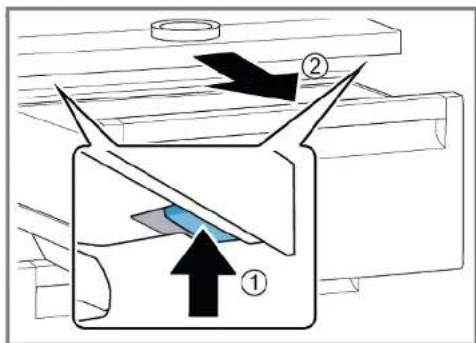
- Lift the partition and swivel it out to the side.
Partition is removed.
-
- Lift the cover of fruit and vegetable container.
-
Pull cover of fruit and vegetable container forwards and swivel it out to the side.
Cover of fruit and vegetable container is removed.
4.7.2 Installing partition and cover of fruit and vegetable container
▶ Install in reverse order.

Repair
4.8 Replacing cool-fresh container
Prerequisite:
√ Door is open.
4.8.1 Removing cool-fresh container
▶ 1. Tilt cool-fresh container forwards (1).
2. Remove cool-fresh container (2).

Cool-fresh container is removed.
4.8.2 Installing cool-fresh container
▶ Install in reverse order.

Repair
4.9 Replacing LED side bar light
Suggested tools:

Suction cup ∅50 mm [00342224]

Your appliance features a maintenance-free LED light. These lights may be repaired by customer service or authorised technicians only!

Danger
Risk of electric shock due to live parts!
Danger to life through electric shock in case of improper repair - Electric parts should be repaired by a qualified electricians. - After the repair have a safety test according VDE 0701 or country-specific regulations performed.

Danger
Risk of electric shock due to live parts! Death by electrocution
- Disconnect appliances from electrical supply at least 60 seconds before starting repairs.

Caution
Sharp edges!
Cut injuries
▶ Wear protective gloves.
Prerequisite:
√ Appliance is disconnected from power supply.
Door is open.
√ Fridge compartment shelves are removed.
4.9.1 Removing LED side bar light
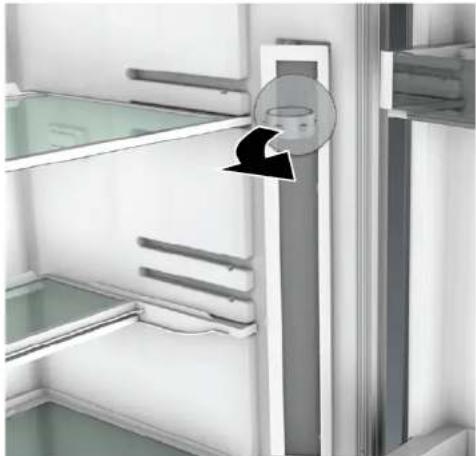
- Stick the suction cup on the upper third of LED side bar light.

natural_image
Close-up of a refrigerator interior showing a glass door and shelf, with a circular component inserted (no text or symbols visible)Repair
- Pull suction cup with forward LED side bar light in one rotary movement.
natural_image
Close-up of a refrigerator interior showing glass shelves and a circular button with an arrow pointing to the door (no text or symbols visible)- Disconnect electrical connection of LED side bar light.
LED side bar light is removed.
4.9.2 Installing LED side bar light
- Connect electrical connection of LED side bar light.
- Fix LED side bar light into it's location on compartment wall (hooks click).
LED side bar light is installed.
Repair
4.10 Replacing LED spot light
Suggested tools:
Special tool [00342180]
Slotted screwdriver Blade 2.4 mm x 0.4 mm x 60 mm, in the kit [00341820]

Your appliance features a maintenance-free LED light.
These lights may be repaired by customer service or authorised technicians only!


Risk of electric shock due to live parts!
Danger to life through electric shock in case of improper repair
▶ Electric parts should be repaired by a qualified electricians.
After the repair have a safety test according VDE 0701 or country-specific regulations performed.

Risk of electric shock due to live parts!
Death by electrocution
- Disconnect appliances from electrical supply at least 60 seconds before starting repairs.


Sharp edges!
Cut injuries
▶ Wear protective gloves.
Prerequisite:
√ Appliance is disconnected from power supply.
√ Door is open.
√ Fridge compartment shelves are removed.
4.10.1 Removing LED spot light
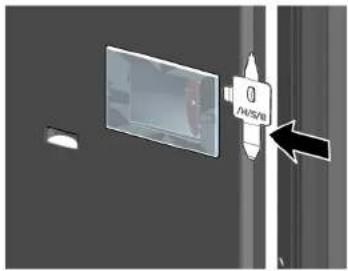
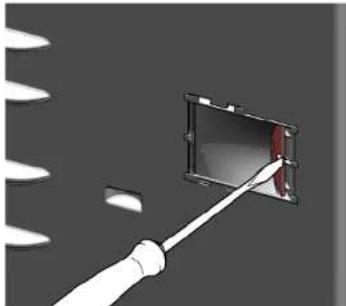
- Release LED spot light cover.
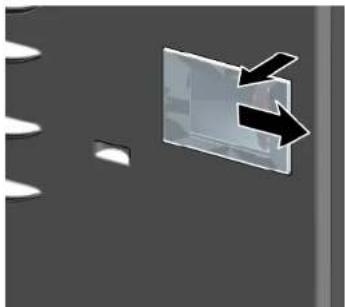
- Pull LED spot light cover inwards and simultaneously push forwards.
natural_image
Abstract graphic with a document icon and two arrows pointing to it, set against a dark background (no text or symbols)
Repair
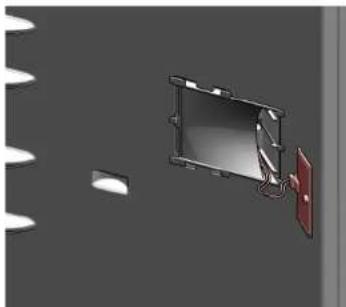
- Detach LED spot light module.
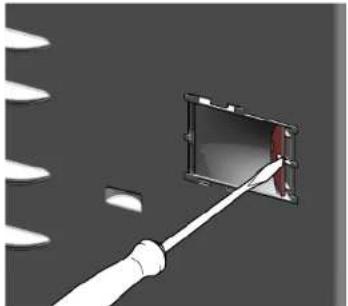
natural_image
Diagram of a screwdriver interacting with a rectangular device, showing blade and handle (no text or symbols)- Disconnect LED spot light electrical connection.
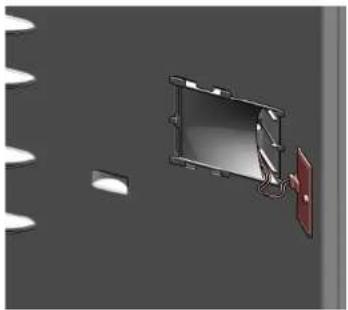
natural_image
3D rendering of a rectangular device with attached red panel and white circular elements, no visible text or symbols
LED spot light is removed.
4.10.2 Installing LED spot light
▶ Install in reverse order.
Remonditeave - Külmik
i Selle dokumendiga seoses 111
1.1 Tähtis teave 111
natural_image
Technical line drawing of a door frame with two inset views showing internal components (no text or symbols)
Remont

natural_image
Diagram showing two mechanical components with upward arrows indicating motion or assembly (no text or symbols)natural_image
Illustration of hands holding a tablet with a black curved arrow indicating rotation (no text or symbols)natural_image
Diagram showing a mechanical or structural component with an arrow indicating direction, no text or symbols present
natural_image
Diagram of a mechanical assembly with a blue component and an upward arrow, no text or symbols present
natural_image
Close-up of a refrigerator interior showing a glass door and shelf, with no visible text or symbols.
Remont
natural_image
Interior view of a refrigerator showing the door and shelf, with a black arrow pointing to the door panel (no text or symbols visible)natural_image
Abstract graphic with a rectangular object and two arrows pointing outward, no text or symbols present.
Remont
natural_image
Diagram of a tool interacting with a rectangular device, showing motion lines and no text or symbolsnatural_image
3D rendering of a rectangular electronic device with a red panel and white components, set against a gray background (no text or symbols visible)natural_image
Technical line drawing of a door frame with two inset views showing internal components (no text or symbols)
Korjaus

natural_image
Diagram showing two mechanical components with upward arrows indicating motion or assembly (no text or symbols)natural_image
Illustration of hands holding a tablet with a curved arrow indicating rotation (no text or symbols)Hylly on poistettu.
natural_image
Diagram showing a mechanical or structural component with an arrow indicating direction, no text or symbols presentnatural_image
Diagram of a mechanical assembly with a blue top component and a black upward arrow indicating motion (no text or symbols)Cool-fresh-lokero on poistettu.
4.8.2 Cool-fresh-lokeron asennus
Imukuppi ∅50 mm [00342224]

natural_image
Close-up of a refrigerator interior showing a glass door and shelf, with no visible text or symbols.Korjaus
natural_image
Close-up of a refrigerator interior showing glass shelves and a circular button with an arrow pointing to the door (no text or symbols visible)natural_image
Abstract graphic with two arrows pointing to a rectangular object, no text or symbols present
Korjaus
- Irrota LED-kohdevalomoduuli.

natural_image
Diagram of a tool interacting with a device, showing motion lines and a red highlighted section (no text or symbols)natural_image
3D rendering of a rectangular electronic device with a red panel and white components, set against a gray background (no text or symbols visible)Outillage suggérèse:
Embout Torx TX20 6,3 mm (1/4") [00340865]


natural_image
Technical line drawing of a refrigerator door with two inset views showing internal components (no text or symbols)
Réparation

natural_image
Diagram showing two mechanical components with upward arrows indicating motion or assembly (no text or symbols)natural_image
Illustration of hands holding a tablet with a curved arrow indicating rotation (no text or symbols)natural_image
Diagram showing a mechanical assembly with an arrow indicating direction and a blue component, no text or symbols present.natural_image
Diagram of a mechanical assembly with a blue top component and an upward arrow, no text or symbols presentOutillage suggérèse:

Ventouse ∅50 mm [00342224]

natural_image
Close-up of a refrigerator interior showing a glass door and adjacent storage unit (no text or symbols visible)
Réparation
natural_image
Close-up of a refrigerator interior showing glass shelves and a circular button with an arrow pointing to the door (no text or symbols visible)Outillage suggérèse:

natural_image
Abstract 3D graphic with two arrows pointing to a rectangular block, no text or symbols present
Réparation
natural_image
Diagram of a tool interacting with a device, showing motion lines and a red highlighted section (no text or symbols)natural_image
3D rendering of a rectangular electronic device with a red panel and white components, set against a gray background (no text or symbols visible)natural_image
Technical line drawing of a refrigerator door with two inset views showing internal components (no text or symbols)
Instandsetzen

natural_image
Diagram showing two mechanical components with upward arrows indicating motion or assembly (no text or symbols)natural_image
Illustration of hands holding a tablet with a black curved arrow indicating rotation (no text or symbols)natural_image
Diagram showing a mechanical or structural component with an arrow indicating direction, no text or symbols present
natural_image
Diagram of a mechanical assembly with a blue top component and an upward arrow, no text or symbols presentnatural_image
Close-up of a refrigerator interior showing a door latch and shelf, with no visible text or symbols.
Instandsetzen
natural_image
Interior view of a refrigerator showing the door and shelf, with a black arrow pointing to the door panel (no text or symbols visible)natural_image
Abstract graphic with a rectangular panel and two arrows pointing to it, set against a dark gray background (no text or symbols)
Instandsetzen
natural_image
Diagram of a tool interacting with a device, showing motion lines and a red highlighted section (no text or symbols)natural_image
3D rendering of a rectangular electronic device with a red panel and white components, set against a gray background (no text or symbols visible)
natural_image
Technical line drawing of a refrigerator door with two inset views showing internal components (no text or symbols)
Επισκευή

natural_image
Diagram showing two mechanical components with upward arrows indicating motion or assembly (no text or symbols)To páfi pórtas éxei aφαιρεθεί.
natural_image
Illustration of hands holding a tablet with a curved arrow indicating rotation (no text or symbols)To páφι αφαιρέθηκε.
natural_image
Diagram showing a mechanical assembly with an arrow indicating direction and a blue component, no text or symbols present.natural_image
Diagram of a mechanical assembly with a blue top component and an upward arrow, no text or symbols presentnatural_image
Close-up of a refrigerator interior showing a glass door and shelf, with no visible text or symbols.
Επισκευή
natural_image
Interior view of a refrigerator showing the door, shelves, and a circular vent (no text or symbols visible)natural_image
Abstract graphic with a document icon and arrows, no readable text or symbols
Επισκευή
natural_image
Diagram of a tool interacting with a device, showing motion lines and a red highlighted section (no text or symbols)natural_image
3D rendering of a rectangular electronic device with a red panel and white components, set against a gray background (no text or symbols visible)natural_image
Technical line drawing of a refrigerator door with two inset views showing internal components (no text or symbols)
Javítás

natural_image
Diagram showing two mechanical components with upward arrows indicating motion or assembly (no text or symbols)natural_image
Illustration of hands holding a tablet with a curved arrow indicating rotation (no text or symbols)natural_image
Diagram showing a mechanical or structural component with an arrow indicating direction, no text or symbols present
natural_image
Diagram of a mechanical assembly with a blue component and an upward arrow, no text or symbols presentnatural_image
Close-up of a refrigerator interior showing a glass door and lid, with no visible text or symbols.
Javítás
natural_image
Close-up of a refrigerator interior showing glass panels and a circular doorbell (no text or symbols visible)natural_image
Abstract graphic with a rectangular panel and two arrows pointing inward, set against a dark background with faint white patterns (no text or symbols)
Javítás
natural_image
Diagram of a tool interacting with a device, showing motion lines and a red highlighted section (no text or symbols)natural_image
3D rendering of a rectangular electronic device with a red panel and white components, set against a gray background (no text or symbols visible)
natural_image
Technical line drawing of a refrigerator door with two inset views showing internal components (no text or symbols)Riparazione
natural_image
Diagram showing two mechanical components with upward arrows indicating motion or assembly (no text or symbols)natural_image
Illustration of hands holding a tablet with a curved arrow indicating rotation (no text or symbols)natural_image
Diagram showing a mechanical or structural component with an arrow indicating direction, no text or symbols presentnatural_image
Diagram of a mechanical assembly with a blue top component and a black upward arrow indicating motion (no text or symbols)natural_image
Close-up of a refrigerator interior showing a glass door and adjacent storage unit (no text or symbols visible)Riparazione
natural_image
Interior view of a refrigerator showing the door, shelves, and a circular vent (no text or symbols visible)natural_image
Abstract 3D graphic with two arrows pointing to a rectangular object, no text or symbols presentRiparazione
natural_image
Diagram of a tool interacting with a device, showing motion lines and a red highlighted section (no text or symbols)natural_image
3D rendering of a rectangular electronic device with a red panel and white components, set against a gray background (no text or symbols visible)natural_image
Technical line drawing of a door frame with two inset views showing internal components (no text or symbols)
Remonts

Viras ir nonemtas.
natural_image
Diagram showing two mechanical components with upward arrows indicating motion or assembly (no text or symbols)natural_image
Illustration of hands holding a tablet with a curved arrow indicating rotation (no text or symbols)Plaukts ir iznemts.
natural_image
Diagram showing a mechanical or structural component with an arrow indicating direction, no text or symbols presentTvertne ir iznemta.
4.6.2 Auglu un dârzenu tvertnes uzstâdîsana
natural_image
Diagram of a mechanical assembly with a blue component and an upward arrow, no text or symbols present-
Iznemiet auglu un dârzenu tvertni.→247
-
- Nospiediet sviru starplikas apakšā abās pusēs (1).
- Velciet starpliku uz priekšu (2).

- Starpliku paceliet un sagaziet uz sāniem, lai iznemtu.
natural_image
Close-up of a refrigerator interior showing a glass door and lid, with no visible text or symbols.Remonts
natural_image
Close-up of a refrigerator interior showing glass shelves and a circular door (no text or symbols visible)- Atvienojiet sānu LED apgaismes joslas elektriskos savienojumus.
natural_image
Abstract graphic with a rectangular panel and two arrows pointing outward, no text or symbols present.
Remonts
- Atvienojiet LED starmeša moduli.
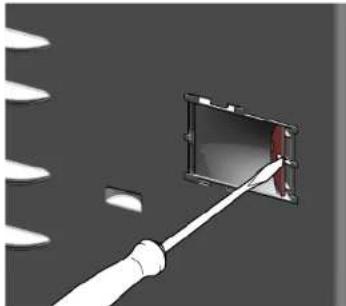
natural_image
Diagram of a tool interacting with a device, showing motion lines and a red highlighted section (no text or symbols)- Atvienojiet LED starmeša elektrisko savienojumu.

natural_image
3D rendering of a rectangular electronic device with a red panel and white components, set against a gray background (no text or symbols visible)
LED starmetis ir nonemts.
natural_image
Technical line drawing of a door frame with two inset views showing internal components (no text or symbols)
Remontas

Vyriai nuimti.
natural_image
Diagram showing two mechanical components with upward arrows indicating motion or assembly (no text or symbols)natural_image
Illustration of hands holding a tablet with a black curved arrow indicating rotation (no text or symbols)Lentyna išimta.
natural_image
Diagram showing a mechanical or structural component with an arrow indicating direction, no text or symbols presentTalpykla išimta.
natural_image
Diagram of a mechanical assembly with a blue component and an upward arrow, no text or symbols presentnatural_image
Close-up of a refrigerator interior showing the door, glass panel, and lid (no text or symbols visible)
Remontas
natural_image
Interior view of a refrigerator showing the door, shelves, and a circular vent (no text or symbols visible)natural_image
Abstract graphic with a rectangular panel and two arrows pointing outward, no text or symbols present.
Remontas
natural_image
Diagram showing a tool interacting with a rectangular device, no text or symbols presentnatural_image
3D rendering of a rectangular device with attached red panel and white circular elements, no visible text or symbols
natural_image
Technical line drawing of a door frame with two inset views showing internal components (no text or symbols)
Reparasjon

natural_image
Diagram showing two mechanical components with upward arrows indicating motion or assembly (no text or symbols)
natural_image
Illustration of hands holding a tablet with a curved arrow indicating rotation (no text or symbols)natural_image
Diagram showing a mechanical or structural component with an arrow indicating direction, no text or symbols present
Beholderen er demontert.
natural_image
Diagram of a mechanical assembly with a blue top component and an upward arrow, no text or symbols presentCool-Fresh-beholderen er demontert.
natural_image
Interior view of a refrigerator showing the door panel and adjacent shelves (no text or symbols visible)Reparasjon
- Trekk sugekoppen forover med LED-lampen i sidelisten i en roterende bevegelse.

natural_image
Close-up of a refrigerator interior showing glass panels and a circular button with an arrow pointing to the door (no text or symbols visible)- Koble fra den elektriske tilkoblingen for LED-lampen i sidelisten.
LED-lampen i sidelisten er demontert.
4.9.2 Montering av LED-lampe i sidelist
- Koble til den elektriske tilkoblingen for LED-lampen i sidelisten.
- Fest LED-lampen i sidelisten på rett sted på veggen i apparatrommet (krokene klikker på plass).
LED-lampen i sidelisten er montert.

Reparasjon
- Trekk LED-spotlightdekslet innover og skyv det samtidig forover.

natural_image
Abstract graphic with a document icon and arrows, no readable text or symbols
Reparasjon
- Løsne LED -spotlightmodulen.

natural_image
Diagram of a tool interacting with a device, showing motion lines and a red highlighted section (no text or symbols)natural_image
3D rendering of a rectangular electronic device with a red panel and white components, set against a gray background (no text or symbols visible)
LED-spotlight er demontert.
natural_image
Technical line drawing of a refrigerator door with two views showing internal components (no text or symbols)
Naprawy
natural_image
Diagram showing two mechanical components with upward arrows indicating motion or assembly (no text or symbols)natural_image
Illustration of hands holding a tablet with a curved arrow indicating rotation (no text or symbols)Półka jest wyjęta.
4.4.2 Montaż półki
natural_image
Diagram showing a mechanical assembly with an arrow indicating direction and a blue component inside (no text or symbols)natural_image
Diagram of a mechanical assembly with a blue top component and a black upward arrow indicating motion (no text or symbols)natural_image
Close-up of a refrigerator interior showing a door, glass panel, and lid (no text or symbols visible)
Naprawy
natural_image
Interior view of a refrigerator showing the door, shelves, and a circular vent (no text or symbols visible)natural_image
Abstract graphic with two arrows pointing to a rectangular panel, no text or symbols present
Naprawy
natural_image
Diagram of a tool interacting with a device, showing motion lines and a red highlighted section (no text or symbols)natural_image
3D rendering of a rectangular electronic device with a red panel and white components, set against a gray background (no text or symbols visible)natural_image
Technical line drawing of a refrigerator door with two inset views showing internal components (no text or symbols)
Reparação
-
- Remova quatro parafusos (1).
-
Remova as dobradiças (2).
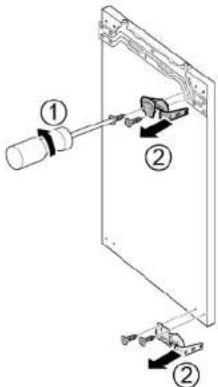

natural_image
Diagram showing two mechanical components with upward arrows indicating motion or assembly (no text or symbols)natural_image
Illustration of hands holding a tablet with a black curved arrow indicating rotation (no text or symbols)natural_image
Diagram showing a mechanical or structural component with an arrow indicating direction, no text or symbols presentnatural_image
Diagram of a mechanical assembly with a blue top component and a black upward arrow indicating motion (no text or symbols)natural_image
Close-up of a refrigerator interior showing a glass door and adjacent storage unit (no text or symbols visible)
Reparação
natural_image
Interior view of a refrigerator showing the door, shelves, and a circular vent (no text or symbols visible)natural_image
Abstract graphic with a document icon and arrows, no readable text or symbols
Reparação
natural_image
Diagram of a screwdriver inserted into a rectangular component with a red edge, against a dark background (no text or symbols)natural_image
3D rendering of a rectangular device with attached red panel and white circular elements, no visible text or symbolsCap torx TX20 6.3 mm (1/4") [00340865]


AVERTISMENT
Aparate grele, masive!
natural_image
Technical line drawing of a door opening with two inset views showing internal components (no text or symbols)
Repararea

Balamalele sunt demontate.
4.2.2 Montarea balamalei plate
natural_image
Diagram showing two mechanical components with upward arrows indicating motion or assembly (no text or symbols)natural_image
Illustration of hands holding a tablet with a curved arrow indicating rotation (no text or symbols)natural_image
Diagram showing a mechanical or structural component with an arrow indicating direction, no text or symbols present
natural_image
Diagram of a mechanical assembly with a blue top component and an upward arrow, no text or symbols presentnatural_image
Close-up of a refrigerator interior showing the door, shelves, and a hanging lid (no text or symbols visible)Repararea
natural_image
Interior view of a refrigerator with shelves and a door, showing a black arrow pointing to the door (no text or symbols visible)natural_image
Abstract graphic with two arrows pointing to a rectangular object, no text or symbols present
Repararea
natural_image
Diagram of a tool interacting with a rectangular device, showing motion lines and no text or symbolsnatural_image
3D rendering of a rectangular electronic device with a red panel and white components, set against a gray background (no text or symbols visible)
natural_image
Technical line drawing of a door frame with two inset views showing internal components (no text or symbols)
Oprava

Závesy sú odobraté.
natural_image
Diagram showing two mechanical components with upward arrows indicating motion or assembly (no text or symbols)Polička v dvierkach je odobratá.
4.3.2 Montáž poličky do dvierok
natural_image
Illustration of hands holding a tablet with a curved arrow indicating rotation (no text or symbols)natural_image
Diagram showing a mechanical or structural component with an arrow indicating direction, no text or symbols presentNádoba je odobratá.
natural_image
Diagram of a mechanical assembly with a blue component and an upward arrow, no text or symbols present-
Odoberte nádobu na ovocie a zeleninu.→355
-
- Stlačte páčku na spodnej strane oboch strán priehradky (1).
- Potiahnite priehradku dopredu (2).

- Zdvihnite priehradku a vyklopte ju nabok.
Priehradka je odobratá.
Nádoba cool-fresh je odobratá.
natural_image
Interior view of a refrigerator showing the door, glass panel, and shelf (no text or symbols visible)
Oprava
natural_image
Interior view of a refrigerator showing the door, shelves, and a circular vent (no text or symbols visible)natural_image
Abstract graphic with a rectangular panel and two arrows pointing outward, no text or symbols present.
Oprava
natural_image
Diagram showing a tool interacting with a rectangular device, no text or symbols presentnatural_image
3D rendering of a rectangular device with attached red panel and white circular elements, no visible text or symbols
natural_image
Technical line drawing of a door frame with two inset views showing internal components (no text or symbols)
Popravilo

natural_image
Diagram showing two mechanical components with upward arrows indicating motion or assembly (no text or symbols)natural_image
Illustration of hands holding a tablet with a curved arrow indicating rotation (no text or symbols)Polica je odstranjena.
4.4.2 Namestitev police
- Namestite v obratnem vrstnem redu.

Popravilo
natural_image
Diagram showing a mechanical or structural component with an arrow indicating downward motion, no text or symbols presentnatural_image
Diagram of a mechanical assembly with a blue top component and an upward arrow, no text or symbols present-
Odstranite predal za sadje in zelenjavo.→373
-
- Pritisnite pritrdila na spodnji strani steklene plošče (1).
- Pregrado potegnite k sebi (2).

-
Pregrado dvignite in jo z obračanjem na stran odstranite. → Pregrada je odstranjena.
-
- Dvignite polico nad predalom za sadje in zelenjavo.
- Polico nad predalom za sadje in zelenjavo potegnite k sebi in jo z obračanjem na stran odstranite. → Polica nad predalom za sadje in zelenjavo je odstranjena.
4.7.2 Namestitev pregrade in police nad predalom za sadje in zelenjavo
▶ Namestite v obratnem vrstnem redu.

Popravilo
natural_image
Close-up of a refrigerator interior showing a glass door and lid, with no visible text or symbols.Popravilo
natural_image
Close-up of a refrigerator interior showing glass shelves and a circular button with an arrow pointing to the door (no text or symbols visible)- Pokrovček točkovne lučke LED povlecite navznoter in ga hkrati potisnite naprej.

natural_image
Abstract graphic with a rectangular panel and two arrows pointing to it, set against a dark background with faint white patterns (no text or symbols)
Popravilo
natural_image
Diagram showing a tool interacting with a rectangular device, no text or symbols presentnatural_image
3D rendering of a rectangular device with attached red panel and white circular elements, no visible text or symbols
natural_image
Technical line drawing of a refrigerator door with two inset views showing internal components (no text or symbols)
Reparación
natural_image
Diagram showing two mechanical components with upward arrows indicating motion or assembly (no text or symbols)natural_image
Illustration of hands holding a tablet with a black curved arrow indicating rotation (no text or symbols)natural_image
Diagram showing a mechanical or structural component with an arrow indicating downward motion, no text or symbols present.natural_image
Diagram of a mechanical assembly with a blue component and an upward arrow, no text or symbols presentnatural_image
Close-up of a refrigerator interior showing a glass door and adjacent storage unit (no text or symbols visible)
Reparación
natural_image
Interior view of a refrigerator showing the door and shelf, with a black arrow pointing to the door panel (no text or symbols visible)natural_image
Abstract graphic with two arrows pointing to a rectangular object, no text or symbols present
Reparación
natural_image
Diagram of a tool interacting with a device, showing motion lines and a red highlighted section (no text or symbols)natural_image
3D rendering of a rectangular electronic device with a red panel and white components, set against a gray background (no text or symbols visible)
natural_image
Technical line drawing of a door frame with two inset views showing internal components (no text or symbols)
Reparation
natural_image
Diagram showing two mechanical components with upward arrows indicating motion or assembly (no text or symbols)Dörrhyllan har tagits bort.
natural_image
Illustration of hands holding a tablet with a curved arrow indicating rotation (no text or symbols)natural_image
Diagram showing a mechanical or structural component with an arrow indicating direction, no text or symbols presentnatural_image
Diagram of a mechanical assembly with a blue component and an upward arrow, no text or symbols presentCool fresh-facket har tagits bort.
4.8.2 Montera cool fresh-fack
Sugkopp ∅50 mm [00342224]

natural_image
Close-up of a refrigerator interior showing a glass door and shelf, with no visible text or symbols.
Reparation
natural_image
Close-up of a refrigerator interior showing glass shelves and a circular door (no text or symbols visible)- Lossa elanslutningen till LED-sidoramplampan.
LED-sidoramplampan har tagits bort.
4.9.2 Montera LED-sidoramplampa
natural_image
Abstract graphic with a document icon and two arrows pointing right, set against a dark background (no text or symbols)
Reparation
- Ta loss LED-spotlightmodulen.
natural_image
Diagram of a tool interacting with a device, showing motion lines and a red highlighted section (no text or symbols)- Lossa LED-spotlightens elanslutning.
natural_image
3D rendering of a rectangular electronic device with a red panel and white components, set against a gray background (no text or symbols visible)
LED-spotlighten har tagits bort.
4.10.2 Montera LED-spotlight
natural_image
Technical line drawing of a door frame with two inset views showing internal components (no text or symbols)
Onarim

natural_image
Diagram showing two mechanical components with upward arrows indicating motion or assembly (no text or symbols)natural_image
Illustration of hands holding a tablet with a black curved arrow indicating rotation (no text or symbols)natural_image
Diagram showing a mechanical or structural component with an arrow indicating direction, no text or symbols present
Kap çıkartılmıştır.
natural_image
Diagram of a mechanical assembly with a blue component and an upward arrow, no text or symbols presentnatural_image
Interior view of a refrigerator showing the door, glass panel, and shelf (no text or symbols visible)
Onarim
natural_image
Close-up of a refrigerator interior showing glass panels and a circular doorbell (no text or symbols visible)Special tool [00342180]
Düz tornavida Biçak 2,4 mm x 0,4 mm x 60 mm,
natural_image
Abstract graphic with a document icon and two arrows pointing to it, set against a dark background (no text or symbols)
Onarim
natural_image
Diagram of a screwdriver inserted into a rectangular component with a red edge, against a dark background (no text or symbols)natural_image
3D rendering of a rectangular device with attached red panel and white circular elements, no visible text or symbols
- Ремонт
- Popravak
- Postavljanje ravnog zgloba
- Postavljanje izvlačne police
- Zamjena spremnika za voće i povrće
- Postavljanje spremnika za održavanje svježine
- Oprava
- Reparation
- Reparatie
- Self-repair hints - Refrigerator
- i Concerning this document....93
- Safety....95
- Tools and aids....96
- Repair 97
- i Concerning this document
- Important information
- Purpose
- Explanation of symbols
- Danger levels
- Hazard symbols
- Structure of the warnings
- General symbols
- Safety
- General Safety instructions
- All domestic appliances
- Risk of electric shock due to live parts!
- Risk of injury from sharp edges!
- Risk to the appliance's safety / function!
- Risk of damage to electrostatically sensitive components (ESDs)!
- Tools and aids
- Repair
- Installing flat hinge
- Replacing door rack
- Replacing shelf
- Removing shelf
- Installing shelf
- Replacing extendable shelf
- Removing extendable shelf
- Installing extendable shelf
- Replacing fruit and vegetable container
- Removing fruit and vegetable container
- Installing fruit and vegetable container
- Replacing partition and cover of fruit and vegetable container
- Removing partition and cover of fruit and vegetable container
- Installing partition and cover of fruit and vegetable container
- Replacing cool-fresh container
- Removing cool-fresh container
- Installing cool-fresh container
- Replacing LED side bar light
- Danger
- Caution
- Removing LED side bar light
- Installing LED side bar light
- Replacing LED spot light
- Suggested tools:
- Prerequisite:
- Removing LED spot light
- Installing LED spot light
- Remonditeave - Külmik
- i Selle dokumendiga seoses 111
- Remont
- Korjaus
- Cool-fresh-lokeron asennus
- Réparation
- Instandsetzen
- Επισκευή
- Javítás
- Riparazione
- Remonts
- Auglu un dârzenu tvertnes uzstâdîsana
- Remontas
- Reparasjon
- Montering av LED-lampe i sidelist
- Naprawy
- Montaż półki
- Reparação
- AVERTISMENT
- Repararea
- Montarea balamalei plate
- Montáž poličky do dvierok
- Popravilo
- Namestitev police
- Namestitev pregrade in police nad predalom za sadje in zelenjavo
- Reparación
- Montera cool fresh-fack
- Montera LED-sidoramplampa
- Montera LED-spotlight
- Onarim
Brand : SIEMENS
Model : KI81FHDD0
Category : Dishwasher