
Smart Tab M8 - Tablet LENOVO - Free user manual and instructions
Find the device manual for free Smart Tab M8 LENOVO in PDF.


| Product type | Tablet |
| Brand | Lenovo |
| Model | Smart Tab M8 |
| Category | Tablet |
| Dimensions (L x W x H) | Approx. 200 x 120 x 8 mm |
| Weight | Approx. 300 g |
| Power supply | Lithium-ion battery 5000 mAh, USB-C charging |
| Screen | 8-inch HD (1280x800 pixels) |
| Operating system | Android |
| Processor | MediaTek octa-core |
| RAM memory | 2 GB |
| Internal storage | 32 GB expandable via microSD |
| Connectivity | Wi-Fi 802.11 b/g/n, Bluetooth 5.0 |
| Sensors | Accelerometer, ambient light sensor |
| Main functions | Web browsing, Android apps, video and music playback, games, note taking |
| Maintenance and cleaning | Use a soft dry cloth; avoid liquids and abrasive products |
| Safety | Do not expose to moisture, extreme temperatures or shocks |
| Spare parts and repairability | Not user-repairable; contact Lenovo support for repairs |
Frequently Asked Questions - Smart Tab M8 LENOVO
User questions about Smart Tab M8 LENOVO
0 question about this device. Answer the ones you know or ask your own.
Ask a new question about this device
Download the instructions for your Tablet in PDF format for free! Find your manual Smart Tab M8 - LENOVO and take your electronic device back in hand. On this page are published all the documents necessary for the use of your device. Smart Tab M8 by LENOVO.
USER MANUAL Smart Tab M8 LENOVO
Safety, Warranty & Quick Start Guide
Lenovo TB-8505FS
Lenovo TB-8505XS
Contents
English....1
Français 18
Español 34
English
Read this guide carefully before using your device.
All information labeled with * in this guide only refers to the WLAN + LTE model.
Reading first - regulatory information
Device models equipped with wireless communications comply with the radio frequency and safety standards of any country or region in which it has been approved for wireless use. In addition, if your product contains a telecom modem, it complies with the requirements for connection to the telephone network in your country.
Be sure to read the Regulatory Notice for your country or region before using the wireless devices contained in your device. To obtain a PDF version of the Regulatory Notice, go to https://support.lenovo.com.
Getting support
To get support on network services and billing, contact your wireless network operator. To learn how to use your device and view its technical specifications, go to https://support.lenovo.com.
Accessing your User Guide
Your User Guide contains detailed information about your device. To download the publications for your device, go to https://support.lenovo.com and follow the instructions on the screen.
Legal notices
Lenovo and the Lenovo logo are trademarks of Lenovo in the United States, other countries, or both.
Other company, product, or service names may be trademarks or service marks of others.
Manufactured under license from Dolby Laboratories. Dolby, Dolby Atmos, and the double-D symbol are trademarks of Dolby Laboratories.
LIMITED AND RESTRICTED RIGHTS NOTICE: If data or software is delivered pursuant a General Services Administration “GSA” contract, use, reproduction, or disclosure is subject to restrictions set forth in Contract No. GS-35F-05925.
Device overview
| Model Version | |
| Lenovo TB-8505FS WLAN | |
| Lenovo TB-8505XS WLAN + LTE |
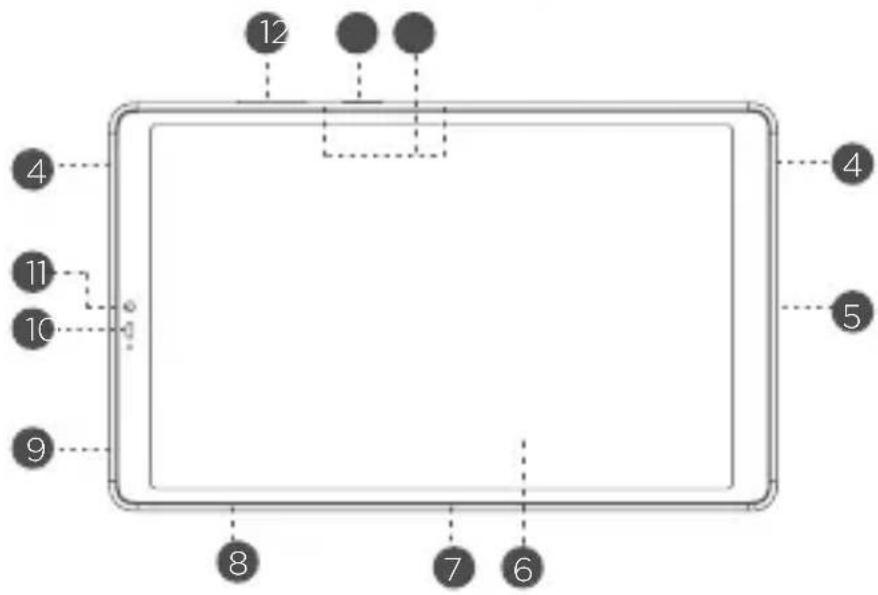
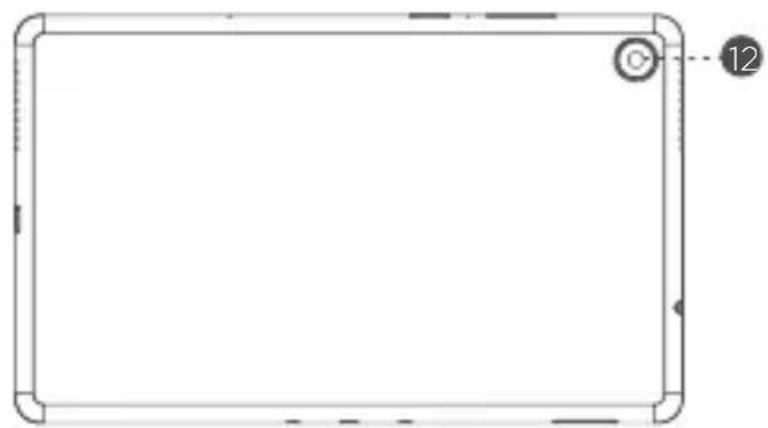
natural_image
Blank rectangular frame with corner edges and a small circular mark labeled '12' at the top right corner (no text or symbols on the frame itself)1 Volume bottoms
2 Power button
3 Microphones
4 Speakers
5 Micro USB connector
6 Touch screen
7 Smart connector
8 Card tray
9 Headset connector
10 Proximity sensor
11 Front camera
12 Rear camera
• The WLAN version does not have a Nano-SIM card tray.
- All pictures and illustrations in this document are for your reference only and may differ from the final product.
Device overview
| Name Model | |
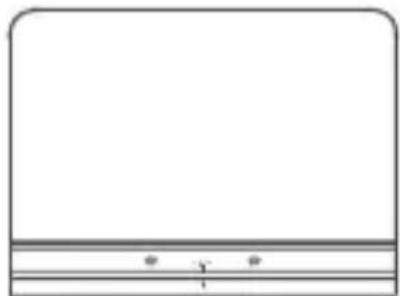
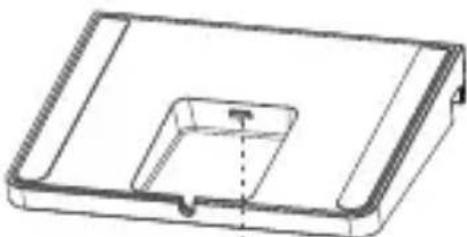
| Smart Charging Station Lenovo CD-100 |
natural_image
Simple line drawing of a rectangular frame with horizontal lines and two small dots at the bottom (no text or symbols)1
natural_image
Technical line drawing of a rectangular electronic component with a recessed cavity and mounting bracket (no text or symbols)2
1 Smart connector 2 Micro USB connector
Preparing your device
Charging your device
Connect your device to a power outlet using the USB cable and power adapter provided.
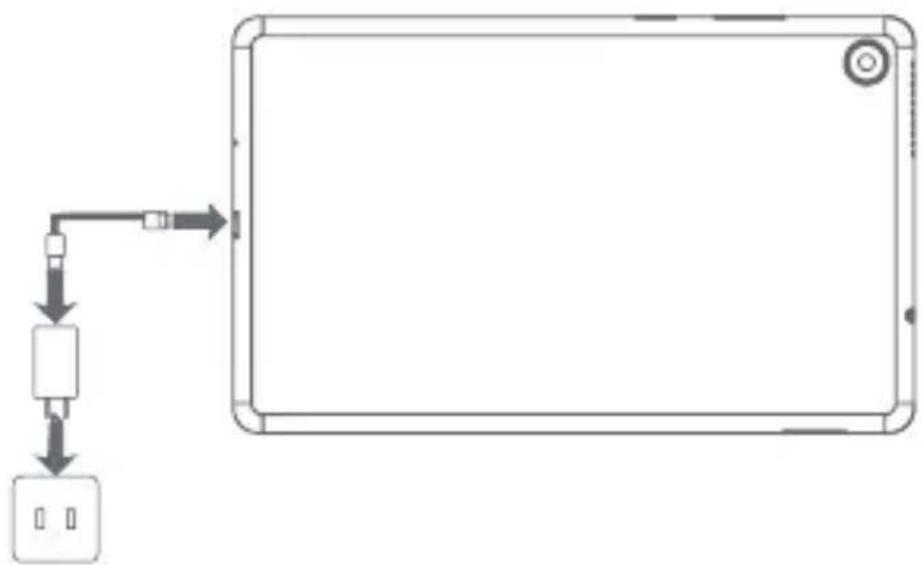
flowchart
graph TD
    A["Input"] --> B["Processing Unit"]
    B --> C["Output"]
Place your tablet in the dock. Connect your smart dock to a power outlet using the USB cable and power adapter provided.
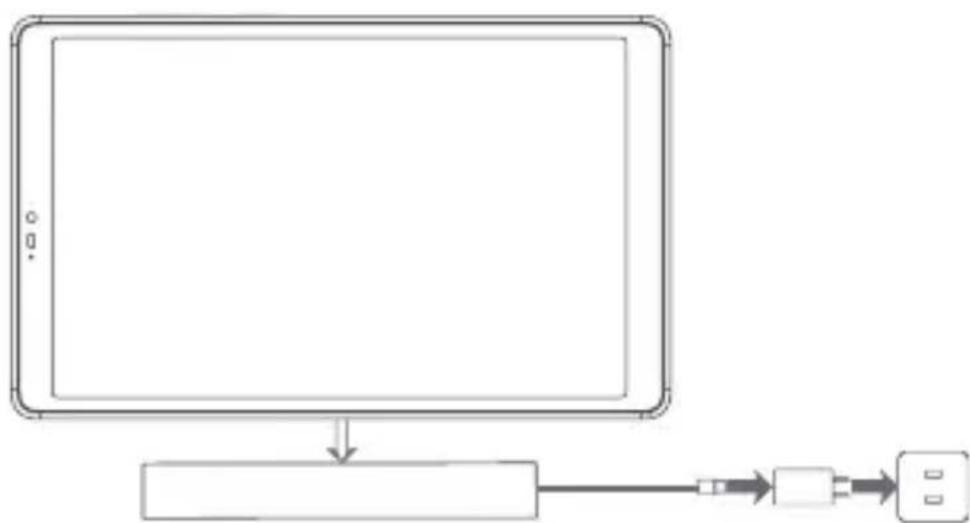
flowchart
graph TD
    A["Table Screen"] --> B["Device"]
    B --> C["Serial Port"]
    C --> D["Port Interface"]
Preparing your device
Installing cards
Install the cards as shown in the figure.
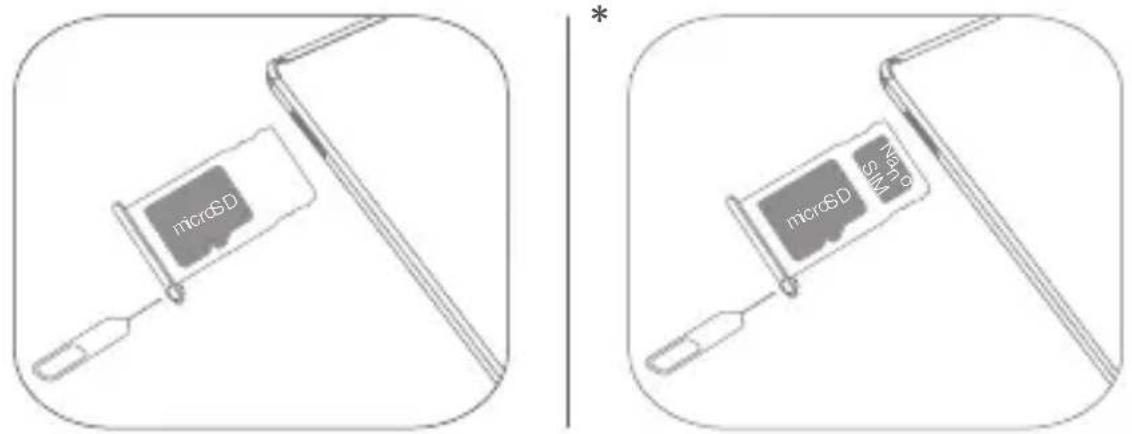
• Power off the device before inserting or removing a card.
• Note that the WLAN version does not have a Nano-SIM card tray.
Turning on
Press and hold the Power button until the Lenovo logo appears.
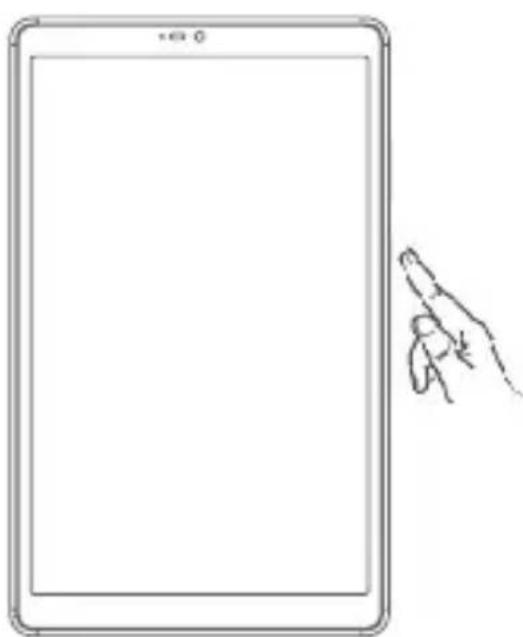
natural_image
Line drawing of a tablet device with a pointing hand gesture (no text or symbols)Google Assistant on Your Tablet
Lenovo Smart Tab M8 includes Google Assistant integration for supported languages.
Setting up Google Assistant
To open the Google Assistant, touch and hold the Home button, tap “GET STARTED, and follow the on-screen prompts to set up the Google Assistant. Say “OK Google” and “Hey Google” when prompted to teach the Google Assistant to recognize your voice and complete the setup process.
Using Google Assistant
Lenovo Smart Tab M8 supports Google Voice Assistant recognition when the screen is on, allowing you access it from across the room.
You can touch and hold the Home button or say “OK Google” or “Hey Google” to interact with the Google Assistant. Ask “What can you do?” to see what the Google Assistant can help you with.
Google Assistant's Ambient Mode
Google Assistant's Ambient Mode will turn your tablet into a digital photo frame. You can also easily control music and smart home devices by touch and voice command, and quickly access your most important updates while your tablet is charging via the charging cable or the smart charging station. Google will release more features for Ambient Mode in the future.
How to use Google Assistant's Ambient Mode
You can enable/turn off Google Assistant's Ambient Mode by going to Settings > Google > Search, Assistant & Voice > Google Assistant > Assistant > Assistant Devices (Tablet) > Personalization (Ambient Mode).
The Google Assistant requires an internet connection and may not be available in all countries and languages.
- For more information about the Google Assistant including supported languages and changing or adding languages, go to http://support.google.com/assistant/answer/7394513
- You also can go to https://support.lenovo.com for the current list of languages that Ambient Mode supports.
Important safety and handling information
Plastic bag notice
Danger: Plastic bags can be dangerous. Keep plastic bags away from babies and children to avoid danger of suffocation.
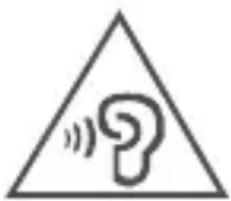
Caution about high volume usage
Warning: Exposure to loud noise from any source for extended periods of time may affect your hearing. The louder the sound, the less time is required before your hearing could be affected. To protect your hearing:
- Limit the amount of time you use headsets or headphones at high volume.
- Avoid turning up the volume to block out noisy surroundings.
- Turn the volume down if you can't hear people speaking near you.
If you experience hearing discomfort, including the sensation of pressure or fullness in your ears, ringing in your ears or muffled speech, you should stop listening to the device through your headset or headphones and have your hearing checked.
natural_image
Warning symbol with a question mark inside a triangle, indicating sound or noise (no text present)To prevent possible hearing damage, do not listen at high volume levels for long periods.
Safety instructions for parents and adult supervisors
Your mobile device is not a toy. As with all electrical products, precautions should be observed during handling and using of electrical products to reduce the risk of electric shock. If parents choose to allow children to use the device, they should caution his or her child about the potential hazard while using and handling the mobile device.
Parents should inspect the mobile device (including the ac power adapter and the small part, as applicable) periodically for damage. Routinely check this mobile device to ensure that the device is working properly and is safe for children to use.
Internal rechargeable battery warning
Danger: Do not attempt to replace the internal rechargeable lithium ion battery.
Replacing the original battery with an incompatible type may result in an increased risk of personal injury or property damage due to explosion, excessive heat, or other risks. Do not attempt to disassemble or modify the battery pack. Attempting to do so can cause a harmful explosion or battery fluid leakage.
When disposing of the battery, comply with all relevant local ordinances or regulations. Do not dispose the battery pack in municipal waste. Dispose used batteries according to the instructions.
The battery pack contains a small amount of harmful substances.
To avoid injury:
- Keep the battery pack away from open flames or other heat sources.
- Do not expose the battery pack to water, rain, or other corrosive liquids.
- Do not leave the battery in an environment with extremely high temperature.
- Avoid short-circuiting the battery pack.
- Keep the battery pack out of reach of small children and pets.
- Do not leave the battery in an environment with extremely low air pressure. It may result in an explosion or the leakage of flammable liquid or gas from the battery. To extend battery life, we recommend charging the battery to at least 30% to 50% capacity each time, and recharging it every three months to prevent over discharge.
Service and support information
The following information describes the technical support that is available for your product, during the warranty period or throughout the life of your product. Refer to the Lenovo Limited Warranty (LLW) for a full explanation of Lenovo warranty terms. See “Lenovo Limited Warranty notice” later in this document for details on accessing the full warranty.
Online technical support
Online technical support is available during the lifetime of a product at:
https://support.lenovo.com
Telephone technical support
You can get help and information from the Customer Support Center by telephone. Before contacting a Lenovo technical support representative, please have the following information available: model and serial number, the exact wording of any error message, and a description of the problem.
Your technical support representative might want to walk you through the problem while you are at your device during the call.
Worldwide Lenovo Support telephone list
Important: Telephone numbers are subject to change without notice. The most up-to-date telephone list for the Customer Support Center is always available at: http://www.lenovo.com/support/phone
If the telephone number for your country or region is not listed, contact your Lenovo reseller or Lenovo marketing representative.
Warranty information
Lenovo Limited Warranty notice
This product is covered by the terms of the LLW, version L505-0010-02 08/2011. Read the LLW at http://www.lenovo.com/warranty/llw_02. You can read the LLW in a number of languages from this Web site. If you cannot view the LLW from the Web site, contact your local Lenovo office or reseller to obtain a printed version of the LLW.
Warranty period and type of warranty service
| Country or region Warranty period | Type of warranty service | |
| United Kingdom, Israel, Australia, New Zealand | Parts and Labor - 1 yearBattery Pack - 1 year | 3 |
| Guatemala, Costa Rica, Venezuela, Peru, Uruguay, Ecuador, Colombia, Chile, Argentina, Indonesia, Vietnam, India, Malaysia, Thailand, Philippines, Singapore, Hong Kong, El Salvador, Taiwan, South Korea, Mexico, Russia, Ukraine, Egypt, Lebanon, Morocco, South Africa, Tunisia, Mauritius, Mozambique, United Arab Emirates, Jordan, Kenya, Nigeria, Uganda, Ghana, Oman, Tanzania, Namibia, Panama | Parts and Labor - 1 yearBattery Pack - 1 year | 4 |
| United States of America, Canada, Japan | Parts and Labor - 1 yearBattery Pack - 1 year | 5 |
| Brazil | Parts and Labor - 1 yearBattery Pack - 1 year | 3,5 |
| Spain, Switzerland, Portugal, Netherlands, Belgium, Sweden, Denmark, Norway, Finland, Estonia, Latvia, Lithuania, Iceland, France, Germany, Italy, Austria | Parts and Labor - 2 yearsBattery Pack - 1 year | 3 |
| Czech Republic, Hungary, Romania, Bulgaria, Greece, Croatia, Slovenia, Slovakia, Cyprus, Poland | Parts and Labor - 2 yearsBattery Pack - 1 year | 5 |
| Turkey | Parts and Labor - 2 yearsBattery Pack - 2 years | 3,4 |
| Saudi Arabia | Parts and Labor - 2 yearsBattery Pack - 2 years | 4 |
| Serbia | Parts and Labor - 2 yearsBattery Pack - 1 year | 4 |
* Excludes some components. 90-day limited warranty for power adapters, keyboards, plastics, and hinges.
Type of warranty service
- Customer Replaceable Unit ("CRU") Service
- On-site Service
- Courier or Depot Service
- Customer Carry-In Service
- Mail-in Service
- Customer Two-Way Mail-in Service
- Product Exchange Service
For a full explanation of the types of warranty service, refer to the full warranty. See “Lenovo Limited Warranty notice” for details on accessing the full warranty. If you need support for this device, do not go back to your point of purchase. Please visit https://support.lenovo.com, where you will find answers to frequently asked questions, software updates and details on how to get in touch with us.
EurAsia compliance mark
EAC
Environmental, recycling, and disposal information
General recycling statement
Lenovo encourages owners of information technology (IT) equipment to responsibly recycle their equipment when it is no longer needed. Lenovo offers a variety of programs and services to assist equipment owners in recycling their IT products. For information on recycling Lenovo products, go to http://www.lenovo.com/recycling
Important battery and WEEE information
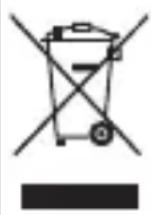
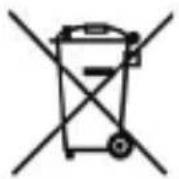
Batteries and electrical and electronic equipment marked with the symbol of a crossed-out wheeled bin may not be disposed as unsorted municipal waste. Batteries and waste of electrical and electronic equipment (WEEE) shall be treated separately using the collection framework available to customers for the return, recycling, and treatment of batteries and WEEE. When possible, remove and isolate batteries from WEEE prior to placing WEEE in the waste collection stream. Batteries are to be collected separately using the framework available for the return, recycling, and treatment of batteries and accumulators.
Country-specific information is available at: http://www.lenovo.com/recycling
Recycling information for Japan
Recycling and disposal information for Japan is available at: http://www.lenovo.com/recycling/japan
Additional recycling statements
Additional information about recycling device components and batteries is in your User Guide. See "Accessing your User Guide" for details.
Battery recycling marks
Battery recycling information for Taiwan

Battery recycling information for the United States and Canada
US & Canada Only
Battery recycling information for the European Union
Restriction of Hazardous Substances Directive (RoHS)
Turkey
Lenovo products sold in Turkey, on or after June 1, 2009, meet the requirements of the former Republic of Turkey Restriction of Hazardous Substances legislation from 30th of May 2008 and the Control of Waste Electrical and Electronic Equipment Regulations from 22nd of May 2012 (“Turkey RoHS”).
Ukraine
Lenovo products sold in Ukraine, on or after January 1, 2011, meet the requirements of the Technical Directive on Restriction of Hazardous Substances in Electric and Electronic Equipment enforced by the Government, Decision No 1057 dated 2008/12/03 (“Ukraine TR on RoHS”).
India
Lenovo products sold in India, on or after May 1, 2012, meet the requirements of the India E-waste (Management) Rules (“India RoHS”).
Vietnam
Lenovo products sold in Vietnam, on or after September 23, 2011, meet the requirements of the Vietnam Circular 30/2011/TT-BCT (“Vietnam RoHS”).
European Union
Lenovo Products meet the requirement of Directive 2011/65/EC on the restriction of the use of the certain hazardous substances in electrical and electronic equipment (“RoHS 2”). Lenovo products sold in the European Union, from the 21st July 2019, meet the requirement of Commission Delegated Directive (EU 2015/863) amending Directive 2011/65/EU. For more information about Lenovo progress on RoHS, go to: https://www.lenovo.com/us/en/social_responsibility/RoHS-Communication.pdf
Singapore
Lenovo products sold in Singapore, on or after June 1, 2017, meet the requirements of Government Gazette order No. S 263/2016 Restriction of Hazardous Substances in Electrical and Electronic Equipment in Singapore (“SG-RoHS”).
European Union compliance statement
European Union conformity
Compliance with the RE Directive
Lenovo PC HK Limited declares that the radio equipment type Lenovo TB-8505FS, Lenovo TB-8505XS is in compliance with Directive 2014/53/EU.
The full text of the EU declaration of conformity is available at the following internet address: https://www.lenovo.com/us/en/compliance/eu-doc.
This radio equipment operates with the following frequency bands and maximum radio-frequency power:
| Model Name Frequency Bands | Maximum Conducted Power (dBm) | ||
| Lenovo TB-8505FS | WLAN 2400-2483.5 20 | ||
| WLAN 5150-5250 20 | |||
| WLAN 5250-5350 20 | |||
| WLAN 5470-5725 20 | |||
| WLAN 5725-5850 14 | |||
| Bluetooth 2400-2483.5 10 | |||
| Lenovo TB-8505XS | GSM 900 33.5 | ||
| GSM 1800 30 | |||
| WCDMA I 24.5 | |||
| WCDMA V 24.5 | |||
| WCDMA VIII 24.5 | |||
| LTE B1, 3, 5, 7, 20, 38, 40 24.5 | |||
| LTE B8 24 | |||
| WLAN 2400-2483.5 20 | |||
| WLAN 5150-5250 20 | |||
| WLAN 5250-5350 20 | |||
| WLAN 5470-5725 20 | |||
| WLAN 5725-5850 14 | |||
| Bluetooth 2400-2483.5 10 | |||
The above information is for EU countries only. Please refer to the actual product for supported frequency bands in other countries.
Specific Absorption Rate information
YOUR MOBILE DEVICE MEETS INTERNATIONAL GUIDELINES FOR EXPOSURE TO RADIO WAVES.
Your mobile device is a radio transmitter and receiver. It is designed not to exceed the limits for exposure to radio waves (radio frequency electromagnetic fields) recommended by international guidelines. The guidelines were developed by an independent scientific organization (ICNIRP) and include a substantial safety margin designed to assure the safety of all persons, regardless of age and health.
The radio wave exposure guidelines use a unit of measurement known as the Specific Absorption Rate, or SAR. The SAR limit for mobile devices is 2W/kg.
Tests for SAR are conducted using standard operating positions with the device transmitting at its highest certified power level in all tested frequency bands. The highest SAR values under the ICNIRP guidelines for your device model are listed below:
Maximum SAR for this model and conditions under which it was recorded.
| Europe 10g SAR Limit (2.0 W/kg) | Lenovo TB-8505FS Body-worn | WLAN, Bluetooth | 0.784 W/kg | |
| Lenovo TB-8505XS Body-worn | WCDMA Band VIII, GSM, LTE, Wi-Fi, Bluetooth | 1.572 W/kg | ||
During use, the actual SAR values for your device are usually well below the values stated. This is because, for purposes of system efficiency and to minimize interference on the network, the operating power of your mobile device is automatically decreased when full power is not needed for the data connection.
The lower the power output of the device, the lower its SAR value.
If you are interested in further reducing your RF exposure then you can easily do so by limiting your usage or simply using a hands-free kit to keep the device away from the body.
ENERGY STAR

Select models conform to ENERGY STAR requirements. Additional ENERGY STAR information is in the User Guide. Refer to “Accessing your User Guide” in this publication.
This device complies with Part 15 of the FCC Rules. Operation is subject to the following two conditions: (1) This device may not cause harmful interference, and (2) this device must accept any interference received, including interference that may cause undesired operation.
Français

natural_image
Blank rectangular frame with corner edges and a small circular button labeled '12' at the top right corner (no text or symbols on the frame itself)natural_image
Simple line drawing of a rectangular frame with horizontal lines and a numbered label (1) at the bottom, no text or symbols present.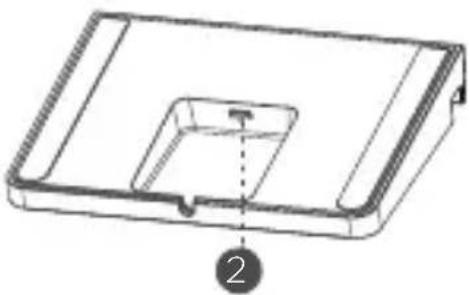
natural_image
Technical line drawing of a rectangular device with a recessed top and internal cavity, labeled with number 2 (no text or symbols on the diagram itself)natural_image
Line drawing of a tablet device with a pointing hand gesture (no text or symbols)natural_image
Warning symbol with a question mark inside a triangle and sound waves (no text)http://www.lenovo.com/recycling/japan
Directive européenne RoHS (Restriction of Hazardous Substances)
Turquie
https://www.lenovo.com/us/en/social_responsibility/RoHS-Communication.pdf Singapour
natural_image
Blank rectangular frame with rounded corners and a small circular button labeled '12' at the top right corner (no text or symbols on the frame itself)natural_image
Simple line drawing of a rectangular frame with horizontal lines and two small dots at the bottom (no text or symbols)1
natural_image
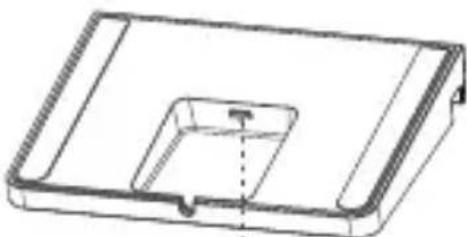
Technical line drawing of a rectangular electronic component with a recessed cavity and mounting bracket (no text or symbols)2
1 Conector smart 2 Conector micro USB
natural_image
Line drawing of a tablet device with a pointing hand gesture (no text or symbols)natural_image
Warning symbol with a question mark inside a triangle (no text or numbers)https://www.lenovo.com/us/en/social_responsibility/RoHS-Communication.pdf Singapur
© Copyright Lenovo 2019.
Recycle | Reuse | Recycle

V1.0_20190930
711608033061
MC
Printed in China