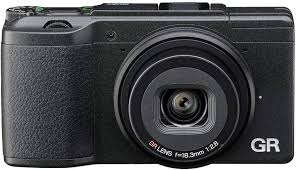
RICOH GR-II - Compact camera

GR-II - Compact camera RICOH - Free user manual and instructions

Find the device manual for free GR-II RICOH in PDF.

📄 186 pages English EN Download 💬 AI Question 12 questions ⚙️ Specs
Notice RICOH GR-II - page 177
View the manual : Français FR English EN
Pick your language and provide your email: we'll send you a specifically translated version.
Product type Compact digital camera
Brand RICOH
Model GR II
Sensor CMOS APS-C 16.2 megapixels
Lens 28 mm equivalent 35 mm, aperture f/2.8
Display 3 inches, 1,230,000 dots
Image processor GR Engine V
ISO sensitivity 100 - 25,600
Shooting modes P, Av, Tv, TAv, M, Auto, My Settings (My1-3), Video
Video recording Full HD 1920x1080, 30 fps
Image formats JPEG, RAW (DNG)
White balance Multi-P AUTO, manual, color temperature
Focus Multi AF, Spot, Precise, Tracking, Manual, Snap, Infinite
Exposure metering Multi, Center, Spot
Built-in flash Yes (guide number 5.4)
Connections USB 2.0, AV output, micro HDMI (type D), Wi-Fi, NFC
Power supply Rechargeable battery DB-65 (3.6 V, 1250 mAh)
Battery life Approx. 320 shots (CIPA standard)
Dimensions 117 × 62.8 × 34.7 mm
Weight Approx. 251 g (with battery and memory card)
Internal memory Approx. 54 MB + SD/SDHC/SDXC card
Operating temperature 0°C to 40°C
Maintenance and cleaning Clean the lens with a blower or soft dry cloth; avoid volatile solvents
Safety Follow usual precautions: do not disassemble, avoid moisture, use recommended battery
Spare parts and repairability DB-65 battery, BC-6 charger, AC-U1 power adapter, optional external flash

Frequently Asked Questions - GR-II RICOH

How to charge the GR II battery?
Use the supplied AC-U1 USB power adapter. Connect the USB cable to the camera and the adapter, then plug into a wall outlet. The auto focus/flash lamp lights up during charging and turns off when charging is complete (approx. 3 hours at 25°C).
What type of memory card can I use?
The camera accepts SD, SDHC, and SDXC memory cards. Insert the card into the slot with the back facing the screen until it clicks.
How to set the date and time?
When first turning on the camera, the Date setting screen appears. Use the ▲▼ buttons to select a field and change the value, then press MENU/OK to confirm. You can also change this setting in the menu [Setup] > [Date setting].
How to activate macro mode for close-ups?
In shooting mode, press the ▲ button (macro). The icon 0 appears. You can then shoot from 10 cm away from the subject. Press the button again to deactivate macro mode.
What is the difference between P, Av, Tv, and M modes?
P (Program): the camera automatically selects aperture and speed, with the possibility to change the combination. Av (Aperture Priority): you set the aperture, the camera selects the speed. Tv (Shutter Priority): you set the speed, the camera selects the aperture. M (Manual): you set both aperture and speed.
How to transfer photos to a computer?
Connect the camera to the computer using the supplied USB cable. The camera appears as an external drive. Copy the desired files. You can also use the supplied Digital Camera Utility 5 software.
What to do if the camera does not turn on?
Check that the battery is charged and inserted correctly. If the problem persists, remove the battery for a few minutes, then reinsert it. If the camera still does not turn on, contact customer support.
How to use the Wi-Fi function?
Press and hold the Effect/Wi-Fi button until you hear a beep. The camera activates Wi-Fi. Use the Image Sync app on your smartphone to connect and transfer photos or use the camera remotely.
How to reset all settings?
In the [Setup] menu, select Reset default values (Shooting) or Reset default values (Options/custom) to reset shooting settings or custom options.
Where is the camera serial number located?
The serial number is engraved under the camera, near the tripod screw hole. It is also indicated on the original packaging.

User questions about GR-II RICOH

2 questions about this device. Answer the ones you know or ask your own.

Ask a new question about this device

The email remains private: it is only used to notify you if someone responds to your question.

Why does my Ricoh GR-II camera record photos in DNG format instead of JPEG?
Frequently Asked Questions - 16/04/2026
Response Notice-Facile

Your Ricoh GR-II records photos in DNG (Digital Negative) format because the [Image Format] setting in the [Shooting] menu is currently configured to RAW mode. DNG is a RAW file format that preserves all the raw data from the 16.2-megapixel CMOS sensor, offering maximum flexibility for later editing, but the files are larger (about 20 MB per image compared to 7 MB in JPEG).

To change and save your photos in JPEG instead, access the shooting menu by pressing the MENU button, then navigate to [Image Format]. You will see several options represented by characters: select the o symbol to save only in JPEG, or the r symbol to save simultaneously in JPEG and RAW if you want to keep both formats. Confirm your choice by pressing OK.

For your information, here are the main options available in this menu:

  • JPEG format only (o): Saves photos in compressed JPEG, ready to use immediately, ideal for quick sharing
  • RAW format only (p): Saves in DNG only, for advanced editing
  • RAW + JPEG (r): Saves a pair of files (DNG + JPEG) for each photo, useful for having both options

You can also select the image size in this same menu: 16M (4928 x 3264 pixels), 10M, 5M, or 1M, as well as the aspect ratio formats 3:2, 4:3, or 1:1. Remember that you can save these settings to the quick access buttons Fn1, Fn2, or Effect to quickly switch between your preferred configurations without going through the menu each time.

If you already have DNG photos that you want to convert to JPEG, use the [RAW Development] function accessible from the [Playback] menu in viewing mode. This function allows you to convert your RAW files to JPEG with different settings (white balance, brightness, dynamic range correction, effects, etc.) while preserving the original DNG.

Respond (be the first)
How to reset a Ricoh GR-II camera to factory settings?
Frequently Asked Questions - 16/04/2026
Response Notice-Facile

To reset your Ricoh GR-II camera and restore factory settings, follow the steps below:

  1. Turn on the device: Press the power button to turn on your Ricoh GR-II.
  2. Access the main menu: Press the Menu button located on the back of the device.
  3. Navigate to settings: Use the directional arrows to scroll through the options until you find the Settings or Setup menu.
  4. Find the reset option: Look for an entry named Reset, Reset settings, or similar. This option may be located in a sub-menu like Configuration or System.
  5. Confirm the reset: Select this option and confirm your choice when the device asks if you want to restore default settings.
  6. Check the return to factory settings: After the reset, you can verify that all settings have returned to their original values.

This procedure helps resolve many issues related to settings and clears any customizations made to the device.

Respond (be the first)

Download the instructions for your Compact camera in PDF format for free! Find your manual GR-II - RICOH and take your electronic device back in hand. On this page are published all the documents necessary for the use of your device. GR-II by RICOH.

USER MANUAL GR-II RICOH
RICOH GR-II - 1
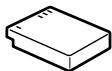
Batterie rechargeable (DB-65)

http://www.ricoh-imaging.com/registration/

Copyright (c) T.Teranishi.

Copyright (c) TeraTerm Project.

http://www.apple.com/quicktime/download/

Batterie rechargeable DB-65 (battery lithium-ion)

Batterie rechargeable DB-65

For customers in USA

STATEMENT OF FCC COMPLIANCE

This device complies with Part 15 of the FCC Rules. Operation is subject to the following two conditions: (1) This device may not cause harmful interference, and (2) this device must accept any interference received, including interference that may cause undesired operation.

Changes or modifications not approved by the party responsible for compliance could void the user's authority to operate the equipment.

This equipment has been tested and found to comply with the limits for a Class B digital device, pursuant to part 15 of the FCC Rules.

These limits are designed to provide reasonable protection against harmful interference in a residential installation. This equipment generates, uses and can radiate radio frequency energy and, if not installed and used in accordance with the instructions, may cause harmful interference to radio communications. However, there is no guarantee that interference will not occur in a particular installation.

If this equipment does cause harmful interference to radio or television reception, which can be determined by turning the equipment off and on, the user is encouraged to try to correct the interference by one or more of the following measures:

  • Reorient or relocate the receiving antenna.
  • Increase the separation between the equipment and receiver.
  • Connect the equipment into an outlet on a circuit different from that to which the receiver is connected.
  • Consult the dealer or an experienced radio/TV technician for help.

FOR CALIFORNIA, U.S.A. ONLY

Perchlorate Material-special handling may apply.

The lithium battery used in this camera contains perchlorate material, which may require special handling.

See www.dtsc.ca.gov/hazardouswaste/perchlorate

For customers in Canada

Industry Canada (IC) Compliance Notice

This Class B digital apparatus complies with Canadian ICES-003.

This device complies with Industry Canada licence-exempt RSS standard(s). Operation is subject to the following two conditions: (1) this device may not cause interference, and (2) this device must accept any interference, including interference that may cause undesired operation of the device.

Declaration of Conformity According to 47CFR, Parts 2 and 15 for Class B Personal Computers and Peripherals

We: RICOH IMAGING AMERICAS CORPORATION

Located at: 633 17th Street, Suite 2600 Denver, Colorado 80202 U.S.A. Phone: 800-877-0155 FAX: 303-790-1131

Declare under sole responsibility that the product identified herein complies with 47CFR Parts 2 and 15 of the FCC rules as a Class B digital device. Each product marketed is identical to the representative unit tested and found to be compliant with the standards. Records maintained continue to reflect the equipment being produced can be expected to be within the variation accepted, due to quantity production and testing on the statistical basis as required by 47CFR §2.909. Operation is subject to the following two conditions: (1) This device may not cause harmful interference, and (2) This device must accept any interference received, including interference that may cause undesired operation. The above named party is responsible for ensuring that the standards of 47CFR §15.101 to §15.109.

Product Name: Digital Camera

Model Number: GR II

Contact person: Customer Service Manager

Date and Place: June, 2015, Colorado

Lecture animation 38

Lecture zoom cible 96

Leger (Effet) 84
Manual assistant
Powered by Anthropic
Waiting for your message
Product information

Brand : RICOH

Model : GR-II

Category : Compact camera