
FFAD6022W1 - Dehumidifier FRIGIDAIRE - Free user manual and instructions
Find the device manual for free FFAD6022W1 FRIGIDAIRE in PDF.


| Type of Product | Dehumidifier |
| Model | FFAD6022W1 |
| Brand | Frigidaire |
| Capacity (Pints per Day) | 60 |
| Coverage Area (sq ft) | Up to 4,000 |
| Water Tank Capacity (Gallons) | 2.2 |
| Dimensions (W x D x H) in inches | 15.4 x 11.4 x 24.5 |
| Weight (lbs) | 50 |
| Power Supply | 115V, 60Hz |
| Amperage (Amps) | 7.6 |
| Energy Star Certified | Yes |
| Auto Defrost | Yes |
| Continuous Drainage Option | Yes, via garden hose (not included) |
| Filter Type | Washable, reusable |
| Filter Check Indicator | Yes |
| Auto-Restart After Power Outage | Yes |
| Noise Level (dB) | 52 |
| Warranty | 1 year limited |
| Refrigerant Type | R-410A |
| Recommended Usage | Basements, living rooms, large spaces |
Frequently Asked Questions - FFAD6022W1 FRIGIDAIRE
User questions about FFAD6022W1 FRIGIDAIRE
0 question about this device. Answer the ones you know or ask your own.
Ask a new question about this device
Download the instructions for your Dehumidifier in PDF format for free! Find your manual FFAD6022W1 - FRIGIDAIRE and take your electronic device back in hand. On this page are published all the documents necessary for the use of your device. FFAD6022W1 by FRIGIDAIRE.
USER MANUAL FFAD6022W1 FRIGIDAIRE
Important Safety Instructions.... 3
Location.... 4
How It Works.... 5
Dehumidifier Features.... 6
Operating Instructions.... 6
Care And Cleaning....11
Storage.... 12
Normal Sounds.... 12
Before You Call.... 13
Major Appliance Limited Warranty..... 14
Welcome to our family
Thank you for bringing Frigidaire into your home! We see your purchase as the beginning of a long relationship together.
This manual is your resource for the use and care of your product. Please read it before using your appliance. Keep it handy for quick reference. If something doesn't seem right, the troubleshooting section will help you with common issues.
FAQs, helpful tips and videos, cleaning products, and kitchen and home accessories are available at www.frigidaire.com.
We are here for you! Visit our website, chat with an agent, or call us if you need help. We may be able to help you avoid a service visit. If you do need service, we can get that started for you.
Let's make it official! Be sure to register your product.
Keep your product info here so it's easy to find.
Model Number ____
Serial Number ____
Purchase Date ____

WARNING
For Your Safety
- Do not store or use gasoline or other flammable vapors and liquids in the vicinity of this or any other appliance. Read product labels for flammability and other warnings.
- Discard water from bucket. Water is not potable and cannot be used for drinking.

WARNING
Electrical Information
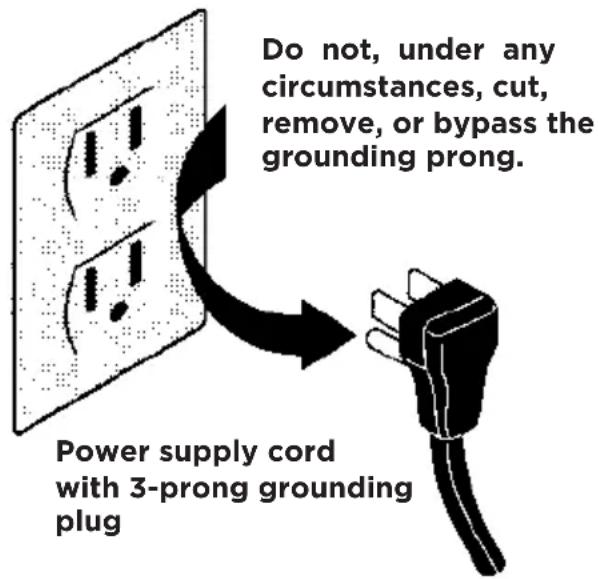
- For your safety and protection, this dehumidifier is equipped with a three-prong grounding plug on the power cord. Do not, under any circumstances, cut or remove the round ground prong from the plug.
- Your dehumidifier must be plugged directly into a properly grounded and polarized three-prong receptacle. If the wall receptacle you intend to use will not accept a three-prong plug, or if you are not sure the outlet is adequately grounded or protected by a time delay fuse or circuit breaker, have a qualified electrician install the proper outlet according to the National Electrical Code and applicable local codes and ordinances. Do not use an extension cord or an adapter plug.
- Never unplug the dehumidifier by pulling on the power cord. Always grip the plug firmly and pull straight out from the receptacle.
- Do not pinch, bend, or knot the power cord.

WARNING
Child Safety Precautions
- Destroy the carton, plastic bags, and any packing materials immediately after the dehumidifier is unpacked. Children should never use these items for play.
- Do not leave children unattended in an area where the appliance is operating. Do not allow them to sit or stand on the appliance.
- This appliance is not intended for use by persons (including children) with reduced physical, sensory or mental capabilities or lack of experience and knowledge, unless they have been given supervision or instruction concerning use of the appliance by a person responsible for their safety.
• Children should be supervised to ensure that they do not play with the appliance.

SAFETY PRECAUTIONS
DANGER! Avoid Serious Injury or Death
- This dehumidifier contains no user-serviceable parts. Always call an authorized Electrolux servicer for repairs.
- Do not insert or place fingers or objects into the air discharge area or back grille of the unit.
- Do not start or stop the dehumidifier by unplugging the power cord or turning off the power at the electrical box.
- Do not cut or damage the power cord. Do not pull on the power cord.
- If the power cord is damaged, it should only be replaced by an authorized Electrolux servicer.
- In the event of a malfunction (sparks, burning smell, etc.), immediately stop the operation, disconnect the power cord, and call an authorized Electrolux servicer.
- Do not operate the dehumidifier with wet hands. Do not drink any water from the dehumidifier.
- If the supply cord is damaged, it must be replaced by the manufacturer, its service agent or similarly qualified persons in order to avoid a hazard.
- The appliance shall be installed in accordance with national wiring regulations.

SAFETY PRECAUTIONS
CAUTION! Avoid Injury or damage to the unit or other property
- Do not direct airflow at fireplaces or other heat related sources as this could cause flare ups.
- Do not climb on or place objects on the unit. Do not hang objects off the unit.
- Do not place containers with liquids on the unit.
- Turn off the dehumidifier at the power source when it will not be used for an extended period of time.
- Operate the unit with air filter in place.
- Do not block or cover the intake grille, discharge area and outlet ports.
- Ensure that any electrical/electronic equipment is one yard away from the unit.
- Do not use or store flammable gases near the unit.

WARNING
Avoid fire hazard or electric shock. Do not use an extension cord or an adaptor plug. Do not remove any prong from the power cord.
Grounding type wall receptacle
Location
Selecting a Location
IMPORTANT:
- Dehumidifier must be operated in an enclosed area to be most effective. Close all doors, windows, and other outside openings to the room. The effectiveness of the dehumidifier depends on the rate at which new moisture-laden air enters the room.
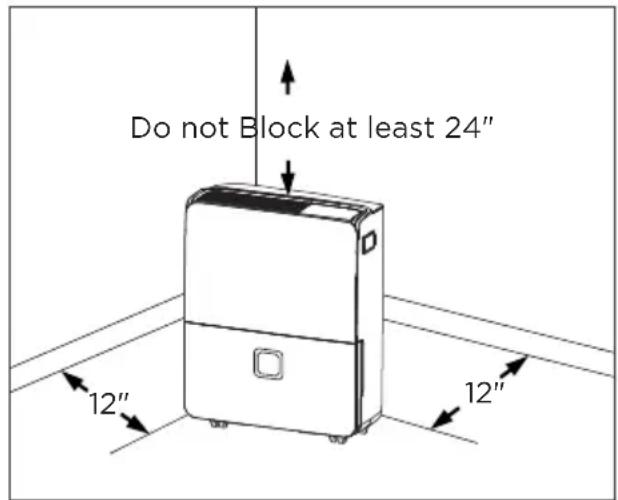
- Place dehumidifier in a location that does not restrict the airflow of the air intake and air outlet.
- A dehumidifier operating in a basement will have little or no effect in drying an adjacent enclosed storage area, such as a closet, unless there is adequate circulation of air in and out of the area. It may be necessary to install a second dehumidifier in the enclosed area for satisfactory drying.
- The dehumidifier must be installed on a level floor that will support it with a full bucket of water.
- There should be a minimum of 12 inches clearance around the dehumidifier. The unit will produce heat while in operation and should not be operated in an enclosed small space like a closet.
How It Works
When the unit is started, the fan begins to pull moisture-laden air across the dehumidifying coils. The coils condense or draw moisture from the air, and air flows through the air outlet louvers into the room as dry, warm air. Moisture removed from air is collected in a bucket on the front of the dehumidifier.
The unit is designed to operate between 41 °F (5 °C), and 89 °F (32 °C). The unit will not work properly if the temperature is out of this temperature range, or the performance of the unit will fall greatly.
The "Compressor" circuit has an automatic 3 minute time delayed start if the unit is turned off and on quickly. This prevents overheating of the compressor and possible circuit breaker tripping. Make sure the tank is fitted correctly otherwise unit will not turn on.
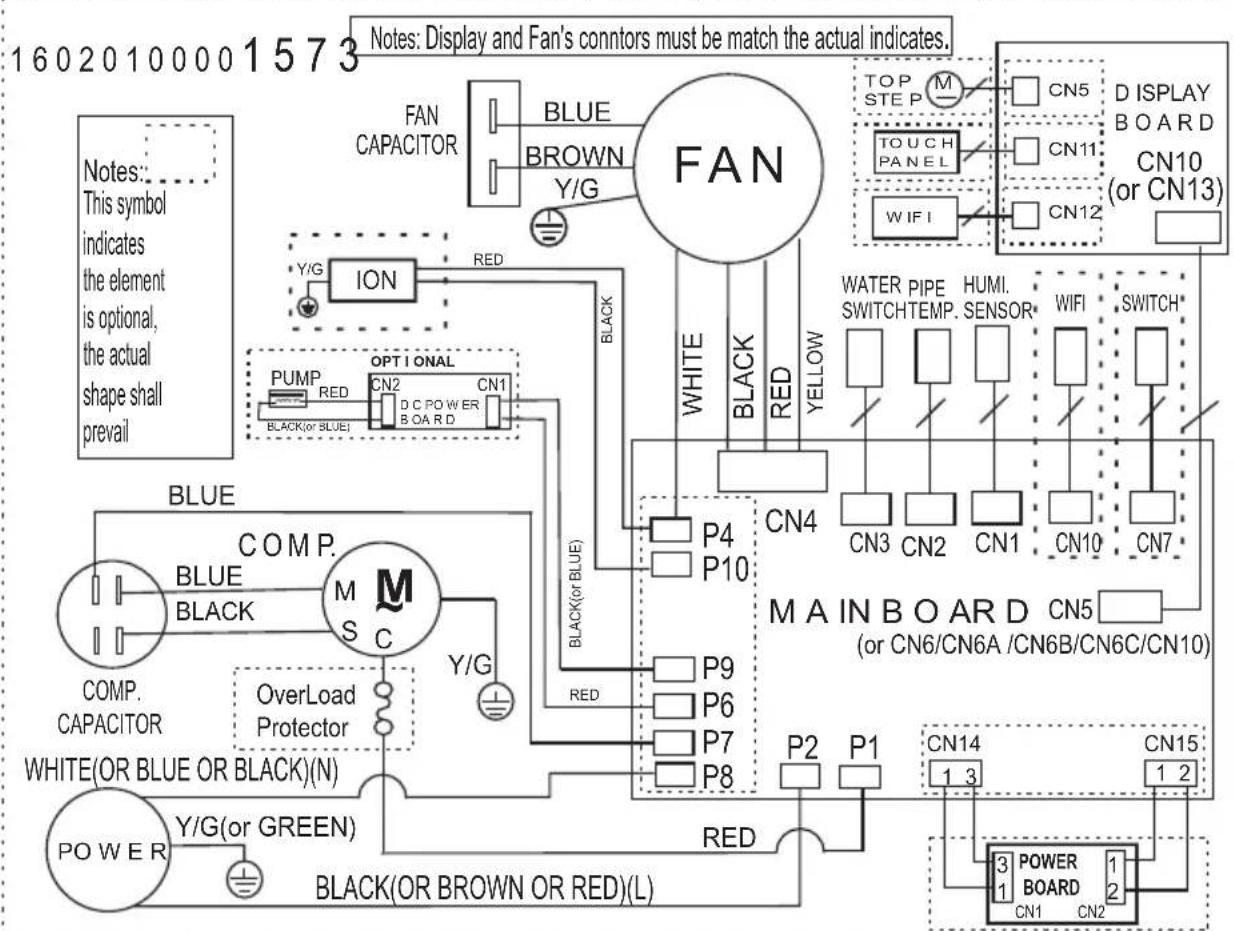
Wiring Diagram
flowchart
graph TD
    A["FAN"] --> B["BLUE CAPACITOR"]
    A --> C["BROWN Y/G"]
    A --> D["RED"]
    A --> E["ION"]
    A --> F["PUMP RED"]
    A --> G["OPT I ONAL CN2"]
    A --> H["CN1"]
    A --> I["BLACK(or BLUE)"]
    A --> J["WHITE"]
    A --> K["BLACK (or BLUE)"]
    A --> L["RED"]
    A --> M["WHITE"]
    A --> N["BLACK"]
    A --> O["RED"]
    P["TOP STEP"] --> Q["M"]
    R["TOUCH PANEL"] --> S["CN5"]
    T["WIFI"] --> U["CN11"]
    V["D ISPLAY BOARD"] --> W["CN10 (or CN13)"]
    X["WATER PIPE SWITCHTEMP."] --> Y["HUMI. SENSOR*"]
    Z["WIFI"] --> AA["SWITCH*"]
    AB["CN4"] --> AC["P4"]
    AB --> AD["P10"]
    AE["P9"] --> AF["P6"]
    AE --> AG["P7"]
    AE --> AH["P8"]
    AI["P2"] --> AJ["P1"]
    AK["POWER BOARD"] --> AL["CN14 1 3"]
    AK --> AM["CN15 1 2"]
    AN["BLACK(OR BROWN OR RED)(L)"] --> AO["RED"]
    AP["COMP. CAPACITOR"] --> AQ["M"]
    AP --> AR["BLACK"]
    AP --> AS["OverLoad Protector"]
    AP --> AT["Y/G (or GREEN)"]
    AU["WHITE(OR BLUE OR BLACK)(N)"] --> AV["Black (or BROWN OR RED)(L)"]
    AW["Black (or BLUE)"] --> AX["RED"]
    AY["Notes: This symbol indicates the element is optional, the actual shape shall prevail"]
Dehumidifier Features
ELECTRONIC CONTROL
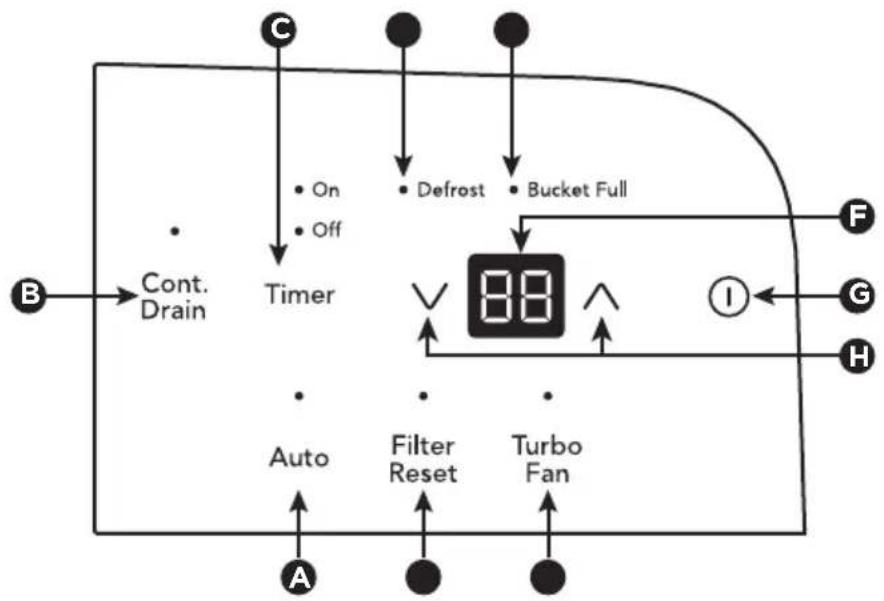
Before you begin, thoroughly familiarize yourself with the control panel and all its functions (as shown below).
flowchart
graph TD
    B["Input"] --> Cont.Drain["Cont. Drain"]
    Cont.Drain --> Timer["Timer"]
    Timer --> Defrost["Defrost"]
    Timer --> BucketFull["Bucket Full"]
    Timer --> Auto["Auto"]
    Timer --> FilterReset["Filter Reset"]
    Timer --> TurboFan["Turbo Fan"]
    Defrost --> 88["88"]
    BucketFull --> 88
    TurboFan --> 88
    88 --> I["I"]
    I --> G["G"]
    I --> H["H"]
    C["C"] --> Defrost
    Off["Off"] --> Timer
    Timer --> Defrost
    Timer --> BucketFull
    Timer --> Auto
    Timer --> FilterReset
    Timer --> TurboFan
| A Auto Mode Button |
| B Continue Drain Button |
| C Sets Timer |
| D Defrost Indicator |
| E Bucket Full Indicator |
| F Displays Humidity |
| G Turns Unit On Or Off |
| H Adjusts Humidity |
| I Turbo Fan Button |
| J Check Filter Reset Button |
Operating Instructions
Allow the unit to reach room temperature before operating.
To begin operating the dehumidifier, follow these steps:

NOTE
Unit must be upright for one hour prior to operating.
- Plug the power cord into a properly grounded 115 volt AC outlet.

NOTE
If the "BUCKET FULL" light is on, remove the bucket and re-install to reset the float switch.
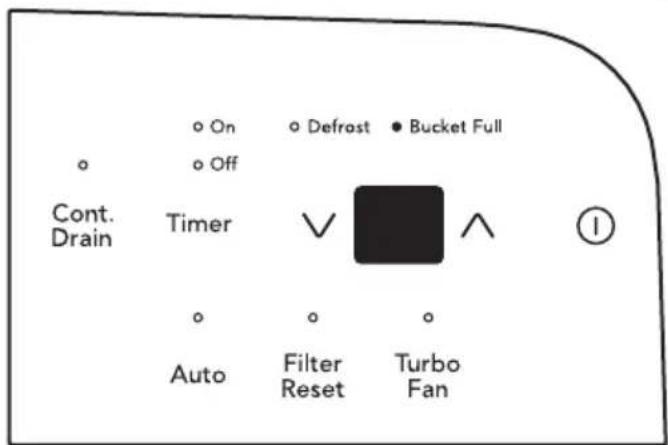
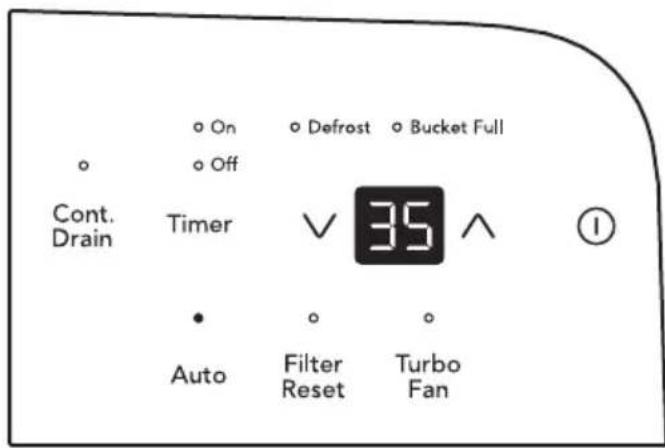
- To turn the unit on, press the ① button. The unit will run in Auto mode. In this mode, the unit will automatically set a comfortable humidity and fan speed according to the indoor environment. When room temperature < 65°F, the humidity will be set as 55% When room temperature ≥ 65°F and ≤ 77°F, the humidity will be set as 50%; When the room temperature T > 77°F, the humidity will be set as 45%. In Auto mode press ∨ or ∧ button will cancel this feature.
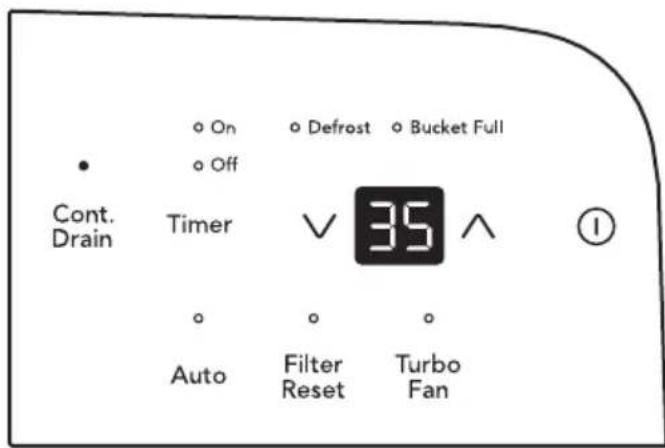
- It is recommended to press the Cont. Drain button to use the CONTINUOUS setting for the first three or four days until the sweating and dampness odors have stopped. In this setting the unit will run in the maximum power and the display will show actual room humidity.
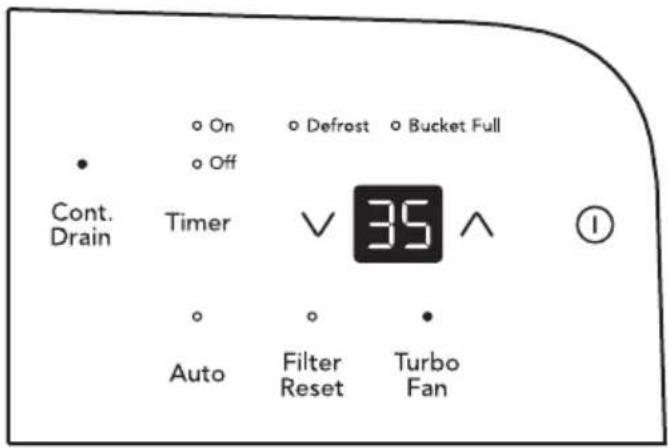
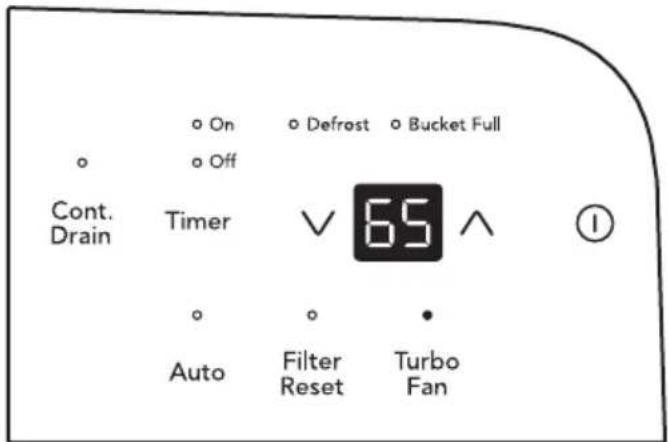
- Press the Turbo Fan button to activate the Turbo Fan feature. In this feature the unit will run in high fan speed to maximize the dehumidification speed.
- After a few days when the Relative Humidity has declined, press the Cont. Drain button to deactivate the Cont. Drain feature then press the HUMIDITY ∨ or ∧ buttons to choose a value between 35% to 85%, so the room is kept at a comfortable humidity. Pressing the ∨ or ∧ buttons will change the humidity selection in 5% increments. After you have set the desired humidity, the readout will display the actual room humidity.
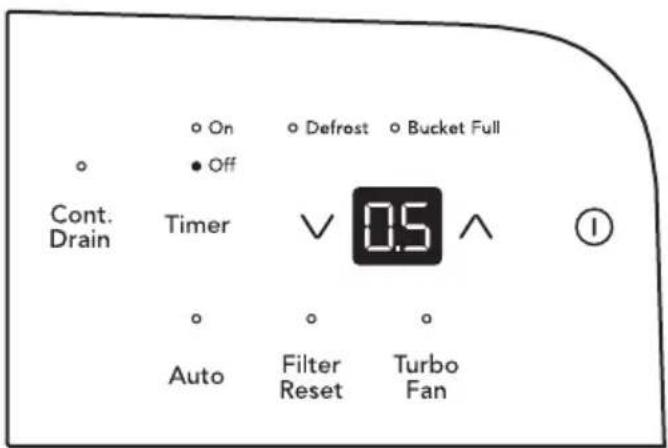
- When the unit is on, first press the Timer button, the Timer Off indicator light illuminates. It indicates the Auto Stop program is initiated. Press it again the Time On indecator light illuminates. It indicates the Auto Start is initiated.
When the unit is off, first press the Timer button, the TIMER ON indicator light illuminates. It indicates the Auto Start program is initiated. Press it again the Time Off indecator light illuminates. It indicates the Auto Stop is initiated.
Press or hold the UP or DOWN pad to change the Auto time by 0.5 hour increments, up to 10 hours, then at 1 hour increments up to 24 hours. The control will count down the time remaining until start.
The selected time will register in 5 seconds and the system will automatically revert back to display the previous humidity setting.
When the Auto start & Auto stop times are set, within the same program sequence, TIMER ON OFF indicator lights illuminate identifying both ON and OFF times are now programmed.
Turning the unit ON or OFF at any time or adjusting the timer setting to 0.0 will cancel the Auto Start/Stop function.
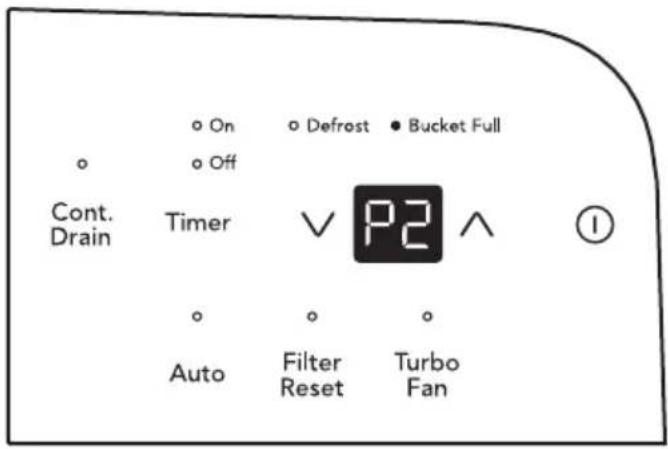
When LED display window displays the code of P2, the Auto Start/Stop function will also be cancelled.

NOTE:
- Before entering TIMER setting, make sure power is being supplied to the unit.
-
Before entering TIMER setting, make sure pressing HUMIDITY ∨ or ∧ button sets one desired room humidity first.
-
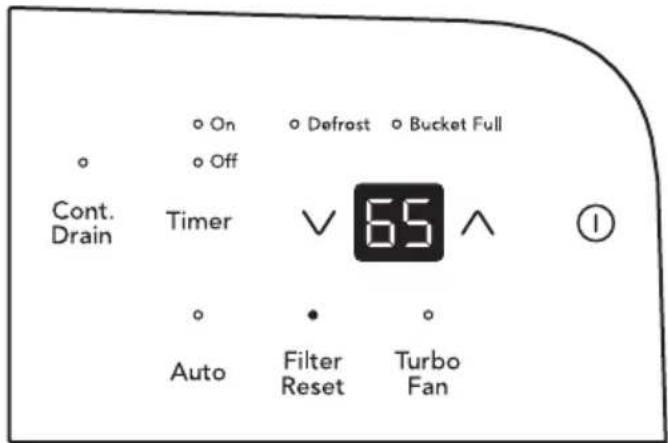
The CLEAN FILTER light will illuminate after 250 hours of operation. At this time refer to the care and cleaning section to remove and clean the filter. Once the filter has been cleaned and replaced, simply press the FILTER button to extinguish the light.
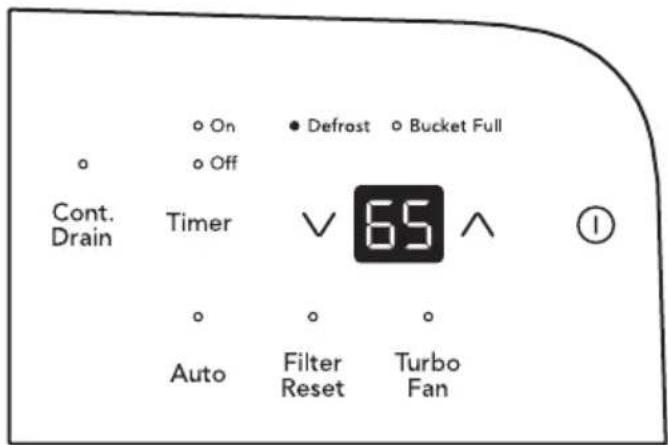
- When frost builds up on the evaporator coils, the compressor will cycle off and the fan will continue to run until the frost disappears.
- To shut the unit down, press the ON/OFF button.
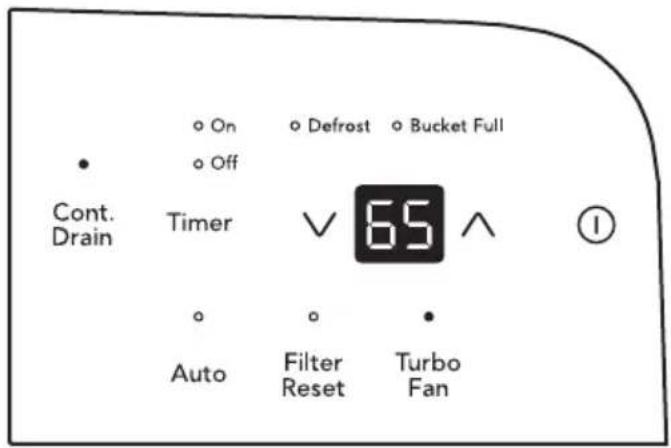
Note: After a power outage, the unit will memorize the last setting and return the unit to the same setting once power is restored.
Fault Codes
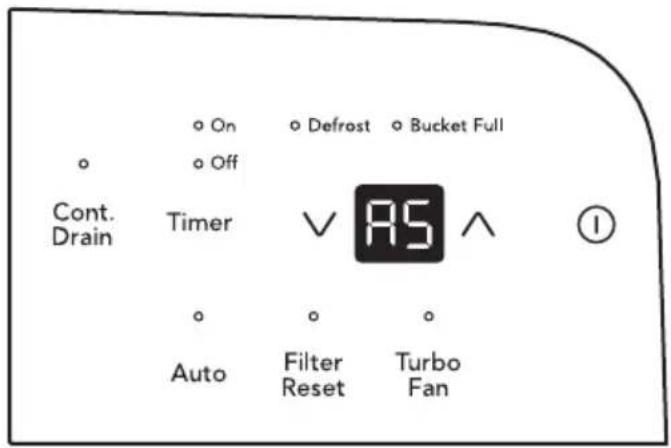
- If the display reads "AS" or "ES", a sensor has failed. Contact your Authorized Frigidaire Service Center.
- If the display reads "P2", Bucket is full or removed or not in right position. Replace the bucket in the right position.
Removing Collected Water
- Emptying the Bucket:
a. When the bucket is full, the unit will shut down and the BUCKET FULL indicator will illuminate.
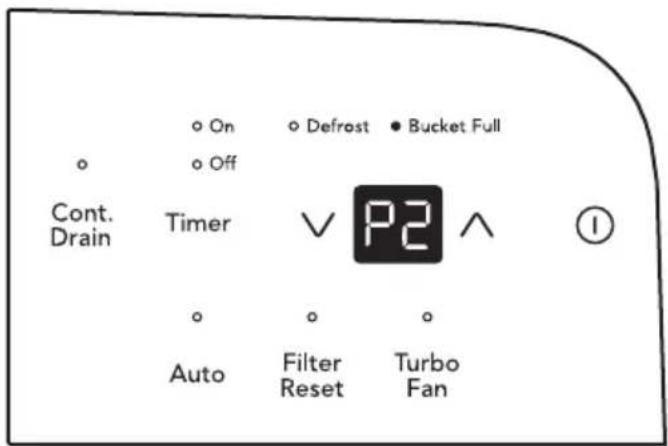
b. Do not move the unit at this time otherwise water may spill on the floor.
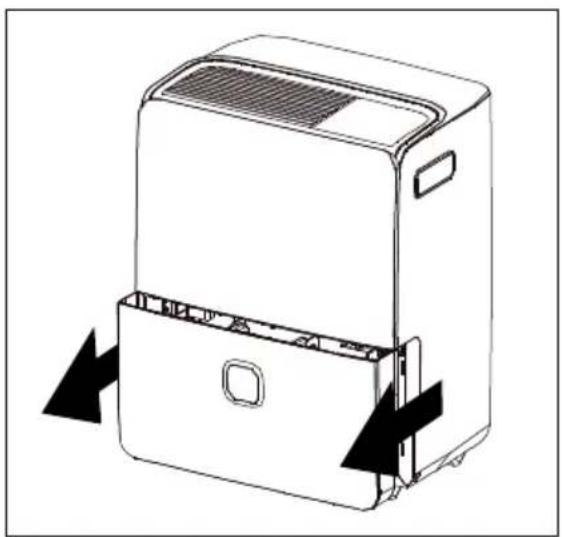
c. Press sides of bucket gently to unclip the bucket from the unit.
d. Remove the bucket as shown in the photographs below and empty the bucket.
natural_image
Line drawing of a refrigerant device with arrows indicating airflow or movement (no text or symbols)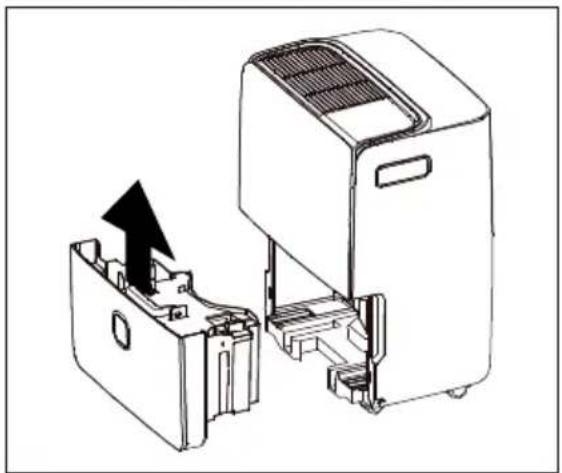
natural_image
Technical line drawing of a device with an open lid and internal components, showing no text or symbols.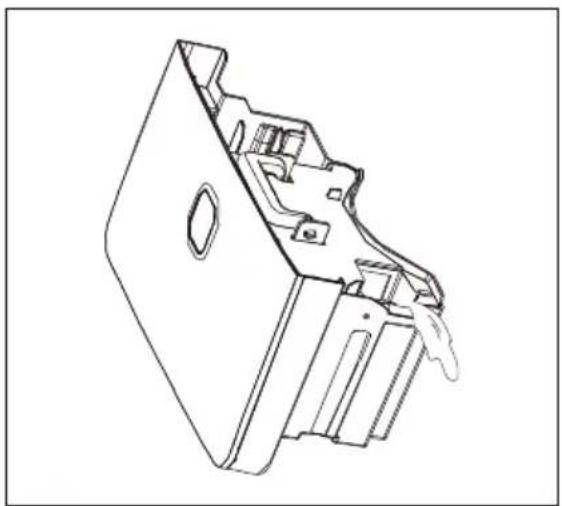
natural_image
Technical line drawing of a mechanical component with internal cavities and mounting holes (no text or symbols)
WARNING
Discard water from bucket. Water is not potable and cannot be used for drinking.
e. Replace the empty bucket back into the unit and once seated correctly, the unit will start up again.
f. You should hear a click when the bucket is in the correct position.
- Continuous Drainage:
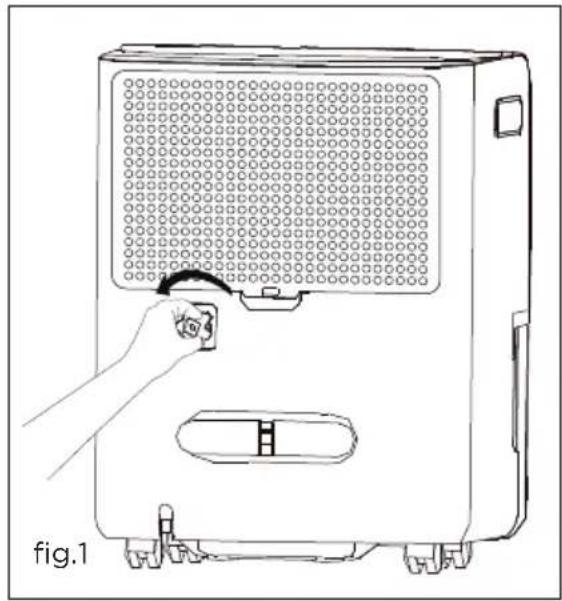
a. For continuous drainage operation, you will need a garden hose and a drain nearby to discharge the water into.
b. Unscrew the drain cap on the back side of the unit. (fig.1)
natural_image
Line drawing of a portable air purifier with a hand adjusting its lid (no text or symbols)c. Insert the female threaded end of the hose onto the drain connector of the unit. (fig.2)
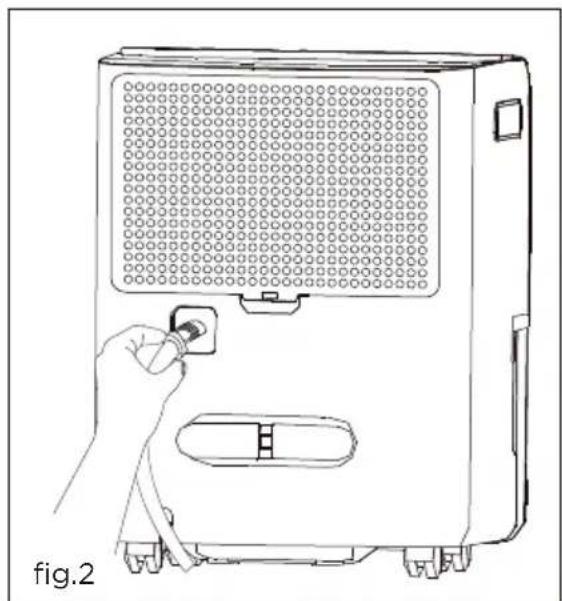
natural_image
Line drawing of a hand inserting a plug into a device labeled 'fig.2' (no text or symbols on the device itself)d. Screw the garden hose onto the threaded portion of the drain connector. (fig.3)
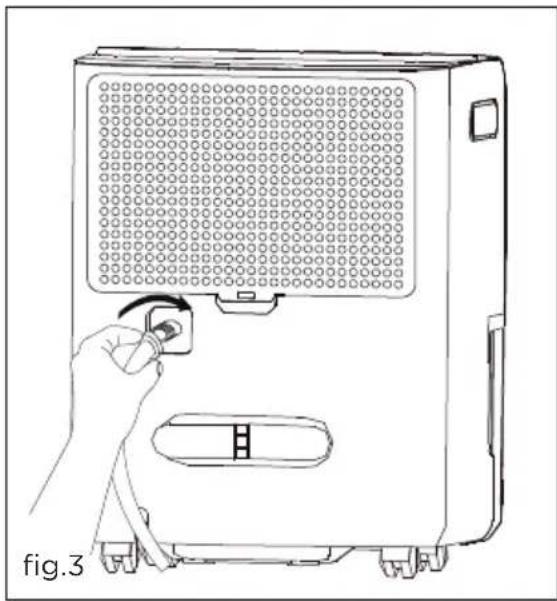
natural_image
Line drawing of a hand inserting a plug into a device panel (no text or symbols)e. Make sure the hose is secure so there are no leaks.
f. Direct the hose toward the drain, making sure that there are no kinks that will stop the water flowing.
g. Place the end of the hose into the drain. (fig.4)
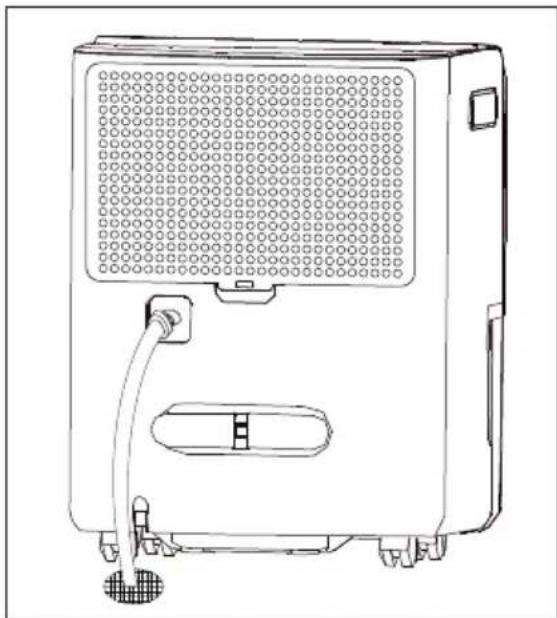
natural_image
Line drawing of a portable air purifier with ventilation grilles and control knobs (no text or symbols)h. Select the desired humidity setting and fan speed on the unit for continuous draining to start.

NOTE
-
Check the seal between the hose and the drain connector. If there is a small leak then replace the hose gasket and re-tighten the hose.
-
It is recommended that a Dehumidifier Drain Hose - 1/2" (12.7 mm) or larger be used. Make sure there are no kinks or elevations in the hose.
-
When a hose is not attached to the drain connector, please ensure drain cap is screwed securely to the connector to prevent leakages.
Care and Cleaning
- Filter
Clean the filter every two weeks based on normal operating conditions.
To remove the filter:
a. Remove the back grille every two weeks based on normal operating conditions.
b. To remove the back grille, pull back grille outwards (see figure on the left).
c. Wash the back grille with clean water then dry.
d. Re-install the back grille.
- Cabinet
a. Dust cabinet with an oil-free cloth, or using a damp cloth.
b. Vacuum grill using brush attachment.
- Water Bucket
a. Clean bucket with warm water and detergent.
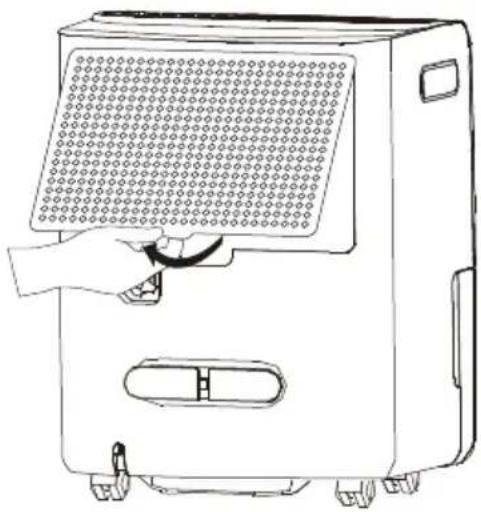
natural_image
Line drawing of a portable air conditioner unit with a hand inserting a fan (no text or symbols)Storage
When unit is not in use, unplug and use the cord wrap shown for your model type.
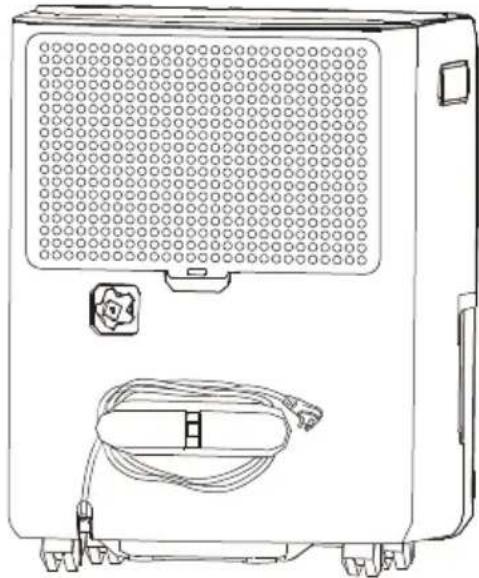
natural_image
Line drawing of a portable electronic device with ventilation grille and cable (no text or symbols)Normal Sounds
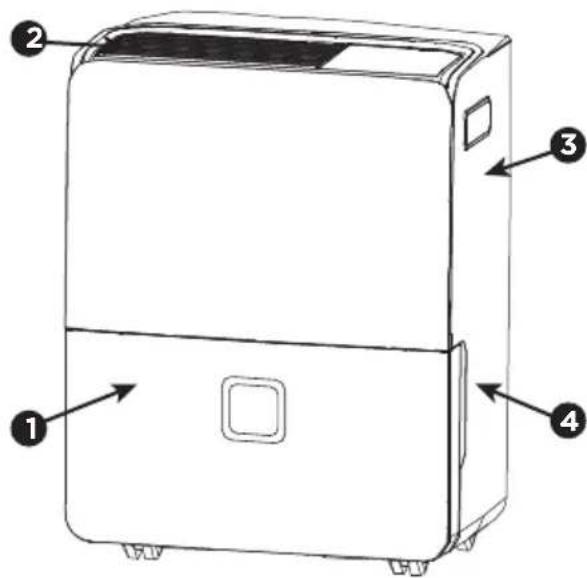
1 Dripping Sound
The sound of dripping water may be heard during the dehumidification cycle.
② Sound of Rushing Air
At the top of the unit, you may hear the sound of rushing air being moved by the fan.
3 Gurgle/Hiss
"Gurgling or hissing" noise may be heard due to refrigerant passing through evaporator during normal operation.
4 High pitched Chatte
Today's high efficiency compressors may have a high pitched chatter during the dehumidification cycle.
Before calling for service, review this list. It may save you time and expense. This list includes common occurrences that are not the result of defective workmanship or materials in this appliance.
| SOLUTIONOCCURRENCE | |
| Dehumidifier does not operate. | Wall plug disconnected.Push plug firmly into wall outlet.House fuse blown or circuit breaker tripped.Replace fuse with time delay type or reset circuit breaker.The dryness level you selected has been reached.Dehumidifier automatically shuts off when selected amount of moisture has been removed from the air. If you want to remove more moisture, Select 'CONTINUOUS' by using the humidity button or knob. After the dehumidifier starts, reset the control to the desired setting.Bucket not installed properly.See "Removing Collected Water".Water in the bucket has reached its preset level. Dehumidifier automatically turns off when this occurs.Empty bucket and return bucket to position.Dehumidifier is not turned on.Turn unit on."BUCKET FULL" light is on.Remove bucket, empty water and re-install correctly. |
| Dehumidifier runs too much. | Windows or doors near dehumidifier are open to outdoors. Close all windows or doors to outside.Area to be dehumidified is too large. Check with your dealer to see if capacity is adequate.Air movement through dehumidifier is blocked.Grill may be dirty. Use brush attachment of vacuum cleaner to clean grill.See "Care and Cleaning".Dehumidifier must be placed in a space that does not restrict air flowing into the rear coil or out of the front grill.Dehumidifier has been installed or restarted recently. The higher the moisture in the room,the longer the dehumidifier will operate.Dehumidifier is in the CONTINUOUS mode and will remain on in this mode, use the humidity button or knob to set a RH% higher level. |
| Dehumidifier is operating but room is not dry enough. | Humidity setting is too high.Press the HUMIDITY button or rotate knob to a lower setting or choose CONTINUOUS for maximum dryness.Dehumidifier has been installed or restarted recently. The higher the moisture in the room air,the longer it takes for the room air to become dry.Dehumidifier does not have sufficient clearance to operate. Air flow to the air outlet is blocked.See "Selecting a Location".Room temperature is too low. Unit will not operate satisfactorily if the room temperature is below 41 °F(5 °C). See "Operating Conditions".Refer to causes under DEHUMIDIFIER RUNS TOO MUCH. |
| Frost appears on coils behind the filter | Dehumidifier has been turned on recently. This is normal due to refrigerant rushing through the coil. Frost will usually disappear within 60 minutes.Room Temperature is too low. All models will operate satisfactorily at temperatures greater than 41 °F (5 °C). |
| Fan noise. | Air is moving through the dehumidifier. This is a normal sound. |
If These Solutions Fail, Call 1-800-944-9044(US)/1-800-265-8352(Canada) For Frigidaire Service.
Your appliance is covered by a limited one-year warranty for functional repairs only. For one year from your original date of purchase, Electrolux will pay all costs for repairing or replacing any parts of this appliance that prove to be defective in materials or workmanship when such appliance is installed, used and maintained in accordance with the provided instructions. After one year from your original date of purchase, the consumer will be responsible for diagnostic, labor and parts costs as well as any removal, transportation and reinstallation expenses which are incurred during service on components.
Exclusions
This warranty does not cover the following:
- Products with original serial numbers that have been removed, altered or cannot be readily determined.
- Product that has been transferred from its original owner to another party or removed outside the USA or Canada.
- Rust on the interior or exterior of the unit.
- Products purchased "as-is" are not covered by this warranty.
- Food loss due to any refrigerator or freezer failures.
- Products used in a commercial setting.
- Service calls which do not involve malfunction or defects in materials or workmanship, or for appliances not in ordinary household use or used other than in accordance with the provided instructions.
- Service calls to correct the installation of your appliance or to instruct you how to use your appliance.
- Expenses for making the appliance accessible for servicing, such as removal of trim, cupboards, shelves, etc., which are not a part of the appliance when it is shipped from the factory.
- Service calls to repair or replace appliance light bulbs, air filters, water filters, other consumables, or knobs, handles, or other cosmetic parts.
- Surcharges including, but not limited to, any after hour, weekend, or holiday service calls, tolls, ferry trip charges, or mileage expense for service calls to remote areas, including the state of Alaska.
- Damages to the finish of appliance or home incurred during installation, including but not limited to floors, cabinets, walls, etc.
- Damages caused by: services performed by unauthorized service companies; use of parts other than genuine Electrolux parts or parts obtained from persons other than authorized service companies; or external causes such as abuse, misuse, inadequate power supply, accidents, fires, or acts of God.
DISCLAIMER OF IMPLIED WARRANTIES; LIMITATION OF REMEDIES
CUSTOMER'S SOLE AND EXCLUSIVE REMEDY UNDER THIS LIMITED WARRANTY SHALL BE PRODUCT REPAIR OR REPLACEMENT AS PROVIDED HEREIN. CLAIMS BASED ON IMPLIED WARRANTIES, INCLUDING WARRANTIES OF MERCHANTABILITY OR FITNESS FOR A PARTICULAR PURPOSE, ARE LIMITED TO ONE YEAR OR THE SHORTEST PERIOD ALLOWED BY LAW, BUT NOT LESS THAN ONE YEAR. ELECTROLUX SHALL NOT BE LIABLE FOR CONSEQUENTIAL OR INCIDENTAL DAMAGES SUCH AS PROPERTY DAMAGE AND INCIDENTAL EXPENSES RESULTING FROM ANY BREACH OF THIS WRITTEN LIMITED WARRANTY OR ANY IMPLIED WARRANTY. SOME STATES AND PROVINCES DO NOT ALLOW THE EXCLUSION OR LIMITATION OF INCIDENTAL OR CONSEQUENTIAL DAMAGES, OR LIMITATIONS ON THE DURATION OF IMPLIED WARRANTIES, SO THESE LIMITATIONS OR EXCLUSIONS MAY NOT APPLY TO YOU. THIS WRITTEN WARRANTY GIVES YOU SPECIFIC LEGAL RIGHTS. YOU MAY ALSO HAVE OTHER RIGHTS THAT VARY FROM STATE TO STATE.
If You Need Service Keep your receipt, delivery slip, or some other appropriate payment record to establish the warranty period should service be required. If service is performed, it is in your best interest to obtain and keep all receipts. Service under this warranty must be obtained by contacting Electrolux at the addresses or phone numbers below.
This limited warranty only applies in the USA and Canada. In the USA, your appliance is warranted by Electrolux Major Appliances North America, a division of Electrolux Home Products, Inc. In Canada, your appliance is warranted by Electrolux Canada Corp. Electrolux authorizes no person to change or add to any obligations under this warranty. Obligations for service and parts under this warranty must be performed by Electrolux or an authorized service company. Product features or specifications as described or illustrated are subject to change without notice.
USA
1.800.944.9044
Electrolux Major Appliances
10200 David Taylor Drive
Charlotte, NC 28262

Electrolux
Canada
1.800.265.8352
Electrolux Canada Corp.
5855 Terry Fox Way
Mississauga, Ontario, Canada
L5V 3E4
FRIGIDAIRE
welcome home
Our home is your home. Visit us if you need help with any of these things:

owner support

accessories
service

registration
(See your registration card for more information.)
Frigidaire.com
1-800-944-9044
Frigidaire.ca
1-800-265-8352
- Welcome to our family
- WARNING
- For Your Safety
- Electrical Information
- Child Safety Precautions
- SAFETY PRECAUTIONS
- DANGER! Avoid Serious Injury or Death
- CAUTION! Avoid Injury or damage to the unit or other property
- Location
- Selecting a Location
- IMPORTANT:
- How It Works
- Wiring Diagram
- Dehumidifier Features
- ELECTRONIC CONTROL
- Operating Instructions
- NOTE
- NOTE:
- Fault Codes
- Removing Collected Water
- Care and Cleaning
- Storage
- Dripping Sound
- ② Sound of Rushing Air
- Gurgle/Hiss
- High pitched Chatte
- Exclusions
- This warranty does not cover the following:
- DISCLAIMER OF IMPLIED WARRANTIES; LIMITATION OF REMEDIES
- USA
- 1.800.944.9044
- FRIGIDAIRE
- welcome home
Brand : FRIGIDAIRE
Model : FFAD6022W1
Category : Dehumidifier