
K-01 - Mirrorless Camera PENTAX - Free user manual and instructions
Find the device manual for free K-01 PENTAX in PDF.


| Product type | Mirrorless camera |
| Brand | PENTAX |
| Model | K-01 |
| Dimensions (W × H × D) | 121 × 79 × 59 mm |
| Weight | 560 g (with battery and memory card), 480 g (body only) |
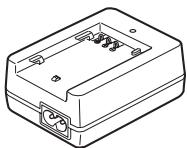
| Power supply | Rechargeable lithium-ion battery D-LI90; charger D-BC90; AC adapter K-AC1202 (optional) |
| Sensor | CMOS, 16 megapixels (4928 × 3264 max.) |
| Main functions | Auto, Scene, HDR, P, Av, Tv, M, B modes; Shake Reduction stabilization; built-in flash; Full HD video (30 fps); optional GPS (O-GPS1) |
| Maintenance and cleaning | Dust lens with a brush; CMOS sensor cleaning by a PENTAX professional (fee-based); do not use solvents |
| Safety | Do not disassemble or modify the camera; avoid shocks and humidity; use specified charger and battery; do not look directly at the sun with the lens |
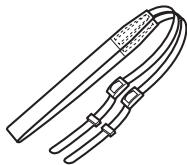
| Spare parts / Repairability | Battery D-LI90, charger D-BC90, AC adapter K-AC1202, GPS unit O-GPS1, external flashes, USB cable I-USB7, strap O-ST120; repair by a PENTAX authorized center |
| General information | 12-month warranty; compatibility with DA, DA L, D FA, FA J lenses and lenses with A position; recording in JPEG and RAW format |
Frequently Asked Questions - K-01 PENTAX
User questions about K-01 PENTAX
0 question about this device. Answer the ones you know or ask your own.
Ask a new question about this device
Download the instructions for your Mirrorless Camera in PDF format for free! Find your manual K-01 - PENTAX and take your electronic device back in hand. On this page are published all the documents necessary for the use of your device. K-01 by PENTAX.
USER MANUAL K-01 PENTAX
natural_image
Line drawing of a Pentax digital camera with no visible text or symbols on the body

SILKYPIX®
The Excellent digital development technology





HDMI ^TM
HIGH-DEFINITION MULTIMEDIA INTERFACE
natural_image
Simple line drawing of a circular ring or washer (no text or symbols)natural_image
Line drawing of a multi-pin cable with connectors and connectors (no text or symbols)Câble USB I-USB7
natural_image
Line drawing of a mechanical tool or clamp with two handles and a textured handle (no text or symbols)Courroie O-ST120
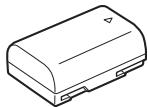
Batterie lithium-ion rechargeable D-LI90
natural_image
Line drawing of a rectangular electronic device with internal components and mounting holes (no text or symbols)natural_image
Coiled black cable with two terminal connectors (no text or symbols visible)Guide rapide

① Déclencheur
natural_image
Black-and-white photo of a wooden pier with a traditional pavilion on calm water, no visible text or symbolsnatural_image
Black-and-white photo of two children with camera lens bounding boxes, no visible text or symbols in the image itself.natural_image
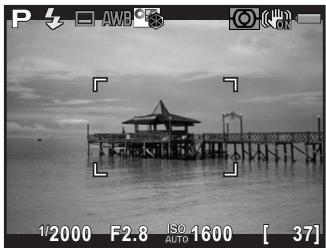
Black-and-white coastal scene with palm trees, shoreline, and camera settings (no readable text or symbols in main image area)12 Anti-bougé (p.105)/Movie SR (p.120)
13 Mode centre (p.96)
27 Correction distorsion (p.146)
natural_image
Abstract white silhouette of a mountain peak against a gray background (no text or symbols)natural_image
Abstract white silhouette on a gray background, no text or symbols presentnatural_image
Abstract grayscale shape with a white wavy base and a smooth peak, no text or symbols present.natural_image
Diagram of a rope knot being tied with a camera, showing rope routing and angle changes (no text or symbols)3 Fermez la trappe de protection.
natural_image
Technical line drawing of a DSLR camera with a circular dial and an arrow indicating direction (no text or symbols)natural_image
Diagram of a DSLR camera with a circular lens and adjustment arrows indicating motion (no text or symbols)natural_image
Line drawing of a Pentax digital camera with lens and control panel (no text or symbols)😊 (Standard), 📁 (Portrait), ▲ (Paysage),
✿ (Macro), 🎨 (Sport), 🍴 (Portrait nocturne), 🌐 (Coucher de soleil),
natural_image
Black-and-white photo of a wooden pier at dusk with a small building on the water, captured in a camera interface (no readable text or symbols)Mire AF
natural_image
Diagram of a Pentax camera with a downward arrow indicating compression or disassembly (no text or symbols present)
natural_image
Diagram of a Pentax smartphone with a paper feed cover and a downward arrow indicating compression (no text or symbols present)
natural_image
Black-and-white photo of a wooden pier by the sea with a gazebo on the shore, no visible text or symbols.natural_image
Black-and-white photo of a wooden pier at sea with a traditional pavilion, showing exposure lens and camera settings (no readable text or symbols in the main scene)natural_image
Black-and-white landscape illustration featuring a winding river, rolling hills, and scattered trees under a cloudy sky (no text or symbols)Exposition standard
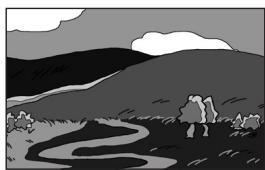
natural_image
Black-and-white landscape illustration featuring a winding river, rolling hills, and scattered trees under a cloudy sky (no text or symbols)Sous-exposition
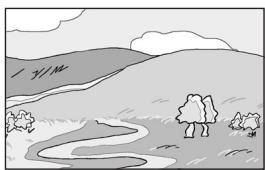
natural_image
Simple black-and-white landscape illustration with hills, trees, and a winding river (no text or symbols)Surexposition
natural_image
Black-and-white photo of a person lying on a wooden structure with a grid overlay, no visible text or symbols.natural_image
Black-and-white photo of a wooden pier with a gabled pavilion on calm water, no visible text or symbolsnatural_image
Line drawing of a woman standing near a bridge with a cable-stayed bridge in the background (no text or symbols)natural_image
Illustration of a person standing near a large bridge and cable-stayed bridge (no text or symbols)natural_image
Illustration of a person standing on a bridge with a cable-stayed bridge in the background (no text or symbols)
natural_image
Line drawing of a Pent X digital camera with no visible text or symbols on the bodynatural_image
Black-and-white photo of a traditional-style wooden pavilion by a waterfront, with no visible text or symbols.natural_image
Black-and-white photo of a wooden pier at dusk with a small building on the water, no visible text or symbols.
natural_image
Illustration of a Pentax camera with a lens and control panel (no text or symbols)natural_image
Line drawing of a DSLR camera with attached cable and connector (no text or symbols)natural_image
Black-and-white photo of a person riding a bicycle with camera control buttons (no readable text or symbols)natural_image
Black-and-white photo of a person riding a bicycle against a sky background (no text or symbols visible)natural_image
Black-and-white photo of a person riding a bicycle against a sky background, no visible text or symbolsnatural_image
Black-and-white photo of a wooden pier at dusk with a gazebo and camera lens (no readable text or symbols)7 Prenez une photo.

natural_image
Pure grid pattern with no text, numbers, or symbolsDistorsion en coussinet

natural_image
Pure grid pattern with no text, numbers, or symbolsDistorsion en barillet
natural_image
Pure optical ray diagram showing parallel light rays converging through a lens (no text or labels)natural_image
Black-and-white photo of a traditional-style pavilion by a waterfront, with no visible text or symbols.Affichage 4/9/16/36/81 imagettes
natural_image
Grid of black-and-white photos showing tropical beach scenes, a coastal city skyline, and marine life with no visible text or symbols.Affichage dossier
natural_image
Grid of six grayscale landscape photos labeled 100 to 105, each with a unique image and a small icon below (no text or symbols in the images themselves)natural_image
Four-panel black-and-white photo sequence showing a person performing pull-ups on a pole, with no visible text or symbols in the main image area.natural_image
Four-panel black-and-white photo collage showing palm trees, beach, whale leaping, and city skyline (no text or symbols)natural_image
Black-and-white photo of a wooden pier at dusk with a traditional pavilion on the left, no visible text or symbols.natural_image
Black-and-white photo of a wooden pier with a gabled pavilion over calm water, no visible text or symbols.natural_image
Diagram of a DSLR camera connected to a device via cable, showing ports and wiring (no text or symbols present)natural_image
Illustration of a car with motion blur effect (no text or symbols)natural_image
Side view illustration of a car with motion lines indicating speed (no text or symbols)Synchro 2e rideau

natural_image
Line drawing of a DSLR camera setup with tripod-mounted camera and coiled cable (no text or symbols)
natural_image
Line drawing of a hand inserting a Pentax camera into a circular lens (no text or symbols)natural_image
Exterior view of a black PERTAX photography studio flash unit (no visible text or symbols on body)AF540FGZ
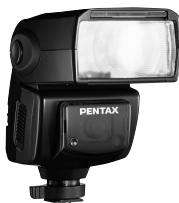
natural_image
Black Pentax camera flash unit with visible lens and control buttons (no text or symbols on body)AF360FGZ
Flash auto AF200FG
natural_image
Black Pentax flash unit with no visible text or symbols on bodyAF200FG
natural_image
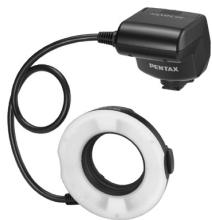
Close-up of a black and white optical device with a coiled cable and ring, no visible text or symbols.AF160FC
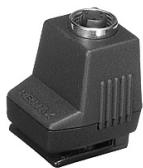
natural_image
Close-up of a black electronic device with ventilation slots and a circular lens (no visible text or symbols)natural_image
Close-up of a black Pentax optical device with visible ports and lens (no text or symbols on body)natural_image
Black Pentax camera clamp with adjustable grip and base (no visible text or symbols)natural_image
Black Pentax analog device with control buttons and indicator lights (no readable text beyond branding)Étui/Courroie
Afficher quadrillage .....204
Assistance AF 17, 96
AUTO Mode (Image auto.) .... 58, 78
Autofocus AF 96
Bouton Ⓞ (G) 19, 155
Bouton vert 19, 155
CTE (Balance blancs) .....137
D Décharge flash auto .....61, 64
Déchargement manuel .....61, 65
Déclencheur .....19, 21, 59
Destination 201
INFO Bouton ....19, 21, 22, 26, 169
Info/options programme .....212
Microphones .....17, 121
Portrait nocturne 🙏 ......78, 79
For customers in USA
STATEMENT OF FCC COMPLIANCE
This device complies with Part 15 of the FCC Rules. Operation is subject to the following two conditions: (1) This device may not cause harmful interference, and (2) this device must accept any interference received, including interference that may cause undesired operation.
Changes or modifications not approved by the party responsible for compliance could void the user's authority to operate the equipment.
This equipment has been tested and found to comply with the limits for a Class B digital device, pursuant to part 15 of the FCC Rules.
These limits are designed to provide reasonable protection against harmful interference in a residential installation. This equipment generates, uses and can radiate radio frequency energy and, if not installed and used in accordance with the instructions, may cause harmful interference to radio communications. However, there is no guarantee that interference will not occur in a particular installation.
If this equipment does cause harmful interference to radio or television reception, which can be determined by turning the equipment off and on, the user is encouraged to try to correct the interference by one or more of the following measures:
- Reorient or relocate the receiving antenna.
- Increase the separation between the equipment and receiver.
- Connect the equipment into an outlet on a circuit different from that to which the receiver is connected.
* Consult the dealer or an experienced radio/TV technician for help.
For customers in Canada
This Class B digital apparatus complies with Canadian ICES-003.
Perchlorate Material-special handling may apply.
The lithium battery used in this camera contains perchlorate material, which may require special handling.
See www.dtsc.ca.gov/hazardouswaste/perchlorate
Declaration of Conformity
According to 47CFR, Parts 2 and 15 for
Class B Personal Computers and Peripherals
We: PENTAX RICOH IMAGING AMERICAS CORPORATION
Located at: 633 17th Street, Suite 2600 Denver, Colorado 80202 U.S.A. Phone: 800-877-0155 FAX: 303-790-1131
Declare under sole responsibility that the product identified herein complies with 47CFR Parts 2 and 15 of the FCC rules as a Class B digital device. Each product marketed is identical to the representative unit tested and found to be compliant with the standards. Records maintained continue to reflect the equipment being produced can be expected to be within the variation accepted, due to quantity production and testing on the statistical basis as required by 47CFR §2.909. Operation is subject to the following two conditions: (1) This device may not cause harmful interference, and (2) This device must accept any interference received, including interference that may cause undesired operation. The above named party is responsible for ensuring that the equipment complies with the standards of 47CFR §15.101 to §15.109.
Product Name: Digital Single Lens Camera
Model Number: K-01
Contact person: Customer Service Manager Date and Place: February, 2012, Colorado
PENTAX RICOH IMAGING FRANCE S.A.S. (European Headquarters)
112 Quai de Bezons, B.P. 204, 95106 Argenteuil Cedex, FRANCE (HQ - http://www.pentax.eu) (France - http://www.pentax.fr)
PENTAX RICOH IMAGING DEUTSCHLAND GmbH
Julius-Vosseler-Strasse 104, 22527 Hamburg, GERMANY (http://www.pentax.de)
PENTAX RICOH IMAGING UK LTD.
PENTAX House, Heron Drive, Langley, Slough, Berks SL3 8PN, U.K. (http://www.pentax.co.uk)
PENTAX RICOH IMAGING AMERICAS CORPORATION
633 17th Street, Suite 2600, Denver, Colorado 80202, U.S.A. (http://www.pentaximaging.com)
PENTAX RICOH IMAGING CANADA INC.
1770 Argentina Road Mississauga, Ontario L5N 3S7, CANADA (http://www.pentax.ca)
Brand : PENTAX
Model : K-01
Category : Mirrorless Camera