
BPI6426X - Cooker BRANDT - Free user manual and instructions
Find the device manual for free BPI6426X BRANDT in PDF.


| Product type | Built-in / freestanding cooker |
| Brand | Brandt |
| Model | BPI6426X |
| Width | 60 cm |
| Depth | 60 cm |
| Height | 85 cm (with base) |
| Net weight | Approx. 45 kg |
| Power supply | 230 V / 400 V, 50 Hz, 30 A |
| Total power | Approx. 10 kW |
| Cooking type | Mixed: gas and electric |
| Number of burners | 5 gas burners + 1 electric plate |
| Oven | Multifunction oven, capacity 70 L |
| Oven functions | Fan-assisted, convection, grill, bottom heat, defrost |
| Oven cleaning | Catalytic / pyrolytic depending on version |
| Oven door | Removable double glazing |
| Safety | Safety thermostat, automatic shut-off, child lock |
| Ignition | Integrated automatic ignition |
| Repairability | Repairability index: 7.5/10 |
| Spare parts available | Yes, on the official website and authorized dealers |
| Oven energy class | A+ (energy saving) |
| Warranty | 2 years parts and labor |
| Included accessories | Grid, drip tray, pizza pan |
Frequently Asked Questions - BPI6426X BRANDT
User questions about BPI6426X BRANDT
0 question about this device. Answer the ones you know or ask your own.
Ask a new question about this device
Download the instructions for your Cooker in PDF format for free! Find your manual BPI6426X - BRANDT and take your electronic device back in hand. On this page are published all the documents necessary for the use of your device. BPI6426X by BRANDT.
USER MANUAL BPI6426X BRANDT
natural_image
Black-and-white photo of a bowl with leaf garnish, blurred bowls in background (no text or symbols)MANUEL D'INSTRUCTION FR INSTRUCTION MANUAL EN MANUAL DE INSTRUCCIONES ES BEDIENUNGSHANDBUCH DE BRUGSVEJLEDNING DA NÁVOD K POUŽITÍ CZ MANUAL DE INSTRUÇÕES PT BEDIENINGSHANDLEIDING NL NÁVOD NA OBSLUHU A SK MANUALE DI ISTRUZIONI IT EΓXEIPIΔIO OΔΗΓΙΩΝ ΕΛ INSTRUKCJA OBSŁUINSTR PL
Table de cuisson Cooking Hob Placa de cocción Kochfeld Kogeplade Varná deska Placa de cozinha Kookplaat Varná doska Piano di cottura Μαγειρικές εστίες Ρłyta indukcyjna
BPI6426X
1
1.1
natural_image
Diagram of a grid-patterned panel with directional arrows indicating movement or force (no text or symbols)1.2
1.2.1
A
B
C
D
1.3
1.3.1
1.3.2
1.3.3
2

natural_image
Three white circles of varying sizes on a black background, no text or symbols presenta
natural_image
Four white circles arranged in a 2x2 grid on a black background, with no text or symbols present.b
natural_image
Pure electrical circuit lines without any symbolsC
natural_image
Pure geometric diagram with four white circles and a dashed line, no text or symbols presentd
natural_image
Abstract geometric composition with three white circles and a black rectangle, no text or symbols presente
natural_image
Four white circles arranged in a 2x2 grid on a black background, with no text or symbols present.f
natural_image
Pure electrical circuit lines without any symbolsg
natural_image
Pure electrical circuit lines without any symbolsh
natural_image
Two white circles on a dark background with a small symbol below (no text or labels)i
natural_image
Pure electrical circuit lines without any symbolsj
3
natural_image
Illustration of a cooking pot on an induction cooktop with three circular lamps and a curved arrow indicating rotation (no text or symbols)3.1
3.2
3.2.1
3.2.2
3.2.3
3.2.4
3.2.5
3.2.6
4

4.1
4.1.1
4.1.2
4.2
4.2.1
4.2.2

c-d
4.2.3

g-h-j
4.2.4

4.3
4.3.1

4.3.2
4.4
natural_image
Hand gesture showing a finger pressing a button with two curved arrows indicating rotation (no text or symbols)4.5
4.6
4.6.2
natural_image
Illustration of a cooking stove with a pot and crossed xen (no text or symbols)4.6.3

flowchart
graph LR
    A["Input"] --> B["Process"]
    B --> C["Output"]
    style A fill:#000,stroke:#000
    style B fill:#000,stroke:#000
    style C fill:#000,stroke:#000
Chère Cliente, Cher Client,
RELATIONS CONSOMMATEURS FRANCE
You have just acquired a BRANDT product and we would like to thank you.
We have designed and made this product with you, your lifestyle and your requirements in mind so that it meets your expectations. We have devoted our know-how, our innovative spirit and the passion that has been guiding us for over 60 years.
In an effort to ensure that our products meet your requirements in the best possible way, our Customer Relations department is at your disposal, to answer all your questions and to listen to all your suggestions.
Visit our website www.brandt.com where you will find our latest innovations, as well as useful and complementary information.
BRANDT is delighted to assist you every day and hopes you get the most out of your purchase.

Important: Before using your appliance, read this user guide carefully to familiarise yourself more quickly with its operation.
IMPORTANT SAFETY INSTRUCTIONS TO BE READ CAREFULLY AND KEPT FOR FUTURE USE.
This guide can be downloaded from the brand web site.
This appliance can be used by children over 8 years old and persons with reduced physical, sensory or mental capabilities or without experience and knowledge if they have been correctly informed or trained in the use of the appliance in a safe way and understand the hazards involved.
Children must not play with the appliance.
Children must not clean and maintain the appliance without supervision.
Children under 8 years old must be kept away from the hob unless they are supervised at all times.
The appliance and its accessible parts become hot during use.
Precautions must be taken to avoid touching the heating elements.
Metal objects such as knives, forks, spoons and lids must not be placed on the cooking surface as they may heat up.
Your hob is equipped with a child safety device that locks its operation after use or during cooking (See "Child Safety use" section).
Your appliance complies with applicable European Directives and regulations.
In order to avoid interference between your cooking hob and a pacemaker, the pacemaker must be designed and programmed in compliance with the regulations that apply to it. Ask the pacemaker manufacturer or your GP.
Leaving oil or fat to heat unattended on a hob may be dangerous and lead to fire. NEVER attempt to extinguish a fire with water. Instead, switch off the appliance, then cover the flame with a lid or a fire blanket.
CAUTION: cooking must be monitored. Quick heating must be monitored at all times.
Danger of fire: do not store objects on the cooking areas.
If the surface is cracked, disconnect the appliance to avoid the risk of electric shock.
Do not use your hob until you have replaced the glass worktop.
Avoid hard shocks from cookware: although the vitroceramic glass worktop is very sturdy, it is not unbreakable.
Do not place any hot lids flat on your cooking hob. A suction effect may damage the vitroceramic surface. Avoid
dragging cookware across the surface, which may in the long-term result in the degradation of the decorative finish of the vitroceramic top.
Never use a sheet of aluminium for cooking. Never place items wrapped in aluminium foil or packaged in aluminium dishes on your cooking hob. The aluminium will melt and permanently damage your appliance.
Do not store cleaning products or flammable products in the cabinet underneath your cooking hob.
If the power cable is damaged, it should be replaced by the manufacturer, its after-sales service department or a similarly qualified person to avoid danger. Ensure that the power cables of any electrical appliances plugged in close to the hob are not in contact with the cooking zones.
Never use a steam cleaner to clean your cooking hob.
The appliance is not designed to be switched on using an external timer or a separate remote control system.
WARNING: Only use hob protectors designed by the manufacturer of the cooking appliance or listed as suitable in the user guide, or included with the appliance. Use of unsuitable protectors could cause accidents.
1

1.1 UNPACKING
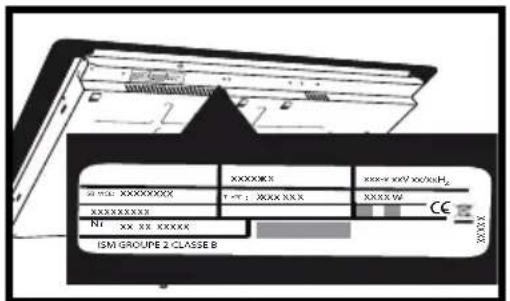
For future use, remove all protective elements. Check and respect the appliance's characteristics that appear on the nameplate.
Note in the boxes below the service and standard references shown on this plate.
| Service : | Type : |
1.2 FITTING INTO THE WORK TOP
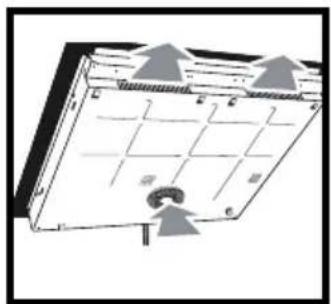
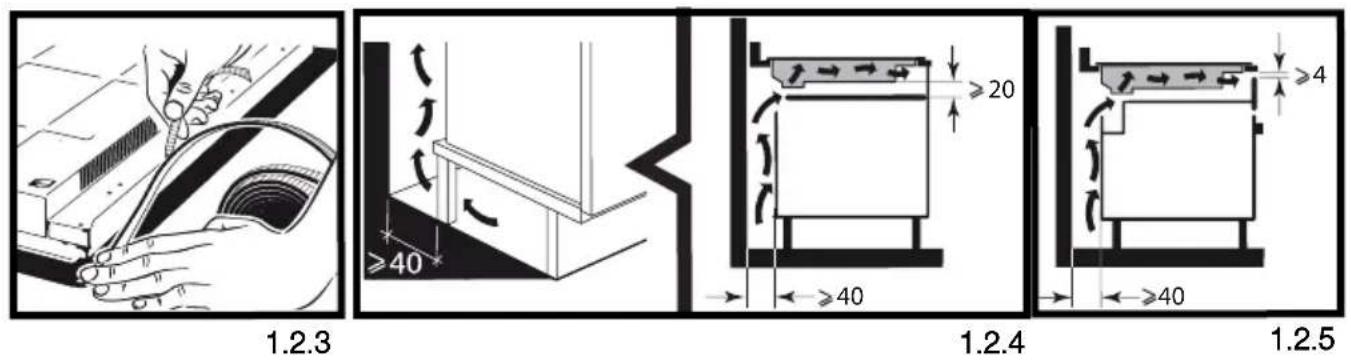
Check that the air intake and outlet are free of obstruction (1.2.1).
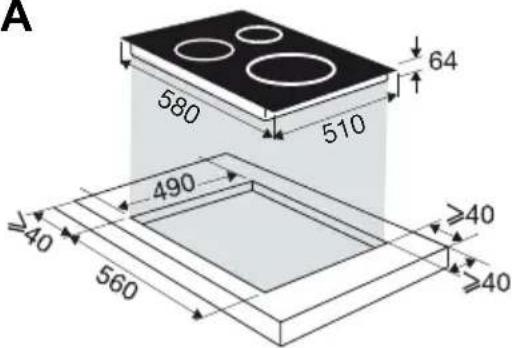
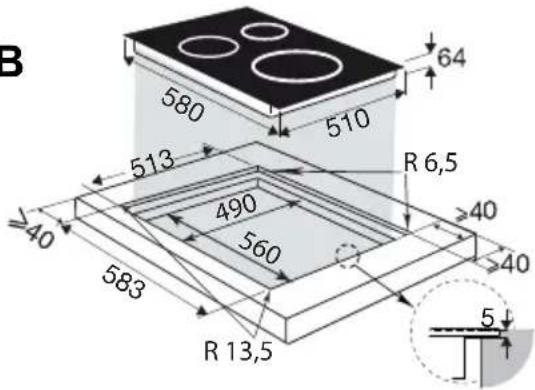
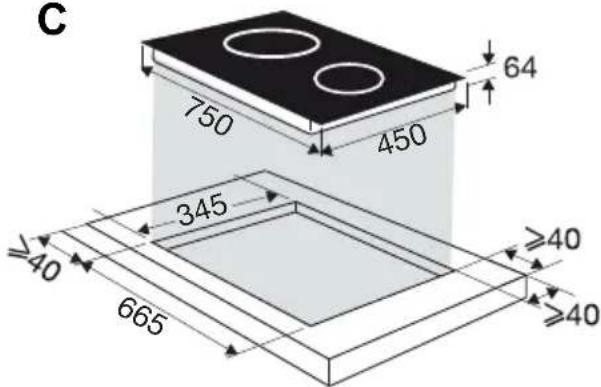
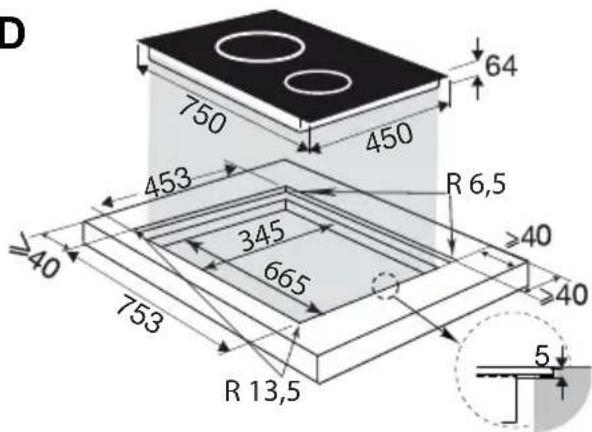
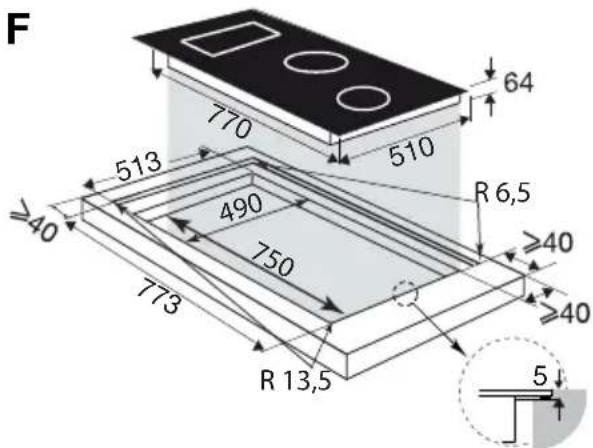
For standard fitting, refer to diagrams A or C.
For flush-fitting, refer to diagrams B or D.
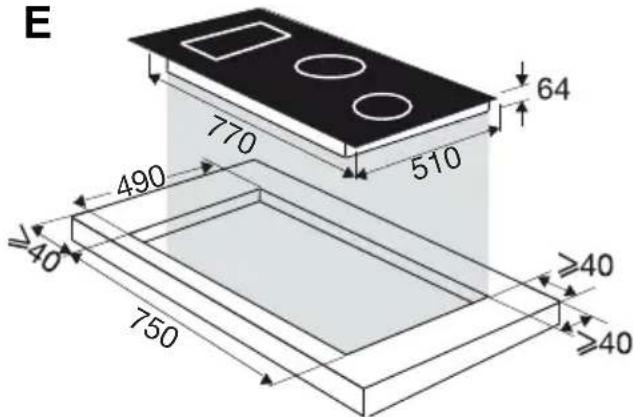
Comply with the information concerning the fitting dimensions (in millimetres) of the work top destined to receive the hob (1.2.2). Glue the sealing joint to the entire surround of the hob (depending on model) (1.2.3), before fitting. Check that air circulates correctly between the front and the back of your hob.
If you are installing the hob above a drawer (1.2.4) or above a built-in oven (1.2.5), comply with the dimensions provided on the illustrations to ensure a sufficient air outlet at the front.
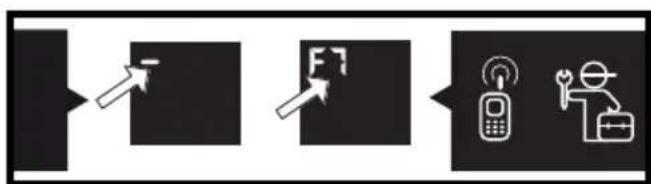
If your hob is located above your oven, the hob's thermal safety devices can impede the simultaneous use of the hob and the oven's pyrolysis programme, display code "F7" in the control zones. In such circumstances we recommend that you increase the hob's ventilation by creating an opening in the side of the cabinet (8 x 5 cm).
1. 3 ELECTRIC CONNECTIONS
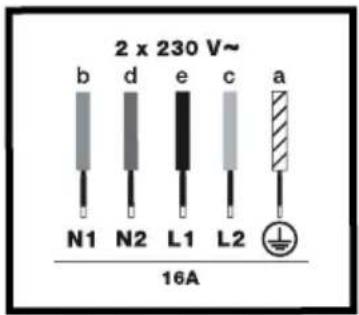
These hobs must be connected to the power grid via an all-pole cut-off device that complies with installation regulations in effect. A disconnection device must be incorporated into the fixed wiring.
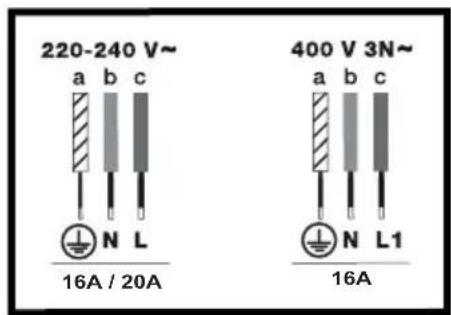
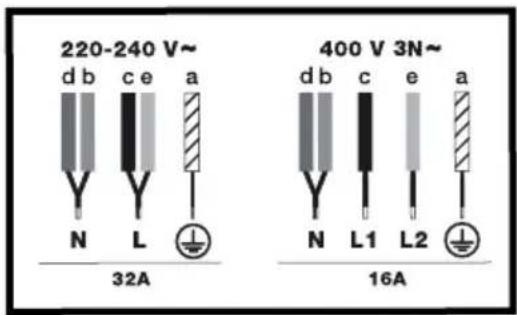
Identify the type of cable of your hob according to the number of wires and colours:
- 3-wire cable (1.3.1):
a) green-yellow, b) blue, c) brown. - 5-wire cable (1.3.2 and 1.3.3):
a) green-yellow, b) blue, c) brown, d) black, e) grey.
When switching your hob on or after a lengthy power cut, a code is shown on the control pad (this display is reserved for your after-sales service, where applicable. The user of the hob does not need to take notice of it).
This information disappears after around 30 seconds.
2
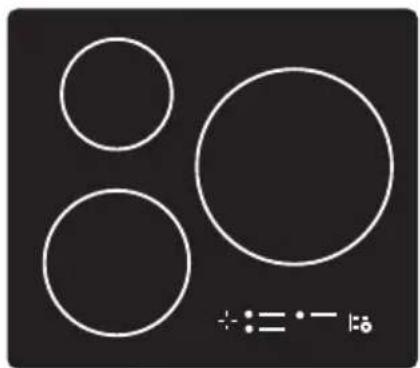
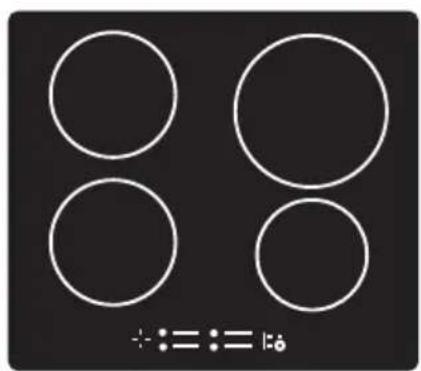
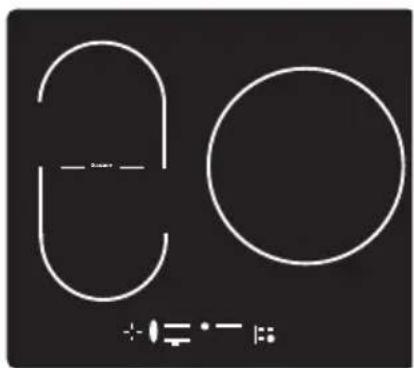
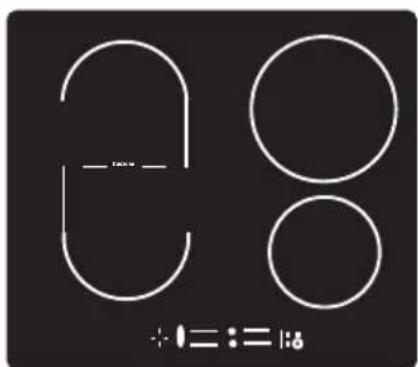
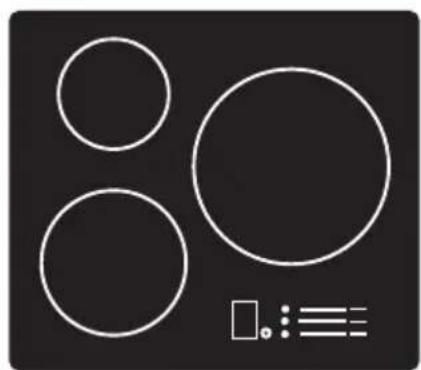
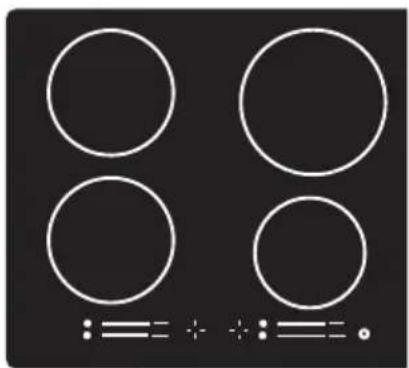
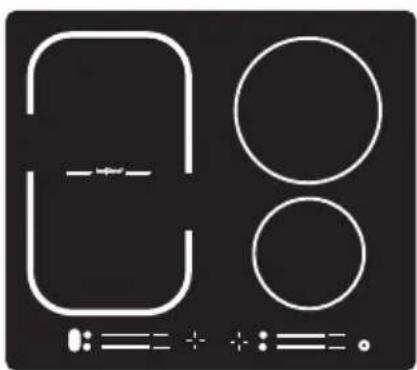
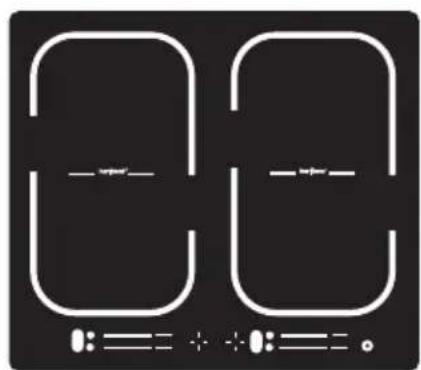
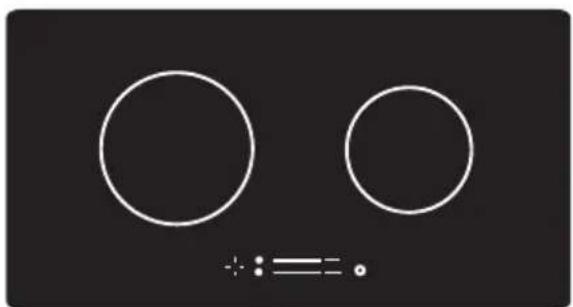
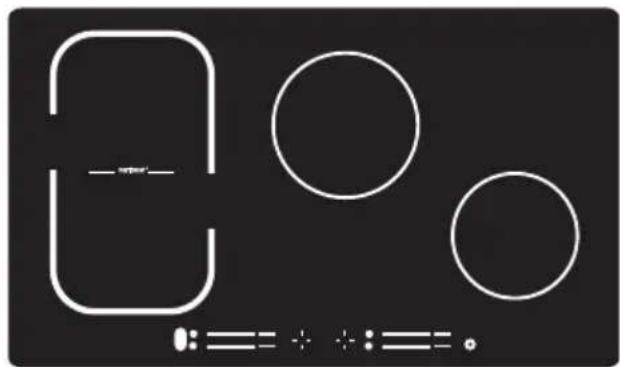
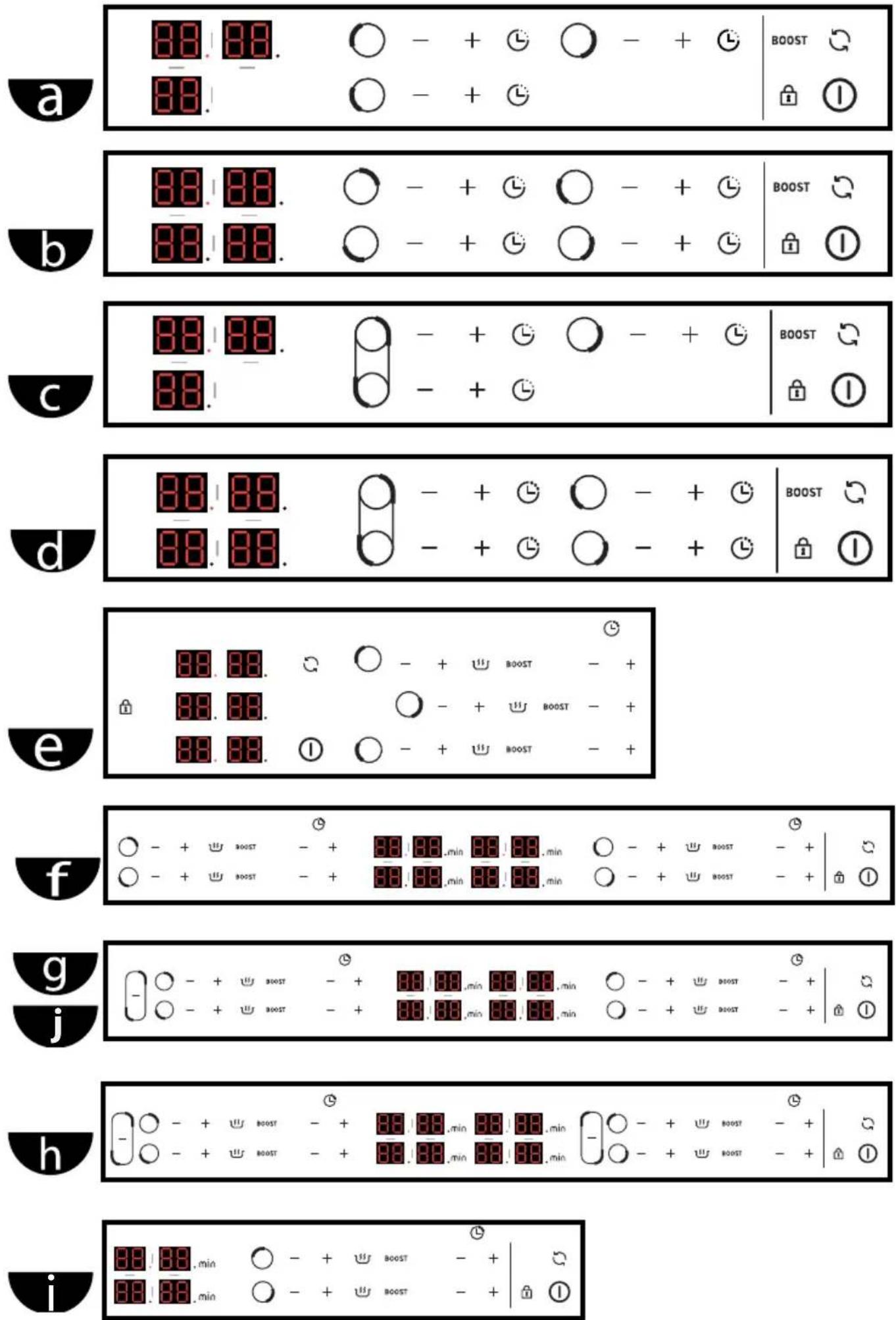
Identify your type of hob a b c d e f
g h i j by comparing the number and arrangement of burners, the type of keypad and the total power of your appliance using the illustrations with the nameplate.
3
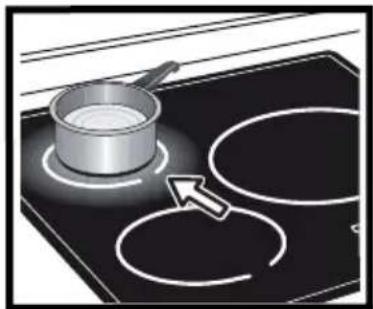
3.1 CHOICE OF COOKWARE
Cookware with the symbol are compatible with induction.
We suggest that you choose cookware with a thick and flat bottom. The heat will be distributed better and cooking will be more uniform.
Advice on how to save energy Cooking with the correctly sized lid saves energy. If you use a glass lid, you can control your cooking perfectly.
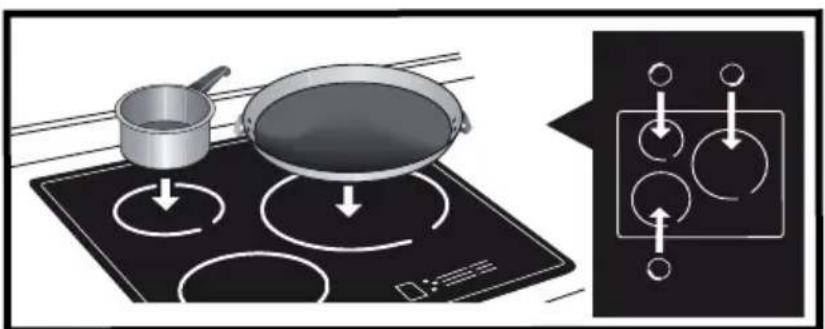
3.2 BURNER SELECTION
Select the burner which is the right size for the bottom of your cookware (see table). If the base or the cookware is too small, the power indicator will start to flash and the burner will not work, even if the cookware's material is recommended for induction.
| Burner diameter | Hob model | Maximum power of burner (Watts) | Diameter of bottom of cookware |
| 16 cm |  | 2000 | 10 to 18 cm |
 | 2200 | ||
| 18 cm |  | 2800 | 11 to 22 cm |
| 21 cm |  | 3100 | 12 to 24 cm |
| 28 cm |  | 4000 | 15 to 32 cm |
| Duozone |  | 3600 | Oval, fish cooker |
| HoriZone |  | 4000 | 18 cm, oval, fish cooker |
| 1/2 zone |  | 2800 | 11 to 22 cm |
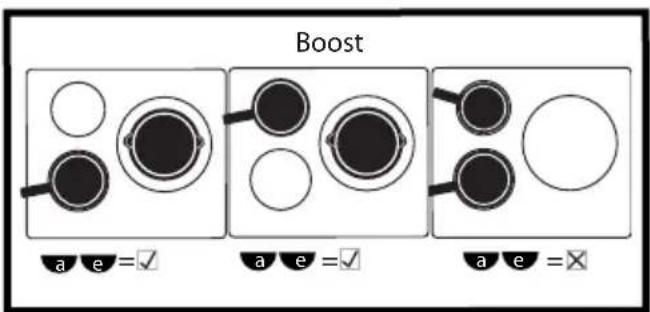
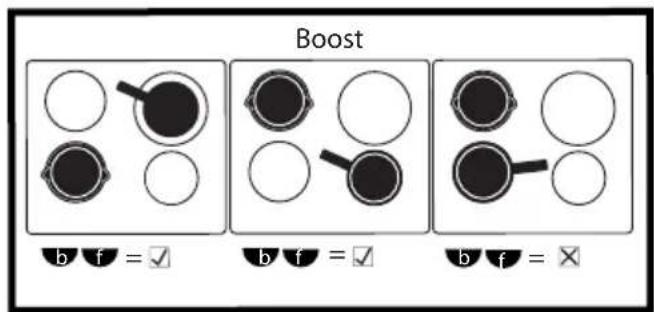
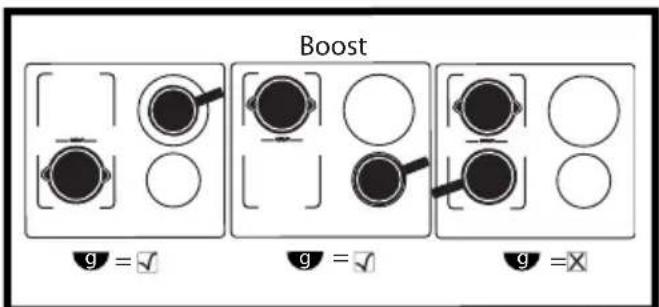
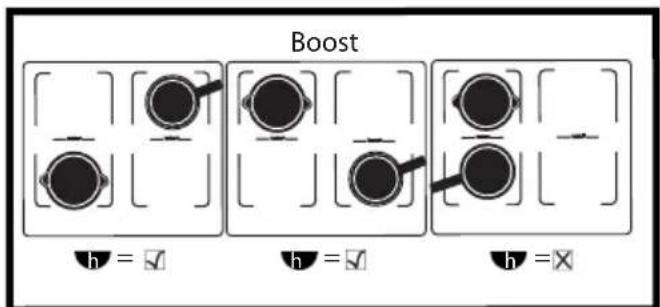
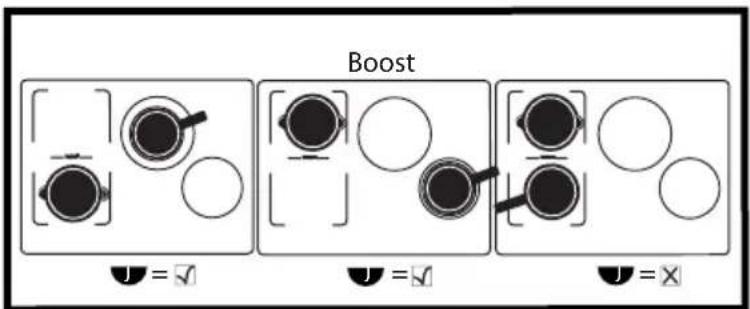
When you use maximum power (Boost) on several burners at once, position your cookware following the model of your hob as indicated on the illustrations (3.2.1 - 3.2.2 - 3.2.3 - 3.2.4 - 3.2.5).
☑ = recommended positioning.
☒ = positioning to avoid.
In this way you will avoid automatic power limitation on one of the burners if positioning is not optimal.


4.1 SWITCHING ON - STOPPING
Switching on:
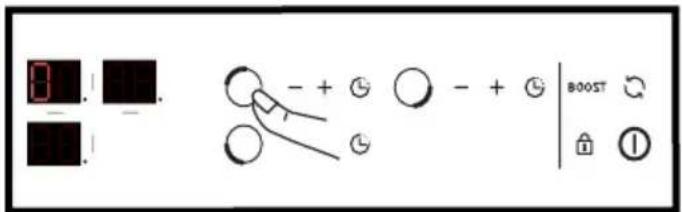
Press the on/off button (4.1.1) then the button to select the burner you want (4.1.2).
A 0 is displayed and a beep indicates that the cooking zone is on. You can adjust the required power of the burner selected. If the power level is not set, the cooking zone will be switched off automatically.
Stopping a zone:
Keep the key corresponding to the required burner pressed down. A long beep sounds and the display switches off or the "H" symbol (residual heat) appears.
General shutdown:
Hold down the on/off button ①. A long beep sounds and the display switches off or the "H" symbol (residual heat) appears.
4.2 SETTING THE POWER
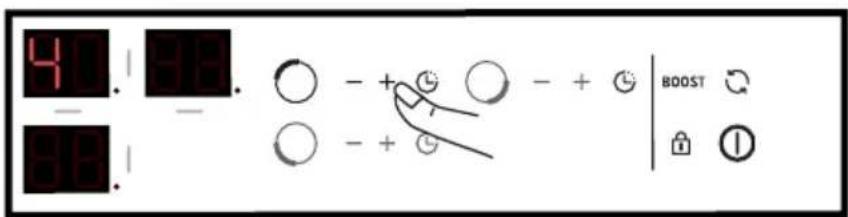
Press + or - to set the power level from 1 to 9 (4.2.1).
When it is switched on you can move directly to maximum power "9" by pressing the - button.
Power pre-selection: (depending on model)
2 buttons are available for you to access the pre-set power levels directly:
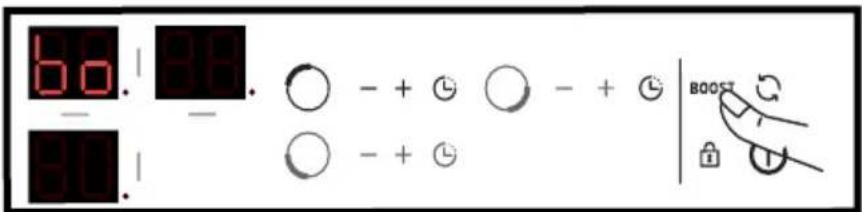
U = Simmering (corresponds to power 4)
BOOST = maximum power (4.2.2)
DUOZONE: c-d
Press the 2 and buttons at the same time to activate the "duoZone" front and rear burners together (4.2.3). The symbol is displayed. The power and the timer are set on the left rear burner's commands, as for a normal burner. The front left burner's setting is deactivated.
To deactivate the "duozone" function, press the
○ or ○ button.
HORIZONE: g-h-j
Press the button time to activate the "Horizone" front and rear burners together (4.2.4). The symbol is displayed. The power and the timer are set on the rear burner's commands, as for a normal burner. The front burner's setting is deactivated.
To deactivate the "Horizone" function, press the or button.
4.3 SETTING THE TIMER
Each cooking zone has its own timer which can be adjusted up to 99 minutes. It can be used as soon as the cooking zone concerned is turned on.
Press the selected burner's button; a light dot is displayed to the right (4.3.1) (depending on model).
Press+ or - to set the time. It is possible to directly access 99 minutes by pressing the - key from the beginning (4.3.2).
When the cooking is finished, 0 is displayed and a beep sounds for around 20 seconds. To cancel the timer, press any button for the particular cooking zone being used.
To stop the timer manually, hold + and - down at the same time or return to 0 using the -
button. Press to see how much time is left.
4.4 CHILD SAFETY
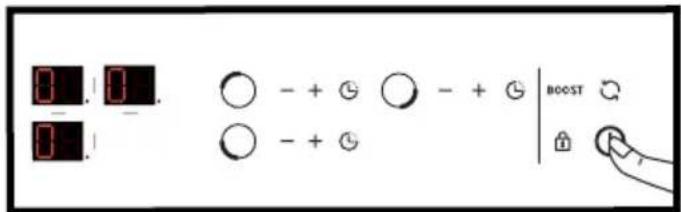
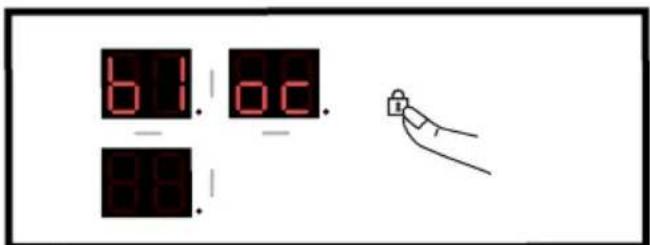
Your hob has a child safety device which locks the controls when the hob is not in use or when it is being used for cooking. Due to safety reasons, the key remains active and authorises the heating zones to be switched off even when locked.
Locking:
Press until the locking symbol disappears and a beep confirms your operation (4.4).
The cooking zones that are active are then displayed,
alternating between the power and the locking symbol.
Unlocking:
Press until the locking symbol disappears and a beep confirms your operation.
CLEAN LOCK function:
The Clean Lock function permits the temporary locking of your hob while it is being cleaned.
To activate the Clean Lock function, perform a
short press on the key; a beep sounds and the symbol flashes. After around 1 minute, locking is automatically deactivated.
Two beeps will sound and the /mol will disappear. You can stop the Clean Lock function
at any time by holding down the button.
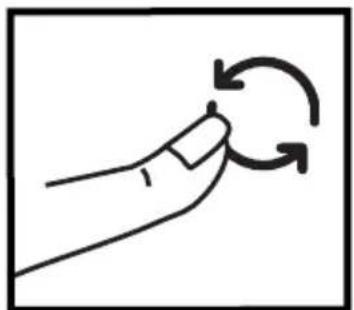
4.5 Recall- function (button)
This function lets you display the last "power and timer" settings for all the burners which were switched off less than 3 minutes previously.
The hob must be unlocked to use this function.
Press the On / Off button then perform a short press on the button.
When the hob is operating, the function lets you see the power and timer settings for the burner(s) which have been switched off for less than 30 seconds.
4.6 SAFETY PRECAUTIONS AND RECOMMENDATIONS
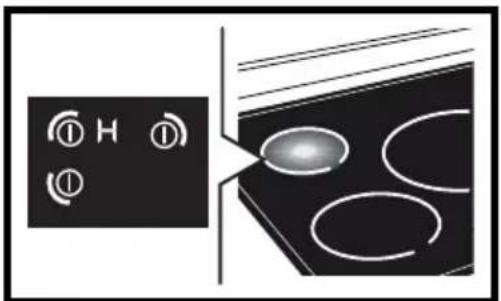
Residual heat:
After intensive use, the cooking zone that you have just used can remain hot for several minutes.
The "H" symbol is displayed during this period (4.6.1).
Avoid touching the areas concerned during this time.
Anti-overheat protection:
Each cooking zone has a safety sensor that constantly monitors the temperature of the bottom of the cookware. In the event that empty cookware is left on a cooking zone that is switched on, the hob automatically lowers the power output and thus limits any risk of damage.
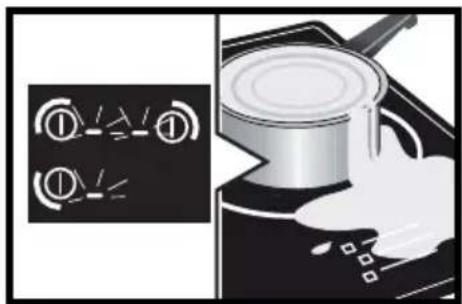
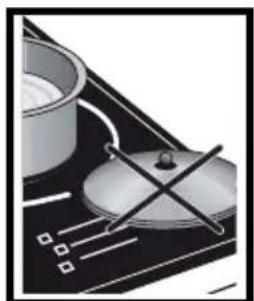
Protection against overflows:
A special display (symbol →, a sound signal, followed with the hob switching off, may be triggered in the following cases:
- Overflow that spills onto the buttons (4.6.2).
- Metallic object placed on the buttons (4.6.3).
Remove the object or clean and dry the buttons, then restart cooking.
Auto-stop:
Your hob has an auto-stop device, which automatically stops any cooking zone which remains switched on for an excessive length of time (between 1 and 10 hours depending on the power used).
If this safety system is triggered, the cut-off to the cooking zone is shown with the "AS" display on the control panel and a beep sounds for about 2 minutes. Simply press any of the buttons to stop this.

Sounds which are similar to those of a clock mechanism may be given off.
These noises occur when the hob is working. They disappear or reduce depending on the heating configuration. There may also be whistling sounds depending on the model and quality of your cookware. The noises described are normal. They are related to induction technology and do not indicate a problem.

Advice on how to save energy
When cooking with the grill or empty cookware, we recommend that you do not use maximum power (Boost).
5

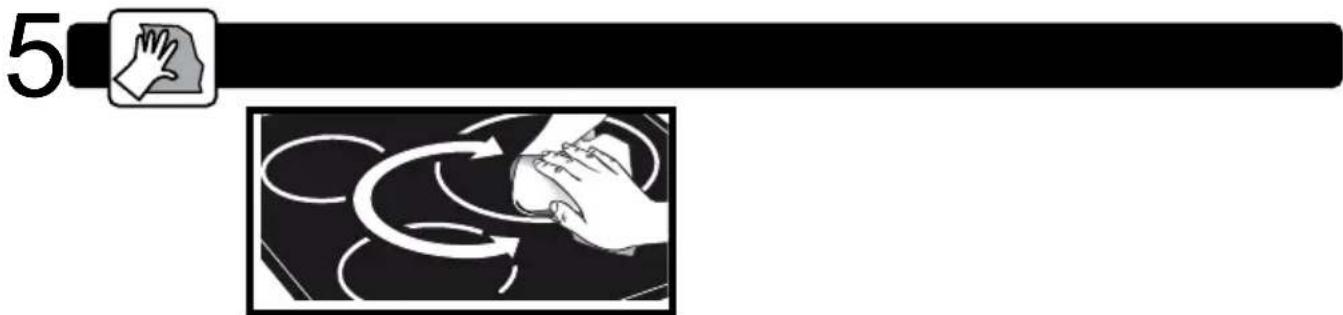
For light dirt, use a disinfectant sponge. Thoroughly moisten the zone to be cleaned with hot water, then wipe off (5).
For a build-up of baked-on dirt or sweet overflows, use a disinfectant sponge and/or a special glass scraper. Thoroughly moisten the zone to be cleaned with hot water. Use a scraper for glass to remove the large bits, finish off with a disinfectant sponge, and then wipe off.
For rings and hard water residue, apply warm white vinegar to the stain, leave on, then wipe with a soft cloth.
For shiny metal streaks or weekly maintenance, use a special vitroceramic glass product.
Important note: do not use any powders or abrasive sponges. Use creams and special delicate glassware sponges.
6?
6.1 DURING INITIAL USE:
- An indicator light appears. This is normal. It will go away after 30 seconds.
- Your installation blows a fuse or one side only of the hob works. The electrical connection of your hob is incorrect. Check its compliance (see connection chapter 1.3).
- The hob smells the first few times it is used for cooking. The appliance is new. Heat up each ring for half an hour with a saucepan full of water.
6.2 WHEN POWERING ON:
The hob does not work and the indicator lights on the control panel are not on.
The appliance is not receiving electricity. The electrical supply is defective or the connection is incorrect. Inspect the electrical circuit breaker and fuses.
- The hob does not work and another message is displayed. The electronic board is functioning poorly. Call the After-Sales Service Department.
- The hob does not work, the symbol b1oc is displayed. Unlock the child safety device (see connection chapter 4.4).
- Error code F9: voltage less than 170 V
- Error code F0: voltage less than 5°C
6.3 DURING USE:
- The hob has stopped working. The symbol is displayed and there is a sound signal.
There was an overflow or an object is in contact with the control panel. Clean or remove the object, then begin cooking again.
- Code F7 is displayed.
The electronic circuits have overheated. Check the hob's ventilation (see chapter on fitting 1.2).
- During operation of a heating zone, the keypad display continues to flash.
The cookware used is not compatible with induction or its size is not suitable for the burner (see chapter 3).
- The cookware makes noise and your hob clicks during cooking (see chapter on Safety precautions and recommendations 4.5).
This is normal with some types of cookware. This is caused by the transfer of energy from the hob to the cookware.
- The fan continues to function after your hob is turned off.
This is normal. It cools the electronic parts.
- In the event of persistent malfunction.
Switch off your hob for 1 minute. If the problem persists, contact the after-sales service.
7
Protecting the environment
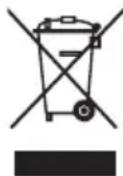
This symbol indicates that this product should not be treated as household waste.
Your appliance also contains a great amount of recyclable material. It is marked with this symbol to indicate that used appliances must be disposed of in certified collection points.
Contact your town hall or your retailer for the used appliance collection points closest to your home. This way, the appliance recycling organised by your manufacturer will be done under the best possible conditions, in compliance with European Directive on Waste Electrical and Electronic Equipment.
This appliance's packing materials are also recyclable. Help recycle it and protect the environment by dropping it off in the municipal receptacles provided for this purpose.
We thank you for your help in protecting the environment.
8
INTERVENTIONS
Any repairs to your appliance must be made by a qualified professional accredited to work on the brand. When you call, in order to facilitate processing your request, make sure to have the following information relating to your appliance in front of you (commercial reference, service reference, serial number).
Estimado cliente:
1.2 INDBYGNING I K∅KKENBORDPLADEN
4.1 TÆNDING OG SLUKNING AF KOGEPLADEN
Tænding:
Anti-oververhittingbeveiliging:
- 2
- 3
- 4
- RELATIONS CONSOMMATEURS FRANCE
- IMPORTANT SAFETY INSTRUCTIONS TO BE READ CAREFULLY AND KEPT FOR FUTURE USE.
- 1
- UNPACKING
- FITTING INTO THE WORK TOP
- 3 ELECTRIC CONNECTIONS
- CHOICE OF COOKWARE
- BURNER SELECTION
- SWITCHING ON - STOPPING
- Switching on:
- Stopping a zone:
- General shutdown:
- SETTING THE POWER
- Power pre-selection: (depending on model)
- DUOZONE: c-d
- HORIZONE: g-h-j
- SETTING THE TIMER
- CHILD SAFETY
- Locking:
- Unlocking:
- CLEAN LOCK function:
- Recall- function (button)
- SAFETY PRECAUTIONS AND RECOMMENDATIONS
- Residual heat:
- Anti-overheat protection:
- Protection against overflows:
- Auto-stop:
- Advice on how to save energy
- 5
- 6?
- DURING INITIAL USE:
- WHEN POWERING ON:
- The hob does not work and the indicator lights on the control panel are not on.
- DURING USE:
- 7
- Protecting the environment
- 8
- INTERVENTIONS
- INDBYGNING I K∅KKENBORDPLADEN
- TÆNDING OG SLUKNING AF KOGEPLADEN
- Tænding:
- Anti-oververhittingbeveiliging:
Brand : BRANDT
Model : BPI6426X
Category : Cooker